
Most site owners set up a robots.txt file once, forget about it, and assume it's still doing the job. Then you check your server logs at some ungodly hour and wonder why traffic looks "busy" when nobody on your team is awake. Nine times out of ten, it's bots.
The AI crawler landscape has shifted fast. A lot of robots.txt files haven't kept pace. Some teams want AI systems to cite their content in answers. Others don't want their pages used for model training, full stop. But before you argue about policy, you need a clean technical answer to one question: check if ai can crawl site content right now, or is something already blocking them (intentionally or by accident)?
You'll audit your robots.txt, confirm the exact user-agent tokens that matter (GPTBot, Google-Extended, ClaudeBot, PerplexityBot, CCBot), test rule logic, then fix the stuff that quietly breaks visibility in AI search and AI answers.
Step 1: Pull Up Your robots.txt File
Go straight to yourdomain.com/robots.txt. If you get a 404, you don't have one, which means every crawler (AI bots included) can access your entire site by default. If the file loads, read it top to bottom. The format is simple, but it's easy to ship a rule that blocks more than you meant to, especially once multiple teams have touched it.
Start with the blunt stuff. A blanket "User-agent: *" paired with "Disallow: /" blocks everything, including Googlebot. That's rarely the intent. The more common scenario is messier: old rules written before GPTBot existed, a few copied snippets, and no one is sure which user agents are actually covered.
WordPress adds its own twist. Your robots.txt might be dynamically generated by a plugin like Yoast or Rank Math. If that's your setup, change the plugin settings rather than editing the file directly, otherwise your edits can disappear after an update or a cache purge.
Step 2: Know Which AI Crawlers to Look For
A common thing I hear is, "We blocked the AI bots." Then we open the file and it's one lonely rule for GPTBot while everything else is wide open. AI crawlers aren't one monolith. They split into two broad buckets: training crawlers that collect data to build language models, and retrieval crawlers that fetch live pages to answer user questions in real time.
This split is where marketing teams get tripped up. Blocking training crawlers keeps your content out of future model training pipelines. Blocking retrieval crawlers is different, it can reduce your chances of being cited or linked in AI-powered answers. From what we've seen, most growth-focused teams block training but keep retrieval open, because retrieval can act like a new referral channel (and it shows up in analytics as real visits).
| Crawler | User-Agent Token | Purpose | Respects robots.txt? |
|---|---|---|---|
| OpenAI GPTBot | GPTBot | Model training | Yes |
| Google-Extended | Google-Extended | Gemini / AI training | Yes |
| Anthropic ClaudeBot | ClaudeBot | Model training | Yes |
| Anthropic Claude-User | Claude-User | User-initiated fetches | Yes |
| Anthropic Claude-SearchBot | Claude-SearchBot | Search indexing | Yes |
| PerplexityBot | PerplexityBot | Real-time query answers | Yes |
| CCBot (Common Crawl) | CCBot | Open web archive / AI training data | Yes |
| Sources: Anthropic support docs, Google Search Central, Perplexity AI docs, Common Crawl FAQ |
Anthropic is the cleanest example of why names matter. They run three distinct crawlers, each controllable independently. Blocking ClaudeBot stops training data collection, but it won't prevent Claude from fetching your page when a user directly asks about it. That's Claude-User, a separate token entirely, and most guides skip over it.
Google works similarly. Google-Extended covers Gemini and AI training, while Googlebot handles Search. You can disallow one without touching the other. And don't overlook CCBot. Common Crawl's dataset feeds into dozens of AI training pipelines, so blocking CCBot can have a wider downstream effect than blocking any single company's crawler.
Step 3: Test Your Rules With a Dedicated Checker
Reading your robots.txt manually catches obvious omissions, but it won't surface logic errors. Conflicting rules, wildcard syntax, and path-matching edge cases can all produce results you didn't intend. I've seen enterprise robots.txt files that look "fine" until you realize three teams have been patching them for years and the end result is basically a Frankenstein rule set where nobody can explain what's actually allowed.
Google offers a robots.txt Tester inside Search Console, but it only validates rules against Googlebot and Google-Extended. It won't tell you anything about GPTBot, ClaudeBot, or PerplexityBot. If your goal is to check AI bot access across the big user agents, you need something that tests those tokens directly.
Vizup's AI Crawler Checker tests your site against the major AI user agents and shows you exactly which ones can and can't reach your content, without manually untangling rule precedence. If you're also concerned about how AI bots affect your overall crawl budget, the Crawl Budget Checker gives you a broader view of how all crawlers interact with your server.
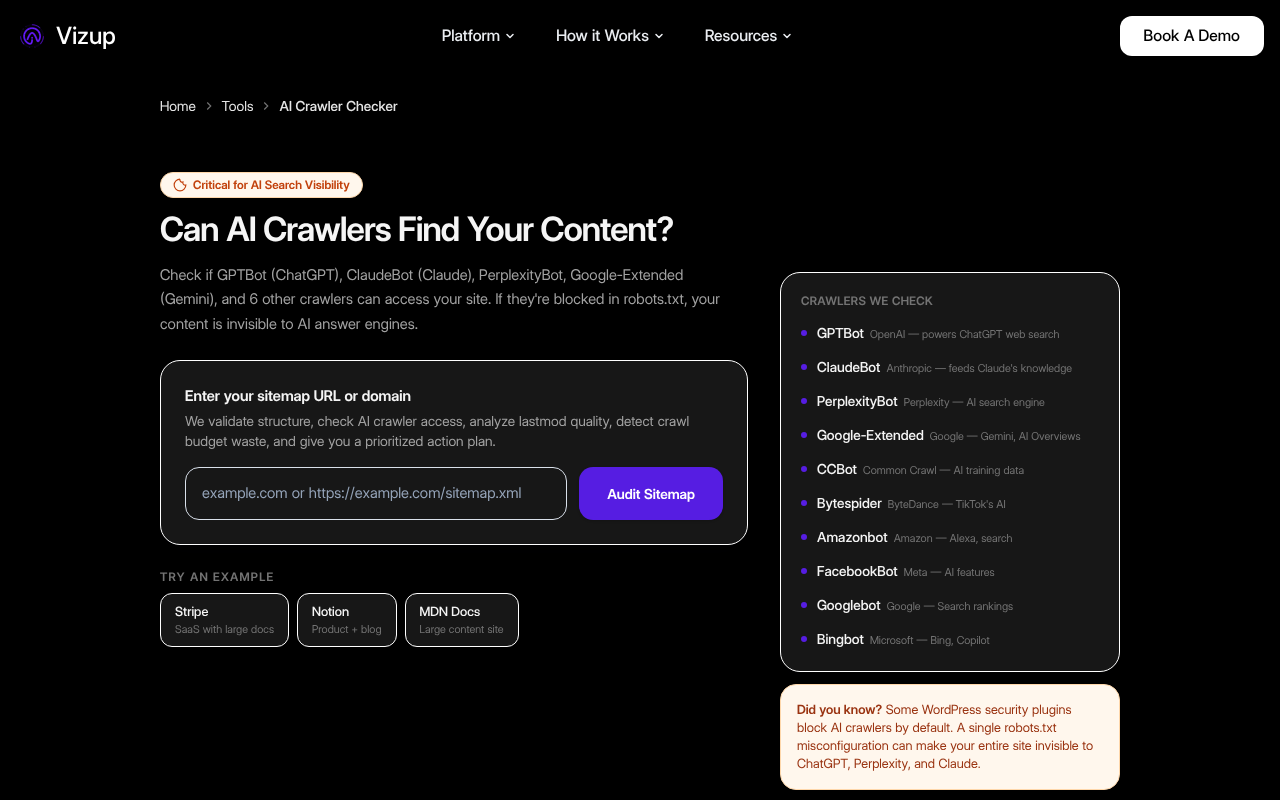
Check which AI crawlers can access your site right now, free, no signup needed.
Step 4: Fix What's Wrong (and Avoid the Common Traps)
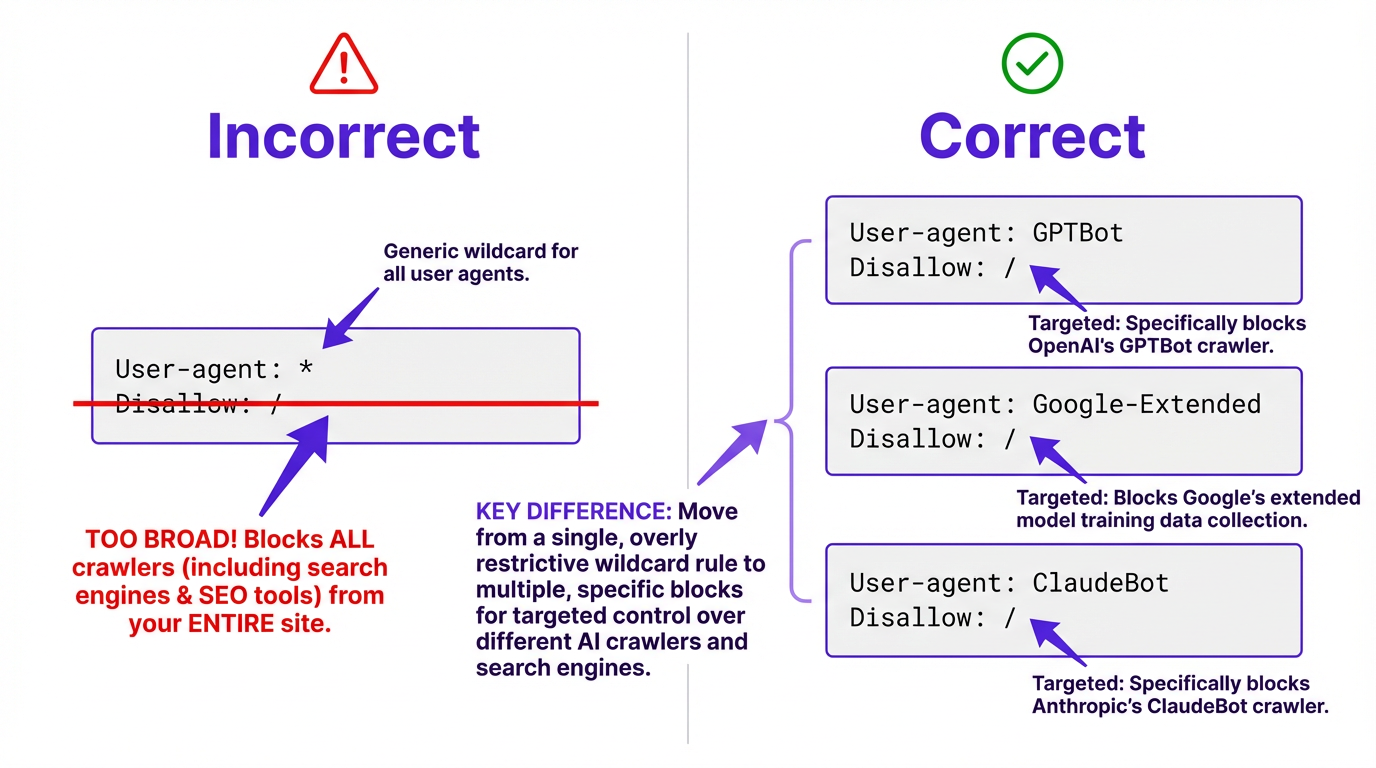
The most common mistake isn't neglecting to block AI crawlers. It's blocking them accidentally through overly broad rules, or targeting the wrong ones because someone copied a snippet from a forum without verifying the user-agent names.
Common Crawl's CCBot is a frequent unintended casualty of aggressive WAF rules. Since CCBot data feeds into numerous AI training datasets, you might be blocking AI training without realizing it while GPTBot still has full access. The reverse happens too: teams that carefully block GPTBot and ClaudeBot forget about CCBot entirely, leaving a massive backdoor for training data collection.
Blocking a specific crawler is straightforward. Add the user-agent name followed by a disallow rule:
To block OpenAI's training crawler, add these two lines to your robots.txt:
User-agent: GPTBotDisallow: /- Repeat the pattern for each additional crawler using its specific token (ClaudeBot, Google-Extended, PerplexityBot, etc.)
A couple traps worth calling out, because they waste the most time in audits:
First, robots.txt blocks crawling, not indexing. If a URL is discoverable through links, it can still show up as a URL-only result in some systems even if crawling is disallowed. If you need a page completely invisible, you'll need noindex directives or authentication on top of robots.txt.
Second, rule precedence is not "first rule wins." Specificity matters, and an Allow directive can override a broader Disallow for a narrower path. If you've tried this and gotten garbage results, you're not alone. Test after every change.
Third (and this is the part most people get wrong), changes to robots.txt aren't retroactive. If GPTBot already crawled your site last month, that data is already in OpenAI's pipeline. Blocking the crawler now prevents future access, but it doesn't undo past collection. For content that's already been scraped, you'd need to pursue a separate data removal request with each AI company.
Explore all of Vizup's free SEO tools for site health and crawler analysis.
One More Thing Worth Checking
robots.txt is a polite request, not a technical barrier. The major crawlers listed above publicly state they respect it, but a rogue scraper won't care. If you have content that genuinely needs protecting (proprietary research, gated resources, pre-launch pages), authentication and access controls are the real answer.
While you're auditing access, it's also worth checking what AI systems "see" once they do reach your pages. Sites with heavy AI-generated content can be flagged or deprioritized by certain retrieval systems, which is a separate issue from access but it shows up in the same conversations. Vizup's AI Content Checker helps you understand how your content reads to automated systems.
For ongoing monitoring, don't just check once and move on. AI companies launch new crawlers, update user-agent strings, and change their crawling behavior. A quarterly audit of your robots.txt against current crawler lists keeps you from falling behind. More context on both topics is available on Vizup's SEO blog.
Frequently Asked Questions
Does blocking GPTBot affect my Google Search rankings?
No. GPTBot is OpenAI's crawler and has no connection to Google's indexing. Blocking Google-Extended (Google's AI training crawler) also has no effect on your Google Search rankings. These are separate systems with separate user agents.
How do I check if AI can crawl my site without technical tools?
Open your robots.txt at yourdomain.com/robots.txt and look for user-agent entries like GPTBot, Google-Extended, ClaudeBot, Claude-User, Claude-SearchBot, PerplexityBot, or CCBot. If none appear and you have a permissive wildcard rule (or no robots.txt at all), AI crawlers can access your site. For a faster check, use a dedicated tool like Vizup's AI Crawler Checker.
Can I block AI training crawlers but still allow AI search crawlers?
Yes. Training and retrieval crawlers use different user-agent tokens, so you can block them independently. You can disallow ClaudeBot (Anthropic's training crawler) while allowing Claude-SearchBot (used for search indexing). The same logic applies to Google-Extended versus Googlebot.
Does robots.txt actually stop AI crawlers from accessing my content?
For reputable AI companies, yes. OpenAI, Anthropic, Google, Perplexity, and Common Crawl all publicly state they respect robots.txt directives. Scrapers that don't identify themselves or ignore the protocol won't be stopped by it.
What happens if my CDN or WAF is blocking AI crawlers without my knowing?
This is a very common issue. Your robots.txt might explicitly allow AI crawlers, but a security rule at the CDN level (like Cloudflare or AWS WAF) can block them before they ever reach your server. This often happens with aggressive bot protection settings that haven't been updated to recognize newer AI user agents. The fix is to review your CDN/WAF bot management settings and add explicit 'allow' rules for the user-agent strings of the crawlers you want to permit (e.g., GPTBot, Google-Extended).
What FAQ schema should I add for this page?
Use FAQPage schema with the five Q&As on this page (GPTBot vs Google rankings, how to check access, blocking training vs retrieval, whether robots.txt stops crawlers, and CDN/WAF blocking). Keep the questions and answers aligned with the on-page FAQ copy so the markup matches what users can read.
Run a free AI crawler access check on your site with Vizup's AI Crawler Checker.
