
You've crafted the perfect ad. The visual is striking, the copy is crisp, and you hit "publish" in Meta Ads Manager. Then comes the dreaded notification: "Ad Not Approved." It's a frustrating ritual for marketers, and the problem usually isn't the message. It's a technicality. An image that's 20 pixels too narrow, a headline five characters too long, or a video that looks mangled because you uploaded one file and hoped it would work everywhere.
If you've ever watched your carefully designed creative get cropped into something unrecognizable, you already get why meta ad specs matter. These are the technical requirements (resolution, aspect ratio, file size, text length, video duration) that Meta enforces or recommends across Facebook, Instagram, Messenger, and the Audience Network. Getting them wrong doesn't just hurt aesthetics. It can tank delivery, inflate costs, and burn budget on impressions that never stood a chance.
Why Meta Ad Specs Actually Affect Performance
A lot of advertisers treat specs as a checkbox. Upload, hit publish, move on. Then the same thing happens on repeat: one creative runs across Feed, Stories, and Reels without dimension changes. The Feed version looks fine. The Stories version gets its headline cropped, the logo sliced off, and the call-to-action buried under interface elements. CTR drops on that placement, and the media buyer blames "the algorithm."
But the algorithm is responding to what you gave it. Meta's delivery system factors in creative quality signals. An ad that renders poorly on a given placement gets penalized in the auction, not officially, but practically. Lower engagement drives down relevance scores, which pushes CPMs higher. So ignoring specs isn't just an aesthetic problem. It's a budget problem.
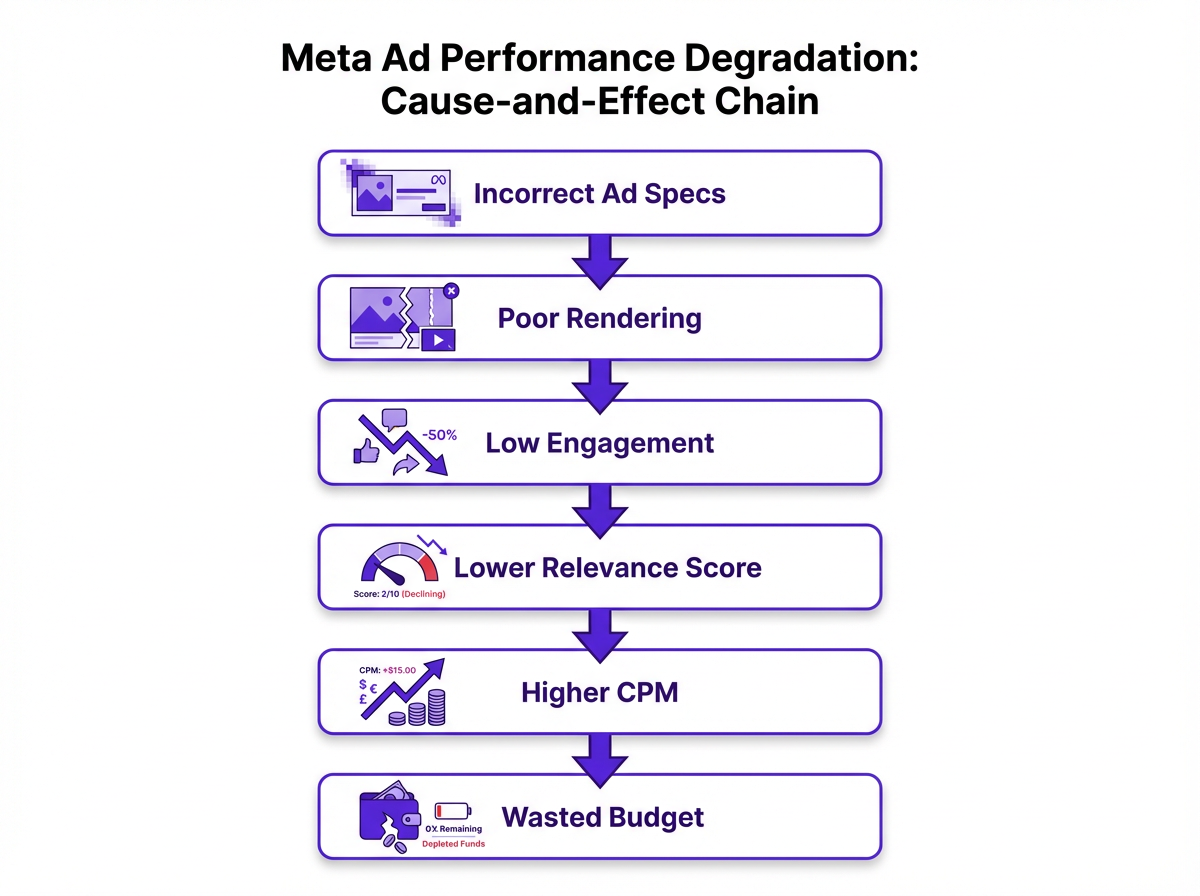
Image Ad Specs by Placement
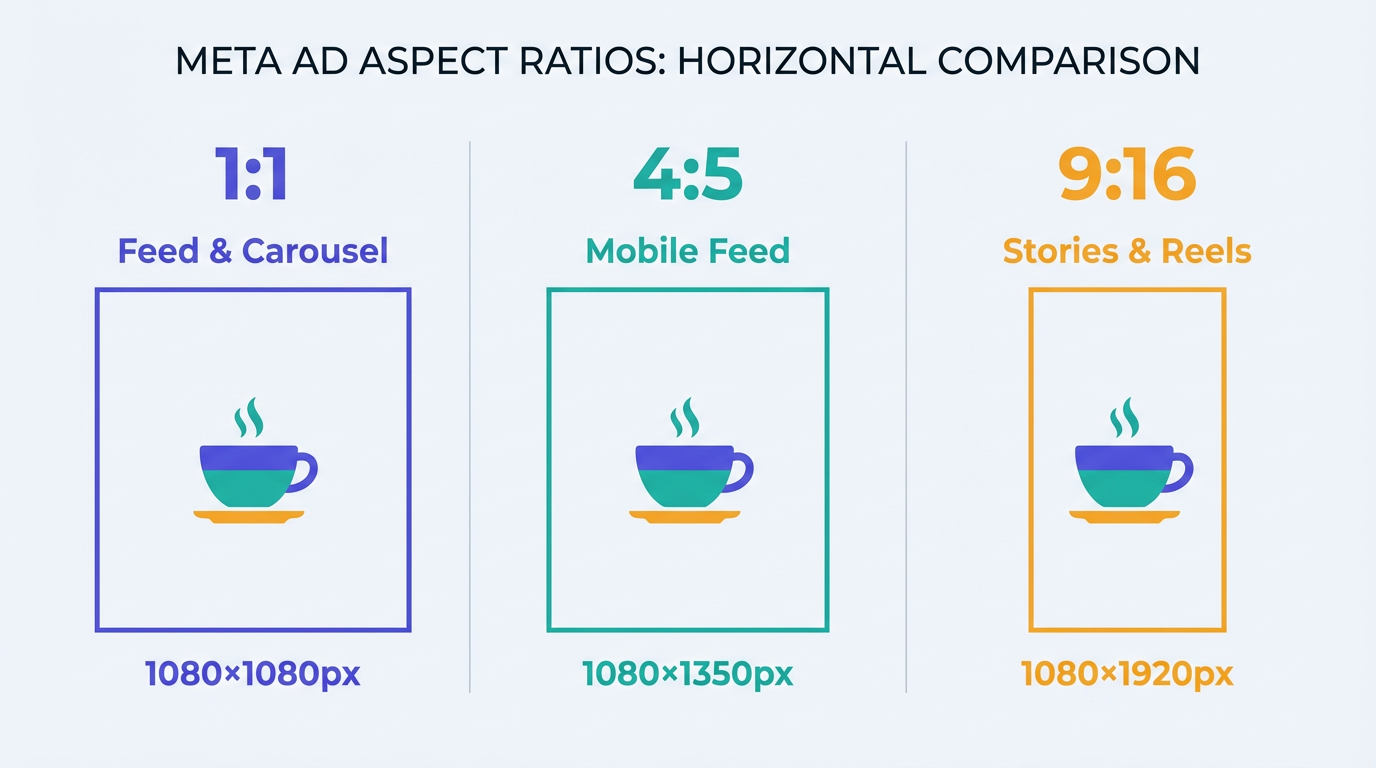
This is where most people trip up. They design one image and force it into every slot. Meta expects different shapes in different placements, and the gaps are bigger than they look in the preview window. Two assets usually carry the load for most teams: a square or slightly vertical version for Feeds, and a vertical 9:16 version for Stories and Reels. Get those right and you've handled the majority of day-to-day creative production.
| Placement | Recommended Resolution | Aspect Ratio | Primary Text | Headline |
|---|---|---|---|---|
| Feed (Facebook & Instagram) | 1080 x 1080 px minimum | 1.91:1 to 1:1 | ~125 characters | ~40 characters |
| Stories & Reels | 1080 x 1920 px | 9:16 | ~125 characters | ~40 characters |
| Right Column (Facebook) | 1080 x 1080 px | 1:1 | ~125 characters | ~40 characters |
| Marketplace | 1080 x 1080 px | 1:1 | ~125 characters | ~40 characters |
| Recommended specs based on commonly used placement templates and in-platform guidance. Character counts are guidelines, not hard limits. |
The 9:16 ratio for Stories and Reels is non-negotiable if you want the full-screen immersive experience. Uploading a square image to Stories leaves ugly letterboxing that screams "we didn't bother." For Feed, the 1:1 square format tends to outperform on mobile because it claims more screen real estate, though 1.91:1 landscape still works for link-click campaigns where the headline card matters.
Use high-quality JPG or PNG files and keep your file size under 30MB to ensure fast loading, even for users on slower connections. If you're building a template library, save exports at 1080 px on the short edge so you aren't upscaling later and inviting compression artifacts.
Video Ad Specs: Where Most Budget Gets Wasted
Video is where the real money moves on Meta, and it's also where spec mistakes do the most damage. The common failure mode is trying to force one video file into every placement, then hoping Meta's automation will save it. Sometimes it does. Often it doesn't.
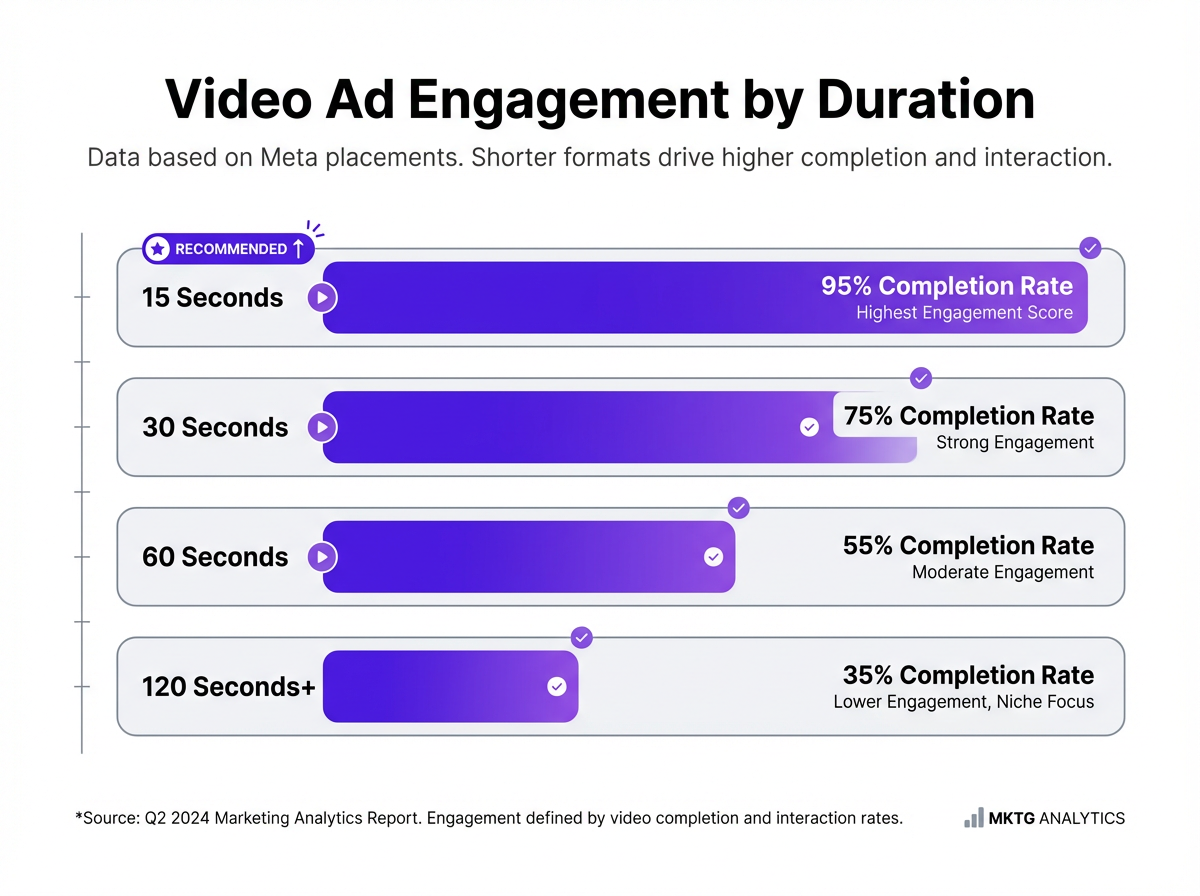
Meta accepts MP4 and MOV files up to 4GB. Technically, you can upload videos up to 240 minutes long. Please don't. Shorter videos, between 15 and 60 seconds, consistently outperform longer ones. For most brands, 15 to 30 seconds works for awareness and 30 to 60 seconds for consideration. Three-minute product demos running as Reels ads with sub-5% completion rates are more common than they should be.
| Placement | Resolution | Aspect Ratio | Recommended Length | Notes |
|---|---|---|---|---|
| Feed (Facebook & Instagram) | 1080 x 1080 or 1080 x 1350 | 1:1 or 4:5 | 15 to 60 seconds | 4:5 vertical claims more mobile screen space |
| Stories & Reels | 1080 x 1920 | 9:16 | Under 15 seconds ideal | Reels ads max out at 90 seconds; shorter holds attention |
| In-Stream | 1920 x 1080 | 16:9 | 5 to 15 seconds | Exception to the vertical-first trend; landscape format |
| All Placements | MP4 or MOV | Varies | Varies | Max file size 4GB |
| Resolution follows the same placement logic as images. Upload multiple aspect ratios for Advantage+ placements to avoid ugly auto-cropping. |
Text Rules, Safe Zones, and the Stuff That Actually Wrecks Performance
The pixel dimensions are the easy part to look up. The stuff that actually wrecks performance tends to be the half-documented rules, the UI overlays, and the "why did this get rejected?" surprises.
Character Counts: Recommendations, Not Hard Cutoffs
One detail most guides skip is that Meta's character counts are recommendations, not hard limits. Meta will let you write 500 characters of primary text. But anything past roughly 125 characters gets truncated behind a "See more" link on mobile. If your hook isn't in those first 125 characters, most people will never read it.
| Text Field | General Recommendation | Placement-Specific Notes |
|---|---|---|
| Primary Text | 125 characters | Main copy above your creative. Anything more gets hidden behind "See more..." |
| Headline | 40 characters | Some placements, like Facebook Feed, cut off after just 27 characters. |
| Description | 25-30 characters | Appears below the headline and isn't shown in all placements. |
| Sticking to these limits ensures your full message is seen without truncation. |
The 20% Text Rule: Officially Dead, Still Haunting
Meta officially removed the hard rule that rejected ads with more than 20% text on the image. But the ghost of that rule still haunts the platform. Images with heavy text overlays consistently get lower delivery. Meta's system still seems to deprioritize them, even without an official penalty. If you're putting paragraphs of text on your ad image, you're fighting the system. The smarter approach: keep image text to a short headline or value prop and let the primary text and headline fields carry the message.
The Safe Zone Problem
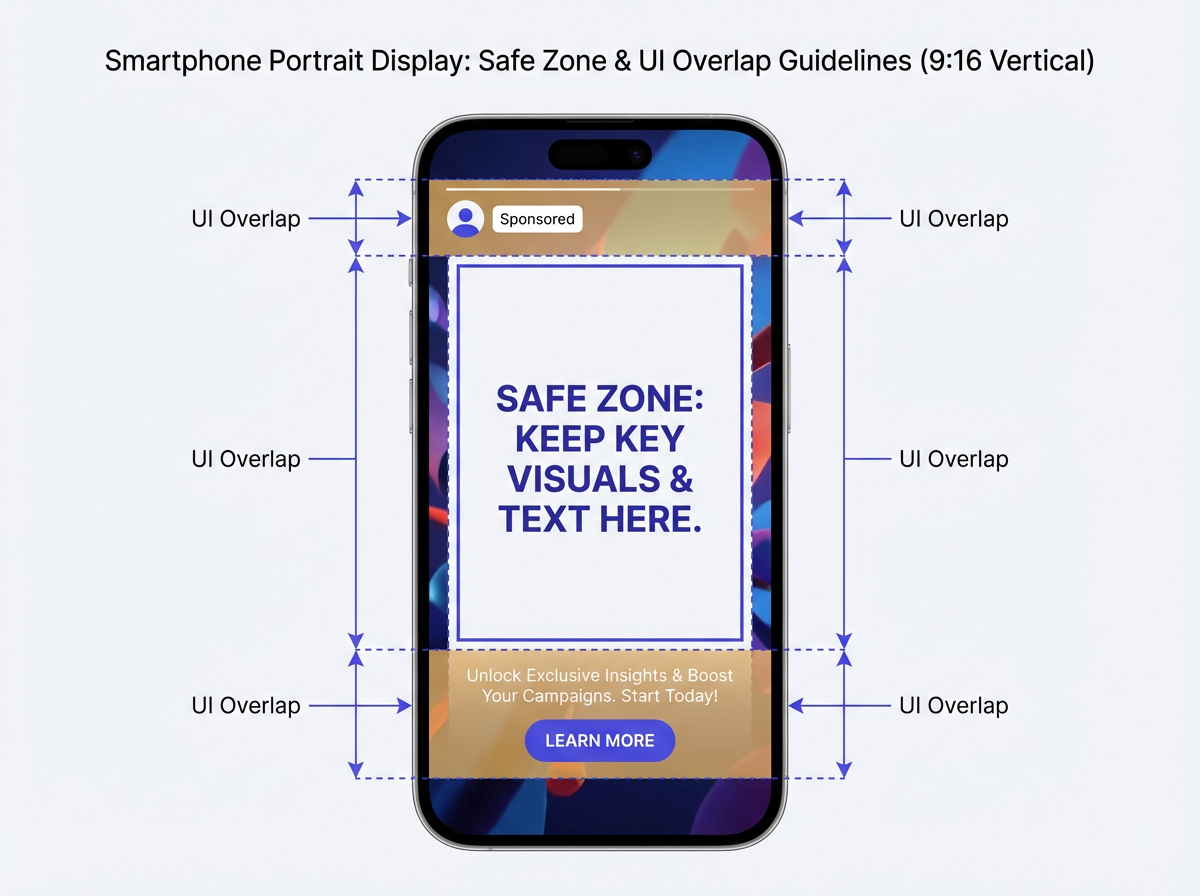
This is the number one reason great vertical videos fail. When you run a 9:16 ad in Stories or Reels, Meta overlays UI elements on top of your creative: your profile icon, the "Sponsored" tag, the call-to-action button, and the caption. Put your logo or key line of text in those areas and it gets covered up.
As a general rule, keep all essential elements out of the top 14-15% and bottom 20-35% of your vertical creative. Instagram Stories has tighter safe zones than Facebook Stories, so if you're running across both, design for the tighter constraint. The middle is your safe zone. Not glamorous advice, but it prevents a lot of self-inflicted pain.
Common Rejection Triggers
Meta's policies are built around user experience, and the enforcement can feel picky. A common thing I hear is, "We followed the dimensions, why did it still get rejected?" It's usually one of these patterns:
- Misleading Claims: Get-rich-quick schemes or exaggerated results like "Lose 10 pounds in one week" are a fast track to rejection.
- Low-Quality Media: Blurry, pixelated images and shaky videos get flagged more often than people expect.
- Landing Page Mismatch: The page your ad links to must align with the ad's promise. A bait-and-switch will get your ad disapproved and can harm your account health.
- Before-and-After Images: Not completely banned, but heavily scrutinized in health and wellness categories. These lead to rejections frequently.
Common Misconceptions About Meta Ad Creative
"I'll just use Advantage+ Creative and Meta will fix everything." This is the myth that refuses to die. Advantage+ Creative enhancements (auto-cropping, text variations, brightness adjustments) are useful, but they work within the constraints of what you upload. A 600 x 400 pixel source image won't look good at 1080 x 1920 no matter how much AI enhancement runs on it. Bad input produces bad output.
Another common assumption: specs are identical across Facebook and Instagram. They're close, but not the same. Instagram Feed favors 1:1 more strongly than Facebook Feed, and Instagram Stories has tighter safe zones than its Facebook counterpart. Design for the tighter constraint and you'll be covered on both.
Then there's the "higher resolution is always better" crowd. Uploading a 5000 x 5000 pixel image doesn't help. Meta compresses everything. You'll just slow down your upload and risk introducing compression artifacts. Stick to the recommended resolutions.
Staying Current: Automate, but Verify
Meta updates its ad specs and policies regularly, often without fanfare. The Meta Ads Help Center is the canonical source, though it's not always the fastest to reflect changes. Build a quarterly check into your workflow: pull up the ads guide, compare against your current templates, and update anything that's drifted.
The best approach for day-to-day production is to manually create and upload specific assets for your most important placements. Use the placement customization tool in Ads Manager to assign your 1:1 creative to Feeds and your 9:16 creative to Stories. It takes only a few extra minutes but gives you full control, ensuring your brand looks professional everywhere it appears. If you're trying to speed up campaign production without letting copy quality slip, learning how to write a great prompt for meta titles and descriptions can save hours and keep messaging consistent across ad sets.
Key Takeaways
- Meta ad specs govern resolution, aspect ratio, file size, text length, and duration requirements for every ad placement across Facebook, Instagram, Messenger, and Audience Network.
- Feed ads perform best at 1080 x 1080 px (1:1). Stories and Reels require 1080 x 1920 px (9:16) to avoid cropping and letterboxing.
- Video files can reach 4GB (MP4 or MOV), but the 15-to-60-second range delivers the strongest engagement.
- The old 20% text rule is officially gone, yet text-heavy images still get deprioritized in delivery.
- Always upload multiple aspect ratios for Advantage+ placements, and review specs quarterly against Meta's official ads guide.
Frequently Asked Questions About Meta Ad Specs
What is the most important Meta ad spec to get right?
Aspect ratio. Using the correct shape for the placement (for example, 9:16 for Stories and Reels, 1:1 for Feeds) has the biggest impact on how your ad looks and how it performs. Incorrect ratios lead to ugly cropping or black bars.
Is the 20% text rule on images still enforced?
No. Meta officially removed the hard rule that rejected ads with more than 20% text on the image. However, their systems still appear to deprioritize text-heavy images with reduced delivery. Keeping text on images minimal remains a best practice.
What's the best video length for a Meta ad?
It depends on the placement, but shorter is almost always better. For Reels and Stories, aim for under 15 seconds. For Feed ads, under 60 seconds is a good guideline. For In-Stream placements, you're limited to 5 to 15 seconds.
Can I use the same creative for Facebook and Instagram?
For the most part, yes. The specs for corresponding placements (for example, Instagram Feed and Facebook Feed) are nearly identical. A 1:1 square image and a 9:16 vertical video will serve you well across both platforms. The main difference is that Instagram Stories has slightly tighter safe zones.
What happens if my ad gets rejected for a spec violation?
First, review the rejection reason in Ads Manager and compare your creative against the specs for that placement. Usually, you can edit the ad, replace the creative with a compliant version, and resubmit it for review.
What is the best image size for Meta Feed ads?
The best image size for Meta Feed ads is 1080 x 1080 pixels (1:1 square). For mobile feeds, a 1080 x 1350 pixel (4:5 vertical) image can be even more effective because it claims more screen real estate.
What video format does Meta recommend for ads?
Meta recommends MP4 or MOV files for the best compatibility. Keep file sizes under 4GB, and aim for the recommended resolution for each placement (1080 x 1080 for Feed, 1080 x 1920 for Stories and Reels).
How can I keep up with changes to Meta's ad specs?
Build a quarterly review into your workflow. Check the Meta Ads Help Center for updates, compare against your current creative templates, and update anything that's drifted.
Do Meta ad safe zones really matter for Stories and Reels?
Yes, if you care about performance on Stories and Reels. UI overlays can cover logos, captions, and call-to-action areas. Keep key elements out of the top 14-15% and bottom 20-35% of 9:16 creative so your message doesn't get blocked.
Does uploading higher resolution creative improve Meta ad quality?
No. Meta compresses uploads, so extremely large files don't translate to sharper ads. Stick to the recommended resolutions per placement and export cleanly to avoid compression artifacts.
