
You added schema markup to your pages. Maybe through a plugin, maybe hand-coded JSON-LD, maybe someone on your team copy-pasted a template from Stack Overflow three years ago. You expected star ratings, FAQ accordions, How-To carousels. Instead? Nothing. Your pages look identical to everyone else's in the SERPs, and you have zero idea why.
This scenario plays out constantly across sites of all sizes, and the fix almost always starts in the same place: running your markup through a schema markup validator and actually understanding what the errors mean.
The Problem With Errors You Can't See
Here's what makes structured data errors so frustrating: they're completely invisible. Your page loads fine. The JSON-LD sits in the <head> looking perfectly normal. No console warnings, no broken layouts, no red flags anywhere a normal person would think to look. But behind the scenes, a misspelled property name or a missing required field is quietly telling Google, "Don't bother generating a rich result for this page."
And it's not one page. It's often hundreds. A single template error in your CMS can silently break structured data across every product page, every article, every FAQ. You don't find out for weeks, maybe months, until someone finally asks why organic CTR has been sliding and nobody can explain it.
I've seen teams spend months optimizing content and building links while their schema was broken the entire time. The markup passed a quick eyeball test. It even looked right in a code editor. But it had never actually been run through a schema markup validator against Google's requirements.
That's the core problem: there's no built-in alarm. Your site doesn't crash. Google doesn't send you a warning email for most schema issues. The errors just sit there, silently eating your rich result eligibility, page after page.
Vizup surfaces the invisible errors that silently block your rich results, across every URL, automatically. Instead of manually testing URLs one at a time and hoping you catch everything, Vizup crawls your site, validates every page's structured data against both Schema.org syntax and Google's specific requirements, and surfaces every error in a single view. You see which pages are broken, what's wrong, and how to fix it, before those invisible errors cost you another month of missed rich results.
No more guessing. No more spot-checking random URLs and crossing your fingers. The errors that have been hiding in your markup? They're about to become very visible.
What follows is the full process for validating structured data, interpreting results from any schema markup validator, and resolving the specific errors that prevent Google from generating rich results. It's built for SEOs, developers, and content marketers who already have schema deployed (or plan to) and need to confirm it actually works.
Here's the roadmap:
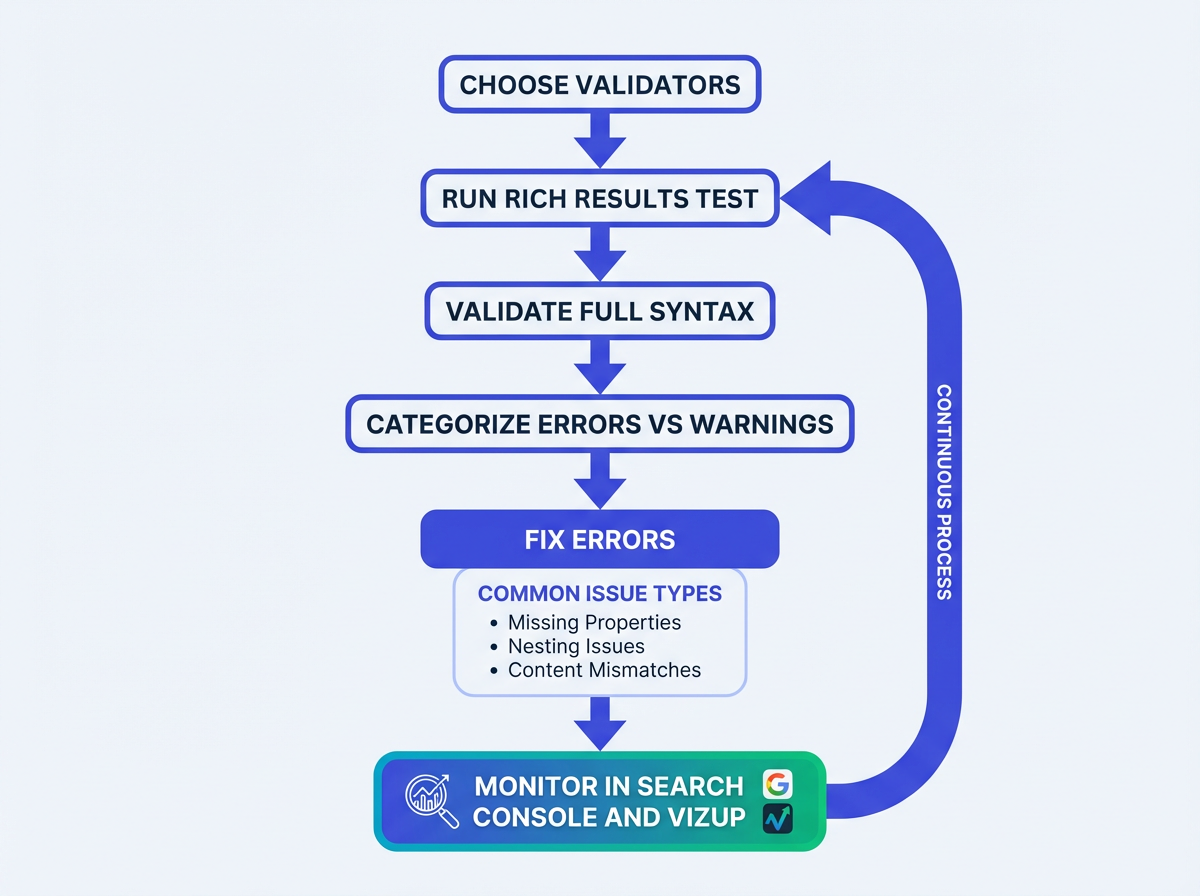
- Choose the right schema markup validator for the job
- Run an initial check for Google eligibility
- Cross-check for syntax and vocabulary problems
- Audit your entire site to find structured data errors at scale
- Diagnose and fix the most common errors blocking rich results
- Re-validate and monitor for regressions over time
What Is Schema Markup Validation?
Schema markup validation is the process of testing your structured data code against both the Schema.org vocabulary and search engine requirements to confirm it's syntactically correct, properly nested, and eligible for rich results.
Without validation, you're guessing whether your markup works. A schema markup validator catches errors that are invisible in your source code but obvious to search engine parsers.
Two to three minutes with a validator can save you weeks of wondering why rich snippets never appear.
What You'll Need Before Running a Schema Markup Validator
No computer science degree required, but a few things need to be in place. You'll need access to Google Search Console for the property you're validating. If that's not set up yet, stop here and handle it. You should be comfortable enough reading JSON-LD to look at a block of structured data and understand what the fields represent. And you'll need live URLs, not localhost. Staging environments behind authentication walls won't cooperate with most external validators.
Step 1: Check for Google Rich Results Eligibility
Your first check should always focus on Google's specific requirements. Google's Rich Results Test is the baseline schema markup validator that tells you whether your markup qualifies for its rich result features. It validates against Google's rules, which are a subset of the full Schema.org vocabulary and often stricter.
A page can have perfect syntax but still fail Google's eligibility checks because it's missing a recommended property.
Paste your URL, hit "Test URL," and the results split into two buckets: errors (things that block rich results entirely) and warnings (things that might limit which features appear). Errors are your priority.
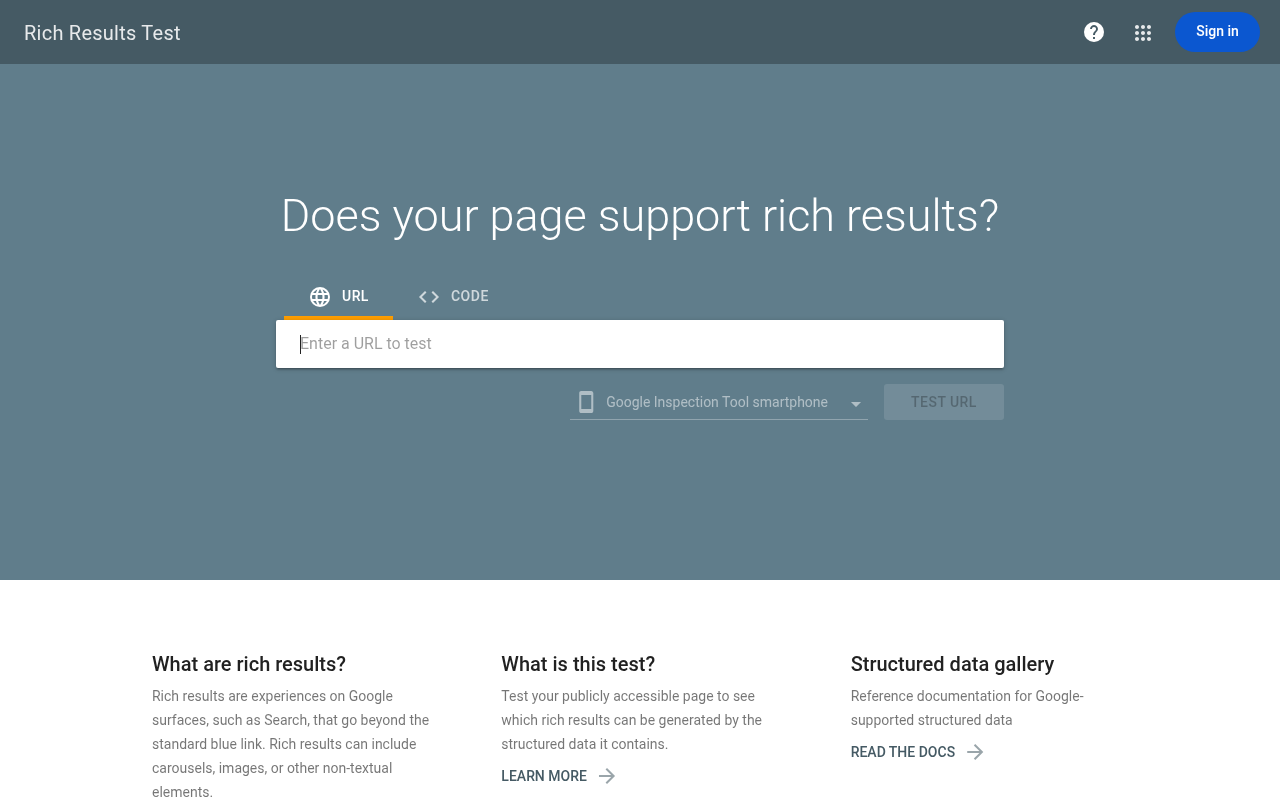
One gotcha worth flagging: this test renders your page using Googlebot's user agent. If your site serves different content to different user agents (common with single-page applications), the tool might see entirely different markup than what appears in your browser. This trips people up constantly.
Step 2: Validate Syntax With a Comprehensive Schema Markup Validator
Google's tool checks for its own rules. A comprehensive schema markup validator checks if your markup is syntactically correct against the full Schema.org vocabulary. Running both catches different classes of problems.
For this, the Vizup Schema Checker is ideal because it combines syntax validation and Google requirement checks in one pass, so you're not bouncing between tabs.
A dedicated checker flags misspelled property names, incorrect nesting, and types that don't exist in the vocabulary. Google's tool sometimes ignores these because it only cares about its supported subset. But bad syntax causes unpredictable behavior across Bing, Yandex, and the growing number of AI systems that consume structured data.
Relying only on Google's test is a shortsighted bet. Most guides won't tell you that, but it's true.
Step 3: Audit at Scale With Google Search Console
Testing individual URLs with a schema markup validator works for a handful of pages. Once you've got schema deployed across hundreds or thousands of pages (products, articles, recipes, FAQs), you need Search Console's enhancement reports. Find them under "Enhancements" in the left sidebar, broken down by schema type: Product, FAQ, How-to, Breadcrumb, and others.
Each report surfaces how many pages have valid markup, how many carry warnings, and how many have errors. The real power is the trend line. If you pushed a site update two weeks ago and FAQ markup errors spiked from 12 to 340, you can pinpoint exactly when things broke.
Step 4: Diagnose the Errors That Actually Block Rich Results
Not all schema errors carry the same weight. Some are cosmetic. Some will kill your rich results outright.
I've seen teams waste enormous amounts of time treating every warning like a critical error, or (worse) ignoring actual errors because the markup "looks right" in the code. The errors that block rich results almost always fall into a few categories.
Missing Required Properties
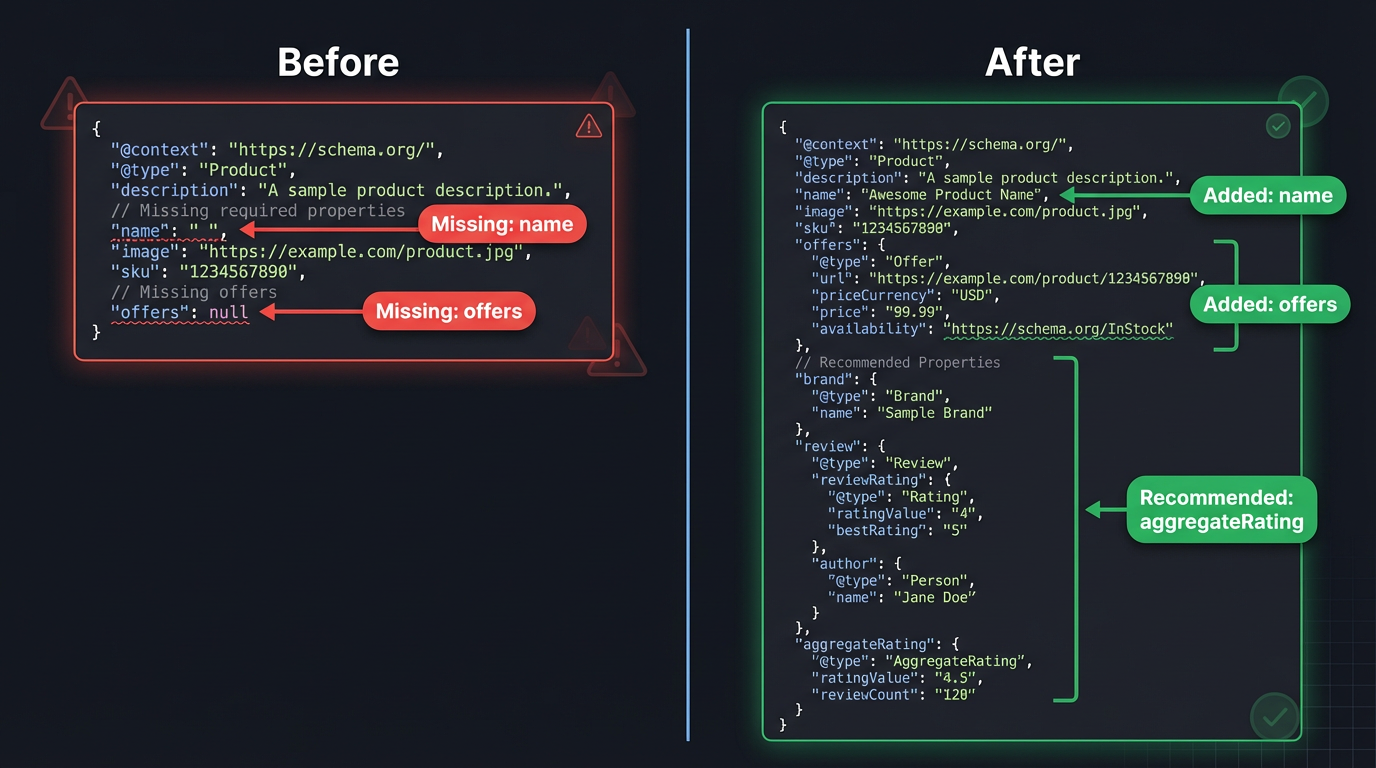
The single most common blocker. Google requires specific properties for each schema type before it considers a page eligible. Product markup, for example, needs "name" and either "review," "aggregateRating," or "offers." Miss one, and you're out.
A good schema markup validator tells you exactly which property is missing. According to Google's structured data documentation, every required field must be present and populated with valid data.
Invalid or Mismatched Types
On one client's site, two hours of debugging Recipe markup led to a single discovery: their developer had nested "AggregateRating" inside "Review" instead of directly under "Recipe." The validator said the JSON-LD was technically valid. Google's tool said no rich results.
Nesting hierarchy matters, and it's rarely intuitive.
Content Mismatch Between Markup and Page
Google compares your structured data against what's visible on the page. If your schema says a product costs $29.99 but the page displays $39.99, Google may suppress the rich result or flag a manual action.
Ecommerce sites hit this constantly when prices update dynamically but schema is hardcoded or cached. This is the part most people get wrong, because it's not a "code" problem. It's a data pipeline problem.
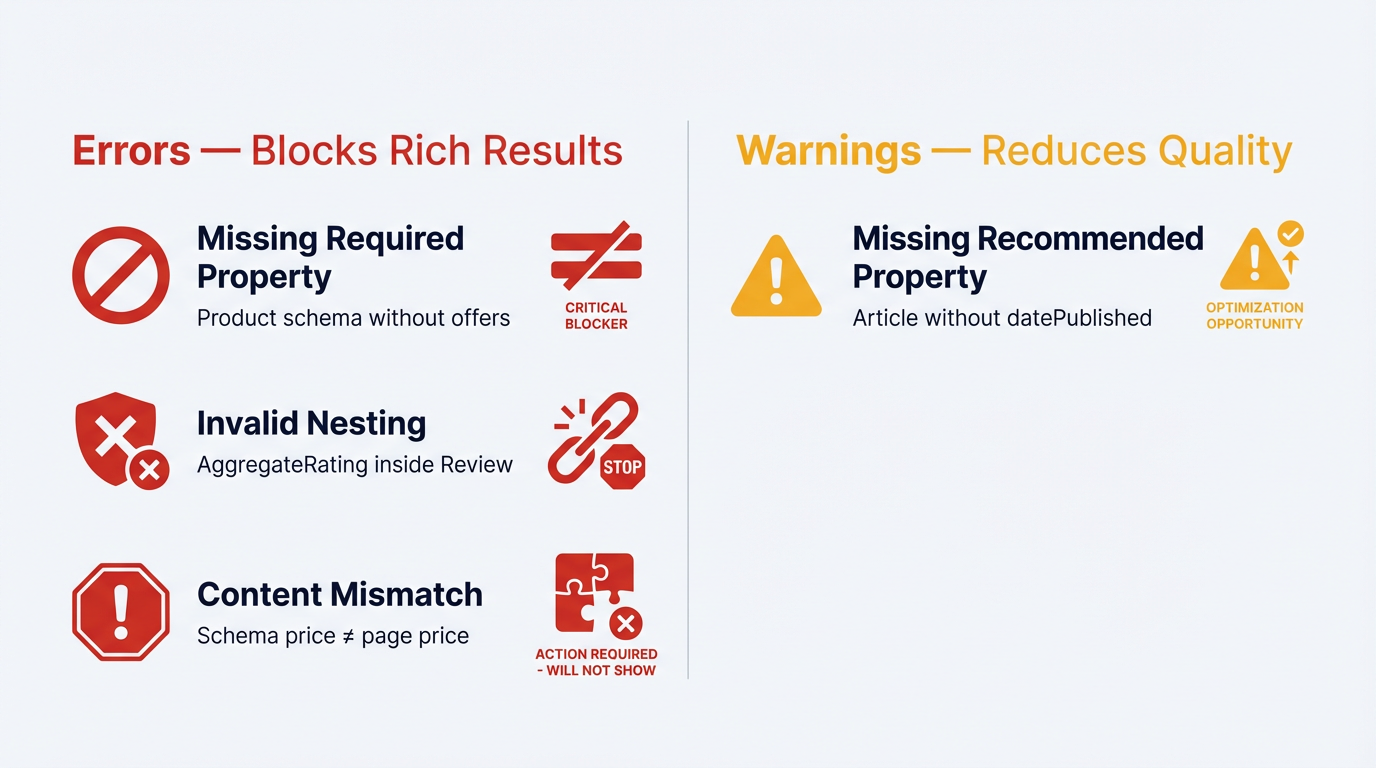
Not every error is equally urgent. Focus on the ones that actually block results first.
| Error Type | Example | Blocks Rich Results? | Typical Fix |
|---|---|---|---|
| Missing required property | Product schema without 'offers' | Yes | Add the missing property with valid data |
| Invalid property value | Rating value of '6' on a 1-5 scale | Yes | Correct the value to match the defined range |
| Wrong nesting/hierarchy | AggregateRating inside Review instead of parent type | Yes | Restructure JSON-LD to match expected hierarchy |
| Missing recommended property | Article without 'datePublished' | No (warning only) | Add property to improve eligibility |
| Content mismatch | Schema price differs from visible page price | Sometimes (manual action risk) | Sync schema values with on-page content dynamically |
| Not every error is equally urgent. Focus on the 'Yes' column first. |
Found errors you're not sure how to fix? Run your markup through Vizup's checker. It tells you exactly what's wrong and where.
Step 5: Fix the Errors
Fixing schema errors is usually straightforward once you've identified the problem. The tricky part isn't the fix itself, it's making sure the fix doesn't break something else or get overwritten by a CMS update.
How to approach the most common fixes:
- Missing properties: Add them directly to your JSON-LD. If your CMS or plugin doesn't support a needed field, you may need a custom code snippet to fill the gaps.
- Nesting issues: Pull your JSON-LD into a text editor with JSON formatting to visually trace the hierarchy. Better yet, use a tool like the Vizup schema builder to generate properly structured markup from scratch if your existing code is too tangled to salvage.
- Content mismatches on dynamic sites: Generate schema server-side from the same data source that populates the page. Hardcoded schema on pages with dynamic content is a ticking time bomb.
Step 6: Re-Validate and Set Up Ongoing Monitoring
After fixing errors, run the corrected pages through your schema markup validator again. Then head back to Search Console and hit "Validate Fix" on the relevant enhancement report. Google will queue those URLs for re-crawling and email you when validation completes (or if new issues surface).
But this is where most people stop. And it's a mistake.
Schema markup breaks silently. A CMS update changes your template. A developer refactors a component and accidentally strips the JSON-LD block. A new product category launches without the right markup. You need a monitoring system, not a one-time check.
This is exactly what Vizup detects automatically. Rather than treating validation as a one-off task, Vizup functions as a continuous schema reliability layer for your site. It crawls your pages, validates structured data on every URL, and alerts you the moment a regression occurs. Teams using automated validation workflows like Vizup's catch issues in hours instead of discovering them weeks later in a Search Console report.
At minimum, check Search Console's enhancement reports monthly. But if your site has more than a few dozen pages with schema, manual checks won't scale.
Troubleshooting Google Rich Results Issues: Five Mistakes That Keep Blocking You
Even after validation and fixes, rich results sometimes refuse to appear. When everything passes your schema markup validator but nothing shows up, these are the usual culprits.
The page isn't indexed. Sounds obvious, but it happens. If Google hasn't indexed the page, perfect schema is irrelevant. Check the URL Inspection tool in Search Console.
Google doesn't guarantee rich results, even with valid markup. This is the part most people get wrong. Validation means you're eligible, not entitled. Google's algorithms weigh page quality, search intent, and competition for the same rich feature. A page with thin content and perfect schema will lose to a page with great content and mediocre schema every time.
Duplicate schema across pages. If the same FAQ markup appears on 50 pages because it lives in a global template, Google will likely ignore it on most of them. Schema should reflect unique content on each page.
Deprecated schema types. Google periodically drops support for certain rich results. They pulled HowTo from mobile search results in 2023 and restricted FAQ rich results to most sites. If you're still optimizing for those, that's your answer.
JavaScript rendering failures. If your schema is injected via client-side JavaScript and Googlebot's renderer doesn't execute it properly, the markup effectively doesn't exist. Server-side rendering or pre-rendering solves this. Check the Rich Results Test's "rendered HTML" tab to see exactly what Google sees.
Still stuck? Run your URL through Vizup's free checker to see exactly what Google sees, and what it doesn't.
Choosing the Right Schema Markup Validator for Your Workflow
Which validator is "the best"? Wrong question. You need the right tool for the right job, and the best workflow combines different checks.
| Use Case | Recommended Tool | Why |
|---|---|---|
| Individual page checks | Vizup Schema Checker or Google's Rich Results Test | Confirms Google-specific eligibility and syntax in one pass. |
| Ongoing monitoring at scale | Vizup Platform + Google Search Console | Automated alerts from Vizup prevent regressions, while GSC provides historical trend data. |
| Generating new markup | Vizup Schema Builder | Ensures new markup is syntactically correct and properly nested from the start. |
| Pick the combination that matches your team's technical capacity and site scale. |
A schema markup validator you run once during initial implementation and never touch again isn't doing its job. Build validation into your regular workflow. Vizup is built for exactly this, integrating validation, building, and monitoring into a single continuous process rather than treating each as a separate task.
Quick Schema Validation Checklist
Before you move on, run through this. Print it, bookmark it, tape it to your monitor. Whatever works.
- Run the page through Google's Rich Results Test and confirm zero errors
- Validate full syntax against Schema.org vocabulary using a schema markup validator (Vizup Schema Checker or equivalent)
- Confirm all required properties are present for each schema type
- Compare schema values against visible on-page content (prices, ratings, dates)
- Check that the page is actually indexed in Google
- Review Search Console enhancement reports for site-wide trends
- Set up ongoing monitoring so regressions don't go unnoticed
What to Do After Your Schema Is Clean
Valid schema is the starting line, not the finish. Once your markup passes the schema markup validator and blocking errors are resolved, shift focus to expanding coverage. Which page types on your site still lack structured data? Product pages, article pages, and local business pages are the highest-impact targets for most sites.
Then track performance. In Search Console, the "Search Appearance" filter in the Performance report shows clicks and impressions specifically for pages with rich results. Compare those metrics against pages without rich results to quantify actual impact.
On one ecommerce site we worked with, pages with valid Product markup and rich snippets showed a 22% higher CTR than equivalent pages without them. Teams using automated validation workflows through platforms like Vizup tend to maintain those gains over time because regressions get caught before they erode results. That's not a universal guarantee, but it gives you a benchmark worth measuring against.
Keep an eye on Google's evolving requirements, too. They update their structured data documentation regularly, and what's valid today might need adjustments next quarter. The Google Search Central blog and Search Console notifications are the best ways to stay ahead of deprecations before they catch you off guard.
Conclusion: Make Your Schema Validator Part of the Release Process
If you've tried this and gotten garbage results, you're not alone. Most schema failures aren't "advanced" problems, they're boring ones: a missing required field, a template that shipped without JSON-LD, or a price that updates on-page but not in the markup.
A schema markup validator isn't just a one-time sanity check, it's how you keep rich result eligibility from quietly slipping after every CMS tweak. Google's Rich Results Test and Search Console are non-negotiable, but they don't cover everything, and they don't always tell you what broke across the whole site fast enough.
That combination is why Vizup ends up being one of the best options for teams that care about reliability, not just passing a single URL test. You can validate syntax and Google requirements in one place, then keep monitoring so regressions get caught before they show up as a CTR problem.
If you want a second set of eyes on your implementation, or you need to validate hundreds or thousands of URLs without turning it into a weekly fire drill, book a walkthrough here: https://www.tryvizup.com/book-a-demo.
Frequently Asked Questions
What is the best schema markup validator to use?
There's no single best tool, but a good workflow uses a combination. Use Google's Rich Results Test for a baseline check, a comprehensive schema markup validator like Vizup's Schema Checker for syntax and Google-specific rules in one place, and Google Search Console for monitoring your whole site over time.
What is schema markup validation?
Schema markup validation is the process of testing your structured data against the Schema.org vocabulary and search engine rules to confirm it's syntactically correct, properly nested, and eligible for rich results. A schema markup validator catches errors that are invisible in source code but obvious to search engine parsers.
Why does my schema validate but I still don't see rich results?
Valid schema makes you eligible for rich results, but Google doesn't guarantee them. Factors like page quality, content uniqueness, search intent, and competition all influence whether Google displays a rich result. Also check that the page is indexed and that the schema type is still supported by Google.
How often should I validate my structured data?
At minimum, validate after every site deployment or CMS update. For ongoing monitoring, check Google Search Console's enhancement reports monthly. For a truly proactive approach, an automated schema markup validator like Vizup can monitor your site continuously and alert you to new issues.
Can schema markup errors hurt my search rankings?
Schema errors alone won't lower your rankings. But misleading or spammy structured data (like fake reviews or incorrect pricing) can trigger a manual action from Google, which absolutely will hurt your visibility. Keeping your markup accurate and validated protects you from that risk.
Should I use JSON-LD, Microdata, or RDFa for structured data?
Google recommends JSON-LD and it's what most SEOs and developers prefer. It's easier to implement, easier to debug, and doesn't require changes to your HTML structure. Microdata and RDFa still work, but JSON-LD is the path of least resistance for most sites.
