
You know the moment. Blinking cursor, empty doc, and a vague mandate from leadership that "we should be doing YouTube." That paralysis isn't a creativity problem. It's a youtube prompts problem, because the input is fuzzy, so the output stays fuzzy.
In 2026, "prompts" on YouTube actually refers to two things marketers keep conflating. First, there are the AI prompts you feed into tools to generate scripts, titles, descriptions, and Shorts. Second, there are the in-video prompts that nudge viewers to take action, keep watching, click to the next video, comment, or jump from Shorts to long-form. Both matter, and they matter more now than ever. In early 2026, YouTube's CEO Neal Mohan described the platform as "a global television network, a creator marketplace, a commerce platform, and a discovery engine powered by AI" (YouTube Blog: The Future of YouTube 2026). That's the playing field.
YouTube prompts are specific, structured instructions you feed an AI tool to generate video scripts, titles, descriptions, or content ideas tailored to your channel and audience. The prompt is the input. Its quality determines whether you get a draft you can actually film, or something that sounds polished and says absolutely nothing.
YouTube now surpasses 2.70 billion monthly active users globally, and average views per video jumped 76% between 2024 and 2025, partly driven by Shorts as a discovery engine. Marketing teams are under real pressure to ship consistent, quality video content without burning through their entire bandwidth. Smarter prompting is how the good ones keep up.
What YouTube Prompts Actually Are
A YouTube prompt is a text instruction that tells an AI model exactly what kind of video content to produce, for whom, in what format, and toward what goal. "Write me a YouTube script" is a request. A prompt is the creative brief compressed into a few lines, giving the AI less room to guess and more room to deliver.
The difference matters because AI defaults to generic filler when you leave gaps. If you've tried this and gotten garbage results, you're not alone. Most teams quit right there, then blame the tool.
Every effective prompt answers four questions. What format is this video (tutorial, listicle, product review)? Who is watching? What is the core message or angle? And what are the constraints, whether that's tone, length, or a specific call to action? Skip any of those and the AI fills the gap with generic defaults that waste your editing time.
Here's a nuance that separates marketers who get value from prompts and those who don't: prompts aren't only for writing. They're for decision-making. A well-crafted prompt can force clarity on positioning, audience pain points, and what your channel is trying to become known for. Channel authority is increasingly a gatekeeper for distribution in 2026, and the prompting process itself helps you define what that authority looks like.
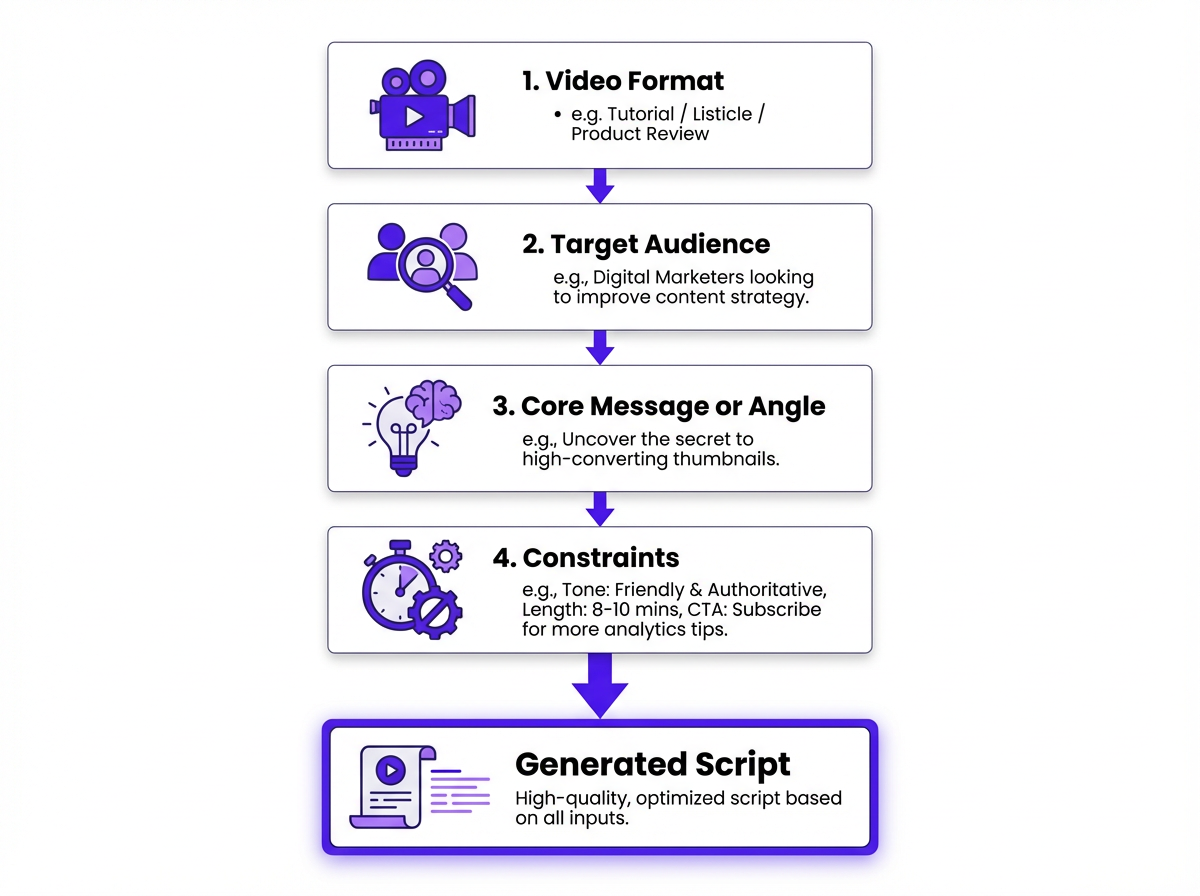
Every strong YouTube prompt answers four questions before the AI writes a single word.
The Different Types of YouTube Prompts Marketers Use
Not all YouTube prompts do the same job. They map to distinct phases of production, and picking the right type for the right moment saves a lot of wasted effort. If you're trying to improve YouTube SEO, for example, an optimization prompt will beat an ideation prompt almost every time.
| Prompt Type | What It Produces | Best Used For |
|---|---|---|
| Ideation Prompts | Video topic lists, content angles, series concepts | Channel planning, editorial calendars |
| Script Prompts | Full video scripts, hooks, intros, outros | Scripted tutorials, explainers, product demos |
| Optimization Prompts | Titles, descriptions, tags, thumbnail text | SEO and click-through rate improvement |
| Repurposing Prompts | Short-form clips, blog summaries, social captions | Extending content reach across channels |
| Each prompt type maps to a specific stage in your video production workflow. |
A contrarian take that holds up in practice: ideation is usually the least valuable prompt type once you're past the first month. The real time sink is everything after the idea. The outline, the hook, the title variations, the YouTube description, the repurposed assets. That's where prompts earn their keep.
Something most guides gloss over is how these prompt types connect to channel authority. If your ideation prompts spit out random topics every week, you're training YouTube's algorithm to see your channel as "about everything," which is basically "about nothing." Tight topic clusters build channel authority over time, and authority is what gets you recommended when the platform is filtering harder than it used to.
Repurposing prompts are the most underused of the four. Many marketers treat YouTube as a standalone channel when it functions better as a content engine. One well-structured video can feed your blog, LinkedIn, and email newsletter if you prompt for it correctly. For instance, you can use a dedicated prompt for YouTube scripts to generate the initial video, then follow it up with a content repurposing prompt to turn that video script into distributable assets without rewriting everything from scratch.
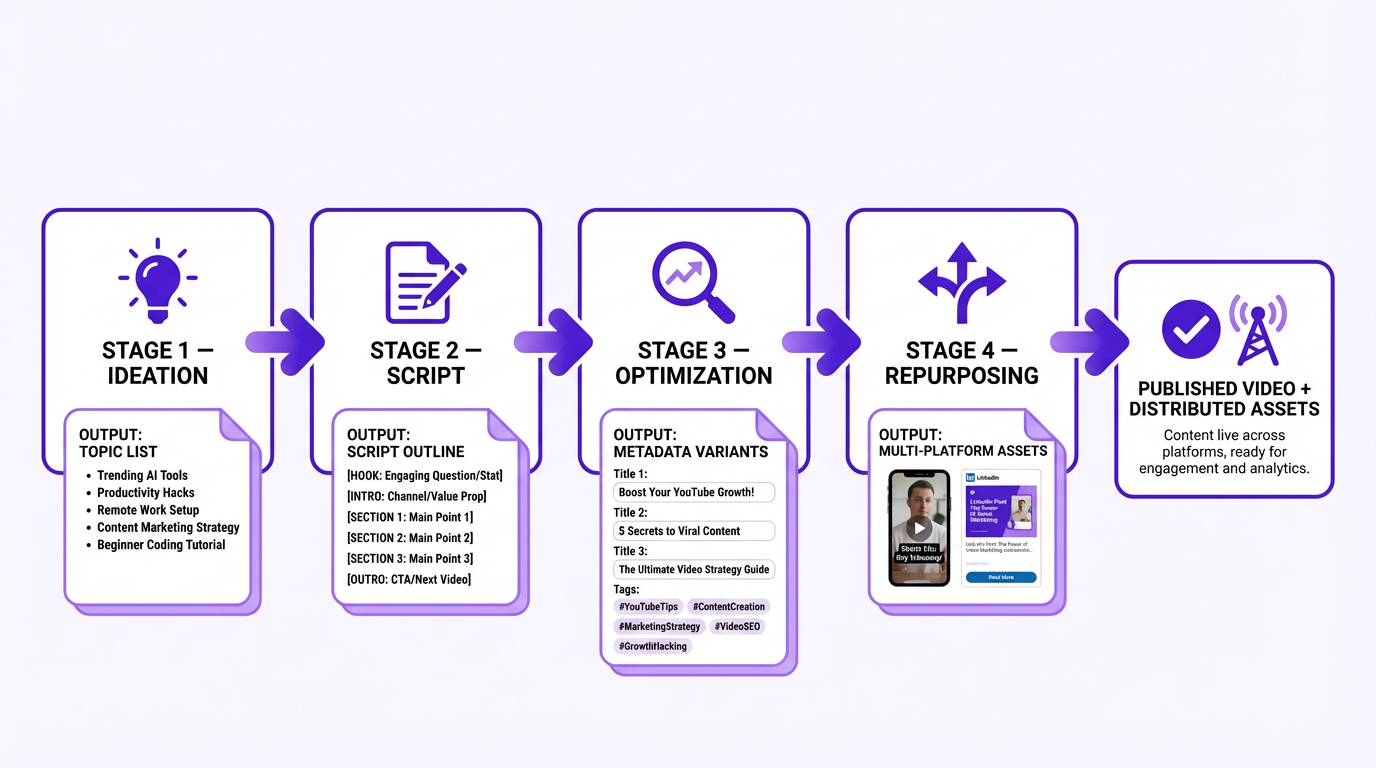
The prompt type you choose should match the production step you're trying to speed up, not the one that feels most "creative."
How to Write a YouTube Prompt That Actually Works
Most beginner advice stops at "be specific." True, but incomplete. Specific about what, exactly? The sections below break down the five elements that separate prompts that produce filmable drafts from prompts that produce filler, including the stuff that impacts retention and click-through rate, not just writing quality.
A quick gut check before you hit enter: read your prompt and ask, "Could a stranger on my team film this without asking me five follow-up questions?" If not, the model is going to guess, and you'll pay for it in rewrites.
Nail the Audience First
"Small business owners" is too broad to be useful. "First-time Shopify store owners running Google Ads on a budget under $500 per month" gives the AI something concrete to write toward. The tighter the audience definition, the more the script will feel like it was written for a real person rather than a demographic category.
Assign the AI a Role
"Act as a senior YouTube content strategist for B2B SaaS" produces a different draft than "act as a creator who speaks plainly and hates jargon." This sounds small. It's not. I've seen teams spend weeks arguing about "tone" when the fix takes an afternoon of role and voice constraints baked into the prompt.
Lead with the Hook
Hook strategy comes before topic details more often than people expect. The prompt that wins is the one that tells the model how to earn the first 30 seconds. "Open with a counterintuitive claim that challenges what most people believe about X" will generate something far more watchable than "write an engaging intro." YouTube's own data consistently shows that the first 30 seconds determine whether a viewer stays or bounces, so your prompt should treat the hook as the highest-priority output.
Set Sharp Constraints
Constraints are where prompts either get sharp or fall apart. Pick a few that matter and make them non-negotiable: runtime (say 6 minutes), structure (hook, 3 sections, CTA), and what to avoid (no fluff, no buzzwords, no long setup). Stuffing 20 constraints into one prompt usually backfires because the model tries to satisfy all of them and satisfies none well. Three to five tight constraints beat twenty loose ones every time.
Iterate, Don't One-Shot
This is the part most guides get wrong: prompting is iterative. Your first prompt gets a draft. Your second prompt fixes the pacing. Your third prompt tightens the CTA and adds your brand quirks. People who treat it as one-and-done are the same people who conclude AI scripts are mediocre. The best marketers we've worked with run two to three rounds before they consider a script "ready to film."
If you'd rather start from a tested framework than build one yourself, Vizup's prompt for YouTube scripts handles the structure automatically, so you can focus on the creative decisions instead of prompt engineering.
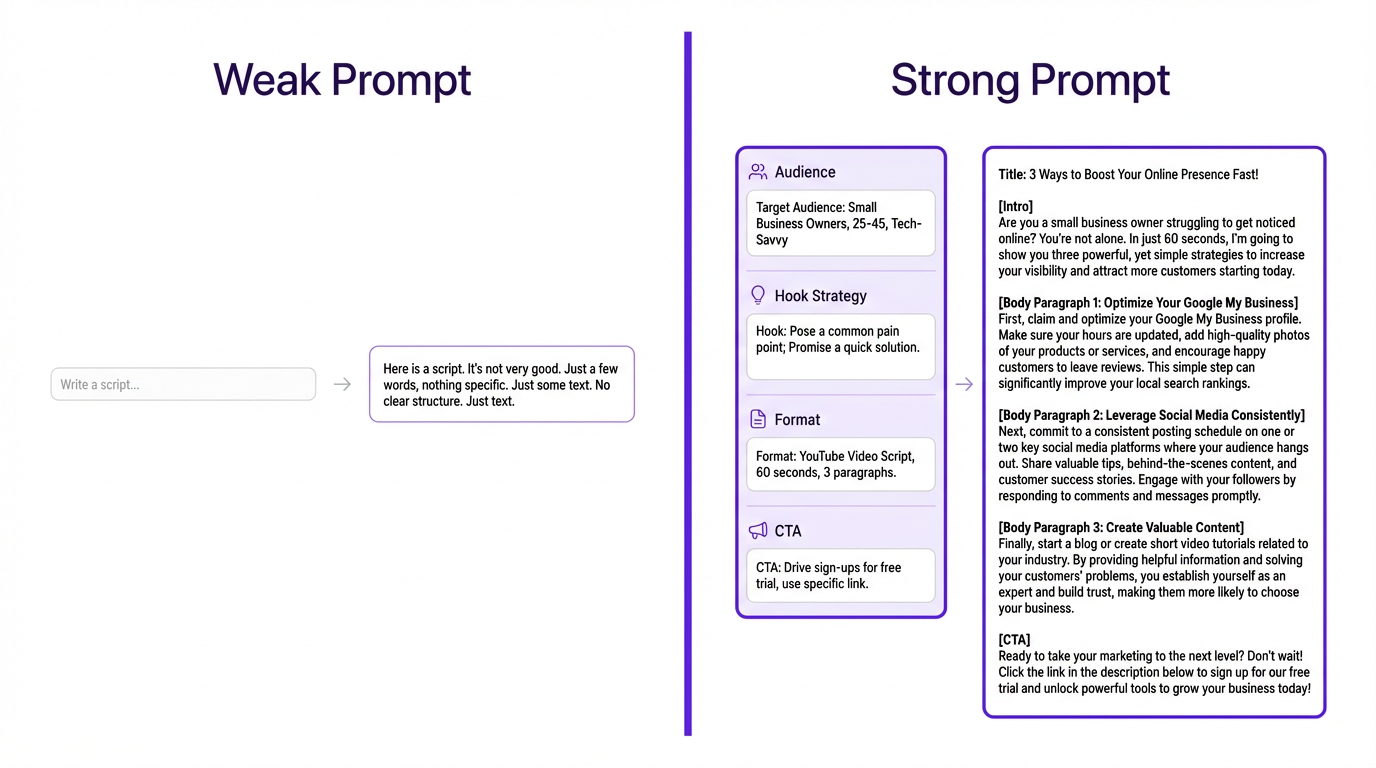
Specificity in your prompt directly determines the quality of the AI output.
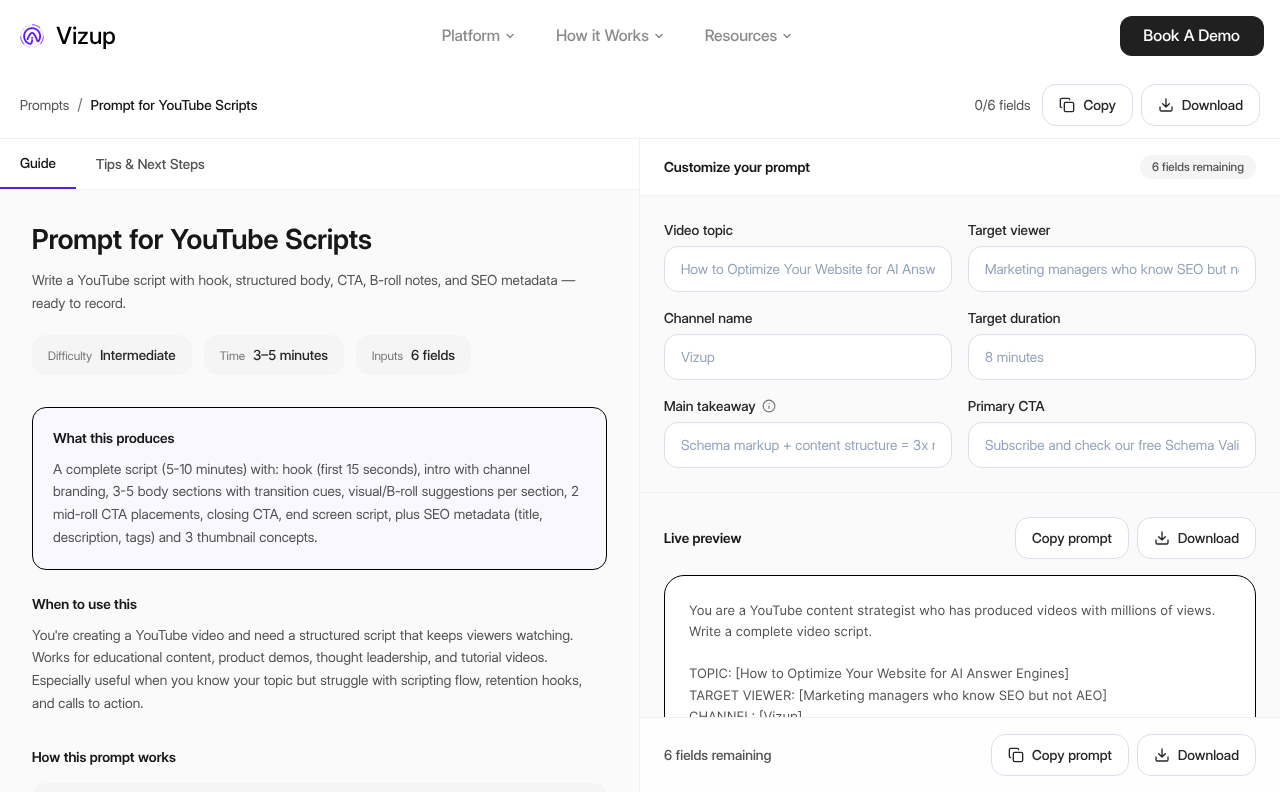
Vizup organizes YouTube prompts alongside the rest of your marketing workflow, so you can reuse a structure instead of rewriting prompts from scratch.
Common Misconceptions Worth Clearing Up
The most persistent myth: YouTube prompts replace your creative judgment. They don't. What they replace is the blank page. The AI produces a draft; you still decide whether the angle is right, whether the tone fits your brand, and whether the hook actually lands. Skipping that editorial layer is how channels end up sounding like every other AI-generated feed.
A second assumption worth questioning is that longer prompts are always better. A 500-word prompt stuffed with contradictory instructions will produce worse output than a focused 80-word prompt with clear priorities. More context helps. More noise doesn't.
The "one perfect prompt" idea is another trap. Prompt libraries are useful starting points, but they can teach bad habits if you treat them like magic spells. The best results come from two or three rounds of refinement, because your first draft reveals what you forgot to specify.
A myth I wish would die: "Just make it go viral." Growth hacking is fun to talk about, but in 2026 the channels winning aren't chasing one-off spikes. They're engineering consistent viewership across formats, and that means repeatable systems, not lottery tickets.
There's also a tendency to think prompts are only useful for scripted content. Optimization prompts for titles and descriptions are arguably where you see the fastest return, especially if you have a library of existing videos that aren't ranking. Brands using YouTube's AI-driven ad products, for example, have seen a significant return on ad spend, and better metadata is part of that equation.
One more misconception, and it's subtle. People treat "viral hooks" as hypey lines you slap on top of a video. Hooks are really an audience match test. If your hook attracts the wrong viewer, your retention tanks, satisfaction signals drop, and YouTube stops pushing the video. Great hook prompts are specific enough to pull in the right person, not the biggest crowd.
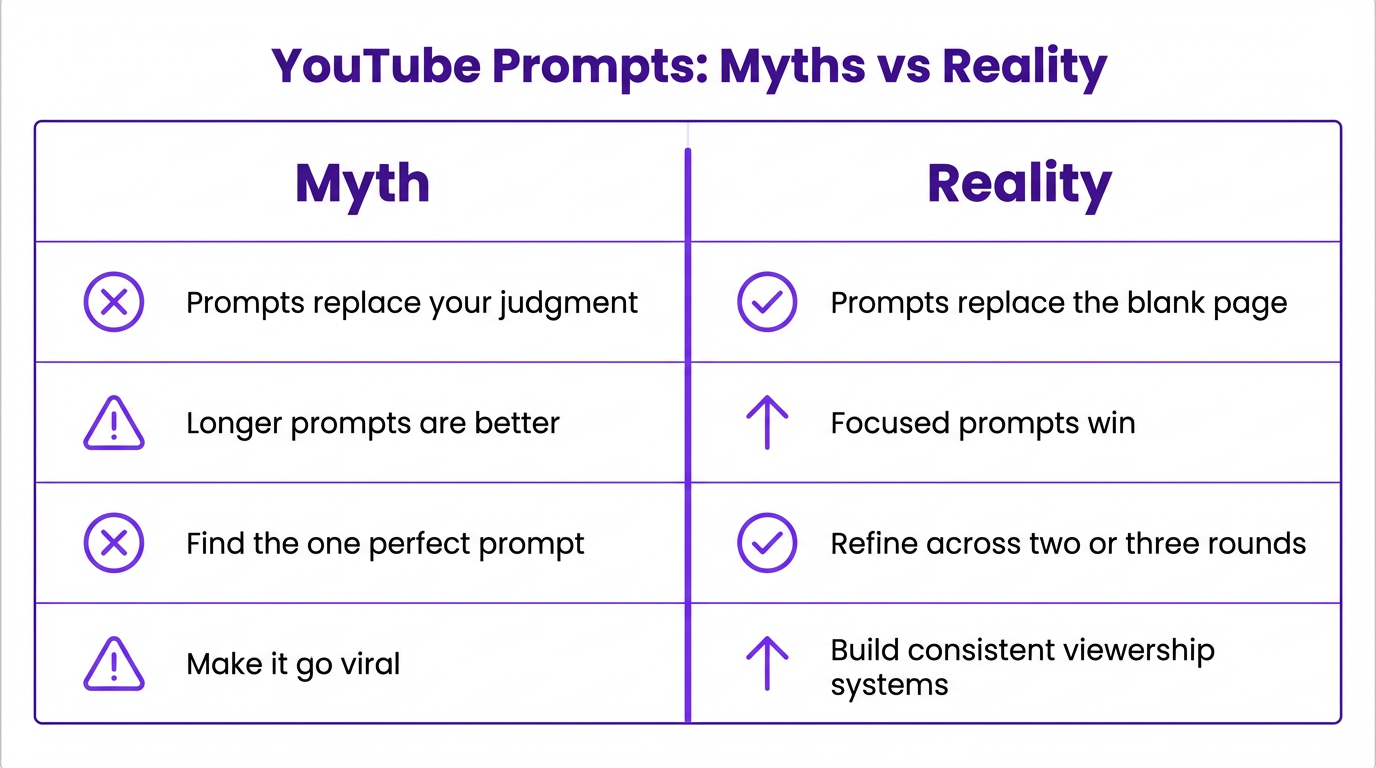
Most prompt mistakes are mindset problems first, wording problems second.
Putting It Into Practice: Real Prompt Scenarios
Theory is useful, but prompts live or die in execution. The three scenarios below show how the principles from the previous sections translate into actual prompts you can adapt for your own channel, whether you're writing a YouTube script, planning a content calendar, or turning one video into Shorts.
Script Prompt for a Product Tutorial
A SaaS company running a product tutorial series might use a script prompt like: "Write a 5-minute YouTube tutorial script for a B2B marketing manager who has never used [product]. Tone should be direct and practical, no filler. Open with the biggest mistake new users make. End with a CTA to book a demo." That prompt is deployable because the AI knows the audience, the format, the tone, and the goal.
Now here's the same idea with the kind of detail that changes output quality fast: "Act as a B2B content strategist. Write a 6-minute tutorial for a marketing manager at a 20 to 50 person company. Include a 15-second hook that calls out the most common setup mistake. Structure: hook, 3 steps with on-screen callouts, recap, CTA to book a demo. Avoid jargon and long intros." The second version tends to produce something you can film with minimal surgery.
If you want to push this further, add one line that forces retention design. For example, "Include one mid-video pattern interrupt at the 2:30 mark, a quick objection-handling moment, then return to the steps." That single instruction often cleans up pacing and reduces the "AI wrote this" feel.
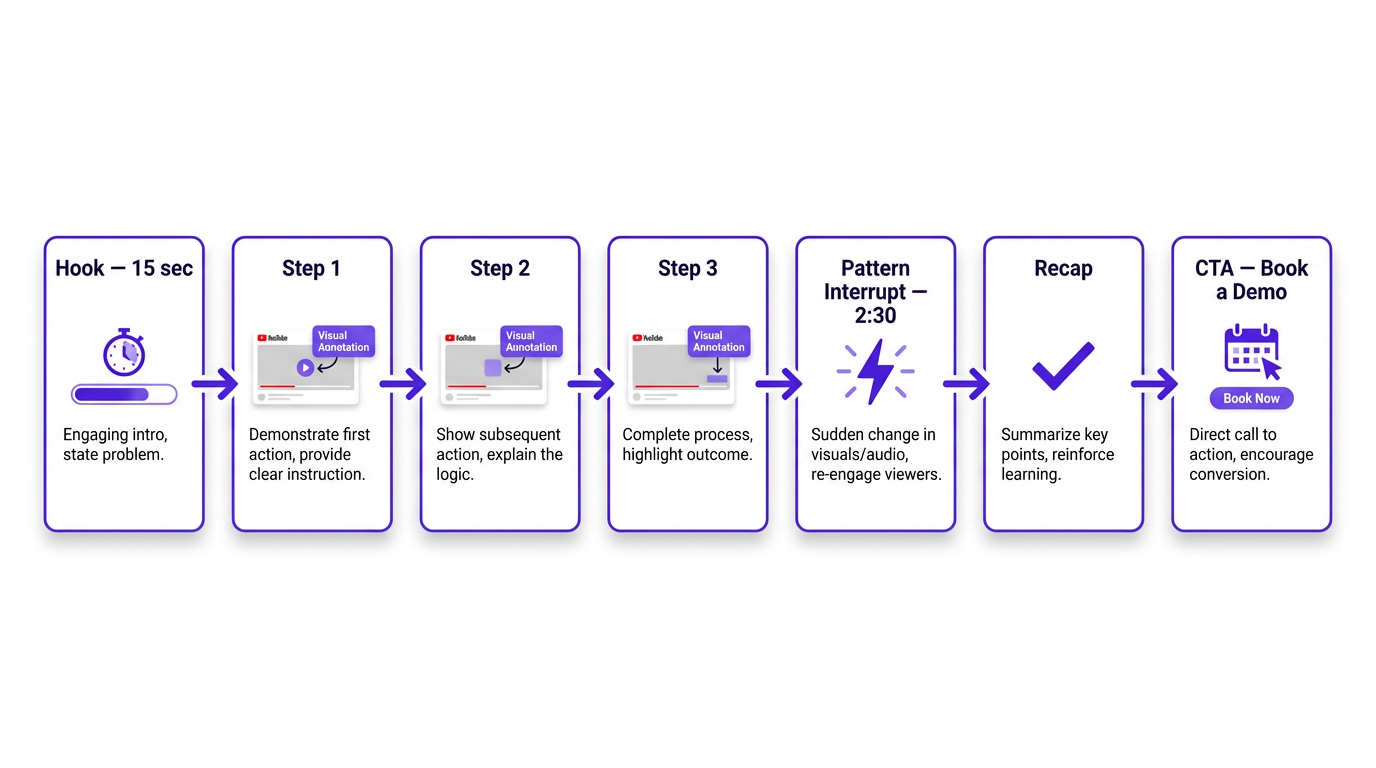
A prompt that bakes in structure usually saves more time than a prompt that only asks for "better writing."
Ideation Prompt for an Editorial Calendar
For ideation, something like "Generate 10 YouTube video ideas for a US-based HR software company targeting mid-market businesses. Each idea should address a specific pain point HR managers face during annual performance review cycles" will produce a content calendar's worth of material in under a minute. Pair that output with a social media calendar prompt and your promotion plan is covered too.
A practical twist that helps with channel authority: tell the model to keep 8 of the 10 ideas inside your core problem set, then let 2 explore adjacent angles. That keeps the channel focused while still giving you room to test fresher hooks. It's basically the "stay anchored, explore angles" idea you see in modern YouTube strategy playbooks, and it works because it mirrors how the algorithm clusters your content.
Repurposing a Long-Form Video
Repurposing is where you can get a sneaky amount of ROI. If you already have a 10-minute script, prompt for three Shorts hooks, a LinkedIn post that argues a single point from the video, and an email intro that tees up the watch. Same core idea, different packaging. This is the part most teams skip, then wonder why YouTube "takes so long" to pay off.
This is also where in-video prompts matter. Shorts are a discovery surface, but they shouldn't be a dead end. The best repurposing prompt includes a line like, "End each Short with a subtle prompt to watch the full breakdown, and name the long-form video exactly as it appears on YouTube." That tiny detail improves the handoff from short to long and keeps viewers inside your content ecosystem.
YouTube Studio has begun rolling out AI-powered features for video ideas and thumbnail suggestions, which signals clearly where the platform is headed. Those built-in tools are fairly generic by design, though. Custom prompts built around your specific audience and positioning will consistently outperform platform defaults, because they carry context the platform has no way of knowing.
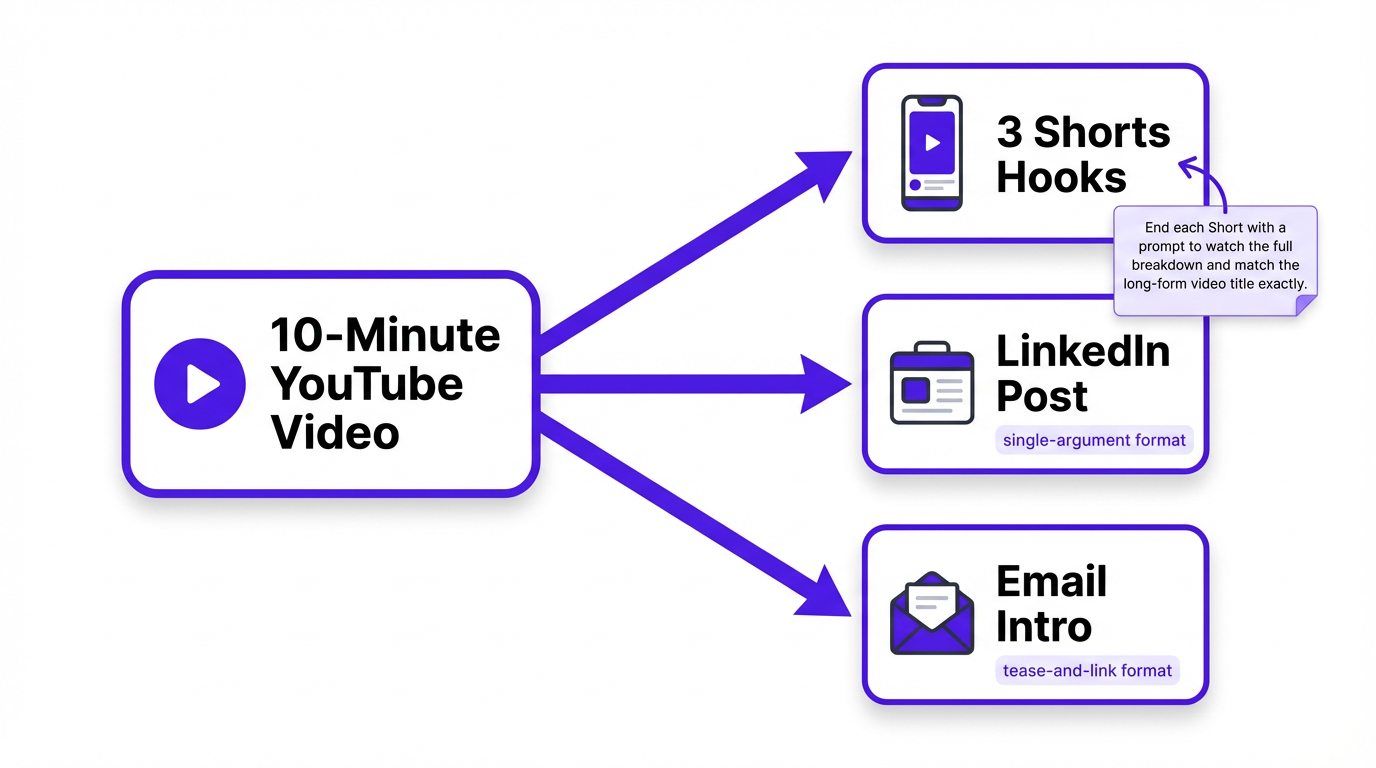
One long-form script can turn into a small distribution kit if you prompt for the outputs explicitly.
What you need to remember about YouTube prompts:
- A YouTube prompt is a structured instruction specifying format, audience, angle, and constraints, not just a topic request.
- The four main prompt types (ideation, script, optimization, and repurposing) each serve a different stage of production.
- Audience specificity and a defined hook strategy are the two variables that most directly improve output quality.
- AI output is a draft, not a final product. Editorial judgment still determines what gets published.
- Repurposing prompts stretch a single video into blog posts, social content, and email copy with minimal extra effort.
- Vizup's full library of marketing prompts covers the complete content workflow beyond YouTube scripts alone.
Frequently Asked Questions
Do I need a specific AI tool for YouTube prompts?
No, YouTube prompts will work with any capable large language model. The quality of your prompt framework is often more important than the specific model you use. For marketers, platforms like Vizup offer pre-built and optimized prompt libraries, like this prompt for YouTube scripts, that save you from having to engineer them from the ground up.
What is the ideal length for a YouTube script prompt?
Aim for 50 to 150 words. Your goal is to provide clear constraints, not a novel. Include the target audience, the video's format (e.g., tutorial, listicle, reaction), the central hook, the desired tone, and any mandatory call to action. Overly long prompts can introduce contradictions that confuse the AI and lead to muddled, generic output.
Can YouTube prompts improve my video SEO?
Yes, this is a core function. You can use specific prompts to generate dozens of keyword-focused titles, detailed descriptions, and relevant tags in minutes. If you embed videos within blog posts, you can also use SEO writing prompts to create surrounding text that helps both the article and the video rank in search results.
Are prompts useful for creating YouTube Shorts?
Absolutely, and it's a major growth area. YouTube Shorts has become a critical format for discovery and reach. A good repurposing prompt can analyze a long-form video script, identify the most compelling 60-second segment, and reformat it for a vertical, fast-paced delivery. This is one of the most efficient ways to increase your content output without doubling your production time.
How can I make AI-generated scripts sound like my actual brand voice?
Don't just describe your voice; show it. While including descriptors like "conversational and authoritative, with no jargon" is a good start, the best results come from providing a concrete sample. Paste in 2-3 sentences of your own writing that perfectly capture your style. The AI will mirror a real example far more accurately than it can interpret abstract adjectives.
Do YouTube prompts help with growth hacking?
Yes, if you treat prompts as part of a system rather than a one-off trick. A strong prompt can generate attention-grabbing hooks quickly, but the real win is using prompts to build topic clusters, improve audience retention, and guide viewers to the next video. Shorts are especially powerful for discovery, and YouTube Shorts now average over 200 billion daily views.
