
You publish a page, hit "request indexing", and then nothing. Or you ship a redesign and watch Search Console light up with weird URLs you swear you killed months ago. It’s annoying, and it’s way more common than people admit.
That’s why a sitemap generator earns its keep. I use a sitemap tool to crawl a site and generate XML sitemap files, basically a structured list of the URLs you actually want search engines to find and revisit, often with metadata like last updated dates. It won’t magically boost rankings, but it does make discovery and recrawling less of a guessing game once your site stops being "small and tidy".
Start here: what an XML sitemap is (and what it isn’t)
An XML sitemap is a machine-readable list of URLs you hand to crawlers, formatted to match the Sitemaps protocol (supported by Google, Yahoo!, and Microsoft since November 2006, per sitemaps.org). It’s not your navigation. It’s not a promise that Google will index everything. It’s you saying, "These pages exist, and these are the ones I care about".
And yes, you can run a site without one. I’ve seen 30-page brochure sites with clean internal linking get indexed fast with zero sitemap work. Most sites don’t stay that simple, though. Add a few new sections, a blog, a filterable directory, and suddenly your internal linking looks "fine" until you audit it.
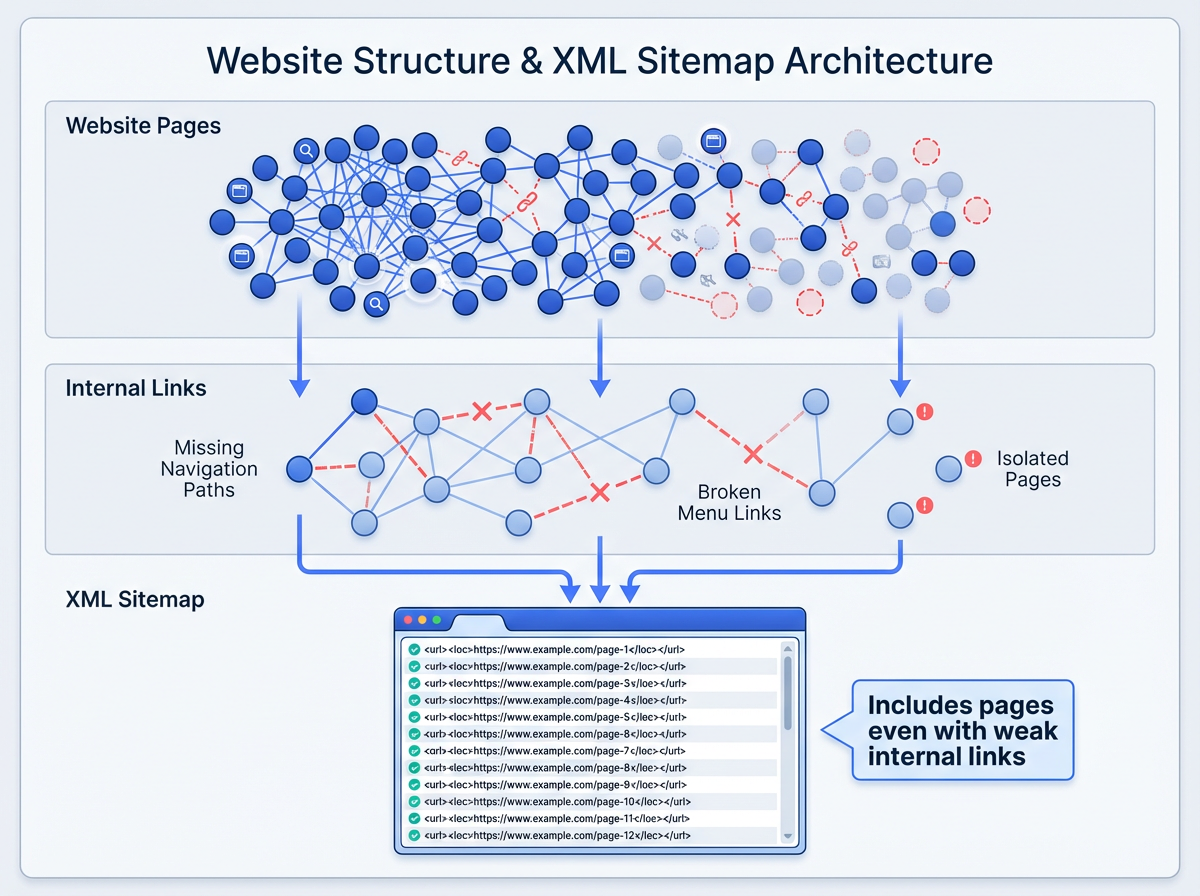
Google keeps it pretty straightforward: build a sitemap if your site is large (over 500 pages), new with few external links, or heavy on video and images (Google Search Central). In practice, I’d widen that. If you publish often, reorganize often, or run faceted navigation, you want a sitemap generator in the mix because real websites get messy, even with good intentions. (Internal link suggestion: link the phrase "free SEO tools" to Vizup’s free SEO tools page, since this is where people start looking for a toolkit, not a single fix.)
Why sitemaps still matter in 2026 (yes, even with AI search)
Indexing is the gate. Rankings sit behind it. If crawlers don’t reliably find a page, you can write the best content on earth and still get crickets.
You’ll hear people say, "Sitemaps aren’t a ranking factor", like that ends the conversation. Technically true. Practically unhelpful. Indexing efficiency makes the rest of SEO possible, and that’s why sitemaps still matter (you’ll see the same indexing-first framing in industry discussion around sitemaps as an indexing factor, not a ranking boost, per Chapters Digital Solutions, 2025).
Bing has been loud about this as search gets more AI-driven. Their 2025 note on keeping content discoverable calls out sitemaps as a practical way to help crawlers find what you publish and revisit what changed (Bing Webmaster Tools). Freshness signals still need a source, and your sitemap gives you one of the cleaner knobs to turn.
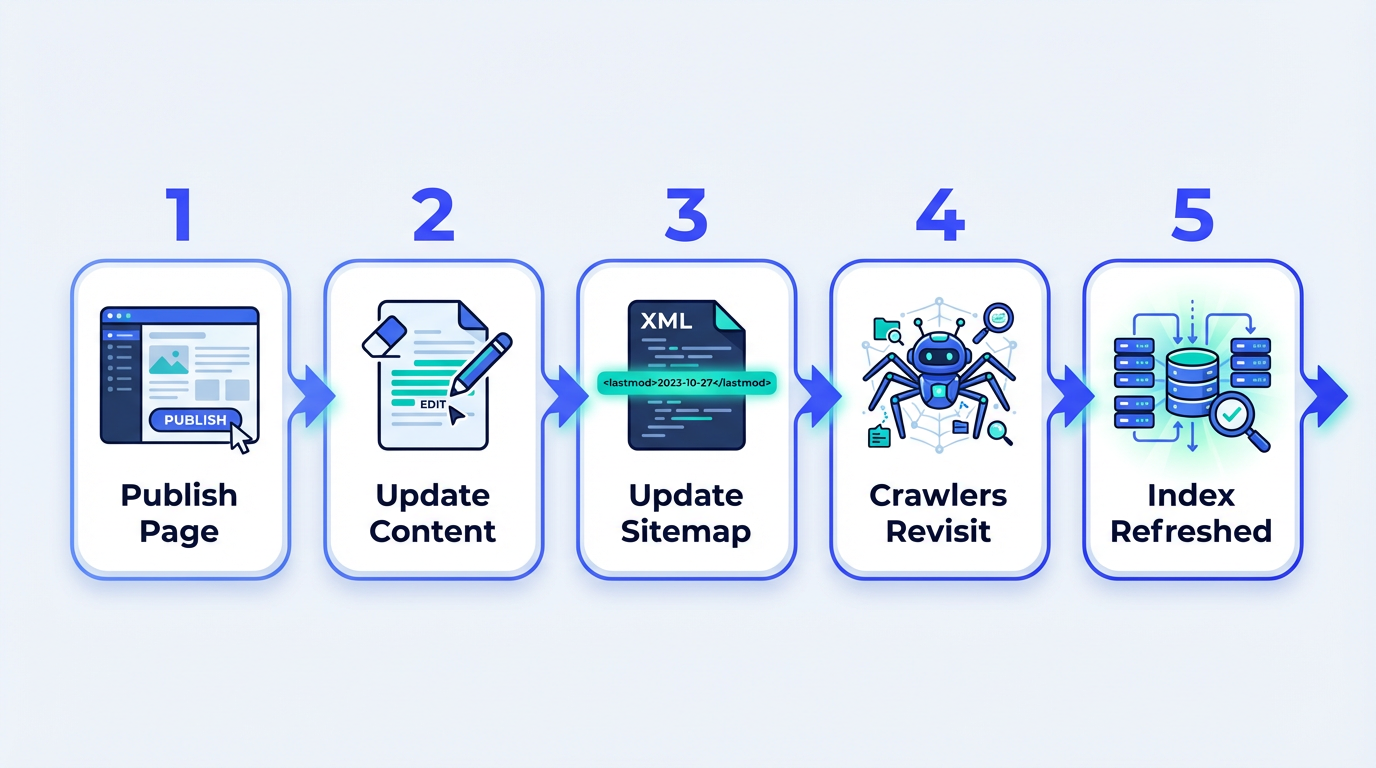
Here’s the lived-in truth from audits: the pages that "should" be indexed often aren’t the pages that actually get indexed. I’ve watched ecommerce sites burn crawl budget on parameter URLs while the canonical category pages lag behind. I’ve seen tag archives get crawled like they’re the main attraction while new articles sit undiscovered for weeks. A sitemap won’t fix every underlying issue, but it gives you a clean list to submit and a clean list to monitor.
How a sitemap generator works (the mechanics, not the marketing)
A good XML sitemap generator does three things well. It finds URLs, it filters out the junk, and it outputs XML that follows the protocol. That middle step decides whether you end up with a sitemap you trust or a sitemap that quietly sabotages you.
Most tools start with a crawl. They pick a starting URL and follow internal links the way a bot would. Some also pull URLs from your CMS or from an export you upload. I like crawl-based discovery because it shows what’s actually reachable, but it can miss orphan pages. CMS exports catch those orphans, but they also love to include drafts, staging routes, and system pages nobody wants in the index. Real sites usually need both viewpoints.
Filtering is where teams get burned. I don’t mean just excluding /wp-admin or /login. I mean making calls on internal search results, faceted parameters, duplicate language variants, and thin tag archives. The protocol won’t stop you from listing garbage URLs. It’ll just deliver your garbage to Google, neatly wrapped. (Internal link suggestion: link "sitemap checker" to Vizup’s sitemap checker as the natural follow-up to filtering, since validation is where bad URLs get caught.)
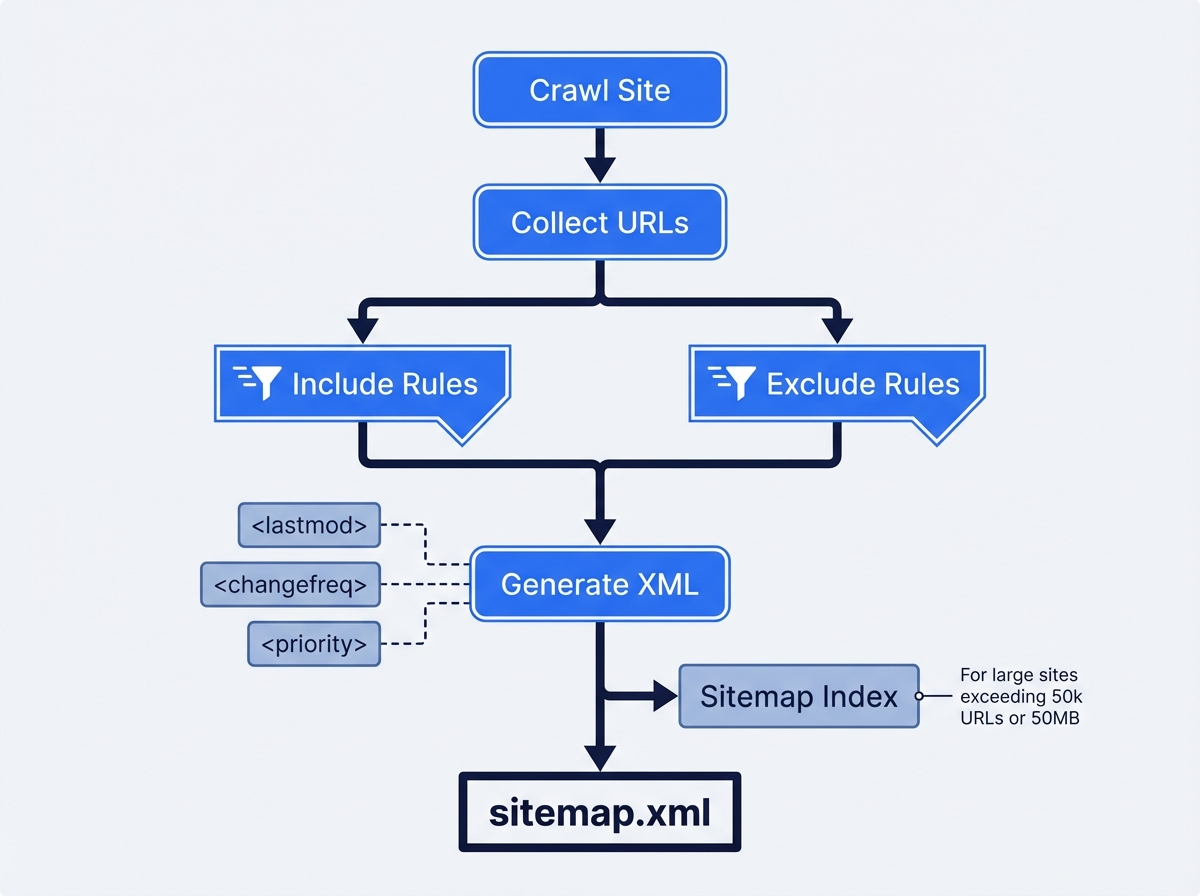
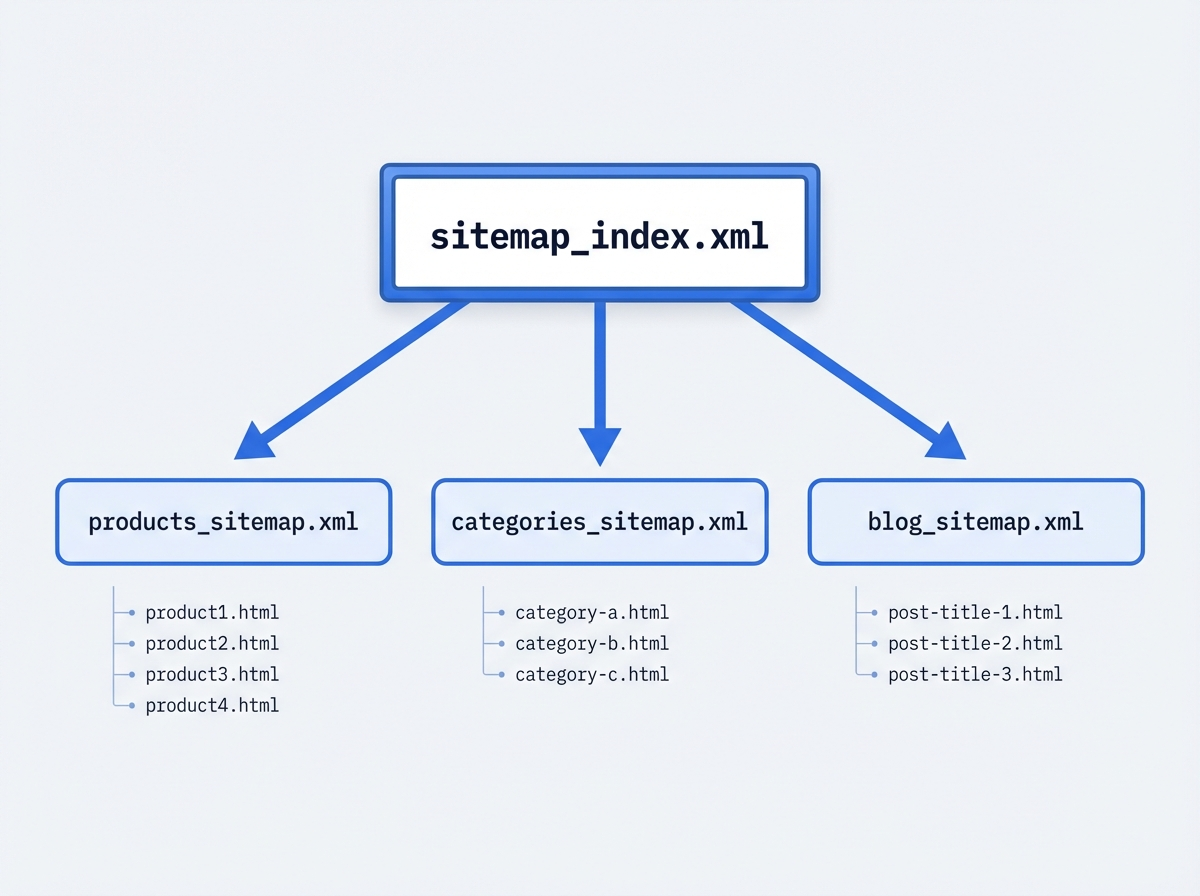
One hard limit you can’t negotiate: a single sitemap file tops out at 50MB (uncompressed) or 50,000 URLs. After that, you split into multiple sitemaps and list them in a sitemap index file, per sitemaps.org protocol limits. If you run a marketplace, a big publisher, or a serious ecommerce catalog, you’ll hit this faster than you expect.
Types of sitemaps you’ll run into (and when each one matters)
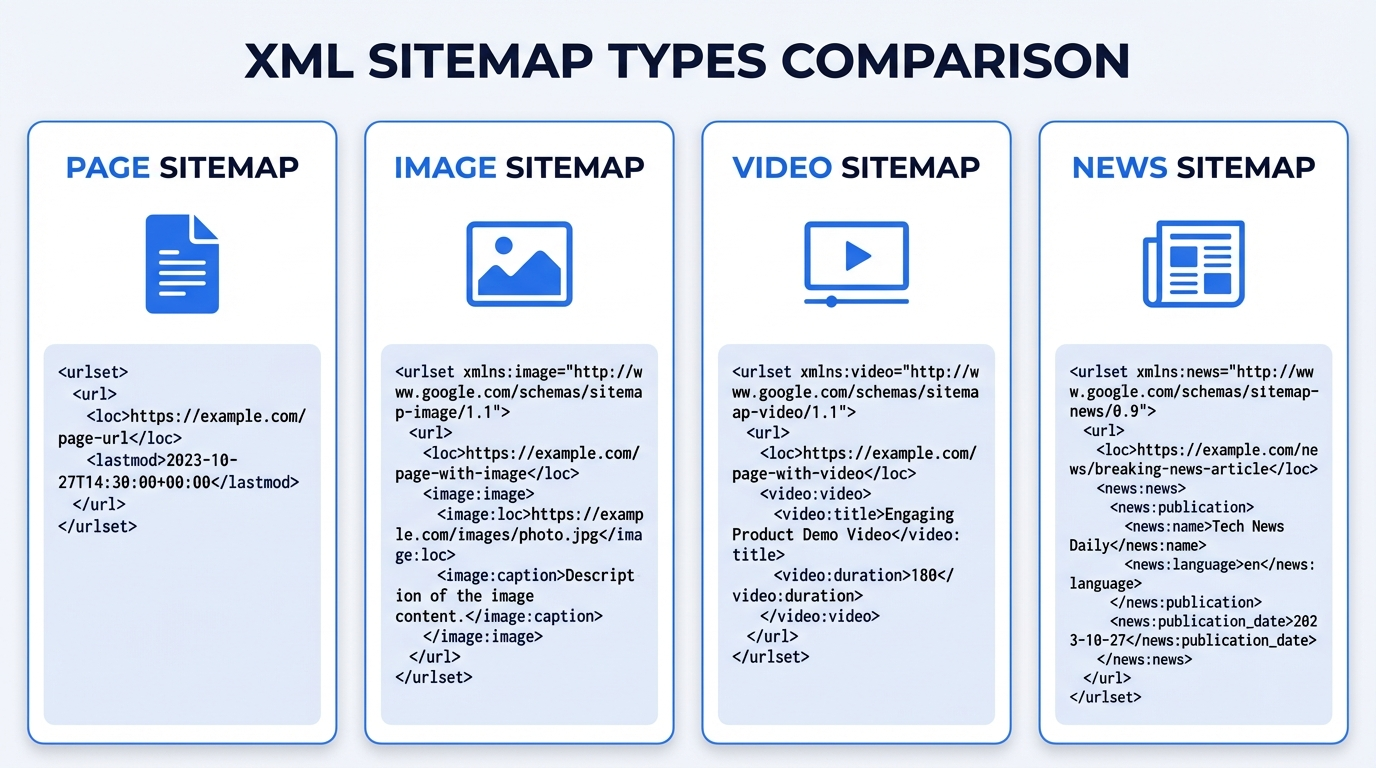
Most people say "sitemap" and mean "an XML sitemap for web pages". That’s usually the right starting point. But if you publish media-heavy content, the sitemap family gets bigger, and ignoring that can leave a lot of discovery on the table.
The common sitemap types:
- Page (URL) sitemaps: the default list of canonical URLs you want crawled and indexed.
- Image sitemaps: useful when images drive discovery (recipes, ecommerce, portfolios) and you want clearer signals about what’s on the page.
- Video sitemaps: for sites where video is the product, not just an embed, and you want video-specific metadata understood.
- News sitemaps: for publishers with time-sensitive content and strict inclusion windows.
A typical marketing site usually does fine with a page sitemap plus solid internal linking. A publisher or a store with thousands of product images plays a different game. Google’s documentation spells out that sitemaps can describe different content types, not just pages (Google Search Central). If rich results drive growth for you, media sitemaps stop being "nice" and start being practical.
Building a clean XML sitemap: the stuff that actually trips people up
Most "how to create sitemap" posts stay in the safe zone. Real sites don’t. These are the parts that trip up smart people, especially after migrations, redesigns, or a few years of "we’ll clean it up later".
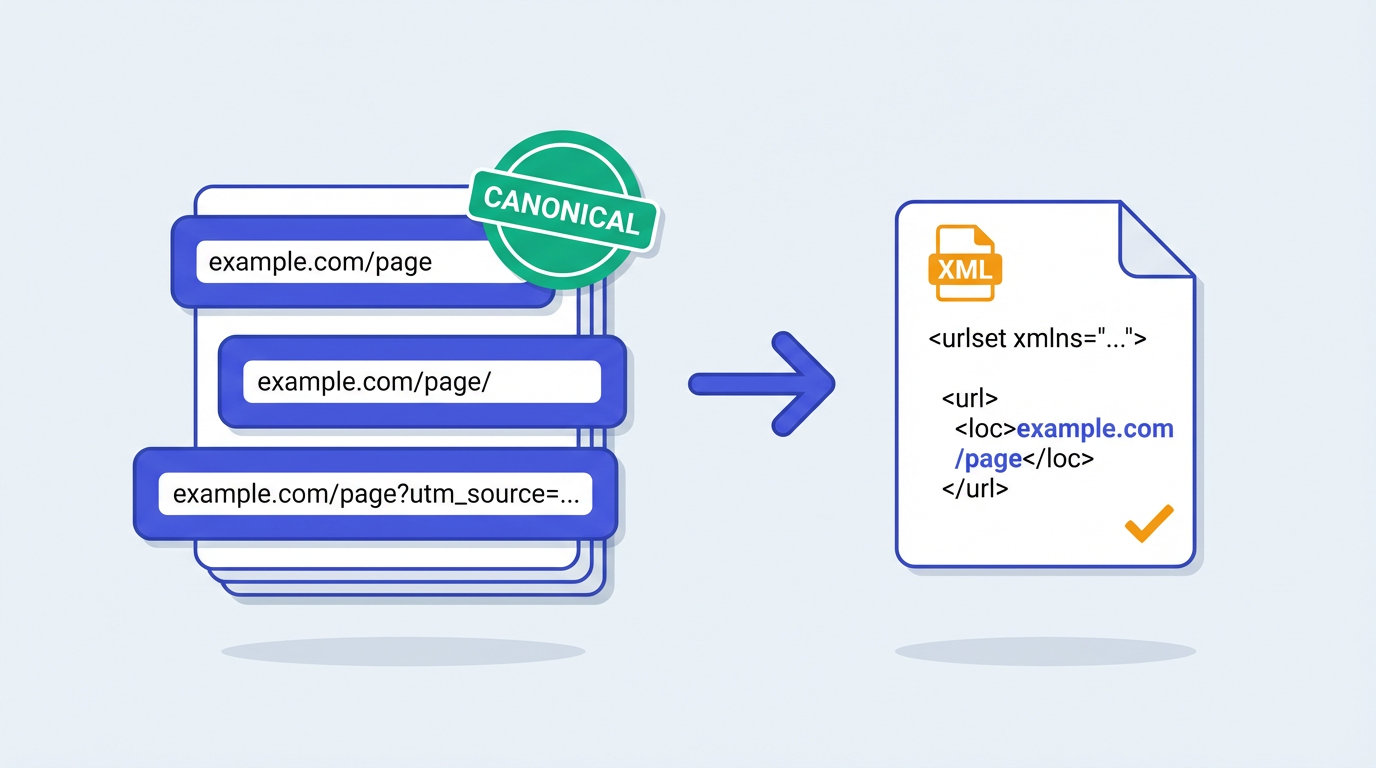
Canonicalization: pick the one URL you mean
If your sitemap lists non-canonical URLs, you send mixed signals. Trailing slash variants, HTTP vs HTTPS, www vs non-www, and parameterized URLs cause most of the mess. I’ve watched teams generate XML sitemap files from server logs and accidentally include both /product and /product?ref=homepage. Google won’t implode, but you just made crawling less efficient and debugging more annoying.
Status codes: don’t list what returns 3xx/4xx/5xx
This sounds obvious until you inherit a site with years of redirects. A sitemap full of 301s tells crawlers your structure is stale. A sitemap with 404s is worse, it’s basically a to-do list you hand to bots. If you’ve generated a sitemap and gotten garbage results, you’re not alone. I usually find a dirty URL inventory, not a broken tool.
The <lastmod> tag is underrated, but only if you’re honest
Direct answer: <lastmod> works when it reflects real content changes, not a daily auto-update. Bing’s 2025 guidance on AI-powered search calls out sitemaps as a way to signal freshness, and in day-to-day work, <lastmod> is one of the cleanest freshness hints you can send at scale (Bing Webmaster Tools).
If every URL changes every day, none of them do. I’ve seen publishers inflate <lastmod> and then wonder why important updates didn’t get recrawled quickly. The crawler just stopped trusting the signal.
Quick gut-check before you submit a sitemap (this takes 2 minutes, and it catches a lot): spot-check 10 URLs from the file. If you see parameters, redirects, or anything you’d be embarrassed to show in Search Console, fix the rules and regenerate. (Internal link suggestion: link "spot-check" or "validate" to Vizup’s sitemap checker since that’s the exact step people skip.)
Real-world sitemap examples (the ones I see constantly)
Concrete beats theory. These three patterns show up constantly in audits, and they’re usually fixable without a full rebuild.
Big ecommerce catalogs that hit the 50,000 URL ceiling
Direct answer: split your sitemap into multiple files and submit a sitemap index. A mid-market retailer with 18,000 products can still blow past 50,000 URLs once you add categories, filters, pagination, and "helpful" internal search pages. Split by content type (products, categories, blog), then use a sitemap index so each file stays within the 50,000 URL and 50MB limits (those limits come straight from sitemaps.org).
Content sites with orphan pages after redesigns
Direct answer: pair a crawl-based sitemap generator with a CMS URL export so orphans still get listed. Redesigns create orphans. Always. The old "Resources" hub disappears, a few legacy guides lose internal links, and those pages start relying on external links alone. A crawl-based tool can miss them because nothing links to them anymore. A CMS-driven URL export catches them, and your sitemap becomes the safety net that keeps them in the crawl path while you repair internal linking.
People also get weirdly strict about "only include pages linked from the main nav". That advice stays popular because it sounds clean. Real sites don’t behave that way, and neither do real growth teams.
Multi-language sites that accidentally double-list everything
Direct answer: keep URL rules consistent across languages, and don’t let canonicals and hreflang drift. If you run /en/ and /es/ versions, you need consistency in what you list and how you handle canonical and hreflang. A sitemap won’t solve international SEO on its own. But a sloppy sitemap makes debugging miserable because you can’t tell whether indexing issues come from language targeting or basic URL hygiene.
Sitemap generator vs CMS plugin vs custom script (a quick comparison)
A common thing I hear is, "Should we just install a plugin and call it done?" Sometimes, yes. Other times, that’s how you end up submitting 30,000 URLs you never meant to index. The right choice depends on how messy your URL inventory gets in the real world, not how clean it looks in a demo.
| Option | Where it shines | Where it bites you |
|---|---|---|
| Crawl-based sitemap generator | Shows what’s actually reachable via internal links, great for audits and post-migration cleanup | Can miss orphan pages unless you pair it with a URL export |
| CMS plugin / built-in sitemap | Easy to keep updated, often "set it and forget it" for small sites | Tends to include thin archives, system URLs, or duplicates unless you configure it carefully |
| Custom script | Full control for large catalogs, marketplaces, and complex rules | Easy to ship bugs, and maintenance becomes a real cost once the site evolves |
How to generate XML sitemap files with Vizup’s free sitemap generator
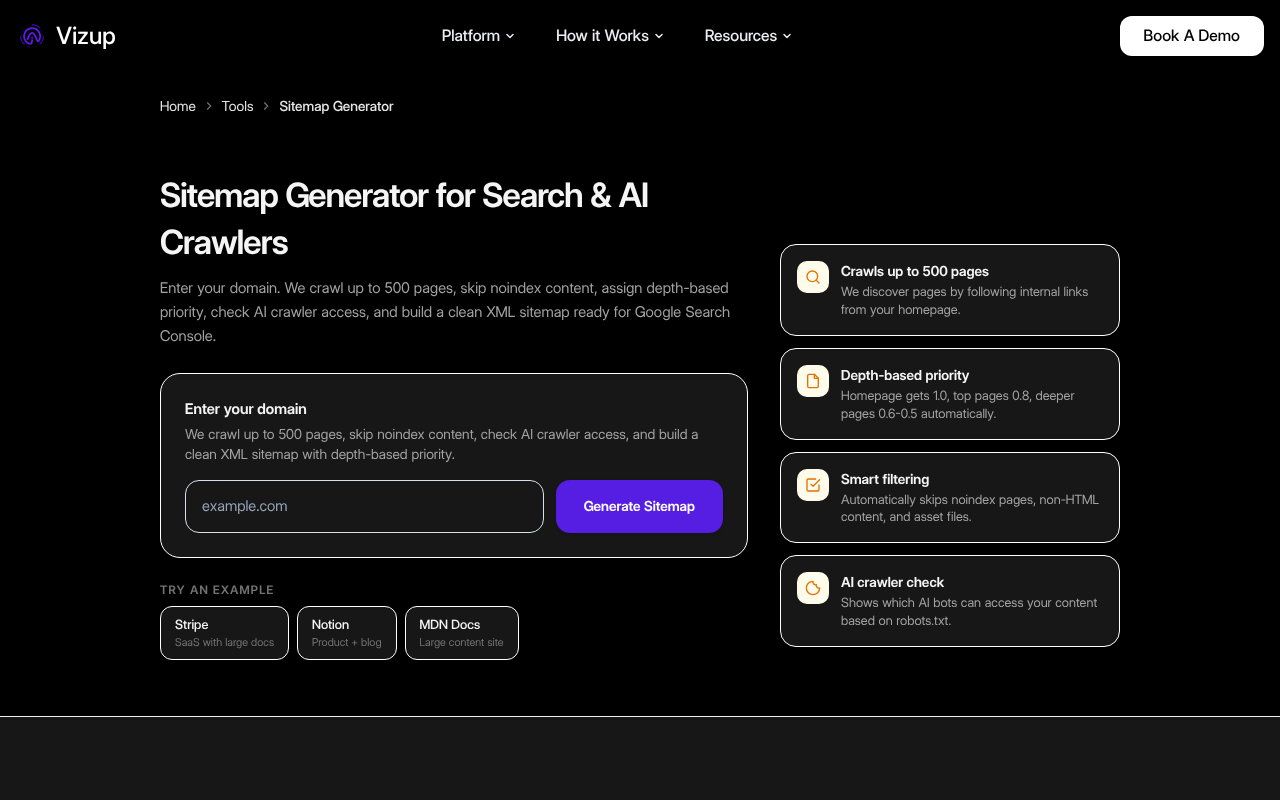
Direct answer: enter your domain, run the crawl, download the XML. If you want to generate XML sitemap output fast, use Vizup’s free sitemap generator. Drop in your domain, run the crawl, download the file. Done.
Now the part most teams skip. Open the output and sanity-check it. Look for parameter URLs you don’t want indexed, old paths that should’ve been retired, and duplicates that hint at canonical issues. Give it 10 minutes. You’ll save yourself hours of "why is Google crawling that?" later. (Internal link suggestion: link "parameter URLs" or "duplicates" to Vizup’s sitemap checker because it’s the fastest way to surface those problems at scale.)
A quick checklist I use before I submit a new sitemap:
- Scan the first 50 to 100 URLs for obvious junk (UTMs, session IDs, internal search).
- Pick 5 random URLs and load them in a browser. If you hit redirects, your sitemap is stale.
- Look for duplicates that differ only by trailing slash, www, or parameters, then fix canonicalization before you "create sitemap" and submit it again.
- If the site is big, confirm you’re not about to hit the 50,000 URL limit in a single file.
Direct answer: validate the XML format and spot-check URL behavior (200 status, canonical, no redirects). After you create sitemap output, validate it. XML formatting issues don’t show up often, but bad URLs show up all the time. Vizup has a dedicated sitemap checker for this step, and it fits a simple workflow: generate, validate, submit, then monitor. (Internal link suggestion: link "free SEO tools" to Vizup’s free SEO tools page for readers who want the rest of the workflow in one place.)
Submit your sitemap in Search Console (and what to watch after)
Submitting is easy. Reading the signals afterward is where people get lost.
Direct answer: submit in Google Search Console and Bing Webmaster Tools, then watch fetch status, errors, and discovered URLs. For Google, submit in Google Search Console. For Bing, submit in Bing Webmaster Tools. Both will show whether the platform fetched the sitemap, whether it found errors, and how many URLs it discovered.
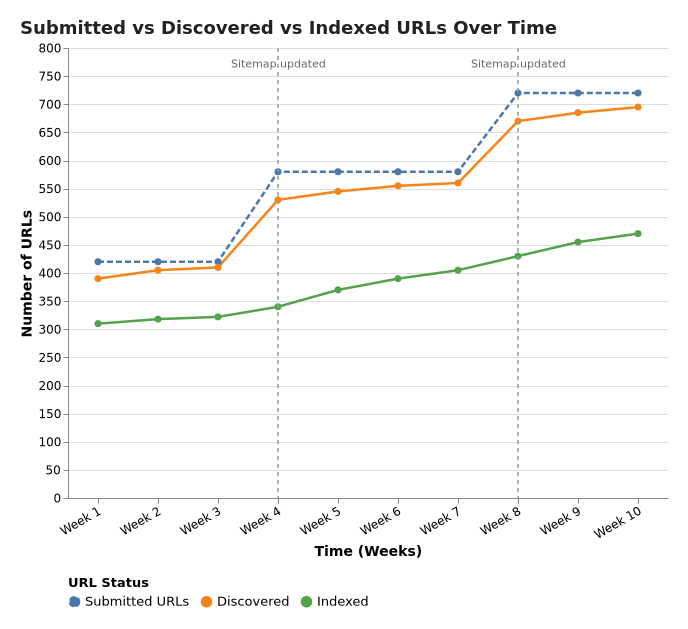
Watch the gap between submitted and indexed. Some gap is normal. A huge, stubborn gap usually points to one of three problems: you listed low-quality or duplicate pages, Google picked different canonicals than you expected, or crawl capacity got squeezed because the site generates a lot of near-duplicates.
What I actually check first in Search Console (before I touch the sitemap again): the Indexing report’s "Excluded" reasons, a handful of example URLs from each bucket, and whether the canonical Google chose matches what you intended. If those three look sane, the sitemap is rarely the bottleneck. In other words, I trust the platform’s diagnostics more than I trust a hunch.
One contrarian take I’ll stand by: chasing 100% index coverage wastes time for a lot of sites. Some pages don’t deserve a spot in the index. Focus on the pages you care about, make sure crawlers find them reliably, and treat the rest as background noise.
Common misconceptions (the ones that keep showing up in Slack threads)
I’ve watched smart teams trip over the same myths for years. Three worth retiring:
Misconception 1: "A sitemap guarantees indexing"
Direct answer: no, a sitemap doesn’t force indexing. A sitemap gives discovery and prioritization hints, not guarantees. Search engines still choose what to index based on quality, duplication, canonical signals, and a bunch of other factors. Google says this plainly, sitemaps help crawlers find content, they don’t force indexation (Google Search Central).
Misconception 2: "Put every URL in the sitemap"
Direct answer: include only canonical, index-worthy URLs. That’s the fastest way to avoid a sitemap that looks "complete" and performs terribly. Internal search pages, faceted combinations, duplicate tag archives, printer-friendly versions, campaign URLs with tracking parameters, they all count as URLs. Most of them don’t belong in your sitemap. If you’ve ever opened a sitemap and felt your stomach drop, it’s usually because someone treated it like a dump, not a curated list.
Misconception 3: "Changefreq and priority will steer Google"
Direct answer: don’t rely on them, focus on canonicals and accurate <lastmod>. They exist in the protocol, but they rarely move the needle in real workflows. The signal I keep seeing pay off is <lastmod>, because it ties to something verifiable. If you’re going to be picky about anything, get your canonical URLs clean and your last modified dates accurate.
What a sitemap is not (because people mix this up)
A sitemap isn’t a substitute for internal linking. If your site architecture feels like a maze, a sitemap helps crawlers see what exists, but you still need to fix the paths.
- A sitemap is not a navigation menu. Users don’t interact with it.
- A sitemap is not an information architecture plan. It’s an output, not the blueprint.
- A sitemap is not a cleanup tool for bad canonicals, duplicates, or thin pages. It will happily list whatever you feed it.
It also isn’t your information architecture plan. Keep user journeys and navigation decisions separate from your XML output. I’ve seen teams argue for days about what "belongs" in a sitemap when the real problem was a confusing menu and a broken hub page. The sitemap debate was just the easiest thing to argue about.

Where a sitemap tool fits in a modern organic workflow (and what to do next)
Sitemaps sit in the "boring but foundational" bucket. If you build topical coverage, publish programmatically, or refresh older content, you want crawlers to find the right pages quickly and come back when you update them. Otherwise you end up shipping work that never gets a fair shot.
I like Vizup’s approach because it treats this as a loop, not a one-time checkbox: generate, validate, submit, monitor, then iterate as the site evolves. Their broader set of free SEO tools fits best when you run this process repeatedly, not when you panic once a year after a traffic dip. That loop is also how you build trust in your own data, you stop guessing and start comparing what you submitted against what actually got indexed.
Two moves that pair nicely with a clean sitemap: tighten your technical signals with structured data so search engines understand what each page represents, and align sitemap coverage with your real priorities, which is part of building an SEO strategy that holds up when algorithms shift.
If you’re tracking how AI features change discovery, Vizup’s take on Google Search Live and AI Mode is worth your time. The short version is simple: staying findable gets more complicated, not less.
If you do one thing today, make it this: generate a sitemap you’d be proud to hand to a crawler.
Key takeaways
- A sitemap generator creates an XML sitemap that helps search engines discover and recrawl your important URLs, especially on large, new, or media-heavy sites.
- Sitemaps don’t guarantee rankings or indexing, but they improve crawl efficiency and make indexing problems easier to diagnose.
- Keep sitemaps clean: include canonical, index-worthy URLs only, and avoid redirects, errors, and parameter junk.
- Respect protocol limits (50,000 URLs or 50MB per sitemap) and use a sitemap index for large sites (per sitemaps.org).
- Generate with Vizup, then validate with a checker, submit in Search Console/Webmaster Tools, and monitor the submitted vs indexed gap.
Frequently Asked Questions
What is a sitemap generator used for?
A sitemap generator crawls or inventories your site’s URLs and outputs an XML sitemap you can submit to search engines. It’s used to speed up discovery and recrawling of your important pages, especially on larger or frequently updated sites. For a quick baseline, Vizup’s free sitemap generator does this in minutes. (Internal link suggestion: if this FAQ appears on a hub page, link "free SEO tools" to Vizup’s free SEO tools so readers can keep going.)
Do sitemaps improve SEO rankings directly?
No. Sitemaps aren’t a direct ranking boost. They help with discovery and indexing, which is foundational because pages that crawlers don’t reliably find don’t get a fair shot at ranking. The practical win is faster, cleaner crawling of the URLs you actually care about.
How many URLs can an XML sitemap include?
A single XML sitemap can include up to 50,000 URLs or be 50MB uncompressed. If you exceed either limit, split into multiple sitemap files and list them in a sitemap index file. Those limits are defined in the official protocol at sitemaps.org.
How do I know if my sitemap is valid?
A sitemap is valid when the XML is well-formed and the URLs are clean. Check that listed URLs return 200 status (not redirects or 404s), match your canonical versions, and don’t include parameter junk. An easy workflow is generate, then validate with Vizup’s sitemap checker before submitting.
How often should I update my sitemap?
Update your sitemap whenever your indexable URL set changes. New pages, removed pages, migrations, and large refreshes all count. If you publish weekly (or daily), treat sitemap updates as part of shipping content, not a quarterly chore. Stale sitemaps tend to accumulate redirects and retired URLs.
Is a free sitemap generator good enough for a serious site?
A free sitemap generator is fine for most sites if it outputs clean XML and lets you control what gets included. The real differentiator is filtering. If the tool can’t exclude parameters, thin archives, or redirects, you’ll submit a bloated sitemap and spend weeks untangling indexing noise in Search Console.
How do I create a sitemap for a large website?
To create sitemap output for a large site, generate multiple sitemap files (by section like products, categories, blog) and submit a sitemap index. Keep each file under the 50,000 URL and 50MB limits, and make sure only canonical, 200-status URLs are included. This approach stays manageable as catalogs and content libraries grow.
