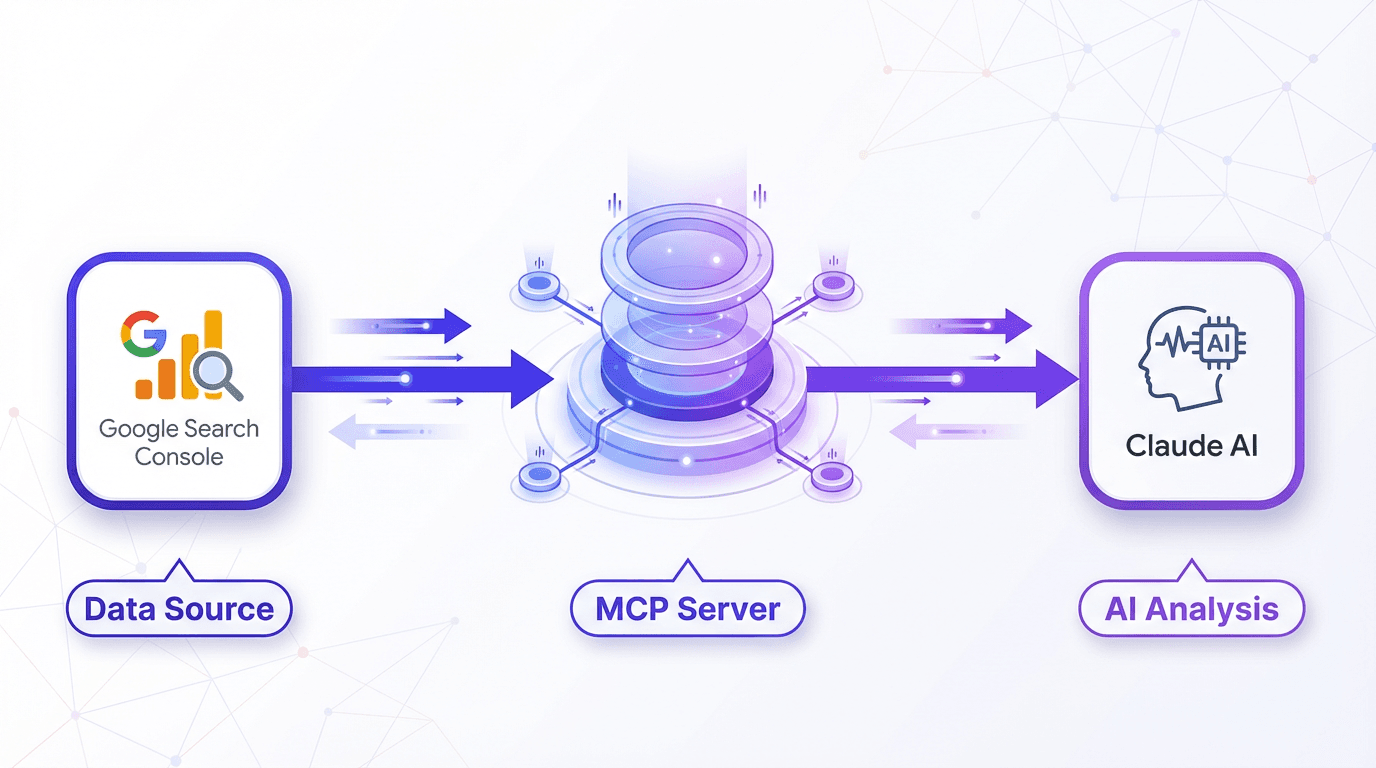
If you've ever stared at a Google Search Console export, you understand the challenge. It’s a wall of data, a sprawling spreadsheet of queries, clicks, and impressions. The insights are buried in there, but digging them out feels like a chore. You can spot the obvious wins and losses, but what about the subtle trends, the quiet opportunities, or the real reason behind a sudden traffic drop?
For years, the solution involved more spreadsheets, complex formulas, and hours of manual work. Now, there's a more elegant approach. By using the Model Context Protocol (MCP), you can connect Google Search Console directly to Claude and have a conversation with your SEO data. This isn't just about uploading a CSV for a quick summary; it's about giving Claude a live, secure key to your GSC data, enabling it to run analysis on command.
What on Earth is MCP, and Why Should You Care?
MCP, or Model Context Protocol, is an open standard introduced by Anthropic in late 2024. It was designed to be a universal language for AI models to communicate with external tools. Think of it as a USB-C port for AI. Before MCP, connecting a tool like Google Search Console to an AI model required a custom, one-off integration that was often brittle, expensive, and difficult to maintain. Adding a new tool meant starting the process from scratch.
This new protocol standardizes how an AI (the 'client,' such as Claude) discovers and uses tools provided by a 'server.' In this case, an open-source MCP server acts as an intermediary that understands the language of Google Search Console. Once connected, Claude can ask the server to fetch data, run reports, and inspect URLs. The crucial difference is that Claude receives structured information it can reason about, not just raw data. This elevates the interaction from simple data summarization to genuine data analysis.
The Setup: What You’ll Actually Need to Do
Let's get practical. You won't find a big 'Connect' button in either GSC or Claude's interface. As of early 2025, this connection requires an intermediary: the MCP server. While several open-source options exist, the most popular is a community-built GSC MCP server on GitHub. The setup isn't a one-click affair, but it's manageable for those comfortable following technical instructions. Most people can get it running in under an hour.
The process breaks down into three general phases. First, you'll create credentials in the Google Cloud Console. This step authorizes your MCP server to access your data by enabling the Google Search Console API and generating a key. You can use OAuth for personal projects or a more robust Service Account for automated team setups.
Next, you will install and configure the MCP server itself, which typically involves running commands in your computer's terminal to download the code and its dependencies. Finally, you connect Claude to your newly running server by editing a configuration file to specify the server's location. A quick restart of your Claude client, and it will recognize the new GSC tools.
Okay, It’s Connected. Now What?
This is the moment your relationship with GSC data changes completely. You can stop exporting CSVs and start asking questions. Instead of wrestling with filters in the GSC interface, you can simply ask Claude.
From Data Pulling to Strategic Analysis:
- Find Quick Wins: Ask Claude, “Show me all queries with over 1,000 impressions last month where my rank is between 11 and 20.” This classic 'striking distance' report, a pain to generate manually, becomes a single sentence. The result is a prioritized list of pages where a small tweak could yield page-one visibility.
- Diagnose Indexing Issues: Instead of deciphering technical errors, ask, “Why isn't
/my-new-landing-page/indexed?” Claude can use the MCP server to run a URL inspection and explain in plain English whether the page is blocked by robots.txt, has a noindex tag, or suffers from a canonicalization problem. - Automate Reporting: A simple prompt like, “Compare performance for the last 7 days against the previous 7 days and highlight the biggest query gains and losses,” can generate a weekly brief that used to take an hour to compile. Claude can even format the output as a clean table.
The real advantage isn't just fetching data, but interpreting it. You can ask follow-up questions like, “For that top-losing query, what other pages on my site rank for similar terms?” This is how you shift from reporting on what happened to deciding what to do next. It's a fundamental change in workflow, underscoring why understanding how AI is changing SEO is so critical for modern marketers.
A Word of Warning: Quotas and Limitations
Before you ask Claude to analyze your site's entire history since 2011, take a breath. The Google Search Console API is not an unlimited buffet. It has quotas. While the daily limits for things like Search Analytics queries are generous, you can hit short-term rate limits if you fire off too many complex requests at once.
Most well-designed MCP servers have built-in politeness features like caching (so repeat questions use saved results) and automatic retries to handle API limits gracefully. Still, it's a constraint to be aware of. You can't ask Claude to inspect 10,000 URLs in a single prompt. The key is to break your analysis into logical chunks. This isn't a limitation of Claude or MCP, but a reality of working with Google's API. The goal is to use this data to improve your search ranking, not just pull it for its own sake.
Ultimately, this is about working smarter. The growth of AI-powered search isn't just changing how Google finds answers, but also how we find insights. Connecting GSC to Claude is one of the first truly transformative steps in that direction, moving SEO analysis from the drudgery of data-pulling into the realm of strategic conversation. Give it a try, and explore the Vizup blog for more ideas.
Frequently Asked Questions
Is connecting GSC to Claude via MCP secure?
Yes. The connection is authenticated through Google's own systems (OAuth or Service Accounts). The MCP server runs on your local machine or a server you control. You are not handing your GSC password to a third party.
Do I need to be a developer to do this?
It helps, but it's not strictly necessary. The process involves the command line, which can be intimidating for some. However, the setup guides for popular MCP servers are very detailed. If you can follow a step-by-step tutorial, you can do this. No-code connector services are also starting to appear.
What are the costs involved?
The software is mostly free. The GSC API is free within its quota limits, Claude has free tiers, and the most common MCP servers are open-source. Your primary cost is the time it takes to set everything up.
Can I use this with other tools besides Google Search Console?
Absolutely. That's the core idea behind the Model Context Protocol. MCP servers are available or in development for tools like Slack, GitHub, and various databases, allowing you to give Claude access to multiple tools at once.
What's the difference between this and just uploading a GSC CSV file to Claude?
It's the difference between a static snapshot and a live connection. A CSV gives Claude data from one point in time. An MCP connection allows Claude to fetch fresh data on demand, compare date ranges, and perform actions like inspecting a URL's current index status.
