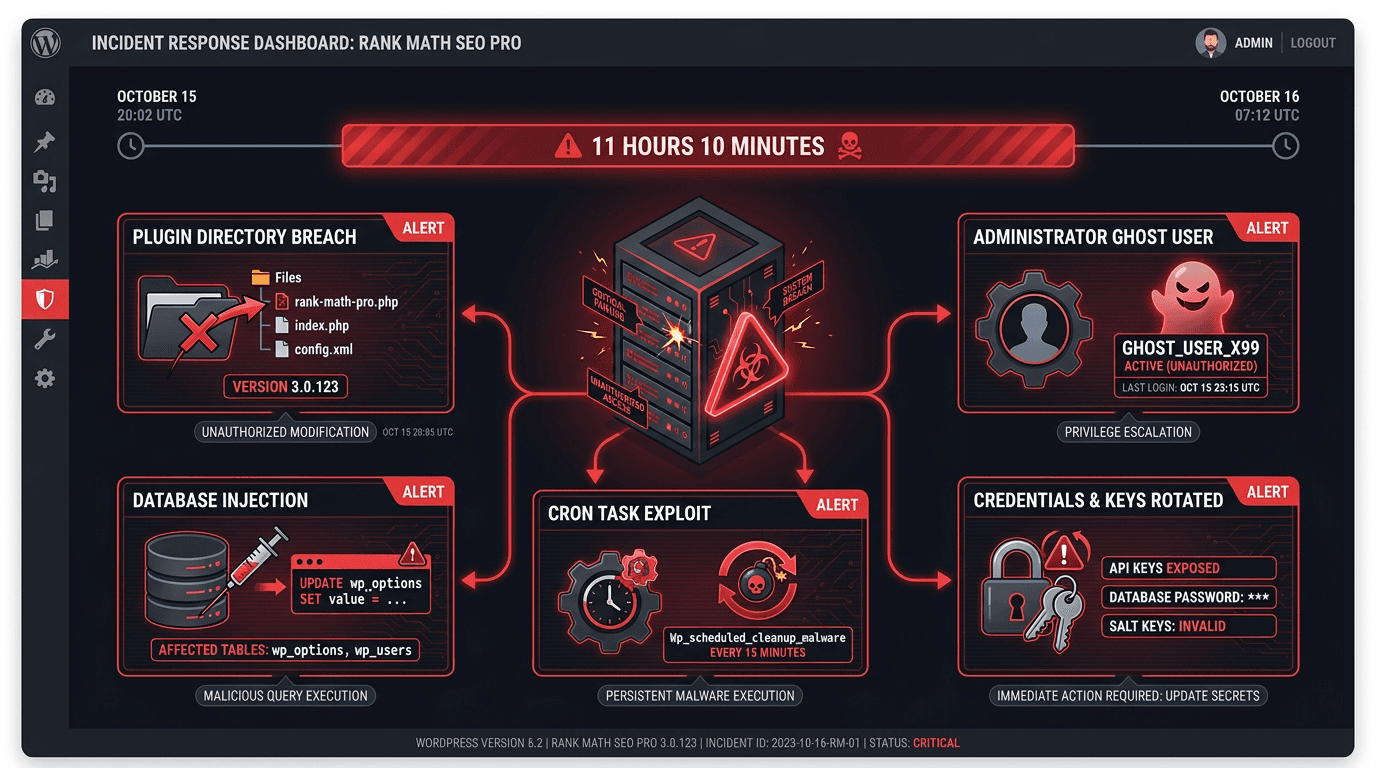
According to Rank Math's official security advisory, the affected distribution window ran from October 15, 2026 at 20:02 UTC through October 16, 2026 at 07:12 UTC, a total of 11 hours and 10 minutes. The fastest check is your Rank Math account download history, your hosting update logs, or the modification timestamps on the 3.0.123 plugin files. If your site installed and activated an affected copy of Rank Math PRO 3.0.123, treat the installation as compromised. If the plugin was downloaded but never activated, remove the affected files, install a verified clean version, and run a security scan. Updating or deactivating Rank Math does not remove the Rank Math PRO malware backdoor.
How to respond:
- Confirm whether version 3.0.123 entered the site during the exact UTC window.
- Isolate the site and preserve a forensic backup.
- Check the malicious file, administrator accounts, database marker, and scheduled tasks.
- Remove persistence or restore from a verified pre-incident backup.
- Rotate every secret accessible to the web server.
- Install Rank Math PRO 3.0.124 or a newer clean release.
This process is for site owners, agency technical leads, and in-house SEOs investigating the Rank Math PRO 3.0.123 malware incident. Wordfence classified CVE-2026-111862 as a critical, unauthenticated malicious-code issue and confirms that an update alone cannot clean an infected installation.
Step 1: Determine Whether Rank Math SEO PRO Was Compromised
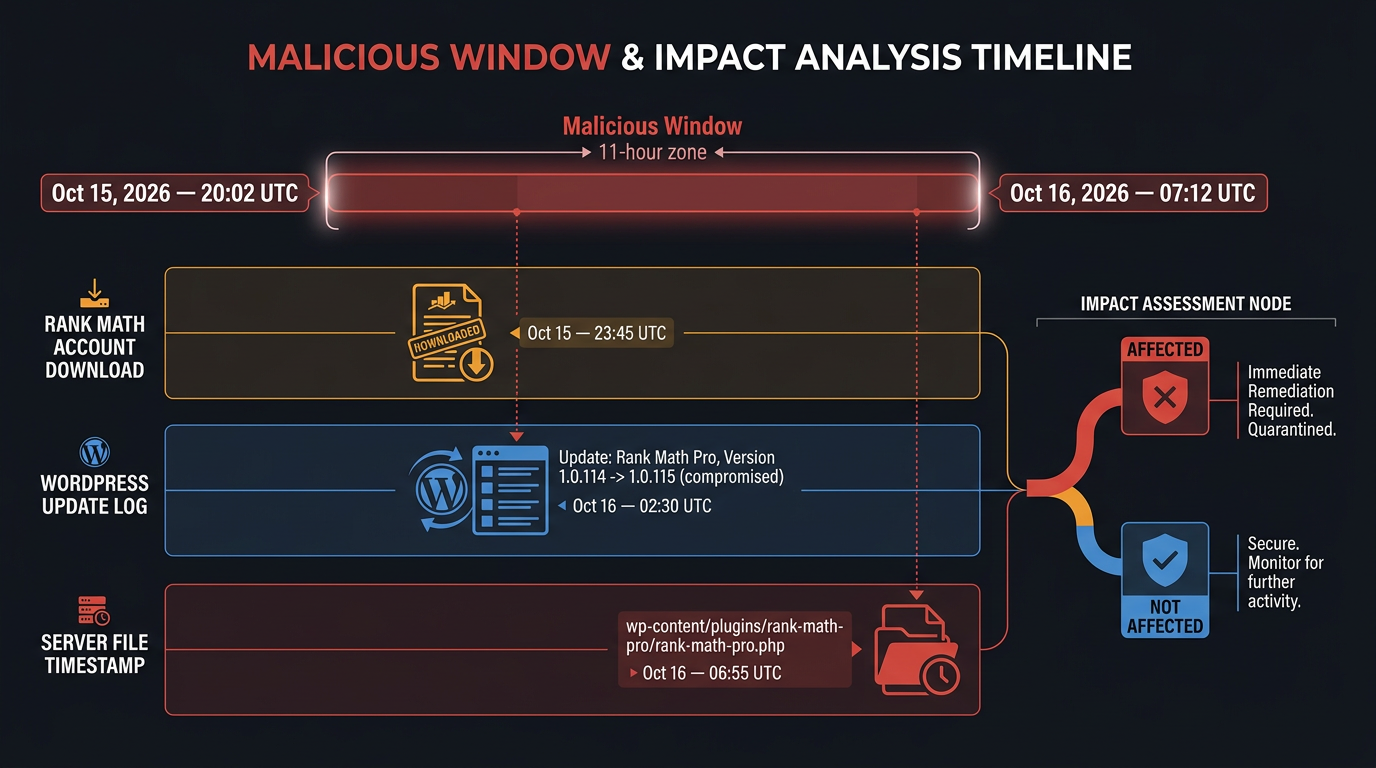
Start with provenance, not the version number alone. Version 3.0.123 existed outside the affected period, so what matters is when your copy was obtained. Check the Rank Math account's download records first. For automatic or delegated updates, pull hosting activity logs, deployment records, backup manifests, and modification timestamps under wp-content/plugins/rank-math-pro/.
The incident affected Rank Math PRO, not the free Rank Math SEO plugin distributed through WordPress.org. The version number alone does not confirm compromise because not every copy of version 3.0.123 was malicious. The download or update timing, activation history, and forensic findings must be considered together.
Requirements before inspection
Prepare:
- Hosting control-panel or SSH/SFTP access
- phpMyAdmin, Adminer, or command-line database access
- Access to cron events and server scheduled tasks
- A clean workstation and encrypted storage for an offline backup
Warning: If timing cannot be proved, assume the site was exposed and continue. The Wordfence technical record for CVE-2026-111862 reports persistent backdoors and communication with
rank1cdn.com.
Step 2: Check the Rank Math Indicators of Compromise
Take the site out of public rotation before scanning. A normal page request can trigger persistence mechanisms, so inspecting a live site while traffic continues arriving risks recreating components you have already deleted. Preserve files, database contents, access logs, and PHP logs before touching anything.
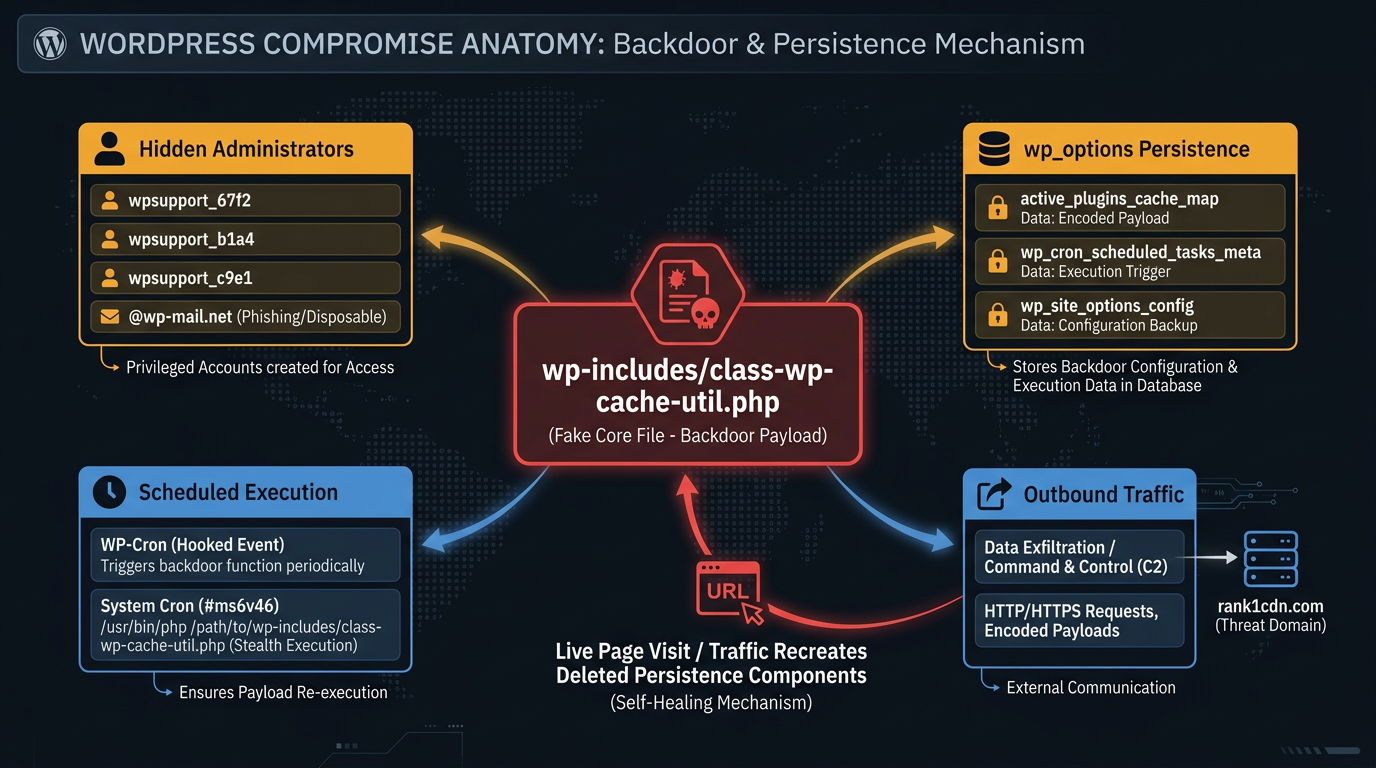
Search every WordPress installation on the account for these fingerprints:
- Malicious file:
wp-includes/class-wp-cache-util.php. This fake core file is the class-wp-cache-util.php backdoor. Do not confuse its location with the Rank Math plugin directory. - **Unauthorized administrators: **Look for usernames beginning with
wpsupport_and suspicious administrator email addresses ending in@wp-mail.net. These accounts may be hidden from the normal WordPress Users screen. Inspect the correctly prefixed users and usermeta tables directly to identify unauthorized accounts and associated permissions. - Database persistence: Inspect the correctly prefixed WordPress options table for the three malicious option names identified by Rank Math:
_uf6qdn2hmm,t8krdk990phb, and_np5pvf754c. Preserve suspicious entries for forensic analysis before removing confirmed malicious records. Also investigate unexpected encoded values or recently modified options that could indicate additional persistence. - Execution and traffic: review WP-Cron, system cron, recently changed PHP files, web requests, and DNS or firewall records involving
rank1cdn.com.
Additional indicators include suspicious PHP-executable .cache files, .htaccess rules that allow cache files to execute as PHP, and system cron entries containing the marker #ms6v46. Investigate unfamiliar SSH authorized keys, unexpected processes, and modifications outside the WordPress directory. Compare suspicious files against verified clean WordPress files before removing them.
The malicious domain is only one indicator of the broader WordPress compromise. A clean plugin directory does not prove a clean site when malicious code has already written to other locations. Run a second scanner such as Sucuri SiteCheck for external symptoms, but do not let it substitute for direct file and database inspection.
Step 3: Perform the Cleanup That Actually Works
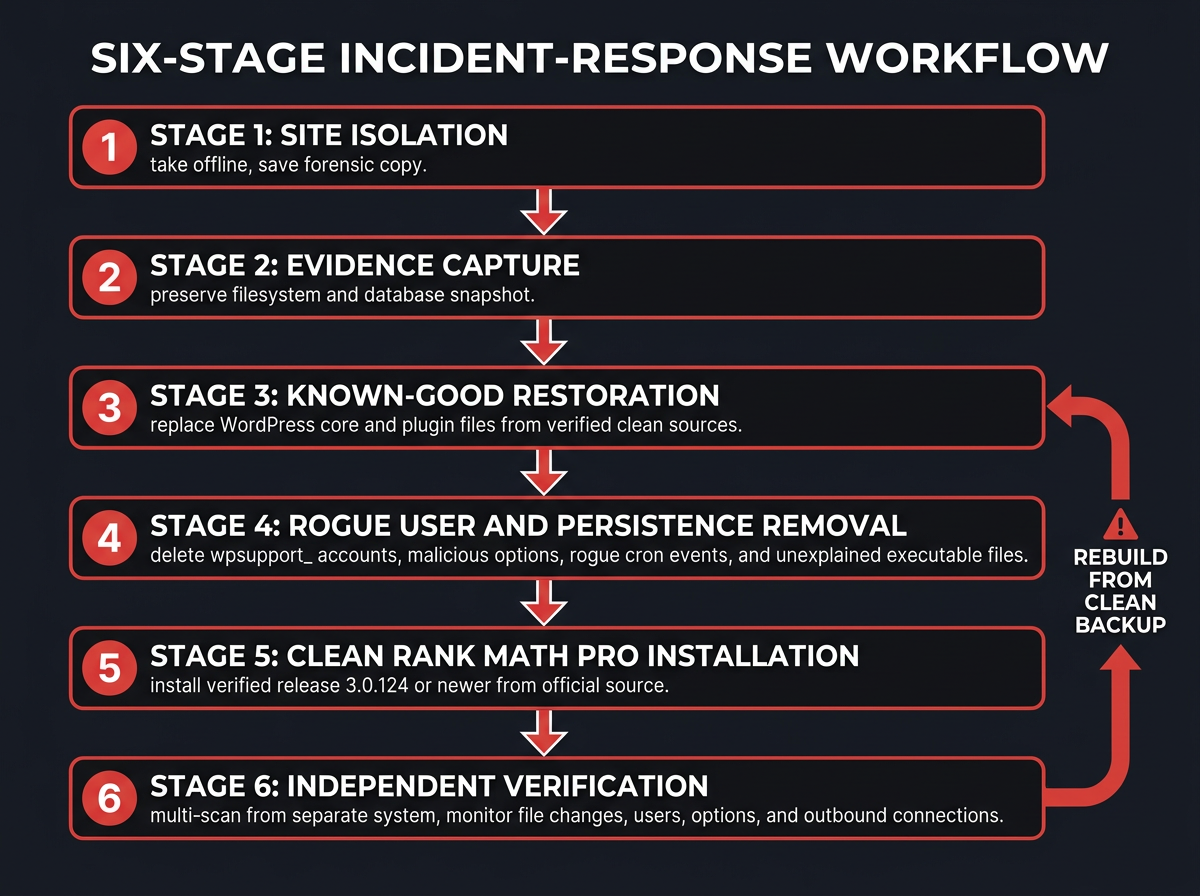
If your website was compromised by the malicious Rank Math PRO update, restoring both the site files and database from a verified pre-incident backup is the safest recovery option. If no trustworthy backup exists, rebuild WordPress core and all plugins from original sources rather than deleting only the visible payload.
Complete these actions in order:
- Keep the site offline and save a forensic copy. Do not later restore that copy into production.
- Delete the entire
rank-math-proplugin directory and replace the WordPress core files with a verified clean copy from the official WordPress source. Preserve a forensic backup before making these changes. - Remove
wp-includes/class-wp-cache-util.phpplus any other unexplained executable files created during or after the incident. - Delete rogue
wpsupport_rows fromwp_usersand their correspondingwp_usermetarecords. Respect the site's custom database prefix. - Remove the malicious option and unauthorized cron events, then inspect mu-plugins, themes, uploads, drop-ins, and sibling sites.
- Download Rank Math PRO 3.0.124 or a newer verified clean release directly from your official Rank Math account. Confirm the release against the official Rank Math PRO changelog before installation.
Before removing the remaining backdoors, stop the malware from recreating them. Delete the compromised Rank Math PRO plugin directory, remove the three confirmed malicious database options, and block outbound connections to rank1cdn.com where supported. Then inspect the filesystem, administrator accounts, scheduled tasks, and server configuration for additional changes.
Warning: Do not reconnect the site after one clean scan. Request several pages while monitoring file changes, users, options, cron, and outbound connections. Repeat scans from a separate system. Reappearing artifacts mean persistence remains.
Common cleanup mistakes
- Deactivating or updating the plugin while leaving the backdoor active
- Deleting the visible administrator without removing its metadata and recreation mechanism
- Cleaning one site while an infected sibling installation shares the same hosting account
- Restoring a backup without confirming that it predates the affected package
Step 4: Rotate Secrets, Verify Recovery, and Reduce Future Risk
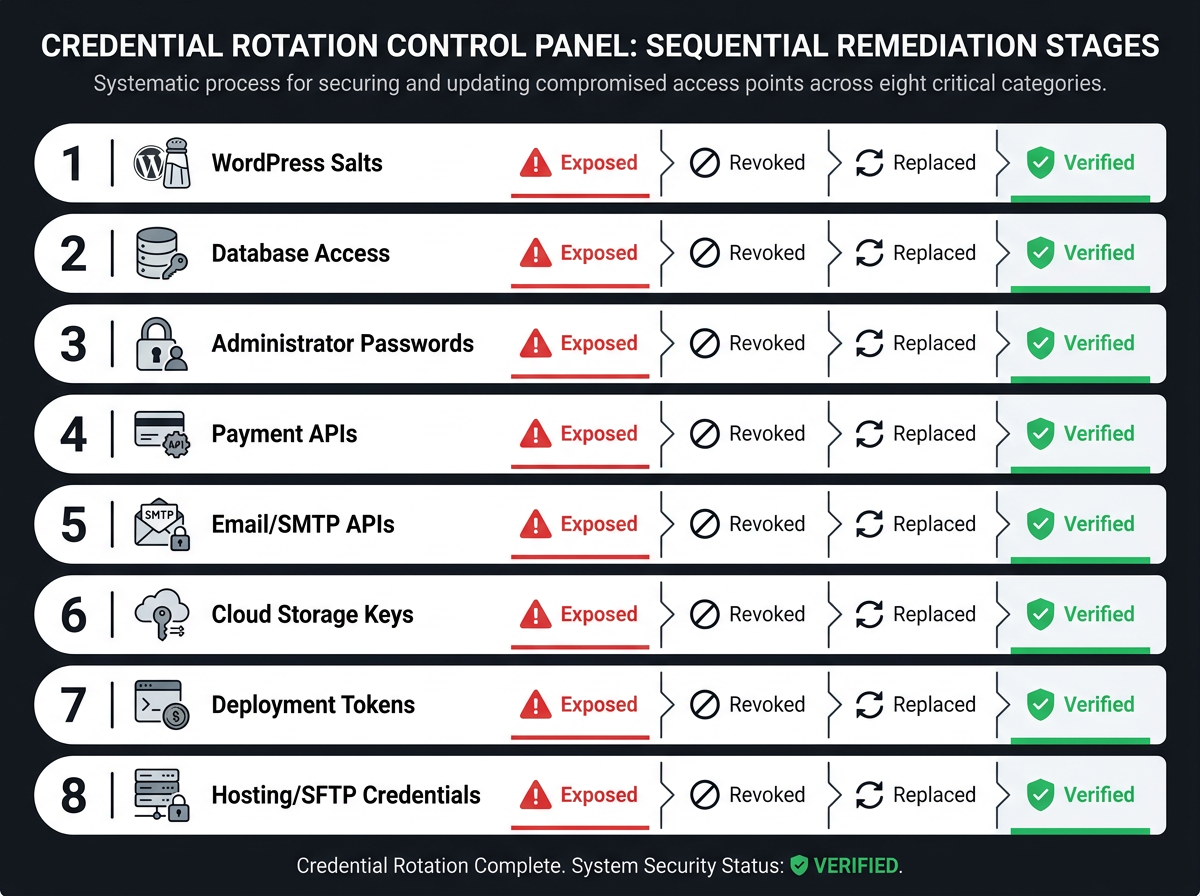
Assume the web server exposed every readable secret. From a clean device, rotate the database password, WordPress salts, hosting and SFTP credentials, administrator passwords, API keys, SMTP credentials, payment integrations, cloud keys, deployment tokens, and backup credentials. Revoke active sessions and review provider logs for activity from unfamiliar addresses.
This incident was a WordPress plugin supply chain attack rather than a conventional plugin vulnerability. The incident highlights why agencies need staged updates, immutable backups, file-integrity monitoring, least-privilege service accounts, and alerts for new administrator accounts. SC Media's 2026 incident summary likewise advises treating activated malicious packages as compromised installations requiring restoration.
After the website is secured, the next priority is restoring organic visibility and validating that search engines can access the recovered pages. Review indexing, rankings, analytics, structured data, and affected landing pages to identify any changes caused by the incident. This is where Vizup helps teams move from technical recovery to ongoing organic growth. As an Organic Autopilot for modern discovery, Vizup combines AI agents, human experts, and live SEO, pSEO, AEO, and GEO tools to help brands monitor, create, optimise, publish, and learn across Search, Social, Communities, AI Answer Engines, and Local Discovery. Agencies managing multiple affected websites can connect recovery monitoring with their agency rank tracking process, making it easier to identify changes in visibility after remediation. Malware removal and server security should remain with qualified WordPress security specialists.
Frequently Asked Questions
What was the exact version of Rank Math PRO that contained the malware?
The affected release was Rank Math SEO PRO 3.0.123, specifically a subset distributed from October 15, 2026 at 20:02 UTC through October 16, 2026 at 07:12 UTC.
Is my site safe if I already updated to the latest version of Rank Math PRO?
No. Version 3.0.124 replaced the compromised package, but updating does not remove files, users, options, cron events, or stolen credentials that were already written to your server.
How do I find the wpsupport admin account if it doesn't appear in the WordPress dashboard?
Query wp_users directly for usernames beginning with wpsupport_, then check associated wp_usermeta capability records. Hidden filtering can prevent these accounts from appearing in the standard dashboard view.
Will Wordfence or another security plugin fully remove this Rank Math backdoor?
Current signatures can detect known artifacts, but no single scan proves complete removal. Combine scanning with direct database review, filesystem comparison, log analysis, credential rotation, and ideally restoration from a confirmed-clean backup.
What should I do if I lack the technical skills to perform these database and file edits?
Keep the site isolated and engage a WordPress incident-response specialist or your managed host. Provide the affected window, backups, logs, and the Rank Math indicators of compromise, and require written confirmation of credential rotation and persistence testing before the site goes back online.
