
If you’ve ever felt your eyes glaze over during a discussion about server-side tracking, you’re not alone. For years, setting up Meta's Conversions API (CAPI) was a project reserved for companies with dedicated developers and deep pockets. It was the right move for ad performance, but the technical hurdles were immense. That calculus shifted on April 15, 2026, with the announcement of Meta’s One-Click CAPI. Suddenly, the promise of more reliable tracking-a way to combat the 30-60% signal loss from ad blockers and browser privacy settings-became accessible to almost everyone.
The temptation is to just flip the switch. It's free, requires no code, and Meta handles the infrastructure. But experience teaches that there's rarely a magic button. While it's a massive step forward, it isn't a cure-all. Before you enable it, you need to know what you’re getting into.
1. Understand What It Actually Is (and Isn't)
Let's be clear: Meta’s one-click CAPI is a fantastic starting point. It’s a Meta-hosted server-side solution designed to capture events your browser-based Pixel might miss. If you have nothing but a Pixel right now, enabling this is a no-brainer. It will almost certainly improve your data signal.
However, it is not a full, custom server-side tracking implementation. A custom setup using Google Tag Manager's server container or a dedicated partner gives you granular control. With those tools, you can modify, enrich, and route data from multiple sources before it reaches Meta. The one-click version is a direct, pre-configured pipeline from your site to Meta's servers. It's convenient, but it’s also a black box. You are trading customization for convenience.
2. Audit Your Existing Pixel Health
This is where most people get it wrong. CAPI doesn't replace the Pixel; it works with it. The one-click solution creates a redundant setup, capturing what the Pixel misses. But if your current Pixel configuration is a mess, you're just building on a shaky foundation. The old adage ‘garbage in, garbage out’ still applies.
Before you do anything, open your Meta Events Manager. Are standard events like PageView, ViewContent, AddToCart, and Purchase firing correctly? Are there diagnostic errors? If Purchase events are firing on your homepage or you have three different 'Lead' events for the same form, CAPI won't fix that. It will just add a server-side version of your existing chaos. Clean up your Pixel events first. For more on this, our guide on managing Meta Ads Manager can provide some foundational help.
3. Check Your Event Deduplication Strategy
When you run the Pixel and CAPI together, they both send data about the same user actions. Without a proper way to merge them, Meta would count every conversion twice, wrecking your reports and ad optimization. This is where event deduplication comes in.
Meta uses a parameter called event_id to recognize and merge a browser event with its server counterpart. In a manual CAPI setup, you are responsible for generating this unique ID and passing it with both your Pixel and server events. The one-click solution is supposed to handle this automatically, but you must verify it. After enabling CAPI, use the 'Test Events' tool in Events Manager. Fire a test conversion and watch the data come in. You should see both a 'Browser' and 'Server' event for your action, with Meta explicitly showing them as 'Deduplicated'. If they appear as two separate events, something is wrong.
4. Know Your Event Match Quality (EMQ) Score
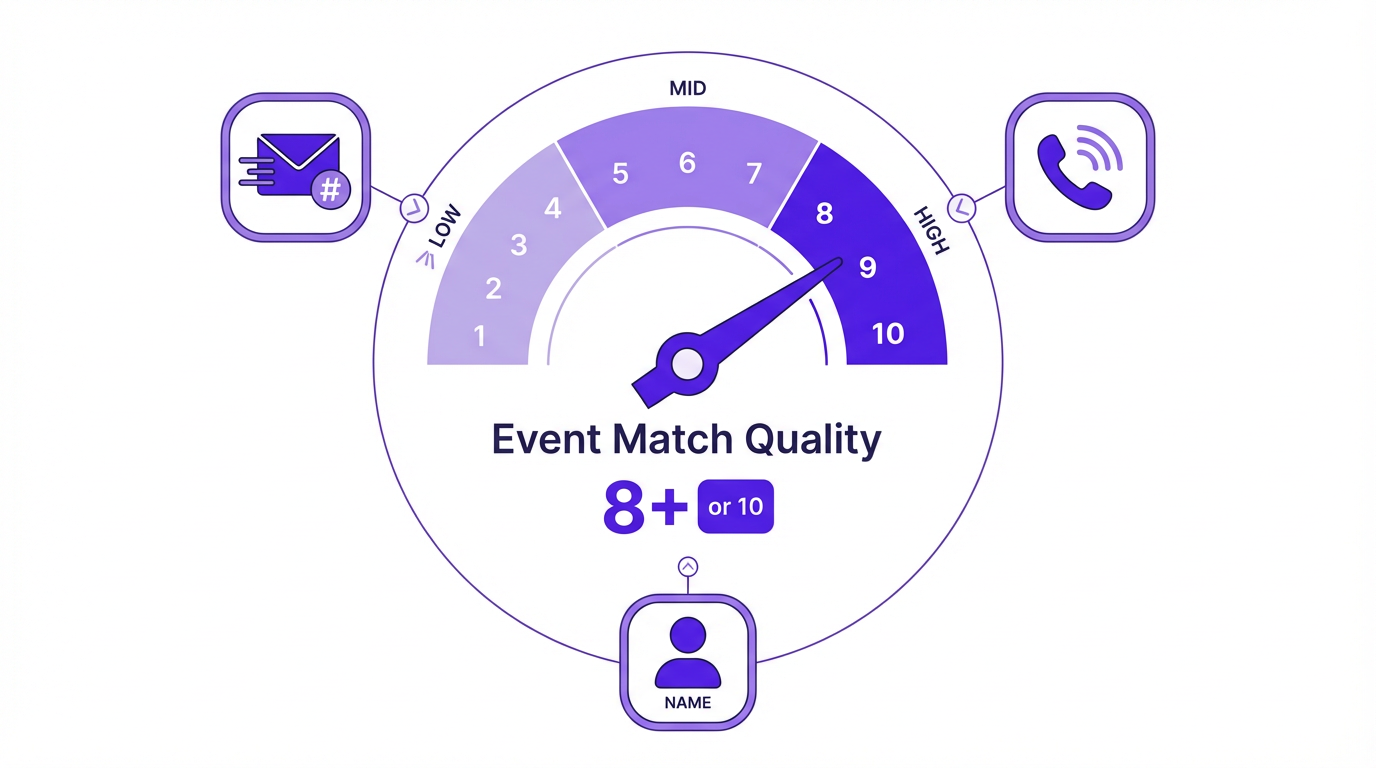
Event Match Quality is one of the most important and overlooked metrics in Meta Ads. It's a score from 0 to 10 that grades how well Meta can connect an event from your website to a specific user on its platform. A low score means Meta is guessing; a high score means it's confident. Better matching leads to better attribution, superior optimization, and lower costs. A score below 6 is poor, so you should aim for 8 or higher.
High EMQ depends on sending rich customer information parameters (like hashed email, phone number, and name) with your events. A full CAPI implementation allows you to pull this data from backend systems (your CRM or e-commerce platform) and send it with every event. The one-click CAPI will likely be limited to the information it can automatically scrape from the page, which might be less than what a custom setup could provide. Check your EMQ score before and after enabling the one-click option. If it doesn't improve significantly, you may need a more robust solution to realize the full benefits of server-side tracking.
5. Review Your Industry and Data Sensitivity
This point is non-negotiable. Meta's one-click CAPI and its accompanying AI Pixel features are explicitly NOT available for certain sensitive categories. If your business is in finance, employment, housing, or health, you are likely excluded. These rules exist to prevent sensitive user data from being used improperly for ad targeting.
Even if your business isn't in one of those official categories, think carefully. If you handle any personally identifiable information (PII) beyond a simple e-commerce transaction, you must understand what data is being sent. The one-click solution is designed to send business and product context, not sensitive user attributes, but the line can be blurry. Always prioritize user privacy and compliance over a marginal gain in tracking fidelity.
6. Confirm It Aligns With Your Consent Framework
A common myth is that server-side tracking provides a workaround for consent rules like GDPR or CCPA. It does not. CAPI is a more reliable data transmission method, not a tool to bypass your legal obligation to get user consent before you track them. Your existing consent banner and privacy settings still apply. While the one-click CAPI respects Meta's Limited Data Use (LDU) flags for states like California, it's your responsibility to trigger those flags based on user choices.
Before enabling this, review your consent management platform. How does a user's choice to accept or reject tracking cookies get passed to your analytics tools and the Meta Pixel? Ensure that your setup correctly blocks or allows data transmission based on that consent. CAPI doesn't change this requirement. For a deeper look at the foundational concepts, our article on Meta's one-click CAPI and AI Pixel features is a great resource.
7. Compare It to Other CAPI Options
The one-click solution is a breakthrough for businesses with limited technical resources, but it's not the only option. Before you commit, it's worth knowing the alternatives, as your business may be a better fit for a more powerful solution.
| CAPI Method | Best For | Effort Level | Control Level |
|---|---|---|---|
| Meta's One-Click CAPI | Small businesses, advertisers new to CAPI | Low (minutes) | Low |
| Partner Integrations (e.g., Shopify, WooCommerce) | E-commerce stores on supported platforms | Low-Medium | Medium |
| CAPI Gateway | Advertisers wanting a middle ground without full GTM | Medium | Medium |
| Server-Side GTM / Custom Build | Enterprises, agencies, advertisers needing full control | High (weeks) | High |
| Comparison of different Conversions API implementation methods. |
For many Shopify or WooCommerce stores, the native partner integration is excellent and offers a great balance of ease and control. For businesses that want more flexibility without the full complexity of Google Tag Manager, the CAPI Gateway is a strong contender. And for those who need to integrate CRM data or build custom attribution models, a full server-side GTM setup remains the gold standard. The one-click option is great, but don't assume it's the only option.
The Verdict: A Powerful Tool, Not a Panacea
Meta's one-click CAPI is a genuinely positive development. It lowers the barrier to entry for more resilient ad measurement, which helps level the playing field. For any advertiser currently running on the Pixel alone, the decision is simple: check your Pixel health, then turn it on. The incremental signal you gain will almost certainly be worth it.
For those with more complex needs or existing server-side setups, the answer is more nuanced. It's a tool, and like any tool, it's only as good as the strategy behind it. Don't let the simplicity fool you into skipping your homework. Validate your setup, monitor your data quality, and understand the trade-offs. A button can't fix a broken strategy, but it can give a good one the better data it needs to succeed. And remember, while backend tracking is crucial, don't forget the front end-optimizing Meta titles and descriptions is just as important for getting the click in the first place.
Frequently Asked Questions
Will one-click CAPI replace my Meta Pixel?
No. It is designed to work in tandem with your Meta Pixel in what's called a 'redundant setup.' The Pixel captures events from the browser, and CAPI captures events from the server. Together, they provide a more complete picture. You should not remove your Pixel.
Is there any cost associated with Meta's one-click CAPI?
According to Meta's announcement, there are no additional costs for using the one-click, Meta-enabled CAPI setup. Meta handles the server infrastructure, removing the hosting and maintenance fees associated with a custom implementation.
How do I know if the one-click CAPI is working correctly?
The best way to verify your setup is by using the 'Test Events' tool within Meta Events Manager. You can send test traffic to your site and watch for both 'Browser' and 'Server' events to appear for the same action. Crucially, you should see them marked as 'Deduplicated'.
Can I use one-click CAPI if I'm in the health or finance industry?
No. Meta has explicitly stated that the one-click CAPI and AI Pixel enrichment features are not available for advertisers in sensitive categories like health, finance, employment, or housing to protect user privacy.
Does CAPI get around GDPR and other privacy laws?
Absolutely not. CAPI is a technical method for data transmission, not a legal workaround for consent. You are still required to obtain user consent before collecting and sending their data to Meta, regardless of whether you use the Pixel, CAPI, or both.
