
You launch a Meta lead gen campaign, watch cost per lead creep upward week after week, and have zero visibility into which part of the form is causing it. Sound familiar? I see teams pour hours into creative iterations and audience segmentation, then treat the Instant Form like a set-it-and-forget-it checkbox. That habit costs real money. Meta's own data shows Instant Forms deliver a 20% lower average cost per qualified lead compared to website forms, but that advantage erodes quickly when the form is poorly structured or never tested against alternatives.
The skill that quietly separates decent accounts from great ones is knowing how to Edit Instant Forms in Meta Ads Manager without turning your campaign into a mess of "Copy of Form 1" duplicates and contaminated results. Published forms are basically locked, which is annoying the first time you run into it. But it also forces versioning, and versioning is the backbone of any clean A/B test.
Understanding What You're Working With
Meta gives you two Instant Form types: "More Volume" and "Higher Intent." More Volume is built for scale. It strips friction so users submit quickly, often with pre-filled fields they barely glance at. Higher Intent adds a review step where leads confirm their details before submitting. In many accounts, Higher Intent produces fewer total leads but stronger qualification downstream. That trade-off matters a lot when your sales team is drowning in unqualified submissions and blaming marketing for the pipeline.
Most guides oversimplify this into "Higher Intent equals better." Not always true. If you're running a top-of-funnel offer where speed matters and qualification happens later (say you're piping leads into an automated nurture sequence anyway), More Volume can outperform on real business outcomes. The only honest answer is to test both, then pick based on downstream quality metrics, not gut feeling.
| Form Type | Best For | Lead Volume | Lead Quality | Review Step |
|---|---|---|---|---|
| More Volume | Top-of-funnel, high-scale campaigns | High | Moderate | No |
| Higher Intent | Mid-funnel, sales-ready leads | Lower | Higher | Yes |
| Choose your form type based on where leads enter your funnel, not just which sounds better. |
The Duplicate-Edit-Publish Workflow
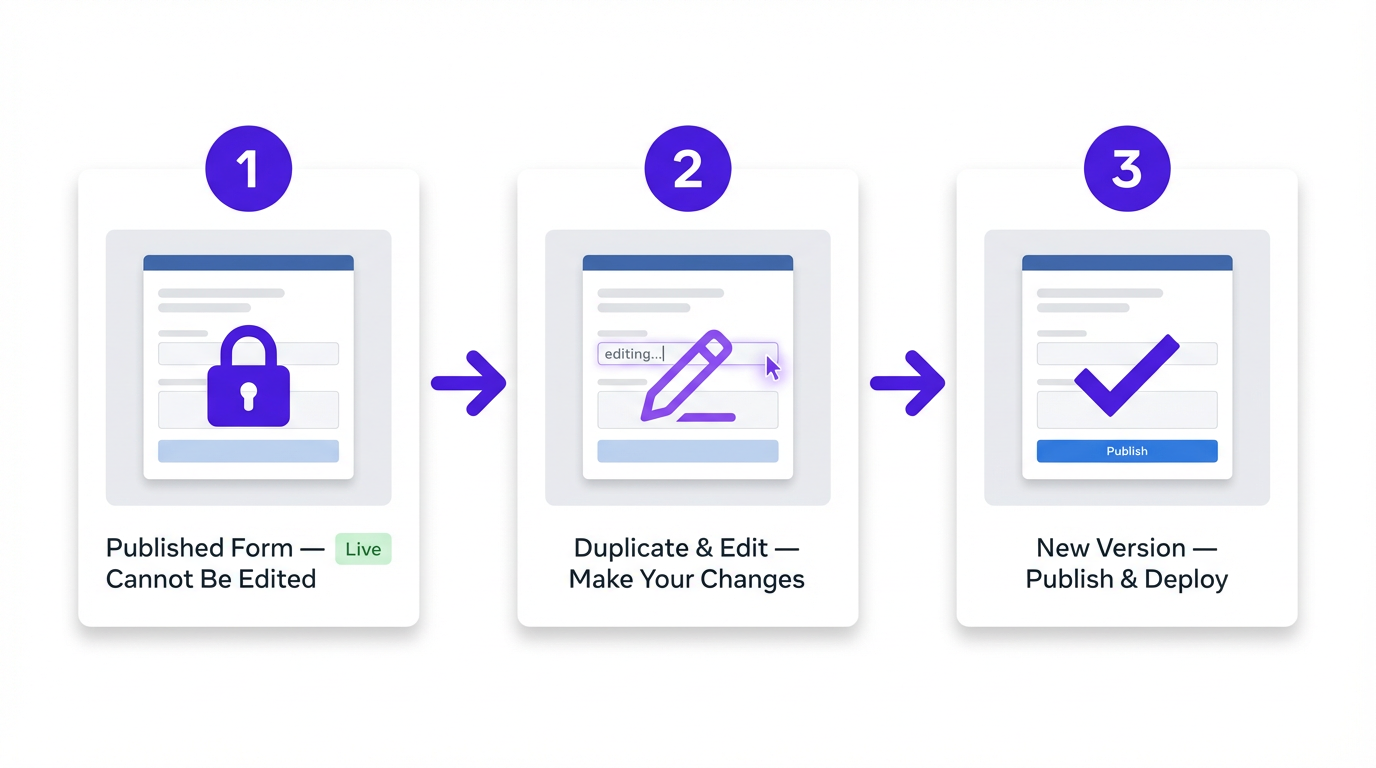
This is the part that causes the "where's the edit button?" scavenger hunt every new advertiser goes through: you cannot edit a Meta Instant Form after it's been published. The form locks the moment it goes live. Want to change the headline, swap a question, or update the thank-you screen? You duplicate the form, make your edits on the copy, then publish the new version.
A newer wrinkle worth knowing: some accounts have started seeing a direct "Edit" option at the ad level within Ads Manager. If it shows up in your account, test it carefully on a low-risk campaign first. If you don't see it, or it behaves unpredictably, the duplicate workflow remains the reliable path. It also keeps the original form's performance data intact, which makes before-and-after comparisons much cleaner.
The workflow that keeps everything organized goes like this. Open Ads Manager, navigate to the ad that uses the form, jump into the form library, find the published form, and hit "Duplicate." Rename it with intention. Something like "Form_V2_HeadlineTest_April2026" beats "Copy of Form 1" every single time. Make one planned change, publish, then swap the new form into a duplicated ad set with identical targeting and budget.
Why a separate ad set? If you've ever tried to compare two Meta lead form variations inside the same ad set and gotten garbage results, you already know the answer. Meta's delivery system optimizes toward whatever wins early, and your "test" turns into a lopsided traffic allocation that tells you nothing useful.
Building a Testing Framework That Actually Produces Answers
The most common testing mistake is changing two or three things at once, then wondering why results shifted. You'll never isolate what moved the needle that way. One variable per test cycle. Full stop.
Before you duplicate anything, write down a hypothesis in plain language. Not "improve performance." Something specific: "If we switch from More Volume to Higher Intent, we expect fewer leads but a higher sales-accepted lead rate within 14 days."
High-Impact Variables Worth Testing
Form type (More Volume vs. Higher Intent) is usually the single biggest lever if you haven't tested it yet. After that, the intro headline and description text carry outsized weight because they're the first thing users read after clicking your ad. The number of questions matters too: fewer fields almost always lifts volume, but at a quality cost you need to quantify, not assume.
One qualifying question (budget range, job title, or timeline) gives your sales team a sorting mechanism without tanking conversion rate. Add two or three qualifiers and you'll feel the drop-off immediately, especially on mobile. And don't ignore the thank-you screen CTA. "Download now" vs. "Schedule a call" shapes what happens after submission and determines who actually follows through.
On that qualifying question: one strategic qualifier is usually enough. I've seen teams get greedy, stacking three or four custom questions because "sales needs the data." Sales needs leads that respond to outreach. A form that scares people off before they submit doesn't help anyone.
What to Measure and When to Call a Test
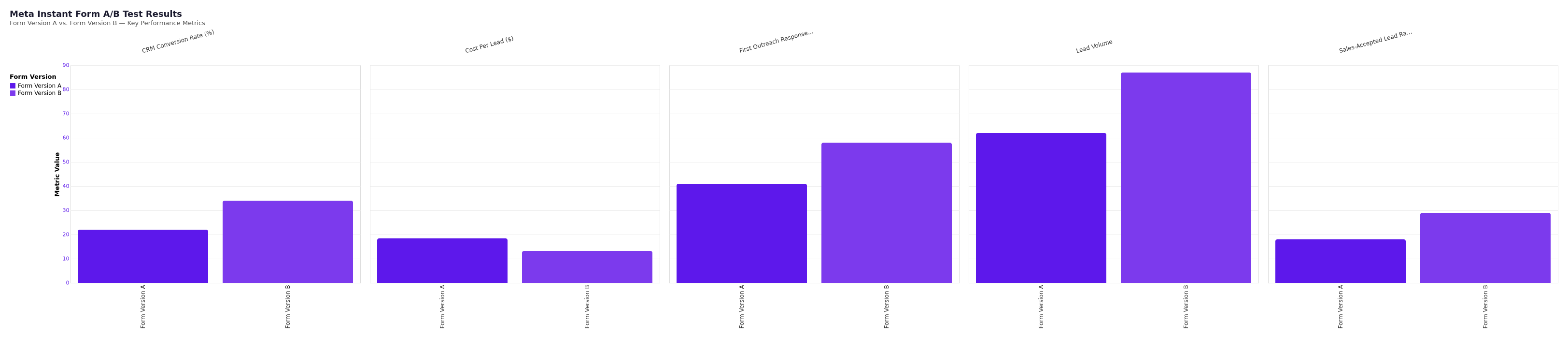
Cost per lead is the obvious metric, but it's not the whole story. A form that generates 40% more leads at the same cost looks great in the dashboard until your sales team reports that half the phone numbers are wrong. Track CPL alongside lead quality signals: CRM conversion rate, sales-accepted lead rate, or at minimum, the percentage of leads that respond to a first outreach attempt.
Minimum Sample Sizes and Runtime
Run each variation for at least 7 days and aim for a minimum of 50 leads per variant before drawing conclusions. Meta's algorithm needs time to optimize, and calling a test after 15 leads is how you end up making bad decisions with confident-looking data.
If your budget means 50 leads per variant takes three weeks, that's fine. Patience is worth more than speed here. Rushing to conclusions with a thin sample is one of the most common (and most expensive) testing mistakes in lead gen.
Common Pitfalls and How to Avoid Them
Testing Both Variants in the Same Ad Set
Running both form variations in the same ad set is the most common structural error. Meta's delivery system optimizes toward whichever form performs better early, which skews the entire comparison. Always use separate ad sets with identical settings. The only thing that should differ between them is the form itself.
Sloppy Naming Conventions
Naming conventions matter more than they seem. Three months into testing, a form library full of "Copy of Form 1," "New Form Final," and "Test March" will cost you real time to reconstruct what you tested and what you learned. Settle on a consistent format from the start: [CampaignName][Variable][Version]_[Date]. Your future self will thank you.
Broken Integrations After Duplication
Here's a failure mode nobody warns you about until it happens: integrations. When you duplicate a form and publish it as a new version, your CRM connection or Zapier workflow can still be listening to the old form. Leads submit, Ads Manager shows conversions, and your sales team swears nothing came through. Brutal. Make it a habit to verify your lead routing every time you publish a new form version.
Mismatched Ad Copy and Form Messaging
Don't overlook the relationship between your ad creative and your form. The form headline and ad copy need to tell the same story. If your ad promises a free consultation and the form says "Get a quote," that mismatch creates hesitation at exactly the wrong moment. Small copy disconnects like this quietly kill conversion rates and are easy to miss when you're focused on the form in isolation.
If you want a fast way to keep ad copy, form headlines, and thank-you screen CTAs aligned across versions, prompts for Meta titles and descriptions can help you generate options that stick to one message instead of drifting.
Explore Vizup's AI-powered tools for organic and paid marketing content creation.
A quick look to keep your tests organized
Form testing isn't glamorous work, but it compounds. A 15% CPL improvement from a headline test, stacked with a 20% quality improvement from adding one qualifying question, adds up to a meaningfully different campaign six months from now. I've seen teams spend weeks chasing "new audiences" when the fix takes an afternoon inside the form.
If you're building a broader optimization practice, pairing this with a solid guide to AI marketing tools can help systematize work that currently lives in your head. And once you're generating more leads and need to feed them with consistent content, the principles behind scaling AI content become relevant fast.
Start with one test. Duplicate your current best-performing form, change one thing, run it for a week with enough budget to generate meaningful data, and measure what actually matters downstream. That's the whole system. Edit Instant Forms in Meta Ads Manager the boring, disciplined way, and you get the fun part later: cheaper growth and fewer junk leads.
Frequently Asked Questions
Can you edit an Instant Form after it's been published in Meta Ads Manager?
No. Once a Meta Instant Form is published, it cannot be edited directly. You need to duplicate the form, make your changes to the copy, and publish the new version. Some accounts are seeing a newer direct "Edit" option at the ad level, but the duplicate workflow remains the standard approach and preserves your original form's performance data for comparison.
What's the difference between "More Volume" and "Higher Intent" Instant Forms?
More Volume removes friction for faster submissions, optimized for lead quantity. Higher Intent adds a review step where users confirm their details before submitting, which tends to reduce volume but improve lead quality.
How many leads do I need before I can call a form test conclusive?
Aim for at least 50 leads per variant and a minimum of 7 days of runtime. Meta's delivery algorithm needs time to optimize, and smaller sample sizes produce unreliable results. If your budget makes this take two to three weeks, that's acceptable. Rushing to conclusions with 15-20 leads per variant is one of the most common testing mistakes.
Should I test both form variations in the same ad set?
No. Running both variations in the same ad set lets Meta's algorithm favor whichever form starts performing better early, which skews the comparison. Use separate ad sets with identical targeting, budget, and creative. The only variable that should differ between the two ad sets is the form itself.
What's the single highest-impact element to test first on a Meta Instant Form?
Form type (More Volume vs. Higher Intent) is usually the biggest lever if you haven't tested it yet. If you've already established which type works better for your audience, the next highest-impact test is typically the intro headline or adding one qualifying question. A single strategic qualifier like budget range, job title, or timeline helps sales teams prioritize without significantly hurting conversion rate.
How do I A/B test Meta Instant Forms without contaminating results?
Use the same ad creative and targeting, then change only the form. Duplicate the published form, rename it clearly (for example, Form_V2_Qualifier_Timeline_April2026), publish it, and attach it to a duplicated ad set so delivery doesn't skew your results.
