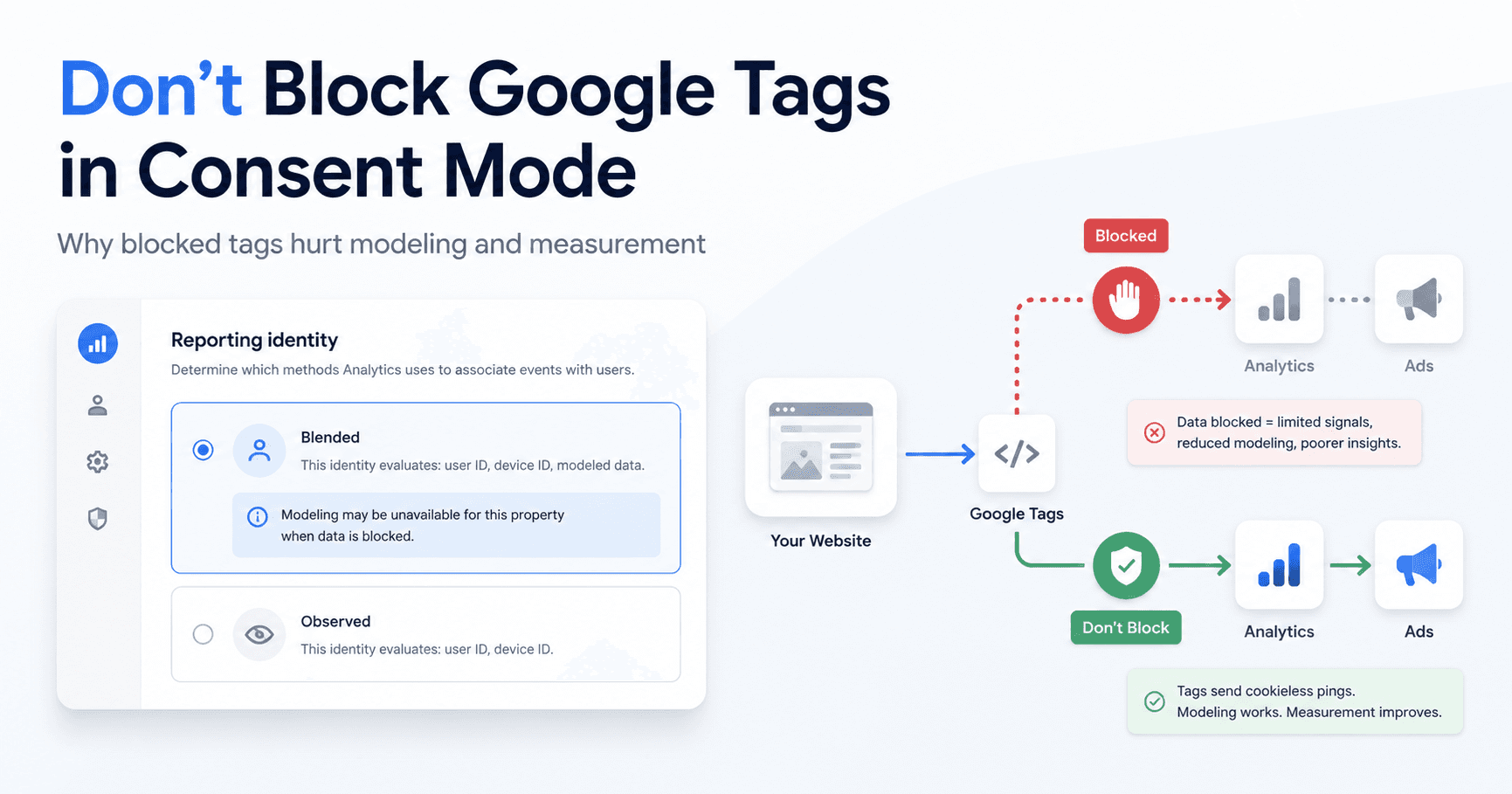
If your analytics went full Swiss cheese the moment you added a consent banner, you’re in crowded company. A lot of teams feel stuck between doing the right thing on privacy and getting numbers they can actually trust. Google recently offered official guidance that changes how this should be approached. It’s not a new product launch; it’s a plainspoken clarification on how to set up measurement so it’s less wrong. The headline: stop blocking your Google tags.
For years, the knee-jerk response to consent rules was to build a kind of script bunker: nothing loads until someone opts in. That approach felt sensible. It also punched huge holes in reporting. Google’s guidance flips the default assumption for teams using Consent Mode.
What Google’s Guidance Actually Says
Google’s recommendation is straightforward: if you’re using Google Consent Mode, your Google tags should load every time, no matter what the user clicks on the banner. That’s the “advanced” Consent Mode setup. When someone denies consent, the tags don’t go dark; they run in a restricted, cookieless mode. In that state, they send non-identifying signals (often described as “pings”) back to Google, including consent state and country, and limited interaction signals depending on the tag setup.
Official source: Google’s official guidance on unblocking Google tags when using Consent Mode
If you block the tags entirely, even those basic, privacy-safe signals never leave the browser. Letting the tags load keeps the recovery mechanism alive while still respecting the user’s choice.
Why Blocking Your Google Tags Is a Problem
Teams roll out a Consent Management Platform (CMP) and then watch conversions crater in the dashboards. The assumption is that this is simply what measurement looks like after consent. Often it’s not user behavior at all; it’s implementation. When tags are fully blocked, Google loses the inputs it needs to model what you’re no longer allowed to observe directly.
The fallout tends to show up in a few predictable places:
- Google Ads Conversion Modeling: If tags are blocked, Google Ads falls back to broad models to estimate conversions from users who don’t consent. When tags are allowed to load, the site can still send anonymous pings, which lets Google build a more accurate model tailored to your advertiser data. The result is cleaner attribution and bidding decisions that aren’t based on guesswork.
- GA4 Behavioral Modeling: For a lot of marketers, this GA4 feature might as well not exist. They hit the traffic thresholds, yet modeling never turns on. A common reason: GA4 behavioral modeling doesn’t work if you block tags. It needs a steady stream of events with
analytics_storage='denied'so it can learn how to estimate the behavior of users who opted out. No pings means no model. - First-Party Measurement Quality: They help reduce measurement gaps by supporting conversion modeling and GA4 behavioral modeling.
- Reporting Gaps: The cliff-drop after a CMP goes live is frequently a reporting artifact. People are still visiting and converting; your setup is just preventing those actions from being counted, even in aggregated or modeled form. Unblocking your Consent Mode Google tags is often the change that closes the gap.
How to Check If Your Tags Are Blocked
You can verify this in minutes. Google Tag Assistant is the easiest way to see what your tags are doing in the real world, not what the configuration claims they should do.
Open a debug session in Tag Assistant for your site. When the page loads (before you touch the consent banner), check the “Tags” section. Do your Google Ads and GA4 tags appear under “Tags Fired,” or are they stuck under “Tags Not Fired”?
If you see a tag in “Not Fired,” click into it and read the reason. In many cases, the trigger is being held back by a consent requirement. Watch for the “Required Additional Consent” section. If ad_storage or analytics_storage shows up there, the tag is waiting on a signal it shouldn’t be waiting for, because Google tags already include their own consent logic. That’s the misconfiguration to unwind.
Common Reasons Google Tags Get Blocked
After auditing plenty of GTM containers, the same patterns show up again and again. Most of them are leftovers from the pre-Consent Mode era, when teams had to bolt their own controls onto everything.
| Blocking Method | What It Is and Why It's a Problem |
|---|---|
| Old Exception Triggers | Before Consent Mode, teams often built a “consent denied” trigger and used it as an exception across tags. That pattern now gets in the way and should be removed. Google tags handle this internally. |
| Additional Consent Checks | In GTM, tags can be configured to require “Additional Consent.” For Google tags, that setting should be “Not set” or “No additional consent required,” since consent checks are already built in. |
| CMP Automatic Blocking | Some CMPs ship with “auto-blocking” that stops scripts from loading at all. For Google tags, that needs to be turned off so Consent Mode can manage behavior instead. |
| Manual Script Blocking | Developers sometimes add custom logic that prevents tag scripts from being injected until consent is granted. That logic needs to change so the scripts load regardless, with Consent Mode controlling what they send. |
| TMS-Based Consent Triggers | Using tag-manager triggers that only fire when consent is granted is the older approach. The current approach is to let the tag fire on its normal trigger (like Page View) and let Consent Mode adjust what happens next. |
| Consent Mode Override Issues | In rarer cases, a CMP overrides default consent states in a way that creates conflicts. It’s uncommon, but when it happens it can quietly break everything. |
What Google Recommends Fixing
Google’s recommendation is clear here. For core Google tags, Google Analytics, Google Ads, Floodlight, and Conversion Linker, you’re meant to remove the extra blocking layers that accumulated over time. These tags already include consent checks. They know how to behave when ad_storage is denied.
In practice, this is mostly cleanup. In Google Tag Manager, strip out exception triggers and remove “Additional Consent” requirements from those Google tags. Consent isn’t being turned off; you’re eliminating redundant controls that now prevent Consent Mode from working the way it was designed to.
What This Means for Marketers
Marketing, analytics, and dev teams should treat this as a prompt to re-check the plumbing. Audit the GTM container for legacy triggers. Review CMP settings for auto-blocking. In GA4, look at reporting identity: is behavioral modeling available, or is GA4 telling you it can’t run? In Google Ads conversion tracking, confirm you’re actually getting advertiser-specific modeling rather than generic estimates.
This isn’t about sneaking around consent. It’s about letting the consent-aware tech do what it’s supposed to do. When Google tags can load and Consent Mode governs their behavior, you get measurement that’s less distorted while still honoring the user’s privacy choice. It also makes it easier to interpret other shifts in reporting, including how AI is changing Google Ads reporting. For more on that, read how AI is changing Google Ads reporting.
How Vizup Can Help
Even if your technical team is heads-down in GTM and CMP settings, the business still needs to know what’s working. Measurement breakage doesn’t just make dashboards uglier; it changes how you judge performance across organic search, paid media, and the emerging world of AI-led discovery. Vizup offers a separate line of sight into visibility. By tracking search visibility, AI visibility, and content performance, it helps you keep a steady read on your digital presence while the analytics plumbing is being repaired. That gives you a consistent benchmark to compare results before, during, and after tracking fixes land.
Seeing this gap in your own reporting? We can show you how an independent visibility score gives you a stable metric for judging performance, no matter what’s happening with your client-side tags. Book a demo and we’ll walk you through it.
Frequently Asked Questions
Should Google tags fire before consent is granted?
Yes. With the advanced implementation of Google Consent Mode, Google tags should load before the user interacts with the banner. They start in a limited, cookieless state and only send full data if the user grants consent.
Does Consent Mode collect personal data when consent is denied?
No. When consent is denied, Google tags send anonymous, cookieless pings that don’t include personally identifiable information. The signals can include details like timestamp, browser type, and country, but they aren’t tied to an individual profile.
Why does GA4 behavioral modeling become unavailable?
GA4 behavioral modeling needs a reliable flow of data from users who denied consent so it can build its models. If you block Google tags for those users, GA4 gets nothing (not even anonymous pings) and it can’t train the machine learning model that estimates their behavior.
Which Google tags support Consent Mode?
Google tags with built-in consent checks include the Google tag (gtag.js), Google Analytics (including the Firebase SDK), Google Ads (Conversion Tracking and Remarketing), Floodlight, and the Conversion Linker tag.
Should non-Google tags also be unblocked?
No. This guidance applies to Google tags that already have built-in consent checks. For non-Google tags (other ad tech, marketing platforms, and similar tools), you should still rely on your CMP and GTM triggers to block them until explicit consent is granted, unless that vendor provides an equivalent consent-aware setup.
