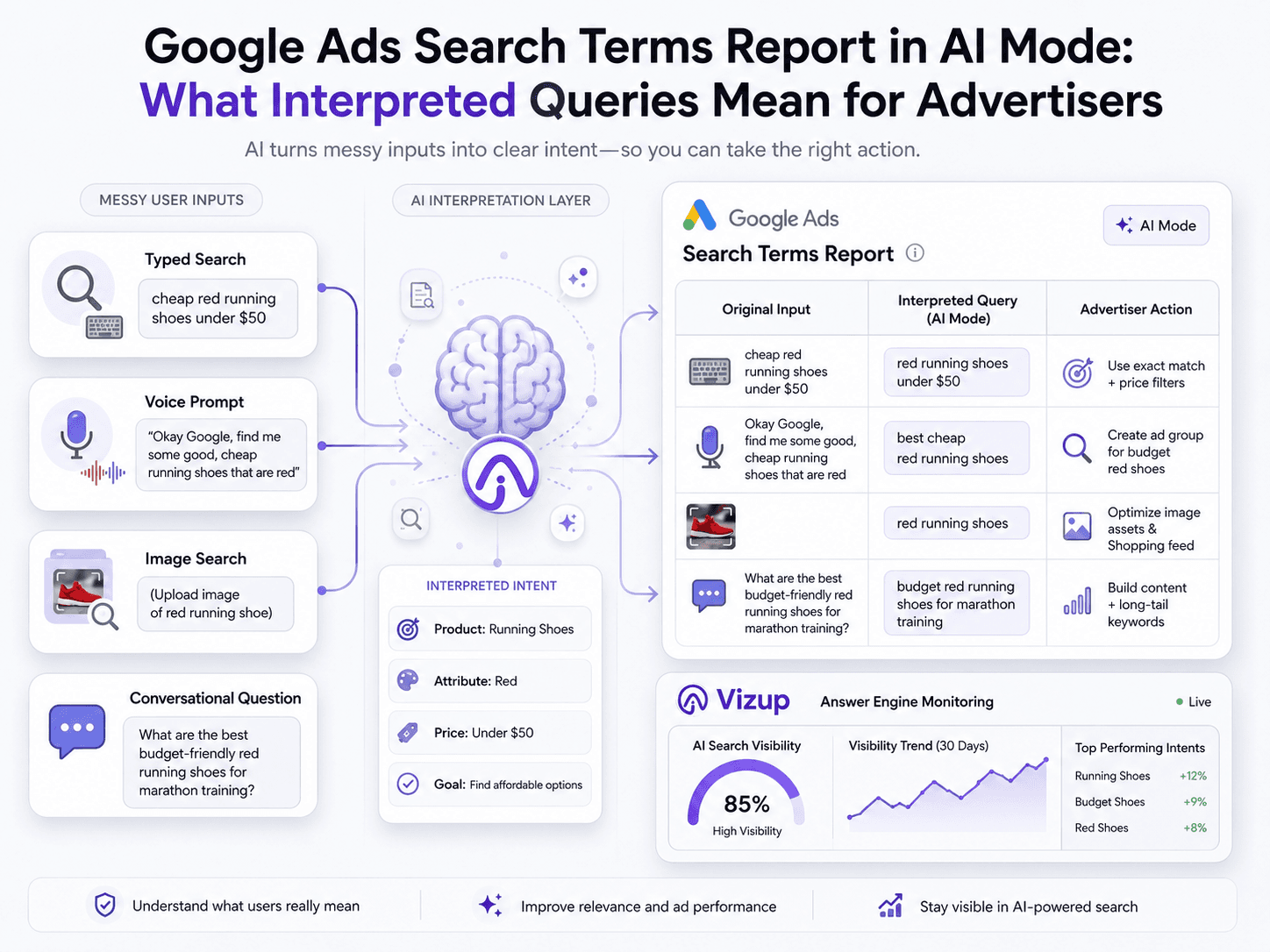
The Google Ads search terms report in AI Mode is effectively a reporting layer: it shows an AI-shaped read on user intent, not always the literal words someone typed or spoke. In May 2026, Google updated its help documentation to clarify that across experiences like AI Mode, AI Overviews, and Google Lens, the report may surface an "interpreted" query that reflects its best approximation of what the user meant.
That’s a real change in the contract paid search has relied on for years. The search terms report used to be the closest thing we had to a verbatim log of customer language, and it powered everything from negatives to messaging tests. Now the “truth” at the query level is increasingly filtered through an AI layer. This piece breaks down what interpreted queries are, how they show up in reporting, and how to adjust optimization and measurement so performance doesn’t drift.
What Are 'Interpreted Queries' in the Google Ads Report?
Put simply, interpreted queries Google Ads are normalized, derived versions of what Google’s systems believe the user intended, rather than the exact text, voice command, or image input the user provided. That shifts the Search Terms report from a near-transcript to a privacy- and AI-mediated translation layer. In the past, you could assume a reported term mapped closely to what someone actually entered; with AI-powered experiences in the mix, that assumption doesn’t hold.
You’ll notice it most in Search campaigns wherever Google is leaning on AI-driven experiences. Reporting highlighted by Search Engine Journal’s Brooke Osmundson on May 13, 2026 ties the change to AI Mode, AI Overviews, Google Lens, and even some autocomplete-assisted searches. The report is still useful, but it’s no longer a mirror, it’s an interpretation.
Why This Matters: The Report Is Now a Translation, Not a Transcript
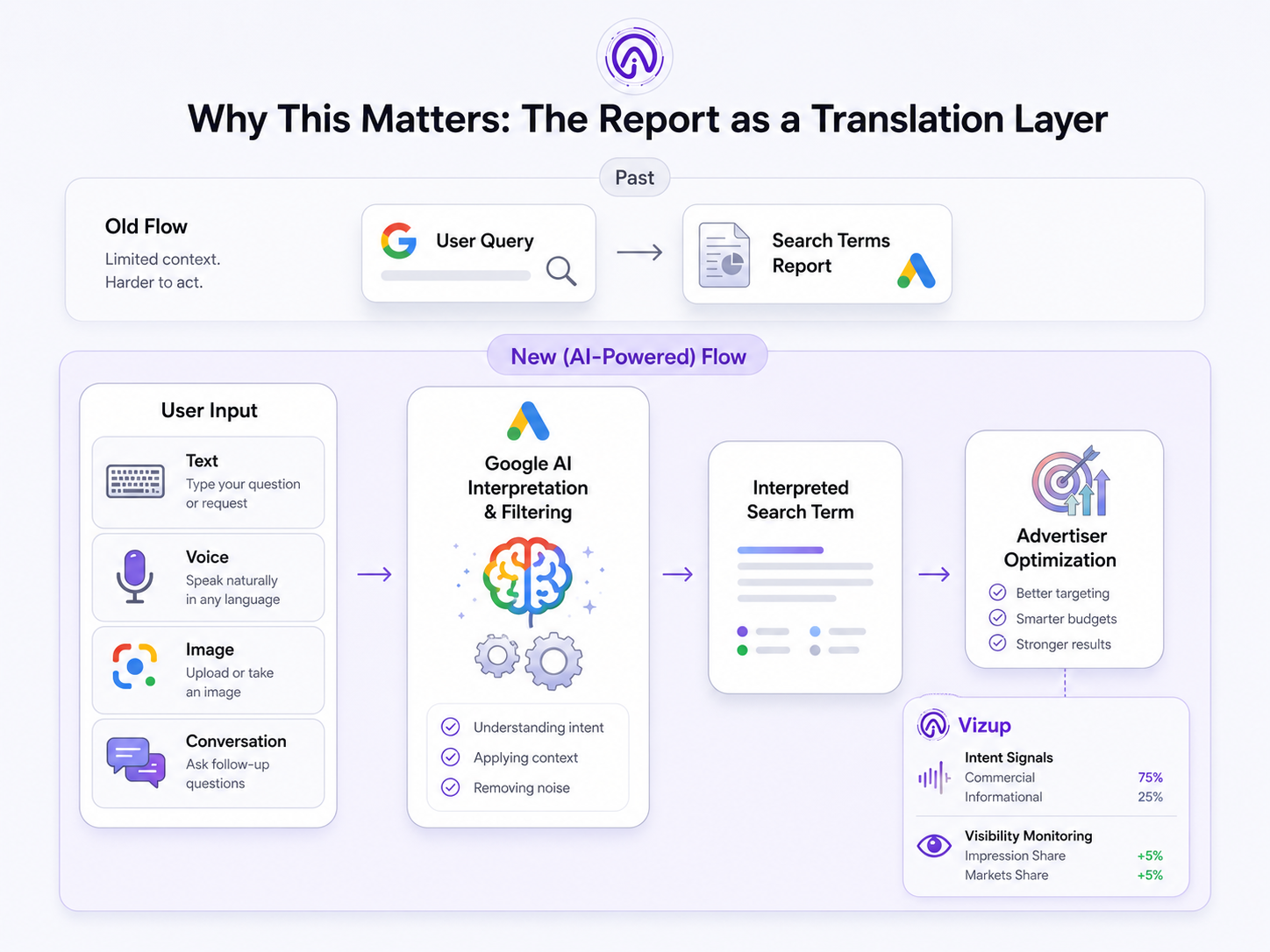
This shift from transcript to translation has significant consequences for advertisers:
- Impact on Optimization: Core tasks like building negative keyword lists, refining match type strategy, and testing ad creative depend on clean query visibility. When you’re optimizing against a search terms approximation Google outputs, the feedback loop gets noisier and less precise.
- Impact on Governance: If you work in a regulated category, brand safety and compliance checks get harder. Abstracted queries can hide the kind of intent you’d normally flag as risky or non-compliant.
- Impact on Measurement: The line from a user’s original prompt to the landing page they hit is looser than it used to be. That makes intent-to-page mapping harder and pushes you toward first-party signals, conversion quality, and tighter monitoring. Google's documentation on ad group prioritization now explains how AI interprets user intent.
How Google AI Mode Search Terms Get Reported
Zooming out, there are simply more steps between a user and what you see in the report. The user provides an input, maybe a multimodal prompt, a conversational follow-up, or a standard typed query. Google’s AI interprets the intent and entities inside that input, uses that interpretation to run the ad auction, and then simplifies what happened into the reporting string you get. The gap between “what they asked” and “what you see” comes from those interpretation choices.
From Prompt to “Interpreted Query”: The Transformation Steps
Several transformations can occur between the user's prompt and the reported term:
- Interpretation: The system pulls out key entities (brands, products), infers intent (transactional vs. informational), and resolves ambiguity.
- Compression: Long, conversational prompts often get collapsed into a shorter, standardized query-like phrase so they can be aggregated and reported.
- Filtering: Some terms are withheld or generalized for privacy or safety reasons, especially in conversational contexts where users might include personal details.
Where the Report Can Diverge Most
The widest gaps show up in Google’s newer search formats. Conversational context can get stripped out, so a follow-up question reads in reporting like a generic, standalone search. A multimodal input from Google Lens query reporting (image plus a few words) can be flattened into a simple product-category term that loses the visual specifics. Net effect: query clusters can look deceptively “clean.” That’s nice for rollups, but it’s a problem when you’re trying to diagnose why a segment is converting poorly.
The Authoritative References: What Google and the Industry Have Said
This isn’t guesswork. In May 2026, Google updated its Ads help documentation to explain that for AI-powered experiences, the report may display an interpreted query. Industry watchers spotted the change, and it was covered by Search Engine Journal. The throughline is straightforward: advertisers have less visibility into the exact searches that trigger ads as Google moves further from keyword matching and deeper into AI-led intent modeling. If you want more context on where Google is taking the interface itself, it also helps to understand how Google's AI Mode side-by-side view works.
The Big Reporting Buckets: AI Overviews, AI Mode, and Lens
If you’re trying to make sense of what’s changing, it helps to bucket these experiences by how they reshape user input, and what that reshaping does to the terms you’re left optimizing against.
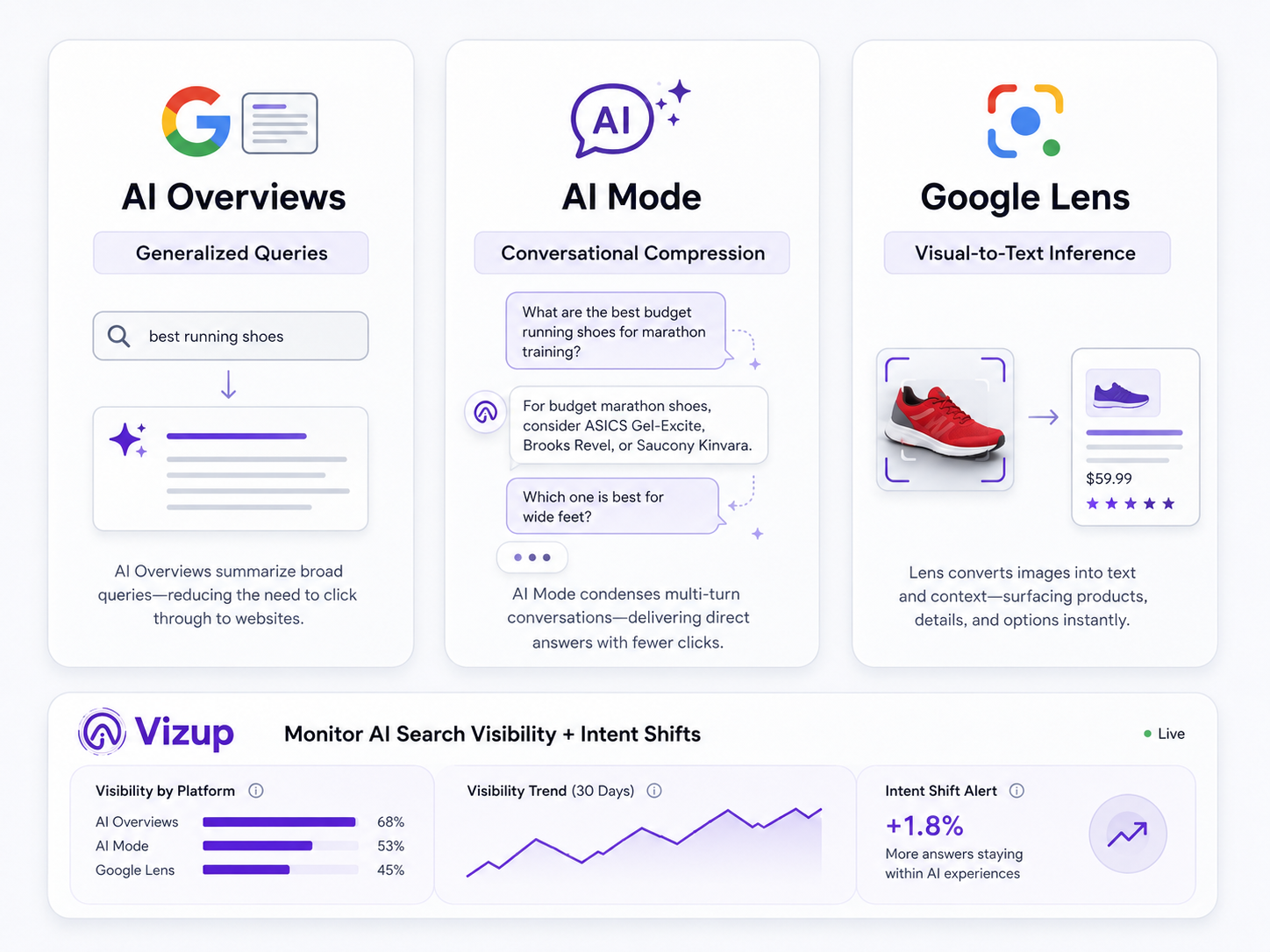
- AI Overviews search terms reporting: When the SERP serves up a synthesized answer, users often stop refining their query the way they used to. The terms you see can skew more general, closer to the overview’s topic than the original long-tail question. The practical response is broader intent coverage and landing pages that clearly match that topic.
- Google AI Mode search terms: A multi-step conversation can get boiled down into a single, auctionable interpreted query. Your reports look tidier because the “weird” conversational prompts disappear, but you also lose the story of how the user got there. Keep an eye out for term-theme shifts that don’t line up with any keyword or targeting changes.
- Google Lens query reporting: This is where the old mental model breaks fastest. Someone can point a camera at sneakers and trigger an interpreted query like “black running shoes with white sole” without typing anything. That’s powerful, but it’s also ambiguous, especially for ecommerce and local intent.
| Experience | Typical User Input | Google Interpretation | What Appears in Search Terms Report | Advertiser Risk | Best Response |
|---|---|---|---|---|---|
| Classic Search | Typed keywords (e.g., “plumber near me”) | Direct match to keywords based on match type settings. | The literal query, or a close variant. | Low. Report is a mostly accurate reflection of user query. | Tighten match types and build negative keyword lists off specific terms. |
| AI Overviews | Informational or complex question (e.g., “how to fix a leaky faucet”) | Synthesizes an answer; matches ads with commercial intent related to the topic. | A more generalized, topic-level term (e.g., “leaky faucet repair”). | Moderate. Long-tail context drops out; intent can be misread. | Prioritize landing page relevance to the broader topic; watch conversion quality. |
| Google AI Mode | Conversational dialogue with follow-ups. | Extracts the core intent from the entire conversation. | A compressed, standalone query that summarizes the dialogue. | High. Important qualifiers (e.g., “not emergency”) can disappear. | Lean on audience/geo signals to infer intent; judge performance by conversion actions, not just terms. |
| Google Lens | Image of a product + optional text (e.g., photo of a chair + “in leather”) | Infers product category, attributes, and intent from visual and text data. | A descriptive, text-based query (e.g., “brown leather accent chair”). | Very High. Elevated risk of mismatch between the visual item and the inferred text query. | Make sure the product feed is richly detailed; add negatives to block wrong sub-categories. |
| A comparison of how different Google search experiences affect what advertisers see in their reports. |
Negative Keywords in AI Mode: How to Adapt Your Strategy
With negative keywords AI Mode, the friction is that you’re negating the interpreted query, not necessarily the user’s original (and often more specific) prompt. You might block one interpreted term and still see similar traffic later because Google interprets a near-identical conversation differently the next time.
A sturdier play is to build negatives around durable intent categories, not brittle phrasing. Block themes like “jobs,” “free,” “reviews,” “DIY,” or “support” when they don’t belong in your funnel. Start from outcomes: segment by conversion quality (lead-to-close rate, LTV) and work backward to the term themes correlated with low-value interactions. That approach holds up better than trying to swat every irrelevant string. If you want to go further, using auction insights to outsmart competitors is a useful angle when everyone is dealing with the same reporting blur.
What This Is NOT: A Reason to Abandon Search
Interpreted queries don’t make Google Ads unmanageable, they change where the levers are. The new source of truth is a stack of signals: conversion quality, on-site behavior, CRM data, and brand visibility inside AI answers. That’s why Answer Engine Monitoring matters: when query strings get fuzzier, how your brand and products show up in AI-generated answers becomes part of the context you need to manage performance. This is a core part of what we focus on at Vizup.
When you pair what’s happening in your Google Ads account with Vizup’s Digital Presence and Answer Engine Monitoring, you can spot shifts in market perception or competitor visibility that often show up before your term themes change. That lead time lets you adjust intentionally, update ad messaging, tighten landing page alignment, or explore how to guide ad campaigns with natural language so your inputs match Google’s AI-first direction.
Frequently Asked Questions
What does the Google Ads search terms report show in AI Mode versus classic Search?
Classic Search generally reports the user’s literal query (or a close variant). In AI Mode, the report can show an “interpreted query”. Google’s AI-derived best guess at intent, often compressed or generalized from a longer conversation or multimodal search.
Are interpreted queries in Google Ads the same as the user’s exact search?
No. An interpreted query is a translation, not a transcript. It reflects what Google’s AI believes the user meant, which can differ from the exact words typed or spoken, or from the image used in the original prompt.
Why are some Google AI Mode search terms missing or generalized in reporting?
Terms can be generalized or omitted to standardize reporting for complex inputs (conversational or visual searches), to meet privacy thresholds when a query is too unique, or due to safety filtering.
How should I build negative keywords in AI Mode when search terms are approximations?
Build negatives around stable intent categories (like “jobs,” “free,” or “DIY”) instead of fragile, one-off phrases. Start by diagnosing performance through conversion quality, then map back to the term themes tied to low-value traffic.
Does Google Lens query reporting affect Search campaigns, and how can I spot it?
Yes. Search and especially Shopping can be affected. A common tell is highly descriptive, machine-like product terms (for example, “blue ceramic mug with handle”) that most humans wouldn’t type verbatim; those are often inferred from a visual search.
Key Takeaways
- The Google Ads search terms report for AI-powered experiences now includes “interpreted queries,” which are AI approximations of intent rather than literal user inputs.
- AI Mode, AI Overviews, and Google Lens can all reshape what you see, making query analysis less exact.
- Optimization needs to lean more on intent alignment (landing pages, messaging, and conversion quality) than on perfect query matching.
- Negative keyword strategy should shift toward blocking durable intent categories instead of chasing specific phrasing.
- To keep performance readable, triangulate search terms with on-site behavior, CRM signals, and Answer Engine Monitoring.
