
Performance marketers spend more time wrestling with dashboards than shaping strategy. Google AI Brief is designed to change that. It is a Gemini-powered feature inside AI Max for Search campaigns that accepts plain-language inputs: your brand context, audience definition, and what good performance looks like for your business (Google, 2026). Instead of toggling settings and hoping the algorithm interprets your intent, you tell it directly. The result is a faster path from strategic thinking to campaign execution.
This piece is for performance marketers, growth leads, and analysts running Google Ads alongside GA4 who want faster, higher-confidence decisions. One prerequisite matters before you write a single brief: the AI is only as smart as the data feeding it. Gaps in your GA4 setup mean the brief optimizes toward the wrong outcomes. The workflow below starts with measurement integrity, moves to briefing technique, and ends with AI Max campaign setup done right.
Before you trust any AI brief: make sure GA4 isn't quietly lying to you
Natural language input does not fix broken attribution. Misconfigured conversions, missing UTM parameters, and a consent mode setup that silently drops sessions will cause the AI to optimize toward the wrong signal. If the foundation is unreliable, every recommendation built on top of it inherits that unreliability.
Run this audit before you write your first Google AI Brief:
GA4 measurement audit checklist:
- Confirm key conversion events are firing and mapped to Google Ads (not just created, but actively receiving data)
- Verify consent mode is active and modeled conversions are enabled, especially in privacy-restricted regions
- Audit UTM hygiene across all paid channels to prevent misattribution
- Check that GA4 and Google Ads are linked and sharing the correct conversion actions
- If your funnel spans multiple domains, confirm cross-domain measurement is configured
A single misconfigured conversion event can send the algorithm chasing low-value actions at scale. Treat this audit as a non-negotiable prerequisite.
What Task Assistant is and where to find it in GA4
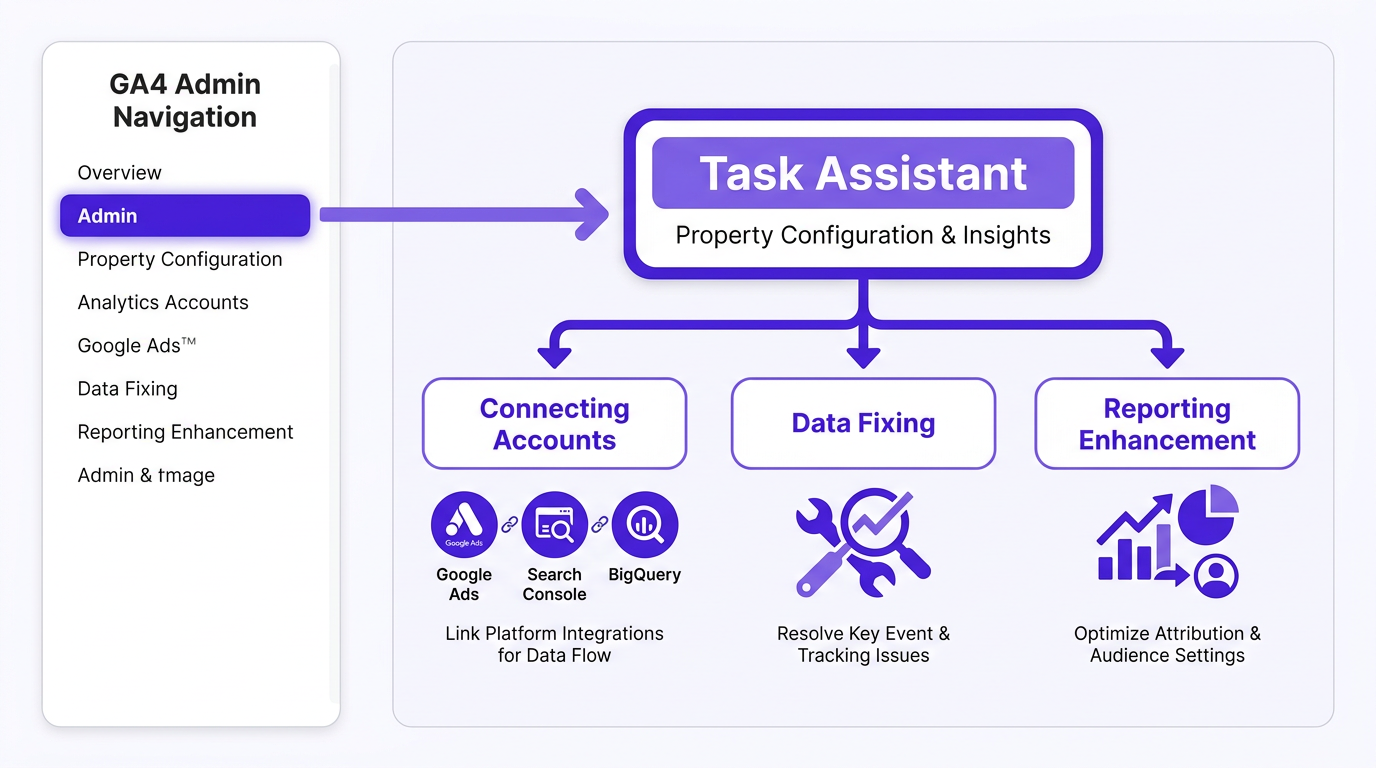
Task Assistant is GA4's guided measurement hub. It surfaces actionable recommendations in three categories: connecting accounts, fixing data quality issues, and enhancing reporting. You find it inside the GA4 Admin area as a card or panel within property configuration. It is the single most useful pre-flight tool before acting on any AI-generated campaign guidance, including outputs from your Google AI Brief.
Each category serves a distinct purpose:
Task Assistant categories:
- Connecting accounts: Link GA4 to Google Ads, Search Console, and BigQuery for conversion import, audience sharing, and raw event exports
- Data fixing: Covers key event configuration, referral exclusions, and cross-domain setup. These determine whether your attribution data is trustworthy enough for AI optimization
- Reporting enhancement: Custom channel groupings, audience definitions, and attribution model settings. These shape what the AI "thinks happened" when it reads your campaign performance
Task Assistant vs Setup Assistant vs Tag Assistant: three tools, three jobs
| Symptom | Likely Cause | Best Tool | Fastest Check | Fix | What to ask in your next AI Brief |
|---|---|---|---|---|---|
| Conversions missing in GA4 | Key event not configured | Task Assistant | Check key events in Admin | Mark correct event as key conversion | Which conversion action should I prioritize for lead quality? |
| Ads and GA4 numbers don't match | Attribution model or conversion mapping mismatch | Task Assistant + Google Ads | Compare attribution windows in both platforms | Align conversion actions and attribution model | How should I weight assisted vs last-click conversions for my goal? |
| Tag not firing on a page | Implementation error | Tag Assistant | Run Tag Assistant on the specific URL | Fix tag trigger or container publish | Once tag is fixed, what audience signals should I add? |
| Weird traffic spike from unknown source | Missing referral exclusion | Task Assistant | Check referral exclusion list in Admin | Add domain to referral exclusions | Is my paid traffic share distorted by referral inflation? |
| First-time GA4 property setup | No prior configuration | Setup Assistant | Open Setup Assistant checklist | Complete all checklist items in order | Now that setup is complete, what campaign type fits my goals? |
| Low-quality leads from AI Max | Wrong conversion event optimized | Task Assistant + Google Ads | Audit conversion actions in Ads account | Remap to qualified lead or pipeline event | How do I signal lead quality to the bidding algorithm? |
| Use this table to triage measurement problems before writing or acting on a Google AI Brief. |
Quick triage rule: Setup Assistant is for initial configuration (use it once). Tag Assistant is for debugging when a specific tag is not firing. Task Assistant is the one you return to regularly, especially before making budget or targeting decisions based on AI recommendations.
If the problem is "data looks wrong," start with Task Assistant. If the problem is "data is missing entirely from a specific page," start with Tag Assistant. Getting this triage right saves hours of debugging and ensures your Google AI Brief receives clean signals from the start.
Writing a Google AI Brief that actually works
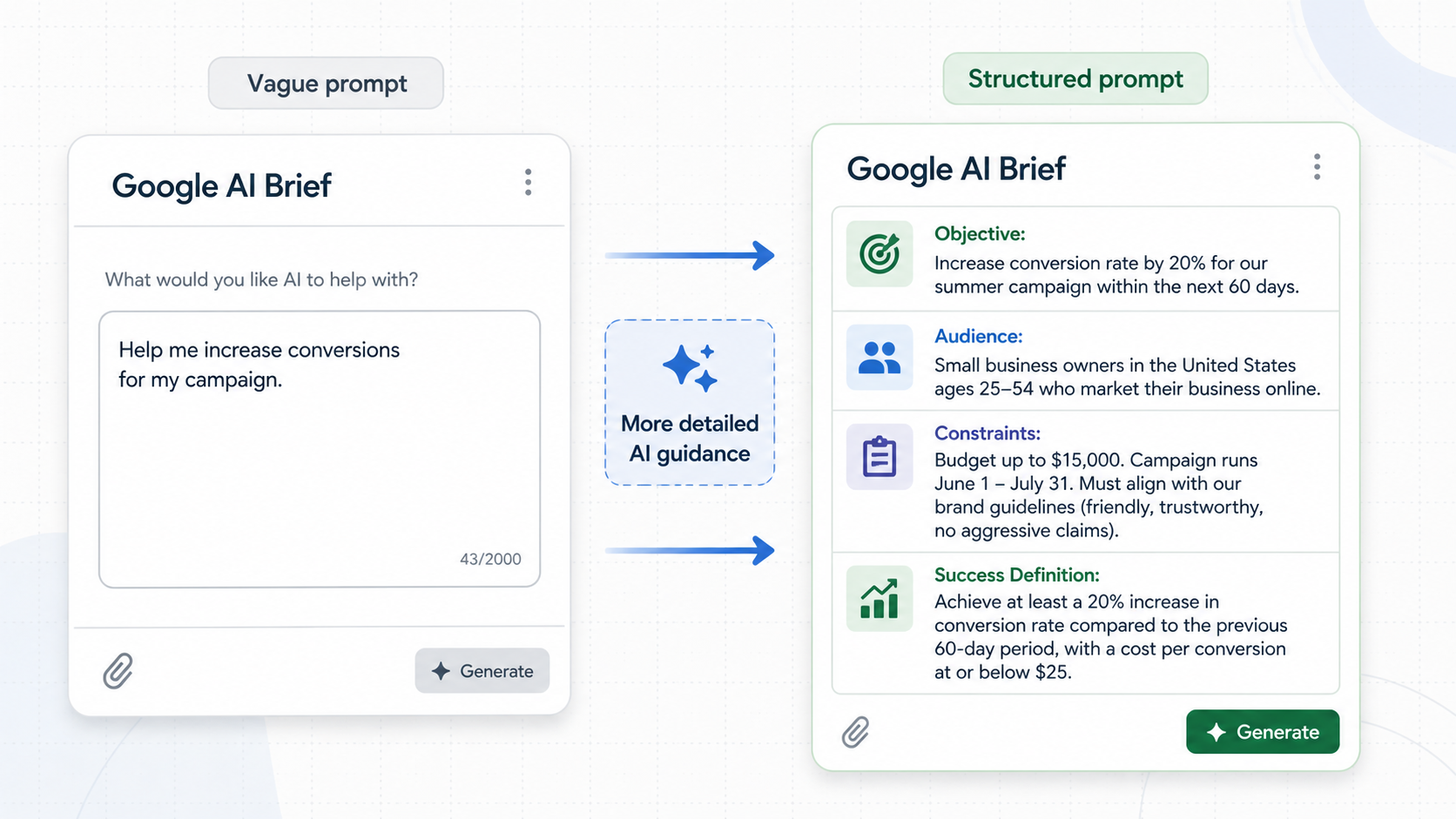
Google AI Brief accepts three types of guidance: Messaging Guidelines, Matching Guidelines, and Audience Guidelines. The quality of your brief directly determines the quality of the AI's decisions. Weak input produces generic output. Precise input produces actionable targeting.
Start with a business question, not a metric. Instead of "improve ROAS," ask "which audience segment drives the highest-quality pipeline leads at the lowest CPA in the northeast region?" Then build your brief around six elements:
Anatomy of an effective AI Brief:
- Campaign objective in plain terms (the outcome you need, not which metric to move)
- Audience definition and what they care about at this buying stage
- Product truth: the specific reason your offer is worth clicking
- Budget and geographic constraints stated explicitly
- Success definition: lead quality threshold, CAC ceiling, pipeline stage, or revenue attribution model
- Desired output: keyword themes, audience hypotheses, creative angles, or budget reallocation logic
A brief that says "we sell software to mid-market companies" produces fundamentally different results than one that says "we sell compliance automation to 200-500 employee healthcare organizations where the buyer is a VP of Operations evaluating during Q1 budget cycles." Specificity is the mechanism that separates useful AI guidance from noise.
Pro tip: Before finalizing your brief, read it from the AI's perspective. If the guidance could apply to any company in your industry, it is too generic. Rewrite until the brief could only describe your business, your audience, and your goals.
For structured input templates, Vizup's AI Prompts library includes frameworks built for this kind of campaign guidance. If you are producing ad copy from brief outputs, the prompt library helps keep messaging consistent.
AI Max campaign setup: turning your brief into a live campaign
AI Max handles targeting, creative expansion, and bid optimization automatically. What you own is the offer, the guardrails, and the measurement. Inputs from your Google AI Brief should flow directly into campaign setup. AI Brief is currently rolling out in English for AI Max for Search campaigns, with plans to expand to Performance Max and AI Max for Shopping in the coming months.
This table maps each brief component to its corresponding campaign setting:
| Brief Component | AI Max Campaign Setting | Why It Matters |
|---|---|---|
| Audience Guidelines | Audience signals (custom segments, demographics, in-market audiences) | Tells the algorithm who to prioritize, reducing wasted impressions on low-intent users |
| Messaging Guidelines | Ad creative themes, landing page selection, brand voice constraints | Ensures generated headlines and descriptions stay on-brand and relevant |
| Matching Guidelines | Brand exclusions, negative keywords, query expansion boundaries | Prevents matching to irrelevant or competitor queries |
| Success definition | Primary conversion action, bid strategy target (tCPA or tROAS) | Aligns bidding with the business outcome you actually care about |
| Budget and geo constraints | Campaign-level budget cap, location targeting | Enforces hard limits that the brief alone cannot guarantee |
| Use this mapping to ensure every element of your brief translates into a concrete campaign configuration. |
Guardrails that prevent "smart" from going rogue:
- Brand exclusions: Specify competitor terms, irrelevant categories, and brand-safety restrictions in your Matching Guidelines. The algorithm expands aggressively if you leave gaps.
- Geo and device constraints: Set at the campaign level so they are enforced, not just suggested.
- Negative keywords: Still worth maintaining to filter clearly irrelevant traffic as broad match expands.
- Budget pacing: Cap daily spend at your actual testing budget until the campaign exits learning. Overfunding during learning wastes spend on unoptimized traffic.
Do not treat the brief as a set-and-forget document. Revisit your Matching Guidelines and Audience Guidelines as performance data comes in. The brief is a living input that evolves with every review cycle.
This reflects a broader shift in campaign management: moving from manual keyword shaping toward "policy design." You define what matters, what is off-limits, and what kind of customer to reach, rather than micromanaging individual queries. This shift rewards marketers who articulate strategy clearly over those who rely on granular bid manipulation.
Mid-flight check: validating the AI is optimizing for the right outcome
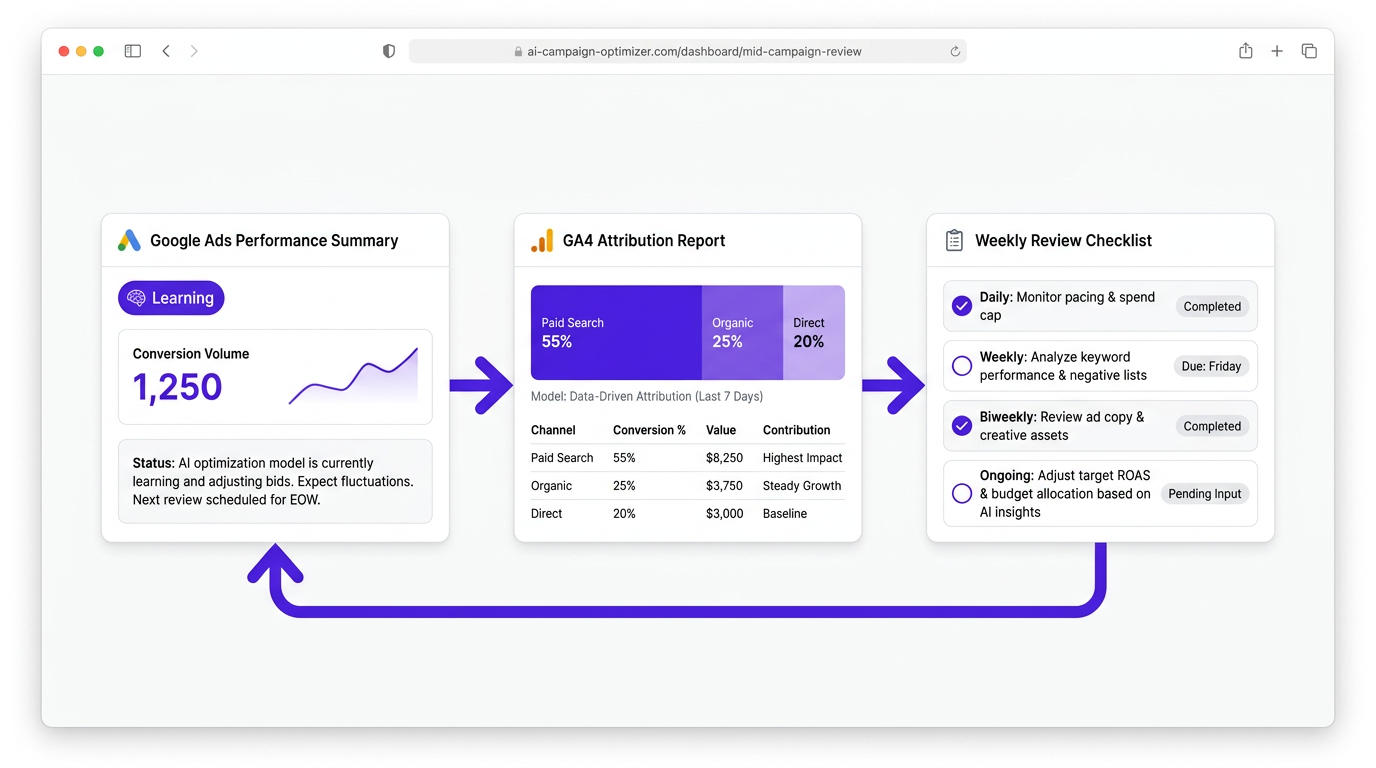
In the first seven to fourteen days, watch for three things: conversion lag (especially with longer sales cycles), learning status in the Ads interface, and whether matched queries align with your Matching Guidelines. Secondary metrics like time on site, pages per session, or downstream CRM stage often surface problems before your primary KPI does.
A lightweight decision cadence beats daily tinkering:
Recommended review cadence for AI Max campaigns:
- Daily: Check learning status and conversion volume. Observe only.
- Weekly: Review query themes and audience overlap against your Guidelines. Flag terms for exclusion.
- Biweekly: Assess budget allocation, lead quality, and whether downstream metrics (CRM stage, revenue) align with in-platform signals.
- Ongoing: Confirm key events in Ads match conversions in GA4, and that attribution models are consistent across both.
Resist the urge to change bids or budgets before the algorithm has enough conversion data to stabilize. Patience during the learning window is strategic, not passive. Marketers who hold steady consistently see stronger performance once the algorithm stabilizes.
One blind spot: campaign-level reporting does not tell you whether your brand is gaining or losing visibility in AI-driven search surfaces. Tools like Vizup monitor digital presence and answer-engine visibility so your campaign learnings tie to actual brand demand, not just click-level signals inside Ads.
Common pitfalls and how to fix them
Optimizing to the wrong conversion is the most expensive mistake in AI Max. If your key event is a page view rather than a qualified lead, the algorithm will find plenty of it, and your pipeline will have nothing to show. Fix this in Task Assistant by auditing key events, then remap your Ads conversion actions to the event that reflects pipeline value.
Three other pitfalls surface repeatedly:
Common AI Max pitfalls and their fixes:
- Budget scaling without incrementality analysis: When the AI recommends increasing budget, ask for incrementality framing first. Blended ROAS improvements often hide channel cannibalization. Compare new versus returning user cohorts and review assisted conversion paths in GA4 before scaling.
- Generic creative recommendations: A symptom of a brief that lacked product truth or audience specificity. Add brand constraints and tone examples to your Messaging Guidelines. The guide to high-converting ad creatives has practical frameworks for this.
- Matching Guidelines drift: As AI Max expands query matching, your original exclusions may not cover new irrelevant terms. Review search term reports weekly during the first month and update accordingly.
Key takeaway: Most AI Max performance issues trace back to measurement problems or vague brief inputs, not the algorithm itself. When results disappoint, audit your data and brief specificity before adjusting bids or budgets.
Your new workflow: measure cleanly, brief clearly, automate confidently
Using Google AI Brief effectively comes down to four steps:
The four-step Google AI Brief workflow:
- Fix your GA4 foundations using Task Assistant so the data underneath your brief is trustworthy.
- Write a Google AI Brief that starts with a real business question and includes specific audience, messaging, and matching guidance.
- Execute through AI Max with guardrails that protect your brand and budget.
- Validate outcomes against both Ads and GA4 data on a consistent cadence.
Pick one campaign to pilot this workflow. Document your brief so you can iterate on it. Set a review cadence before the campaign goes live. The marketers who get the most from AI Max treat the brief as a strategic artifact and the review cadence as non-negotiable. For insights beyond click-level Ads reporting, Vizup's answer engine and digital presence monitoring keeps brand demand visible as AI search surfaces reshape how buyers find you.
Frequently Asked Questions
What should I fix in GA4 before trusting a Google AI Brief for budget or targeting decisions?
Confirm your key conversion events are correctly configured and mapped to Google Ads, verify consent mode is active with conversion modeling enabled, audit UTM parameters across all paid channels, check that GA4 and Google Ads are properly linked, and ensure cross-domain tracking is set up if your funnel spans multiple domains. Any gap can silently distort the attribution data the AI Brief relies on.
What inputs from a Google AI Brief matter most during AI Max campaign setup?
Messaging Guidelines inform creative themes and landing page focus. Matching Guidelines shape query expansion and brand exclusions. Audience Guidelines provide the audience signals the algorithm uses for targeting. Your success definition should also determine which conversion action you set as the primary optimization target.
Why do Google Ads and GA4 conversions not match, and how do I troubleshoot it?
The most common causes are attribution model differences (Ads defaults to data-driven, GA4 may use a different model), different conversion windows, and conversion actions in Ads not mapped to the same key events in GA4. Compare attribution settings in both platforms, use Task Assistant to audit key event configuration, and confirm you are importing the right GA4 events.
What are the three types of guidance you can set in a Google AI Brief?
Messaging Guidelines (brand voice, product positioning, creative direction), Matching Guidelines (query relevance, brand exclusions, category restrictions), and Audience Guidelines (target segments, intent signals, demographic focus). Structure each section with specific details for the most targeted AI output.
How long should I wait before adjusting an AI Max campaign after launch?
Avoid making bid or budget changes during the first seven to fourteen days while the algorithm gathers conversion data. Monitor learning status daily, review query themes weekly, and assess lead quality biweekly. Premature changes reset the learning phase and delay optimization.
How often should I update my Google AI Brief after the campaign launches?
Revisit your brief when you observe Matching Guidelines drift (irrelevant queries in search term reports), a shift in lead quality, or a change in business priorities. In many cases, a biweekly review during the first month and monthly after that keeps the brief aligned with performance and strategy.
