If you’ve ever stared at a GTM-XXXXXX ID and a G-XXXXXX ID and wondered which one is doing what (and whether you somehow installed both wrong), you’re in good company. For years, Google Tag and Google Tag Manager have lived in that annoying gray area: similar names, overlapping jobs, totally different things. The result has been a lot of needless second-guessing.
That ambiguity is finally getting addressed. As part of a major Google Tag Manager update for 2026, Google is folding the two lines together, effectively turning GTM containers into a unified Google Tag. This isn’t a cosmetic rename; it’s a real shift in how the plumbing works, with real implications for workflow, performance, and data quality. Here’s what’s actually changing.
So, What's Actually Changing? (And What Isn't)
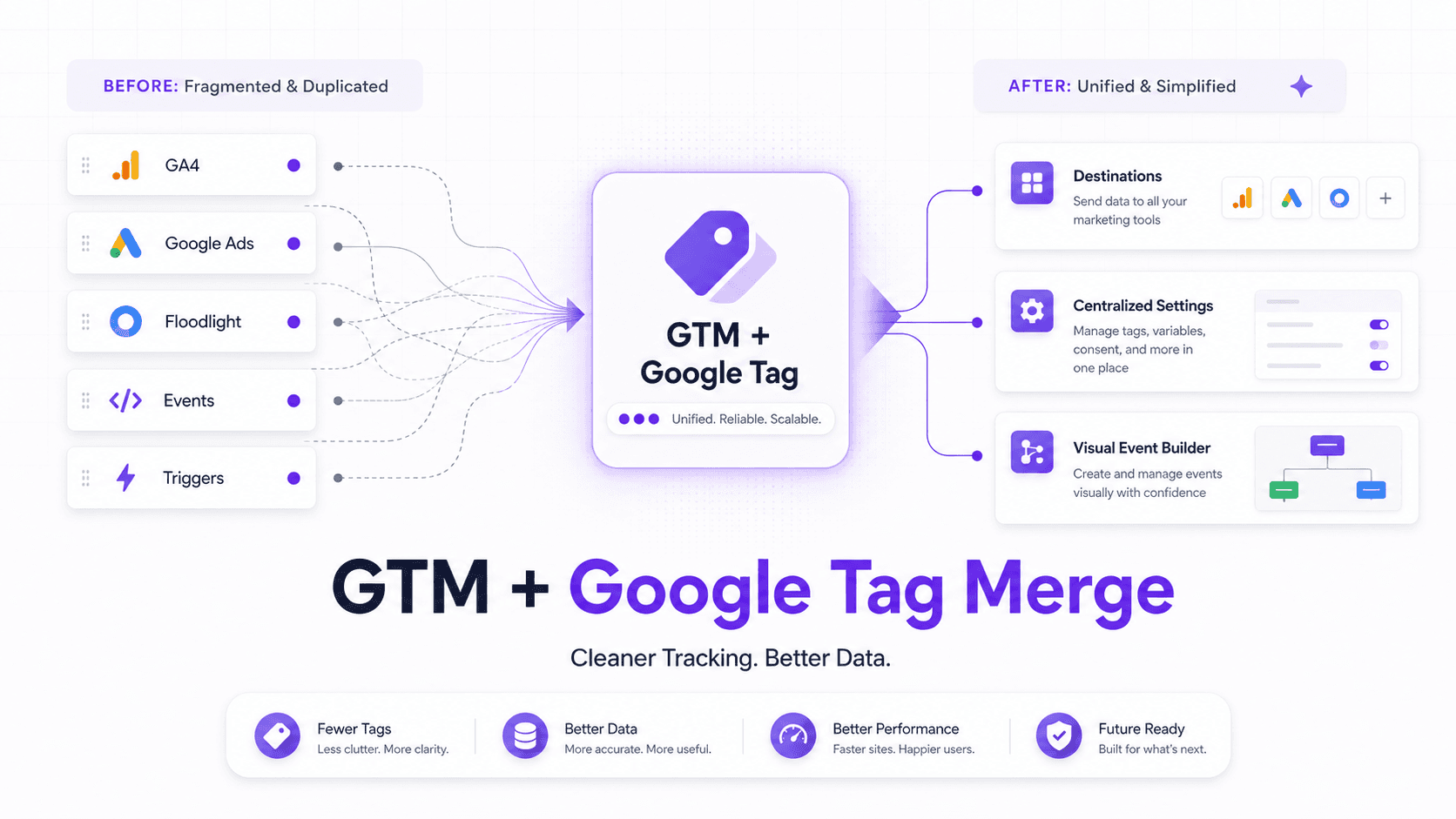
Announced ahead of Google Marketing Live 2026, the headline change is straightforward: Google Tag Manager (GTM) containers are becoming Google Tags. The standalone Google Tag (gtag.js) functionality gets pulled into the GTM experience most teams already live in. The upgrade is opt-in, so you’re not waking up to a broken implementation because Google flipped a switch overnight.
The centerpiece is a new concept called “Destinations.” Today, a container with GA4, Google Ads, and Floodlight tags typically ends up loading separate scripts for each product. With the upgrade, those move into Destinations attached to the main container. Instead of three script downloads, the single GTM container script handles the lot, less code shipped to users, and a meaningful bump in page-load performance.
Updates like this tend to trigger the same reflex: assume the worst, then scramble. A few clarifications up front, because this change does not mean:
- GTM will not start collecting data automatically. Opting into the upgrade doesn’t give the container permission to send hits to GA4 or Ads on its own. You still decide what fires and when.
- You do not have to use only Google products. GTM’s value has always been that it’s vendor-neutral, and that part stays intact. Non-Google tags and custom HTML are still supported.
- Your existing setup will keep working. If you don’t opt in, nothing changes. Your current tags, triggers, and variables remain as they are.
Mostly, this reads like overdue housekeeping: two overlapping systems getting stitched into one, the way it arguably should have been from the start.
The New Toys: Visual Event Builder and Centralized Settings
The merge isn’t the only part marketers will notice. Google is also adding a visual event builder. Anyone who’s used a CRO platform like VWO or Optimizely will recognize the pattern: you browse the site, click the element you care about, and GTM helps create the tracking pieces that normally require hand-built tags and triggers. For smaller teams (especially those without an engineer on speed dial) that’s a real reduction in friction for custom interaction tracking.
There’s also a quieter but arguably more useful change: centralized settings for Google tags. Once Google Tags live inside the container as Destinations, configurations like cross-domain tracking or user-provided data settings can be managed in one place. That means less bouncing between GA4 and Google Ads just to keep behavior consistent. It’s the kind of cleanup that prevents the most common analytics failure mode: settings that drift out of sync across platforms.
Want a clearer plan for moving to the unified Google Tag? Read our complete guide.
Why This Was Inevitable: A Quick History Lesson
The backstory explains why this consolidation was always where things were headed. Google Tag Manager started life as a way to manage third-party scripts. In parallel, Google built the Global Site Tag (gtag.js) as the default tracking snippet for Google Analytics and Google Ads. Then, in 2023, “Global Site Tag” was renamed “Google Tag,” which did nobody any favors on the clarity front.
If you were using GTM, you were effectively using a manager to inject another manager (the Google Tag). That redundancy was awkward, and it showed in product momentum: GTM felt quieter while Google Tag picked up new capabilities. The merger closes that gap by putting the feature work back into one place. In practice, the container becomes the tag.
What This Means for Your Day-to-Day Workflow
So what changes when you’re actually shipping tags, debugging events, and trying to keep stakeholders happy?
For new site setups, it gets cleaner. You drop in a single snippet (the GTM container) and run everything through it. The “do we also need a separate Google Tag?” question basically goes away, which is a small but constant source of implementation mistakes.
For existing sites, it’s optional, but tempting. You can opt into the upgrade and migrate your current Google tags into Destinations. The obvious payoff is performance: fewer redundant scripts generally means faster pages, which users notice and search engines reward. It’s also a natural moment to tidy up measurement and naming conventions while you’re already touching the setup. A good Google Analytics data cleanup checklist can keep that work from turning into a weeks-long rabbit hole.
For large organizations, governance gets a real upgrade. The new model introduces a dual-ID system. You can deploy the container with the GTM-XXXXXX ID for full functionality (custom scripts, third-party tags), or deploy it with a product-specific ID (like G-XXXXXX). Using the product ID limits the container to Google product tags only. For companies that worry about someone slipping a rogue script onto the site, that’s a practical way for IT to lock down the risky parts while still letting marketing run Google measurement.
The Bigger Picture: AI and Simplified Data
Google isn’t doing this just to make marketers’ lives nicer. The merger fits with the company’s broader push to standardize (and simplify) data collection as more of the ad stack leans on AI. Cleaner, more consistent signals feed directly into the AI features landing in Google Ads. If tagging is less fragmented, it’s easier to send high-quality inputs into those systems, whether you’re trying to guide ad campaigns with natural language or looking for ways to outsmart AI competitors with Google Ads.
In other words, tagging hygiene isn’t just something you do to keep an analyst happy. It’s becoming table stakes for getting the most out of Google’s platforms over the next few years.
Frequently Asked Questions
When does the Google Tag Manager update roll out in 2026?
Google announced the update ahead of Google Marketing Live in May 2026. Because the rollout is opt-in, you can choose when to upgrade your containers.
Do I have to switch to the unified Google Tag?
No. The upgrade is optional, and your current Google Tag Manager container will continue to run as it does today. To use features like Destinations and the visual event builder, though, you’ll need to opt in.
After the update, what’s the difference between Google Tag and Google Tag Manager?
The distinction largely disappears. After the update, a Google Tag Manager container effectively is a Google Tag, with the GTM interface acting as the control center for the unified tag and its Destinations (like GA4 and Google Ads).
Will the update change how my non-Google tags (like the Meta Pixel) work?
No. Google says GTM will continue to support third-party tags and custom HTML. The merger is mainly about how Google’s own tags are configured and delivered inside the container.
What is a GTM "Destination"?
A Destination is a Google measurement product (such as a GA4 property or a Google Ads account) that receives data from the unified Google Tag. Moving existing Google tags into Destinations improves performance by cutting down on redundant script loads.
