
You've typed a blog prompt into an AI tool, hit generate, and gotten back something that reads like a Wikipedia stub crossed with a press release. Not wrong, exactly. Just hollow. Generic. The kind of content that technically covers a topic without saying anything a reader would remember or act on.
Nine times out of ten, the problem isn't the AI model. It's the prompt. Prompt engineering, the practice of structuring natural language inputs to get specified outputs from a generative model, is where the real advantage lives. Most marketing teams treat these tools like a search engine (type a topic, get an answer) instead of treating them like a junior writer who needs a proper brief. Vague input, vague output. Every single time. If you're trying to grow traffic, pipeline, or signups, the blog prompt is the first lever to pull.
What a Weak Blog Prompt Actually Looks Like
Most people write prompts the way they'd write a Google search. "Write a blog post about content marketing." That's not a blog prompt. That's a topic with no direction. The AI fills in every gap you left with statistical averages: average structure, average tone, average depth. You get the middle of the internet, and the middle of the internet is boring.
A common thing I hear from marketing leads is, "I told it to be friendly and SEO optimized, why does it still sound like a corporate FAQ?" Because "friendly" is basically meaningless to a language model. It defaults to press release voice. The details that actually move the needle are the ones that force the model to make decisions: who the reader is, what they already know, what they're skeptical about, and what action you want them to take after reading.
There's also a persistent myth that longer prompts always produce better results. Honestly, a 500-word prompt stuffed with vague instructions ("be engaging, be informative, be SEO-friendly") performs worse than a tight 80-word prompt with a specific persona, a clear goal, and one concrete example. Specificity beats length every time. If you remember nothing else from this article, remember that.
The Core Anatomy of a High-Performing Blog Prompt
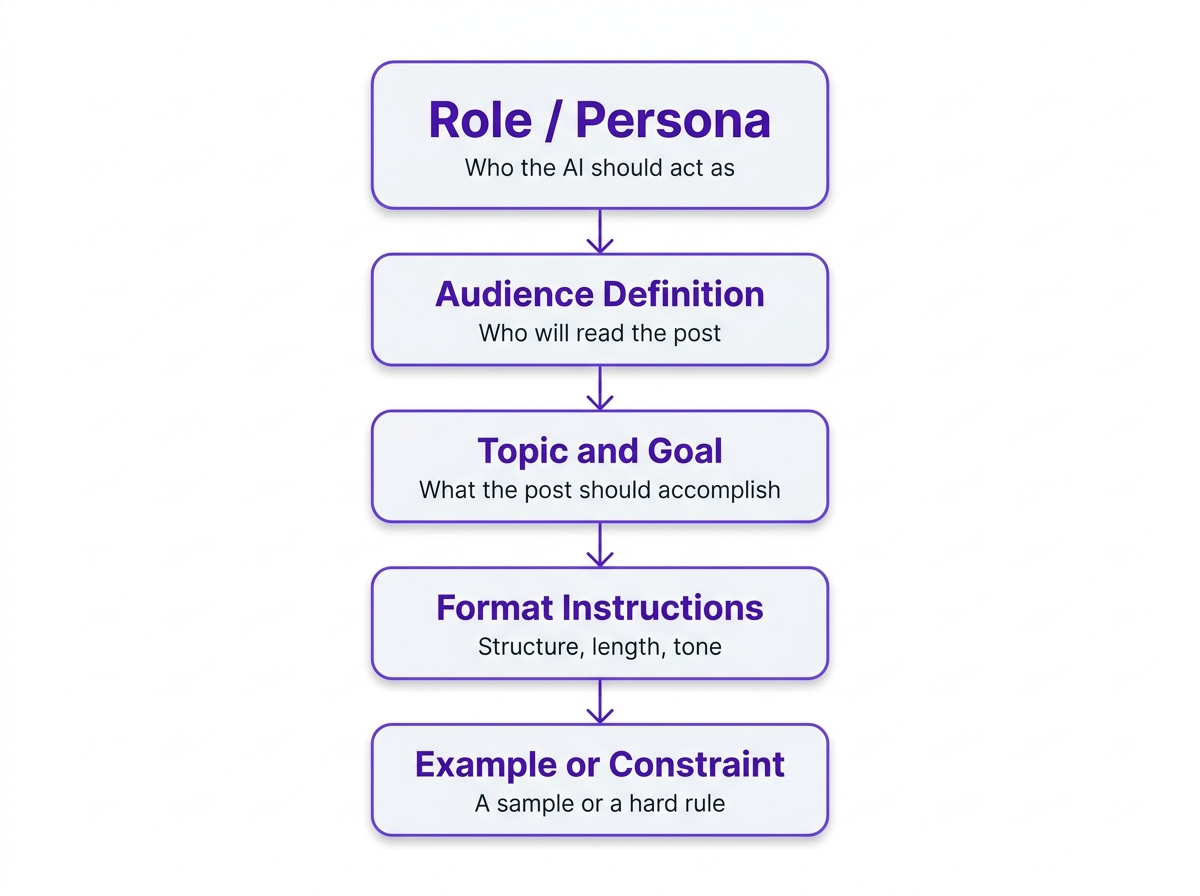
Across the strongest prompts I've worked with, you see the same bones: context, a clear goal, specificity, and at least one example or constraint. For blog work, I treat the blog prompt as a short creative brief. Not because frameworks are magic, but because they prevent the two failures behind most "AI slop": missing context and missing constraints.
| Component | What to Include | Weak Version | Strong Version |
|---|---|---|---|
| Role | Who the AI should act as | 'You are a writer' | 'You are a B2B content strategist with 8 years writing for SaaS companies' |
| Audience | Who will read the post | 'General audience' | 'Mid-level marketing managers at 50-200 person tech companies' |
| Goal | What the post should accomplish | 'Write about email marketing' | 'Convince readers that segmentation is worth the setup time' |
| Format | Structure, length, tone | 'Write a blog post' | '1,200 words, H2 subheadings, conversational but data-backed, no fluff intro' |
| Example/Constraint | A sample or a hard rule | (none) | 'Avoid listicles. Open with a specific scenario, not a definition.' |
| Each component narrows the AI's output space toward something actually useful. |
Two practical additions that most prompt templates miss. First, tell the model what the reader already tried. Something like "they've used Mailchimp for two years" or "they migrated to GA4 and the reports look wrong" gives the AI a starting point that isn't square one. Second, add one or two "do not" rules. Negative constraints are underrated. They stop the model from reaching for clichés, filler paragraphs, and that generic "in today's fast-paced world" opener nobody asked for.
If you want a ready-to-use starting point, Vizup's SEO blog writing prompt is built around exactly this structure, with fields for keyword targeting, audience definition, and tone already baked in.
Few-Shot Prompting: The Technique Most Blog Writers Ignore
Few-shot prompting means giving the AI one or two examples of what you want before asking it to produce something new. For blog content, it's underused to the point of being almost a secret weapon, and it's the single fastest way to close the gap between "sounds like AI" and "sounds like us."
Here's where most people get tripped up: they describe the voice in adjectives ("conversational, witty, authoritative") and then wonder why the output still sounds like a corporate explainer. Instead, paste in the first three paragraphs of a post you love. Then say, "Match this voice and structural approach for the following topic." The difference in output quality is not subtle. You're not just describing what you want. You're demonstrating it.
One caveat worth flagging: don't paste competitor content or proprietary material. Use your own published work, or write a short sample paragraph that captures the voice you're after. Even 100 words of example text makes a measurable difference in how the model handles tone, sentence rhythm, and paragraph structure.
How to Structure a Few-Shot Blog Prompt
The format is simpler than you'd think. Lead with your example text (labeled clearly as "Example"), then follow with your actual request. Something like:
"Example voice and structure (from our published blog): [paste 100-200 words]. Now write a 1,200-word post on [topic] for [audience]. Match the tone, sentence length variation, and paragraph structure of the example. Do not use listicle format. Include [primary keyword] naturally in the first 100 words and in at least two H2 headings."
That's it. You've given the model a concrete target instead of a set of abstract adjectives. I've seen this approach cut editing time by 30-40% on first drafts, which adds up fast when you're publishing weekly.
SEO Variables That Belong in Every Blog Prompt
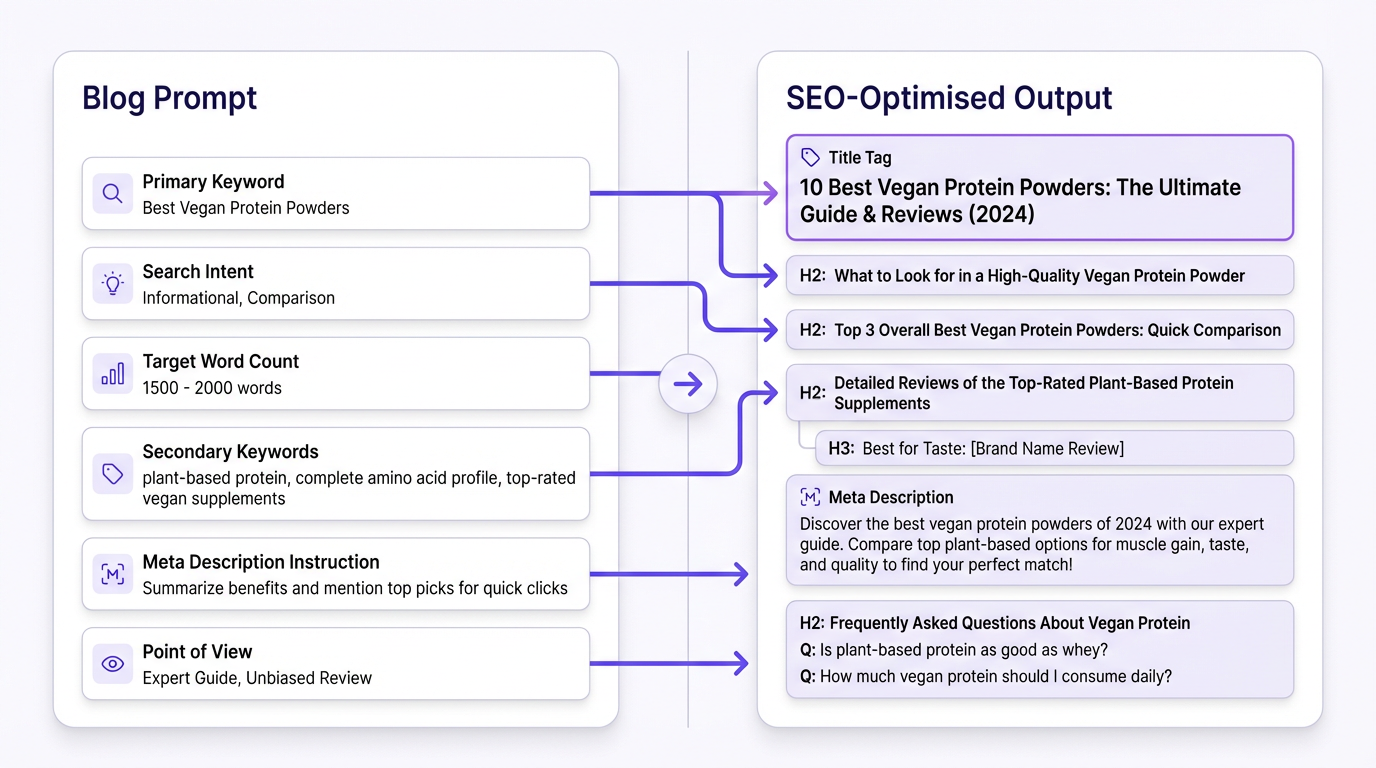
A lot of AI blog content fails not because it's poorly written but because it's optimized for nothing. Google's guidance is clear: their ranking systems reward original, high-quality content demonstrating E-E-A-T (expertise, experience, authoritativeness, and trustworthiness), regardless of how it's produced. The AI can write the post, but your blog prompt has to build in the signals that make it rankable.
SEO variables worth including in your blog prompt:
- Primary keyword and its search intent (informational, commercial, navigational)
- Secondary keywords or related entities to weave in naturally
- Target word count based on what's currently ranking for that query
- Instructions to include a meta description and suggested title tag
- Whether to add an FAQ section for long-tail query coverage
- An explicit instruction not to keyword-stuff (yes, you need to say this out loud)
One more thing I wish more teams would add: a "point of view" line. Not a hot take for the sake of controversy, just the angle that keeps the post from sounding like every other result on page one. Something like "Our position is that most teams over-invest in keyword research and under-invest in content briefs." If you don't supply that angle, the model will borrow the internet's consensus and call it a day.
If you're asking the AI to reason through messy SEO decisions (like picking an angle for a crowded keyword), add a constraint that forces tradeoffs. For example: "Choose one primary angle, justify it in 3 bullets, then write the outline to match." Models do better work when they have to commit to a direction rather than hedge across all of them.
Search Intent: The Variable Most Prompts Get Wrong
You can nail every other SEO variable and still produce content that ranks nowhere if the search intent is off. A blog prompt targeting "best project management tools" needs to produce a comparison post, not a tutorial. One targeting "how to set up Asana for a marketing team" needs step-by-step guidance, not a product overview.
Before writing the prompt, pull up the actual SERP for your target keyword. Look at what's ranking. Are the top results how-to guides? Listicles? Long-form comparisons? That tells you the intent Google has already validated. Build that intent into your prompt explicitly: "This post targets informational intent. The reader wants to learn how to do X, not compare products."
Where the Workflow Breaks Down (and How to Fix It)
According to AFFiNCO's 2026 data, 85% of marketers now use AI for content creation, with 74% using it for first drafts. That's a lot of prompts running every day. And the most common mistake across all of them? Treating the first output as the final output.
I've seen teams get an article that's 90% there and throw the whole thing out because one section felt off. Don't. Treat the first draft like you'd treat a junior writer's work. Mark the thin sections, call out the vague claims, then ask for a rewrite of one subsection at a time. Follow-up prompts like "Rewrite the intro to reference the reader's frustration with manual reporting" or "Add two common GA4 configuration mistakes and how to spot them" are where the draft turns into something publishable.
The Iterative Prompting Loop
Think of your prompting workflow as three passes, not one. The first prompt generates the draft. The second round of prompts (usually 2-4 targeted follow-ups) fixes specific weak spots: a bland intro, a section that's too surface-level, a conclusion that trails off. The third pass is human editing, where you add the original perspective, verify claims, and cut anything that still reads like filler.
This three-pass approach sounds slower, but it's actually faster than regenerating from scratch every time you're unhappy with the output. And the quality difference is significant.
A good blog prompt gets you a strong first draft, not a finished post. After generation, run the output through an AI content checker to catch generic phrasing, factual gaps, and anything that reads like it was averaged from a million similar posts. Then edit like a human, because you are one.
The other common failure point: writing a great prompt once and never revisiting it. Your prompt should be a living document. When a post underperforms, go back to the prompt first. Nine times out of ten, the issue is a missing constraint or an audience definition that was too broad.
If you're scaling this across a team or content calendar, the infrastructure matters as much as the individual prompt. Scaling AI content with Vizup covers how to build repeatable systems around prompt-driven content without sacrificing quality at volume.
Before You Write the Post: The Brief Step People Skip
Brief first, blog prompt second. The single habit that most consistently improves AI blog output is running a content brief prompt before the blog post prompt. It forces you to pick an angle, decide what you will not cover, and define what proof or examples you need. Five minutes on a brief saves the 45-minute "why is this so generic" editing session later.
A content brief doesn't need to be elaborate. At minimum, it should answer four questions: What's the primary keyword and search intent? Who is the reader and what do they already know? What's our angle or point of view? And what are 2-3 proof points (stats, examples, case references) we want included? Those proof points matter more than most people think. Without them, the model reaches for vague claims because it has nothing concrete to anchor on.
Once you have that brief, your blog prompt practically writes itself. You're not staring at a blank prompt field trying to think of everything at once. You're translating strategic decisions you already made into instructions the AI can follow.
Vizup's prompt for creating content briefs handles this step cleanly. Run it before your blog prompt and you'll notice the downstream output is sharper, more focused, and requires less editing.
And once the post is live, don't let it sit there doing one job. A content repurposing prompt can extend its life into social posts, email copy, or a short video script without starting from scratch.
Common Blog Prompt Mistakes (and What to Do Instead)
After working with dozens of content teams on their AI workflows, certain prompt mistakes come up again and again. Some are obvious once you see them. Others are subtle enough that teams repeat them for months before noticing the pattern.
Overloading the prompt with conflicting instructions is probably the most common. "Be concise but comprehensive, casual but authoritative, SEO-optimized but natural." The model tries to satisfy all of these at once and ends up in a bland middle ground. Pick your priorities. If you want conversational tone, say that and accept that the output won't sound like a white paper.
Another one: forgetting to specify what the reader should do after reading. A blog post without a clear next action (sign up, try a tool, read a related guide, change a specific behavior) tends to meander. The AI doesn't know where to land the plane, so it just... keeps circling.
Then there's the "set it and forget it" trap. Teams build one prompt template, use it for six months, and wonder why every post sounds the same. Your prompt library needs the same kind of maintenance as your content calendar. Review what's working quarterly, retire what isn't, and test new variations.
Frequently Asked Questions
How long should a blog prompt be?
Long enough to be specific, short enough to stay focused. Most effective blog prompts land between 80 and 200 words. Beyond that, you're often adding vague instructions that don't meaningfully change the output. Specificity matters more than length.
Should I use the same blog prompt for every post?
Use a base template and customize it per post. The role, format preferences, and brand voice can stay consistent. The audience, goal, keyword, and any post-specific constraints should change every time. A rigid one-size-fits-all prompt produces one-size-fits-all content.
What's the best way to test whether a blog prompt is working?
Run the same prompt three times and compare outputs. If you're getting meaningfully different results each time, the prompt is too open-ended. If all three outputs are nearly identical and match what you wanted, the prompt is doing its job. Consistency is the signal.
Can a good blog prompt replace a human editor?
No, and this is worth saying plainly. A well-crafted prompt reduces editing time significantly, but it doesn't eliminate the need for a human to review facts, add original perspective, and catch anything that reads like filler. Google's E-E-A-T standards reward genuine expertise, which still has to come from a person. You can explore Vizup's prompt library to see how different prompt types support, rather than replace, editorial judgment.
What's few-shot prompting and does it actually help for blog writing?
Few-shot prompting means including one or two examples of the output style you want before making your request. For blog writing, it's one of the most underused techniques available. Paste in 100-200 words from a post that matches your target voice, then ask the AI to match that approach for your new topic. The quality difference is noticeable, especially for tone and sentence rhythm.
Should my blog prompt include an FAQ section for SEO?
Yes, if you want to rank for long-tail queries and win featured snippets. Add 4-6 questions pulled from Search Console queries, "People also ask" boxes, and sales calls, then answer them in 40-70 words each. Put that instruction directly in the blog prompt so the model writes the FAQ in the same voice as the post.
The gap between AI content that ranks and AI content that gets ignored usually isn't the model, the topic, or even the editing. It's the blog prompt. Treat it as the most important document in your content workflow, not something you dash off in ten seconds, and the output quality follows. Start with the five-component structure above, show the model what "good" looks like with a few-shot example, layer in your SEO variables, then iterate with follow-up prompts until the draft sounds like your team actually wrote it.
