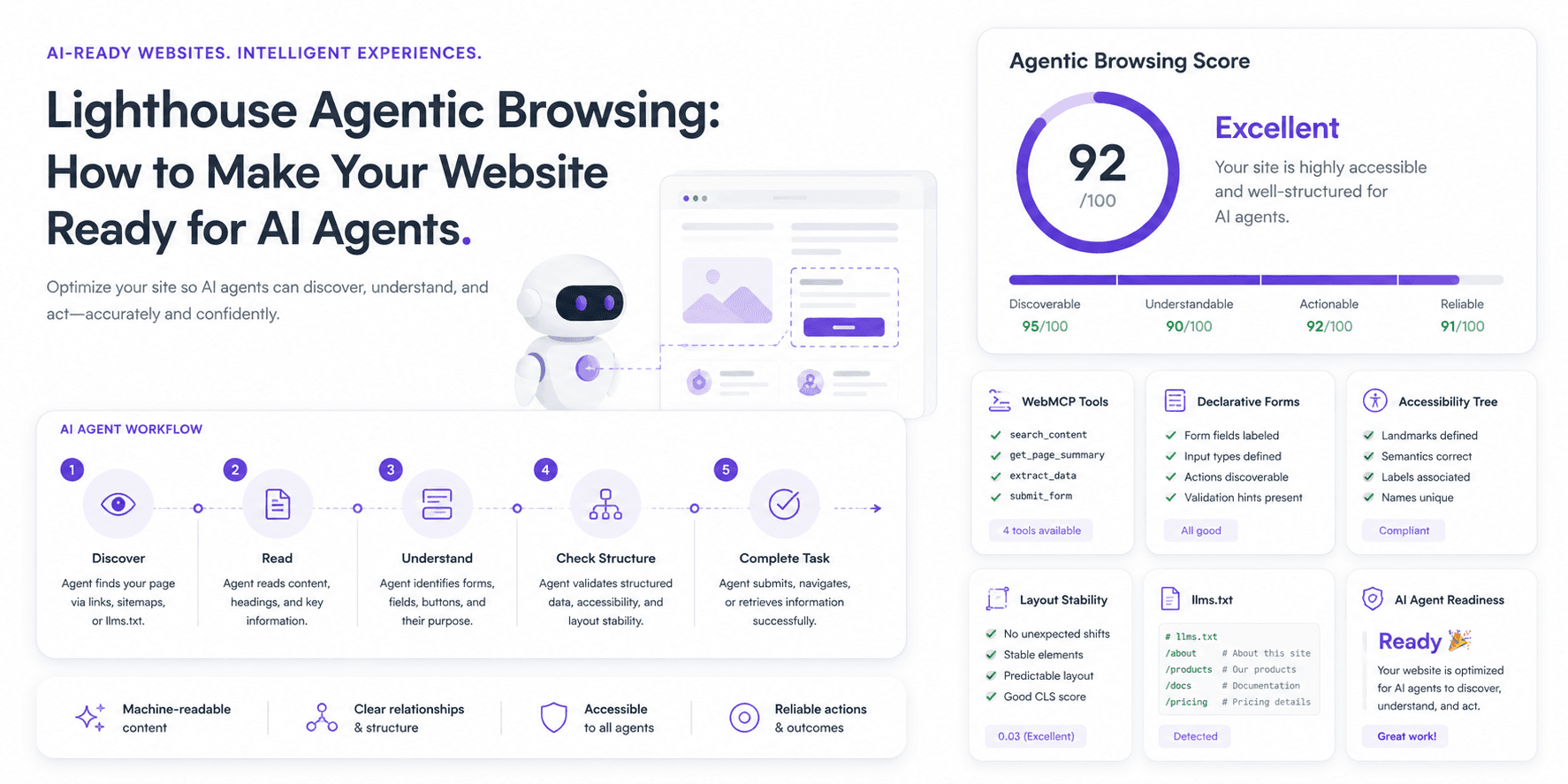
For years, the web playbook has been simple: build for search crawlers and human readers. That playbook is starting to fray. The next “user” you’ll need to account for isn’t a person at all, but an AI agent, software that can read, interpret, and operate a site on someone’s behalf, not just index it for a results page. Google’s Lighthouse Agentic Browsing documentation, updated in May 2026, gives one of the clearest early views of what agent readiness looks like.
If SEO already feels like a treadmill, this sounds like another belt just got added. The twist is that agent readiness isn’t a bag of new hacks. It’s mostly a return to basics: the technical hygiene many teams know they should prioritize, but rarely get rewarded for until something breaks.
What Is Lighthouse Agentic Browsing?
Agentic Browsing is an experimental audit category inside Google’s Lighthouse tool. Unlike the familiar Performance or SEO panels, it doesn’t hand you a neat 0–100 score. It checks whether your site is legible and dependable for machine interaction, more “are we ready?” than “how did we do?” The question it’s trying to answer is straightforward: can an AI agent navigate your site and complete tasks without getting tripped up? The audit emphasizes concrete, actionable signals over a single, made-up grade.
Why Agentic Browsing Matters for SEO and AEO
Traditional SEO is about getting a page in front of a person. That’s visibility. Agentic browsing changes the moment of truth: the “click” may be an agent, and the goal may be an action (pricing lookup, form submission, booking) completed without a human ever touching the page. That’s where Answer Engine Optimization (AEO) and AI agent website optimization start to matter. Ranking is table stakes; being operable by software is the new friction point.
For brands, the stakes are practical, not abstract. When an AI summarizes what you do or lines you up against a competitor, it’s often pulling details from how it can interact with your site. If agents struggle to interpret pricing, forms, or key conversion paths, it may create friction in how your brand is discovered, understood, or acted on in AI-driven journeys. A machine-readable site influences AI search visibility, brand mentions, and whether your pages get cited accurately in AI-generated answers.
How Lighthouse Agentic Browsing Scoring Works
This category is scored differently, and that’s intentional. The “agentic web” is still taking shape, so Lighthouse uses a system that’s easier to evolve than a single universal number. A typical report includes:
- Fractional Score: The headline signal shows how many checks you passed out of the total (for example, “4 out of 6 audits passed”).
- Pass/Fail Status: Each audit returns a clear pass or fail against a specific technical requirement.
- Informational Counts: Some items just tally what exists on the page (like the number of forms) to add context rather than judgment.
Google’s own Lighthouse agentic browsing scoring documentation frames this as actionable feedback, not a definitive ranking system. The point is to surface places where your site becomes fuzzy or ambiguous to a machine.
The Main Areas Lighthouse Checks
The audit clusters around a handful of fundamentals that matter when software is trying to understand a page well enough to use it. If you’re aiming for an agent-ready site, these are the pieces that have to hold together.
WebMCP Integration
WebMCP (Web Model Context Protocol) is a proposed standard for telling an AI agent, explicitly, what your site can do. Instead of forcing the agent to infer meaning from UI, your site can declare: this is a tool to “book a table,” and it expects a date, time, and party size. In practice, it turns key website actions into a structured, API-like interface that agents can use more reliably. Lighthouse checks for registered WebMCP tools and validates their schemas for WebMCP schema validity.
Declarative Forms
Forms are where agents tend to faceplant, especially when the page demands guesswork. Is the date “MM/DD/YYYY” or “DD-MM-YY”? Should the country be “USA” or “United States”? Declarative metadata (often connected to WebMCP) lets the form spell out expectations so an agent can fill it out consistently instead of stumbling through trial and error. Lighthouse flags forms missing declarative WebMCP.
Accessibility for Agents
This is the part many teams underestimate. AI agents don’t “see” your site the way a person does; they frequently rely on the accessibility tree, the same structure screen readers use. If a button lacks a label, or an input isn’t programmatically tied to its name, a screen reader user is blocked and an AI agent is, too. Good accessibility for AI agents is simply good accessibility, as explained in the documentation for accessibility for agents. And unlike some future-facing standards, it’s work you can start shipping immediately.
Layout Stability
Cumulative Layout Shift (CLS) has been in Core Web Vitals for years, but agents raise the cost of getting it wrong. Many agents operate via coordinate-based clicks or screenshots. If a cookie banner loads late and shoves the “Submit” button down after the agent has already committed to a click target, the agent doesn’t “adapt”, it clicks the wrong thing. Strong layout stability for agents reduces these avoidable, mechanical failures.
llms.txt
The llms.txt file is a proposed standard that gives AI crawlers a simple, machine-readable snapshot of your site: structure, key pages, and purpose. It’s similar to a sitemap, but with more narrative context. It isn’t an official standard embraced by every LLM, but it’s low effort and sends a clear signal about what matters on your site. The official llms.txt Lighthouse audit checks for this file at the domain root. It is optional right now, but adding it can make your site easier for agents to understand and avoids issues if the file is expected but misconfigured. Details on the broader llms.txt proposal are at llmstxt.org.
How This Changes Website Optimization
For the last decade, the advice has been familiar: publish great content, earn quality backlinks, and you’ll be fine. That still matters, often a lot. What’s changing is the boundary of what “technically sound” means. A site that’s ready for what’s next needs more than fast pages and clean titles.
It needs semantic HTML that machines can trust. It needs accessible components with unambiguous labels. It needs layouts that don’t jump around mid-interaction. And it needs to start exposing machine-readable metadata about what users can actually do on the site. The mindset shift is subtle but real: optimizing for crawlers that index is not the same as optimizing for agents that act. That’s the practical center of AI crawler optimization and answer engine optimization.
| Focus Area | Traditional SEO (for Humans & Crawlers) | Agentic Readiness (for AI Agents) |
|---|---|---|
| Primary Goal | Rank well in search results and earn clicks. | Let an agent complete a task successfully. |
| Key Signal | Keywords, backlinks, content quality, UX. | WebMCP metadata, semantic HTML, accessibility tree quality, and layout stability. |
| Interaction Model | Humans read and click around. | Machines interpret intent and execute steps. |
| Failure Mode | Lower rankings and less traffic. | Broken tasks, wrong data pulled, brand misrepresented. |
Agentic Browsing Checklist for Website Teams
You don’t need to torch your roadmap to make room for this. Treat it as another review lens, one that pressures the same parts of your stack that already cause user pain. A practical checklist:
- Add clear labels to all buttons and form fields. Start here. If nothing else ships, ship this. It helps real users and agents at the same time.
- Use semantic HTML. Use
<nav>,<main>, and<button>correctly. Don’t fake buttons with<div>tags; it’s brittle and makes the UI harder for machines to parse. - Audit and improve your accessibility tree. Run Lighthouse, find what’s missing, and fix it. You get accessibility improvements, SEO upside, and agent readiness in one pass.
- Hunt down and kill layout shifts. Search Console’s Core Web Vitals report is a good starting point. Stability is what makes automation reliable.
- Review your forms for agent readability. Can an agent understand your date picker, or is it a custom JavaScript trap? When in doubt, simpler wins.
- Explore WebMCP integration for key actions. Don’t try to instrument everything. Pick one high-value action like “add to cart” or “request a demo” and start there.
- Add an llms.txt file. It’s quick to implement and satisfies a Lighthouse check, while signaling intent to AI systems.
- Monitor AI search visibility. Track whether you show up in AI Overviews and other answer engines. Baselines matter. You can make your content discoverable in AI engines with a few targeted efforts.
- Track citations and understanding. Check whether AI systems summarize your services correctly and cite the right pages as sources.
Where Vizup Fits In
Lighthouse is useful for one slice of the problem: page-level technical readiness for agentic browsing. It tells you whether the plumbing is there. What it won’t tell you is what AI engines are actually saying about your brand once they leave your site and synthesize an answer. That’s a different layer of visibility. Lighthouse helps you build an agent-ready website; Vizup is positioned to track your brand’s real-world presence and AI search visibility in the agentic era. Put together, you get both the implementation checklist and the external feedback loop.
Final Takeaway
Lighthouse Agentic Browsing reads like an early warning flare. It suggests the web is heading into a phase where sites aren’t just documents for humans or inventories for crawlers, they’re applications that AI agents operate. Teams that start now, tightening structure, accessibility, and layout stability, will be easier for agents to use and harder for answer engines to misunderstand.
Frequently Asked Questions
What is Lighthouse Agentic Browsing?
It’s an experimental audit category in Google Chrome’s Lighthouse tool that evaluates whether a site is set up for interaction by AI agents and other automated systems.
Does Lighthouse Agentic Browsing affect Google rankings?
Google hasn’t said it’s a direct ranking factor. Right now, it’s better read as a readiness signal for agent usability, not a confirmed lever for SEO rankings.
What is WebMCP?
WebMCP is a proposed standard that lets a website describe its functions (like a search box or booking flow) as structured tools an AI agent can use consistently.
What is llms.txt?
llms.txt is a proposed machine-readable file that helps AI systems understand a site’s purpose and key pages, making it easier for machines to interpret your content.
Why does accessibility matter for AI agents?
AI agents often rely on the accessibility tree to identify elements like buttons, labels, and form fields. If those relationships aren’t clear for assistive tech, agents tend to stumble in the same places.
How is Agentic Browsing different from normal SEO?
Normal SEO focuses on helping search engines crawl, understand, and rank pages for human searchers. Agentic Browsing focuses on whether AI agents can understand a page, interact with forms and buttons, and complete tasks reliably.
Should every website add WebMCP now?
Not necessarily. Since WebMCP is still experimental, most teams should first improve accessibility, layout stability, forms, semantic HTML, and machine-readable content. After that, they can explore WebMCP for high-value actions like booking, form submission, or product search.
How can Vizup help with this?
Lighthouse can help check whether a website is technically ready for AI agents. Vizup helps with the external visibility layer: tracking how a brand appears in AI-generated answers, whether it gets mentioned, and which pages are being cited across answer engines.
