If you’ve been running Facebook and Instagram ads for a while, you probably remember the old “video views” objective. For years it was the obvious pick when you had one job: get people to watch. Open Meta Ads Manager now, though, and the interface tells a different story. The structure has been reorganized, and if you’re hunting for a big button labeled “Video Views,” you can end up looping through menus longer than you’d like. Here’s the official 2026 reality: where video views lives now, how to set it up, and which numbers are worth paying attention to.
The confusing part is mostly naming. You can still run campaigns built to rack up video views. Meta just tucked that workflow into a tighter, outcome-first framework.
What Is the Meta Ads Video Views Objective?
The classic Facebook video views objective did exactly what it said on the tin: it signaled to Meta’s system that you cared about watch behavior, and it should find people likely to stick with a video ad. The goal was simple, maximize real viewing, not just delivery. That intent is still there; what’s changed is where Meta chose to put the controls.
Meta now pushes advertisers into six umbrella objectives: Sales, Leads, Engagement, App Promotion, Traffic, and Awareness. “Video Views” isn’t its own top-level choice anymore. Instead, you pick the broader outcome that fits what you’re trying to accomplish, then set a video-focused performance goal during setup. It’s a small UI change with a real strategic nudge: Meta wants you to frame “getting views” as a means to something else (awareness, engagement, or future retargeting) rather than the whole point.
Is “Video Views” Still a Separate Objective in 2026?
No, and that’s what throws even experienced advertisers. In 2026, when you hit “Create Campaign,” “Video Views” won’t appear as a standalone objective. Meta rolled it into the newer consolidated set.
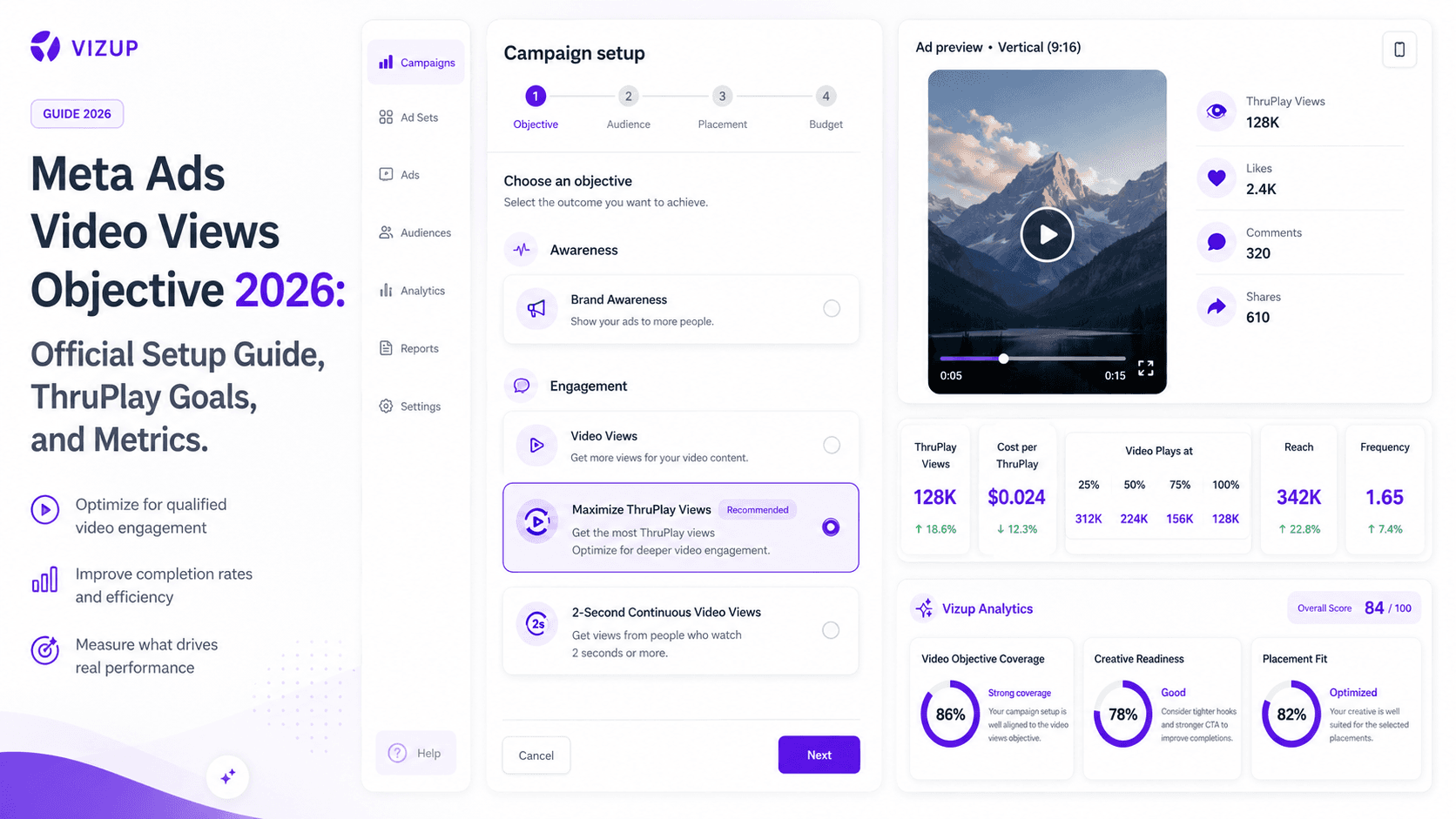
In practice, a Meta video views campaign now starts with either Awareness or Engagement. After that choice, you tell Meta what “success” means by selecting a video views performance goal. The two you’ll see most often are ThruPlay and 2-second continuous video views. So the dedicated button is gone, but the workflow is arguably cleaner: you can still optimize for views, while anchoring the campaign to a clearer business intent.
When Should You Use Video Views Campaigns?
Too many brands light money on fire with video view campaigns when what they actually need is revenue next week. That mismatch almost always ends in frustration. Video views is a top-of-funnel tool: it’s for attention, education, and building an audience you can come back to later, not for squeezing immediate conversions out of cold traffic. It tends to work best in a few specific situations:
- Launching a brand video: You invested in a polished story. A video views campaign helps make sure it gets seen, not just posted.
- Building retargeting audiences: One of the strongest uses. As a best practice, you can run a low-cost views campaign, then build a custom audience of people who watched 50% or more. That group becomes your warmer pool for a later conversion campaign.
- Testing creative hooks: Before you commit serious budget, run 3–4 variations. The one with the best retention and the lowest cost per ThruPlay earns the bigger spend.
- Promoting product explainers: If your product needs context, video views is a straightforward way to put a demo in front of a cold audience.
- Driving top-of-funnel awareness: When the job is simply “get the name out there,” a well-targeted video campaign is often the most cost-effective route.
- Measuring engagement before a big push: Gauge how people react to the message before you ask them to buy. It’s a relatively low-stakes way to pressure-test creative.
Meta Video Views vs. Awareness vs. Engagement
Because you’ll be using Awareness or Engagement to run view-focused campaigns, the distinction matters. Your objective is Meta’s definition of success, and the system optimizes toward whatever you pick. Meta’s own guidance is blunt: choose the objective that matches your business outcome. Here’s the practical difference compared with other common goals:
| Goal | Best For | Main Metric |
|---|---|---|
| Awareness | Max reach and stronger brand recall. | Reach, Impressions, Ad Recall Lift |
| Engagement (for Video Views) | Driving video plays plus social actions like comments and shares. | ThruPlay, 2-second continuous video plays |
| Traffic | Pushing people from Meta to a site or app destination. | Link Clicks, Landing Page Views |
| Sales/Leads | Getting a specific conversion: purchases or form fills. | Purchases, Leads, Cost Per Result |
What Is ThruPlay in Meta Ads?
ThruPlay is both a performance goal and a billing option for video ads. When you optimize for it, you’re asking Meta to find people likely to watch the full video if it’s under 15 seconds, or at least 15 seconds if it’s longer. It’s the default choice most advertisers land on when they run video views through the Engagement objective, because it’s designed to prioritize viewers who actually stick around. Meta’s official definition is on ThruPlay here.
What Are 2-Second Continuous Video Views?
This is the looser, more reach-friendly optimization option. A 2-second continuous video view counts when someone watches for at least two consecutive seconds with at least 50% of the video’s pixels on screen. It’s useful when your creative is short and the message lands immediately, more “hit them fast” than “hold attention.” Meta’s explanation is in its documentation on 2-second continuous video plays.
How to Set Up a Meta Video Views Campaign
Here’s the common current path for setting up a video-view-focused campaign in Meta Ads Manager. Exact options can vary by account, placement, buying type, and campaign setup. If you’re still thinking in terms of the older “Video Views” objective, this is the updated path. Meta’s own guide on creating video ads follows the same flow.
- Open Meta Ads Manager and click Create.
- Choose your objective. Pick Engagement if you want ThruPlay optimization, or Awareness if you’re aiming for the 2-second view goal.
- Select your performance goal. Under Engagement, set conversion location to 'On Your Ad' and engagement type to 'Video views', then choose 'Maximize ThruPlay views'. Under Awareness, select 'Maximize 2-second continuous video views'.
- Choose placements. Start with Advantage+ Placements so Meta can allocate delivery. Tighten this later once you have data.
- Upload your video creative. Use mobile-first assets (9:16) when possible.
- Set your budget and schedule. Choose daily or lifetime and set dates.
- Review and launch. Confirm the settings, publish, and then watch performance in Ads Manager.
Best Meta Video Ad Placements for Video Views
Advantage+ placements are usually the right default, but it helps to know where views tend to come from. Most of the time, the strongest placements are:
- Facebook and Instagram Feeds
- Facebook and Instagram Reels
- Stories (both platforms)
- In-stream video (where available)
Use vertical 9:16 creative that actually fits the screen on mobile. A 16:9 landscape spot jammed into Stories looks like an afterthought, and performance often follows. For the exact dimensions and safe zones, see the latest Meta ad specs for 2026. It’s the kind of reference that keeps you from wasting time on preventable formatting problems.
Key Metrics to Track for Meta Video Views Campaigns
Impressions are an easy number to screenshot and a terrible one to obsess over. If people aren’t watching, you’re just buying scroll-bys. These are the Ads Manager metrics that actually explain what’s happening:
- ThruPlay / Cost per ThruPlay: The headline metric for most view campaigns: how many meaningful watches you’re getting, and what you’re paying for each.
- 2-second continuous video plays: The core KPI for Awareness campaigns optimized around quick views.
- Video plays at 25%, 50%, 75%, 95%, 100%: Your retention curve in numbers. Big drop-offs early usually mean the opening isn’t earning attention.
- Average Video Play Time: A blunt reality check. If it’s 3 seconds on a 60-second video, the edit is the problem.
- Reach and Frequency: How many unique people you hit, and how often. Frequency climbing too high is a common path to fatigue.
- Engagement Rate: Likes, comments, and shares can signal resonance, or that you’ve struck a nerve.
- Audience Retention/Drop-off Chart: The graph version of the truth. Use it to diagnose where viewers bail.
Meta documents these definitions and calculations on its Meta's official video metrics page.
Common Mistakes to Avoid
Most advertisers collect these mistakes the hard way. You don’t have to:
- Choosing video views when you mean sales. If you need purchases, use the Sales objective. Don’t ask a top-of-funnel campaign to do bottom-of-funnel work.
- Optimizing only for cheap views. A one-cent view from an audience you can’t sell to is just noise. Track cost per quality view, not the cheapest possible count.
- Ignoring retention rate. A million 3-second views can be less valuable than 10,000 ThruPlays. The drop-off chart matters more than the raw view total.
- Using long, cinematic intros. You don’t have 10 seconds to set the scene. Earn the next three seconds immediately.
- Not creating retargeting audiences. The biggest missed opportunity. The long-term value is often the warm audience you build for the next campaign.
- Reusing one format everywhere. That 16:9 hero video can look awful when cropped into a 9:16 Story. Build assets per placement.
- Confusing specs with strategy. Dimensions are table stakes; choosing the right objective is the strategy. Don’t mix up your Meta video ad specs with the decision of when to run views versus conversions.
Meta Video Views Campaign Checklist
Right before you hit “Publish,” sanity-check the basics:
- Clear campaign goal (e.g., build a retargeting audience of 100k users).
- Correct objective selected (Awareness or Engagement).
- ThruPlay or 2-second view goal chosen.
- Hook is packed into the first 3 seconds.
- Creative is mobile-first, 9:16 format.
- Captions are added or enabled so the video can still work when someone watches without sound.
- Text and logos are within placement-safe zones.
- A plan exists to use the video viewers for retargeting.
- A calendar reminder is set to review metrics in 3-5 days.
FAQs
Does Meta still have a Video Views objective in 2026?
Not as a standalone objective you can pick at the top level. Video views now lives inside the Awareness and Engagement objectives, where you choose a video-focused performance goal such as ThruPlay.
What is the best objective for video views on Meta?
Pick based on what you want the system to optimize for. Use Engagement when you want ThruPlay (generally the better signal for quality viewing). Use Awareness when the priority is broad reach and you want to optimize for 2-second continuous video views.
What is the difference between ThruPlay and 2-second video views?
ThruPlay is optimized around longer viewing: at least 15 seconds, or the full video if it’s shorter than 15 seconds. A 2-second continuous video view only requires two consecutive seconds of watch time, which fits broad awareness and very short creative.
Should I use video views or engagement objective?
Use the Engagement objective when your goal is video views driven by ThruPlay. Inside Engagement, set the engagement type to 'Video views' so Meta can optimize delivery toward ThruPlay views.
Are video views useful for retargeting?
Yes, this is one of the best reasons to run them. Build a custom audience of people who watched a meaningful chunk of the video (for example, 50% or more), then retarget that warmer group with a Sales or Leads campaign.
