
I once spent two days on a product video for a client launch. The edit was tight, the music hit perfectly, and the call to action was crystal clear. Then we uploaded it to Meta Ads Manager, and the preview looked like it was filmed through a screen door. The aspect ratio was wrong, text was cropped, and the delivery team wanted to know why their creative was rejected. That wasn't an ignorance problem. It was a handoff problem between production and campaign setup. This guide treats meta video ad specs not as a checklist you tape to a monitor, but as infrastructure you build permanently into your workflow.
This is written for media buyers, creative producers, and marketing ops leads who are tired of re-Googling Facebook video dimensions before every campaign launch. The sections below move from a universal technical baseline through placement-specific specs, common mistakes, workflow integration, and advanced edge cases. Jump to whatever section solves your current problem.
What's covered:
- Why spec mismatches keep happening, even to experienced teams
- The universal technical baseline: Facebook video format, codec, and file requirements
- A full reference table of Facebook video ad size and dimensions by placement
- Feed and In-Stream specifics, where most budget actually goes
- Stories and Reels vertical specs, including safe zones
- The most common Facebook video size limit mistakes (and how to avoid them)
- How to bake specs into your production workflow so you stop thinking about them
- A real-world example: one video, five placements
- Advanced edge cases: Advantage+ cropping, captions, codec nuances
- FAQ and key takeaways
Why Meta Video Ad Specs Keep Tripping Up Good Teams
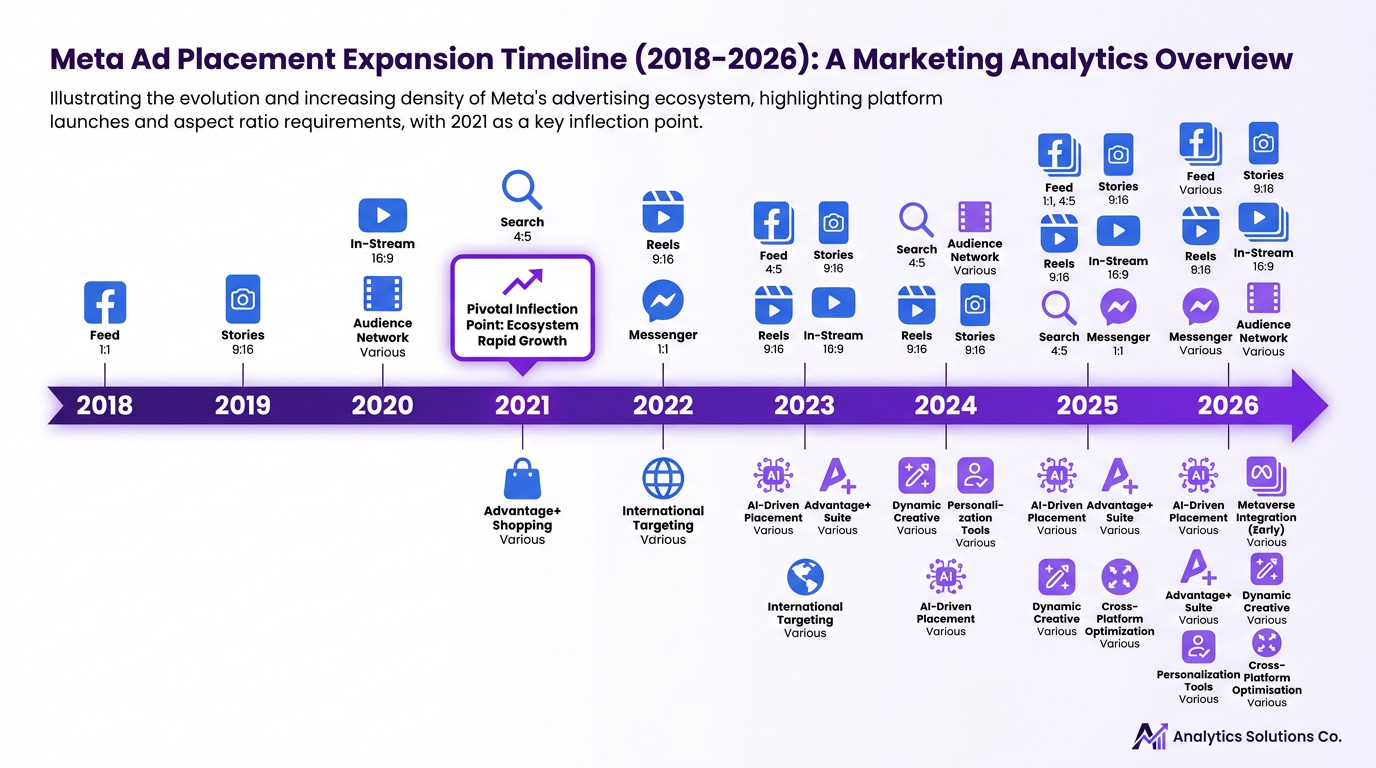
The real issue isn't that teams don't know specs exist. Meta's placement ecosystem has expanded dramatically while most production workflows haven't kept pace. Around 2021, the “one video fits all” era effectively ended. Meta now serves ads across more than 15 distinct placements, each with its own preferred aspect ratio, safe zone, and length expectation. A creative team working two weeks ahead of campaign setup is making decisions without knowing which placements the media buyer will ultimately activate. That gap is where spec problems originate.
The downstream cost is concrete. A cropped CTA means wasted spend on impressions that never convert. A rejected upload blows a launch timeline. A video that technically passes Meta's review but looks wrong in placement erodes brand trust before a single click happens. More spec-sheet awareness alone doesn't fix this. The fix is structural: specs need to live inside the production process, not outside it.
The Foundation: Facebook Video Format, Codec, and Core Requirements
Before diving into placement-specific guidance, there's a universal baseline that applies across nearly every Meta surface. These are the non-negotiable technical requirements every video asset must meet, according to Meta's own documentation:
Universal technical baseline for Meta video ads:
- Container: MP4 or MOV
- Video codec: H.264 (preferred), with frame rates at or below 30fps (up to 60fps supported)
- Audio: AAC stereo at 128kbps or higher
- Maximum file size: 4GB across all placements (though a well-encoded file should rarely exceed 500MB)
- Resolution: 1080p is the practical standard for quality and processing efficiency
A critical point worth emphasizing: a well-encoded 200MB file is indistinguishable from a 3.8GB file after Meta's re-encoding pipeline processes it. Bigger files do not mean better quality in delivery. They just mean slower uploads and more room for compression artifacts.
Facebook Video Ad Size and Dimensions by Placement: The Reference Table
| Placement | Aspect Ratio | Recommended Resolution | Max File Size | Video Length Limit | Supported Formats | Safe Zone Notes |
|---|---|---|---|---|---|---|
| Feed (Facebook) | 1:1 or 4:5 | 1080x1080 or 1080x1350 | 4GB | 1 sec - 241 min (15-30 sec recommended) | MP4, MOV | Keep text/CTA within center 80% of frame |
| Stories (Facebook) | 9:16 | 1080x1920 | 4GB | 1-15 sec | MP4, MOV | Top 14% and bottom 20% reserved for UI overlays |
| Reels (Facebook) | 9:16 | 1080x1920 | 4GB | Up to 90 sec | MP4, MOV | Top 14% and bottom 35% reserved; keep key content in center |
| In-Stream (Facebook) | 16:9 | 1280x720 minimum | 4GB | 5 sec - 10 min | MP4, MOV | First 5 seconds critical; no safe zone restrictions |
| Search Results | 1:1 | 1080x1080 | 4GB | 1 sec - 241 min | MP4, MOV | Square format performs best; minimal UI overlap |
| Messenger Stories | 9:16 | 1080x1920 | 4GB | 1-15 sec | MP4, MOV | Same safe zone rules as Facebook Stories |
| Audience Network | 16:9, 1:1, or 9:16 | Varies by publisher | 4GB | Up to 30 sec recommended | MP4, MOV | Flexible; 1:1 safest across publisher inventory |
| Sources: Meta Business Help Center and Vizup Meta Ad Specs 2026 guide. Length recommendations reflect performance norms, not hard platform limits. |
The table gives you the numbers. The next sections cover what to actually do with them, starting with the placements where most ad budgets are concentrated.
Feed and In-Stream: Where Most of Your Budget Goes
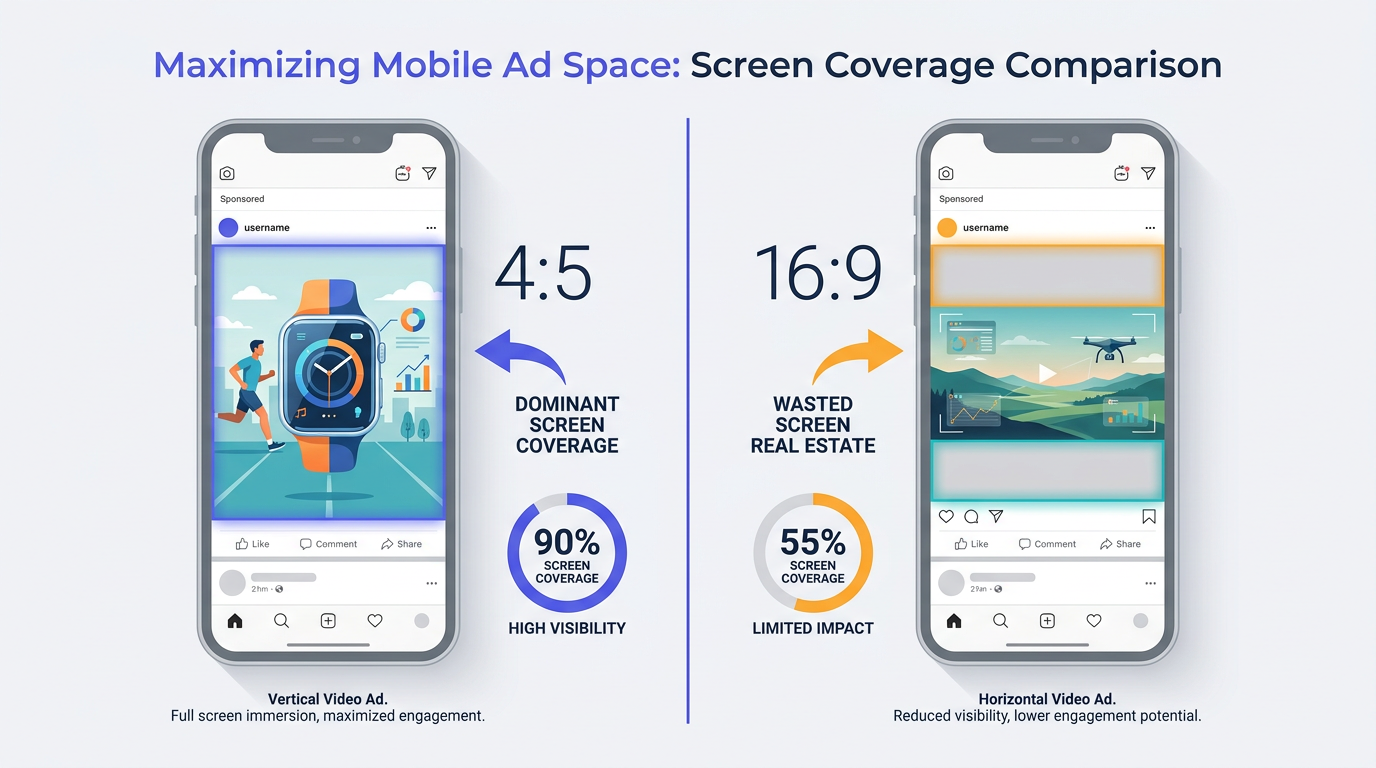
Feed and In-Stream together typically account for 60 to 80 percent of spend in broad-targeting campaigns. Getting these two placements right matters more than anything else in your spec workflow.
For Feed, the 1:1 vs. 4:5 decision deserves careful consideration. A 4:5 video (1080x1350 pixels) takes up more vertical space on a mobile screen, which tends to drive stronger performance for direct-response campaigns on Facebook. But if your campaign also runs on Instagram Feed, 4:5 can get cropped differently depending on placement. Here's the practical rule: for Facebook-only campaigns, go 4:5. For cross-platform campaigns that include Instagram, 1:1 is your lowest-risk option.
In-Stream is a fundamentally different context. Your video is interrupting content the user actively chose to watch, which changes everything about how the creative should be structured. The first five seconds need to deliver a reason to keep watching before the skip button appears. Most guides treat In-Stream as just another 16:9 placement. It isn't. It's the one placement where the opening frame matters more than the closing CTA.
Going Vertical: Facebook Video Specs for Stories and Reels
9:16 is non-negotiable for Stories and Reels. There's no workaround that makes a horizontal video look intentional in a full-screen vertical placement. The technical spec is 1080x1920 pixels, but the more important detail is the safe zones.
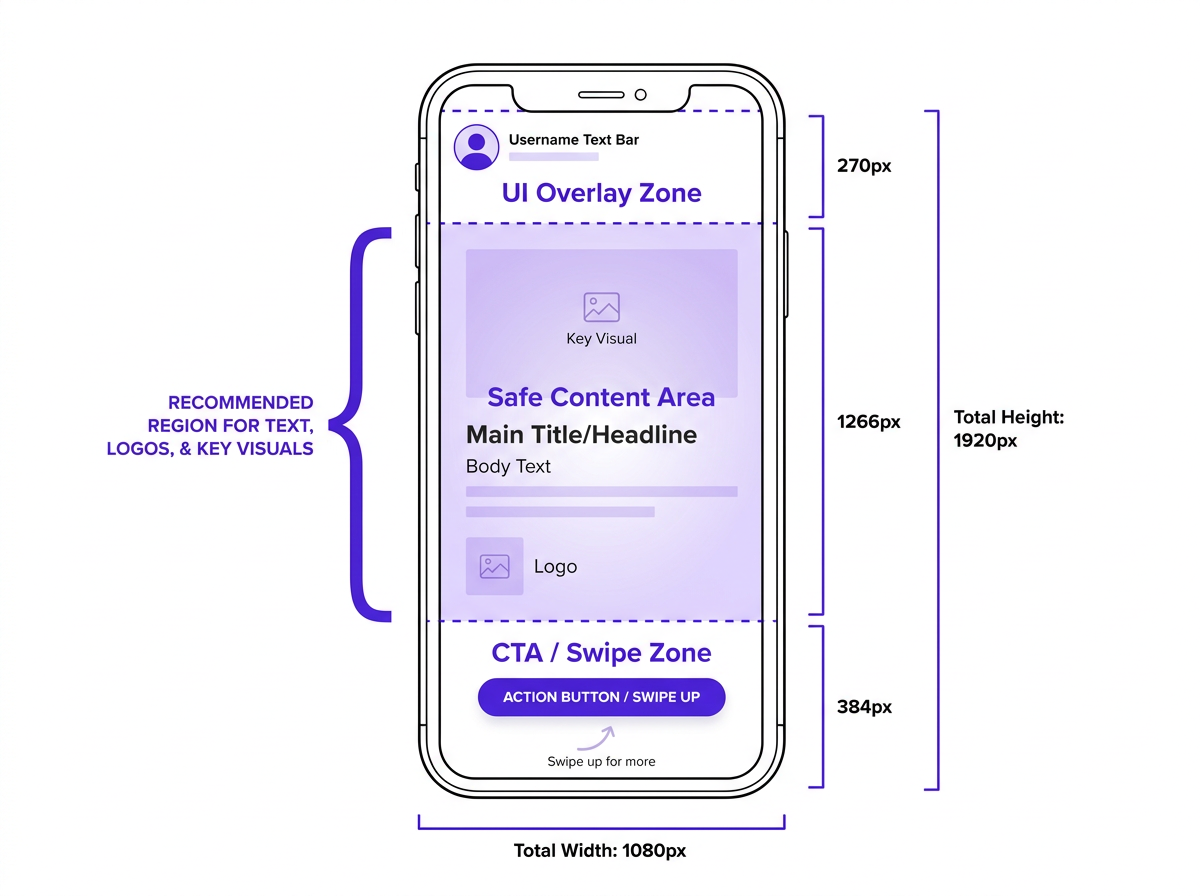
For Stories, the top 14% of the frame is reserved for the profile picture and username overlay. The bottom 20% is where the swipe-up prompt or CTA button appears. Any text or logo placed in those zones will be obscured in delivery. Reels extends the bottom reserved area to roughly 35% because the Reels UI is more complex. On a 1080x1920 canvas, the practical safe zone for key content runs from approximately 270px from the top to 648px from the bottom.
Here’s an opinionated take, based on running hundreds of vertical video tests: Reels ads that look like polished commercials almost always underperform. The spec isn't just technical, it's cultural. A native-feeling vertical video, shot on a phone with text overlays baked into the edit in the same style as organic content, consistently beats a slick 16:9 video that's been awkwardly cropped and repurposed. Spec compliance gets you into the placement. The creative approach determines whether anyone actually watches.
What Most People Get Wrong About Facebook Video Size Limits
Three mistakes come up repeatedly, and none of them stem from ignorance of the rules. They come from assumptions that sound logical but don't hold up in practice.
Mistake #1: Exporting at maximum bitrate to “preserve quality.” Meta re-encodes every video after upload. A 3.8GB file doesn't look better in delivery than a well-encoded 200MB file. It just takes longer to upload, longer to process, and introduces more opportunity for encoding artifacts during Meta's compression pass. Export clean, not large. Target 15 to 30 Mbps for 1080p content.
Mistake #2: Treating the Facebook video length limit as a creative ceiling. Feed technically supports up to 241 minutes, a number that is irrelevant to performance. With up to 85% of Facebook videos watched without sound, and average watch times in Feed measured in seconds, anything beyond 30 seconds needs to earn every additional frame. Shorter is almost always better unless you have data proving otherwise for your specific audience.
Mistake #3: Using a single thumbnail image across all placements. A thumbnail that works at 1:1 will be cropped awkwardly at 9:16. Either upload placement-specific thumbnails or let Meta's auto-selection run on placements where you haven't customized. Don't let a default choice undermine a well-built creative.
Building Meta Video Ad Specs Into Your Production Workflow
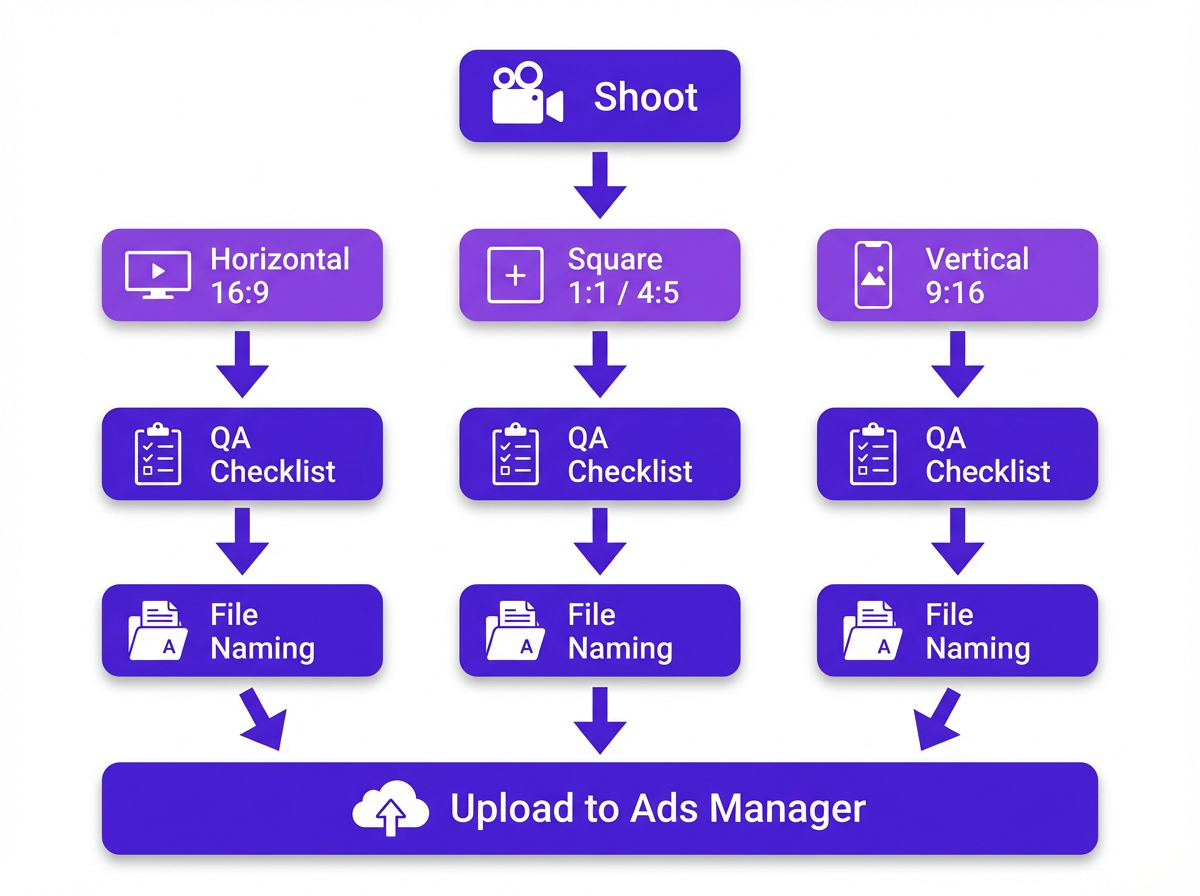
Knowing specs is table stakes. The real efficiency gain comes from embedding them so deeply into your process that nobody has to look them up. Three concrete steps get you there.
Step 1: Create export presets in your editing tool for each placement family. In popular editing tools like Premiere Pro or DaVinci Resolve, you can save custom export settings. Build three presets: Horizontal (H.264, 1280x720 minimum, 16:9), Square (H.264, 1080x1080, 1:1), and Vertical (H.264, 1080x1920, 9:16). Name them clearly and share them across your team so every editor works from the same baseline.
Step 2: Build a pre-upload QA checklist and assign it to whoever touches the file last before Ads Manager. The checklist should cover:
Pre-upload QA checklist:
- Resolution matches the target placement spec
- H.264 codec confirmed
- File size under 4GB (ideally under 500MB)
- Safe zones clear of critical content for vertical placements
- Captions either burned in or an SRT file attached
- Placement-appropriate thumbnail uploaded
Three minutes of QA prevents hours of re-work and missed launch windows.
Step 3: Use a file naming convention that encodes the placement and aspect ratio. Something like productname_feed_4x5_v1.mp4 makes it nearly impossible to upload the wrong asset. When a media buyer is working in Ads Manager at 11pm before a launch, the filename is the last line of defense. Make it obvious. For teams looking to go further, scaling your content with AI tools can help systematize the broader content production pipeline beyond just video.
A Real-World Example: One Video, Five Placements
A DTC brand shoots a 30-second product video for a new launch. The media plan calls for Feed, Stories, Reels, In-Stream, and Audience Network. One shoot day. Here's the decision tree that actually works.
Shoot wide in 16:9, but frame the subject in the center third of the frame. This gives you a clean center-crop to 1:1 and 4:5 in post without losing the subject. For the 9:16 vertical cut, don't auto-crop. Create a separate edit that reframes the key moments for vertical viewing, adds text overlays within the safe zone, and feels native to Reels. The 16:9 master goes to In-Stream and Audience Network. The 1:1 or 4:5 goes to Feed. The vertical cut goes to Stories and Reels.
Asset-to-placement mapping for this example:
- 16:9 master: In-Stream, Audience Network
- 1:1 or 4:5 crop: Facebook Feed (and Instagram Feed if cross-platform)
- 9:16 vertical edit (not just a crop): Stories, Reels, Messenger Stories
Before committing ad spend to a specific creative direction, it's worth understanding which video formats are already resonating with your audience organically. Tools like Vizup help teams analyze organic video performance so the paid strategy is informed by real engagement signals rather than assumptions. Connecting organic insight to paid creative decisions is how you stop guessing and start scaling what works.
Advanced Considerations: Edge Cases and Expert-Level Nuances
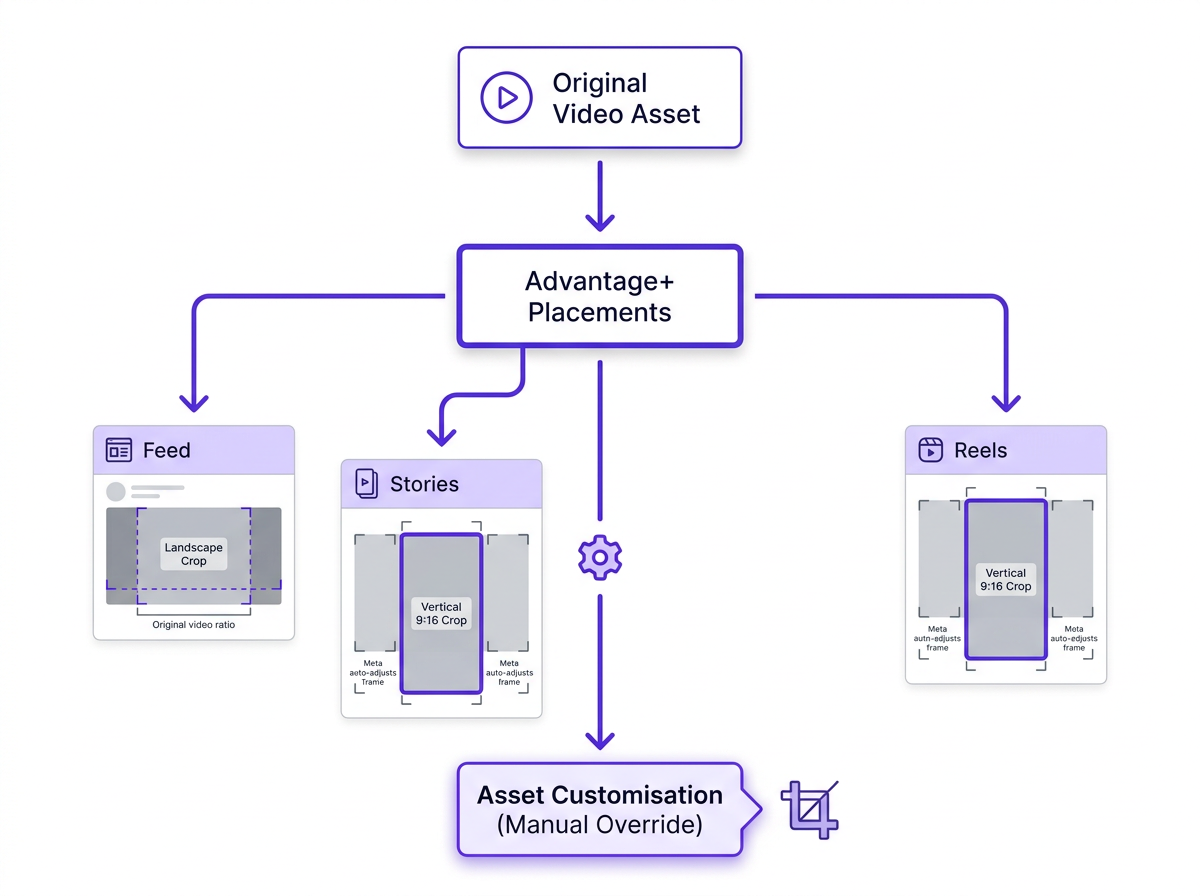
Advantage+ placements give Meta permission to serve your ad across its entire network and auto-format the creative for each surface. What most buyers miss is that you retain control at the ad level through asset customization. Inside Ads Manager, you can upload placement-specific versions of your video so Meta uses your intentional vertical cut for Stories rather than auto-cropping your Feed video. Use this feature. It takes five minutes and the quality difference is significant.
On codec choice: HEVC (H.265) is technically accepted by Meta but can cause processing delays and inconsistent quality in delivery. Unless you have a specific reason to use it, stay with H.264. The compatibility is broader and the processing pipeline is more predictable.
Caption handling deserves more attention than it usually gets. Meta's auto-caption feature has improved but still makes errors on product names, technical terms, and accents. For mobile-first placements where most viewers watch without sound, burned-in captions at roughly 80% frame width are the safest approach. If you're using SRT files instead, test the sync before launch. A caption that's half a second off reads as unprofessional regardless of how good the video is. For the tracking side of your campaigns, understanding Meta Pixel and CAPI updates ensures your performance data is as reliable as your creative.
360-degree and 3D video formats are supported on Facebook Feed and are occasionally relevant for immersive brand campaigns. They require equirectangular projection for 360 video and specific metadata injection for the player to recognize the format. These are niche use cases, but if you're running an immersive product experience campaign, the Meta Business Help Center has the technical requirements. For teams managing the full scope of Meta campaign operations, a guide to editing Instant Forms in Meta Ads Manager covers another frequently overlooked workflow detail.
Frequently Asked Questions About Meta Video Ad Specs
What is the best Facebook video format for ads in 2026?
MP4 with H.264 encoding is the recommended Facebook video format for ads. It offers the widest compatibility across placements, the most predictable processing through Meta's encoding pipeline, and the smallest file sizes relative to quality. MOV is also supported but less efficient for upload workflows. Avoid HEVC unless you have a specific technical reason.
Does Meta compress my video ad after upload, and how can I minimize quality loss?
Yes, Meta re-encodes every uploaded video. To minimize quality loss, export at a target bitrate of 15 to 30 Mbps for 1080p content, use H.264 codec, and keep your file under 500MB. A well-encoded smaller file consistently outperforms a large file that undergoes heavy compression during Meta's processing. Uploading at maximum file size does not preserve quality.
What is the maximum Facebook video length limit for each ad placement?
Feed supports up to 241 minutes, but 15 to 30 seconds performs best. Stories and Messenger Stories cap at 15 seconds. Reels allows up to 90 seconds. In-Stream runs from 5 seconds to 10 minutes. Search Results supports up to 241 minutes. Audience Network recommends under 30 seconds. The technical limit and the performance-optimal length are rarely the same number.
Can I use the same video file across all Meta ad placements?
Technically yes, but practically no. Meta will accept a single file and adapt it, but auto-cropping a 16:9 video for Stories produces a poor result. For best performance, create placement-specific versions: a 1:1 or 4:5 for Feed, a 9:16 for Stories and Reels, and a 16:9 for In-Stream. Use asset customization in Ads Manager to assign the right file to each placement.
How do I check if my video meets Facebook video requirements before uploading?
Run your file through a media inspection tool to verify codec, resolution, frame rate, audio format, and file size before upload. Cross-reference against the specs table in this guide for your target placements. Building a pre-upload QA checklist into your workflow, as described in the workflow section above, is the most reliable way to catch issues before they reach Ads Manager. For a deeper look at how to enhance your digital presence with AI marketing tools, our guide covers how analytics fit into the bigger picture.
How do I override Advantage+ auto-cropping for my Meta video ads?
Use Advantage+ asset customization in Ads Manager. When creating your ad, upload separate video files for each placement group (Feed, Stories, Reels, In-Stream). This overrides Meta's automatic cropping and ensures each placement receives the version you intentionally designed for it. The process takes about five minutes per ad and prevents auto-crop issues.
What are the safe zones for Facebook Stories and Reels video ads?
For Stories, the top 14% and bottom 20% of the 1080x1920 frame are reserved for UI overlays (profile info and CTA buttons). For Reels, the bottom reserved area extends to roughly 35%. The safe content zone on a 1080x1920 canvas runs from approximately 270px from the top to 648px from the bottom. Place all critical text, logos, and CTAs within this area.
Key Takeaways: Your Meta Video Ad Specs Checklist
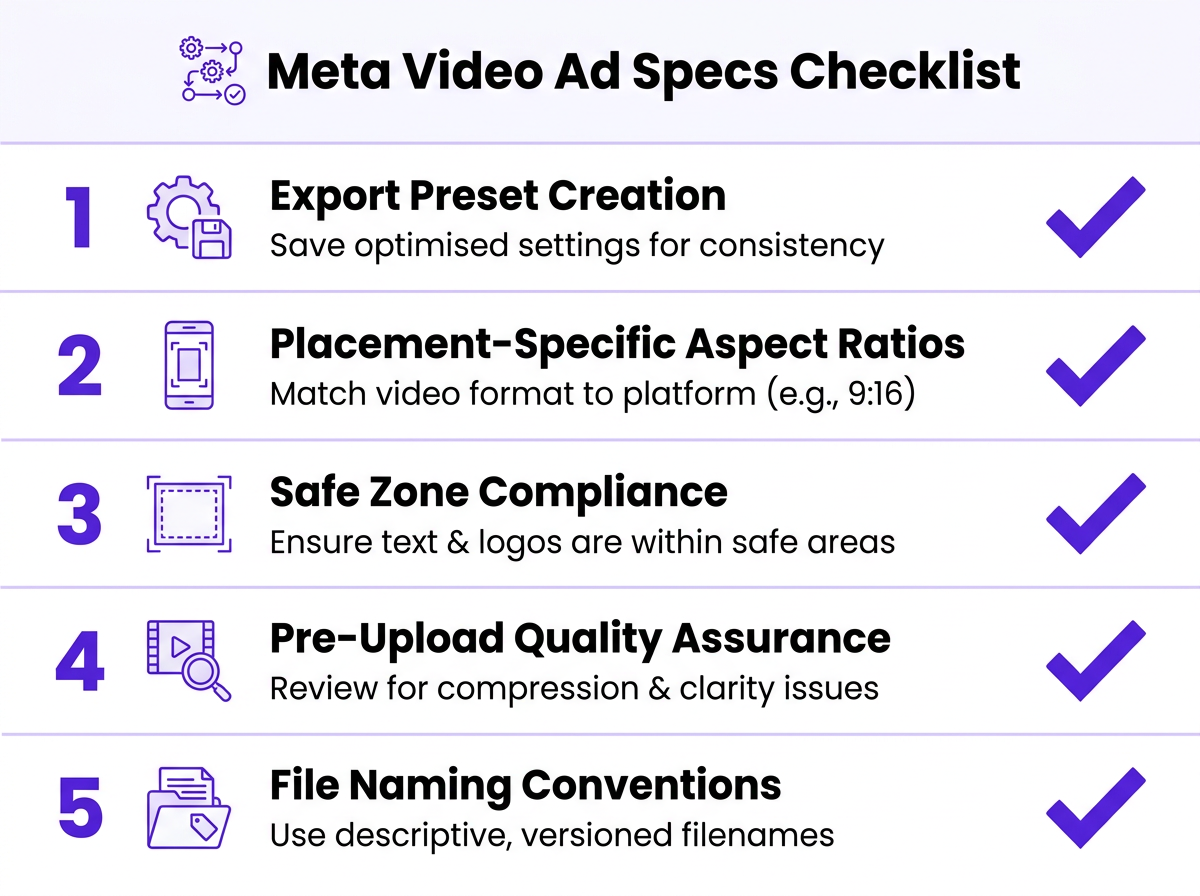
The five highest-impact takeaways from this guide:
- H.264 + MP4 is your default. Everything else is an exception that needs a reason.
- 4:5 wins in Facebook Feed on mobile. 1:1 is the safer cross-platform choice when Instagram is also in the plan.
- 9:16 safe zones are not optional. Top 14% and bottom 20% (Stories) or 35% (Reels) are owned by Meta's UI. Design around them.
- Meta re-encodes your video. Export clean at 15 to 30 Mbps, not large. File size is not a proxy for quality.
- Specs belong in your tools, not in your memory. Export presets, QA checklists, and file naming conventions are the actual deliverable from this guide.
Your practical next step: open your current video asset library and audit it against the meta video ad specs table above. Identify which placements you're running and whether your existing files match the recommended dimensions. Then build your export presets before the next campaign brief lands on your desk. If you want to understand which video formats are already driving organic engagement before scaling with paid, Vizup's platform connects those organic signals to your paid creative decisions. For a broader view of how video ad specs fit into your overall Meta strategy, the comprehensive guide to Meta ad specs covers every placement across Facebook and Instagram in one place. Teams thinking about the full picture of their digital presence will also find value in enhancing your digital presence with AI marketing tools.
