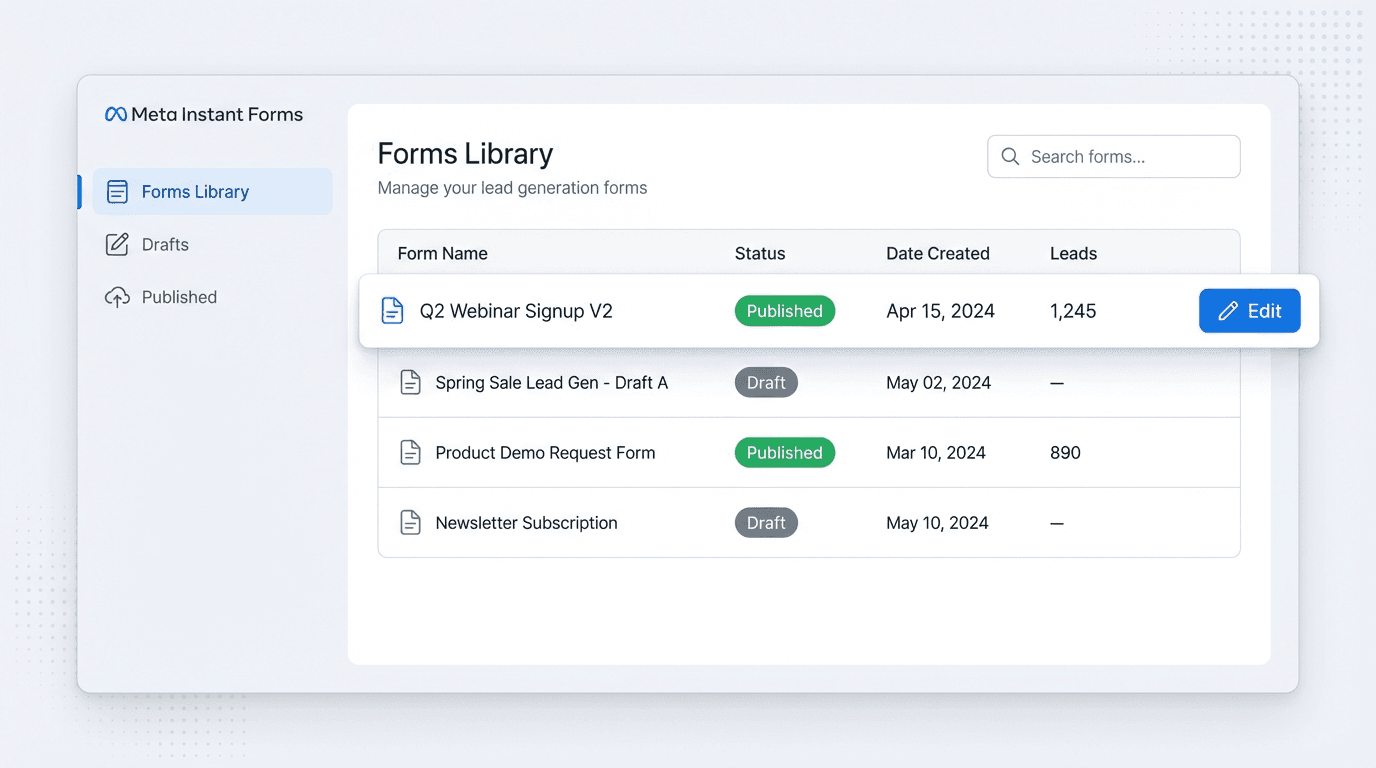
Anyone who has managed Meta Instant Forms knows the trade-off. The low CPLs and seamless in-app experience are great, but the management system has long been rigid and clunky. For years, the rule was frustratingly simple: once a form went live, it was set in stone. Correcting a typo or adding a question meant a full clone-and-replace mission.
That era is finally ending. Meta has been rolling out practical, in-the-weeds updates that advertisers have been requesting for years. We’ll walk through the changes that actually matter and explain how to build a workflow to organize, edit, and manage your forms more efficiently. This isn't about chasing every new button, but about building a smarter process.
The Old Way vs. The New: What’s Actually Changed?
The biggest frustration with Meta Instant Forms has always been the inability to edit a published form. You had to duplicate it, make your changes, save it as a new version (hello, “Lead Form V2_final_final”), and then manually swap it into every active ad. This process was a recipe for version control chaos and reporting nightmares. Forgetting to turn off an old ad set meant leads trickled in from two different forms, creating a mess for your sales team and CRM.
While the core “duplicate and replace” logic remains, recent updates have significantly streamlined the process. As of early 2026, some advertisers can now edit forms directly within the Ads Manager interface at the ad level. This is a quiet but massive shift, moving form management from a clunky, centralized library into the workspace where campaigns are actively managed.
This change means less time navigating to the Business Suite’s Forms Library and more time focusing on the campaign. Although a solid naming convention is still crucial, the risk of orphaned ad sets running old forms is decreasing. Meta is starting to treat forms less like static assets and more like dynamic components of a campaign.
Your New Workflow: A 3-Step Guide to Faster Form Management
Forget the old workarounds. An efficient system for managing Meta Instant Forms in 2026 relies on operational discipline, not just flashy features. It's built on three pillars: a clean library, smart duplication, and a focus on quality control.
1. Master Your Forms Library
Your Forms Library, found in Meta Business Suite under ‘All Tools’, is your new command center. It was once a graveyard of poorly named forms, but it's now the foundation of an organized system. The first step is a ruthless cleanup. Archive any form tied to a completed campaign to clear your active view, but don't delete it in case you need the data.
2. The 'Duplicate and Edit' Discipline
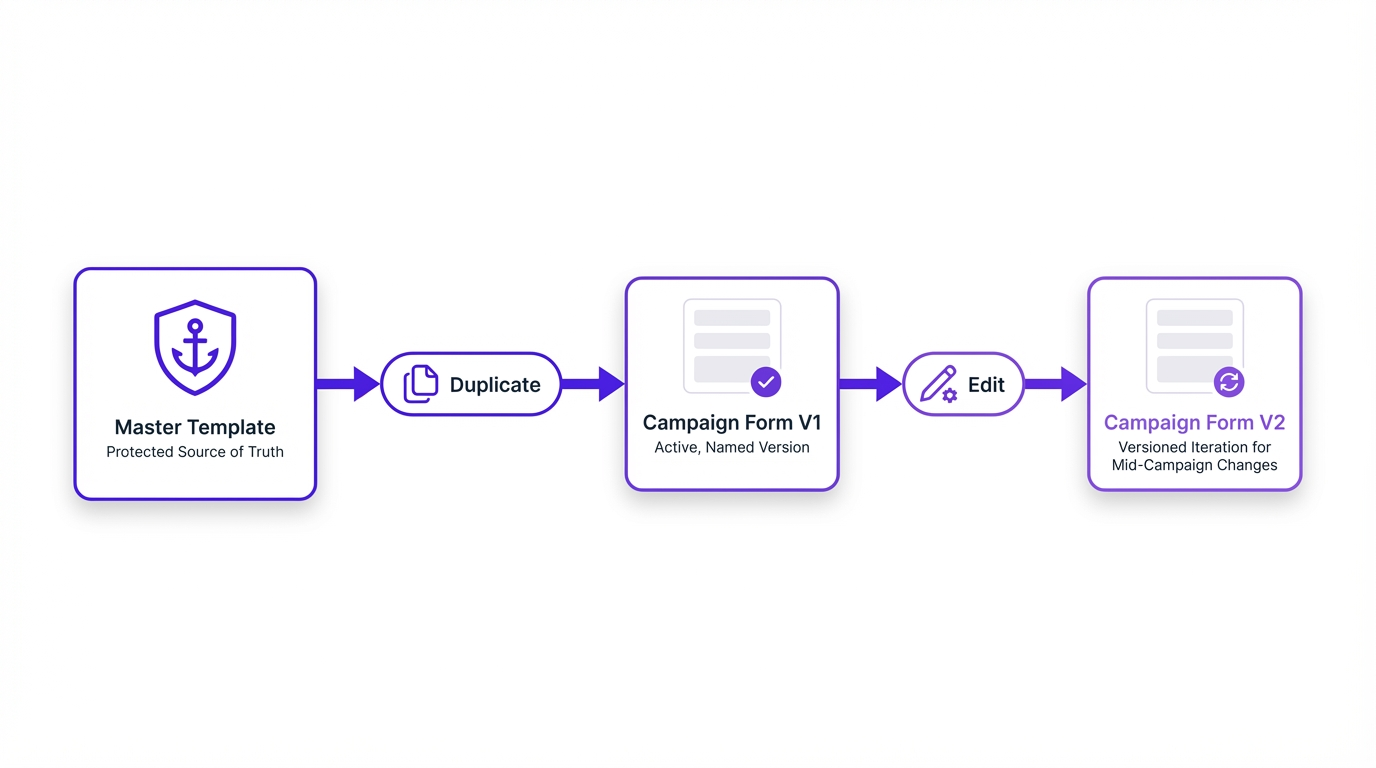
Even with direct editing becoming more available, the duplicate-and-edit method remains the safest way to manage changes, especially for large accounts. It prevents accidental edits to live campaigns and ensures a clean history. But there's a right way and a wrong way to do it.
Always start from your master template in the Forms Library. Duplicate it and immediately apply your naming convention for the new campaign. Make your specific edits, like adding a unique question or updating the thank you link. When you build your ad in Ads Manager, you'll select this new, perfectly named form. If a mid-campaign change is needed, duplicate that form to create a V2, make the edit, and then duplicate the ad set to point to the new version. This creates a clean break for reporting.
3. Lean into Lead Quality Features
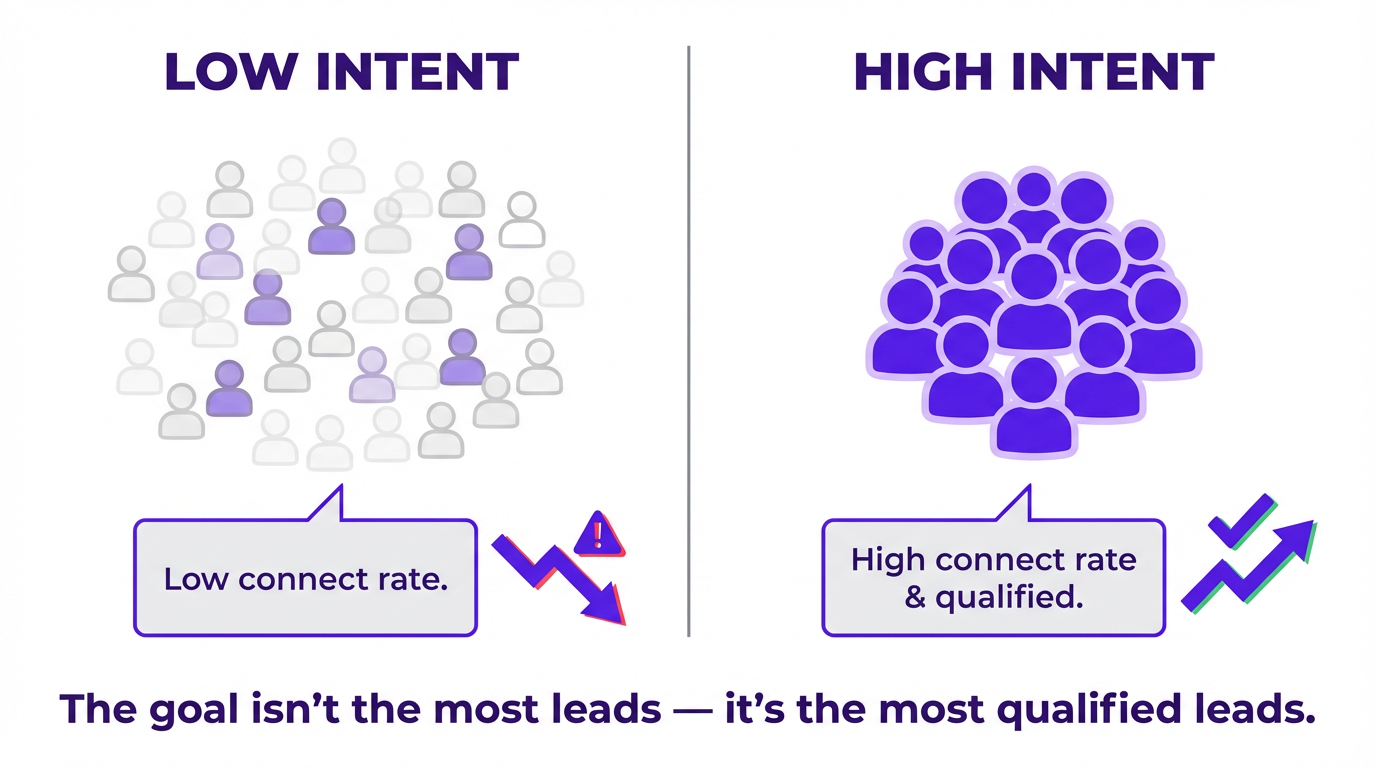
Faster management isn't just about speed; it's about reducing time wasted on bad leads. Meta has rolled out several powerful tools to pre-qualify prospects directly in the form. Many advertisers skip these, fearing a higher CPL. It probably will increase, but your ROI should improve by filtering out junk leads. The goal is a low cost per qualified lead, not just any lead.
Which quality features should you use?
- Higher Intent Form Type: This is the baseline. It adds a review step where users confirm their information, weeding out accidental submissions.
- Lead Verification: For high-value leads, tools like SMS verification or requiring a work email are invaluable. An October 2025 update highlighted these as strong filters against fake or personal contact info.
- Smarter Autofill: Meta has been phasing out aggressive one-tap autofill that led to stale contact details, a huge win for data quality.
- Advantage+ Lead Campaigns: This AI-driven campaign type can now use a mix of website and instant forms to find the most efficient path to conversion, automating choices that once required manual setup.
Connecting the Dots: From Form to CRM
The job isn't done when a lead submits the form. The speed and reliability of getting that lead into your CRM for follow-up is equally important. Manually downloading CSVs from the Forms Library is a soul-crushing, inefficient task that should be automated. It’s 2026, after all.
While tools like Zapier have long been the standard, Meta is improving its native integrations. The ability to send lead events directly to your CRM via the Conversions API is a huge step forward. For example, a recent update allows Salesforce Sales Cloud users to send lead events directly, and partnerships with platforms like Zapier have expanded. This isn't just about convenience. Sending this data back to Meta helps the algorithm understand what a good lead looks like for your business, improving targeting over time. Exploring the latest Meta Pixel and CAPI updates is a valuable next step.
Ultimately, the recent updates to Meta Instant Forms are a welcome evolution. They reward advertisers who are organized and disciplined. By cleaning up your library, adopting a smart duplication process, and using the built-in quality filters, you can spend less time wrestling with the platform and more time talking to qualified leads. It's the kind of smarter campaign management that actually moves the needle.
Frequently Asked Questions
Can I edit a Meta Instant Form after it's published?
As of late 2025, you cannot directly edit a live, published Instant Form that has received impressions. The safest method is to duplicate the form, make your edits, and then replace the old form with the new one in your ad sets. Some accounts are seeing new direct-edit capabilities, but the duplication workflow is more reliable.
How do I improve the quality of leads from my instant forms?
Use the 'Higher Intent' form type, which adds a review screen for users to confirm their details. You can also add one or two qualifying questions and use new features like SMS or work email verification to ensure contact information is accurate.
Where do I find my leads from Meta Instant Forms?
You can manually download leads as a CSV file from the 'Forms Library' in Meta Business Suite. However, the best practice is to set up an automated integration with your CRM using a tool like Zapier or Meta's native Conversions API to send leads directly to your sales team.
What is the difference between 'More Volume' and 'Higher Intent' form types?
'More Volume' is a quick form designed to maximize the number of submissions. 'Higher Intent' adds a review step where users must confirm their pre-filled information, which improves lead quality by reducing accidental submissions.
How do I organize my many instant forms?
Implement a strict naming convention (e.g., [Campaign][Type][Version]) and archive old, unused forms. Create 'master' draft templates for common campaigns that you can duplicate to ensure consistency and save time.
