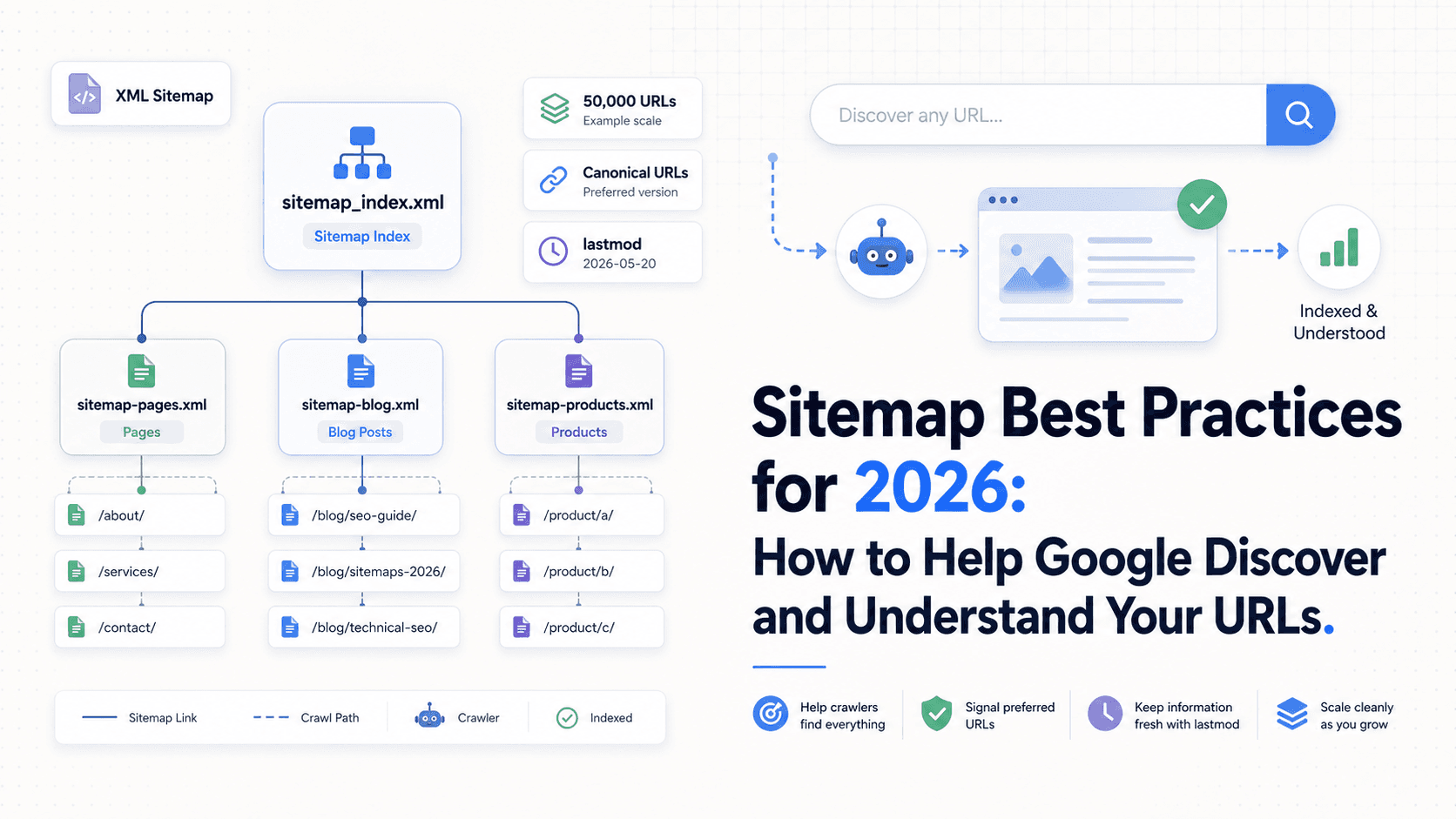
Let’s be clear: sitemaps aren’t magic. Submitting one won’t catapult you to the top of Google, and a lot of the advice floating around is either stale or simply wrong. I’ve spent more than a decade watching teams sprint after shiny tactics while skipping the boring fundamentals. A clean, logical sitemap is one of those fundamentals. It’s basic technical SEO hygiene.
In 2026, sitemaps still do a straightforward job: they tell search engines which URLs you consider worth paying attention to. They don’t guarantee indexing, but they do hand Google a clean, preferred starting list. This is grounded in Google’s own sitemap documentation and practical experience, no theatrics, just the parts that hold up.
What Is a Sitemap, Really?
A sitemap is a file on your site that lists the URLs you want search engines to find. The useful mental model isn’t “secret ranking lever”; it’s wayfinding. You’re pointing crawlers toward the pages that actually matter, instead of letting them wander through endless filters, parameters, and dead ends. It’s you telling Google, “Start here.”
That’s why canonical URLs in a sitemap matter. Your sitemap should read like a list of final answers: the preferred, definitive URLs you want showing up in search. If a page exists in multiple versions (say, with tracking parameters), include only the version you want indexed. That helps Google consolidate duplicates and makes your structure easier to interpret. It won’t boost rankings on its own, though. A sitemap full of junk is still junk, just neatly organized.
Which Sitemap Format Should You Use?
Google supports several sitemap formats, but most sites end up choosing from three. There’s no universal winner here; the right pick comes down to how your site is built and how much control you need.
| Sitemap format | Best for | Pros | Cons |
|---|---|---|---|
| XML sitemap | Most websites, especially complex sites, blogs, product catalogs, programmatic pages, image/video/news pages, and multilingual pages | Extensible and versatile; can provide the most information about URLs; supports additional data for images, videos, news, and localized versions; most CMS platforms or plugins can generate it. | Can be more complex to maintain on large sites or sites where URLs change often. |
| RSS, mRSS, and Atom 1.0 | Blogs, news sites, and websites that publish frequent updates | Often automatically generated by CMS platforms; useful for fresh content discovery; can provide Google information about videos. | More limited than XML; can be cumbersome to work with; does not provide the same level of metadata support as XML. |
| Text sitemap | Very small, simple websites that only need to list URLs | Simple to create and maintain; one URL per line; useful when no extra metadata is needed. | Limited to URLs only; cannot include image, video, news, localized page, or lastmod metadata. |
For most modern websites, XML is the safest default because it gives you the most flexibility. RSS or Atom feeds are useful for fresh publishing workflows, while text sitemaps only make sense when the site is very small and simple.
Key Rules: Size Limits and URL Inclusion
Most sitemap errors aren’t mysterious, they’re self-inflicted. The mistakes are common, and they’re easy to avoid if you stay disciplined.
First, the non-negotiables on sitemap size limits:
- A single sitemap file can have a maximum of 50,000 URLs.
- The uncompressed file size must be under 50MB.
If you’re over either limit, split the URLs into multiple sitemap files. For a sitemap for large websites, you’ll tie those together with a sitemap index file. That index is what you submit to Google, and it can include up to 50,000 individual sitemaps.
The bigger issue is usually what you include. Your sitemap should be a curated list of high-quality, canonical URLs. Include only URLs that:
- Are the canonical version of the page.
- Return a 200 OK status code.
- Are pages you actually want to be indexed.
- Use fully qualified absolute URLs (e.g.,
https://www.tryvizup.com/page, not/page).
Leave out anything that redirects, is blocked by robots.txt, returns a 404, or carries a “noindex” tag. Handing Google a list of pages and then telling it not to touch them sends conflicting discovery signals and creates avoidable noise.
Sitemap Tags: What Google Uses (and What It Ignores)
XML sitemaps support a bunch of tags, but Google’s stance has narrowed over time. In practice, one optional tag is worth your attention; the rest are mostly busywork.
- <lastmod>: This tag tells Google when the page was last meaningfully updated. Google may use this when it’s consistently accurate. Reserve it for real content changes, not a rolling copyright year. Fabricating
lastmoddates is an old trick that doesn’t age well. - <priority>: Google explicitly ignores this. Skip it. Marking everything as 1.0 doesn’t accomplish anything.
- <changefreq>: Google ignores this too. The idea was to declare how often a page changes, but Google is better off relying on its own systems than whatever you guessed here.
How to Create and Submit Your Sitemap
For most sites, the simplest answer is also the best one: your CMS (WordPress, Shopify, Squarespace, and plenty of others) will generate and maintain a sitemap automatically. If you need tighter control, a dedicated sitemap generator can fill the gap. Hand-building a sitemap only makes sense when the site is genuinely tiny.
Once you know your sitemap URL, you’ve got three standard options to submit sitemap to Google:
- Google Search Console (Recommended): The most useful route for monitoring, because Search Console also shows sitemap status and processing errors. Open the Search Console sitemap report, add your sitemap path (for example, /sitemap.xml), and submit.
- robots.txt File: Add a line to
robots.txt:Sitemap: https://www.yourdomain.com/sitemap.xml. This robots.txt sitemap placement is a solid habit, since crawlers often check there first. - WebSub: If you publish via RSS or Atom, WebSub can push updates to subscribers (including search engines) quickly. It’s mainly relevant for sites that post frequently.
Sitemap Checklist for 2026
If you’re tired of contradictory takes, keep it simple. Check these boxes and you’re doing the work that actually matters.
- ✅ Absolute URLs: Every URL includes
https://www... - ✅ Canonical URLs Only: No duplicates, no non-preferred versions.
- ✅ Clean & Indexable: Only 200-status URLs you want in search results.
- ✅ UTF-8 Encoded: The standard for all web files.
- ✅ Under Size Limits: Below 50MB and 50,000 URLs per file.
- ✅ Sitemap Index for Large Sites: Use an index file if you need multiple sitemaps.
- ✅ Submitted in Search Console: The best way to track performance.
- ✅ Included in robots.txt: A helpful backup for discovery.
- ✅ Accurate
<lastmod>: Use it for meaningful updates only. - ✅ Regularly Monitored: Check your Search Console sitemap report for errors. A sitemap checker can also help identify issues before they become indexing problems.
Frequently Asked Questions
Does a sitemap guarantee Google will index my pages?
No. Submitting a sitemap is a hint about which URLs you want prioritized, but it doesn’t guarantee crawling or indexing. Content quality and a sensible internal structure still do most of the heavy lifting.
How often should a sitemap be updated?
Update it whenever you add, remove, or meaningfully change a page. In practice, that usually means letting your CMS or sitemap generator update it automatically as the site changes.
What’s the difference between an XML sitemap and an HTML sitemap?
An XML sitemap is built for search engines. An HTML sitemap is a navigational page meant for humans. Both can be useful, but only the XML sitemap is part of these technical best practices. You can also check these sitemap examples.
Google Search Console shows sitemap errors. What now?
Treat them as a to-do list, not a curiosity. Common issues include 404s, redirected URLs, and pages that are blocked or noindexed. Fix the root problem (often by removing or correcting the URL in the sitemap) and then resubmit. Ongoing monitoring sitemap health in Google Search Console helps you catch regressions early.
Should I split my sitemap for a large website?
Yes. For a sitemap for large websites, split by section (blog, products, categories, and so on) and manage the set with a sitemap index file. It keeps troubleshooting sane and makes it easier to see how different parts of the site are performing in indexing.
The Bottom Line
Sitemaps aren’t a strategy; they’re infrastructure. They’re plumbing, unexciting right up until something breaks and the whole house floods. Nail the sitemap best practices and you give Google a clean, efficient route to your best pages. As search experiences become more automated, clean machine-readable signals like sitemaps, canonical URLs, and structured site architecture become even more important. Sitemaps alone do not optimize a site for AI search, but they support the crawlability foundation that visibility depends on.
