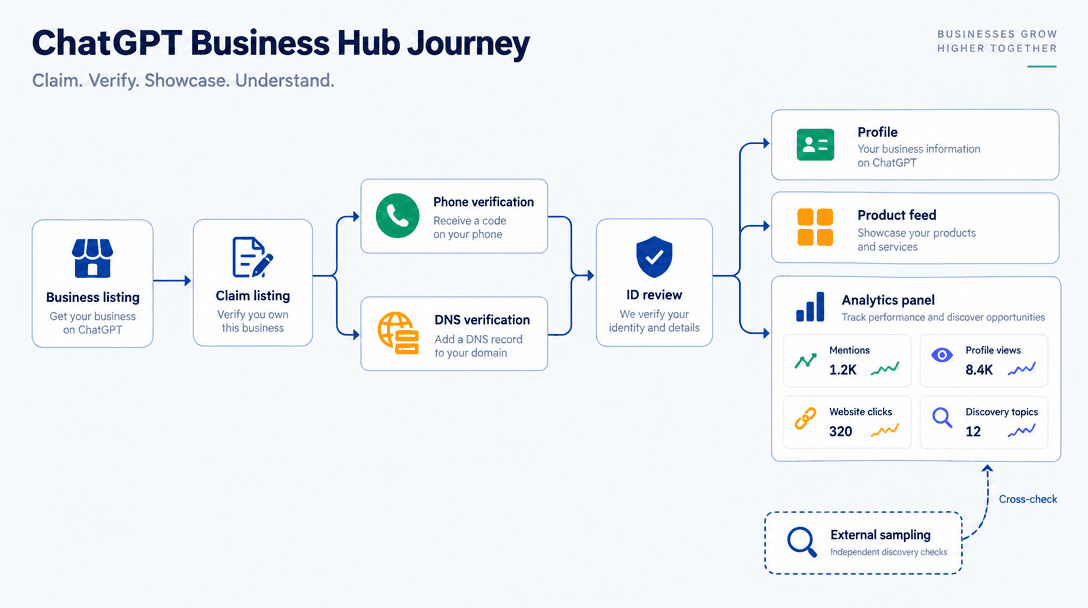
For two years, ChatGPT visibility reporting meant third-party prompt sampling. ChatGPT Business Hub finally gives brands OpenAI's own numbers. ChatGPT Business Hub provides official visibility data, but it doesn't give brands the complete picture of how they appear in ChatGPT.
Businesses in ChatGPT combines claimed profiles, product feeds, optional Business Agents and reporting. For growth, ecommerce and GEO/AEO teams, the immediate job is claiming access, then deciding which existing reports to keep.
Business Hub adds first-party insight into how businesses appear in ChatGPT, but it does not replace an ongoing organic visibility strategy. Vizup connects that reporting to a broader Organic Autopilot, helping brands monitor, create, optimise, publish and learn across Search, Social, Communities, AI Answer Engines and Local Discovery.
The seven steps:
- Find your listing.
- Verify ownership by phone or DNS.
- Pass the ID review.
- Complete the profile and connect your product feed.
- Decide on Business Agents.
- Read the four metrics.
- Set a baseline and cross-check it.
Verification and review times vary. After approval, reporting may still be unavailable while OpenAI collects sufficient data or completes processing. A blank dashboard does not necessarily indicate zero visibility.
Before You Open ChatGPT Business Hub
Decide who owns the account before starting, especially at agencies and multi-brand companies. The person submitting ID goes on record.
Have these ready:
- An OpenAI account the business can retain when employees leave.
- Access to the public business phone number or root-domain DNS.
- The claimant's government-issued ID.
- Your product feed URL or file, if applicable.
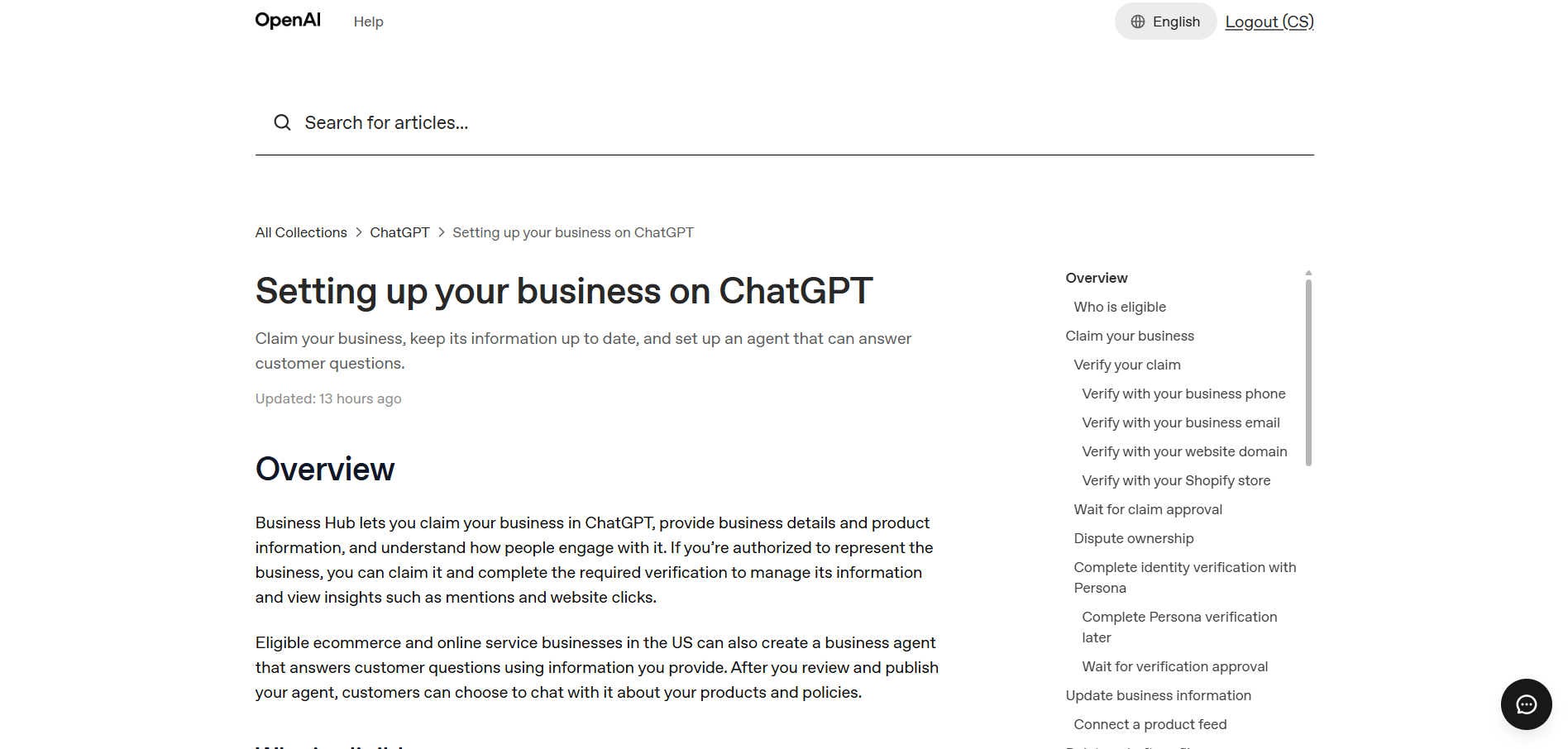
Check OpenAI's help article on setting up your business on ChatGPT for current requirements. The beta interface can change.
Step 1: Find Your Listing in ChatGPT Business Hub
Search by business name and location. Check the matching entity carefully: old addresses, rebrands and franchise locations can appear together. A near-match wastes a verification attempt.
No match? Eligible online businesses may see an option to add their business. Local stores and restaurants can currently claim only existing U.S. listings. Check your website and business listing information, then revisit Business Hub or contact OpenAI Support if needed.
Step 2: Prove Ownership With a Phone or DNS Check
Choose the verification option available for your listing. Business phone verification may use SMS or an automated call. Business email, website domain and Shopify verification may also be available. Choose the method your team can complete reliably.
For website-domain verification, copy the exact DNS TXT record shown in Business Hub, including its host or name and value. Add it through your DNS provider, allow time for propagation, then return to Business Hub and select Verify domain.
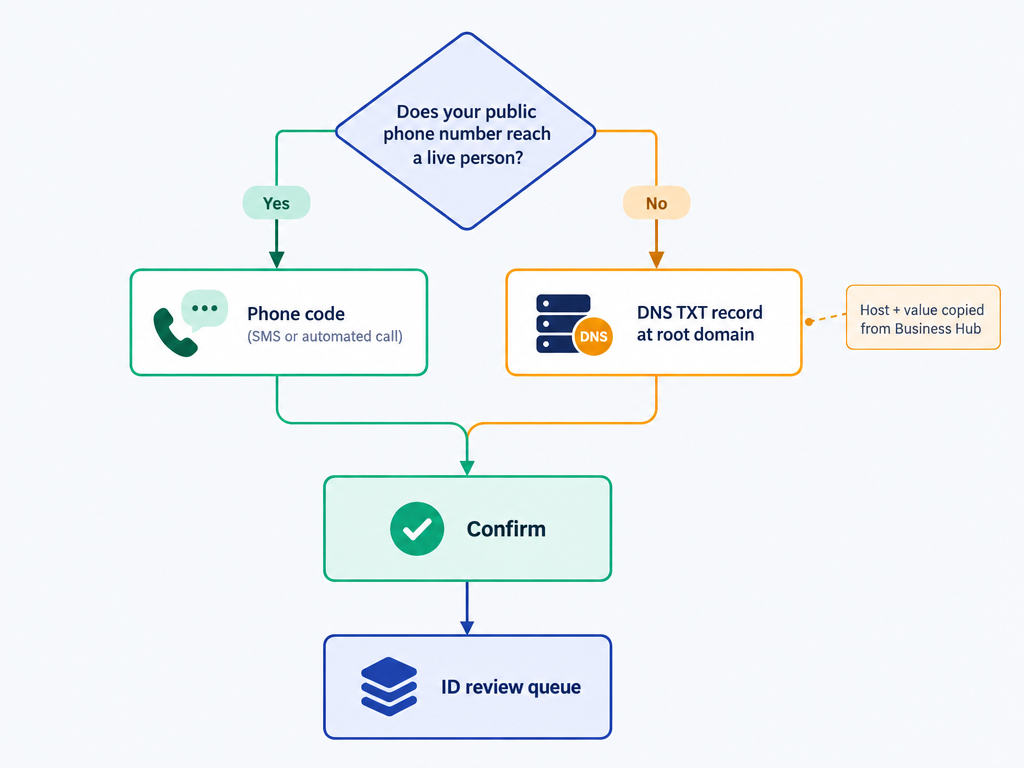
Tip: Send IT the DNS record before starting. Tickets outlasting verification windows are the most common reason teams have to restart.
Step 3: Pass the Review (and What to Do If You're Waitlisted)
After submitting your claim, OpenAI reviews your request. Once approved, complete identity verification through Persona before publishing business information, connecting a product feed or viewing insights. You may need a government-issued ID, business registration details or proof of authorization.
Some launch-day claims were waitlisted. That is a queue, not a rejection. Submit once, keep the confirmation and check back; repeated submissions rarely speed things up.
Warning: Document whose ID was used and why. Choose someone likely to stay: an undocumented claim tied to a departed employee puts profile control at risk.
Step 4: Complete the Profile and Connect Your Product Feed
This is where you directly shape the information ChatGPT has about you. Supply structured facts, not a sales pitch.
Profile fields worth getting right
Match hours, categories, address and description across your website, Google Business Profile and Yelp. Conflicting records invite hedging. State what you sell, for whom and where; slogans rarely survive paraphrasing.
Connecting the ChatGPT product feed
Reuse a Merchant Center-style feed where accepted, after checking GTINs, prices and availability. Product appearances and clicks plausibly depend on this feed, but OpenAI has not confirmed that connection.
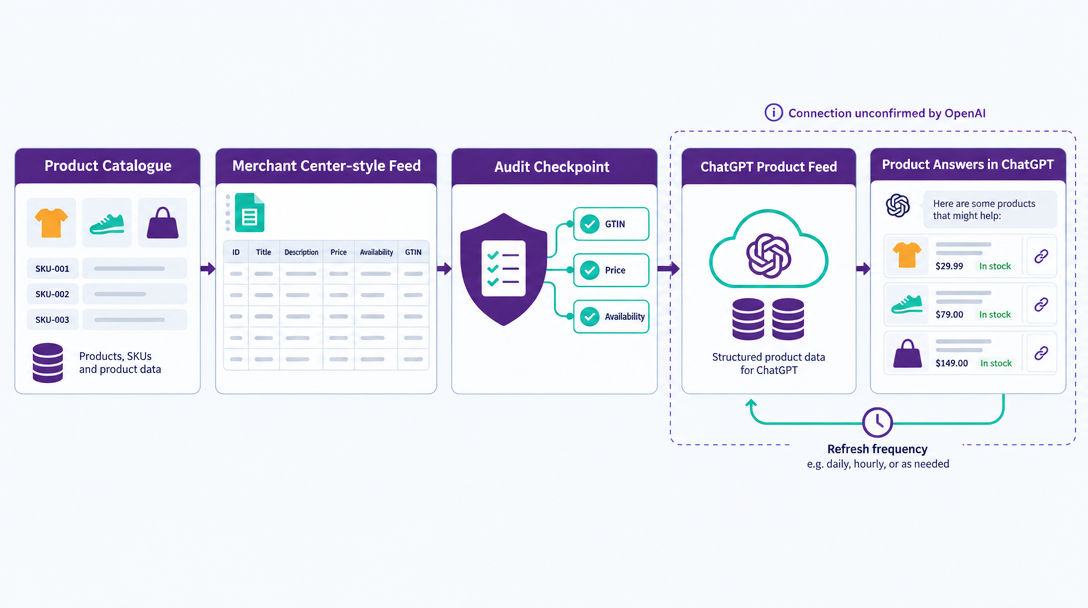
Tip: Match refresh frequency to price changes. Weekly updates cannot keep daily promotions accurate inside answers.
Step 5: Decide Whether ChatGPT Business Agents Are Worth Switching On
Business Agents are brand-controlled assistants answering business questions inside ChatGPT. They remain in beta, as technology.org's report on the Business Hub notes. They are separate from sponsored placement, covered in our ChatGPT ads overview.
Our recommendation: name a customer question the agent would answer better than your site. If you cannot, claim and measure first. Building can wait.
Step 6: Read the Four Metrics in ChatGPT Business Hub Analytics
Business Hub reports aggregated mentions, website clicks and discovery topics. Its launch dashboard also shows profile views. OpenAI explains some counting rules, although details such as deduplication and topic grouping remain limited.
| Metric | What it appears to measure | What OpenAI has not defined | Common misreading | Cross-check against |
|---|---|---|---|---|
| Mentions | Business appearances in ChatGPT answers | Mention definition, prompts, wording, volume thresholds | Counting appearances as recommendations | Prompt-level sampling |
| Profile views | Views of your ChatGPT business profile | Viewers, originating prompts, deduplication | Equating views with purchase intent | Mentions trend and sampled answers |
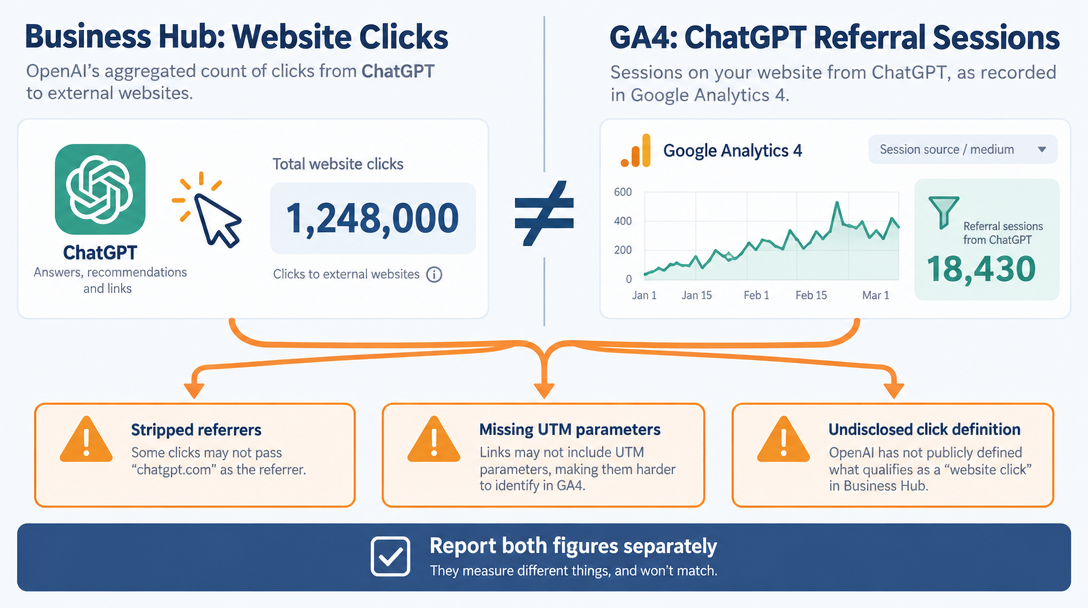
| Website clicks | Clicks from ChatGPT to your site | Attribution method, eligible link types | Calling it total ChatGPT traffic | GA4 referral data |
| Discovery topics | Topics associated with business appearances | Topic derivation and grouping | Reading topics as keywords | Bing topic data, prompt research |
| The four metrics, their gaps and the source to pair with each |
Mentions arrive without prompts or answer text. Profile views show a further interaction, but neither metric tells you whether ChatGPT recommended you.
Do not expect website clicks to reconcile with GA4. Our October UTM bug and fixes coverage documented attribution gaps. Report both figures, separately.
Discovery topics group common themes in ChatGPT answers that mention or cite your business. They do not reveal individual prompts or directly measure customer intent. Compare these themes with Bing's AI citation data and Vizup's answer-engine monitoring to identify content opportunities.
Step 7: Set a Baseline and Cross-Check It
Export or screenshot week one and record your understanding of each definition. Otherwise, a beta measurement change can masquerade as growth or decline.
Keep prompt-level monitoring alongside Business Hub. First-party counts show aggregated activity, while sampled answers help teams investigate what was said and where gaps appear. Vizup's Watcher agent monitors visibility across answer engines, search and social or community platforms. Its Strategist and Operator agents help turn those observations into priorities and execution plans, supported by human expertise and SEO, pSEO, AEO and GEO tools.
Which reports stay:
- **Adds: **first-party counts that provide another reference point for sampled visibility trends. Keep prompt-level monitoring because the two methods measure different things.
- Does not replace: prompt-level reporting, competitor share-of-answer, sentiment or position analysis.
- Does not replace: GA4 referrals. Business Hub clicks remain a separate measurement.
The Questions ChatGPT Business Hub Cannot Answer
These are structural limits, not simply beta glitches. Explain them before stakeholders start interpreting the charts.
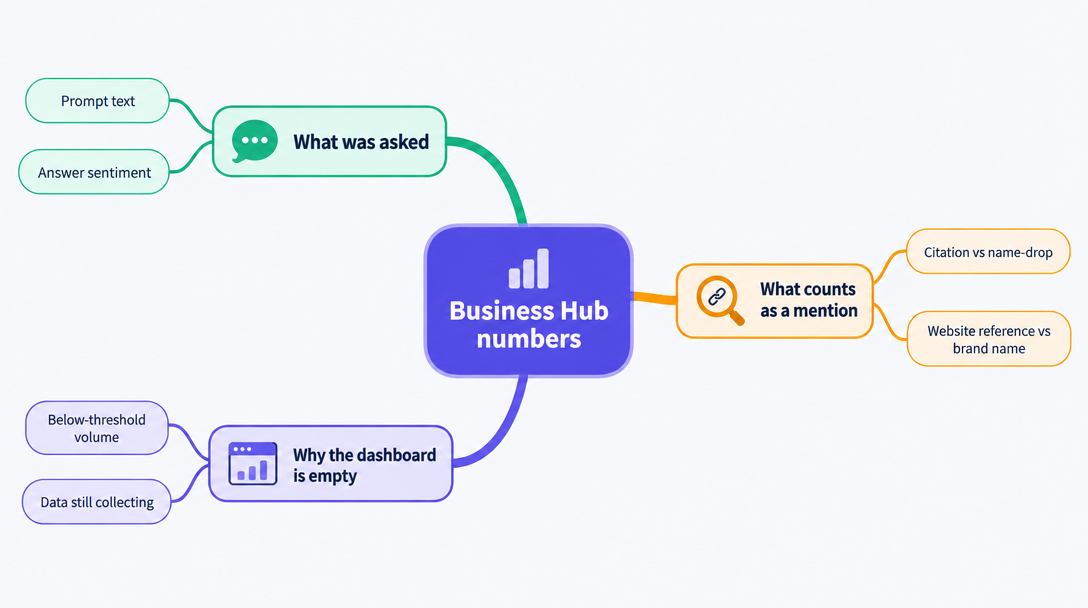
What was asked, and what was said about you?
Conversations stay private. An appearance could be a recommendation, an unfavourable comparison or an alternative. Counts cannot explain the problem examined in our piece on why ChatGPT recommends competitors.
What actually counts as a mention?
OpenAI defines mentions differently by business type. For online businesses, a mention counts when ChatGPT references the business's website, not merely its brand name. For local businesses, a mention counts when ChatGPT displays a result for that location. More detailed breakdowns remain unavailable.
Why your dashboard may be empty
OpenAI applies reporting thresholds, but a blank metric can also mean data is still being collected or reporting is unavailable. An empty dashboard does not establish that your business is invisible in ChatGPT. Continue monitoring relevant AI answers separately and contact OpenAI Support if the issue persists.
Common Mistakes When Claiming and Reporting
Avoid these four mistakes:
- Using a personal account or undocumented employee ID. Access becomes a problem when they leave.
- Repeatedly submitting a waitlisted claim. A queue is not a failed verification.
- Calling website clicks total ChatGPT traffic. Attribution gaps prevent that equivalence.
- Comparing monthly mentions without checking definitions. Beta measurement changes can distort the trend.
The reporting mistakes share a cause: mistaking measurement for behaviour. That is the argument behind why traffic metrics lie and visibility metrics don't, now applied to OpenAI's data.
Turn Business Hub Insights Into Organic Growth With Vizup
Turn Business Hub Insights Into Organic Growth With VizupClaiming your business is the starting point. The next step is understanding where your brand appears, which discovery topics matter and what you can improve. Vizup acts as an Organic Autopilot for modern discovery, helping brands monitor, create, optimise, publish and learn across Search, Social, Communities, AI Answer Engines and Local Discovery. By combining AI agents, human experts and live SEO, pSEO, AEO and GEO tools, Vizup helps teams move from visibility insights to practical improvements. Paid ads can be added for amplification, while organic discovery remains the core focus. Want to turn AI visibility data into an ongoing growth workflow? Explore Vizup's Organic Autopilot.
Frequently Asked Questions
Is ChatGPT Business Hub free?
OpenAI says eligible businesses do not need an Ads account or a ChatGPT Enterprise agreement to claim a listing. Claiming, Business Agents and paid advertising are separate activities. Check the current terms for any applicable fees before budgeting.
How long does verification take, and why was I waitlisted?
Review times vary. After you submit a claim, OpenAI may approve it or request more information. Persona identity verification is a separate step, and its approval is required before certain features become available. Follow the status shown in Business Hub and contact support if the process becomes stuck.
Does claiming make ChatGPT recommend my business more often?
OpenAI has published no evidence that it does. Claiming provides profile and feed control plus reporting, not a promised recommendation boost. Measure before and after.
Can I see the prompts behind brand mentions?
No. Prompts and conversations are not shared. Separate prompt-level sampling provides answer context, not access to those private conversations.
What if my business is missing from Business Hub search?
Correct third-party records, including Yelp and Google Business Profile, and match your website details to them. Search again and check back as the beta expands.
