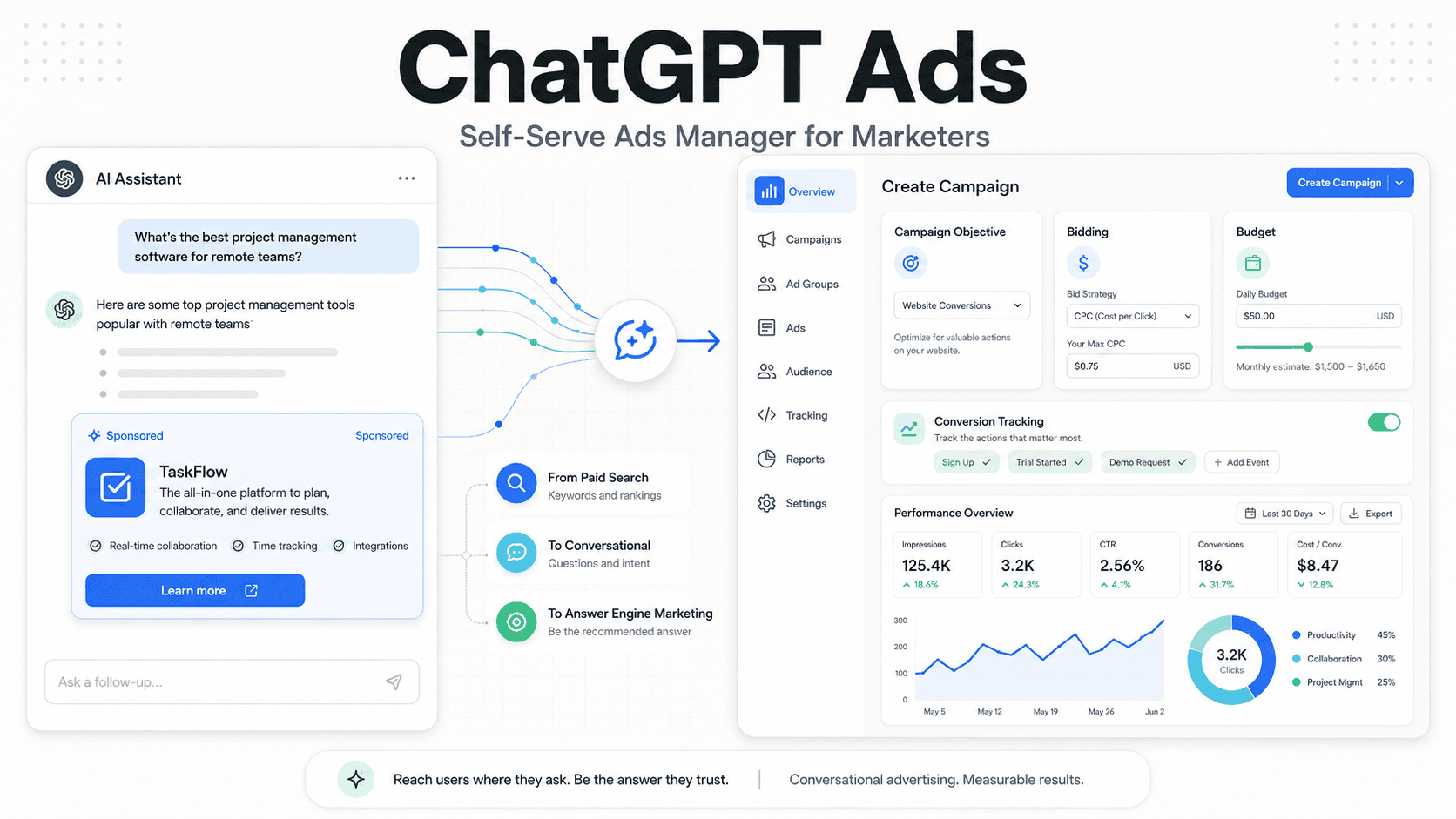
For the last few months, advertising on ChatGPT has felt like a party you can hear from the sidewalk but can’t enter. The bass is thumping, the guest list is stacked with six-figure brands, and everyone else is stuck outside the velvet rope. That started to change in May 2026, when OpenAI began the gradual, beta rollout of a self-serve Ads Manager in the U.S., finally starting to let more advertisers in.
This isn’t just “another platform” in the way every new ad product claims to be. It changes the unit you buy: not keywords, but conversational context. With a self-serve tool that includes cost-per-click (CPC) bidding and conversion tracking, ChatGPT ads stop looking like a science project. They start looking like a real performance channel. If you’re a marketer, the question isn’t whether to pay attention; it’s how to show up without wasting money. Here’s a practical read on where to start, what to expect, and the traps early adopters keep stepping into.
Step 1: Understand the New Landscape (It’s Not Google Search)
Before you create an account, you’ll need to drop some muscle memory. For two decades, the mental model has been straightforward: users type keywords, advertisers bid on them, and the best match wins the slot. Someone searches “best running shoes,” and you try to be the answer.
ChatGPT advertising plays out in longer, messier sentences. A user might ask, “I’m training for my first marathon and my knees hurt on long runs. What kind of shoes should I look for?” That’s not just a query; it’s a bundle of constraints, preferences, and urgency. Your ad isn’t matching a term so much as earning a place in the flow of a conversation. That’s the promise behind what some are calling answer engine advertising: getting your brand in front of someone right as they’re narrowing down a decision. OpenAI’s north star, at least as described, is to make the ad read like a useful suggestion rather than a record scratch.
Info: The big change: OpenAI dropped the rumored $50,000 minimum spend that defined the early pilot. That decision does more than tweak pricing; it turns the platform from an enterprise-only experiment into something small and mid-sized businesses can actually test.
Step 2: Getting Access and Setting Up Your Account
As of early May 2026, the self-serve OpenAI Ads Manager is rolling out as a beta for U.S. advertisers. It’s not an instant signup-and-spend situation. You register interest, then wait for approval. The flow looks like this:
- Request Access: Head to the official OpenAI for advertisers page at ads.openai.com and join the waitlist. You’ll submit basic business details.
- Business Verification: This step is heavier than what you’d expect from a typical social platform. OpenAI is being selective about who gets in, so plan on supplying documentation to prove you’re a real business. Have your legal name, address, and tax information ready.
- Onboarding: Once you’re approved, you’ll land in a dashboard that looks familiar if you’ve used modern ad tools. You can add billing, set user access, and start building campaigns.
Teams can wind up stuck in verification for weeks. The most common snag is boring but brutal: mismatched business details. Make sure the name and address you submit line up exactly with your registration documents. Even small inconsistencies can trigger manual review, and manual review takes time.
Step 3: Structuring Your First Campaign
Once you’re in, it’s tempting to crank out an ad and call it progress. Don’t. A little upfront structure is the difference between “learning” and lighting budget on fire. The ChatGPT ads manager uses the standard hierarchy: Campaigns > Ad Sets > Ads.
Campaigns: This is where you pick your objective. In the current version, that mainly means driving traffic or conversions. You’ll also set the top-line budget and the dates the campaign should run.
Ad Sets (Targeting): This is where the platform feels new, and where most early mistakes happen. You’re not selecting keywords. You’re describing conversational context, the kinds of discussions where your offer makes sense. That can include:
- Topics: Broad categories like “Project Management Software” or “Sustainable Travel.”
- Intent Signals: The job the user is trying to get done, like “comparing options,” “looking for a tutorial,” or “troubleshooting a problem.”
- Prompt Examples: Sample questions your ideal customer might ask, such as “How do I create a social media calendar for a small business?” For marketers, our own guide on using ChatGPT to generate content is a solid place to pull realistic prompt language.
Ads (Creative): Creative here is built from the basics: headline, body text, a call-to-action (CTA), and a URL. The winning tone is closer to “useful recommendation” than “BUY NOW.” Picture a sponsored suggestion that appears beneath ChatGPT’s main answer, clearly labeled and visually distinct.
Step 4: Bidding and Budgeting in a CPC World
For performance marketers, the arrival of CPC bidding in ChatGPT is the headline. The early pilot leaned on cost-per-mille (CPM), which can work for awareness but is a rough fit for direct response. CPC gives you a cleaner line from spend to clicks to return on ad spend (ROAS), imperfect, but usable.
Early reports put CPCs around $3 to $5, though you should expect that range to move as more advertisers enter and the auction settles. Treat those numbers as a snapshot, not a benchmark. What you pay will hinge on your category, how tight your targeting is, and whether the system considers your ad relevant to the conversation.
Tip: A pro tip: Start with a modest daily budget. Give the campaign at least a week before you make big calls. The system needs time to map conversational patterns to outcomes. Killing a campaign after two days of ugly metrics is the classic rookie move.
You can choose daily or lifetime budgets and control pacing. Given how new this is, daily budgets are the safer default, they keep you close to the wheel while you figure out what’s working. Once you’ve got a targeting-and-creative combo that holds up, scaling is the easy part.
Step 5: Measurement and Conversion Tracking
An ad platform without measurement is just a faster way to lose money. For months, that was the loudest complaint about the ChatGPT advertising pilot. Reporting often stopped at impressions and clicks, and it wasn’t uncommon to get the data as a weekly CSV. The self-serve launch finally moves past that.
With self-serve, OpenAI shipped two measurement tools that matter:
- The OpenAI Pixel: A small snippet of code, similar in concept to the Meta Pixel, that you install on your site. It tracks what users do after clicking, purchases, lead submissions, signups, and more.
- Conversions API (CAPI): A server-side option that lets your systems send conversion events directly to OpenAI. It’s typically more dependable than browser-only tracking and less exposed to tracking prevention.
Treat setup as mandatory, not optional. Without conversion tracking, you’re guessing, and guessing doesn’t survive a budget review. OpenAI lets you define standard events such as “Lead,” “Purchase,” and “Page View.” Implement and test everything before you launch. If you’ve configured conversion tracking in a platform like the Meta Ads Manager, the workflow will feel familiar.
Common Mistakes to Avoid
Every new ad channel comes with its own ways to get burned. After more than a decade in this work, the patterns are familiar: people port old playbooks into new environments and then blame the environment. Here are the most likely mistakes marketers will make on this AI advertising platform:
- Using Search Ad Copy: Aggressive, keyword-heavy Google Ads-style copy tends to land poorly. The native tone is conversational and genuinely helpful. If your ad reads like a commercial break, it will perform like one.
- Sending Traffic to Your Homepage: Someone asking a specific question expects a page that meets them there. Dumping them on a generic homepage forces extra work and usually tanks conversions. Build landing pages that match the intent you’re targeting.
- Ignoring the Conversation Gap: A user can see your ad, skip the click, and still remember you, then search your brand days later. Last-click attribution won’t credit that influence. You’ll need to watch blended metrics and brand lift alongside direct response. This is a familiar problem in new channels.
- Expecting Immediate Results: This isn’t Google or Meta, where decades of optimization have sanded down the rough edges. It’s a beta. Expect volatility, rough reporting, and the occasional glitch. Set aside budget for learning, not just outcomes.
What This Means for the Future
A self-serve ad platform is OpenAI signaling that it wants real ad budgets, not just pilot dollars. Yes, it’s monetization, but it’s also a bet on a new kind of discovery layer. Google has spent years as the default front door to the internet. That grip loosens if more people start asking AI for answers first.
As that shift plays out, brand visibility starts to look like a two-track system: organic presence Answer Engine Optimization, or AEO and paid placements. The relationship will feel familiar to anyone who’s lived through SEO and SEM. Organic visibility can show you which conversational contexts actually matter, and that intelligence should feed your paid targeting. Paid campaigns, meanwhile, buy you presence in high-intent moments where you can’t reliably earn the organic slot yet.
This is still the ground floor, and it’s going to be chaotic. The rules will move, the product will change, and early performance will be uneven. But the brands that start testing now (and get fluent in how this AI advertising platform behaves) are the ones most likely to own the channel later. The door is open. The only real mistake is showing up after everyone else has already mapped the room.
Want more practical marketing walkthroughs? Start with our beginner’s guide to YouTube prompts.
Frequently Asked Questions
What is the OpenAI Ads Manager?
The OpenAI Ads Manager is OpenAI’s self-serve product for buying ads inside ChatGPT, launched in May 2026. It lets businesses build campaigns, bid on CPC, and measure results with conversion tracking.
How much does it cost to advertise on ChatGPT?
OpenAI removed the early high minimum spend requirement (previously reported as up to $50,000). With CPC bidding, budgets can be set more flexibly. Early reporting suggests CPCs in the $3-$5 range, but pricing will vary by auction conditions.
What kind of targeting is available for ChatGPT ads?
ChatGPT ads rely on contextual targeting tied to the conversation rather than user data. Advertisers can target broad topics, user intents (such as “comparing products”), and supply example prompts that match their customers’ questions.
Can I track conversions from ChatGPT ads?
Yes. OpenAI supports conversion tracking via a web pixel and a Conversions API (CAPI), so you can measure actions like purchases, leads, and sign-ups after someone clicks your ad.
Are ChatGPT ads separate from the AI's answers?
Yes. OpenAI says ads are clearly labeled as sponsored and kept separate from ChatGPT’s organic responses. Ad placements are not supposed to influence the model’s informational output, which OpenAI describes as “answer independence.”
