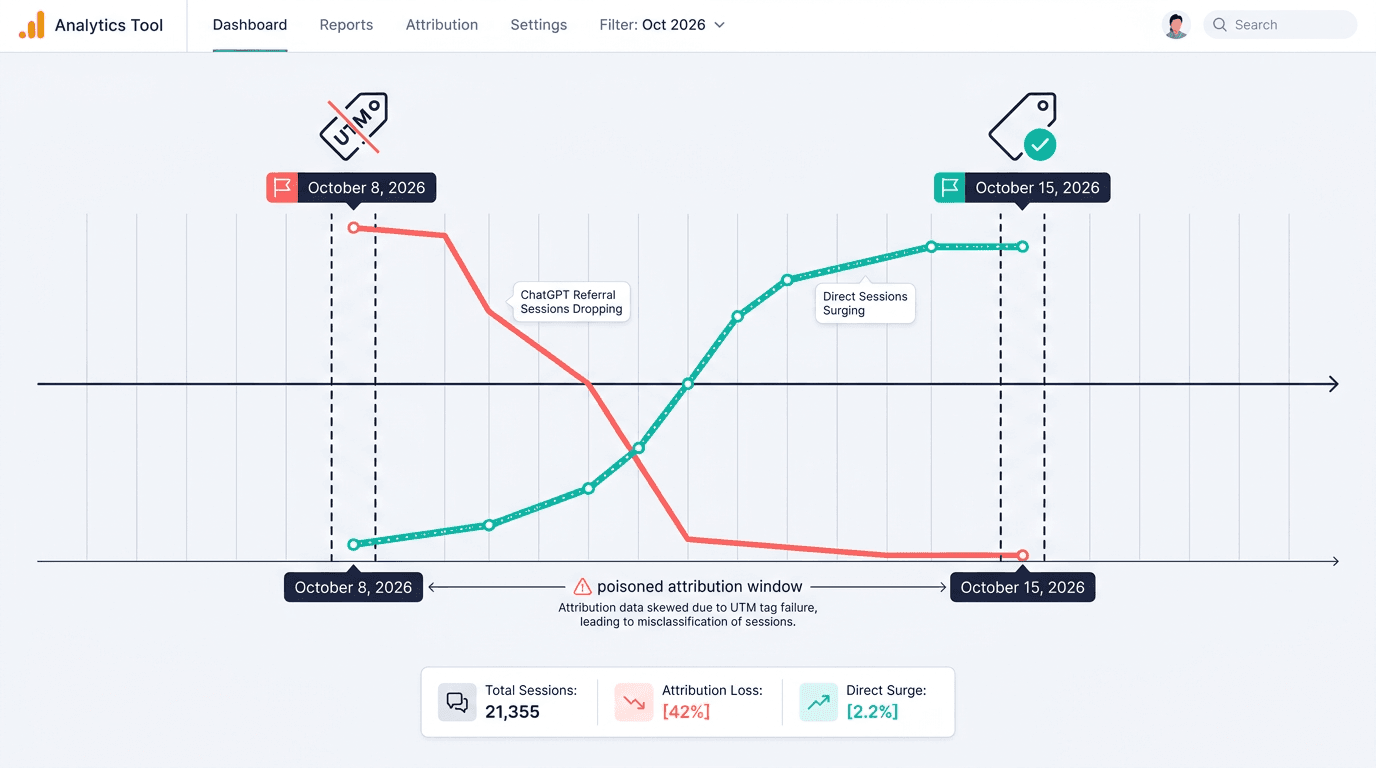
If you opened GA4 in mid-October 2026 and saw ChatGPT referrals collapse, a substantial part of the apparent decline may have been attribution-related rather than a genuine loss of ChatGPT visits. A ChatGPT UTM tracking bug stripped utm_source=chatgpt.com from outbound links at the same time referrer information went missing on many visits. GA4 did exactly what it was designed to do: with no source signal to work from, it filed those sessions under Direct.
Analytics leads, growth teams, and agencies should treat October 8 through October 15, 2026 as a poisoned attribution window. The immediate to-do list is short: document the incident, revise any client commentary that went out during the gap, estimate how many sessions were displaced, and put monitoring in place that catches the same failure within a day rather than a week.
How to correct the record:
- Confirm the anomaly began around October 8 and recovered around October 15, 2026.
- Add a shared GA4 annotation covering the affected dates.
- Estimate displaced ChatGPT sessions from the Direct traffic surplus and landing-page patterns.
- Review GA4's native AI Assistant channel and create supplementary tracking rules only for sources it does not recognize.
- Monitor channel share, raw referrals, and Direct traffic for inverse movements.
Step 1: Understand the ChatGPT UTM tracking bug
ChatGPT normally appends utm_source=chatgpt.com to many outbound links. After an October 2026 rollout, that parameter vanished for roughly one week. When the browser also sent no HTTP referrer, GA4 followed its standard attribution logic and bucketed the session as Direct. That is the mechanism behind the chatgpt referral traffic drop GA4 users were reporting.
Practitioners reconstructed the timeline by comparing source-level traffic against Direct sessions on the same landing pages. Search Engine Land reported in 2026 that OpenAI confirmed the bug and began restoring UTM tagging on October 15. Cedric Huesler's Adobe analysis found roughly 31,000 fewer daily ChatGPT visits on affected pages alongside about 26,000 additional Direct visits. That inverse movement is strong evidence of chatgpt direct traffic misattribution, not a sudden collapse in audience demand.
Info: Requirements: You need GA4 report access, permission to create shared annotations, and at least four weeks of session data before the incident. A landing-page export or server logs will strengthen the estimate.
This was an upstream labeling failure, not something broken inside any individual GA4 property. The missing ChatGPT source signals could affect analytics platforms that relied on the same UTM and browser-referrer information. It also exposed a pre-existing structural weakness: assistant traffic in GA4 is already fragmented across referral, tagged campaigns, organic, and Direct before any bug enters the picture.
Step 2: Pinpoint the exact dates in your property
Annotate October 8 through October 15, 2026. Treat both boundary dates as approximate because the fix and cached links did not propagate everywhere at once. Use October 7 as a clean comparison day and check October 16 to confirm recovery in your property.
| Date | Sessions from source=chatgpt.com | Total Direct sessions |
|---|---|---|
| Oct 7, 2026 | 480 | 2,120 |
| Oct 8, 2026 | 205 | 2,390 |
| Oct 9, 2026 | 72 | 2,535 |
| Oct 10, 2026 | 61 | 2,548 |
| Oct 11, 2026 | 58 | 2,529 |
| Oct 12, 2026 | 66 | 2,501 |
| Oct 13, 2026 | 75 | 2,487 |
| Oct 14, 2026 | 119 | 2,421 |
| Oct 15, 2026 | 352 | 2,240 |
| Oct 16, 2026 | 471 | 2,135 |
| Illustrative data, not a universal benchmark. Your volumes will differ, but the inverse shape should be recognizable. |
In GA4, open Reports > Acquisition > Traffic acquisition. Set the date range to October 1 through October 22 and use Session source / medium as the primary dimension. Filter for sources containing chatgpt, then lay the line against Direct. Run the same analysis by landing page. Pages that normally pull ChatGPT referrals should show lost referrals alongside an unusual Direct spike.
Warning: Do not automatically label every Direct session during the window as ChatGPT. Direct also contains bookmarks, untagged email, messaging apps, privacy-restricted browsers, and other unknown sources.
Step 3: Add a shared GA4 annotation
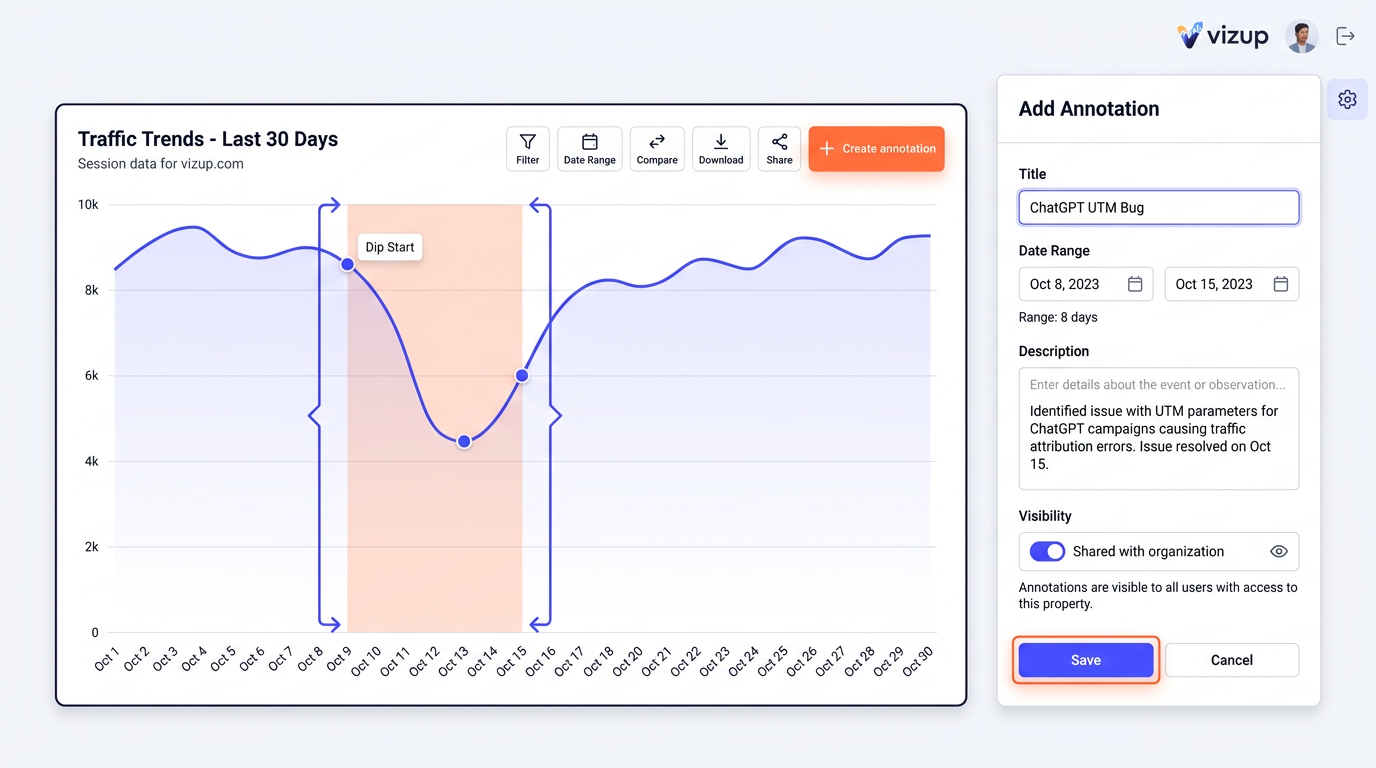
Open a GA4 overview or detail report that includes a time-series chart. Select the annotation control associated with the chart, choose Create annotation, and enter the affected range. The exact interface placement varies with GA4 updates and account permissions.
Use this copy:
- Title: ChatGPT UTM Bug
- Date range: October 8, 2026 to October 15, 2026
- Description: ChatGPT referral sessions were misattributed as Direct because outbound links lacked
utm_source=chatgpt.comand often supplied no referrer. Treat source and channel reporting for this window as unreliable. - Visibility: Shared
Save the annotation and drop the same wording into your reporting change log. If your interface only supports a single-date note, create one annotation on October 8 for the start and a second on October 15 for the fix rollout. Anyone who pulls up the chart six months from now gets a durable chatgpt traffic drop explained note instead of a dead Slack thread.
For a client report already issued, correct the narrative directly: 'The previously reported decline reflected an attribution interruption, not a confirmed reduction in ChatGPT-driven visits. October 8 through October 15 has been excluded from source trend conclusions.' Resist replacing the published figure with an estimate unless the estimate is clearly labeled as such.
Step 4: Estimate the missing ChatGPT sessions
There is no way to retroactively recover AI referral data inside GA4 when the original request carried neither a campaign parameter nor a referrer. GA4 cannot reconstruct a source signal it never received. A defensible estimate is still possible, and for most client conversations it is enough.
Estimation method:
- Calculate average daily Direct sessions for the same weekdays across the four weeks before October 8.
- Subtract that expected baseline from actual Direct sessions for each incident day.
- Limit the calculation to landing pages that received regular ChatGPT referrals before and after the gap.
- Compare the Direct surplus with the missing ChatGPT volume. Report a range if the two values do not align.
- Exclude campaign launches, email sends, outages, or seasonality that also changed Direct traffic.
Example: if qualifying pages normally receive 2,100 Direct sessions per day but averaged 2,480 during the incident, the surplus is 380. If those same pages simultaneously lost 420 identified ChatGPT sessions per day, report an estimated 380 to 420 displaced sessions. Keep the actual GA4 totals untouched and surface the estimate as a separate reporting adjustment.
Server access logs provide a second check. They will not restore a missing referrer, but request timing, landing-page concentration, browser patterns, and query-string changes can confirm that measurement behavior shifted. This is precisely why traffic metrics can be misleading when they are read in isolation from visibility and technical evidence.
Step 5: Build resilient AI traffic measurement
Create an AI Assistant custom channel
GA4 includes a native AI Assistant channel in its Default Channel Group for recognized AI-assistant referrals. Open Reports > Acquisition > Traffic acquisition, select Session default channel group, and review AI Assistant traffic. GA4 automatically assigns the ai-assistant medium when a recognized assistant provides the relevant referral signal. For additional sources GA4 does not recognize, use a supplementary custom channel group without replacing the native classification.
Gemini UTM parameters and referrer behavior shift depending on the product surface. Combine source, medium, hostname, and landing-page evidence rather than trusting any single parameter indefinitely. Follow the detailed process for setting up a GA4 AI Assistant channel, then revisit the source list as products evolve.
Alert on relationships, not one metric
A simple referral alert generates too many false alarms when weekly volume is small. Build a GA4 custom insight that flags a material day-over-day or week-over-week decline in the AI Assistant channel, then pair it with a second condition watching for an unusual Direct increase on historically strong AI landing pages.
A practical daily monitoring rule checks:
- AI Assistant sessions fall more than 40 percent against the trailing 28-day weekday baseline.
- Direct sessions rise more than 20 percent on the same landing-page set.
- The change holds across two consecutive daily checks or exceeds a minimum session threshold.
- Raw tagged URLs or referrers disappear from request samples.
This layered approach strengthens LLM referral traffic measurement but does not eliminate dark traffic. Vizup's Organic Autopilot helps brands monitor, create, optimise, publish, and learn across Search, Social, Communities, AI Answer Engines, and Local Discovery. Its Watcher, Strategist, and Operator agents, human experts, and live SEO, pSEO, AEO, and GEO tools extend analysis beyond sessions into answer-engine presence. Teams can connect measuring AI assistant traffic with optimizing for LLM referral traffic. Paid ads remain an optional amplification layer.
Troubleshooting common reporting mistakes
Check these pitfalls before revising a report:
- Annotating the wrong year: The documented incident window is October 8 through October 15, 2026, not October 2024.
- Reassigning all Direct traffic: Only estimate the incremental Direct volume on corroborating landing pages.
- Mixing scopes: Compare session source with sessions. Do not combine first-user source with session-level totals.
- Ignoring time zones: GA4 property time zones can shift the visible start or recovery by one calendar day.
- Assuming a custom channel prevents data loss: It classifies detectable sources. It cannot identify visits stripped of both UTM and referrer data.
Searches for ai traffic tracking october 2026, ai traffic undercounted ga4, or ga4 annotate chatgpt drop often describe the same incident from different angles. Hold onto the raw chart, filters, exports, baseline calculation, and annotation text so another analyst can reproduce your conclusion from scratch.
Summary and next steps
The October 2026 decline was an attribution gap, not evidence that ChatGPT stopped sending visitors. Mark October 8 through October 15 as unreliable, correct any prior commentary, estimate displaced sessions conservatively, and keep watching the inverse relationship between assistant referrals and Direct traffic.
The structural fix is not another dashboard on its own. Pair a maintained AI Assistant channel with anomaly alerts, landing-page baselines, server-side evidence, and answer-engine visibility monitoring. That combination turns the next ChatGPT UTM tracking bug from a week-long reporting crisis into a same-day investigation.
Frequently asked questions
What were the exact dates of the ChatGPT referral traffic drop?
The documented incident occurred in 2026, not 2024. Annotate approximately October 8 through October 15, 2026. Check October 7 and October 16 to identify property-specific rollout boundaries.
Will GA4 automatically recover the AI referral data that was misattributed to Direct?
No. GA4 does not reprocess historical sessions once a missing UTM or referrer is restored. Keep the original totals, annotate the gap, and publish a separately labeled estimate if you need to report displaced volume.
How can I prove to my boss that the traffic drop was not real?
Show the simultaneous ChatGPT decline and Direct increase on the same landing pages, followed by normalization once tagging returned. Support the chart with pre-incident baselines, server logs, and the 2026 practitioner findings confirming OpenAI acknowledged the bug.
Besides ChatGPT, what other AI assistants should I track in a custom GA4 channel?
Track Gemini, Perplexity, Microsoft Copilot, Claude, Poe, and any assistants relevant to your audience. Review source strings regularly because domains, applications, and tagging practices change without notice.
Is AI traffic undercounted in GA4 even when there is no bug?
Yes. Privacy controls, apps, copied links, missing referrers, inconsistent tags, and assistant interfaces all produce unattributed visits under normal conditions. Strong ai referral attribution ga4 reporting therefore combines identifiable sessions with landing-page analysis and answer-engine visibility monitoring.
