
Facebook conversion tracking measures what people do on your site after they click a Facebook ad. You can send those signals through the Meta Pixel, the Conversions API (CAPI), or a hybrid of both when you want the cleanest possible dataset and attribution that holds up on iOS. If you are spending on Meta ads but still can't tie campaigns to revenue with confidence, you're in familiar company. Since Apple's ATT framework rolled out, only 34% of iOS users opt in to tracking, so browser-only measurement misses most iPhone conversions.
This walkthrough breaks modern Facebook ads conversion tracking into three parts: getting the Meta Pixel in place, wiring up Conversions API, and configuring events so Meta can actually optimize and report correctly. Work top to bottom, or skip ahead to the piece you're fixing. Here's the sequence:
-
- Install the Meta Pixel as your browser-side foundation.
-
- Configure Facebook events tracking with standard and custom events.
-
- Connect the Conversions API for server-side signal recovery.
-
- Choose your tracking architecture: Pixel only, CAPI only, or hybrid.
-
- Set your Facebook attribution model and reporting windows.
-
- Troubleshoot common issues (missing events, double-counting, low match quality).
-
- Validate everything with a pre-launch checklist.
What Facebook Conversion Tracking Actually Measures (and Why It Breaks)
A "conversion" is whatever you decide matters: a purchase, a lead form submit, an add-to-cart. When it happens, your site sends an event back to Meta so the system can credit the right campaign, ad set, and ad. Meta uses those events for optimization (delivery and audience finding) and for reporting metrics like ROAS.
Where it falls apart is the browser. Ad blockers can prevent the Pixel from loading at all. Safari's Intelligent Tracking Prevention (ITP) limits first-party cookies to seven days. And the ATT prompt on iOS means roughly two-thirds of iPhone users explicitly decline cross-app tracking.Browser-only tracking can lose signals because of ad blockers, browser privacy restrictions, and ATT opt-outs. Treat any fixed percentage as account-specific unless you have a benchmark from your own Events Manager diagnostics. That's not noise; it's enough to turn a winning campaign into a spreadsheet that looks like it's bleeding cash.
Step 1: Meta Pixel Setup, Your Browser-Side Foundation
In Meta Events Manager, head to Data Sources and find your existing Pixel ID (or create a new Pixel if you don't have one yet). From there, you've got three common install paths: drop the base code into your site manually between the <head> tags, use a partner integration (Shopify, WordPress, or Google Tag Manager), or follow Meta's guided setup wizard. If you're on a custom site and care about exactly what fires and when, manual install usually wins on control.
The base code snippet looks like this (swap the placeholder for your real Pixel ID):
`<!-- Meta Pixel Code -->
<script> !function(f,b,e,v,n,t,s) { if (f.fbq) return; n = f.fbq = function() { n.callMethod ? n.callMethod.apply(n, arguments) : n.queue.push(arguments); }; if (!f._fbq) f._fbq = n; n.push = n; n.loaded = true; n.version = '2.0'; n.queue = []; t = b.createElement(e); t.async = true; t.src = v; s = b.getElementsByTagName(e) ; s.parentNode.insertBefore(t, s); }(window, document, 'script', 'https://connect.facebook.net/en_US/fbevents.js'); fbq('init', 'YOUR_PIXEL_ID'); fbq('track', 'PageView'); </script> <noscript> <img height="1" width="1" style="display:none" src="https://www.facebook.com/tr?id=YOUR_PIXEL_ID&ev=PageView&noscript=1" /> </noscript> <!-- End Meta Pixel Code -->`Verifying Your Facebook Pixel Tracking Is Actually Firing
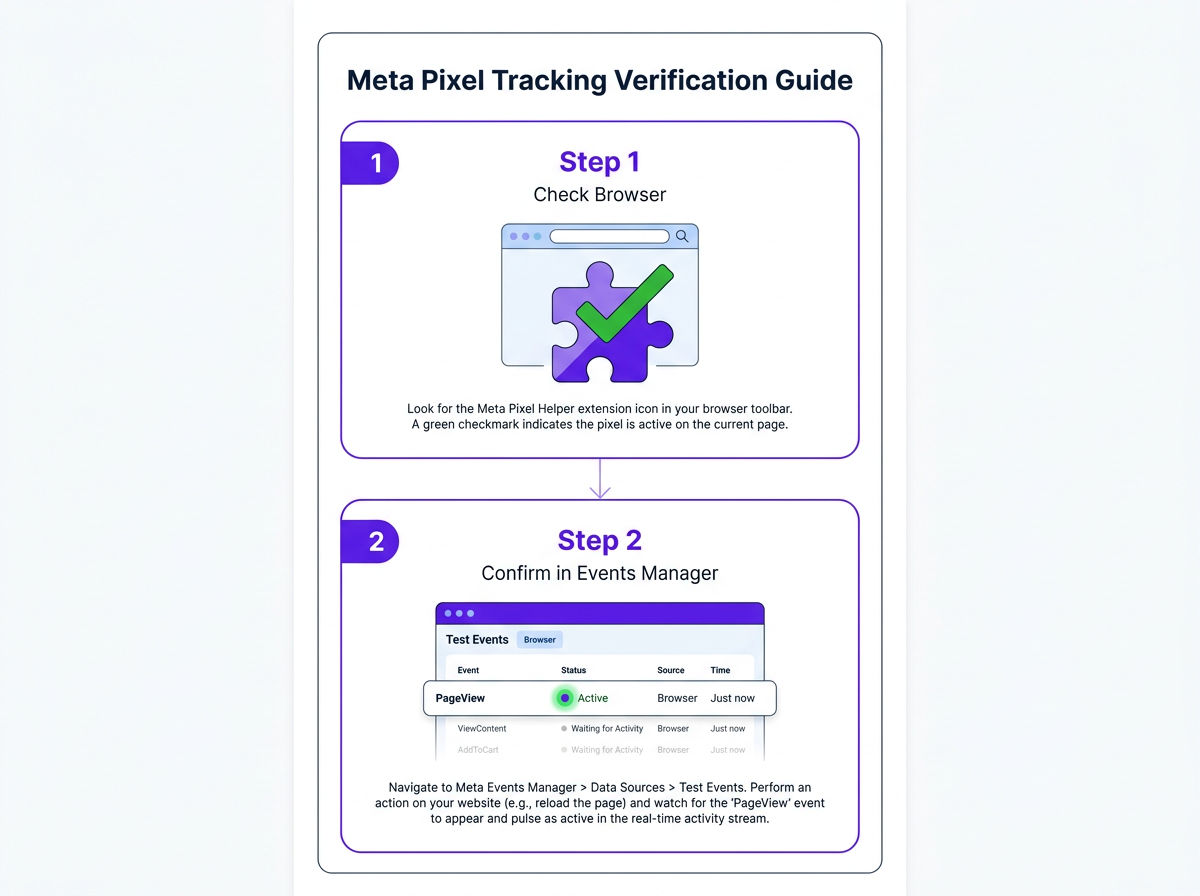
Start with the Meta Pixel Helper Chrome extension. Load your site and look at the icon: green means it fired, yellow usually means a warning (often a parameter mismatch), and red means it didn't fire. After that, open Events Manager, go to Test Events, enter your URL, and trigger a few actions to confirm PageView shows up live. If Pixel Helper is green but Test Events stays empty, you're often looking at a domain verification issue, which you'll handle in Step 2.
Step 2: Facebook Events Tracking with Standard and Custom Events
Meta supports 17 standard events: Purchase, Lead, AddToCart, InitiateCheckout, CompleteRegistration, ViewContent, Search, AddPaymentInfo, AddToWishlist, Contact, CustomizeProduct, Donate, FindLocation, Schedule, StartTrial, SubmitApplication, and Subscribe. Default to standard events whenever you can; Meta's optimization system already "knows" what they mean and is built to optimize against them.
To fire a standard event, add the call after the base code on the page where the action happens. For example, on your order confirmation page:
fbq('track', 'Purchase', {value: 49.99, currency: 'USD'});
Custom events (fired with fbq('trackCustom', 'YourEventName')) are the fallback when none of the 17 standards fit. Most accounts overuse them. A "pricing page view," for instance, is usually just ViewContent with a content_category parameter.
Meta introduced Aggregated Event Measurement after iOS 14.5 to support privacy-conscious web conversion measurement. Earlier versions of AEM required advertisers to prioritize up to 8 conversion events per domain, but Meta's current guidance says manual 8-event prioritization is no longer required for web conversion optimization. You should still focus your setup on high-value standard events such as Purchase, Lead, AddToCart, and InitiateCheckout because cleaner event quality helps optimization and reporting.
Step 3: Conversions API, Server-Side Tracking for Facebook That Fills the Gaps
Conversions API is a server-to-server pipe into Meta: your backend sends events directly, without relying on the browser. Since the request originates from your server (not the user's device), ad blockers and ITP don't get a chance to strip it. Meta treats CAPI as the preferred primary signal for audiences with heavy iOS traffic.
Info: ℹ️ Meta's Conversions API sends events server-side, bypassing ad blockers and iOS restrictions. It is now the recommended primary signal source for all iOS-heavy audiences.
There are three main ways to implement it. Direct API integration is the most hands-on: your backend sends HTTPS POST requests to graph.facebook.com/v19.0/{pixel_id}/events. Partner gateways (Shopify, WooCommerce, or marketing analytics tools) handle most of the wiring with little code. Google Tag Manager server-side containers sit in the middle, giving you flexibility without living in raw API payloads. For a deeper look at the latest platform-level features, read about Meta Pixel, CAPI, and AI features explained.
Warning: ⚠️ Do not fire the same event from both Pixel and CAPI without setting a matching event_id. Meta will count both as separate conversions and inflate your reported numbers.
CAPI via Google Tag Manager Server-Side: The Walkthrough
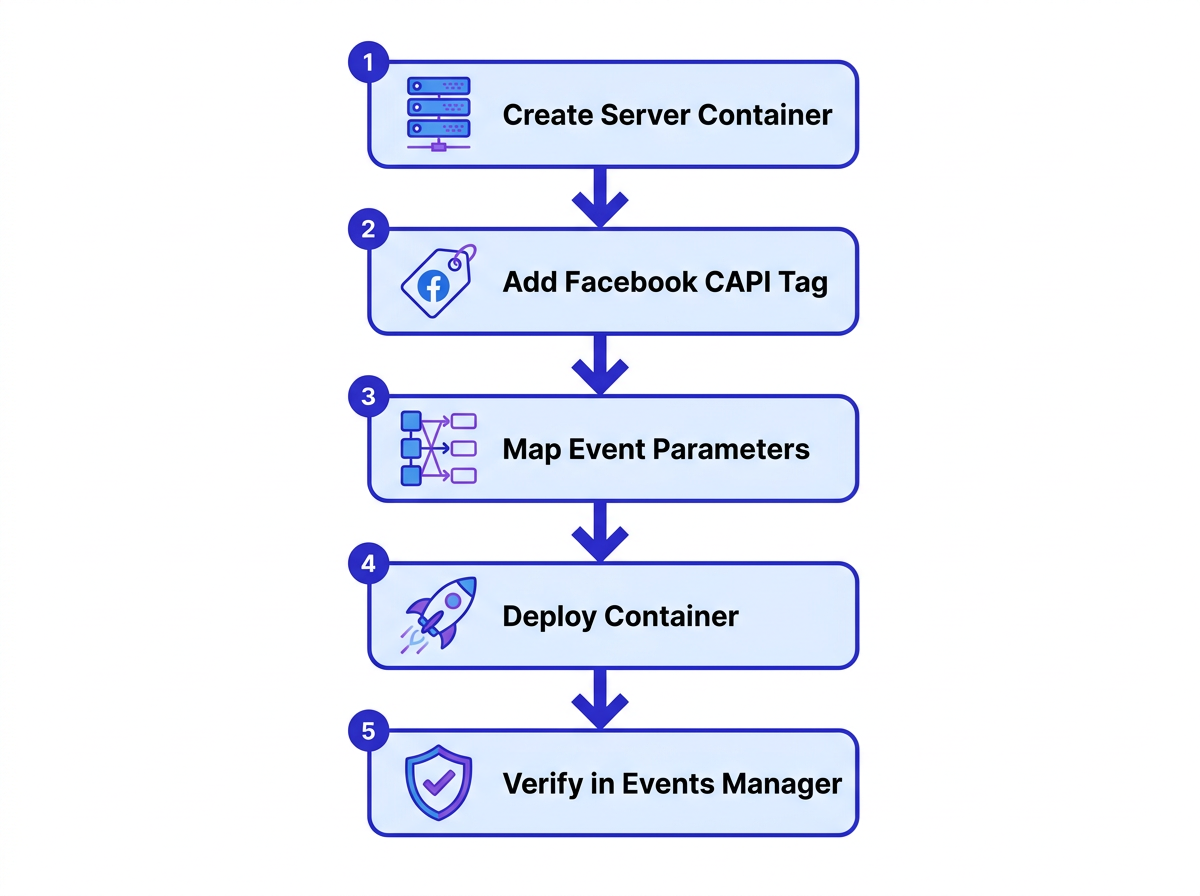
Create a GTM server-side container first (you'll need a cloud hosting environment such as Google Cloud Run or AWS). In that server container, add the Facebook Conversions API tag from the Community Template Gallery. Then configure it with your Pixel ID and API access token (generated in Events Manager under Settings). From there, map the parameters below:
Key parameters to pass through CAPI:
- event_name: Must match the standard event name exactly (e.g., 'Purchase').
- event_time: Unix timestamp of when the event occurred.
- event_id: A unique string that matches the same event_id passed by your Pixel, enabling deduplication.
- user_data: Hashed email, hashed phone, fbp cookie, fbc cookie. More parameters improve Event Match Quality.
- custom_data: Value, currency, content_ids, content_type.
Once the container is deployed, head back to Events Manager and confirm server events are showing up alongside browser events. For deduplicated events, the 'Connection Method' column should list both 'Browser' and 'Server'. Before you ship this to production, review what to check before using Meta's one-click CAPI to avoid the configuration mistakes that quietly wreck match rates.
Pixel vs. Conversions API vs. Both: What to Use When
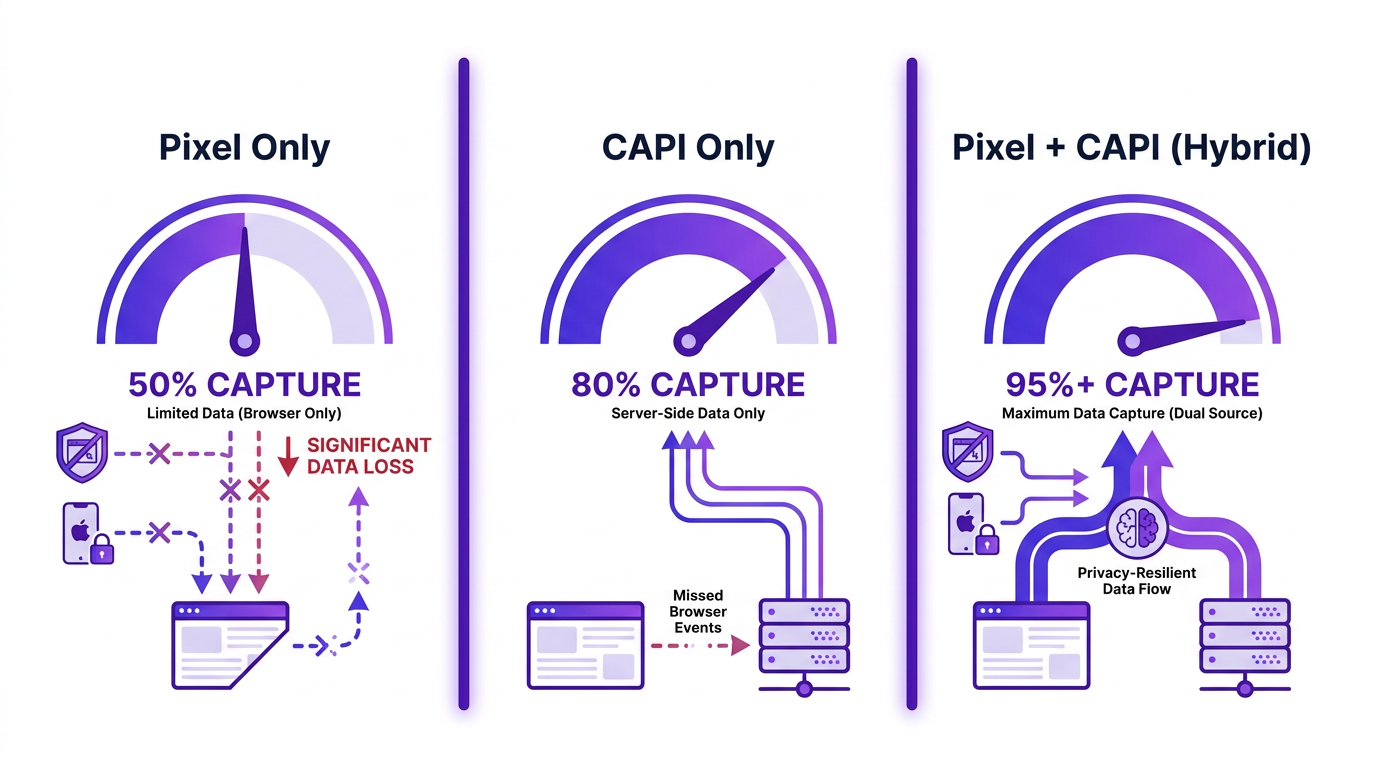
The comparison below is based on Meta's Conversions API best-practice guidance, which recommends using Conversions API alongside the Meta Pixel and sharing the same events through both tools as redundant events, plus Meta's event deduplication documentation for avoiding duplicate Pixel and server-side events.. Advertisers running Pixel and CAPI together typically see A hybrid Pixel + CAPI setup can improve event coverage compared with Pixel-only tracking, especially when browser-side signals are limited.
| Dimension | Pixel Only | CAPI Only | Pixel + CAPI (Hybrid) |
|---|---|---|---|
| Signal Coverage | ~50-60% (blocked by ad blockers, ITP, ATT) | ~70-80% (misses some client-side interactions) | ~90-95% (redundant signals fill gaps) |
| iOS / Ad-Blocker Resilience | Weak | Strong | Strong |
| Implementation Complexity | Low (copy-paste snippet) | Medium-High (server setup required) | High (both plus deduplication) |
| Deduplication Required | No | No | Yes (matching event_id mandatory) |
| Recommended Use Case | Testing or low-budget campaigns | Server-rendered apps, no client JS | All production ad accounts (Meta's recommendation) |
| Meta recommends the hybrid setup for maximum Event Match Quality |
Tip: 💡 Run Pixel and CAPI simultaneously with event deduplication turned on. This is the only way to recover signal lost from iOS 14+ browser restrictions without double-counting conversions.
Step 4: Configure Your Facebook Attribution Model
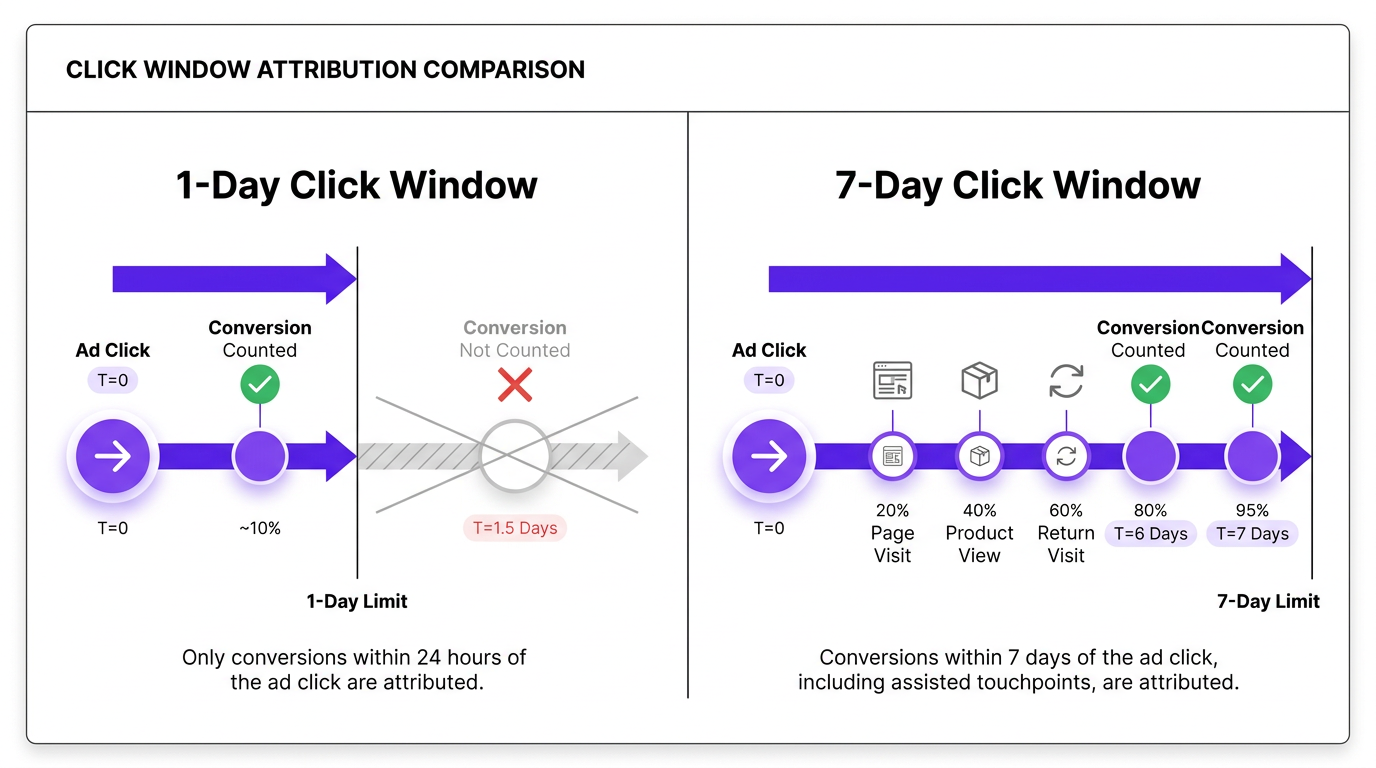
Meta's attribution settings you can change what you're looking at in Ads Manager by customizing your reporting columns and selecting a different attribution setting. In March 2026, Meta adjusted the rules: "click-through attribution" now counts only actual link clicks, while actions like likes and shares are grouped under "engage-through attribution" (Meta Attribution Change 2026, 2026). That split matters, because the same campaign can swing from "printing money" to "why are we running this?" depending on the window and interaction type you choose.
If you sell high-frequency, low-consideration products (impulse buys under $30), a 1-day click view often tracks closer to reality. If your funnel has a longer runway (B2B leads, SaaS trials, high-ticket items), 7-day click is more likely to capture the conversions that happen after comparison shopping. The average conversion rate for Meta ads with a Conversions objective is 8.25% in 2026 (Key Meta Ads Statistics for 2026, 2026), but that headline number moves a lot depending on the attribution window you report against.
Troubleshooting Facebook Ads Conversion Tracking
| Symptom | Likely Cause | Fix |
|---|---|---|
| Events appear in Test Events but not in reporting | Domain not verified or event not prioritized in AEM | Verify domain in Business Settings, re-rank events in Events Manager |
| Conversions are double-counted | Pixel and CAPI fire the same event without matching event_id | Add identical event_id to both Pixel and CAPI payloads |
| Event Match Quality score below 6 | Not enough user parameters in the CAPI payload | Pass hashed email, phone, fbp cookie, fbc cookie, and external_id |
| Conversions appear 24-48 hours late | Standard Meta reporting delay, not missing data | Wait 72 hours before evaluating; use the 'Reporting Starts' date filter |
| Pixel Helper shows green but Events Manager shows no events | Pixel is installed on a staging domain or the wrong Pixel ID is live | Confirm the Pixel ID matches your ad account's data source |
| Diagnostic reference for the most common tracking failures |
A Mistake Most Advertisers Make with Event Configuration
The "track everything" impulse collides fast with AEM's 8-event cap. If you configure 15 events, Meta can't prioritize them in a way that leads to consistent optimization. In practice, the system performs better when you feed it fewer, higher-signal conversion events. Pick your top 3 to 4 (Purchase, Lead, AddToCart, InitiateCheckout), rank them in Events Manager, and stop trying to make every micro-action a conversion. If you want to improve what happens after the click, explore strategies around AI and UX for conversion optimization.
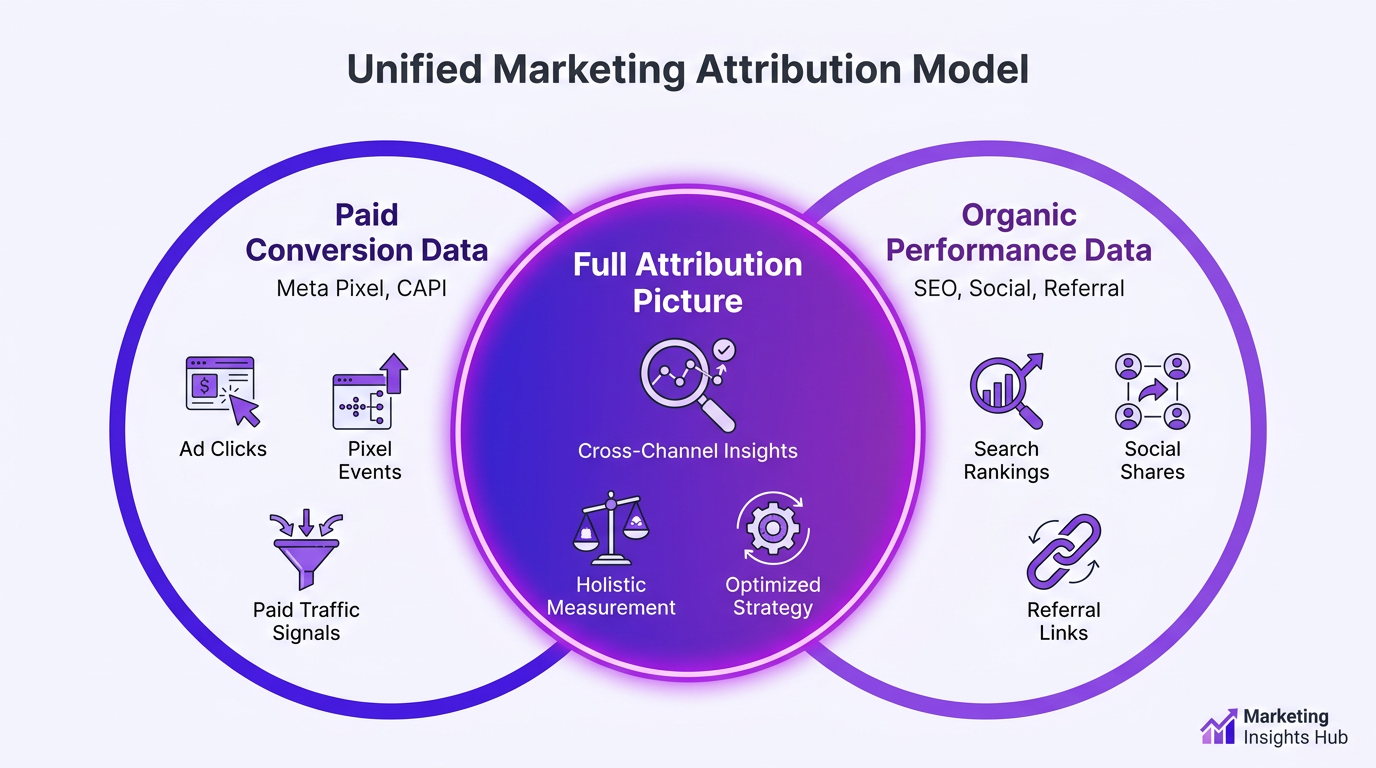
Where Organic and Paid Conversion Data Meet
Paid tracking is only half the story. Organic social, SEO, and referral traffic can drive conversions that Meta will never be able to "see" end to end. If Meta is the only channel you measure with precision, you'll end up crediting paid for revenue it didn't really create, and starving the channels that did. Tools like Vizup can help tie organic performance data back to paid attribution so you get a truer read on what's working. The point isn't to replace Meta's tracking; it's to keep any one channel from taking more credit than it earned.
FAQ: Facebook Conversion Tracking
Do I still need the Meta Pixel if I set up the Conversions API?
Yes. Meta's recommended setup is to run both. The Pixel captures browser-side behavior that CAPI doesn't see, while CAPI recovers events that get lost to ad blockers and iOS restrictions. With deduplication configured, the hybrid setup gives you the broadest coverage without inflating conversions.
How do I verify that my facebook conversion tracking is working correctly?
Use three checks. (1) Install the Meta Pixel Helper Chrome extension and confirm you get green status on key pages. (2) In Events Manager, open Test Events, enter your URL, and run through a conversion flow. (3) For events sent through both Pixel and CAPI, confirm the Connection Method column shows both "Browser" and "Server." If one step fails, start with the basics: Pixel ID, domain verification, and the CAPI access token.
What is a good Event Match Quality score, and how do I improve it?
A score of 8+ (out of 10) is a solid target. When you're below 6, Meta has a harder time matching events to user profiles, which drags on optimization. The fix is usually straightforward: send more hashed identifiers through CAPI, email, phone, first name, last name, city, state, zip code, fbp cookie, fbc cookie, and external_id. More high-quality parameters generally means better match confidence.
Why are my Facebook ad conversions not matching Google Analytics numbers?
Because they're counting different things with different rules. Meta uses its own attribution model (default 7-day click, 1-day view) and credits conversions if the ad interaction falls inside that window. GA4 typically reports last-click or data-driven attribution and only counts the session where the conversion happened. Time zone settings, cross-device behavior, and Meta's view-through attribution (which GA4 doesn't include) all widen the gap. Some mismatch is normal; 10 to 20 percent variance is common.
How does iOS 14.5 affect facebook ads conversion tracking, and what should I do about it?
ATT forces apps to ask permission to track across apps and websites. As of early 2026, only 34% of iOS. For opted-out users, Meta can't reliably receive Pixel events from Safari, and reporting can be delayed up to 72 hours. The practical response is to implement CAPI for server-side events, verify your domain in Business Settings, and make sure your most important standard events are configured cleanly in Events Manager. A hybrid Pixel + CAPI setup can improve event coverage compared with Pixel-only tracking, especially when browser-side signals are limited.
Your Tracking Stack Checklist
Complete these steps in order, then revisit quarterly as Meta updates its platform:
- Meta Pixel installed and base code firing PageView on all pages.
- Standard events configured on key conversion pages (Purchase, Lead, AddToCart at minimum).
- Domain verified in Meta Business Settings.
- Aggregated Event Measurement priorities set (top 8 events ranked).
- Conversions API connected via direct integration, partner gateway, or GTM server-side.
- Event deduplication confirmed (matching event_id on both Pixel and CAPI payloads).
- Attribution window selected in Ads Manager reporting columns (7-day click or 1-day click based on your sales cycle).
- Event Match Quality score checked and above 6 (ideally 8+).
Facebook conversion tracking is infrastructure, not something you "set and forget." Meta changes policies, browsers tighten the screws, and your funnel changes underneath you. Put a quarterly audit on the calendar: confirm events still fire, watch for Event Match Quality sliding, and make sure your attribution window still matches how people actually buy. The teams that treat tracking like ongoing maintenance are the ones whose ROAS numbers hold up when you make decisions off them.
