The average website conversion rate has hovered between 2% and 3.5% for nearly a decade. Billions spent on CRO tools, landing page builders, testing platforms. Entire teams dedicated to moving that number. And for most companies? It barely budged. If you've ever stared at a month-long A/B test that ended in "no significant difference," you know exactly how that feels.
Something shifted around 2024. AI stopped being conference fodder and became the thing quietly rewriting how digital experiences behave. By 2026, the teams getting real conversion lifts aren't running more tests. They're treating AI and UX for conversion optimization as a single integrated discipline, not two separate line items. I've watched this play out firsthand. A mid-size e-commerce brand we tracked spent six months running traditional A/B tests on their checkout flow. Eleven tests. Two statistically significant results. Then they layered in AI-driven behavioral analysis and dynamic personalization. Within eight weeks, cart abandonment dropped 20% and conversions climbed 25%. Same traffic. Same product. Completely different experience architecture.
This is a field manual for product managers, UX designers, marketers, and founders who want to understand how AI reshapes the conversion funnel at the experience layer. Not the hype version. The version where you walk away knowing which layers of your experience to target, which tools justify the budget, and which "best practices" from 2022 are actively hurting your conversion rates today. Already live and breathe CRO? Skip ahead to the sections that interest you. Newer to this intersection? The early sections will ground you before things get technical.
What's ahead: The basics of AI-powered UX design and CRO in 2026 → How AI is replacing the old design-test-wait playbook → What most people get wrong about AI-based personalization → The five layers where AI drives conversions → A step-by-step implementation framework → The tools landscape → Advanced plays including generative UI, predictive UX, and the ethics you can't ignore → Metrics that actually work when AI is continuously optimizing.
The Basics: What AI and UX for Conversion Optimization Actually Means in 2026
Most guides on this topic mash three distinct things into one blob. Let's pull them apart. AI capabilities (pattern recognition, prediction, generation). UX design principles (how humans perceive and navigate an interface). Conversion rate optimization (the systematic process of getting more visitors to take a specific action). The real work happens where these three overlap, but only if you respect what each part does on its own. AI doesn't "do" UX. And a huge mistake I see repeated constantly is confusing AI personalization with AI-powered UX design. Personalization is one application. AI-powered UX design is a much bigger shift in how we conceive, build, and improve digital experiences.
CRO evolved in pretty clear phases. Manual A/B testing dominated the 2010s. Multivariate testing added complexity. Rules-based personalization ("if visitor is from California, show beach imagery") added a thin layer of intelligence. Now, AI-driven experience optimization treats the interface as a dynamic system that adapts to behavioral signals in real time. The practical difference comes down to human labor. Earlier approaches needed humans to define every rule and every segment. Current AI systems discover patterns humans wouldn't think to test, then adjust within the constraints you set. A rule-based system might find that visitors from New York convert better with urgency messaging. An AI system might discover that visitors who read three blog posts before hitting pricing convert 2x better with a case-study CTA than a free-trial button. Nobody would have written that rule manually.
Why 2026 specifically? Three capabilities matured past the hype cycle simultaneously: real-time generative UI (pages that compose themselves), predictive intent modeling (knowing what a user wants before they click), and on-device AI inference (processing that happens in the browser, not on a server round-trip). That convergence is what makes this year genuinely different from the "AI will change everything" promises of 2023.
One contrarian point worth making here. Most teams won't win by chasing the fanciest model. They win by fixing the plumbing: clean event tracking, consistent design tokens, and a feedback loop that doesn't break the moment someone changes a form field. Boring? Yes. But I've seen more CRO programs fail from messy data infrastructure than from picking the wrong AI vendor.
Skip This If You Already Run A/B Tests in Your Sleep
Quick primer for anyone newer to CRO. Conversion rate is visitors who complete a goal divided by total visitors. But the metric that actually matters is the chain of micro-conversions leading to that goal. Did they scroll past the fold? Click into pricing? Start filling out the form? Hesitate on the payment step? Bounce rate, time-to-action, and revenue per visitor all tell different parts of this story. UX is the medium through which every one of those micro-decisions happens. A visitor deciding to scroll past your hero section is a micro-decision. Choosing to click a tab instead of bouncing is another. AI's role is optimizing that entire chain, not just the final click. For a broader grounding in CRO fundamentals, the Vizup blog on conversion optimization offers rigorous practitioner resources.
How AI-Powered UX Design Is Replacing the Old Playbook
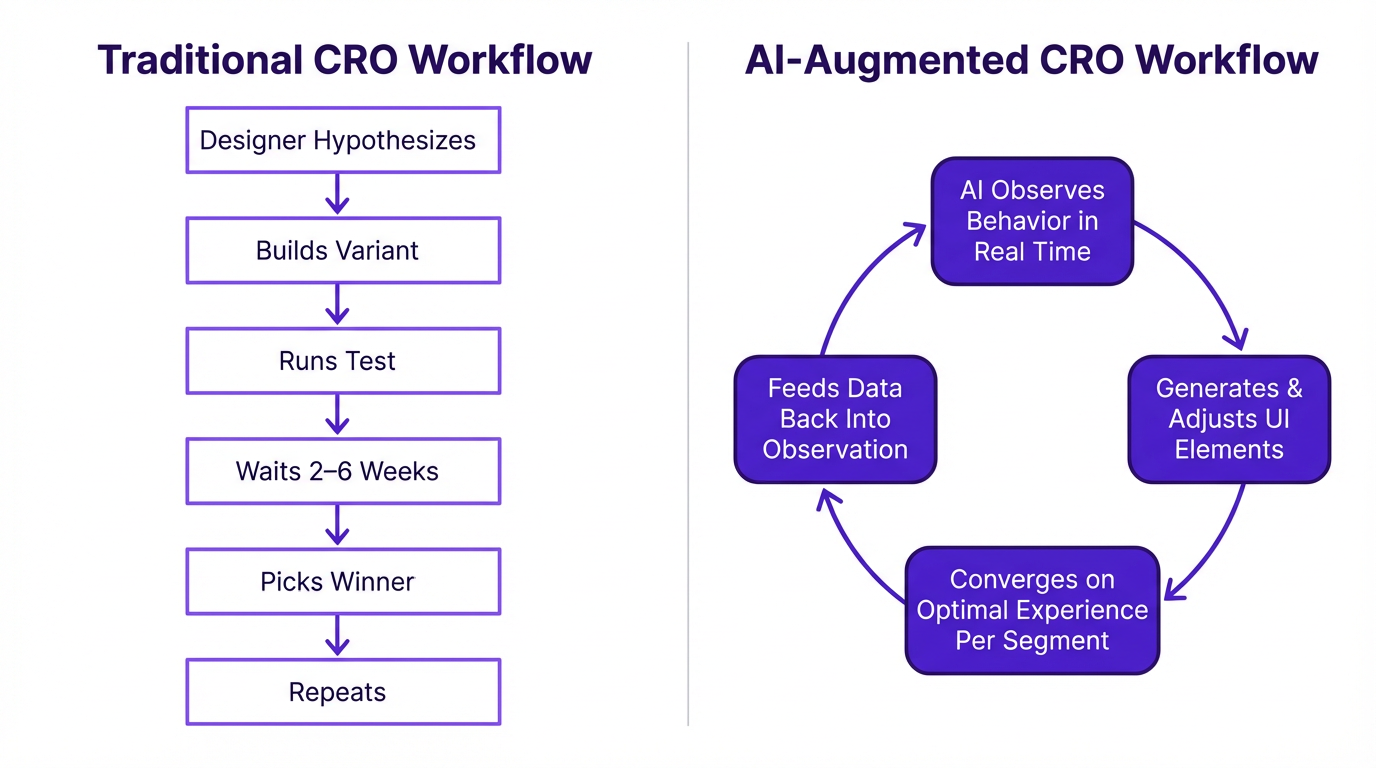
The old playbook is linear and slow. The AI-augmented version runs continuously.
The old way: a designer suspects that moving the CTA above the fold will help. They build the variant, configure the test, wait three to six weeks for statistical significance, and declare a winner. Repeat for the next hypothesis. Traditional A/B testing uses a fixed 50/50 traffic split, which means if one variation is a clear loser, you're still sending half your traffic to it until the test concludes. That inefficiency compounds across a full testing roadmap. And nobody talks about it enough.
I've watched teams burn entire quarters testing button colors while their checkout flow had a fundamental information architecture problem nobody thought to question.
AI-powered UX design collapses that entire cycle. The system observes behavior in real time, generates or adjusts UI elements, and converges on optimal experiences per segment continuously. Instead of a fixed split, the algorithm dynamically allocates more traffic to the better-performing variation as the test runs (a multi-armed bandit approach). This minimizes losses from a bad variation and maximizes conversions during the experiment, not just after. Some concrete examples shipping right now: dynamic form fields that reorder based on user hesitation patterns (if someone pauses on the phone number field, it drops to optional), AI-generated hero copy that shifts tone based on referral source (organic search visitors see benefit-focused messaging, social traffic sees social proof), and layout reflow based on scroll-depth prediction.
An honest caveat: AI-powered UX design doesn't eliminate the need for human designers. It eliminates the bottleneck of waiting for statistical significance on every small decision. The designer's role shifts from "build two versions and see which wins" to "define the design system constraints within which the AI operates." That's a harder job, not an easier one. If you don't set those constraints well, the model will happily optimize itself into a weird, inconsistent experience that technically converts but slowly erodes trust. Vizup's guides on AI for marketers cover this new dynamic well.
What Most People Get Wrong About AI-Based Personalization
The biggest misconception I run into is teams thinking personalization just means slotting a user's first name into a headline. That was personalization in 2018. It's almost insulting now. True AI-driven personalization in 2026 adapts the entire experience architecture: navigation depth, content density, CTA placement, even the visual hierarchy of the page, all based on real-time behavioral signals.
Here's what that looks like in practice. A SaaS tool identifies a "power user" by their behavior and proactively surfaces advanced features, while keeping them hidden for new users to avoid overwhelm. A travel site changes its CTA from "Book Now" to "Hold for 24 Hours" for a visitor who has viewed the same flight page three times without purchasing, because the AI detects hesitation. A media site's search bar re-ranks results based on reading history, anticipating what the user is actually looking for rather than just matching keywords.
The "creepy vs. helpful" line has moved, too. Users now expect intelligent experiences but punish ones that feel like surveillance. The difference comes down to whether the personalization serves the user's goal or the company's goal. One e-commerce brand saw a 34% lift in checkout completion by using AI to detect "comparison shopping" behavior (multiple product page visits, tab switching, price-page revisits) and surfacing a streamlined comparison table instead of pushing urgency countdown timers. They stopped pressuring the user and started helping them decide. That's the shift worth understanding.
McKinsey's 2021 personalization research found that 71% of consumers expect personalized interactions, and 76% get frustrated when they don't get them. Fast-growing firms generate 40% more revenue from personalization than their slower-growing competitors, per the same study. The gap isn't about having fancier AI. It's about deploying AI to genuinely serve user intent rather than just segment and target. Brands that implement AI-driven personalization effectively see up to 25% higher conversion rates within six months, based on patterns observed across real-world deployments.
The technology to accomplish genuine personalization at scale isn't science fiction. Platforms built around behavioral targeting and real-time segmentation are already making it happen. The challenge is more strategic than technical: it demands deep integration of data sources (CRM, analytics, behavioral data) and a clear map of the customer journey. You can't personalize effectively if your data lives in silos. This connects directly to traffic generation, too. A well-executed strategy for building an AI-powered SEO strategy brings in qualified users, and personalization ensures they convert.
The Five Layers Where AI in UX Design Drives Conversions
Rather than a flat checklist, think of this as a layered model. Five layers, each building on the one below: Content, Layout/Structure, Micro-Interactions, Navigation/Flow, and Timing/Triggers. Most teams over-invest in layers 1 and 2 because they're the most visible (headline copy, page layout) and barely touch the rest. If you've ever wondered why your "best practices" redesign didn't move numbers, this is usually why. You polished the bottom layers. The real friction lived higher up the stack.
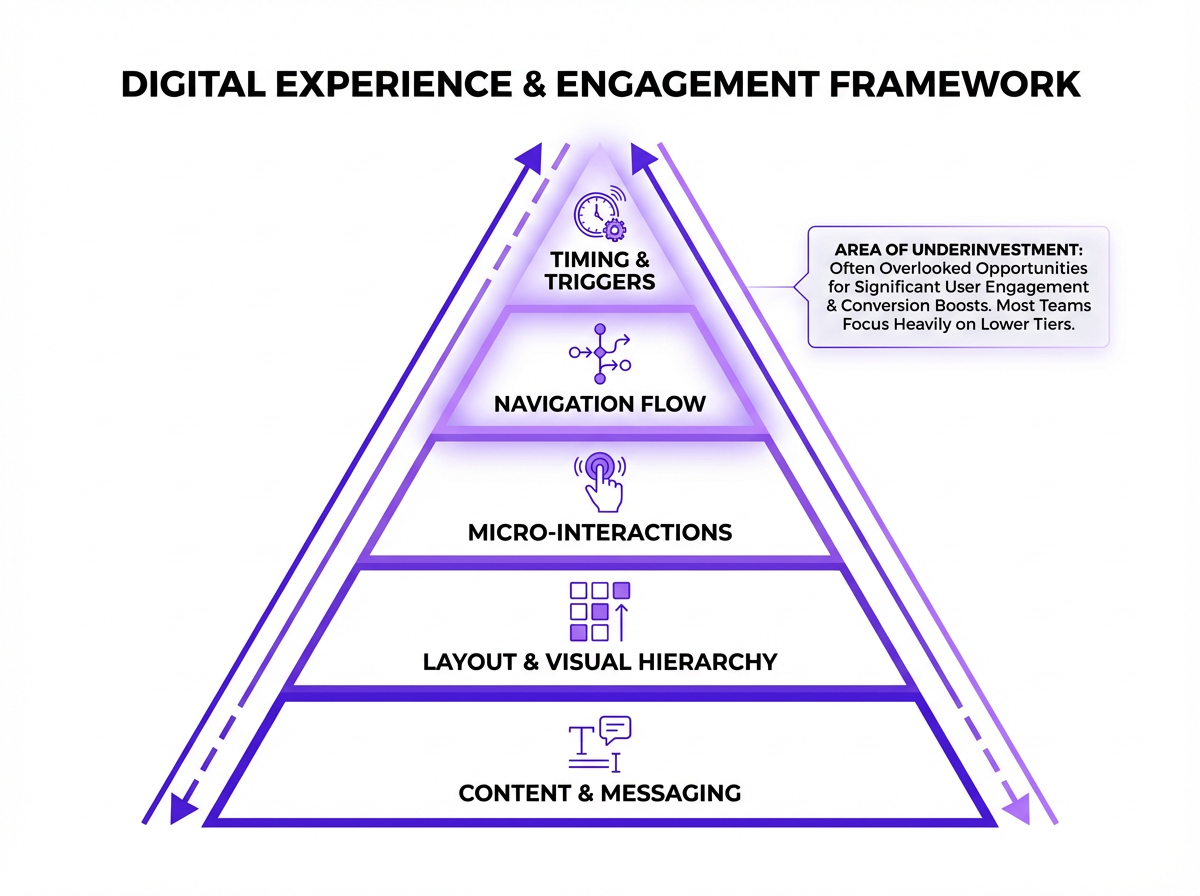
Most teams only optimize the bottom layer. The real gains are higher up.
Layer 1: AI-Optimized Content and Messaging
Dynamic headline and value-prop testing at scale is table stakes now. Generative AI has changed UX writing workflows significantly. Stuck on a headline? An AI tool can generate 20 options across different tones (professional, urgent, conversational) in seconds. Need microcopy for an error state? Give the model the context and you have a solid first draft in under a minute. The writer's job becomes curation and refinement, making sure the copy serves the user's emotional state in that specific moment. That judgment call is still very human.
Where organic teams often miss an opportunity: platforms like Vizup's AI-powered organic marketing platform can reveal which messaging resonates with organic audiences before you even build landing page variants. A specific tactic worth trying: map search intent clusters to landing page copy variations. Not keyword matching, but semantic intent alignment. eDesign Interactive's 2026 web trends research identifies semantic alignment between user intent and on-page messaging as one of the clearest drivers of conversion growth heading into 2026. Someone searching "best CRM for small teams" and someone searching "CRM pricing comparison" are at different decision stages. Your page copy should reflect that automatically.
Layer 2: Adaptive Layout and Visual Hierarchy
AI-driven heatmap prediction has become genuinely useful. Instead of waiting for 10,000 sessions to generate a post-hoc heatmap, predictive attention tools estimate where users will focus before a single visitor arrives. That changes how you prioritize layout decisions in the design phase rather than after launch. Layout reflow based on device, session depth, and user segment can increase form completions by 15-25%. Some generative UI tools can produce multi-screen layout mockups from a text prompt, which has genuinely changed rapid prototyping timelines. You can visualize an entire user flow in the time it once took to sketch a single wireframe. The output isn't pixel-perfect and needs significant refinement, but as a starting point for early concept testing, it's hard to beat.
One thing people overrate here: "more personalization" in layout. Sometimes the win is simply removing a distracting module for mobile visitors and calling it a day. Not everything needs an AI solution.
Layer 3: Micro-Interactions That Nudge Without Annoying
AI-timed tooltips, progressive disclosure, smart defaults. Small UX moves that compound into measurable lifts. The anti-pattern to avoid: AI-triggered pop-ups that interrupt flow. Exit-intent modals have lost roughly 40% of their effectiveness since 2023 because of user fatigue, according to UX benchmark research. Some teams cling to them because "they used to work." They don't anymore, at least not the way they used to. The Nielsen Norman Group's research on modal dialogs documents exactly why users have learned to dismiss them reflexively. If you're still running exit-intent modals as your primary retention tactic, you're training your best prospects to close things without reading them.
Layers 4 & 5: Navigation Flow and Behavioral Triggers
These two layers are deeply intertwined. AI that shortens the path-to-conversion by predicting which pages a user will need (and surfacing them proactively) is one of the highest-impact applications available right now. Trigger-based UX, showing social proof at the moment of hesitation (detected via cursor stall, scroll reversal, or tab-switching behavior) rather than on a fixed timer, consistently outperforms static approaches. Brands using AI-triggered contextual nudges see 18-27% higher engagement than time-based triggers, based on UX benchmark patterns reported across ecommerce and SaaS implementations.
The difference between "show a testimonial after 10 seconds" and "show a testimonial when the user's cursor drifts toward the back button" is enormous. One is a guess. The other is a response.
AI-Powered User Research: From Data Overload to Actionable Insight
User research has always been a bottleneck. Conducting interviews, analyzing session recordings, coding survey responses. Incredibly time-consuming. I've seen teams spend weeks buried in spreadsheets, trying to surface a handful of insights from thousands of data points. The volume of data isn't the problem. The problem is that humans aren't built to process it at scale.
A real-world example makes this concrete. A client was struggling with cart abandonment. Analytics showed a drop-off at the shipping stage, but not why. We used an AI tool to analyze 50 session recordings of failed checkouts. Within an hour, the system highlighted a key pattern: users on mobile were repeatedly clicking the shipping cost estimator, triggering an error, and then leaving. The error wasn't visible in standard analytics dashboards. The AI didn't just show us what was happening. It pointed directly to the broken experience. That's the difference between data and insight.
But you can't blindly trust the output. AI is brilliant at finding correlations but ignorant of causation. The human researcher's job is more critical than ever: take the AI's output, question it, validate it against other data, and weave it into a narrative that drives action. The teams that treat AI research output as gospel are the ones who end up optimizing for the wrong thing entirely.
Putting It Into Practice: A Step-by-Step Framework
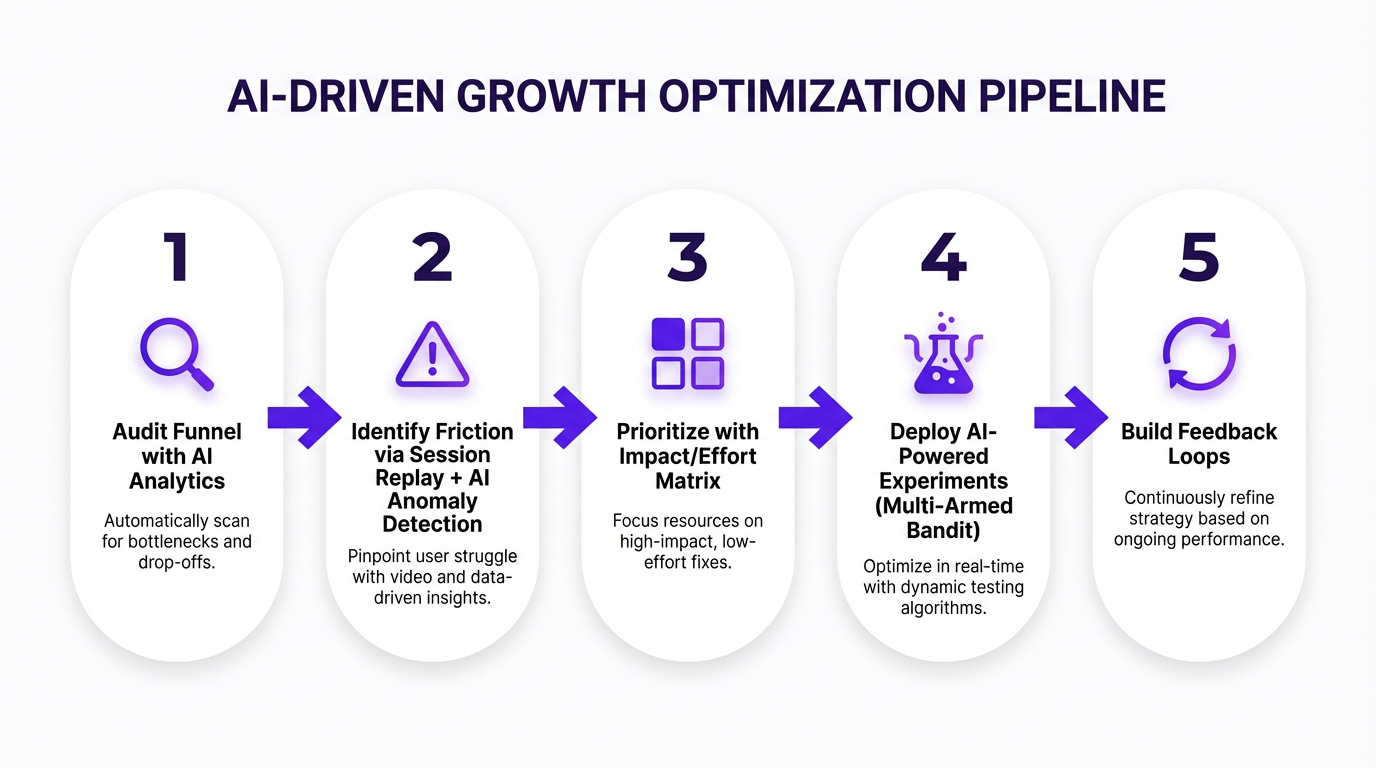
Five steps from audit to continuous learning. Most teams stall at Step 3.
Step 1: Audit your current conversion funnel with AI-assisted analytics. Pull your funnel data and look for drop-off cliffs, not gradual declines. AI anomaly detection can flag where users abandon at rates statistically higher than your baseline. Google Analytics 4's predictive audiences are a decent starting point. Pair that with organic traffic intelligence from a platform like Vizup to understand what visitors expected when they arrived and which traffic segments convert differently based on their entry intent.
Step 2: Identify the highest-friction moments. Session replay tools with AI anomaly detection can flag rage clicks, dead clicks, and hesitation patterns across thousands of sessions without you watching each one. A common thing I hear is, "We already know where users drop off." Cool. But do you know why? The AI layer matters because a human watching 200 session replays will miss patterns that ML models catch across 20,000 sessions.
Step 3: Prioritize using an impact/effort matrix weighted by AI confidence scores. Not every friction point warrants equal investment. Score each opportunity by estimated conversion impact, implementation effort, and the AI model's confidence that the identified pattern is real (not noise). High confidence, high impact, low implementation effort? That's your first sprint. This step is where most teams rush, and it's exactly where they shouldn't. Chasing statistical ghosts is a very real way to burn a quarter and end up with nothing but prettier charts.
Step 4: Deploy AI-powered experiments. Stop defaulting to traditional A/B tests for everything. Multi-armed bandit approaches allocate traffic to winning variants faster. Contextual bandit methods go further by factoring in user context when assigning variants. You'll reach actionable conclusions in days, not weeks. AI-driven personalization can deliver a 10-25% lift in conversion rates when deployed this way.
Step 5: Build feedback loops. The AI needs to learn from every conversion and every drop-off. Pipe outcome data back into your models continuously. This is where most teams stall. They run the experiment, pick a winner, and move on. The real value comes from continuous learning, where the AI refines its understanding of your specific audience over time. Teams that run AI-driven optimization for six months or more consistently outperform those who treat it as a one-time project. If you're building an AI-powered SEO strategy alongside your CRO work, these feedback loops should share data.
The Tools Landscape: What's Worth Your Budget in 2026
I'll be blunt: most teams are over-tooled and under-integrated. Three well-connected tools beat eight siloed ones every time. And here's another hard truth. The best AI CRO tool in the world can't save you from broken tracking, inconsistent naming conventions, or a design system that changes every two weeks. Fix the basics, then buy software.
| Category | Tool Type | Primary AI Capability | Best Fit |
|---|---|---|---|
| Analytics & Insight | AI-powered behavioral analytics platforms | Anomaly detection, behavioral pattern recognition | Mid-to-large teams with high event volume |
| Session Intelligence | AI session replay and analysis tools | AI-assisted session tagging, rage-click detection | Any team running qualitative UX research |
| Personalization | Real-time experience personalization engines | Real-time 1:1 experience adaptation | E-commerce, SaaS with segmented audiences |
| Experimentation | AI-powered testing and experimentation platforms | Multi-armed bandit testing, hypothesis generation | Teams with 1,000+ monthly conversions |
| Content & Copy Optimization | AI content and messaging optimization tools | Generative copy variants, message resonance scoring | Paid traffic-heavy campaigns |
| Organic Traffic Intelligence | Vizup | Intent signal mapping, organic-to-conversion alignment | SEO-driven growth teams |
The gap most tools leave open: they optimize the on-site experience but have zero visibility into where the traffic came from or what it expected. That's where Vizup sits. If your organic visitors arrive with specific intent signals and your landing page doesn't reflect those signals, no amount of on-page optimization fixes the mismatch. If you're building an AI-powered SEO strategy and want that intelligence to inform your UX decisions, that connection matters more than any single feature on a personalization platform. For a broader view of how these tools fit into your stack, the guide to AI marketing tools covers the wider ecosystem.
Advanced Playbook: AI and UX for Conversion Optimization Beyond the Basics
Predictive UX: Designing for What the User Will Do Next
Transformer-based models trained on session sequences can now predict next-action with enough accuracy to pre-render the optimal next screen or content block. This cuts perceived load times and reduces decision friction. It's real, and it works. But an edge case trips up even sophisticated teams: users who deviate from predicted paths can feel trapped if the UI has over-committed to one flow. Always design escape hatches. A persistent navigation bar, a visible search field, a "not what you're looking for?" link. Predictive UX should feel like a helpful shortcut, not a locked corridor.
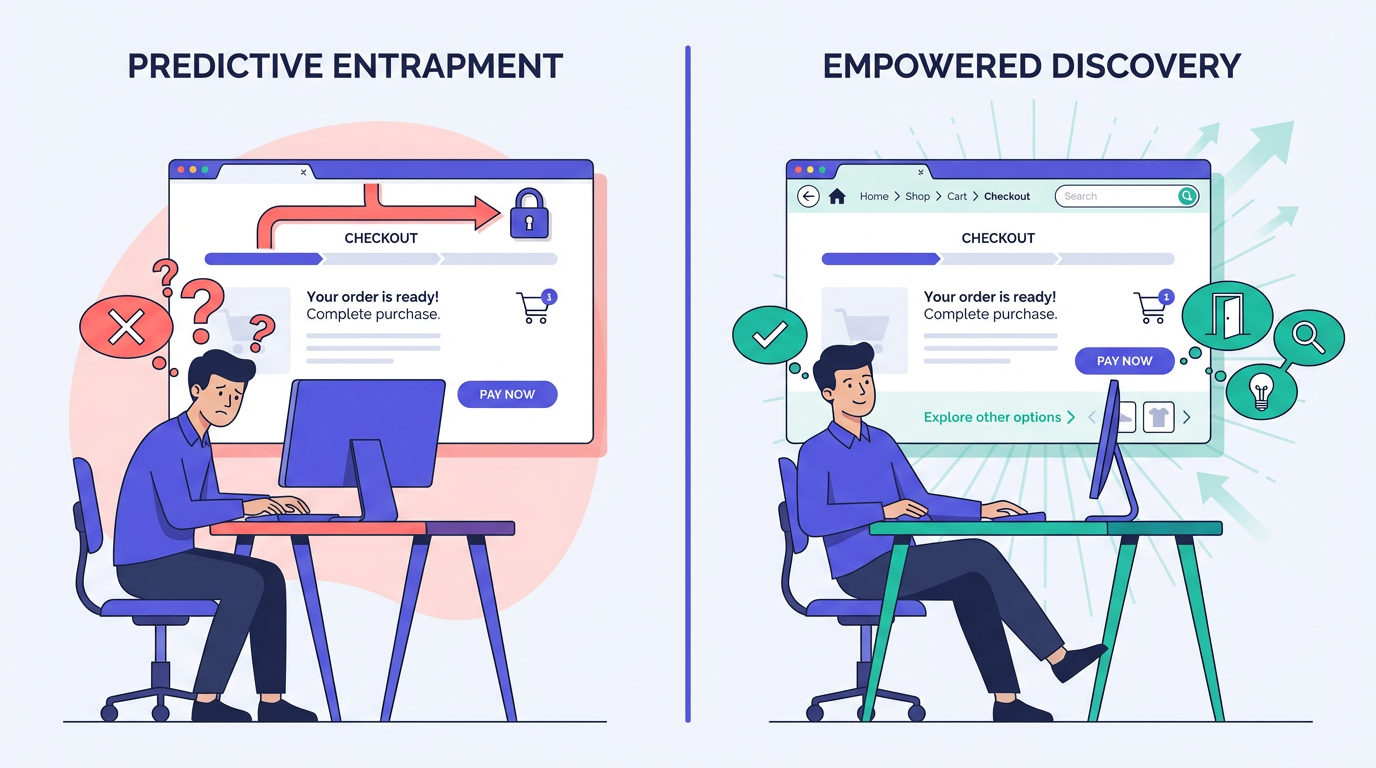
Predictive UX without escape hatches creates a worse experience than no prediction at all.
Generative UI: When AI Builds the Page in Real Time
This is the frontier. LLM-driven interfaces that compose page sections on the fly based on user context. Some tools already generate functional UI from prompts, and the gap between prototype and production is closing fast. The conversion implication: every visitor could theoretically see a unique page. But the reality is messier than the pitch. Forrester's 2026 predictions warn that while some brands will see modest gains in simple self-service, many will actually harm their customer experience by rushing out poorly implemented AI.
The challenge is brand coherence. If every page is unique, returning users get disoriented. Guardrails you need: design token constraints (typography, spacing, component library locked), conversion-critical element locks (your primary CTA never moves or changes shape), and A/B validation layers running on top of generative output to catch regressions. For teams exploring generative AI for marketing growth strategies, generative UI is the logical next frontier. But treat these guardrails as non-negotiable. Scaling AI content without them is how you end up with a site that technically performs but feels like it was assembled by a committee that never met.
The Human-in-the-Loop: Where AI Fails and Designers Prevail
After all this talk of automation, you might think designers are on the fast track to obsolescence. Nothing could be further from the truth.
AI is a remix machine, trained on existing data, so its output is inherently derivative. It can create a competent interface but is unlikely to produce a breakthrough idea. It will also optimize for a goal without regard for consequences. Tell it to maximize sign-ups and it might create manipulative dark patterns without blinking. A human designer has the ethical responsibility to intervene. In an AI-powered world, the UX professional becomes the conductor of the orchestra: orchestrating the technology, guiding it with expertise, and ensuring the final output serves both the user and the business. That requires a deeper understanding of strategy, psychology, and ethics than ever before.
The Ethics and Privacy Angle You Can't Ignore
GDPR, CCPA, and the EU AI Act all carry implications for AI-based personalization. If your AI uses behavioral data to alter the UX, you may need to disclose that. Algorithmic bias is a real operational risk, not just a PR concern. Personalization engines trained on historical data can inadvertently create discriminatory experiences, such as showing different pricing to users based on proxies for socioeconomic status. Auditing for bias isn't optional. The ACM's Fairness, Accountability, and Transparency (FAccT) research is the most rigorous academic resource on this topic. Google's People + AI Guidebook offers solid tactical guidance on building human-centered AI products responsibly.
There's also a clear line between persuasion and manipulation. AI can be used to create hyper-effective versions of dark patterns: exit-intent modals, fake scarcity timers, pre-checked upsell boxes. As practitioners, drawing that line is our responsibility, not the model's. The Nielsen Norman Group's research on dark patterns is worth reading if you're setting guardrails for your team.
Practical advice that actually works: build your AI-powered UX optimization on first-party and zero-party data. It's not just legally safer. It performs better because the signals are higher quality. Third-party cookie data was always noisy. Now it's noisy and legally risky. First-party behavioral data from your own site is clean, consented, and specific to your audience. That's a meaningful advantage, not just a compliance checkbox.
Measuring What Matters: Metrics for AI-Driven CRO
Traditional CRO metrics break down when AI is continuously optimizing. You can't declare a "winner" when the experience is always shifting. I've watched teams try to force old measurement frameworks onto AI-driven systems and end up confused by their own dashboards. Usually the argument starts with, "But we need a control." You do. You just need a smarter one. The control isn't a static variant held at 50% traffic forever. It's a rolling baseline that accounts for the AI's learning curve.
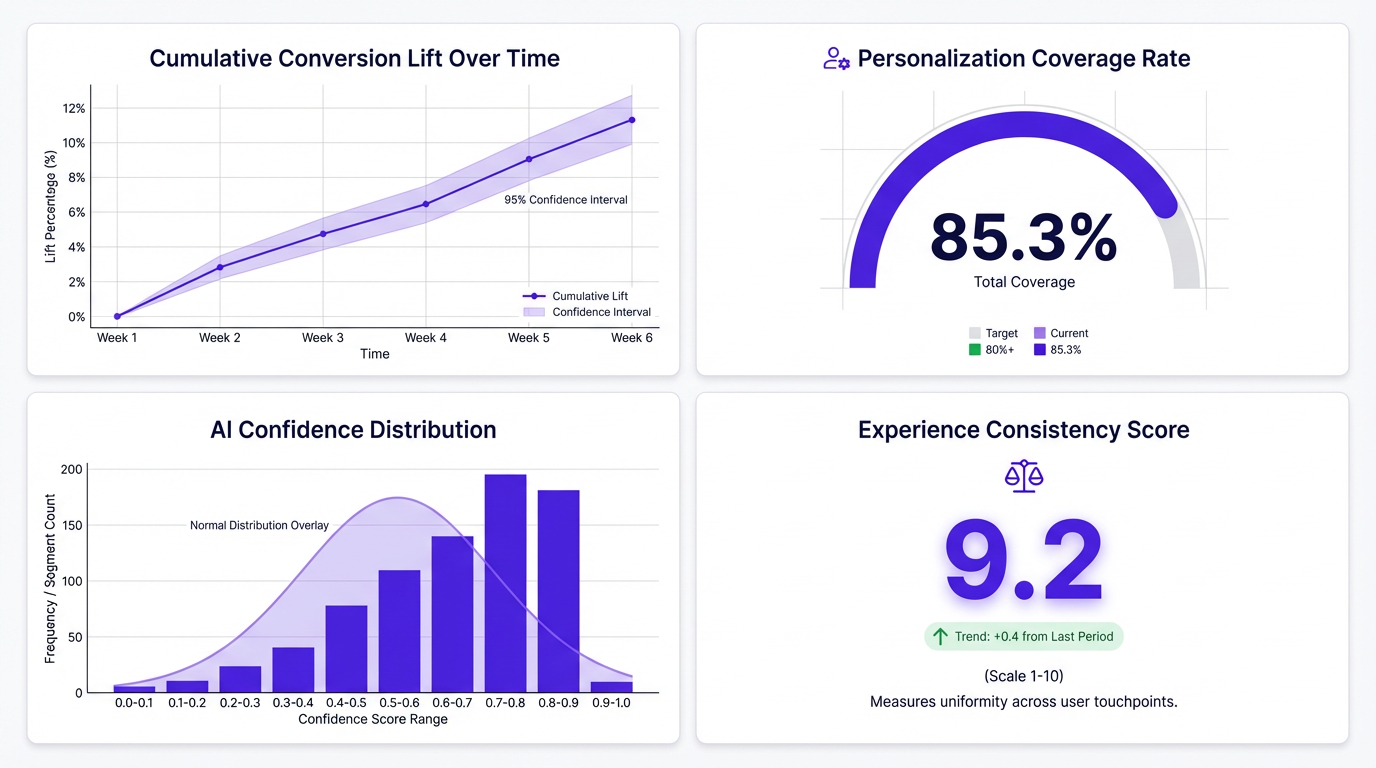
Traditional CRO dashboards break down when AI is continuously optimizing. These four metrics fill the gap.
Four metrics to track when AI is continuously optimizing:
- Cumulative conversion lift over time. Are things trending up across all segments, or is one segment masking a decline in another? This shows the trend line of improvement as the AI learns, not just point-in-time snapshots.
- Personalization coverage rate. What percentage of sessions receive a personalized experience versus the default? Low coverage means your AI isn't reaching enough visitors to justify the investment.
- AI confidence distribution. How confident is the system in its decisions? Are low-confidence segments dragging down overall performance? Track whether confidence improves over time.
- Experience consistency score. Are returning users getting a coherent experience, or whiplash from constant changes? Visual and functional inconsistency is a major factor in users abandoning sites.
Businesses using AI-powered recommendation systems see conversion rate increases of 20-30% according to ResultFirst's 2024 analysis. AI-driven personalization in both B2B and B2C contexts leads to 10-20% improvement in conversion rates per Veza Digital's 2026 research. But you'll only see those numbers if you're measuring the right things. Set up your dashboard to compare the AI-optimized cohort against a holdout group over rolling 60-90 day windows rather than fixed test periods. Short windows understate the compounding value of a model that keeps learning.
For teams scaling content with an AI writer tool, connecting content performance data to these conversion metrics closes a loop that most organizations leave open. Siloed analytics is how you end up with a content team celebrating traffic gains while the CRO team wonders why conversions are flat.
FAQ: AI and UX for Conversion Optimization
How much does it cost to implement AI-powered UX design for a mid-size website?
Expect to spend between $500 and $5,000 per month on tooling depending on traffic volume and whether you use point solutions or full-stack platforms. The bigger cost is usually internal: you need someone who understands both UX and data to configure and interpret the AI outputs. Total first-year investment for a mid-size site typically runs $30K-$80K including tools and team time. Budget 10-15 hours per week of skilled time on top of tool costs.
Can AI and UX for conversion optimization work for low-traffic sites that don't have enough data?
Yes, but with caveats. Multi-armed bandit approaches work with less traffic than traditional A/B tests because they allocate dynamically. Pre-trained models that transfer learning from similar sites can also bootstrap insights. The minimum viable threshold is roughly 1,000-2,000 monthly conversions for meaningful AI-driven optimization. Below that, focus on qualitative UX research and use AI for content optimization rather than real-time personalization. Google Cloud's research shows AI-powered conversational commerce achieves a 4X conversion improvement (12.3% vs. 3.1%), even on smaller sites.
What's the difference between AI-based personalization and traditional rule-based personalization?
Rule-based personalization follows explicit if/then logic a human writes: 'if visitor is from Texas, show Texas imagery.' AI-based personalization identifies patterns humans wouldn't spot and adapts continuously without manual rule creation. It considers hundreds of signals simultaneously (scroll behavior, session depth, referral source, time of day, device type) and optimizes for outcomes rather than following predetermined paths. The AI might find that visitors who read three blog posts before hitting pricing convert 2x better with a case-study CTA than a free-trial CTA, a pattern no human would think to test as a rule. Vizup's guides on AI for marketers cover this distinction well.
How long does it typically take to see conversion rate improvements from AI-driven UX changes?
Most teams see directional signals within 2-4 weeks and statistically meaningful results within 6-8 weeks. Multi-armed bandit approaches show improvements faster than traditional A/B tests because they shift traffic toward winning variants in real time. The compounding effect is real: teams that run AI-driven optimization for 6+ months consistently outperform those who treat it as a one-time project. The caveat: if your baseline experience has fundamental usability problems, AI optimization will improve a broken experience, not fix it. Fix the foundation first, then let AI optimize on top of it.
Will AI in UX design replace the need for human UX researchers and designers?
No, but it will reshape the role significantly. AI handles pattern detection, variant generation, and optimization at speeds humans can't match. Humans handle the work AI can't: understanding emotional context, making ethical judgment calls, defining brand voice constraints, and designing the systems within which AI operates.
What's the biggest mistake companies make when implementing AI for UX?
Deploying AI on top of broken data infrastructure. If your event tracking is inconsistent, your naming conventions are a mess, or your design system changes every few weeks, the AI has nothing reliable to learn from. The most common failure pattern: a team buys an expensive personalization platform, sees mediocre results, blames the tool, and switches. The real problem was upstream. Fix your data plumbing before you invest in AI optimization.
How do you measure the ROI of AI in UX and conversion optimization?
Track cumulative conversion lift over rolling time windows rather than point-in-time test results. Layer in personalization coverage rate (what share of visitors receive an adapted experience) and revenue per visitor trends. For a complete picture, compare the AI-optimized cohort against a holdout group over 60-90 day periods. Short windows understate the compounding value of a model that keeps learning.
What are the privacy and compliance considerations for AI-based UX personalization?
AI-driven UX optimization relies on behavioral data, which falls under GDPR, CCPA, and the EU AI Act. You need explicit consent for data collection, transparent disclosure of how AI influences the user experience, and regular bias audits to ensure personalization doesn't create discriminatory outcomes. Build on first-party and zero-party data wherever possible, as it's both higher quality and more compliant than third-party alternatives.
How do I get started with AI and UX for conversion optimization if I have no prior experience?
Start by auditing your conversion funnel with AI-assisted analytics to identify drop-off points. Then use session replay tools with AI pattern recognition to understand why users abandon. Prioritize fixes using an impact/effort matrix, deploy multi-armed bandit experiments instead of traditional A/B tests, and build continuous feedback loops so the AI model improves over time. Vizup's platform can help you map organic traffic intent signals to on-site experience decisions from the start.
Key Takeaways and Your Next Move
- AI and UX for conversion optimization is a unified discipline now, not three separate budget lines. Teams that treat them as integrated consistently outperform those that don't.
- The five-layer model (content, layout, micro-interactions, navigation, timing) gives you a practical framework for spotting where AI can have the most impact on your specific funnel. Most teams only touch layers 1 and 2.
- AI-based personalization that serves user goals outperforms personalization that serves company goals. That 34% checkout lift from helping comparison shoppers instead of pressuring them isn't an anomaly. It's the pattern.
- Traditional CRO metrics break under continuous AI optimization. Shift to cumulative lift, personalization coverage, AI confidence distribution, and experience consistency.
- Build on first-party data. It's legally safer, higher quality, and produces better AI outputs than anything third-party.
- Generative UI and predictive UX are real and shipping today, but they require guardrails. Design token constraints and escape hatches aren't optional.
- Ethics aren't optional. Bias auditing, privacy transparency, and a clear line between persuasion and manipulation are operational requirements, not afterthoughts.
Your concrete next step: pick one high-traffic page on your site, the one with the most disappointing conversion rate, and run it through the five-layer framework above. Figure out which layers you've been optimizing and which you've been ignoring entirely. That gap analysis alone will surface opportunities worth testing. Or, if you want to start with the traffic intelligence side, try Vizup's platform to see what your organic visitors actually expect before you redesign anything. For a broader look at how AI and UX for conversion optimization fits into the marketing landscape, the generative AI for marketing growth guide is a useful next read.
The teams that win in 2026 aren't the ones with the best AI tools. They're the ones who understand that AI is a UX material, not a UX replacement. The only question is whether you'll be driving it or watching from the sideline.
