
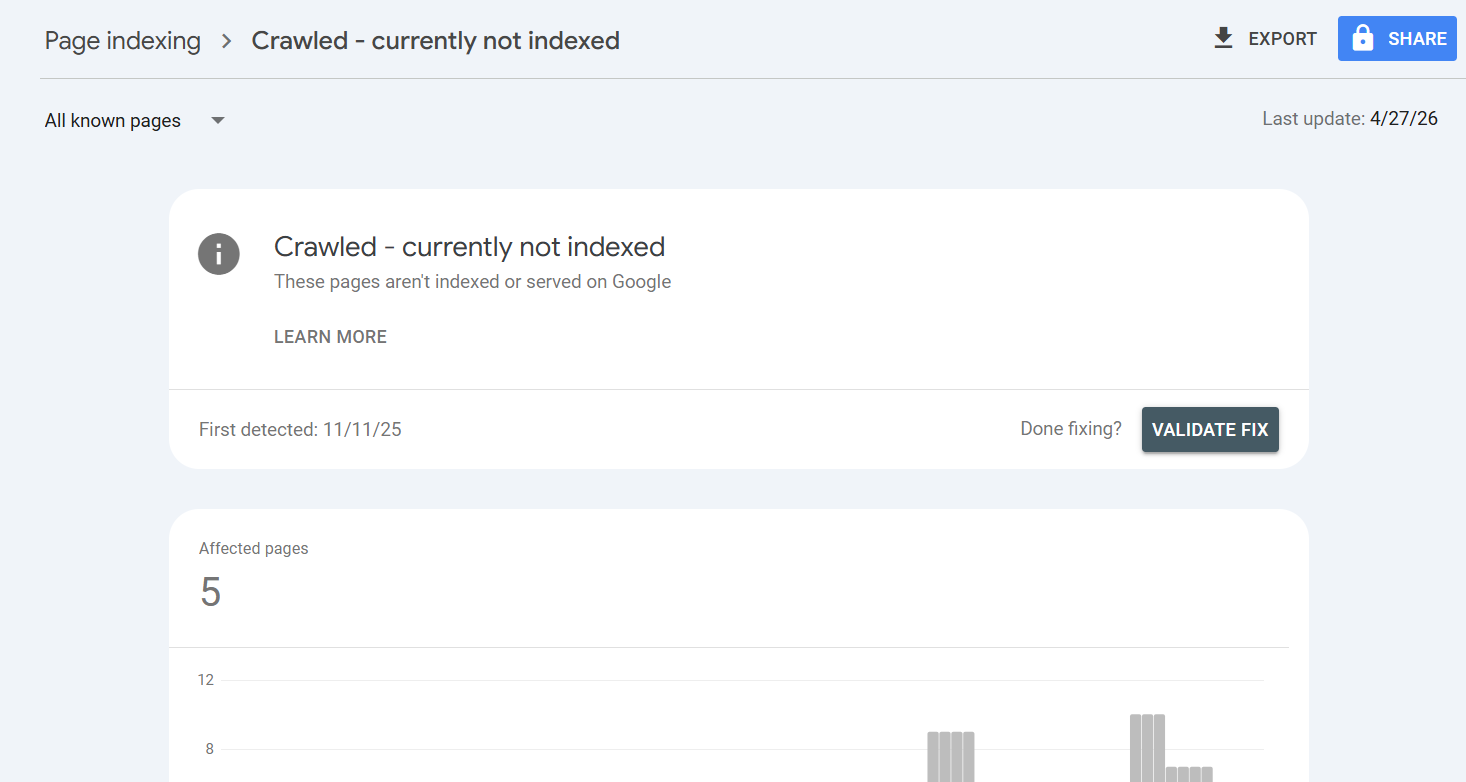
There it is in your Google Search Console reports, a growing list of URLs filed under the frustratingly vague label: “Crawled - currently not indexed.” Google’s bot visited your page, saw what was there, and then simply walked away. The page was not added to the search index, giving it zero chance to rank or attract traffic.
While this status isn't new, its implications have changed dramatically. In the wake of the AI content explosion, this is no longer a simple technical hiccup. It’s a direct warning from Google about your content’s quality. It’s the search engine’s polite way of saying, “We saw your page, but it’s not good enough to show our users.” If you're seeing this status across a large portion of your site, you don't have a crawling problem; you have a content strategy problem.
What 'Crawled - Currently Not Indexed' Actually Means
In simple terms, ‘Crawled - currently not indexed’ means Googlebot successfully downloaded a page from your site but made a deliberate choice not to add it to its massive search index. Since only indexed pages can appear in search results, these URLs are effectively ghosts. They exist on your server, but they are invisible to Google searchers.
This is fundamentally different from its cousin, ‘Discovered - currently not indexed.’ That status merely means Google knows a URL exists, perhaps from a sitemap or link, but hasn’t yet scheduled a crawl. ‘Crawled,’ however, confirms an evaluation has already occurred. Your page was reviewed and found wanting.
Many teams instinctively hit the “Request Indexing” button for these URLs. This is a waste of time. Google's own documentation confirms the page was already evaluated and rejected on quality grounds. Resubmitting it without substantial changes is like failing a driving test and immediately demanding a retake without any more practice. The outcome will be the same.
Why Is This Happening Now More Than Ever?
For years, indexing felt like a given. You publish, Google crawls, you get indexed. That unwritten contract is now broken. The two primary reasons are the deluge of new content and Google’s own rising standards.
First, the sheer volume of content being published is astronomical, largely fueled by generative AI. With everyone now a potential publisher churning out thousands of pages, Google has neither the resources nor the desire to index it all. The index has become a curated collection, not an open archive.
Second, Google's quality algorithms, especially the Helpful Content System, have become far more sophisticated. This system is designed to identify and reward content demonstrating genuine experience, expertise, authoritativeness, and trustworthiness (E-E-A-T). It also generates a site-wide signal. If your site has too much low-quality content, it can suppress the rankings of your entire domain, not just the offending pages. This indexing status is often the first sign your site is on the wrong side of that quality threshold.
The Real Reasons Your Pages Aren't Getting Indexed
When I audit a site plagued by this issue, the causes almost always fall into a few predictable buckets. While many SEO guides offer long checklists of technical possibilities, the reality is that the problem usually lies with the content itself.
1. Your Content Is Thin or Unhelpful
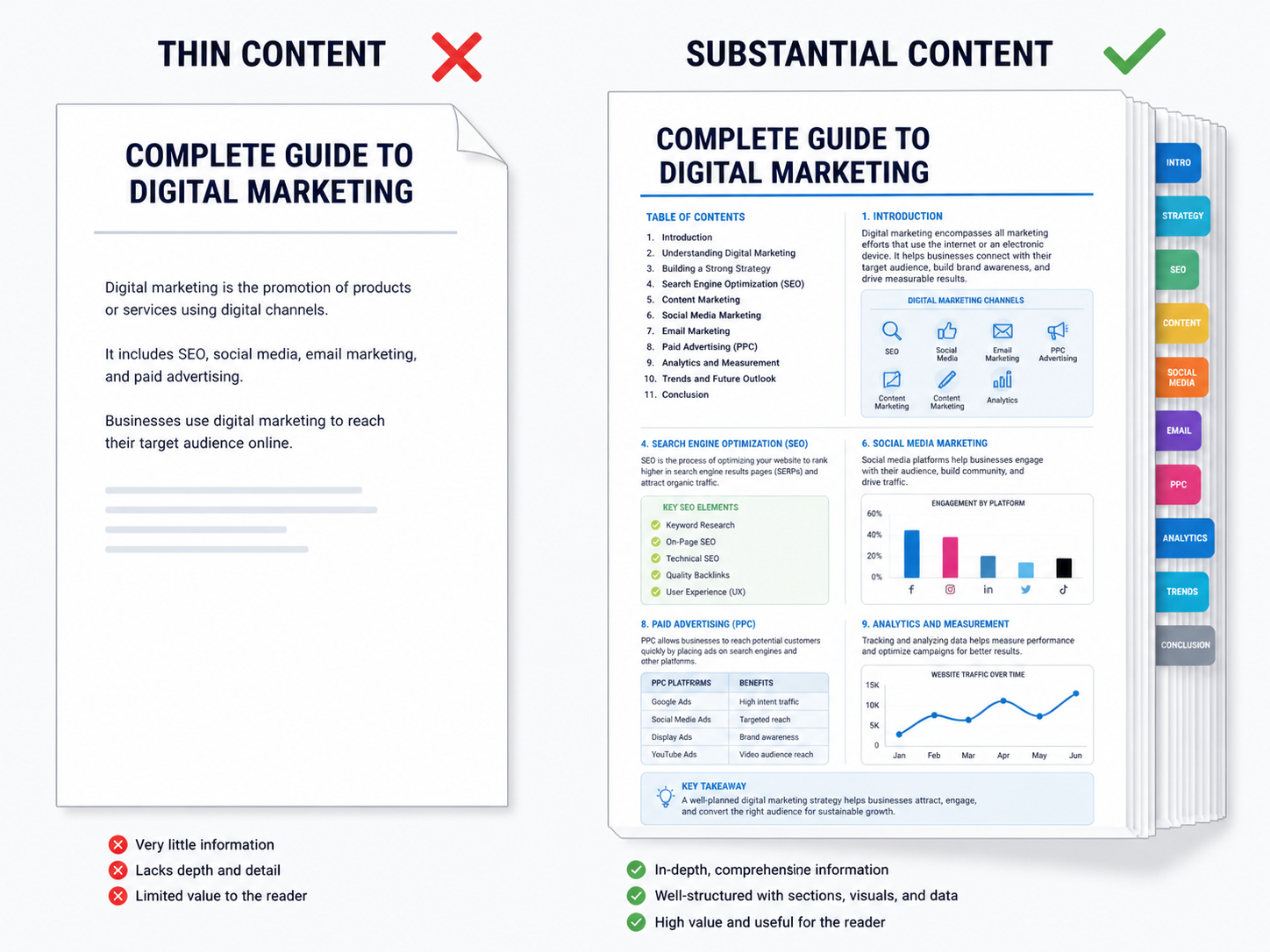
This is the primary culprit. Your page exists, but it offers little unique value. Perhaps it's a 500-word blog post that just rephrases information already on page one of Google, an e-commerce category with no descriptive text, or a product page that simply copies the manufacturer's boilerplate. Google sees this and correctly concludes that the web doesn't need another version of the same thing. If your content doesn't provide a substantial, comprehensive, or insightful perspective, it's a prime candidate for indexing rejection.
2. It's Duplicate or Near-Duplicate Content
This issue goes beyond blatant copy-pasting. Near-duplicate content is a massive problem, especially on large e-commerce sites. Imagine a shoe that comes in 20 colors, each generating a unique URL but with nearly identical page content. Or consider a series of location-based service pages where only the city name is changed in a template. Without proper canonical tags to designate a primary version, Google sees a cluster of low-value, repetitive pages and may choose to index none of them.
3. Poor Internal Linking and Site Structure
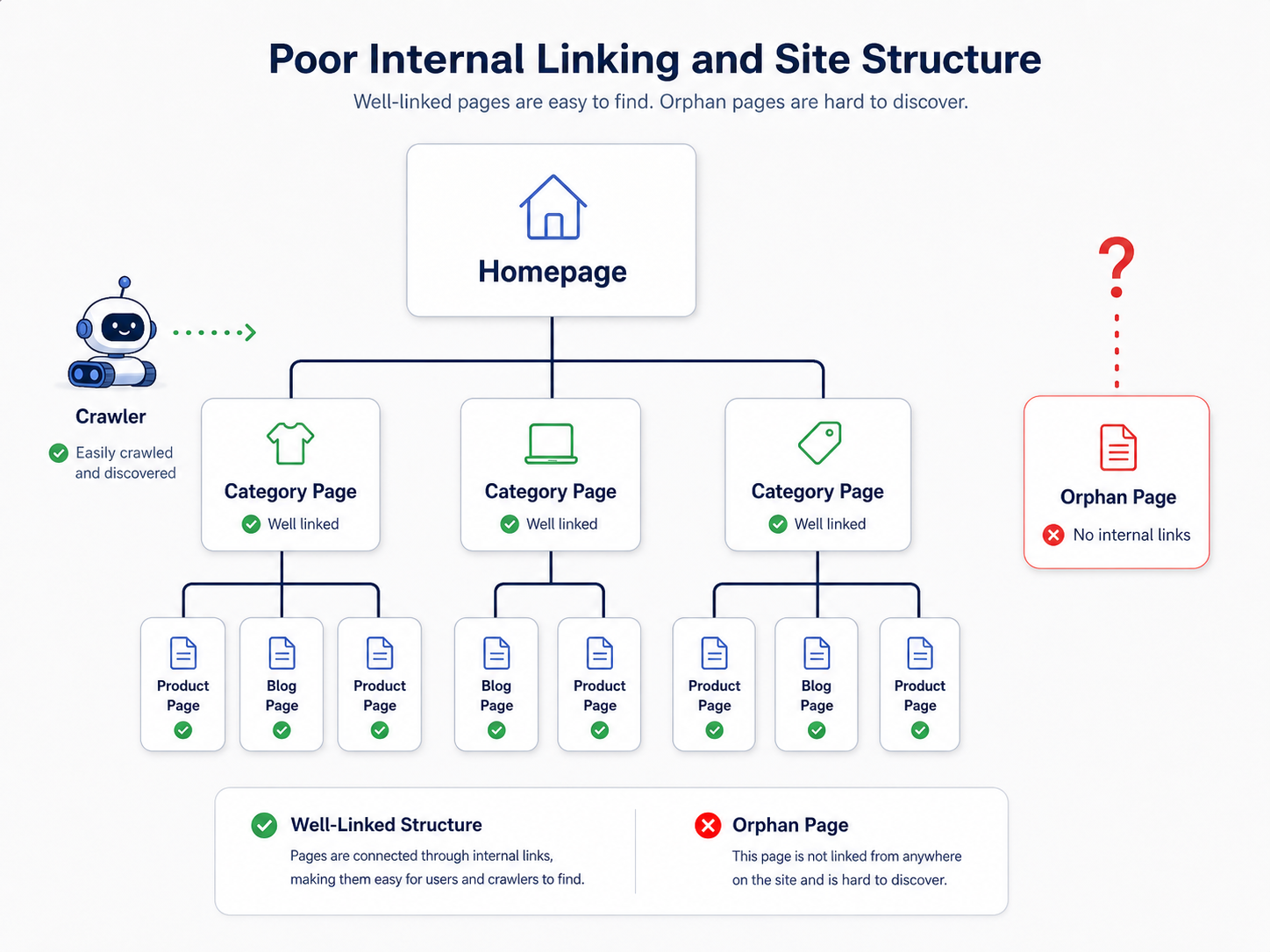
How you link to pages within your site sends powerful signals to Google about their importance. A page buried deep in your site architecture with few or no internal links is essentially telling Google, “This page doesn't matter.” These are often called ‘orphan pages.’ If you don’t treat a page as important, why should Google? A well-planned internal linking structure guides both users and crawlers to your most valuable content. A crucial first step is to check indexed pages effectively to find these orphans before you can fix them.
4. Your Site Lacks Overall Authority (The Crawl Budget Excuse)
Sometimes, particularly on very large or very new sites, Google is unwilling to dedicate the resources to crawl and index everything. This is often described as a crawl budget problem. But crawl budget isn't just technical; it's a reflection of your site's authority. A brand-new site with 50,000 pages and no backlinks is shouting into a void. Google will crawl a fraction, find low user engagement and no external validation, and decide not to waste more resources. You earn a larger budget by building authority through high-quality content and backlinks.
A Practical Plan to Fix 'Crawled - Currently Not Indexed' Issues
There is no magic button to fix this. The solution is a strategic process of improving your site's quality, page by page. I've seen clients turn this situation around in a few months by focusing relentlessly on creating value.
Step 1: Audit and Triage
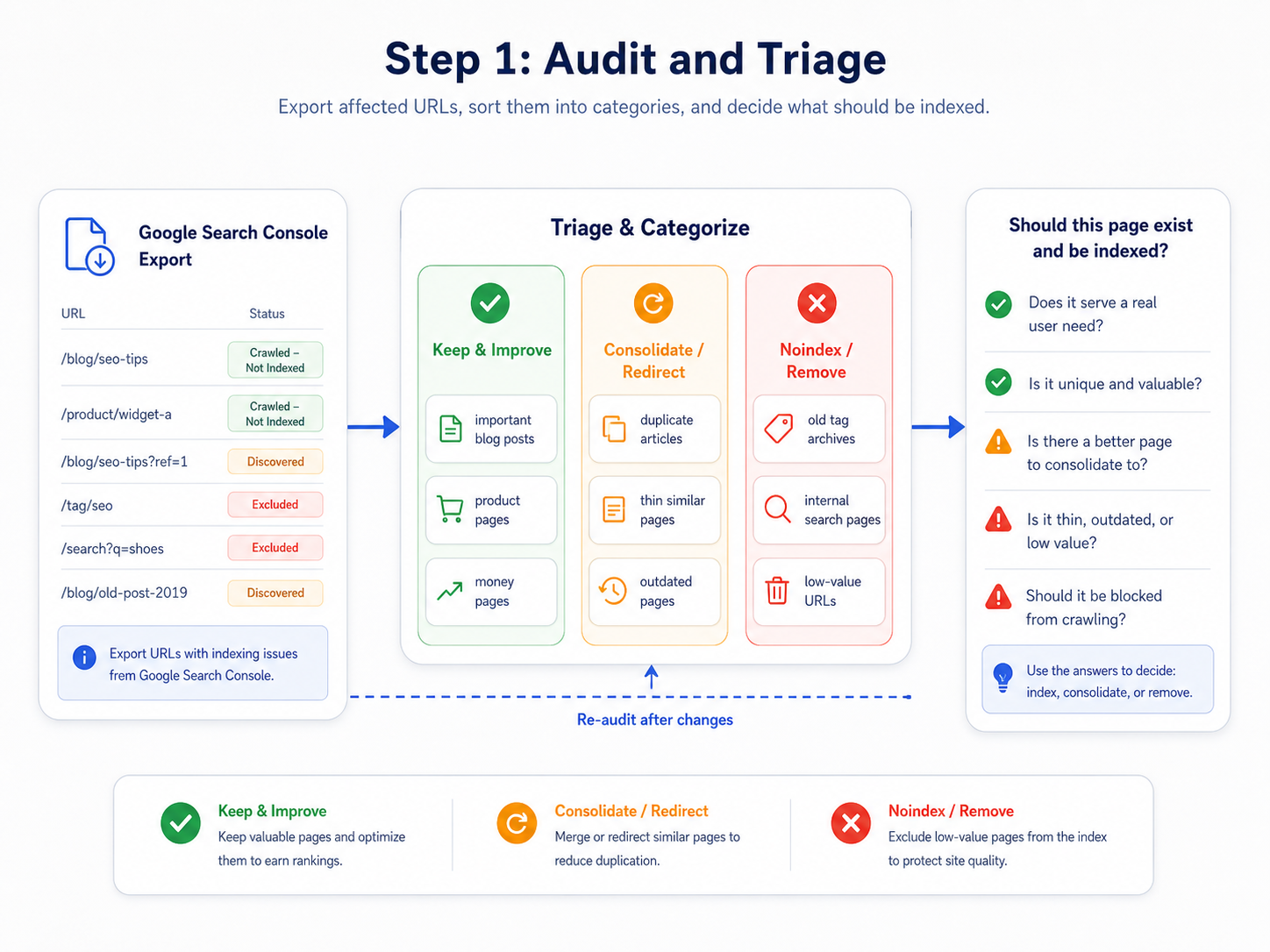
First, you need to understand the scale of the problem. Export the list of affected URLs from your Google Search Console account. Don't just stare at the raw list; categorize the URLs. Are they blog posts? Product pages? Old tag archives? For a large number of pages, you'll need a tool for bulk index checking to monitor your progress over time.
For every URL, ask one brutal question: Should this page even exist and be indexed? The answer is not always yes. Pages like old tag archives with a single post or internal search results probably shouldn't be indexed. Be ruthless in your evaluation.
Step 2: The 4R Framework: Rewrite, Redirect, Remove, or Re-evaluate
After triaging your list, apply one of these four actions to every URL.
Your Action Plan:
- Rewrite/Improve: This is for strategically important pages with thin or low-quality content. This is where most of your effort should go. It means performing a proper SEO content audit and investing in creating high-quality content that is demonstrably better than the competition. Add original data, unique insights, expert quotes, better visuals, or real-world examples.
- Redirect: If you have multiple pages competing for the same topic (keyword cannibalization) or outdated content, consolidate them. Choose the strongest URL, improve it, and implement 301 redirects from the weaker pages to it. This consolidates their authority and cleans up your site architecture.
- Remove & 410: For pages with no value, no traffic, and no backlinks, the best option is often deletion. Serve a
410 Gonestatus, which tells Google the page was intentionally removed and is not coming back. This is a stronger signal than a404 Not Found. - Re-evaluate (Canonicalize): For near-duplicate pages like product variations, use canonical tags. This tells Google, “These pages are similar, but this is the primary version I want you to index.” This is essential for e-commerce sites and those with faceted navigation.
Step 3: Strengthen Your Internal Linking
As you improve your key pages, you must signal their renewed importance. Link to them from other relevant, high-authority pages on your site. Don't just add a link to the footer. Place it contextually within the body of a popular blog post, on a primary category page, or even from your homepage if the content is truly foundational. Create a logical flow of authority through your site to your most valuable assets.
What Most People Get Wrong
The biggest misconception is treating this as a purely technical issue that can be solved with a tool or a tweak. I've seen countless teams waste cycles resubmitting sitemaps or fiddling with robots.txt when the core problem is the quality of the content itself.
Another common mistake is believing that every page on a site deserves to be indexed. It doesn't. A lean, high-quality site with 100 indexed pages will consistently outperform a bloated, mediocre site with 10,000. Quality over quantity is no longer a cliche; it is Google's core indexing philosophy. Don't be afraid to prune weak content aggressively. Your overall site authority will thank you for it.
Key Takeaways for Your Team
If you're seeing a spike in 'Crawled - currently not indexed' pages, here’s how to frame the problem:
- It's a Quality Signal: Google has seen your page and decided it doesn't meet the threshold for inclusion in its index.
- Content is the Usual Culprit: The most common reasons are thin content, duplicate pages, or a fundamental mismatch with search intent.
- 'Request Indexing' is Not a Fix: This action won't solve an underlying quality problem. The page itself must be improved.
- Audit and Triage Ruthlessly: Not every page is worth saving. Decide whether to improve, redirect, or remove each affected URL.
- Focus on Demonstrable Value: In the age of AI, your content must provide original information, deep analysis, or unique experience to justify its existence.
- Internal Links Signal Importance: Use a strong, logical internal linking structure to guide Google to your most important pages.
Frequently Asked Questions
How long does it take for Google to re-evaluate a page after I've improved it?
Patience is required, as the timeframe can range from a few days to several weeks. After you've significantly improved the content and its internal linking, you can monitor its status using the URL Inspection tool in Google Search Console. There is no guaranteed timeline.
Is 'Crawled - currently not indexed' always a bad thing?
Not always. Some pages, like certain paginated series, RSS feeds, or filtered e-commerce views, might fall into this category, and that can be perfectly fine. The key is to determine if the affected pages are ones you expect to drive organic traffic. If they are, you have a problem to solve.
Can low-quality AI-generated content cause this issue?
Absolutely. This is one of the primary drivers for the increase in 'Crawled - currently not indexed' warnings. Unedited, generic AI content often fails to provide unique value and can be flagged by Google's systems as unhelpful, leading directly to it not being indexed.
Will improving my site's E-E-A-T (Experience, Expertise, Authoritativeness, Trustworthiness) help?
Yes, immensely. E-E-A-T is at the heart of Google's quality evaluation. Improving content to reflect real expertise, adding author bios, citing sources, and building a trustworthy brand are long-term solutions that directly combat this indexing issue by proving your site's value.
My page was indexed before, but now it's 'Crawled - currently not indexed'. What happened?
This can happen when Google re-evaluates your page and finds it no longer meets quality standards, especially when compared to newer, better content from competitors. It's also common after a Google core update. This is a clear signal that you need to perform a content refresh and significantly improve the page's value proposition.
