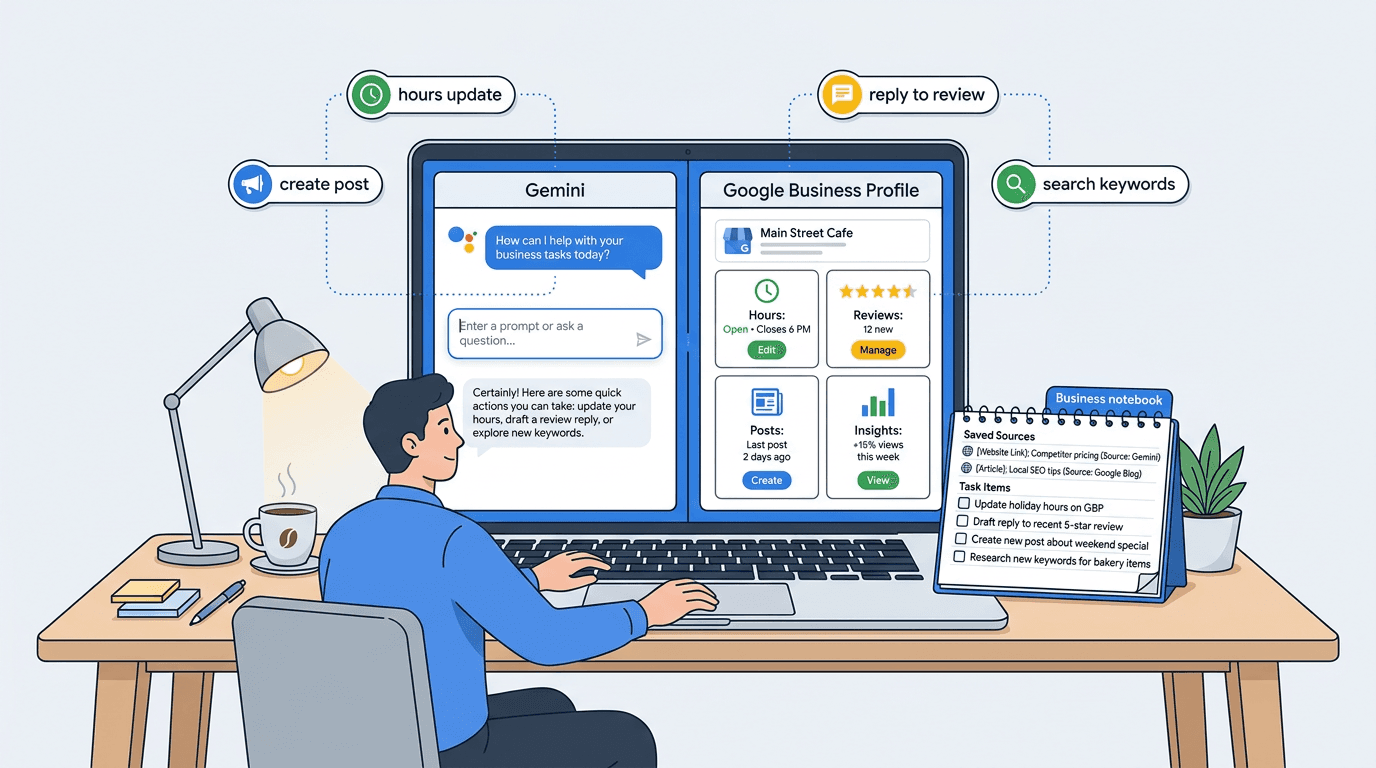
If you have ever opened Google Business Profile, stared at the dashboard, and thought "I should really update this" before immediately closing the tab, you are the target audience for Google's newest move. Google announced new Gemini features for small businesses, including a direct Google Business Profile connection and Business notebooks. Google says it is rolling out globally this month, but the Help Center adds some very real limits around availability, account type, region, and profile ownership (Google Blog announcement, June 2026; Google Business Profile Help Center, 2026).
Google Business Profile Gemini is not just a convenience feature. It suggests Google is moving more local business workflows from manual dashboard management into conversational AI workflows, where "what should I fix this week?" becomes a prompt instead of a checklist.
Google is moving Google Business Profile into the AI assistant layer
Here is the clean definition, because Google loves to scrape these: The Google Business Profile Gemini integration is Google's new connection that lets eligible business owners link a verified Business Profile to Gemini so the AI can draft updates, posts, and review replies, and summarize performance and customer feedback using profile data. It shifts local SEO work from clicking through dashboards to asking natural-language questions and acting on AI-suggested tasks.
Google has shipped a lot of "new dashboards" over the years. Most are UI paint. This one feels different because it changes the interface for local SEO. You are no longer managing a listing, you are managing a conversation about your listing. That matters because the businesses that win locally are usually the ones doing boring maintenance work consistently, not the ones with the fanciest strategy deck.
Google framed this as small business help, and it is. It also signals where Google wants day-to-day local presence work to happen: inside Gemini, using your Business Profile as the context layer (Google Blog announcement, June 2026).
What Google officially announced (and what it implies)
Google's announcement is straightforward: Google is integrating Google Business Profile management into the Gemini app experience, so eligible business owners can connect their profile and use Gemini as an assistant for local presence. Google also positioned Business notebooks as the place where business context, sources, and suggested actions live, and said the rollout is happening globally this month (Google Blog announcement, June 2026).
Google's own headline promises boil down to a few core capabilities:
- Business owners can securely connect Google Business Profile to Gemini (in Google's wording).
- Gemini can use business context such as reviews, customer questions, and performance data to respond in a way that is not generic.
- Gemini can help with profile updates, review responses, seasonal posts, and performance analysis.
- Business notebooks keep business context, chats, sources, the connected GBP, and website information in one place, so the assistant "remembers" what matters.
The implication is the interesting part. This setup pushes owners away from thinking in terms of fields (hours, phone, category) and toward outcomes ("people can't find my menu", "calls dropped last month", "reviews are getting salty"). It is also a tighter ecosystem loop, because more of the work happens inside Google's assistant layer. The feature set and the way Google describes it are documented in the Google Business Profile Help Center (2026).
From dashboard clicks to natural-language local SEO tasks
The Google Business Profile Help Center is where the real details live, and it is more specific than the marketing blurbs. Once connected, Gemini can handle a concrete set of tasks that map directly to what local SEO people nag clients about all year.
Officially supported actions include updating business hours, contact information, and action links; drafting replies to customer reviews; creating posts; summarizing customer feedback from reviews; and accessing performance metrics and search keywords. The Help Center is also where Google spells out what is supported, what is restricted, and what you need to connect in the first place (Google Business Profile Help Center, 2026).
What Gemini can actually touch inside your profile
For anyone wondering whether this is just "write me a post" fluff, the scope is broader. Gemini can help with Google Business Profile updates across the stuff that tends to break over time: hours (including seasonal changes), phone numbers, website links, and those action links that drive bookings or orders.
It also reaches into the messier parts: menus, media, and business attributes. Attributes are easy to ignore after setup, but they still affect how complete and accurate your profile is for real customers (and for Google). If you've ever dealt with a profile that still claims "curbside pickup" years after the business stopped offering it, you already know how this goes.
Reviews: faster replies, but higher stakes
GBP review replies with Gemini will be the feature most owners use first, because it is the most emotionally annoying task. And it is the easiest to mess up.
Drafting is great. Publishing without reading is how you end up thanking someone for "the amazing sushi" when you run a tire shop. That exact genre of failure already shows up in other AI reply tools, and customers notice. They might not call you out, but they trust you less.
Used well, a Google Business Profile AI assistant can keep tone consistent, pull in specifics ("sorry the wait was 20 minutes on Saturday"), and nudge you to respond to the reviews that actually matter. Used lazily, it produces polite mush that looks like it was written by a robot, because it was.
Business notebooks turn GBP data into an AI-powered operating layer
Business notebooks are the part that makes this feel like a workflow rather than a gimmick. Google described them as a workspace inside Gemini that can hold your connected Business Profile context, your website context, chats, and sources, so Gemini can keep track of what matters for your business over time (Google Blog announcement, June 2026; Google Business Profile Help Center, 2026).
Anyone who has used AI tools for marketing knows the pain: you explain your business over and over, and the tool still forgets that you do repairs, not replacements. A notebook is Google's answer to that. It is a persistent container for context, plus a place where Gemini can point to sources instead of making things up.
The proactive suggestions are the sleeper feature. If Gemini starts nudging owners about missing profile info, thin photo galleries, or slipping engagement, that is basically a lightweight local SEO manager living inside the Google app they already use. The Help Center language is more conservative than that, but the workflow direction is pretty clear (Google Business Profile Help Center, 2026).
Current eligibility limits: single-profile businesses first
Google says the rollout is global, but the Help Center is where you find the "yes, but" details. Right now, this is not for everyone, and it is definitely not for agencies managing 30 locations.
| Requirement | What it means in practice | Who gets blocked |
|---|---|---|
| Owner or manager of only one verified profile | Single-location or single-profile operators get first access | Agencies, franchises, multi-location brands |
| Personal Google Account linked to the profile | Not a work/school account, not a shared ops login | Teams using Google Workspace accounts for ops |
| 18+ and Gemini web app access | You need to use the Gemini web app to connect | People expecting it inside the GBP Manager app |
| Gemini Apps Activity (Keep Activity) turned on | Gemini needs activity enabled to maintain context | Privacy-sensitive users who keep activity off |
| Region limits | Not available in the European Economic Area or the UK, according to Google's Help Center | EEA and UK businesses |
| The big theme is clear: Google is starting with the simplest governance model, one person, one profile. |
This is also where a lot of early hype goes wrong. People hear "Gemini can manage your profile" and assume it is a new agency workflow. It is not. Not yet. The eligibility and availability rules are spelled out in Google's Help Center (Google Business Profile Help Center, 2026).
Why this matters for local SEO (the practical impact, not the hype)
Local SEO has always been a weird mix of strategy and janitorial work. The strategy is categories, services, content, links, reputation. The janitorial work is keeping your profile accurate and active week after week. Gemini tilts the playing field toward businesses that were already close to doing the janitorial work but kept dropping the ball because it was tedious.
A few specific ways this changes day-to-day local SEO:
- Freshness becomes easier. Owners can ask Gemini to check hours, links, and attributes, then approve changes in minutes.
- Review response workflows get faster and more consistent, especially for businesses with steady volume.
- Posts stop being "that thing we never do". Gemini can draft seasonal promos and reminders without you staring at a blank box.
- Google Business Profile insights Gemini surfaces (performance metrics and search keywords) are easier for non-marketers to interpret, because the assistant can explain them in plain language.
The bigger shift is behavioral. Instead of logging into dashboards and hunting for problems, owners can ask: "What dropped last month?" or "What are people complaining about lately?" That is a different relationship with local SEO, and it aligns with how Google already positions a verified profile: managing how you appear on Search and Maps, keeping info accurate, interacting with customers, and sending people to booking links and websites (Google Business Profile Help Center, 2026).
One contrarian take worth holding onto: posts are overrated for a lot of categories. A florist or restaurant can get real lift from them. A locksmith posting weekly "we are open" updates is mostly feeding their own anxiety. The Gemini advantage is not that it makes posting easy, it is that it makes the right maintenance easier, like fixing categories, attributes, and unanswered reviews.
What local businesses should do before using Gemini on their profile
Connect Gemini to a messy profile and you will get messy outputs faster. Teams that try to automate their way out of bad data always find it does not work. Clean first, then accelerate.
A practical checklist that takes most single-location businesses an afternoon:
- Verify the profile (sounds obvious, but you would be surprised).
- Fix the basics: hours, website, phone, address or service area, and action links.
- Re-check categories and attributes. Pick the fewest accurate categories, not a grab bag. Vizup has a solid piece on optimizing your Google Business Profile categories that is worth doing before you automate anything.
- Scan recent Q&A and unanswered reviews. Those are public, and they quietly shape conversion.
- Pull a baseline of Google Business Profile performance metrics (calls, website clicks, directions) so you can tell if changes are working.
- Write down a simple brand voice note for replies and posts (two sentences is fine).
Google's guidelines are not complicated, but they are strict in the places that matter: represent the real business, use precise address or service-area details, and follow content policies. Gemini will not save you from a suspension if you are playing games with your address or stuffing keywords into your name. If you want the official version of what you can edit and how Google expects profiles to be represented (address, hours, contact info, photos, categories, service area, website links, social links, attributes), stick to Google Business Profile Help Center guidance (Google Business Profile Help Center, 2026).
For a more advanced angle that a lot of "GBP tips" posts skip entirely, Vizup's take on Google Business Profile optimization signals is worth reading. It is a useful reminder that local visibility is not only about fields in GBP, it is also about the broader reputation and chatter Google can pick up.
What agencies and multi-location brands should know
If you run local SEO for a living, the current limits are the headline: the integration is not available to owners or managers with access to more than one verified profile (per Google Business Profile Help Center requirements, 2026). So no, this is not replacing GBP Manager for agencies tomorrow.
Still, do not shrug this off. This is a clear directional bet by Google. Once they solve permissions, audit trails, and multi-profile governance, the assistant model becomes very tempting for location teams. A store manager does not want to learn local SEO. They want to ask, "Are we missing anything?" and get a straight answer.
Two practical moves for agencies while you wait:
- Start documenting voice and policy rules for review responses and posts. When the AI layer opens up to multi-location, the teams with clear guardrails will move faster.
- Get serious about monitoring. If Gemini starts suggesting changes, you will want to know what changed, when, and whether it affected leads. Tools like Vizup focus on digital presence monitoring and AI visibility, which becomes more relevant as Google shifts workflows into assistants.
If you are trying to understand the broader trend, Vizup's explainer on AI's role in SEO is the right mental model. Gemini is not "a feature". It is an agent interface that Google keeps expanding into more of the old, click-heavy workflows.
Risks, best practices, and what tends to go wrong in real life
AI makes it easy to do more. It also makes it easy to do more wrong, faster. The failure modes here are not theoretical, they are the same ones that have already shown up with automated review reply tools and bulk listing management.
A few best practices that are not glamorous, but save you from embarrassment and lost leads:
- Do not publish AI-written replies without a human read, especially for 1-star reviews and anything involving refunds, safety, or discrimination claims.
- Treat business info edits like production changes. Wrong hours are not a "minor SEO issue", they are a customer experience problem.
- Keep content aligned with Google's Business Profile guidelines. Gemini will draft, but you own compliance.
- Use Gemini for drafting, summarizing, and gap-spotting, then approve with a real person who knows the business.
- Track outcomes, not vibes. Watch calls, website clicks, directions, messages, bookings, and other Google Business Profile performance metrics over 30 to 90 days, not 48 hours.
One more contrarian note: do not obsess over making every reply "unique". Some internet advice pushes businesses to write mini-essays to prove authenticity. Customers do not want essays. They want acknowledgement, a fix, and a next step. Gemini can draft that in seconds, and you can edit it to sound like a person who actually works there.
If you are also thinking about how this intersects with AI Overviews and assistant-driven discovery, Vizup's piece on visibility in Google's AI-powered search is a useful companion. Your GBP is not isolated anymore, it is part of the broader AI interpretation layer.
Real-world examples of how this changes a week of local SEO work
The clearest way to understand this is to picture a normal week for a single-location business getting, say, 15 to 40 reviews a month. Not a marketing team, just an owner and maybe a manager.
Monday: the owner asks Gemini to update holiday hours and confirm the booking link is still correct. That is a 2-minute task that used to get postponed until someone complained in a review.
Wednesday: Gemini drafts replies to three reviews. The owner edits one because it sounds too stiff, adding a specific detail about the fix. That edit matters more than people realize. Customers can smell canned language.
Friday: a post goes up for a weekend promo or a seasonal reminder ("now taking patio reservations"). Posts are not magic, but they give you another surface for conversion, especially when paired with the right action link.
End of month: the owner asks for a summary of what customers complain about and what search keywords drove discovery. That is where Google Business Profile insights Gemini becomes genuinely useful, because it can translate "views" and "searches" into plain English and suggested actions (Google Business Profile Help Center, 2026).
If you have ever tried to get a business owner to look at insights, you know why this matters. Most dashboards fail because they assume curiosity. Assistants work because they assume impatience.
Common misconceptions (the stuff people will get wrong in week one)
There will be a lot of confident takes about this feature. Some will be useful. Some will be nonsense. A few misconceptions worth killing early:
Misconception 1: "Gemini will do local SEO for me"
No. It handles pieces of local SEO operations. The hard parts still exist: earning reviews, building local relevance, getting your categories right, fixing duplicates, and not getting suspended. Gemini is a power tool, not a strategy.
Misconception 2: "More posts and more replies automatically means higher rankings"
Activity can correlate with a healthier profile, but it is not a cheat code. Dead profiles rank because their category, proximity, and reputation are strong. Hyperactive profiles go nowhere when the business name is keyword-stuffed and the address is sketchy. Accuracy and trust come first.
Misconception 3: "This is ready for agency scale"
The current eligibility rules make it clear Google is starting with the simplest case. If you manage multiple profiles, you are not in the first wave. Treat this as a preview of the interface Google wants, not the final product.
Key takeaways for 2026 local SEO teams
If you only remember one thing, remember this: Google is pushing business owners toward managing local visibility through conversation. That changes expectations, workflow, and what "good" looks like.
- Google Business Profile Gemini pulls GBP management into the Gemini assistant layer, making updates, posts, and review replies prompt-driven.
- Gemini can update hours, contact info, action links, attributes, menus, media, and draft replies and posts, based on Help Center-described capabilities.
- Business notebooks (Gemini Business notebook) are the context container that makes the assistant useful over time, with sources and suggested actions.
- Eligibility is limited: single verified profile, personal Google Account, activity enabled, and not available in the EEA or UK right now.
- The local SEO upside is consistency and clarity, especially around review workflows and understanding performance metrics and search keywords.
- The risk is publishing wrong info or robotic replies. Human approval stays non-negotiable.
To get ahead of this shift, start by tightening the fundamentals, then build a simple measurement habit. And if you are already thinking about how to monitor brand presence across search and AI answers, that is basically Vizup's lane.
FAQ
Can Gemini manage my Google Business Profile?
Yes, if you are eligible. Google says Gemini can help update profile information, draft review replies, create posts, summarize customer feedback, and surface business insights including performance metrics and search keywords (Google Business Profile Help Center, 2026; Google Blog announcement, June 2026).
Is Google Business Profile in Gemini available for agencies?
Not yet. Google says the feature is unavailable to owners or managers who have access to more than one verified Business Profile, which blocks most agency and multi-location setups from using it right now (Google Business Profile Help Center, 2026).
Can Gemini show Google Business Profile keywords?
Yes. Google's Help Center says Gemini can help users access business insights, including performance metrics and the search keywords customers use to find the business (Google Business Profile Help Center, 2026).
Is Business notebook the same as NotebookLM?
Business notebooks are a Gemini web app feature tied to your Business Profile, website, recent chats, proactive insights, and suggested prompts for managing your business presence. They should not be described as the same thing as a standard NotebookLM notebook unless Google explicitly frames it that way in this Google Business Profile context (Google Blog announcement, June 2026; Google Business Profile Help Center, 2026).
What should I do before I connect Google Business Profile Gemini?
Verify your profile, clean up hours, contact info, categories, and attributes, then set a baseline for Google Business Profile performance metrics. If you want a fast win, start with using natural language to manage Google tools so your prompts are actually actionable.
