Putting a phone number in a Google Post used to be an obvious mistake. Local SEO advice was blunt: keep Google Posts contact information out of the post text. That rule has changed, and relying on the old version now creates its own risk.
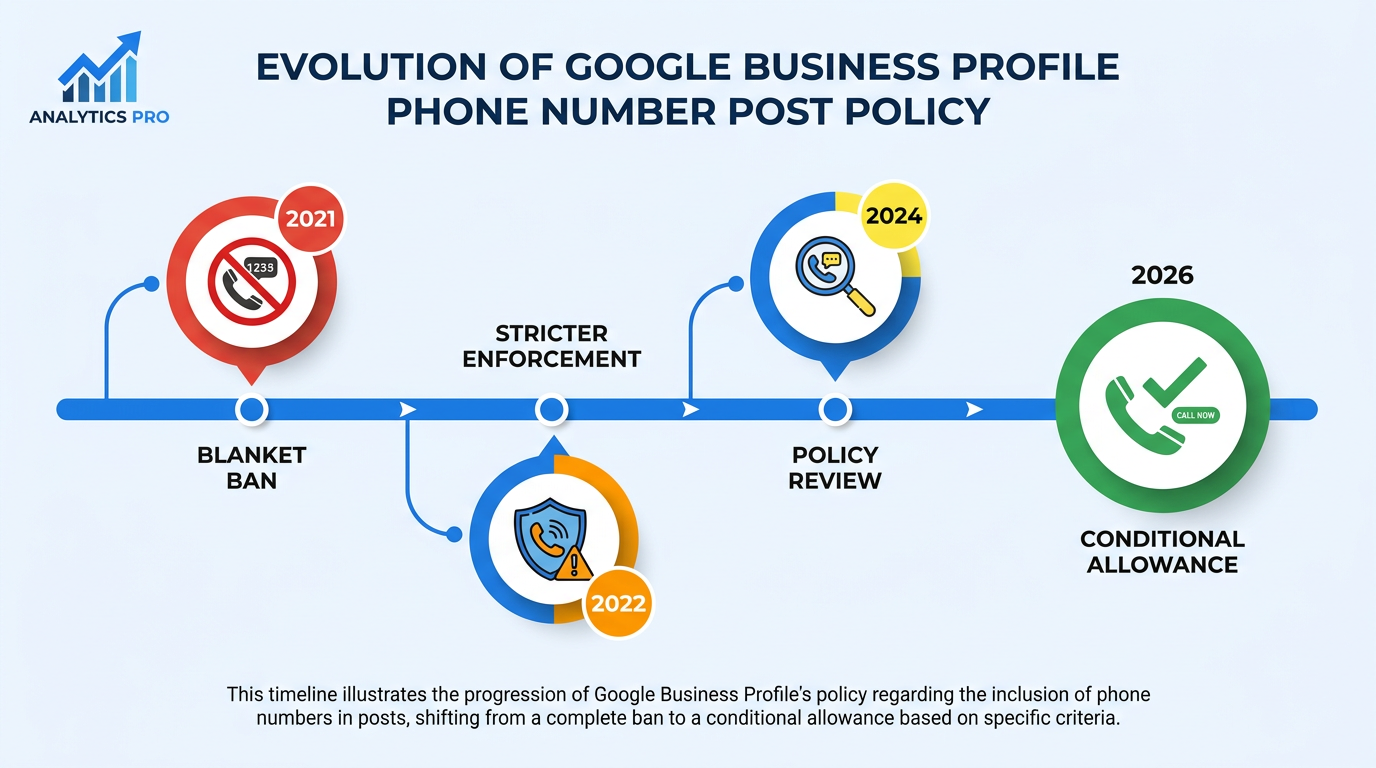
In late 2026, Google revised its Business Profile posts guidelines to separate verified contact details from unverified ones (Search Engine Roundtable, 2026). The blanket ban is gone. Phone numbers may appear in post text, but Google may reject or remove them if it cannot verify that they are connected to the business. That distinction changes the work for agencies, multi-location brands, and owner-operators: old posts need review, and publishing teams need a clear check before they hit publish.
What this means in practice:
- How the former blanket ban differs from the conditional allowance
- What Google appears to mean by a verified phone number
- A three-step audit for risky existing posts
- Publishing rules for compliant local posts
- Which unverified emails, social handles, and other contact details may be restricted
The Old Rule vs. the New Reality
Around 2021, Google introduced what the industry came to call a "phone stuffing" ban. Its Google Posts content policy broadly barred phone numbers from post text (LocalU, 2021). The reason was fraud: bad actors could take over Business Profiles and insert numbers that diverted customer calls. Google's answer was simple, if indiscriminate: reject or remove posts containing numbers.
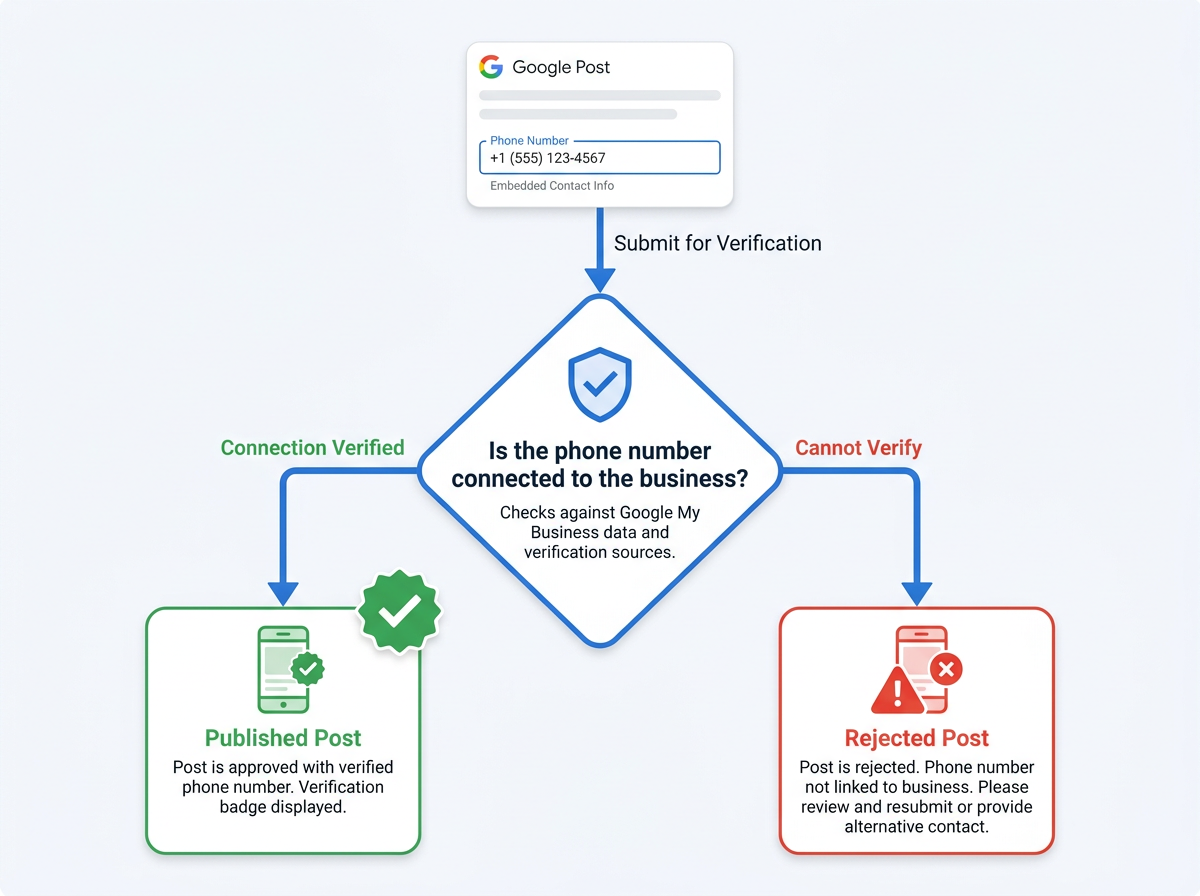
That also caught legitimate businesses. A verified bakery could not print its own number in a reservation-only event post. As reported by Search Engine Roundtable, Google's revised policy now distinguishes verified contact information from unverified information. Under the Google Business Profile Posts policy, phone numbers may appear in post text, but Google may reject or remove a post if it cannot verify that the information is connected to the business. It is a narrower Business Profile fraud-control rule than the old ban.
| The Old Way (Before 2026) | The New Way (Now) |
|---|---|
| All phone numbers banned from post text | Phone numbers connected to the business allowed in post text |
| Any phone number could trigger rejection | Posts containing unverified contact information may be rejected or removed. |
| "Call" CTA was the only safe option | "Call" CTA remains best practice; phone numbers Google can verify as connected to the business comply |
| No verified/unverified distinction | Google must be able to verify that the contact information is connected to the business. |
| Emails and social handles also banned | Unverified email addresses and social handles may also trigger removal. |
| The shift from a blanket prohibition to a conditional allowance, based on Google's 2026 policy update. |
What Exactly Is a 'Verified Phone Number'?
Google has not issued a standalone document called "How We Verify Your Phone Number for Posts." Its guidance is still usable. The primary phone number on a Google Business Profile should be controlled directly by the business and, where possible, be local rather than a central call center number (Google Business Profile guidelines, 2026). Google does not publicly explain exactly how it determines whether a phone number is connected to the business.
A post may be rejected when Google cannot verify that the number is connected to the business, as reported by Search Engine Roundtable (2026).
Warning: What most people get wrong: Profile verification alone is not enough. The phone number in the post needs to be verifiably connected to the business. Google does not publicly document an exact-match requirement with the profile's primary number.
The Audit: Finding Your Risky Posts Before Google Does
Businesses that have posted for more than a year should review live and scheduled content for contact details that conflict with the revised policy. The task is particularly pressing for agencies with many locations: without a bulk audit, mismatches tend to surface location by location, after publication.
Step 1: Identify All Contact Information in Your Posts
Review every active post by location. A single-location business can work through its GBP dashboard. Flag phone numbers, email addresses, social handles, and language such as "DM us" that routes people off-platform. Multi-location teams should export post history from their scheduler. Without an export, create a spreadsheet with Location Name, Post Date, Post Text, Contact Info Found (Y/N), and Type of Contact Info.
Step 2: Confirm Each Number Is Connected to the Business
Review each phone number and confirm that it is clearly connected to the relevant business and Business Profile. Potential risks include call tracking numbers, old numbers from a prior location or owner, department lines such as a pharmacy number on a grocery GBP, and personal cells left over from setup. Any of these may prompt a Google Posts rejected status if Google cannot verify the connection to the business.
Step 3: Triage and Remediate
Apply this decision framework to each post:
- Number is clearly connected to the business: It can remain, subject to Google's verification.
- Number cannot be verified as connected to the business: Remove or replace it, or use the Call CTA.
- Post contains an unverified email address: Remove it, because unverified contact information may cause the post to be rejected or removed.
- Post contains an unverified social media handle: Review or remove it, because Google's policy covers unverified contact information.
- Post contains a website URL in text: Review it and confirm that it is business-related and complies with Google's Business Profile content and link policies.
The New Playbook: Publishing Compliant Posts in 2026
The Google Business Profile Posts policy recommends a "Call now" button rather than a number in post text. That button uses the phone number from the profile. For driving calls, it remains the clearest and least ambiguous option.
Some posts still have a reason to show the number: reservation events, offers that require a call to claim, or updates where the number is itself the point. The updated policy allows phone numbers when Google can verify that they are connected to the business. Still, a Call CTA is enough for most posts. Save in-text numbers for cases where their visibility serves the message.
The change belongs to a broader enforcement trend across Google's local products, from Google's review rewards policy to Google's latest spam update. How Google's changes can have legal implications is also relevant context for teams treating compliance as an operational requirement.
What About Emails, Social Handles, and Other Contact Details?
The changed rule is about verified contact information, not a broad loosening of the Google Posts content policy. Unverified email addresses remain a removal risk. Google treats unverified email contact details as a possible route for fraud or misdirection, much as it once treated every phone number.
Unverified social handles are less consistently enforced, which can make them appear safe. The policy's language on "unverified contact information" can cover Instagram and Facebook handles. Review or remove a handle when Google may not be able to verify its connection to the business.
Summary and Next Steps
Google has moved from an automatic "no" to a conditional "yes": Google must be able to verify that a phone number used in post text is connected to the business. Unverified phone numbers, email addresses, and social handles may cause a post to be rejected or removed. Audit historical and scheduled posts, address contact details that cannot be verified, and make the Call CTA the default in the publishing workflow.
For teams managing visibility across multiple locations, Vizup acts as an Organic Autopilot for modern discovery, helping brands monitor, create, optimise, publish, and learn across Search, Social, Communities, AI Answer Engines, and Local Discovery using AI agents, human experts, and live SEO, pSEO, AEO, and GEO tools. Paid ads are available as an amplification add-on.
Frequently Asked Questions
Can I use a call tracking number in my Google Posts?
A tracking number may create a policy risk if Google cannot verify that it is connected to the business. Google does not publicly document a primary-number-only rule for Google Posts. If that connection is unclear, remove the number or use the Call CTA.
What happens if my Google Post is rejected for contact information?
Google may remove or suppress the post without a detailed explanation. It may disappear from the profile or generate a generic policy notice in the GBP dashboard. Remove the offending detail, or replace it with contact information that is clearly connected to the business, then resubmit the post.
Does this new phone number rule apply to all post types (Update, Offer, Event)?
Yes. Google's Posts content policy applies to Business Profile posts generally, and unverified contact information may trigger rejection or removal. The Call CTA button remains the safest option across post types.
How do I get a phone number 'verified' by Google for my Business Profile?
Google does not offer a separate phone-number verification step for Posts. Google automatically determines which verification methods are available to a business. Depending on eligibility, these may include video recording, phone or SMS, email, live video call, or mail (Google Business Profile verification methods, 2026).
Is it safe to put my website URL in the text of a Google Post?
Business-related website links can be used in Posts when they comply with Google's Business Profile content and link policies. Links must be relevant to the business and comply with the Google Business Profile Posts policy.
