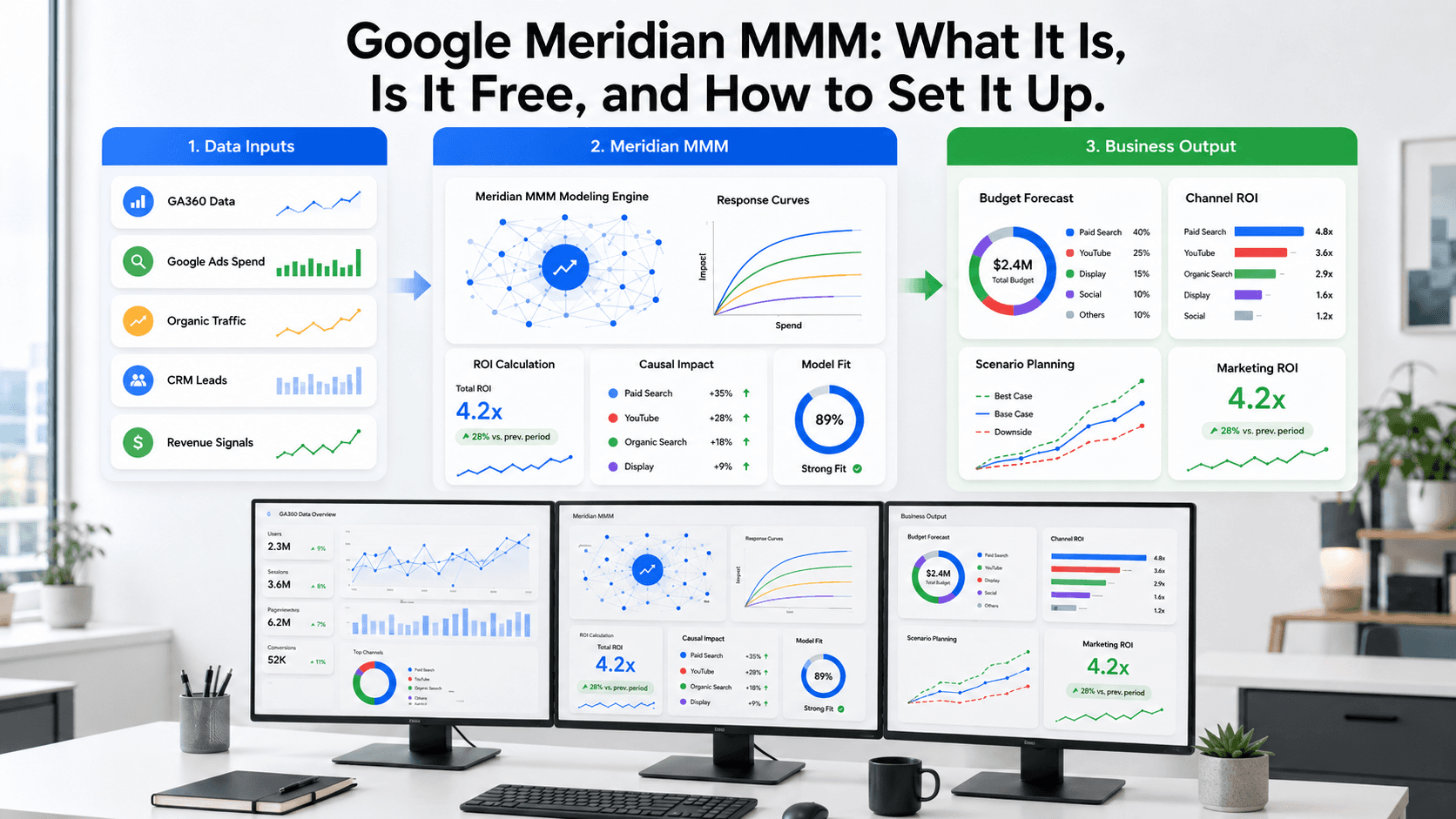
Just when your GA4 setup finally feels stable, Google decides to move the goalposts again. Google recently announced that Meridian, its open-source Marketing Mix Model, is coming to Google Analytics 360. Google’s pitch is familiar but ambitious: unified measurement, causal performance analysis, and predictive scenario planning, all inside the product. If your first reaction was “cool, another system to learn,” you’re in good company. Still, this isn’t a random dashboard flourish. Plenty of “revolutionary” analytics features have arrived with a bang and left with a shrug, but folding an MMM into GA360 reads more like a directional bet on how Google wants measurement to work going forward.
This isn’t about shipping one more report. It’s about shifting from counting clicks to estimating business impact. Below, we’ll unpack what the Meridian Google Analytics 360 integration is actually saying about Google’s measurement strategy, how to start using the open-source tool right now, and why it’s relevant even if you’ll never touch a GA360 contract.
What Is Meridian?
Strip away the product language and Meridian is straightforward: Google’s open-source marketing mix model (MMM). It’s a statistical model designed to estimate how your marketing channels work together to produce outcomes you care about. Instead of obsessing over which ad happened to get the last click, an MMM takes a wider view: spend across Google and Meta, email, SEO, and even non-marketing forces like promotions and seasonality.
The point of this Google marketing mix model is to answer the budget questions that attribution reports tend to duck: “If we add $50,000 next quarter, where does it actually go?” or “Is LinkedIn driving demos, or just creating activity that looks good in a dashboard?” Because Meridian is open-source, the software is free, and your team keeps control of the mechanics: the model, the inputs, and the outputs. No mystery scoring. You can inspect the code, adjust assumptions, and own the workflow end to end. For teams tired of negotiating with platform-reported numbers, that control is the appeal.
Is Meridian Free?
Yes, but also not quite, and that’s where people tend to get tripped up.
The core Google Meridian is free. It’s an open-source project you can pull from GitHub, run in your own environment, and point at your own data. The bill shows up elsewhere: engineering and data science time, plus cloud compute if you’re crunching large datasets. If you already have someone comfortable with Python and a place to run it, the tool itself doesn’t cost anything.
The new piece (the Google Analytics 360 Meridian integration) won’t be free. That functionality lives inside Google Analytics 360, which is an enterprise, paid offering. So while anyone can use the underlying model, the GA360 experience is expected to make Meridian easier to access within Google’s enterprise analytics workflow.
What Is Changing With Google Analytics 360?
Google isn’t treating this as a checkbox feature that lands as one more tile in a dashboard. The company is framing Meridian as a step toward a more model-driven analytics product. In its announcement, Google groups the value into three buckets:
- Unify first-party and cross-channel insights. The promise is to combine GA4 signals with spend and impression data from your marketing channels (Google Ads, social, and so on) inside a single model. That’s the pitch behind GA360 unified measurement: one view of performance rather than a stack of channel-specific truths.
- Measure causal performance. This is what MMMs are built for. Rather than treating correlation as a win, Meridian aims to estimate incrementality, the lift a channel creates. Put differently: “If we turned this channel off, how much would we actually lose?”
- Forecast outcomes using predictive scenarios. Once the model is in place, you can run “what if” planning. What happens if search spend goes up 20%? Where do YouTube ads start hitting diminishing returns? That’s a different posture than reporting; it’s planning.
Google also announced Qualified Future Conversions (QFCs), a predictive metric powered by Gemini. The goal is to connect upper-funnel ad spend with future sales by tracking signals like brand searches. These predictive signals are planned to eventually integrate with Meridian, which could help improve the model's accuracy over time.
Read between the lines and the message is pretty blunt: Google wants enterprise customers to stop treating attribution as the end of measurement and start using modeling to make budget calls.
Meridian vs Traditional Attribution
Most attribution debates eventually devolve into last-click versus data-driven attribution, and the room burns an hour arguing over who “deserves” credit. Traditional attribution is fundamentally a credit-assignment exercise. It answers: “Which touchpoints get counted for this conversion?”
A Meridian MMM is asking a different question, one that’s usually closer to what the business actually needs: “Which channels are creating incremental results?” It doesn’t try to reconstruct a single person’s journey. It looks for macro patterns. If you increased YouTube spend, did total sales rise after accounting for things like seasonality, say, the fact that sales climb around Christmas anyway?
That distinction matters because modern customer journeys aren’t neat. Someone sees an Instagram ad, catches an AI search summary, runs a branded Google search, clicks an organic result, ignores an email, then comes back later by typing the URL directly. Trying to stitch that together at the user level is getting harder, not easier. MMMs dodge that whole mess by working at the aggregate level, modeling the relationship between inputs (spend, impressions) and outputs (revenue, leads).
Who Should Use Meridian?
GA360’s built-in integration is clearly pointed at big enterprises, but Meridian’s open-source version isn’t limited to Fortune 500 teams. If you manage a meaningful budget and you’re expected to justify it, Meridian belongs on your shortlist. It tends to be most useful for:
- Enterprise marketing teams looking for a privacy-safe way to measure cross-channel ROI.
- Paid media teams trying to defend budgets and shift spend between Google, Meta, LinkedIn, and other platforms.
- Growth teams that need to separate what’s truly driving acquisition from what’s merely correlated with it.
- Analytics and data science teams building a measurement framework the rest of the company will accept.
- B2B SaaS teams connecting ad spend to qualified demos, pipeline, and revenue, not just lead counts.
- Ecommerce teams that live on media ROI and need Meridian budget optimization to squeeze more sales out of the same dollars.
What Data Do You Need Before Setup?
This is where most MMM efforts stumble. The model can’t rescue messy inputs; it will just formalize them. Before you even start thinking about Google Meridian setup, you need your data in decent shape. A solid Google Analytics data cleanup is table stakes. As a rule of thumb, Google recommends at least two years of weekly data for geo-level models and three years for national-level models, though the right amount depends on model scope, number of channels, controls, and data variation. A typical dataset looks like this:
| Data Type | Examples |
|---|---|
| KPI data | Weekly revenue, number of leads, demo bookings, qualified pipeline value, total sales |
| Media data | Weekly spend, clicks, and impressions by channel (e.g., Google Ads Brand, Google Ads Non-Brand, Meta Ads, LinkedIn Ads) |
| Organic data | Weekly organic search sessions (from Search Console), branded search volume, direct traffic sessions (from GA4) |
| Control variables | Holiday periods, major promotions, pricing changes, product launches, competitor campaigns |
| Geo/time data | Weekly or daily performance by region, if your business has significant regional differences |
Google’s documentation gets specific about supported formats and how to load inputs. It also ships a helper called the MMM Data Platform to make the wrangling less painful.
How to Set Up Meridian for Your Website
If you want to try Meridian now, here’s the practical version of how to set up Meridian using the open-source release. This isn’t a solo project for most marketers; plan on pulling in an analyst or engineer who’s comfortable working in Python and dealing with data pipelines.
Step 1: Choose your business KPI
Resist the urge to model everything at once. Pick one primary KPI the business actually optimizes for. In B2B SaaS, that might be demo bookings or qualified leads. For ecommerce, it’s usually sales or gross revenue. If the KPI doesn’t matter to the business, it won’t matter in the model either.
Step 2: Collect weekly channel data
This is the unglamorous part. You’ll be pulling weekly data from GA4, Google Ads, Meta Ads, LinkedIn Ads, your CRM, Search Console, and your email platform, then getting it into one place. The goal is a single dataset that’s cleaned, consistent, and aligned by week, no mismatched date ranges, no duplicated channels, no mystery gaps.
Step 3: Install Meridian
Meridian runs as a Python library. You’ll need Python 3.11 or 3.12. Google also recommends using a GPU, since model runs can crawl without one. Installation is a standard pip install, and the full installation guide lives on Google’s developer site.
pip install google-meridian
Step 4: Start with Google’s demo notebook
Don’t start from a blank page. Google’s getting-started notebook walks through the workflow with sample data, from installation and data loading to model setup and reading outputs. Use it as your baseline before you try to adapt anything to your business.
Step 5: Configure the model
This is where your business context shows up as modeling choices. Meridian lets you configure the model around things like carryover (how long an ad’s effect persists), seasonality, and expected ROI assumptions for certain channels. These settings aren’t cosmetic; they shape what the model concludes, so treat them like real decisions, not defaults to breeze past.
Step 6: Run diagnostics
Before anyone starts moving budget, pressure-test the model. Meridian includes diagnostics to check how well predictions track historical performance and whether outputs look stable. Teams sometimes skip this step, present pretty charts anyway, and then spend a quarter chasing a modeling artifact. Run the checks first.
Step 7: Analyze results
Once diagnostics look solid, you can get to the useful outputs. The post-modeling documentation covers channel contribution (how much each channel drove), ROI, and response curves that show diminishing returns. That’s where MMMs usually earn their keep: not “what happened,” but “where the next dollar stops working.”
Step 8: Run budget optimization and scenario planning
From there, you can use the model for planning instead of post-mortems. Meridian’s Scenario Planner is built for “what if” questions and budget allocation: shift spend, set constraints, and see what the model expects to happen to your KPI. This is the part that turns a modeling project into an operating tool.
Example Setup for a B2B SaaS Website
To make this less abstract, picture a SaaS site like ours, Vizup, trying to figure out what’s actually driving qualified leads. Meridian could be set up like this:
- KPI: Weekly number of demo bookings.
- Paid Channels: Spend and impressions from Google Ads (split by brand vs. non-brand) and LinkedIn Ads.
- Organic Signals: Weekly clicks from Google Search Console and direct traffic from GA4.
- Control Variables: A flag for the weeks we run a major webinar, and a variable for US holidays.
- Output: The model would estimate incremental demos by channel, ROI, and where to shift budget next quarter to grow demos more efficiently. It might show that LinkedIn Ads perform well up to $5k/week, and that spend above that level mostly burns money. That kind of threshold is hard to see in a standard GA4 report.
Common Mistakes to Avoid
MMM projects usually fail in predictable ways. Here are the mistakes that show up again and again:
- Using traffic as the only KPI. Traffic is easy to inflate and hard to defend. Model what the business values: revenue, leads, pipeline.
- Mixing poor-quality CRM data with clean media data. If lead source fields are unreliable, don’t pretend they’re ground truth. The model will inherit that mess.
- Ignoring seasonality. Ecommerce brands don’t get to pretend Black Friday is “just another week.” If some periods behave differently, the model needs to know.
- Treating Meridian like last-click attribution. The numbers won’t match your existing reports, and that’s the point. MMM is meant to answer a different question, not reproduce familiar dashboards.
- Acting on results before running diagnostics. Don’t take the outputs to a CMO until you’ve validated that the model holds up.
- Running MMM with too little historical data. Six months won’t cut it. You generally need at least 2-3 years of weekly data to separate seasonal patterns from marketing impact.
What This Means for Marketers
Meridian landing in GA360 isn’t just a feature drop; it’s Google telegraphing where it thinks measurement is headed. The industry is being nudged away from last-click reporting and toward causal, predictive MMM for marketers. That changes the job: less time explaining what happened, more time deciding what to do next. And it pulls the conversation toward business outcomes, not just proxy metrics like clicks or conversion counts from things like Google Ads site visits.
Marketers have been told to “be data-driven” for years, usually without the tools to answer the uncomfortable questions leadership asks in planning meetings. Meridian helps on the measurement side, and Google’s push to guide ad campaigns with natural language hints at the broader direction: fewer knobs, more systems that translate messy reality into decisions people can act on.
Conclusion
Meridian isn’t a magic bullet for measurement. But as a free, open-source MMM, it offers something a lot of teams have been missing: a defensible way to estimate what’s actually working across channels. The tradeoff is real (clean data, technical effort, and time to get the model right) but the upside is clarity you won’t get from attribution reports alone.
The Meridian Google Analytics 360 integration should be taken as a warning shot. Google is betting on unified measurement, causal inference, and prediction as the next default. Even if GA360 isn’t in your budget, it’s worth getting comfortable with marketing mix modeling now. The faster you can connect spend to business impact, the easier it is to make (and defend) the next budget decision.
Frequently Asked Questions
What is the main difference between Meridian and Google’s data-driven attribution (DDA)?
DDA distributes credit for a conversion across touchpoints in an individual user’s journey. Meridian is a marketing mix model (MMM) that works with aggregated, privacy-safe data to estimate the incremental impact of entire channels on a KPI like revenue or leads, without reconstructing user-level paths.
Do I need to be a data scientist to use Meridian?
For the open-source version, you’ll almost certainly want a data scientist or a technically strong analyst who’s comfortable with Python and statistical modeling. The Google Analytics 360 integration is meant to lower the operational burden, but the underlying concepts and data requirements don’t magically become simple.
How much historical data do I need for a reliable Meridian MMM?
Google generally recommends a minimum of two years of weekly data for geo-level models and three years for national models. The ideal amount depends on factors like the number of channels and the natural variation in your data, so more is often better.
Can Meridian measure the impact of organic channels like SEO?
Yes, Meridian can estimate the contribution of organic channels. Since there's no direct ad spend, you use proxy inputs like weekly organic sessions, branded search volume, or non-branded clicks from Google Search Console to model their impact.
Is Meridian a replacement for Google Analytics?
No. Meridian is built for strategic channel measurement and budget allocation. Google Analytics is designed for understanding user behavior, site performance, and conversion tracking. They’re complementary, and GA360’s integration is meant to make them work together.
