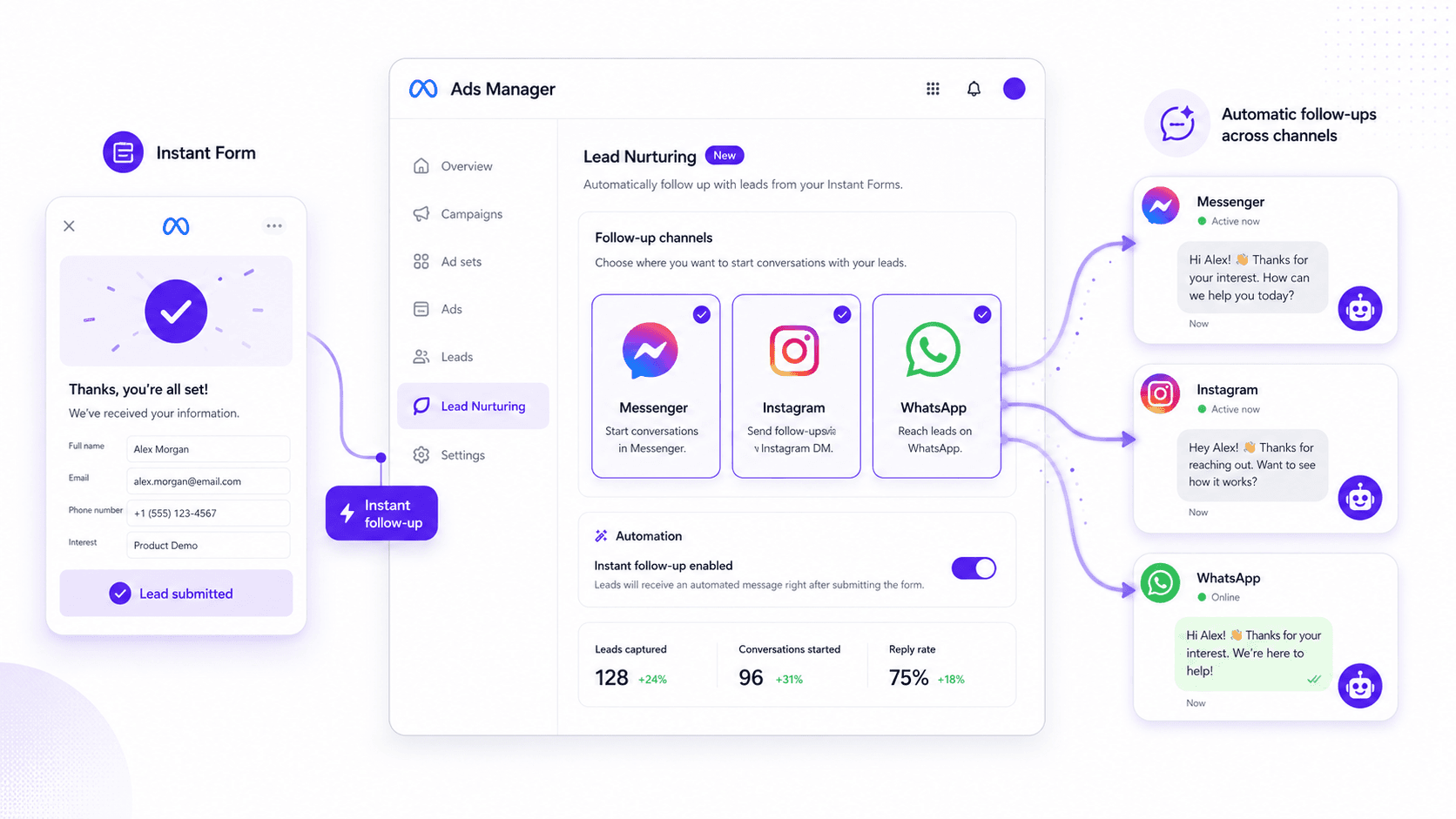
For years, lead gen on Meta has come with an unspoken second job. First you win the submission. Then you race to respond before the person who just handed you their info forgets why they bothered. The routine is familiar: export a CSV, push it into a CRM, route it to a rep, and hope someone follows up before the lead cools off. Too often, it doesn’t happen. The bucket leaks, and the spend keeps flowing.
Meta is trying to plug that leak. A new native Meta lead nurturing in Ads Manager option lets advertisers kick off a follow-up conversation the moment someone submits an Instant Form. No duct-taped integrations required: it’s built into the workflow, wiring lead ads straight into Messenger, Instagram DMs, and WhatsApp. Below is what it does, where the switches live, and why it’s more than another checkbox buried in Ads Manager.
What Exactly Is This New Lead Nurturing Feature?
To set expectations: this isn’t Meta shipping a CRM. What you’re getting is the first, most time-sensitive slice of the funnel handled automatically: an immediate response. At the ad level, you can pick one or more channels that will reach out to a lead as soon as they hit “submit” on an Instant Form.
That sounds small until you’ve watched how often lead ads die on the thank-you screen. Meta’s bet is that the “conversation” shouldn’t start hours later in an inbox; it should start while the person is still in the app and still paying attention. Moving the handoff into a chat thread keeps intent from evaporating during the lag that defines the classic lead-ad workflow. Nurtured leads produce a 20% increase in sales opportunities compared to non-nurtured ones, and speed is the make-or-break variable in that equation.
You’ll see it labeled in a few ways (including “Chat with leads” for the Messenger path), but the scope is consistent: it’s built for campaigns using the “Leads” objective with “Instant Forms” as the conversion location. If your ad sends people off to a landing page, this isn’t for that. The whole point is to keep the loop on-platform.
Need a refresher on Instant Forms? Read our complete Meta Instant Forms guide.
How to Set Up Automated Follow-Ups in Ads Manager
Setup is fairly painless once you know where to look, but it’s easy to miss if you’re clicking through the usual campaign flow on autopilot. Here’s where it lives:
- Campaign Level: Start by selecting the 'Leads' objective. This tells Meta’s algorithm what you're trying to achieve.
- Ad Set Level: In the 'Conversion' section, you must choose 'Instant forms' as your conversion location. This is the key that unlocks the nurturing options at the next step.
- Ad Level: This is where the magic happens. After you’ve set up your creative, scroll down to the 'Destination' section. You'll either create a new Instant Form or select an existing one. If you need a refresher, we have a guide on how to edit Instant Forms.
- Lead Nurturing Section: Just below the form selection, you'll see a new section for 'Follow-up channels'. Here, you can tick the boxes for Messenger, Instagram, and/or WhatsApp.
One caveat: don’t reflexively turn on every channel. The right follow-up depends on who you’re targeting and where the ad shows up. If the placement is Instagram Stories, an Instagram lead ads follow-up is usually the cleanest handoff. A B2B campaign skewing toward desktop audiences may fit Messenger better. And if you’re reaching mobile-first customers who prefer a direct line, WhatsApp lead nurturing Meta ads can work well, but only after you’ve connected a WhatsApp Business account.
Why This Is More Than Just a Convenience Feature
Plenty of companies burn real money on lead ads and then let the value slip away because nobody follows up fast enough. They celebrate the “leads” number in the dashboard as if the job is done. It isn’t. The win is a real interaction: a conversation, a booked demo, a sale. This feature nudges the whole workflow away from collecting contacts and toward starting relationships.
And it’s arriving at a moment when leads are not getting cheaper. Projections for 2026 put the average CPL around $27.66, a meaningful climb from prior years. At that price, letting submissions go stale is basically setting budget on fire. An automated first touch doesn’t just feel nicer for the user; it protects the ROI you’re already paying for. It’s the difference between a row in a spreadsheet and a prospect who’s actually talking to you.
It also fits neatly into Meta’s broader automation push. Keeping the lead journey inside Meta’s walls gives the platform more signals to work with when it optimizes delivery. Pair this with performance goals like “conversion leads” and the Conversions API, and you’re sending Meta clearer feedback on what a quality lead looks like for your business. Meta has reported that this can reduce the cost per quality lead by about 19%. Native nurturing becomes one more signal in that feedback loop.
Curious where Meta’s automation is headed? Read our piece on Meta Ads AI connectors.
Limitations and What's Still Missing
Keep your expectations grounded. This is a strong step forward, but it doesn’t replace a CRM or a real marketing automation stack. Meta can send the first message automatically; what happens after that is still on you. A human has to jump in, or you need a more capable chatbot to carry the thread beyond the opener.
Right now, the built-in tool is essentially a conversation spark. If your sales cycle depends on multi-step email sequences, lead scoring, and detailed lifecycle tracking, you’ll still be wiring Instant Forms into external systems. Meta’s feature covers the first few minutes; your CRM handles what comes next.
One more misconception: this doesn’t let you off the hook on Facebook conversion tracking. If anything, it raises the bar. You’ve just added another point worth measuring, did someone reply to the chat, and did that exchange turn into revenue? Without attribution, you can end up creating more conversations without knowing which ones mattered.
The Bottom Line
The new Meta lead nurturing Ads Manager feature is the kind of obvious addition that makes you wonder why it took this long. It tackles the worst part of lead gen: the dead time between someone raising their hand and someone responding. With instant follow-ups in Messenger, Instagram, and WhatsApp, advertisers get a better shot at catching intent while it’s still hot.
It won’t replace your sales team or your automation tools, and it’s not trying to. What it can do is hand them a warmer start by turning a form fill into a live thread. If you’re already running lead ads on Meta, this is less “nice experiment” and more “basic hygiene.” It’s about fewer CSV exports and more real conversations.
Frequently Asked Questions
Do I need a third-party tool to use this lead nurturing feature?
No. The initial follow-up through Messenger, Instagram, or WhatsApp is native to Meta Ads Manager, so you don’t need an external tool for that first touch. If you want multi-step nurturing, routing, or deeper tracking, you’ll still want a CRM connection.
Can I customize the first automated message?
Yes. When you configure the follow-up inside the Instant Form editor, you can write the opening message and add questions that kick off the chat. That customization matters if you want the handoff from ad to conversation to feel natural.
Does this work for all campaign objectives?
No. It’s limited to campaigns using the “Leads” objective with “Instant Forms” selected as the conversion location at the ad set level. It won’t apply to Traffic, Engagement, or Sales campaigns that send people to an external site.
What are the requirements for using the WhatsApp lead nurturing option?
To use the WhatsApp lead nurturing Meta ads channel, you need a WhatsApp Business account connected to your Facebook Page. If it isn’t connected yet, Ads Manager will prompt you to set that up.
How does this affect my Meta Lead Ads follow-up strategy?
Treat it as step one. The instant message covers the immediate acknowledgment and keeps the lead engaged right away. After that, your team or CRM should take over to qualify the lead and move the conversation toward a conversion.
