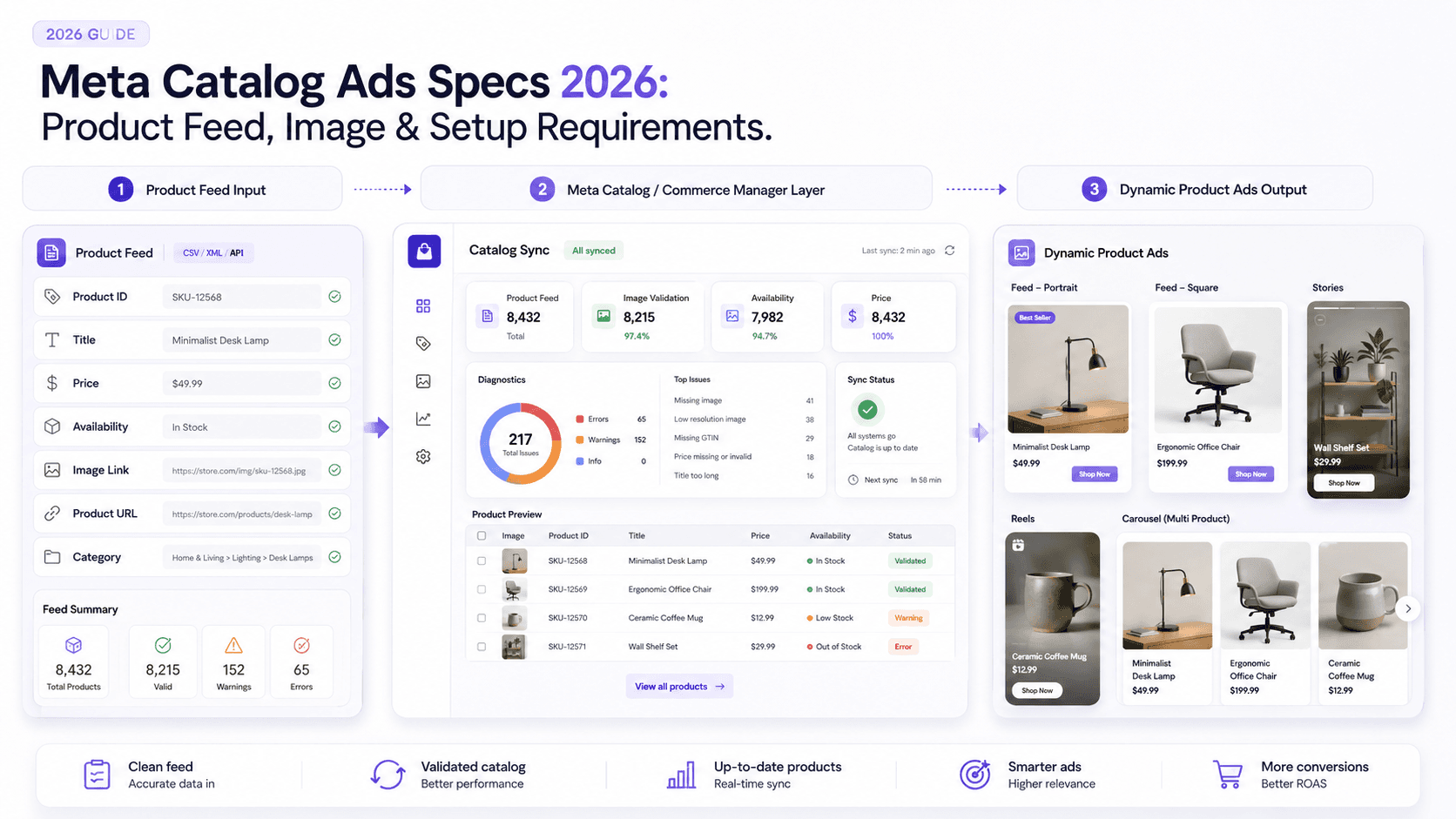
Let’s be honest: most ad-spec posts are just spreadsheets with a byline. The dimensions are right, the file limits are right, and none of it tells you why your campaign is bleeding money. With Meta catalog ads, the failure point is rarely the creative. It’s the plumbing: the data feed and the catalog setup. Botch that, and even great ads won’t get a chance to work.
I’ve watched teams waste spend on out-of-stock items and broken image URLs because the foundation was flimsy. This isn’t that kind of spec dump. We’ll cover the Meta catalog ads specs that matter in 2026: your product feed, your image requirements, and the setup details that decide whether the system runs cleanly. The goal is simple: a practical checklist you can use to ship a catalog that won’t sabotage your e-commerce ads.
What Are Meta Catalog Ads?
Meta catalog ads (previously called Dynamic Ads) are automated ads built from your product catalog. Rather than hand-building an ad for every SKU, you define a template and let Meta populate it with the right product image, price, and details pulled from your catalog. That’s how you end up with relevant ads across Facebook and Instagram without managing an endless grid of creatives. Meta’s own explainer on learn about Meta Advantage+ catalog ads is worth reading for the full context.
Meta Catalog Ads vs. Regular Meta Ad Specs
One quick clarification: this isn’t a rundown of generic Meta ad sizes. If you’re looking for standard image and video dimensions, we already have a full resource on Meta ad specs and dimensions, including stories and video length limits. This piece stays squarely on the Meta product catalog specs side of the house: catalog setup, feed structure, required fields, and the connections that make dynamic ads function the way they’re supposed to.
Meta Catalog Requirements Before You Run Ads
Before you touch a campaign, you need the basics in place. Start by creating a Meta Catalog, the container that holds your product data. Meta walks through the steps to create a catalog in Commerce Manager. After that, you’ll need to get products into it, which we’ll cover shortly.
The non-negotiable part of the Meta Advantage+ catalog ads requirements is your event data source: typically the Meta Pixel or Conversions API (CAPI). This is what ties on-site behavior (product views, add-to-cart events, purchases) back to specific items, so Meta can retarget people with the exact products they interacted with. If that isn’t set up, prioritize setting up the Meta Pixel and CAPI first. Without it, you’re running catalog ads that can’t really behave dynamically.
Meta Product Feed Specifications
The product feed is the engine underneath your catalog. It’s a data file (usually CSV, TSV, or XML) that lists your products and their attributes. If you’ve ever exported inventory into a spreadsheet, you already get the idea. Meta reads this file and uses it to fill in everything your template needs, from titles and prices to availability and images. That’s why the Meta product feed specifications are picky: the feed is the source of truth.
For a basic setup, Meta expects fields like id, title, description, availability, condition, price, link (your product page URL), and image_link. If you sell across brands, you’ll also want brand. Nail these Facebook product feed requirements early and Commerce Manager gets dramatically quieter. Meta’s full reference is the official product data specifications for catalogs.
Required Catalog Fields for Product Feeds
Meta supports a long list of fields, but a handful determine whether your catalog is usable. The table below covers the essentials plus one field you’ll almost always want. One gotcha that’s easy to miss: field names (and many accepted values, like availability strings) need to be in US English. International teams often lose hours to that kind of tiny formatting mismatch. For the full canon, Meta’s developer docs on Catalog Fields remain the definitive source.
| Field Name | Description | Required? |
|---|---|---|
| id | Unique product identifier (SKU). Must match your Pixel/CAPI "content_id". | Yes |
| title | The product name customers will see. | Yes |
| description | Product description. This is where you do the selling, tools for writing effective product descriptions can help. | Yes |
| availability | Stock status ("in stock", "out of stock"). | Yes |
| price | Price plus currency code (for example, "19.99 USD"). | Yes |
| link | Direct URL to the product page. | Yes |
| image_link | URL for the primary product image. | Yes |
| brand | The product’s brand. Required for many categories. | Recommended |
Meta Catalog Image Specs
In catalog ads, the image does most of the persuasion. The official Meta catalog image specs aren’t complicated, yet they’re a frequent source of avoidable breakage. Every product needs at least one image, and it has to be an accurate representation of what you’re selling, no creative loopholes. Stick to high-quality JPG or PNG, keep each file under 8MB, and meet the 500x500 minimum. In practice, 1024x1024 is the safer target: fewer cropping surprises, sharper presentation, and better results on high-density screens. Meta also cites that high-quality photos can deliver a 94% higher conversion rate. If you want the full checklist, Meta’s product image specifications for catalogs lays out the Meta catalog product image requirements in detail.
Uploading Products to a Meta Catalog
You’ve got a few ways to handle a Meta catalog feed upload, but most stores should start with a scheduled data feed. You host the file, Meta fetches it on a cadence (daily is common), and your catalog stays current without manual babysitting. A one-time upload works for a static catalog, but it’s a poor fit for any store where inventory and pricing move. If you’re on a major platform like Shopify or BigCommerce, partner integrations can manage the pipeline for you. At the more technical end, developers can add items via Pixel or API. Meta’s walkthrough on upload products to your catalog with a data feed is the cleanest starting point.
Product Feed API and Automated Catalog Updates
If your inventory or pricing changes quickly, a once-a-day pull can lag behind reality. That’s where the API route starts to make sense. Meta’s Feed API lets you push updates directly instead of waiting for the next scheduled fetch. It’s not a casual weekend project (you’ll need development time) but for large retailers it’s often the only practical way to keep the catalog tightly synced to the site. Meta documents the endpoints and parameters in the Product Catalog Product Feed API reference.
Price and Availability Rules
This is where campaigns quietly fall apart. Your ad promises a $19.99 product; the click lands on a page showing $29.99, or worse, “sold out.” The shopper bails, you’ve paid for a click that never had a chance, and you’ve trained a potential customer to distrust your ads. Your feed’s price and availability need to match your site, period. That’s also why automated updates matter: the longer your feed goes stale, the more money you burn. Meta’s guidance on edit product availability and prices using a data feed covers the mechanics.
Common Meta Catalog Feed Errors
Spend any time in Commerce Manager and you’ll meet the Diagnostics tab, usually glowing red. That’s normal. The same handful of issues account for most of the mess:
- Duplicate IDs: Every
idin the feed has to be unique. - Missing Required Fields: Some items are missing
descriptionor another mandatory field. - Invalid Prices: The price format doesn’t match spec (often missing the currency code).
- Broken Image Links: The
image_linkpoints to a URL that returns 404. - Formatting Issues: Extra columns, incorrect headers, or a malformed CSV.
Treat these warnings as operational debt, not background noise. Enough critical errors can get a catalog paused. Meta’s help doc on troubleshoot data feed errors in your catalog is a solid decoder ring for the most common alerts.
Meta Catalog Ads Checklist for 2026
Before you launch, run this quick Meta catalog ads feed guide checklist:
- ✅ Catalog Created: The catalog exists in Meta Commerce Manager.
- ✅ Feed Fields Complete: Required Meta catalog data feed fields (
id,title,price, etc.) are present and correctly formatted. - ✅ Images Valid: Every
image_linkresolves, and images meet the Facebook catalog ads specs (1024x1024px JPG/PNG recommended). - ✅ Prices & Availability Updated: Automated feed updates run at least daily.
- ✅ Product Links Live: Each
linkURL points to the correct, live product page. - ✅ Pixel/SDK Connected: Pixel
content_idmatches feedidso dynamic retargeting works. - ✅ Diagnostics Clean: Catalog Diagnostics has been reviewed and critical errors are fixed.
FAQs
What are Meta catalog ads?
Meta catalog ads are automated ads that pull items from your product catalog and show them to people across Meta’s platforms. They were previously called dynamic ads.
What fields are required in a Meta product feed?
The core required fields are id, title, description, availability, condition, price, link, and image_link. In many cases you’ll also need brand. These are central to the Meta product feed specifications.
What image size works best for Meta catalog products?
Meta’s minimum is 500x500 pixels, but 1024x1024 pixels is the better target for quality and fewer cropping issues. Use high-quality JPG or PNG images under 8MB.
Do Meta catalog ads require the Meta Pixel?
For dynamic retargeting, yes. The Meta Pixel (or Conversions API) connects on-site actions (like viewing a product or adding it to cart) to specific catalog items, so Meta can serve ads for those exact products. Without it, your Meta Commerce Manager catalog setup is missing a critical piece.
Are Meta catalog ads the same thing as dynamic ads?
Yes. “Dynamic Ads” was the older name. Meta now positions them as Advantage+ Catalog Ads, but the underlying concept (serving ads dynamically from a product catalog) hasn’t changed.
