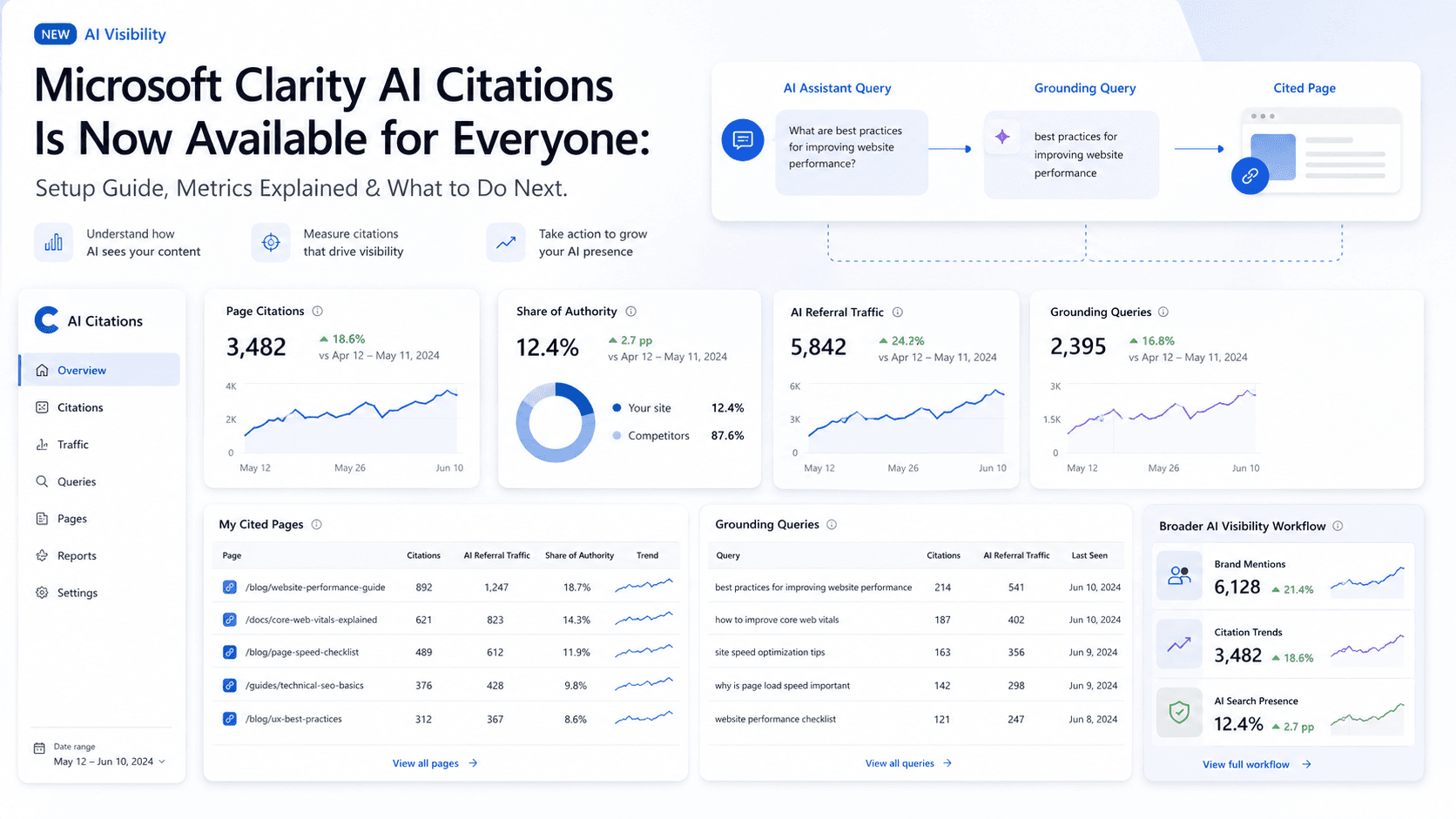
For the last couple of years, measuring how content appears in AI-generated answers has been difficult for SEO and content teams. We could run test prompts, squint at server logs, and trade anecdotes in Slack, but we didn’t have Microsoft’s own reporting view inside Clarity of what was happening. We suspected our content was being pulled into these new experiences, but we couldn’t prove it, let alone quantify it. That just changed.
Microsoft has pushed its AI Citations feature in Microsoft Clarity into general availability. It’s a free Microsoft Clarity feature that helps site owners measure AI citation activity. This isn’t another dashboard you open once a month and forget. It’s a different way to understand visibility in a world where “rank #1” doesn’t always mean “seen.” This piece breaks down what the feature is, how to turn it on, and how to make the numbers useful once they start rolling in.
What this article covers:
- What Microsoft Clarity AI Citations Is: What the dashboard shows and what it’s meant to answer.
- Why This Matters: How AI visibility is starting to diverge from classic SEO reporting.
- Setup Guide: The steps to get it live in your Clarity project.
- Key Metrics Explained: What Page Citations, Share of Authority, and the rest actually tell you.
- Limitations and Context: The edges of the data, and what it won’t replace.
- Practical Next Steps: How to turn citations data into concrete content decisions.
What Are Microsoft Clarity AI Citations?
For years, “visibility” basically meant rankings, impressions, and clicks. Microsoft Clarity AI Citations comes with a new set of words, and a new set of questions. The feature, now generally available for all Clarity projects as of May 2026, is built to show how your content is referenced in AI-generated answers and selected as a source.
Microsoft frames this around “grounding”: the step where an AI system goes out to retrieve and evaluate web content before it assembles a response. When your page is pulled in as a source, that’s a citation. The dashboard tracks that chain (discovery, reference, citation) so you can see which pages are being used and when. The shift here is subtle but big: you’re no longer measuring only whether someone clicked your link; you’re also measuring whether your page was trusted enough to shape the answer the user read.
Why This Matters for SEO and Content Teams
For a long time, SEO teams have been trained to worship the same scoreboard: rankings, impressions, and click-through rate. Those numbers still matter. They’re just no longer the whole story. A user can get what they came for from an assistant and never touch your site. In that moment, your page might be doing the real work (informing the response, nudging a decision) while your analytics report nothing happened.
That gap is what Microsoft is trying to surface. In Microsoft’s framing, traditional SEO tells you how you perform inside a list of links. Microsoft Clarity AI Visibility is about how AI systems use and attribute your content inside generated answers. One measures traffic. The other measures presence and authority upstream of the click, if a click happens at all. That distinction is central to why visibility metrics matter more than traffic as discovery shifts into AI interfaces.
How to Set Up Microsoft Clarity AI Citations
The setup is pleasantly boring, in a good way. Microsoft isn’t asking you to wire up a complicated pipeline or ship a bunch of custom code. Based on the official launch materials, here’s the path to getting the Citations report to show up in your project.
- Create a Microsoft Clarity Project: If you don’t have Clarity running yet, start by signing up for Microsoft Clarity and creating a project for your site. It’s free.
- Install the Clarity Tracking Code: Clarity will hand you a JavaScript snippet. The official guidance is to install the Clarity tracking code on your site. Most CMS platforms have a straightforward field or plugin for header scripts.
- Verify Domain Ownership (If Prompted): Some projects will ask for proof you control the domain. You can typically do that by connecting Bing Webmaster Tools or Google Search Console to the Clarity project, standard verification, nothing exotic.
- Navigate to the Dashboard: Once the script is live and verification is done (if required), open your project and go to Dashboards → AI Visibility → Citations. The report fills in as Clarity collects data.
Key Metrics in the Citation Dashboard
The Citations dashboard comes with metrics you won’t find in your usual SEO stack. They’re easy to skim past (and easy to misunderstand) because they don’t map cleanly to rankings or clicks. Using Microsoft’s official documentation as the baseline, here’s what each metric is trying to tell you.
Page Citations
Page Citations is the blunt instrument: the total number of times pages from your site were referenced in AI-generated answers during the period you’ve selected. One answer can cite your site more than once, and each reference counts. It’s a simple proxy for “how often you show up,” without trying to explain why.
Share of Authority
Share of Authority is the more competitive view. It’s your domain’s portion of total citations across the same set of queries where your site appeared. If your share is high, it suggests that when you’re eligible to be cited, the system tends to choose you. If it’s low, you’re getting considered, but other sources are winning the slot more often.
AI Referral Traffic
AI Referral Traffic pulls the discussion back toward familiar ground. It’s the percentage of your total sessions that arrived from an AI assistant: AI-referred sessions divided by total sessions. In practice, this tells you how often a citation turns into a click, how many people saw the reference and decided your page was worth opening.
Grounding Queries
Grounding Queries is where content strategy starts to get interesting. These are the terms the AI system used behind the scenes to retrieve your content. They aren’t necessarily the same as the user’s original prompt; they’re closer to the machine’s internal search query. Looking through them can reveal what the system believes your site is “about,” and which topics it thinks you’re credible enough to cite.
My Cited Pages
My Cited Pages is the practical view: a table of the URLs that were cited, how often they were cited, and which grounding queries were associated with them. This is the short list you can act on. It’s also a quick way to spot patterns, formats, angles, and structures that seem to travel well inside AI answers.
What AI Citations Does Not Measure
New metrics have a way of getting jammed into old mental models, and that’s how teams end up drawing the wrong conclusions. Microsoft is explicit here: the Citations dashboard is not a replacement for your existing SEO tooling.
Specifically, it does not track:
- Traditional search rankings (your #1 spot on Google or Bing).
- Impressions in a standard search engine results page (SERP).
- Click-through rate (CTR) from those SERPs.
AI Citations is narrowly focused on what happens inside AI-generated answers, citation activity, not classic search performance. Citation counts reflect how often a page was referenced, not its ranking or prominence within an AI-generated answer. Keep your SEO reporting. Treat this as a parallel dataset that captures influence in places your traffic charts can’t see.
AI Citations vs. Bot Activity
Clarity also includes a Bot Activity report, and it’s easy to assume they’re two views of the same thing. They’re related, but they answer different questions. Bot Activity is about access; AI Citations is about outcomes.
| Report | What It Shows |
|---|---|
| Bot Activity | Indicates that an AI crawler or verified bot accessed your content. It’s the initial touch, when the system is simply fetching what’s on the page. |
| AI Citations | Indicates that the access turned into something visible: the content was used for grounding, cited as a source, and attributed in an answer. |
| Bot Activity is the "reading" phase; AI Citations is the "referencing" phase. |
If a page racks up bot activity but barely earns citations (especially if it’s a page you care about) that’s a signal worth taking seriously. The systems are finding it, but they’re choosing not to rely on it. That’s when you look hard at whether the page is clear, well-structured, and deep enough to be worth citing.
What to Do Next After Checking AI Citations
Charts are entertaining; the point is to change what happens next. The Citations dashboard is most useful when you treat it like a workflow input, not a curiosity. Here’s a practical way to turn the report into decisions you can actually ship.
- Review your most cited pages. Start in “My Cited Pages” and pull your top performers. Then look for the common denominators: page type (guide, product page, blog post), tone (direct vs. fluffy), structure (tight headings, clear answers), and freshness. Use those pages as internal examples of what tends to earn citations.
- Compare cited pages with your money pages. The question isn’t just “what gets cited?” but “what gets cited that matters?” If an old blog post is doing great while your core service pages never show up, you’ve got a mismatch between AI visibility and business priorities.
- Study your grounding queries. Export them and read them like a translator. How do they differ from the keywords you optimize for in traditional SEO? They’re often shorter, plainer, and closer to how someone would label a topic. That’s a clue for how to write headings and opening lines that machines can interpret cleanly. It’s also a core input to improving brand visibility in AI search.
- Improve the weak pages. Find high-priority pages with low citations and treat them like products that need iteration. The fix usually isn’t “more keywords.” It’s clearer structure (real H2s/H3s), more complete coverage of the topic, and more direct answers to the questions people are likely asking.
- Use AI referral traffic as a directional signal. Don’t obsess over the exact number; it will vary by site. Watch the trend instead. If you improve a page and citations and Share of Authority move up, does AI referral traffic eventually follow? That helps separate “being used” from “being visited.”
Where Tools Like Vizup Fit In
Clarity is strong at one thing: showing you what’s happening inside Microsoft’s reporting world, with concrete evidence that your pages are being pulled into AI answers. That’s valuable. For most SEO and growth teams, it’s also just the first layer of the problem.
The next layer is operational: building a workflow that’s broader than a single dashboard. That means tracking visibility across more prompts, more topics, and competitors you didn't think to benchmark. It also means monitoring how often your brand is mentioned and how it compares across different AI search experiences, alongside the citation data Microsoft Clarity provides. That’s the gap a dedicated platform for broader AI visibility workflows like Vizup aims to fill. Clarity shows you where you’re being cited; Vizup is positioned as the system for turning that signal into a repeatable, scalable content strategy.
Conclusion
Microsoft Clarity AI Citations isn’t a shiny add-on; it’s a tell that the analytics world is starting to adapt to how people actually get information now. For the first time, there’s a free, first-party way to quantify visibility inside AI answers using metrics like Page Citations, Share of Authority, AI Referral Traffic, and Grounding Queries. That’s a missing piece teams have been trying to approximate with guesswork.
Treat this data as a companion to your existing SEO analytics, not a replacement. Rankings and clicks still matter because they still drive revenue. But as more discovery happens inside AI-driven experiences, the teams that measure citations (and then build content that earns them) will be the ones that keep their authority and presence, even when the user never visits the site.
Frequently Asked Questions
Is Microsoft Clarity AI Citations free?
Yes. AI Citations is part of Microsoft Clarity, and Clarity is free to use.
How long does it take to see data in the Citations dashboard?
Once the Clarity tracking code is installed and any verification is complete, the report will start filling in as data is collected. Meaningful patterns usually take a few days to a week, depending on your traffic volume.
Does this tool work for Google’s AI Overviews?
Microsoft's documentation describes supported AI citation reporting inside Clarity, but does not state that the dashboard directly reports Google AI Overviews. If that’s your target, you’ll need a separate approach, such as following a Google AI optimization guide.
What's the difference between a user's prompt and a 'grounding query'?
The prompt is what the user types in natural language. The grounding query is the more search-like query the AI system generates in the background to retrieve relevant sources before answering. The Citations dashboard exposes those grounding queries.
Can I see which competitors are being cited instead of me?
Microsoft’s documentation explains Share of Authority as a comparison with other cited domains, but does not position the dashboard as a competitor-domain reporting tool.
