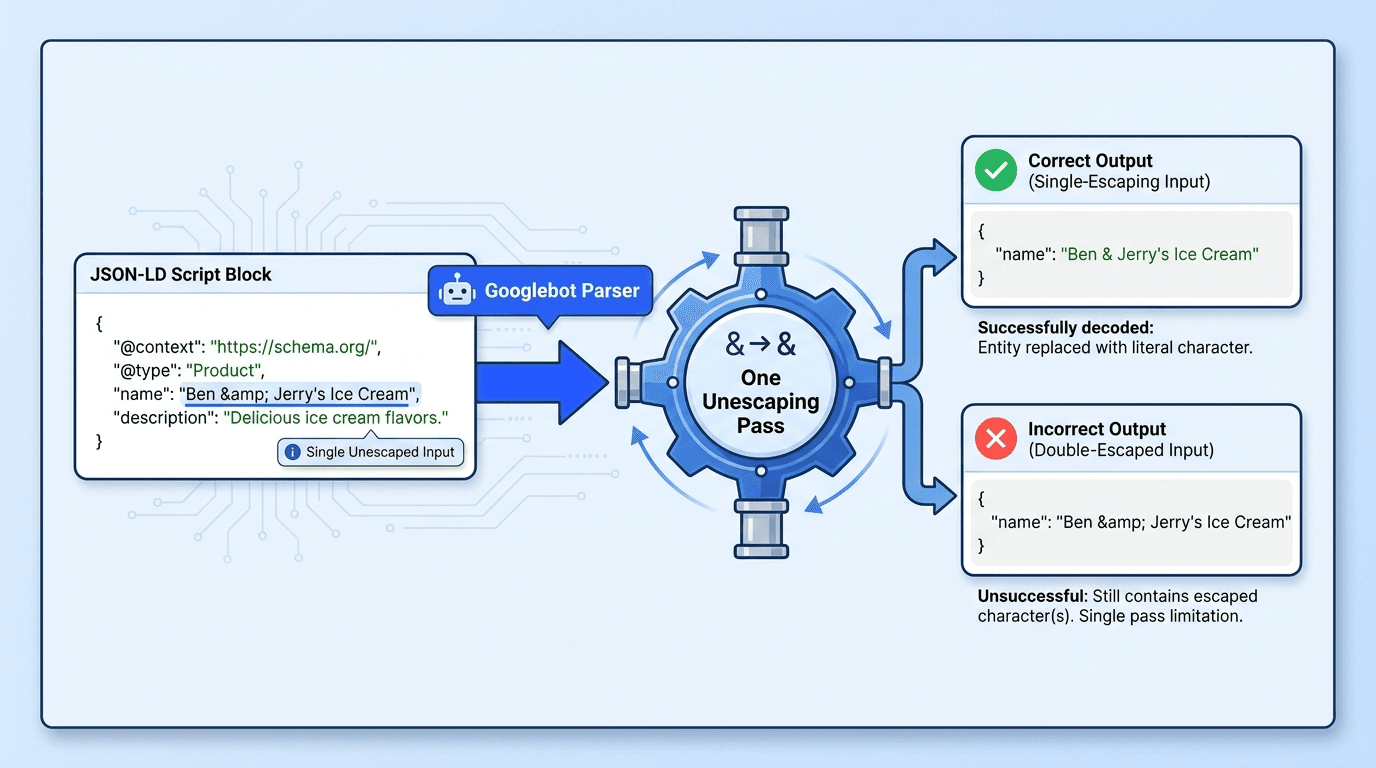
Google JSON-LD single pass unescaping can silently corrupt the values Googlebot extracts from product, article, review, and local business markup. A name like 'Ben & Jerry's' becomes a literal entity string -- reducing data accuracy and rich result eligibility -- without touching anything visible on the page.
Technical SEO managers, developers, and ecommerce owners should audit CMS-generated markup now. The practical workflow is:
How to audit JSON-LD escaping:
- Understand what one-pass unescaping changes.
- Crawl important templates for double-escaped patterns.
- Validate flagged URLs with structured data testing tools.
- Correct the serialization layer, deploy, and verify extraction.
Step 1: Understand Google's Single-Pass Parsing Change
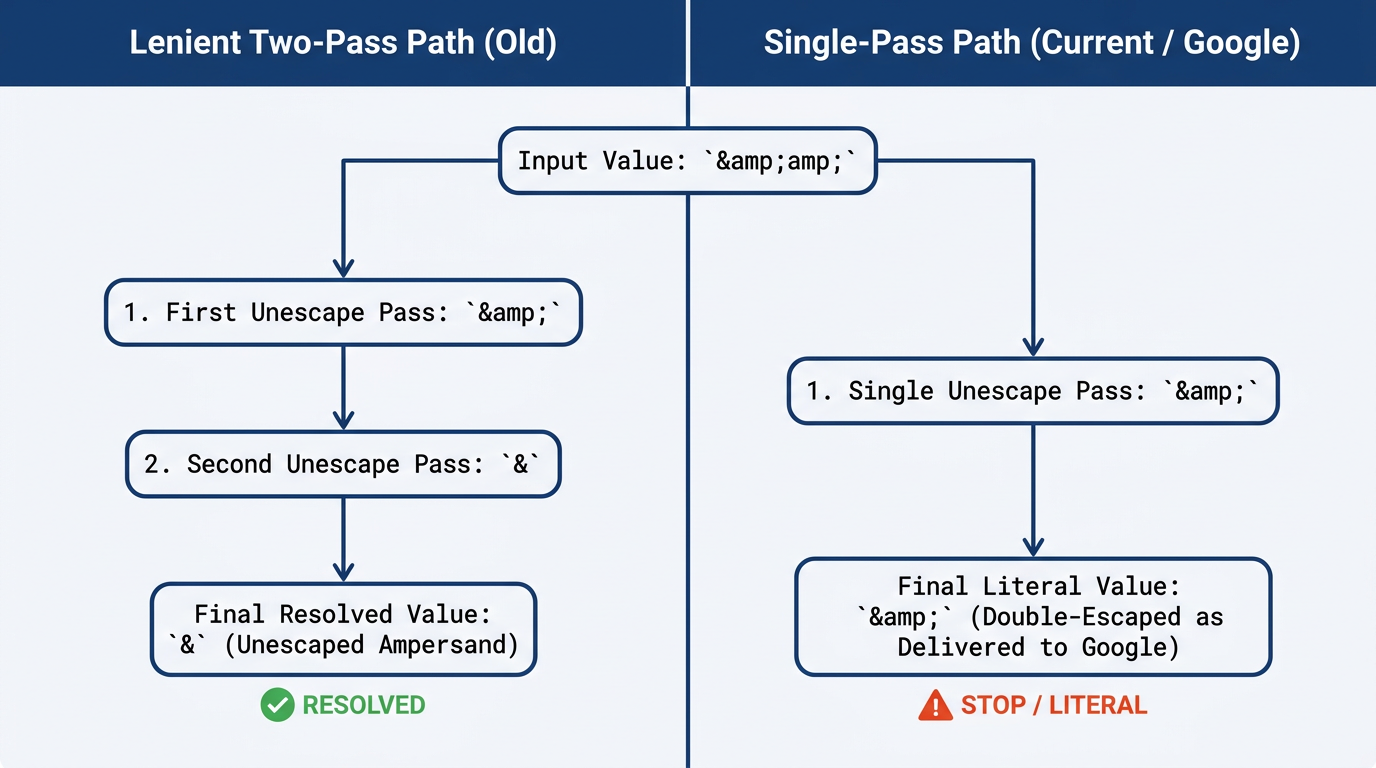
& stops at & — Google never resolves it to the intended &.Search Engine Roundtable reported on August 21, 2026 that Google would apply one HTML-unescaping pass during JSON-LD extraction. Gary Illyes directed developers to RFC 8259 Section 7, which defines JSON string escaping. This Googlebot structured data parser change is about parsing accuracy, not a direct ranking update.
Lenient processing previously turned '&' into '&' and then into '&'. One pass now stops at '&', so Google receives the wrong value. The usual culprit is CMS template schema escaping: a WordPress helper, Liquid filter, Hugo pipeline, plugin, or tag manager escapes text before a second function serializes it -- producing double-escaped entities in structured data.
| Source value | After one pass | Status |
|---|---|---|
| Ben & Jerry's | Ben & Jerry's | Correct |
| Ben & Jerry's | Ben & Jerry's | Usually recoverable |
| Ben & Jerry's | Ben & Jerry's | Incorrect literal value |
| Inspect both raw JSON-LD and the value extracted by the testing tool. |
Info: Unicode hexadecimal escapes in JSON-LD are not inherently errors. A single '\u0026' is valid RFC 8259 JSON escaping and resolves to '&'. Two serialized backslashes can preserve the escape as literal text.
Step 2: Crawl and Validate Double-Escaping Errors
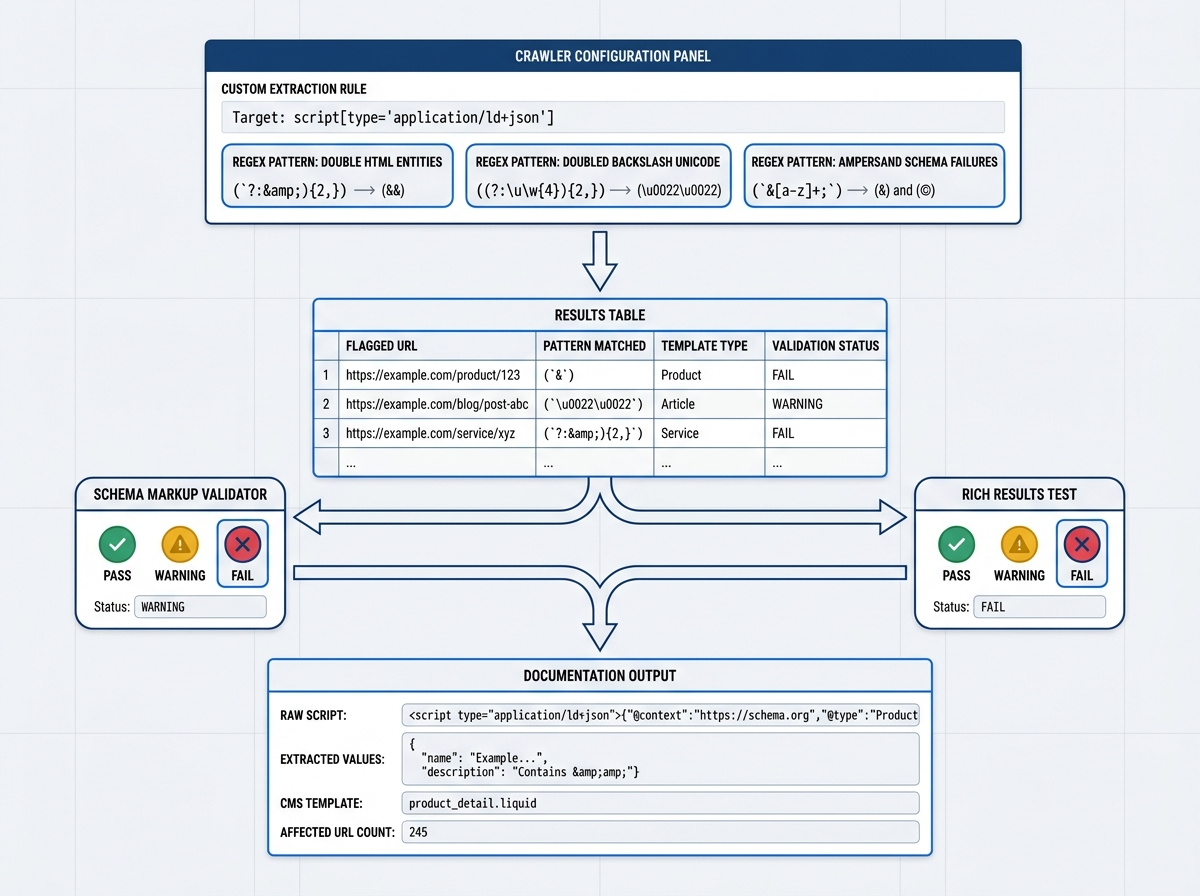
Prepare Screaming Frog or another crawler with custom extraction, Google Search Console access, and a representative URL set. Start with products, articles, recipes, reviews, and LocalBusiness pages -- sampling templates first prevents an expensive full crawl built on a noisy expression.
Configure the custom extraction
Restrict extraction to script elements whose type is 'application/ld+json'. Search the extracted source rather than the complete HTML, or navigation and body copy will generate false positives.
Useful searches for a structured data audit checklist:
- Double HTML entities: '&(?:amp|quot|apos|#39|lt|gt);'
- Known ampersand entity schema failure: '&'
- Any Unicode escape for inventory: '\u[0-9A-Fa-f]{4}'
- A doubled backslash before Unicode: '\\u[0-9A-Fa-f]{4}'
Do not bulk-label every Unicode match as a schema markup escaping error. Valid '\u0026', '\u003C', and '\u003E' sequences decode normally. Prioritize doubled slashes, nested entities, malformed JSON, and any property whose extracted value differs from the source data.
Confirm what Google extracts
Test one flagged URL per template in Google's Rich Results Test, then compare the output against Schema Markup Validator. Google's structured data documentation recommends JSON-LD, while the W3C JSON-LD specification defines how JSON represents linked data.
Watch for an 'unparsable structured data' message, a missing eligible item, or a property rendered as the literal string 'Ben & Jerry's'. A syntactically valid JSON document can still carry semantically corrupted strings, so a green syntax check does not confirm the values are correct. Compare desktop and mobile output as part of the parity audit mistake to avoid.
Tip: Save the raw script, extracted property values, validator result, CMS template, and affected URL count. This evidence lets developers reproduce the defect without relying on screenshots alone.
Step 3: Fix, Verify, and Prevent Schema Regressions
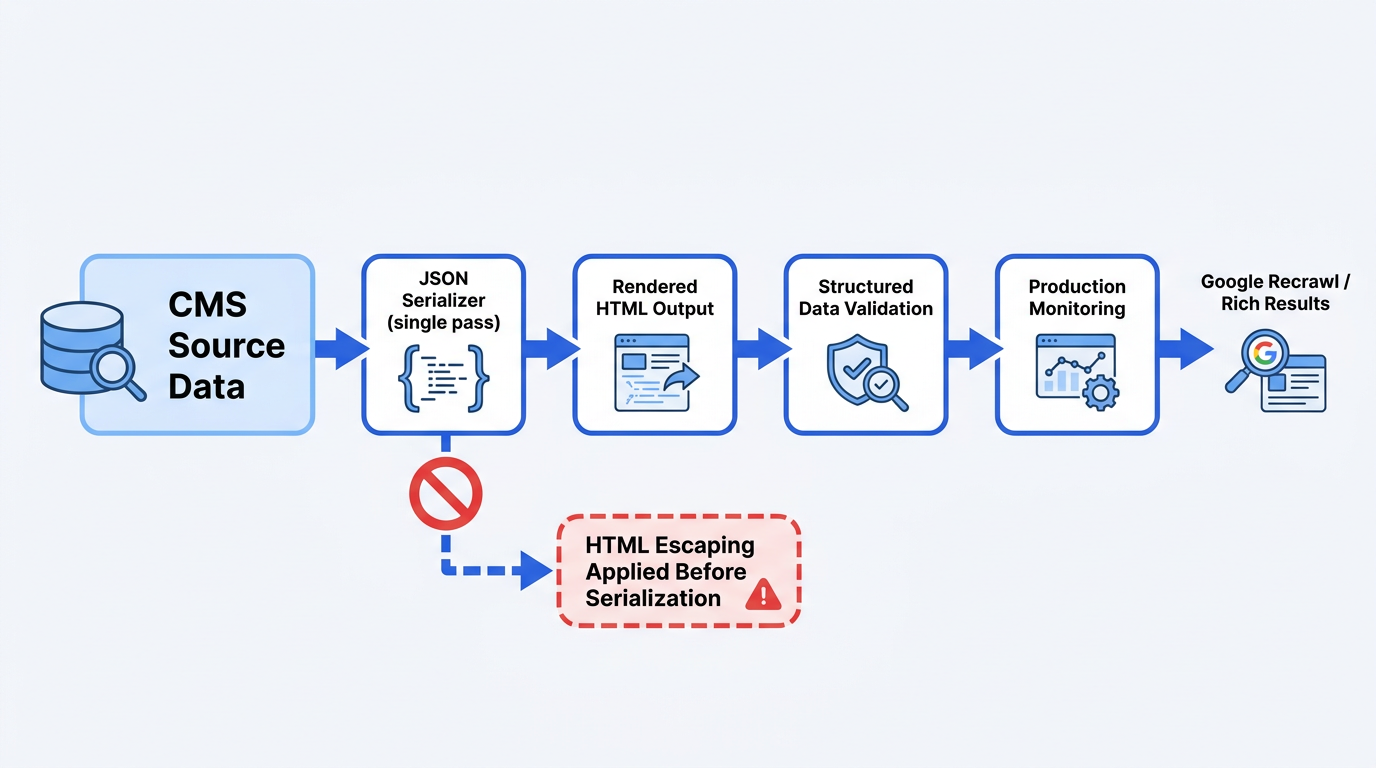
Fix the producer rather than patching strings after rendering. Build a native object, serialize it once with a JSON-aware function, and print that result without running an HTML escape helper over it. Never concatenate untrusted values into JSON by hand.
Platform-safe implementation patterns:
- Liquid: Use '{{ product.title | json }}'. Do not run 'escape' or 'escape_once' before the 'json' filter.
- WordPress/PHP: Build an array, call 'wp_json_encode($schema)', and output the encoded payload. Do not wrap it in 'esc_html'.
- Hugo: Pass structured data through 'jsonify' once. Review 'safeJS' usage carefully because it suppresses contextual escaping rather than repairing bad JSON.
- Other engines: Use a 'raw' or equivalent output only for a complete payload already produced by a trusted JSON serializer.
| Character | Incorrect Double-Escaped Form | Correct JSON-Escaped Form |
|---|---|---|
| Ampersand | & | & or \u0026 |
| Double quote | " | " |
| Apostrophe | ' | ' |
| Less-than sign | < | < or \u003C |
| HTML entities are not required inside JSON strings. Use standard JSON escapes where necessary. |
Troubleshooting common mistakes
- Database replacement: Do not replace every '&' globally. It can be legitimate stored text or visible HTML.
- Client-side differences: Validate rendered HTML and Google-visible output, especially when JSON-LD is injected through a tag manager.
- Syntax-only testing: Confirm extracted values, not just a green validation result.
- Partial deployment: Purge page, CDN, and application caches before declaring the fix unsuccessful.
Summary and next steps
After deployment, rerun the same crawl and validators, inspect key URLs in Search Console, and request indexing for priority pages. Track enhancement reports over subsequent crawls. Add these checks to your ecommerce SEO audit process and pre-release test suite.
Solid JSON-LD practice in 2026 means one controlled serialization step, fixture tests covering '&', quotes, apostrophes, and Unicode, plus automated comparison of source and extracted values. Use Vizup's schema validation workflow for SEO, AEO, and LLMs to turn the Google JSON-LD single pass unescaping audit into a repeatable regression check.
Frequently Asked Questions
Why did Google make this JSON-LD parser change now?
Google aligned extraction with RFC 8259 rather than continuing undocumented lenient multi-pass behavior. Strict processing makes publisher output predictable and removes error correction that publishers were never meant to rely on.
Will Google Search Console show an error for double-escaped entities?
Not reliably. Search Console can flag unparsable structured data, but a syntactically valid document containing literal entities can pass without a clear error. Always inspect the extracted property values directly, not just the status report.
My site passed the Rich Results Test before -- why is this a problem now?
Earlier processing could quietly repair accidental double-escaping during a second pass. Single-pass behavior preserves the remaining entity, so a test can pass syntax checks while the extracted value is still wrong.
Can I just find and replace '&' in my database?
No. A global replacement risks corrupting legitimate content and unrelated HTML. The correct fix is the CMS template or plugin that applies HTML escaping before JSON serialization.
How does this escaping issue affect AI Answer Engines and LLMs reading my structured data?
Corrupted names, authors, offers, and review values reduce machine-readable consistency across pipelines. AI systems do not all consume schema identically, but clean JSON-LD removes ambiguity for both search and answer-engine consumers.
