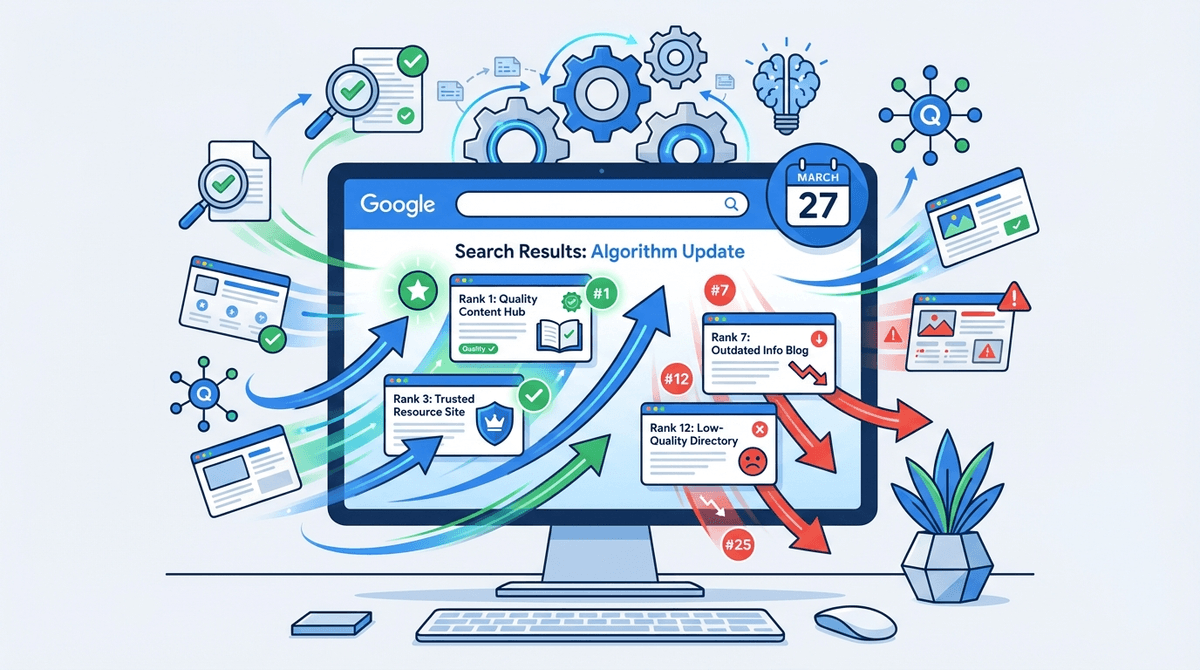
You've done everything right, or so it seems. The product pages look clean, the descriptions are written, and you're publishing blog content regularly. But organic traffic is flat. Conversions from search are underwhelming. And nobody can quite explain why. This is the situation that makes an ecommerce SEO audit genuinely valuable, not as a one-time exercise, but as a diagnostic tool that tells you where the real problems are hiding.
With global retail ecommerce expected to hit $7 trillion in 2026 and organic search driving 44.6% of revenue for ecommerce businesses (more than any other channel, per Omnisend 2026), getting your SEO fundamentals right isn't optional. This guide walks through every major step of an ecommerce SEO audit, in order, with enough specificity that you can actually do the work rather than just nod along.
What You'll Cover (and What You Need Before Starting)
A proper ecommerce SEO audit breaks into five phases: technical health, crawlability and indexation, on-page optimization, content and keyword alignment, and off-page authority. Here's the condensed step-by-step sequence:
Steps in a comprehensive ecommerce SEO audit:
- Step 1: Set up your audit toolkit and baseline data
- Step 2: Run a full technical crawl and fix critical errors
- Step 3: Audit crawlability, indexation, and site architecture
- Step 4: Evaluate on-page optimization across product and category pages
- Step 5: Align your content with keyword intent
- Step 6: Assess your off-page authority and backlink profile
- Step 7: Document findings and prioritize fixes
Before you start, you'll need access to Google Search Console, Google Analytics 4, and a crawling tool (Screaming Frog is the most practical for most teams; the free version handles up to 500 URLs). For keyword and backlink analysis, Ahrefs or a comparable platform is worth having. If you're running a large catalog (10,000+ SKUs), budget at least a full week for this process.
Step 1: Set Up Your Audit Toolkit and Baseline Data
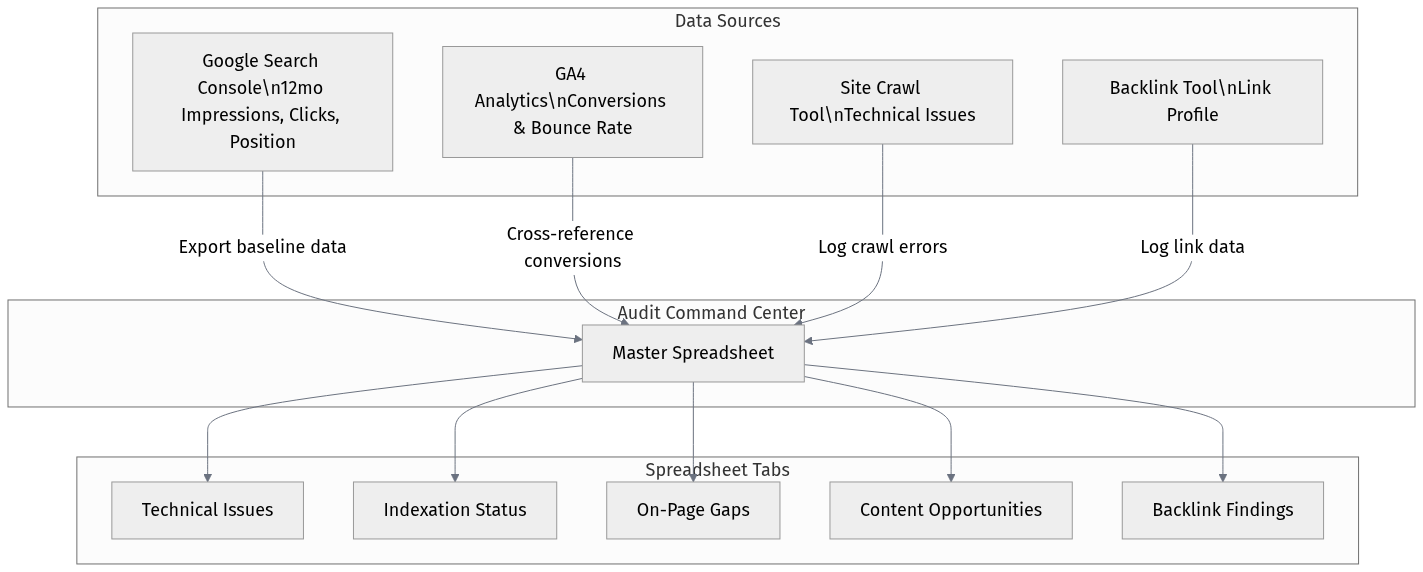
Don't skip this step by assuming you already know your baseline. Pull 12 months of data from Google Search Console: total impressions, clicks, average position, and which pages are actually driving traffic. Export it to a spreadsheet. You want to know, before you touch anything, which pages are performing and which are invisible.
Cross-reference that with GA4 to see which pages convert. A product page ranking on page two for a high-intent keyword is a very different problem than a page that ranks well but has a 90% bounce rate. These are different fixes, and conflating them wastes time.
Set up a shared spreadsheet with tabs for: technical issues, indexation status, on-page gaps, content opportunities, and backlink findings. You'll populate it as you go. Teams that skip this structure end up with a pile of screenshots and no clear action plan.
Step 2: Run a Full Technical Crawl and Fix Critical Errors
Run Screaming Frog across your entire domain. Not just the homepage, not just your top 50 products. The whole thing. Filter for status codes first: 404s, redirect chains longer than two hops, and soft 404s that return a 200 status but show 'product not found' content. These are crawl budget killers on large catalogs.
A 2025 study by Reboot Online found that 62.4% of ecommerce sites have at least one broken link, and 86% lack optimized internal links. Both of these issues are fixable in a single afternoon if you have the data in front of you. The technical SEO fundamentals from Yoast cover the core concepts well if you need a refresher on what each issue type actually means.
Check Core Web Vitals separately using PageSpeed Insights or the CWV report in Search Console. Pay attention to Largest Contentful Paint on product pages specifically. High-resolution product images that aren't lazy-loaded or properly compressed are the most common culprit on ecommerce sites, and they're usually easy to fix with a CDN or image optimization plugin.
Step 3: Audit Crawlability, Indexation, and Site Architecture
Open Google Search Console and check the Coverage report. Look for pages marked 'Excluded' and understand why. 'Crawled but not indexed' is the one that should concern you most on ecommerce sites, because it often means Google visited the page, decided it wasn't worth indexing, and moved on. Thin product pages, near-duplicate category filters, and faceted navigation are the usual suspects.
| Issue | Likely Cause | Fix |
|---|---|---|
| Crawled but not indexed | Thin or duplicate content | Consolidate pages, add unique content, or noindex |
| Duplicate without canonical | Faceted navigation or URL parameters | Implement canonical tags or parameter handling in GSC |
| Blocked by robots.txt | Overly aggressive crawl rules | Audit robots.txt and whitelist key pages |
| Soft 404s | Out-of-stock pages returning 200 | Return 404/410 or redirect to category page |
| Redirect chains | Legacy URL migrations | Consolidate to single 301 redirect |
| Prioritize fixes by volume and traffic impact, not just issue type. |
Site architecture deserves its own look. The general rule is that no important page should be more than three clicks from the homepage. On large ecommerce catalogs, this breaks down fast. If your sub-subcategory pages are six clicks deep, Googlebot may never reach them consistently. Check your internal link depth in Screaming Frog under the 'Crawl Depth' column.
Step 4: Evaluate On-Page Optimization Across Product and Category Pages
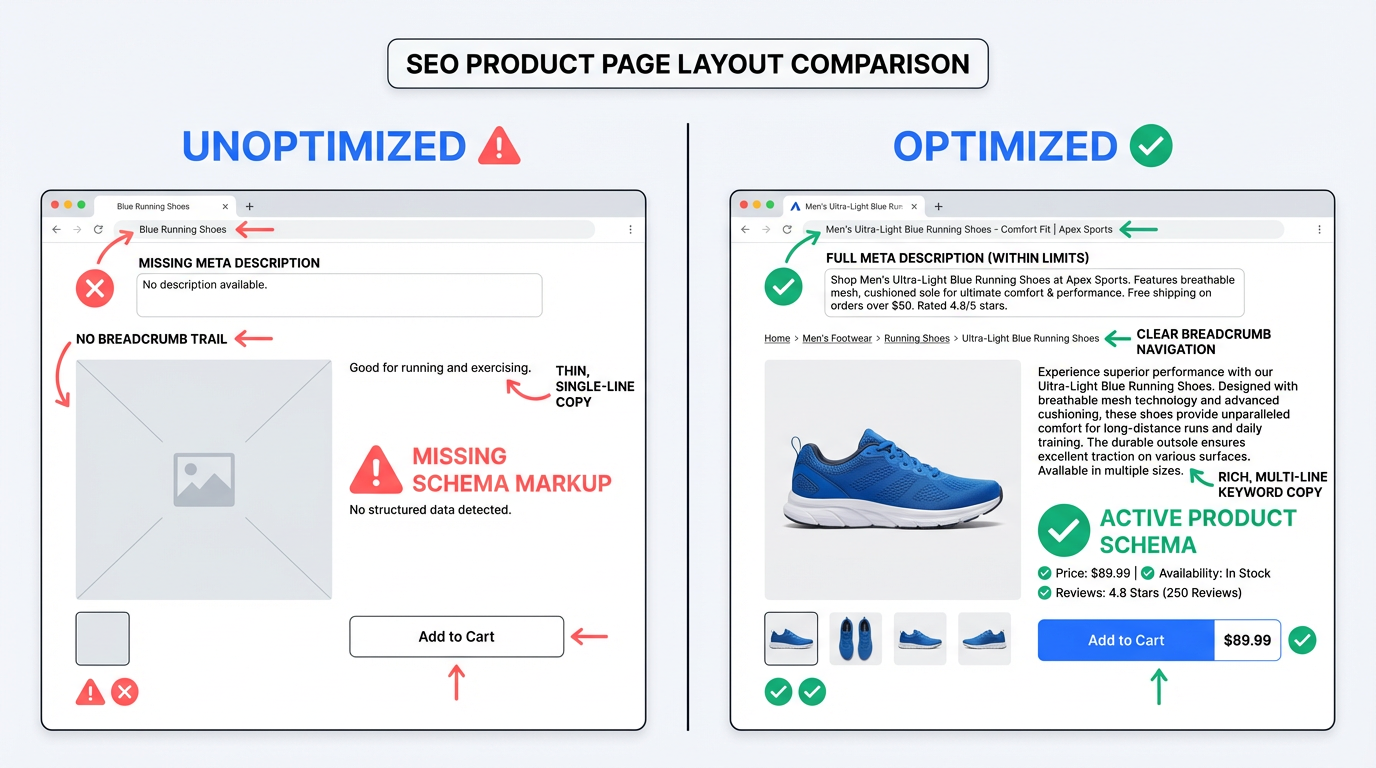
Export all title tags and meta descriptions from your crawl. Sort by character length. Anything under 30 characters for a title is almost certainly generic or auto-generated. Anything over 60 is getting truncated in the SERPs. On ecommerce sites, the most common offender is a title tag that's just the product name with no modifier, no brand, and no keyword context.
Category pages are where most ecommerce SEO audits find the biggest wins. They're often treated as navigation pages rather than landing pages, which means no unique copy, no H1 that targets a real keyword, and no internal links to related categories. A category page for 'women's running shoes' should have a short introductory paragraph, a clear H1, and links to subcategories and related blog content.
Structured data is worth checking separately. Product schema with price, availability, and review markup is practically table stakes now. If your competitors have star ratings showing in the SERPs and you don't, that's a click-through rate gap that compounds over time. Use Google's Rich Results Test to check which pages are eligible and which have errors.
Step 5: Align Your Content With Keyword Intent
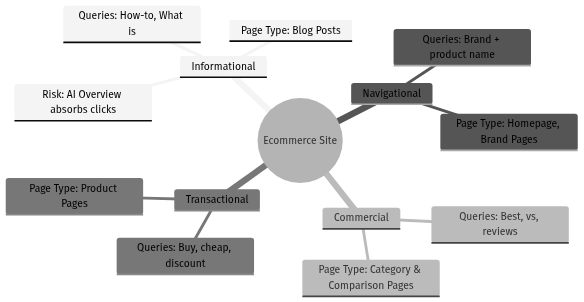
The Moz beginner's guide to keyword research is still one of the clearest explanations of how to think about keyword intent, and intent is the thing most ecommerce audits underweight. It's not enough to know that a keyword has 5,000 monthly searches. You need to know whether the person searching it is ready to buy, comparing options, or just learning.
Pull your ranking keywords from Search Console and group them by intent. Look for two specific problems. First, keyword cannibalization: multiple pages competing for the same term. This is extremely common on ecommerce sites where product pages and blog posts both target 'best running shoes for flat feet.' Second, intent mismatch: a product page ranking for an informational query it can't actually satisfy.
One thing most audit guides don't mention: check your zero-click exposure. With 60% of Google searches predicted to end without a click in 2026 (per AIOSEO), informational queries are increasingly being answered in AI Overviews. If your blog content is targeting pure informational keywords, you may be investing in traffic that Google is absorbing before it ever reaches you. This is part of why organic marketing in 2026 requires a broader strategic lens than keyword rankings alone.
Step 6: Assess Your Off-Page Authority and Backlink Profile
Pull your backlink profile in Ahrefs or a comparable tool. You're looking for three things: the overall domain authority trend over the past 12 months, the ratio of followed to nofollowed links, and any sudden spikes or drops in referring domains that might indicate a penalty or a lost link from a major publication.
Toxic link analysis is honestly overrated as an audit priority. Most ecommerce sites don't have a manual penalty, and the disavow tool is a last resort, not a routine step. Spend more time identifying which competitor pages are earning links that you're not, and why. That gap analysis is where the actual opportunity lives.
The American Marketing Association's SEO audit framework breaks off-page analysis into authority signals and brand mentions, which is a useful framing. Unlinked brand mentions are low-hanging fruit: find them with a Google search for your brand name in quotes, then reach out to convert them into actual links.
Step 7: Document Findings and Prioritize Fixes
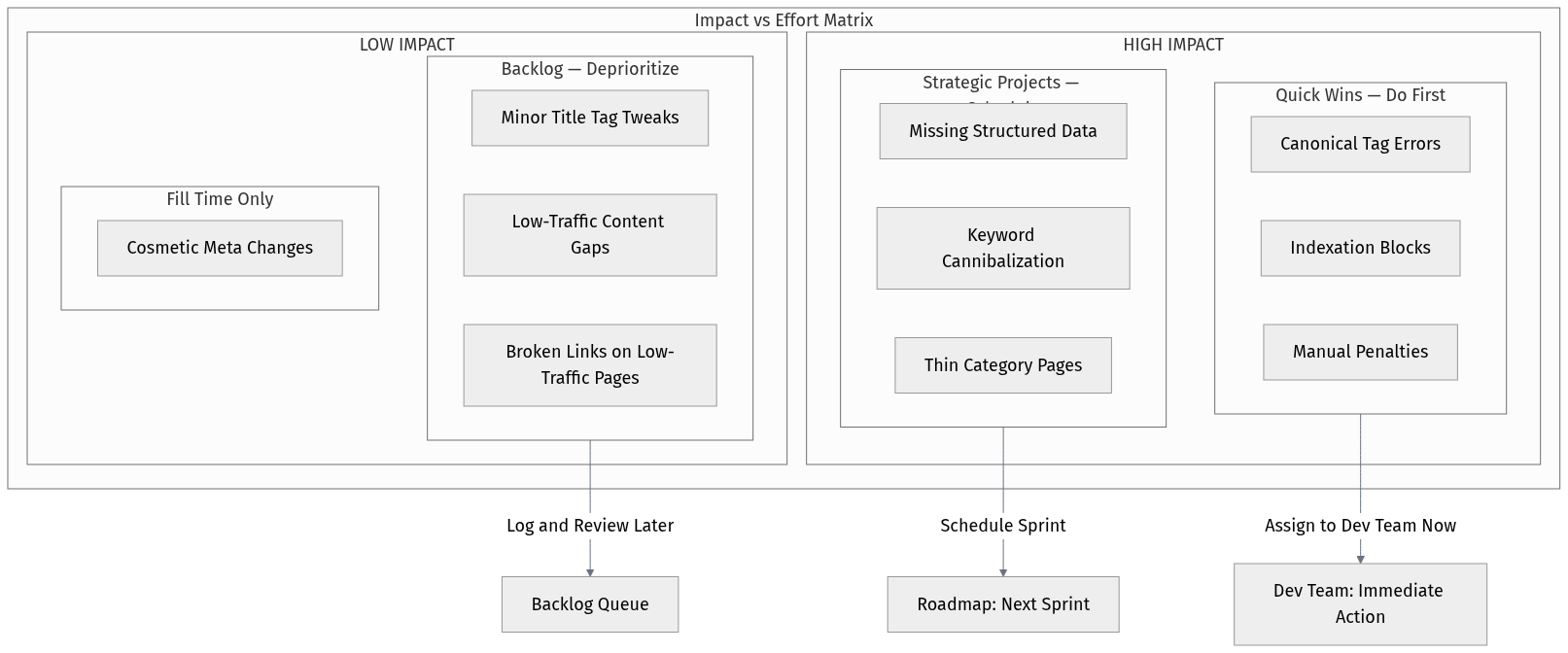
The audit is only useful if it produces a prioritized action list. Group your findings into three tiers: critical (broken pages, manual penalties, major indexation blocks), high priority (missing structured data, cannibalized keywords, thin category pages), and backlog (minor title tag tweaks, low-traffic content gaps). Hand the critical tier to your dev team immediately. Everything else gets scheduled.
One practical tip: assign an estimated traffic impact to each fix before you prioritize. A broken internal link on a page that gets 12 visits a month is less urgent than a canonical tag error on your top-selling category page. The data you pulled in Step 1 makes this possible. Without baseline traffic data, you're just guessing at priority.
Common Mistakes That Derail Ecommerce SEO Audits
Auditing only the pages you already know about is the most common mistake. Teams focus on their top 20 product pages and miss the fact that 3,000 out-of-stock pages are eating crawl budget. Run the full crawl. Every URL.
Treating the audit as a one-time project is the second big mistake. Organic search accounts for an average of 62% of all website traffic for companies (First Page Sage, 2025). A channel that important deserves a quarterly review, not an annual one. Set a recurring calendar event.
Ignoring the connection between technical issues and content performance is subtler but just as damaging. A slow-loading category page will underperform in rankings regardless of how well-optimized the content is. These aren't separate workstreams; they affect each other. The teams that get the best results treat the audit as a unified exercise, not a checklist of disconnected tasks.
And finally: don't let the audit become a reason to delay publishing. I've seen teams spend six weeks in audit mode, fixing every minor issue, while their competitors ship new content and earn new links. Fix the critical stuff fast. Schedule the rest. Keep moving.
After the Audit: What to Do Next
Once your critical fixes are in progress, set up a monitoring cadence. Check Search Console weekly for new coverage errors. Review Core Web Vitals monthly. Run a fresh crawl quarterly. The goal isn't to do a massive audit every year; it's to catch issues early, before they compound into traffic drops that take months to recover from.
An ecommerce SEO audit is a starting point, not a finish line. The brands winning in organic search right now aren't the ones who ran the most thorough audit. They're the ones who acted on the findings quickly, tested what worked, and kept iterating. That's the actual competitive advantage.
Frequently Asked Questions
How long does an ecommerce SEO audit take?
For a site with under 1,000 pages, a thorough audit takes 2-3 days. For larger catalogs (10,000+ SKUs), budget a full week or more. The crawl itself is fast; the analysis and documentation take the most time. Don't rush the prioritization phase - that's where the audit actually pays off.
What tools do I need to run an ecommerce SEO audit?
At minimum: Google Search Console (free), Google Analytics 4 (free), and Screaming Frog (free up to 500 URLs, $259/year for unlimited). For keyword and backlink analysis, Ahrefs or a comparable platform adds significant depth. Platforms like Vizup can consolidate organic data and surface prioritized recommendations automatically.
How often should I conduct an ecommerce SEO audit?
A comprehensive audit once or twice a year is reasonable for most ecommerce sites. But specific components - technical crawl, Core Web Vitals, indexation status - should be reviewed quarterly. Organic search drives nearly half of ecommerce revenue, so treating it as an annual checkbox is a real risk.
What's the most important part of an ecommerce SEO audit?
Indexation and crawlability issues tend to have the highest impact on large catalogs, because they prevent Google from even seeing your content. But the honest answer is: it depends on your site's specific situation. That's why the baseline data step comes first. The audit should tell you what your biggest problem is, not confirm what you already assumed.
Can I do an ecommerce SEO audit without technical SEO knowledge?
You can handle the on-page and content portions without deep technical knowledge. The technical crawl analysis (status codes, redirect chains, canonicalization) benefits from some familiarity with how search engines work. The Yoast guide to technical SEO is a solid starting point if you need to build that foundation before diving in.