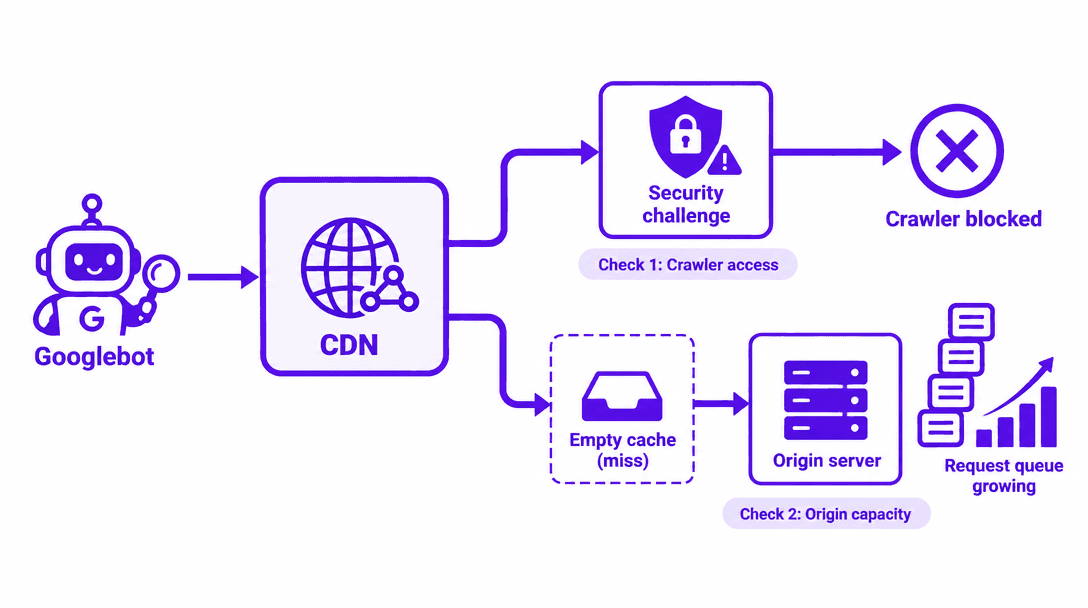
Your CDN goes live and pages get faster. Then Googlebot either hits a bot challenge or follows cache misses into an origin that isn't ready for it. Neither outcome is inevitable. A sound CDN migration SEO workflow protects crawler access and server capacity at the same time.
Two common CDN migration mistakes can damage organic visibility:
Mistake 1: Blocking Googlebot with overly aggressive security rules. A CDN or web application firewall may challenge legitimate search crawlers, preventing them from accessing important pages.
Mistake 2: Overloading your origin with uncached requests. A new CDN may encourage more crawling before its cache is ready, sending additional requests to an origin server that cannot handle them.
Both risks need separate checks. The following five-step workflow explains how to prevent them.
Work through it in this order:
-
- Record your baseline.
-
- Verify Googlebot and test your security rules.
-
- Warm the cache without straining the origin.
-
- Stage the cutover.
-
- Watch crawler access and origin health together.
Note: Before anyone touches DNS, get access to the CDN and WAF, origin logs and metrics, and Search Console. Also collect a set of representative URLs and confirm you control routing. To identify redirects, broken URLs, and other sitemap-related crawl waste before migration, use Vizup's Crawl Budget Checker. Put the SEO and infrastructure owners in the same migration window. Save the old configuration, rehearse the rollback, and agree on stop thresholds specific to your site.
Step 1: Record your crawl and origin baseline
Capture verified crawler requests, status codes, response times, origin volume, saturation, and current cache-hit ratios. Pull them across representative traffic periods, not a single quiet afternoon. Flag the templates that matter most for search, along with any uncached routes that are expensive to serve.
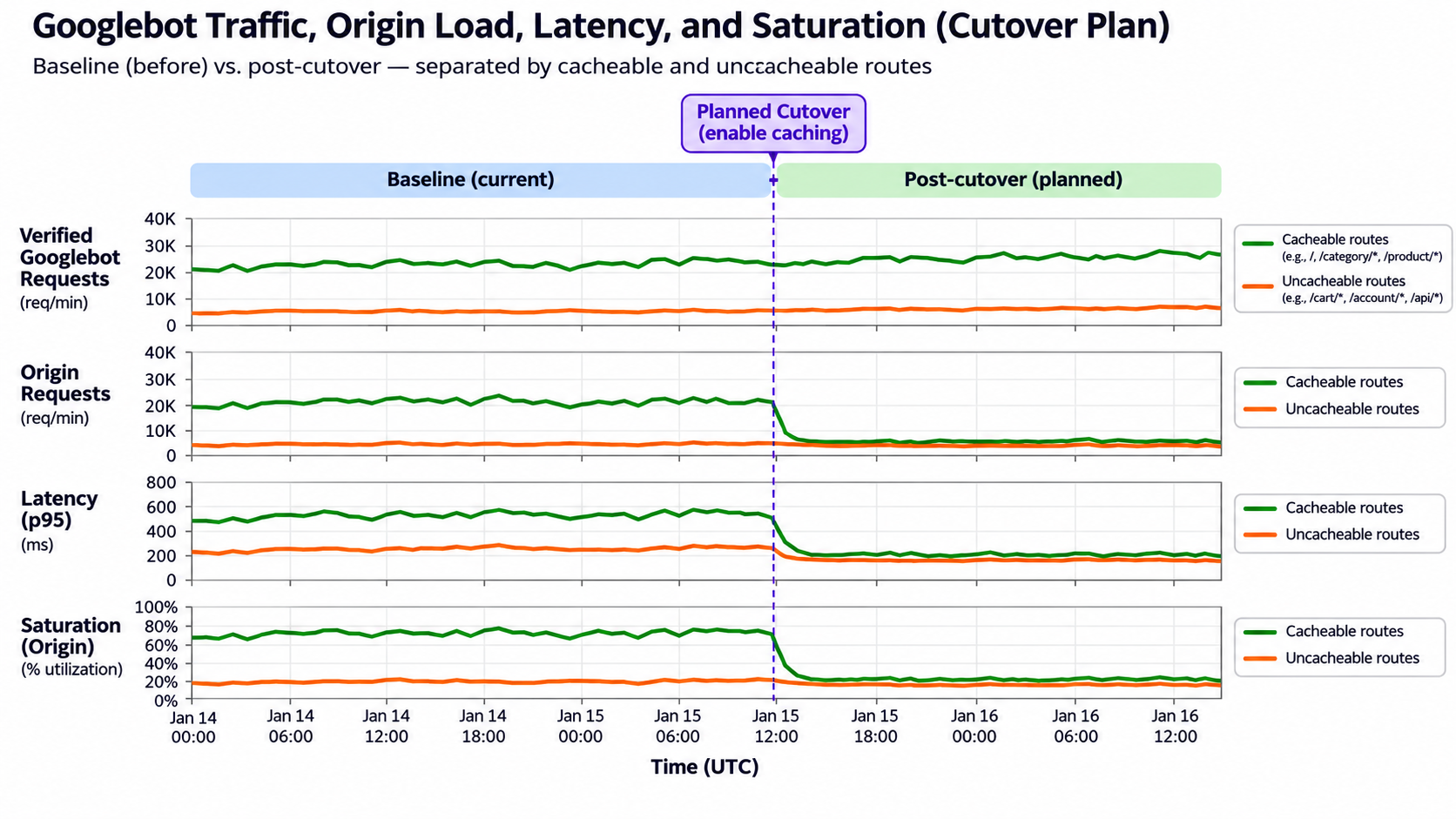
This is the counter-intuitive part. Faster responses can tell Google you have more serving capacity, and that allows more crawling while the new cache is still cold. Every miss goes through to the origin. Uncacheable requests go there no matter what. Crawl demand also plays a role, so a Googlebot crawl spike after CDN migration is possible but not guaranteed.
Google's November 2026 CDN guidance covers this interaction directly, and Search Engine Roundtable's 2026 coverage adds secondary context. It also helps to understand how Google manages crawl budget.. Sitting behind a CDN does not earn you a fixed crawl budget bonus.
Step 2: Verify Googlebot and test security rules
To keep a CDN from blocking Googlebot, you need a reliable way to verify the crawler. Use one of three methods: your provider's documented bot classification, Google's published crawler IP ranges, or Google's reverse-and-forward DNS procedure for that crawler type. A user-agent string proves nothing. Web Bot Auth testing does not replace those checks everywhere.
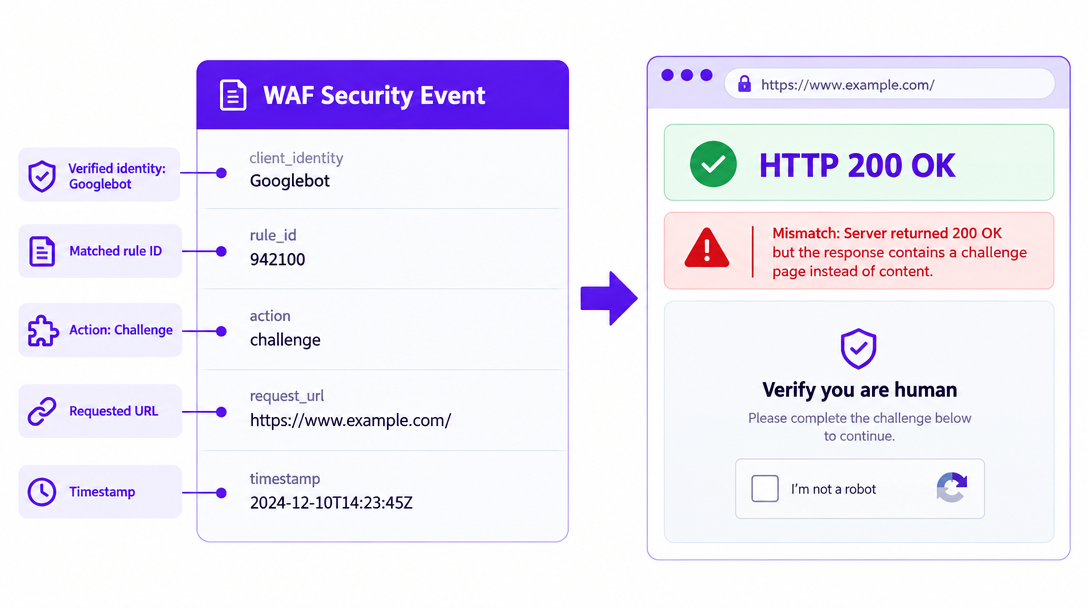
You can also use Vizup's Sitemap Checker to review sitemap structure, URL health, and discovery signals. This complements the direct crawler-response checks required during migration.. Read the response bodies, not only the status codes. A bot check served with a 200 status can still keep pages out of the index.
Warning: If you're dealing with a 'Cloudflare Googlebot blocked' incident, start with the rule IDs and bot classifications. Exempt verified crawlers only from the specific challenge or bot rule that fired. Leave unrelated WAF protections in place, and keep any deliberate training-bot policies. Search, agent, and training crawlers are different categories and need different rules.
Step 3: Pre-warm the CDN cache safely
- Choose URLs that are frequently requested, indexable, and cacheable across your important templates. Include the expensive pages and the assets they load.
- Send requests to the new distribution at low concurrency, using the intended hostname and TLS configuration.
- Repeat the requests and confirm cache status in provider headers or logs. Raise concurrency only while origin health holds steady.
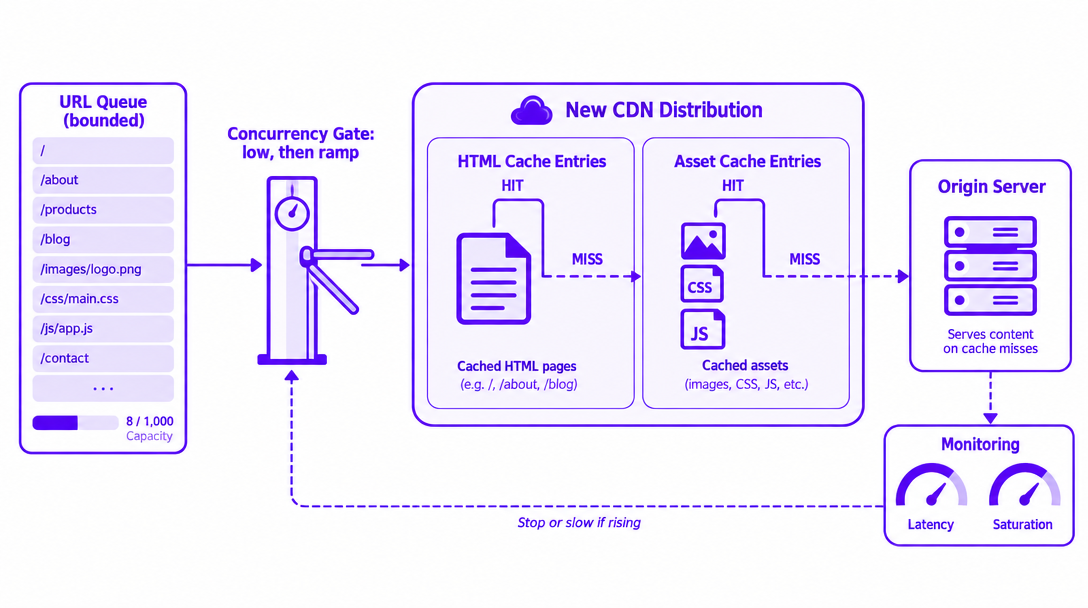
Warming won't help if caching is broken. Cookies, query strings, TTL settings, or bypass rules can defeat caching and keep the cold cache crawl trap in place. Caching only assets leaves dynamic HTML unprotected. Never cache personalized responses. A single request also won't warm every edge location. Stop warming as soon as latency, errors, or saturation start to rise.
Step 4: Stage the cutover around origin capacity
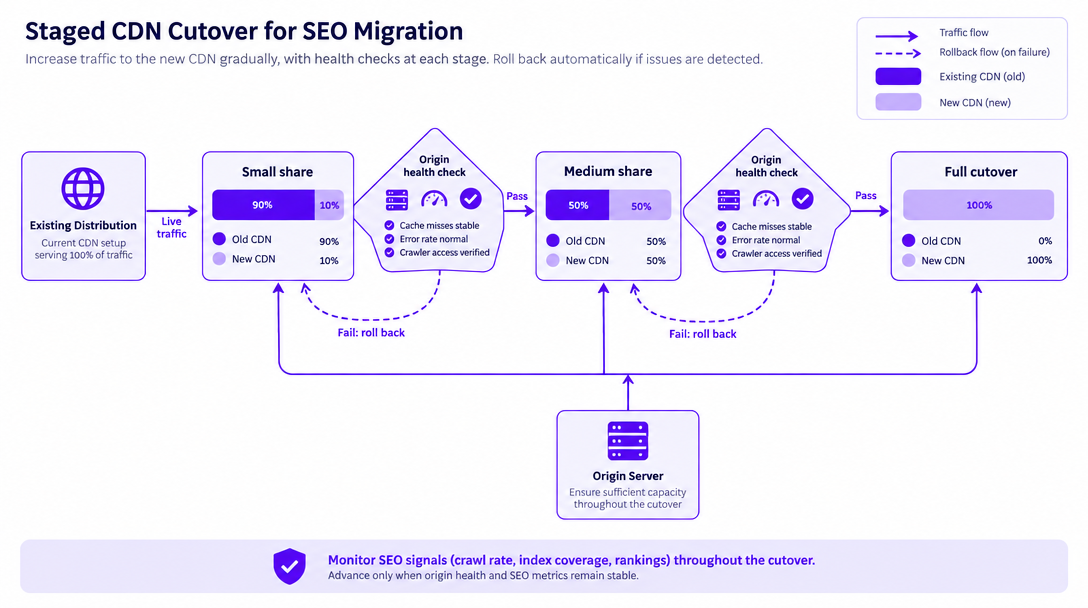
If your setup supports it, move a small share of traffic first, using weighted routing or a representative group of hostnames. Expand once things stabilize. If you can't split traffic, cut over in a controlled window with explicit rollback gates.
To prevent origin server overload from Googlebot, rely on bounded warming, request coalescing you've validated, sensible stale-serving policies, and temporary extra capacity. Avoid blanket Googlebot rate limiting as a routine CDN migration strategy. First, reduce cache misses, pause unnecessary warming, and confirm that verified crawlers can access important pages. If the origin becomes genuinely overloaded, temporary HTTP 429 or 503 responses may help reduce crawl pressure while the underlying issue is resolved. If the origin becomes genuinely overloaded, temporary HTTP 429 or 503 responses can signal that Googlebot should reduce requests. Include an appropriate Retry-After header where supported, and restore normal responses as soon as the problem is resolved. Prolonged server errors can negatively affect crawling and indexing. Don't serve challenges or fake successes. Errors that persist will hurt crawling, so check the HTTP status-code guidance.
Step 5: Watch crawler access and origin health together
Put these metrics on one timeline: verified Googlebot request rate, edge actions, cache misses, origin requests, latency, 5xx responses, and saturation. Annotate every deployment and rule change. Compare crawl rate after CDN migration against your baseline. More crawling at the edge does not by itself mean the origin is overloaded.
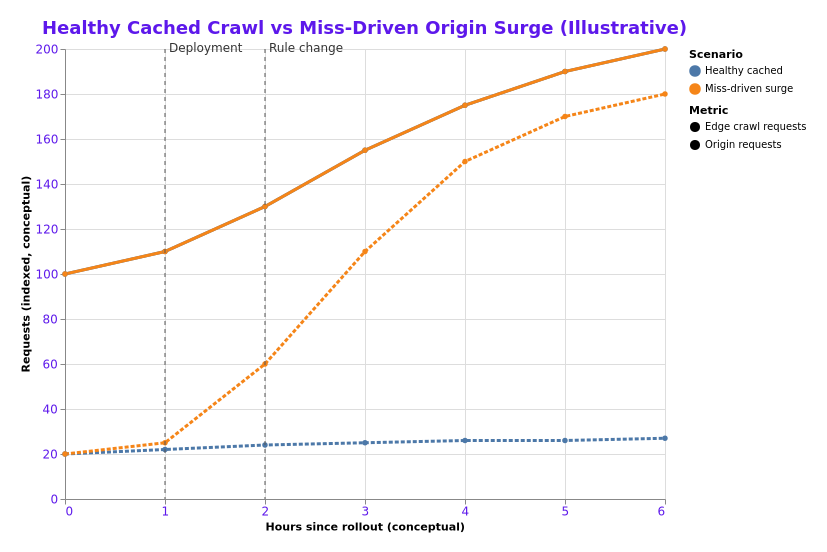
Make decisions from live telemetry. Search Console Crawl Stats is delayed, so use it to confirm what you've already seen. If an agreed threshold is breached, pause the rollout or roll back.
Technical monitoring tells you whether a CDN migration is working. Organic visibility monitoring helps you understand what happens afterward. Vizup's Organic Autopilot connects visibility intelligence with content optimization and publishing workflows across Search, Social, Communities, and AI Answer Engines. Teams can use these insights alongside Search Console and infrastructure telemetry to identify organic discovery changes and prioritize improvements.
When the graphs disagree
| Misleading symptom | Likely mistake | Evidence | Action |
|---|---|---|---|
| 200 responses | Challenge hidden in the body | Response body and rule action | Narrow the verified-bot exception |
| High hit ratio | HTML bypassing the cache | HTML-specific cache logs | Fix caching for eligible HTML |
| More crawling | Edge load mistaken for origin load | Origin volume and saturation | Continue if the origin stays healthy |
| Rollback looks incomplete | DNS caches still active | Resolver and traffic logs | Keep both paths serving |
Check what crawlers receive and how loaded the origin is before you weaken security, block crawlers, or purge caches.
CDN migration SEO FAQs
Why can Googlebot crawl more after a CDN migration?
Faster responses can signal more serving capacity, which lets Google crawl more when there is demand for the content. The increase isn't guaranteed. Until the new cache fills, misses can push that extra load onto the origin.
How do I verify Googlebot before letting it through my WAF?
Use documented verified-bot classification, Google's published crawler IP ranges, or Google's documented reverse-and-forward DNS check. Match the correct crawler type. Then separately inspect the response that verified crawler actually receives.
Should I pre-warm every URL in the CDN cache?
No. Prioritize frequently requested, cacheable URLs across your important templates and assets. Limit concurrency, confirm you're getting real cache hits, and stop if origin health slips. Never warm personalized content into a shared cache.
Should I rate-limit Googlebot if my origin becomes overloaded?
Not as part of your migration plan. Pause expansion, reduce warming, and fix cache behavior first. A genuine, temporary overload justifies proper 503 responses, but ongoing errors are not a sustainable way to control crawling.
Does moving to a CDN automatically increase Google's crawl budget?
No. Crawling depends on both serving capacity and crawl demand. A CDN doesn't give you a fixed allocation or guarantee more indexing. You still need accessible pages and a reliable origin.
Your CDN migration checklist ends at a stable origin
Only sign off on the cutover when verified crawlers get through and response bodies are correct. The intended caching must work, the origin must have healthy capacity, and monitoring needs owners on both teams. Keep watching across representative traffic periods after that.
Keep Your Organic Visibility Moving After Migration
A successful CDN migration protects crawler access and server performance. The next step is understanding how those technical improvements affect your brand's organic discovery.
Vizup is an Organic Autopilot for modern discovery, combining AI agents, human experts, and live SEO, pSEO, AEO, and GEO tools to help brands monitor, create, optimize, publish, and learn across Search, Social, Communities, AI Answer Engines, and Local Discovery.
Use Vizup alongside your dedicated CDN and infrastructure monitoring tools to connect technical SEO improvements with broader organic growth opportunities.
