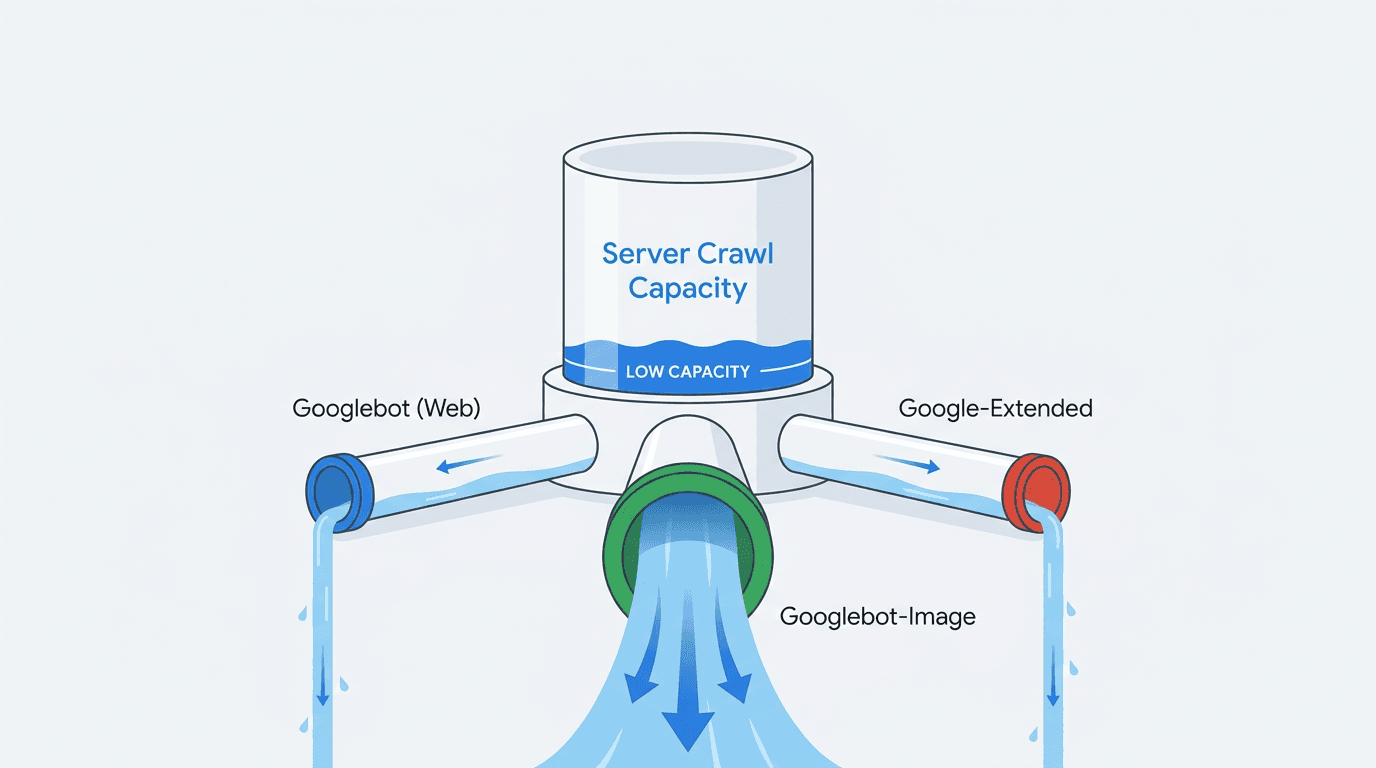
The most operationally important detail in Google's July 2026 crawl-budget documentation clarification is how the underlying resource model is now described: the crawl capacity limit is shared across all Google crawlers. When a log-visible Google crawler such as Googlebot-Image or AdsBot has high demand, less capacity may remain for other Google crawlers on the same hostname. Crawler management, then, is a capacity decision first and a content-protection decision second.
Google also clarified that every site starts with the same default, conservative crawl capacity limit, and if there is demand to crawl more and the site stays healthy, Google's systems will automatically adjust this limit over time. That word "same" carries real weight: new sites are not starting with a smaller baseline than established ones. Every site begins at the same conservative crawl capacity and earns increases through sustained server health and sustained demand (as confirmed in Google's updated crawl-budget documentation).
How to adapt to the new shared-capacity model (4 steps):
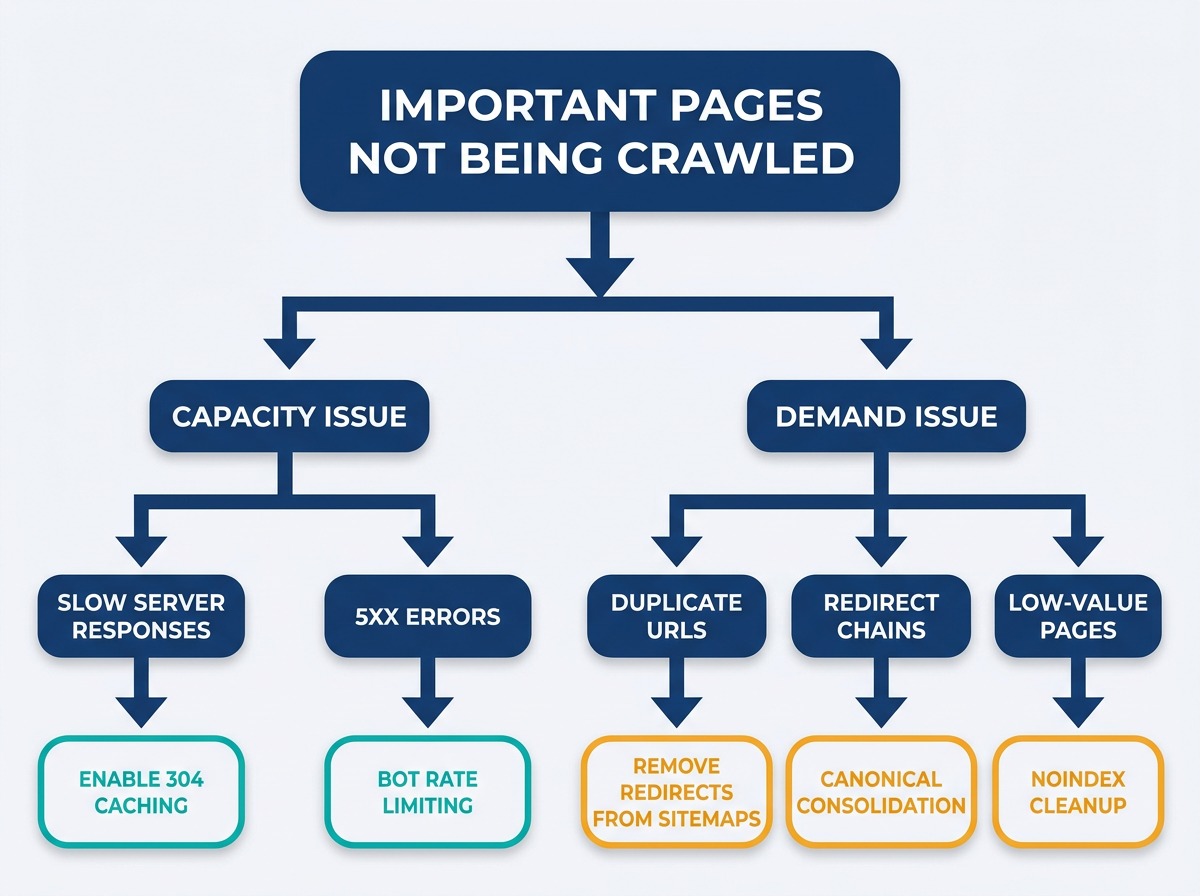
- Diagnose capacity: quantify response times, error rates, and 304 caching for Google crawlers per hostname.
- Reduce wasted demand: remove redirects, duplicates, and low-value URL patterns from internal links and sitemaps.
- Control crawler pressure: decide what to allow, block, or rate-limit so one crawler does not starve another.
- Monitor and iterate: watch Crawl Stats and logs until capacity rises and important URLs get crawled and indexed faster.
Prerequisites: what you need before you optimize crawl budget
Having these in place before touching robots.txt or sitemaps will save you from chasing symptoms instead of causes:
- Google Search Console access (Owner or Full User), for Crawl Stats and index coverage diagnostics.
- Server log access (CDN + origin if possible) and a way to query it (ELK, BigQuery export, Athena, or a log analyzer).
- A site-crawling workflow to map internal links, canonicals, and parameterized URL patterns. Vizup's Sitemap Validator can complement this by identifying sitemap inconsistencies and crawl waste.
- Comfort with HTTP behavior, especially 200, 301, 302, 304, 404, 410, and 5xx. If you need a refresher, use The Essential Guide to HTTP Status Codes for SEO.
Note: Scope your work per hostname. Crawl budget is per hostname (per subdomain), so "www" fixes do not automatically help "m", "cdn", or country subdomains.
Step 1: Diagnose your crawl capacity limit (infrastructure lever)
Capacity is what Google can crawl without hurting your servers. Google's July 2026 documentation clarification highlights server response times and HTTP caching through 304 responses, because those are the clearest signals of whether your infrastructure can sustain higher crawl rates over time.
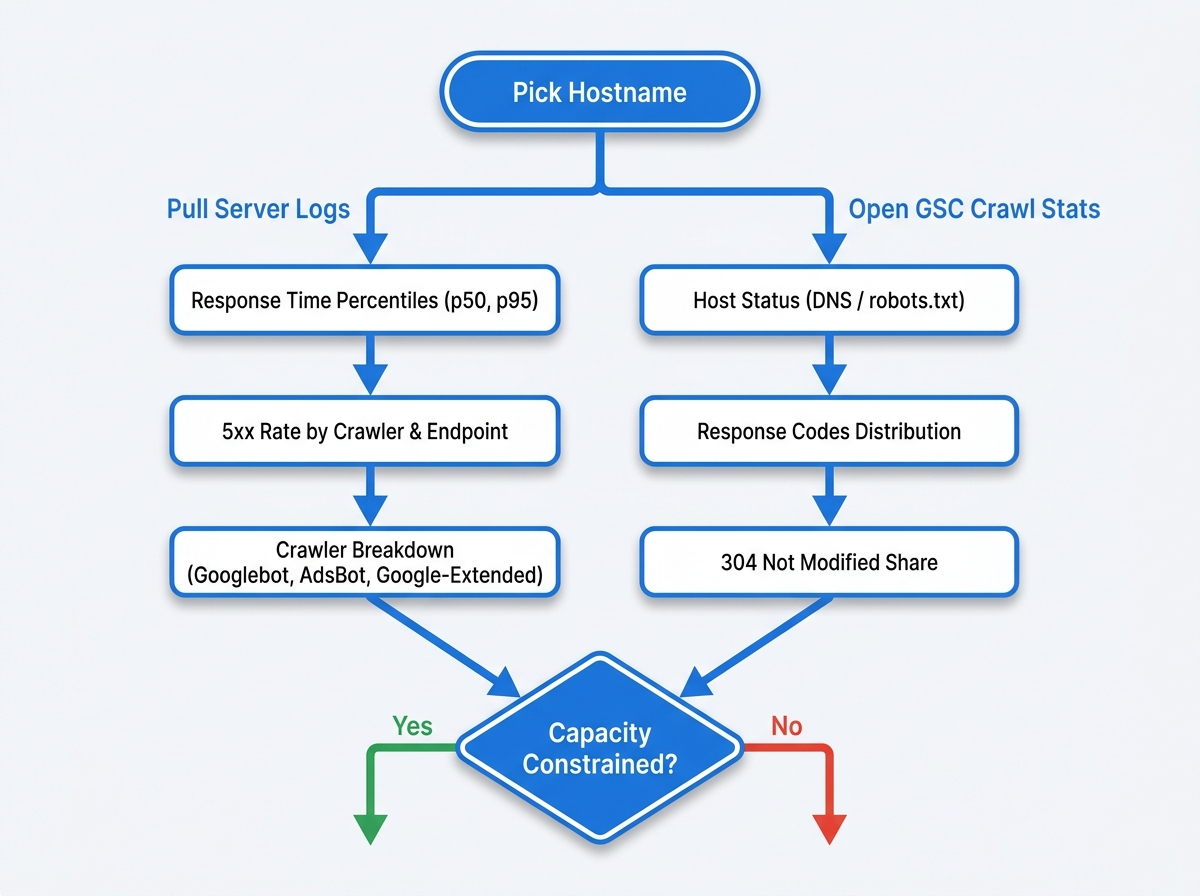
1) Break down Google crawler load in server logs
Query logs by user-agent and group by crawler family (Googlebot, Googlebot-Image, Google-Extended, AdsBot, etc.). Two things matter: which crawler is consuming the most requests, and whether that traffic correlates with slow responses or 5xx spikes. This is where the "crawl budget shared across crawlers" model becomes measurable rather than theoretical.
Log checks that map cleanly to the crawl capacity limit:
- Response time percentiles (p50, p95) for crawler requests at the edge and at origin.
- 5xx rate by crawler and by endpoint group (product pages, search pages, faceted URLs, media).
- Redirect rate (3xx) and chain depth, especially from internal links and sitemaps.
- Cache behavior: how often crawlers get 304 versus full 200 responses for stable resources.
2) Validate Google's view in GSC Crawl Stats
Open Search Console, then Settings, then Crawl stats. Check Host status first -- DNS, connectivity, or robots.txt fetch issues can cap your conservative crawl capacity quickly. Then use the "By response" and "By file type" charts to spot patterns that match what your logs are showing.
Tip: New emphasis to act on: if your 304 share is low for URLs that rarely change, you are forcing full fetches. Fix cache validators (ETag/Last-Modified) and caching layers so Google can revalidate with 304 instead of re-downloading content.
For a quick baseline before refactoring infrastructure, run Vizup's Crawl Budget Checker to surface obvious capacity and demand red flags that show up in crawl patterns.
Step 2: Manage crawl demand (information architecture lever)
Demand is what Google wants to crawl. On large sites, that demand gets distorted by internal link sprawl, duplicate URL variants, and sitemaps advertising URLs you never actually wanted indexed. When capacity is shared, wasted demand is more expensive than it used to be -- it competes directly with your important URLs and with other crawlers fighting for the same pool.
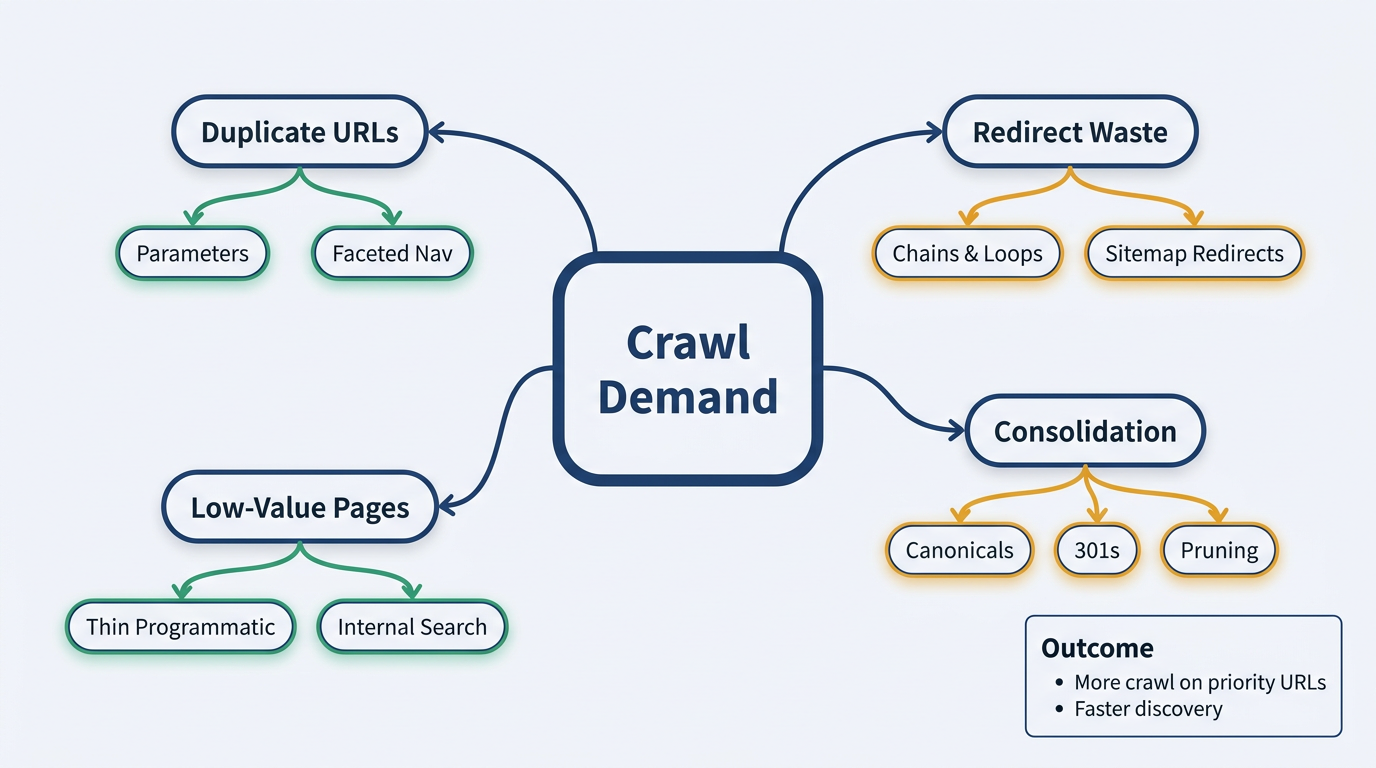
Audit for crawl waste that burns shared capacity
Start with a full crawl of internal links, then segment URLs by template and parameter patterns. The goal is eliminating entire classes of low-value crawl paths -- not hand-fixing a thousand individual URLs.
High-leverage demand fixes:
- Eliminate redirects from internal links and sitemaps. Redirects are direct crawl-budget waste, especially when they chain. See Redirects in Sitemaps: Why They Waste Crawl Budget.
- Consolidate duplicates created by faceted navigation and tracking parameters using canonicals, parameter handling, and selective noindex where appropriate.
- Remove internal links to non-indexable states (noindex pages, soft 404s, empty category pages, filtered search results).
- Fix broken links that generate 404s, and use 410 for intentionally removed content when you want faster de-crawling.
Make your sitemaps reflect real demand
Treat sitemaps as a contract: only list canonical, indexable, 200 URLs that you actually want crawled and indexed. Programmatic sitemap generation is where demand tends to explode if there are no guardrails. Use Sitemap Best Practices for 2026: Built for Google and AI Crawlers to align sitemap partitioning, freshness signals, and URL hygiene.
When demand is misaligned with quality, the downstream symptom shows up in Search Console as a spike in "Crawled, currently not indexed." Because these URLs have already been crawled, investigate content quality, duplication, canonicalization, and indexability before assuming the problem is crawl capacity. Keep only canonical, indexable URLs that you want in Search in your sitemap. For remediation patterns, see how to fix 'crawled, currently not indexed' issues.
Step 3: Control crawler pressure so one bot does not starve another
Shared capacity requires an explicit crawler policy -- covering both Google-owned crawlers (Search, Images, AI) and non-Google bots. The objective is not maximum blocking; it is preventing avoidable load so your crawl capacity limit can rise steadily over time.
| Crawler type | Typical purpose | Common user-agent token | E-commerce action | Publisher action | SaaS action |
|---|---|---|---|---|---|
| Googlebot (web) | Crawl HTML for Search | Googlebot | Allow, prioritize product and category URLs | Allow, prioritize news and evergreen hubs | Allow, prioritize docs and feature pages |
| Googlebot-Image | Fetch images for Image Search and page rendering | Googlebot-Image | Allow if images drive discovery, otherwise consider limiting image URL sprawl | Allow for visual stories, rate-limit if media endpoints are heavy | Usually allow, but avoid infinite image variants |
| Google-Extended | Controls whether crawled content may be used for Gemini training and grounding; it does not affect Search inclusion or ranking | Google-Extended | Allow or disallow according to content-governance goals | Decide according to publishing and AI-visibility strategy | Decide according to content-governance and discovery goals |
| AdsBot | Ad landing page verification | AdsBot-Google | Allow if running Google Ads, keep landing pages fast | Allow if running ads, watch error spikes | Allow if running ads, isolate tracking endpoints |
| Use robots.txt for allow/disallow and edge controls for rate limiting. Shared capacity means high demand from one crawler reduces capacity available for others. |
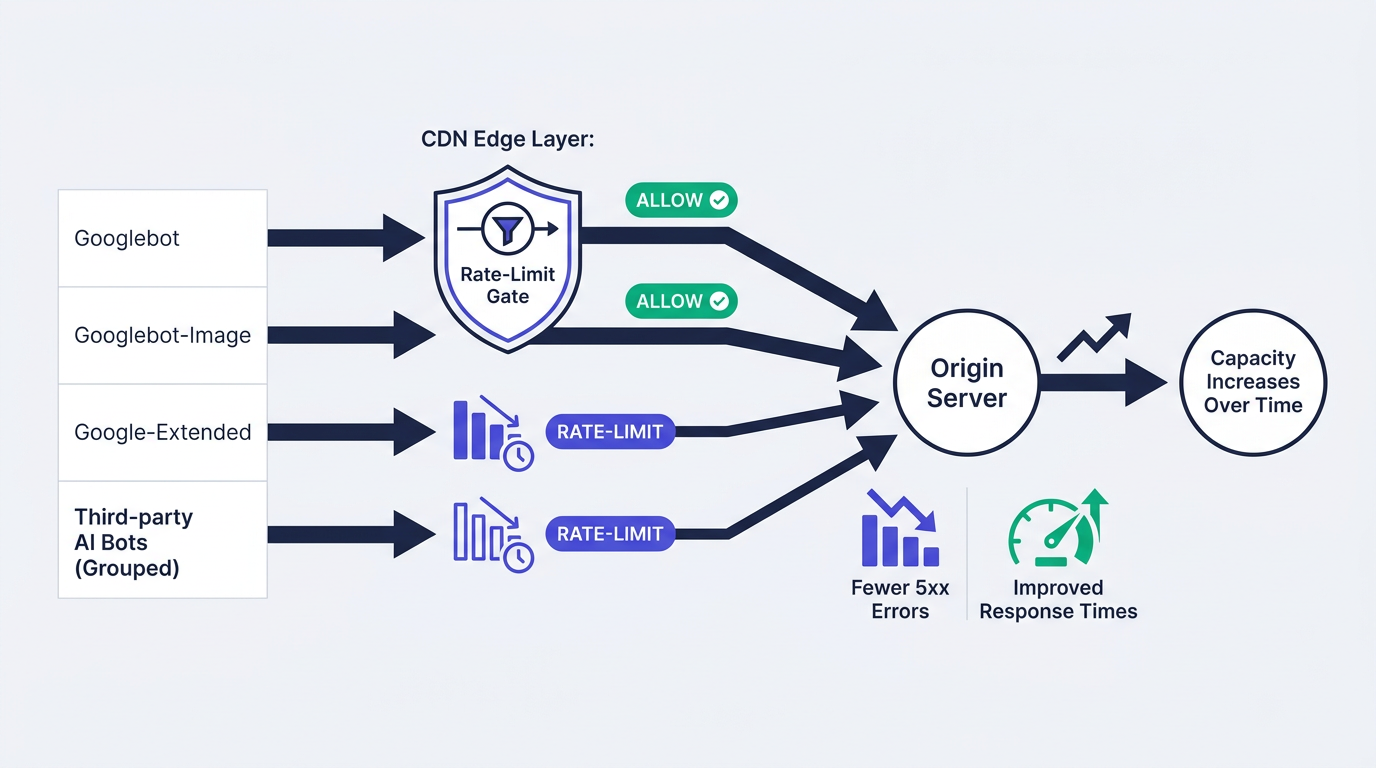
For AI traffic specifically, treat it as direct ai crawlers crawl budget pressure. Start by inventorying log-visible crawlers by user agent and path, then decide what should be allowed or blocked. Avoid using HTTP 429 responses as a routine crawl-management tactic because Google treats them as rate-limiting signals and may reduce crawl capacity. Vizup can help you check for AI crawlers, and for implementation detail, the walkthrough on how to block unwanted AI crawlers covers the specifics. If you are managing this at the CDN layer, the taxonomy in categorizing AI crawlers separates search agents from training bots so you can set different policies for each.
Step 4: Monitor, iterate, and wait for automatic adjustments
Google explicitly stated that systems will automatically adjust capacity upward over time when there is demand and the site remains healthy. Your job, then, is to keep servers fast and stable, keep demand clean, and measure whether crawl allocation actually shifts toward priority URLs.
Weekly monitoring checklist:
- GSC Crawl Stats: total crawl requests, average response time, and host status warnings.
- Response codes: shrinking 5xx and 4xx, rising 304 for stable resources.
- Log sampling: fewer hits on parameter and search-result URLs, more hits on canonical category and product pages.
- Indexation velocity: time from publish to first crawl, then to indexation for your priority templates.
Info: If you change both capacity and demand at once, annotate dates. Otherwise you will not know if improved crawling came from faster servers, cleaner sitemaps, or bot controls.
Common mistakes and troubleshooting
- Treating crawl budget as authority-earned. Google says every site starts with the same baseline, so your fastest wins come from server health and URL hygiene, not waiting for links.
- Letting one log-visible Google crawler dominate. If Googlebot-Image, AdsBot, or another identifiable Google crawler spikes, shared capacity can leave less capacity for Googlebot's HTML fetching. Confirm in logs by crawler family and cap non-essential load.
- Shipping sitemaps with redirects, non-canonicals, or noindex URLs. That inflates demand and wastes fetches before Google even reaches your money pages.
- Ignoring 304 opportunities. Stable URLs that always return full 200 payloads are burning bandwidth and origin compute on every recrawl.
- Fixing only one hostname. If your canonical URLs are on "www" but assets, feeds, or alternate subdomains are unhealthy, you can still hit capacity ceilings per hostname.
Summary and next steps
The google crawl budget update 2026 reframes technical SEO for large sites: capacity is shared across crawlers, and every site begins at the same conservative crawl capacity. You earn increases by keeping servers healthy -- fast responses, low error rates, efficient 304 caching -- and by keeping demand clean through redirect elimination, duplicate consolidation, and sitemaps that only advertise what you actually want indexed.
A practical starting point is Vizup's Crawl Budget Checker, followed by server-log validation to identify which crawlers and URL classes consume capacity. As an Organic Autopilot for modern discovery, Vizup helps brands monitor, create, optimise, publish, and learn across Search, Social, Communities, AI Answer Engines, and Local Discovery using AI agents, human experts, and live SEO, pSEO, AEO, and GEO tools. Paid advertising is available as an amplification add-on.
Frequently Asked Questions
Does site authority (like Domain Rating or PageRank) still affect crawl budget?
Authority still shapes what Google wants to crawl and keep fresh, but the 2026 clarification makes clear that every site starts with the same conservative crawl capacity limit. Google says crawl demand is influenced by factors including popularity, page quality, relevance, site size, and update frequency. Third-party metrics such as Domain Rating are not documented Google crawl-budget inputs.
How do I block AI crawlers without blocking Googlebot?
Use crawler-specific user-agent rules where a separate crawler exists. For Google-Extended, use its robots.txt product token; Google states that it has no separate HTTP user agent and that its setting does not affect inclusion or ranking in Google Search. For a full checklist and testing steps, follow block unwanted AI crawlers.
What is a good server response time to aim for to increase my crawl capacity limit?
Focus on consistent performance under crawler load, particularly at the p95 level, and eliminate timeouts and 5xx spikes before worrying about raw millisecond targets. The exact threshold varies by stack, but the pattern Google rewards is stable, low-latency delivery combined with effective caching that produces more 304 responses for unchanged URLs.
If all crawlers share the same budget, should I disallow Googlebot-Image if I don't care about image search?
Only after you confirm in logs that Googlebot-Image represents a meaningful share of requests and is visibly competing with HTML crawling. The better first step is usually reducing image URL sprawl—such as infinite variants and parameter-driven image paths—and improving caching. Only block Googlebot-Image if losing Google Images discovery is an acceptable business trade-off.
How long does it take for Google to increase my crawl budget after I fix my server issues?
Google described the adjustment as automatic "over time" once there is demand and the site stays healthy. Google does not provide a fixed timeframe. Monitor Crawl Stats and server logs for gradual changes after response times and error rates remain stable.
