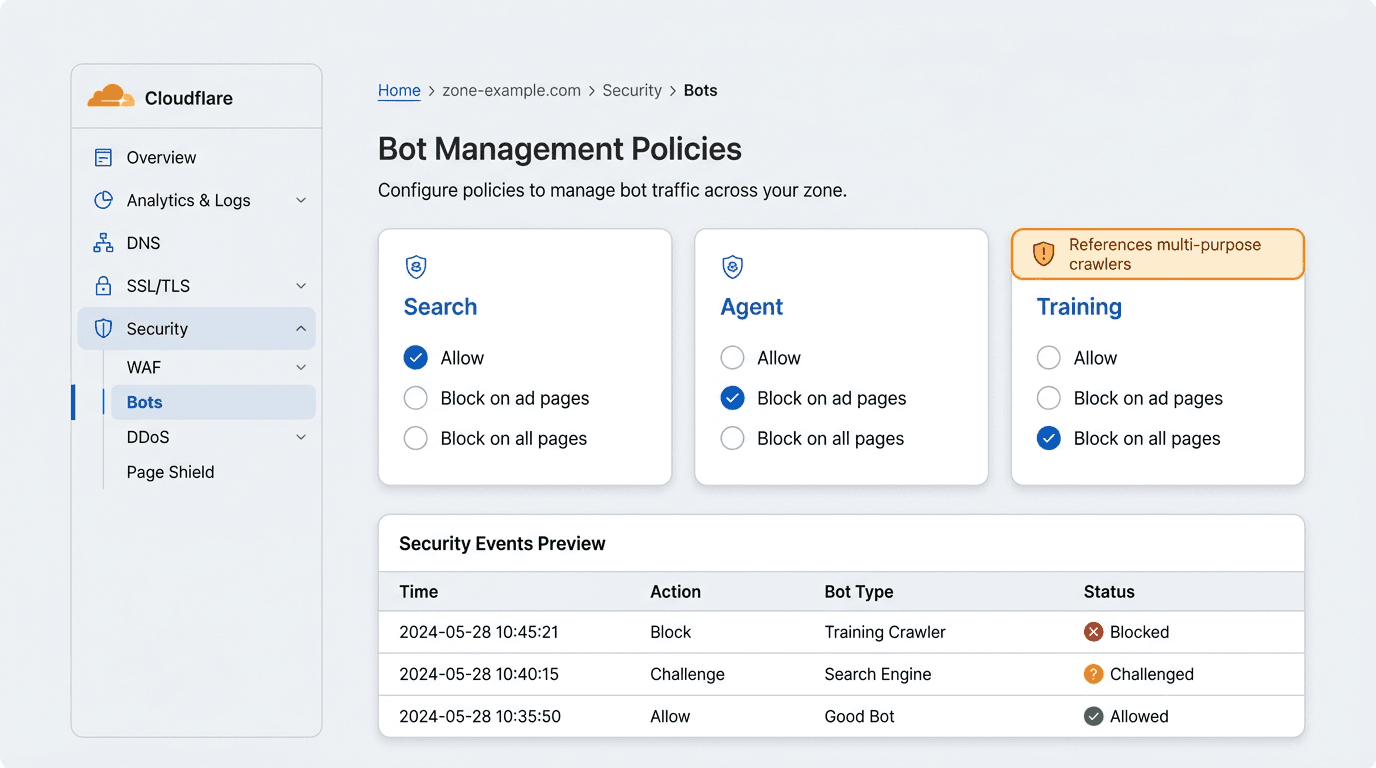
Cloudflare introduced its new AI crawler categories on July 1, 2026, replacing the broad "allow everything or block everything" approach with separate controls for Search, Agent, and Training traffic. These policies are available across Cloudflare plans, including Free, giving brands more control over automated access without unnecessarily reducing their eligibility for future AI-driven discovery. Read Cloudflare's official announcement and review the Cloudflare bot-management changelog for the latest implementation details.
The main operational risk is that some crawlers, including Googlebot, Applebot, and BingBot, can serve more than one purpose and may be classified under both Search and Training. Cloudflare's treatment of these mixed-purpose crawlers changes on September 15, 2026. From that date, a restrictive Training policy may also affect crawlers used for Search unless the relevant opt-out is applied. Teams should review their settings before the change and verify the resulting behaviour in Cloudflare Security Events and origin logs.
How to manage AI bots in Cloudflare without losing visibility:
- Step 1: Inventory what you are trying to allow (Search visibility, agent visits, or model training).
- Step 2: Learn the three Cloudflare AI crawler categories and what they mean in practice.
- Step 3: Check the Cloudflare September 15 defaults and whether your zone will inherit them.
- Step 4: Configure category policies in Cloudflare Security Settings, then document the intent.
- Step 5: Verify in Security Events and external logs, and reconcile with robots.txt directives.
Prerequisites: what you need before changing crawler policy
Have these ready so you can validate changes quickly:
- A Cloudflare account with the domain (zone) already onboarded.
- Access to Cloudflare Security Events (or equivalent logging) and your origin access logs.
- Google Search Console access if you care about Google crawl and indexing signals.
- A list of site templates that render ads, if you plan to use the "block on pages showing ads" option.
Step 1: Understand the three Cloudflare AI crawler categories (Search vs Agent vs Training)
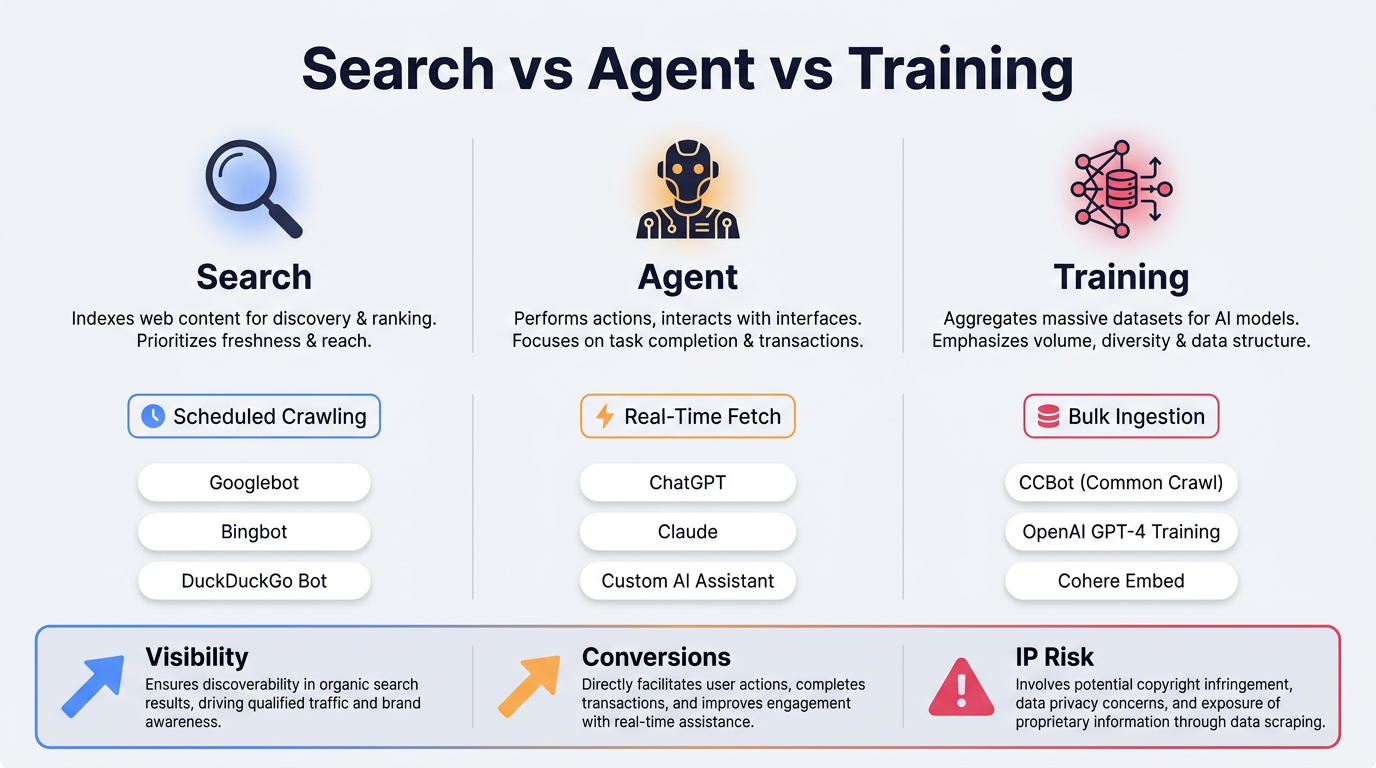
Cloudflare replaced its broad AI bot control with separate Search, Agent, and Training categories on July 1, 2026. The distinction is based on crawler behaviour and intended content use rather than on a simple "AI bot" label. Read Cloudflare's official announcement and the Cloudflare bot-management changelog for implementation details.
Search crawlers
Search crawlers discover and index content so it can appear in search results, AI-enhanced experiences, and answer engines. Vizup treats blocking Search crawlers as a high-risk visibility decision because it can prevent affected systems from discovering new or updated content. However, the correct policy depends on the organisation's content model, compliance obligations, intellectual-property requirements, infrastructure limits, and appetite for organic discovery.
Agent crawlers
Agent crawlers perform real-time actions on behalf of users, such as checking a product page, reviewing a policy, or retrieving information before a purchase. These visits may represent high-intent activity, but their value varies by agent, task, conversion path, website, and server cost. Vizup generally recommends allowing verified Agent traffic unless logs show abuse, excessive resource consumption, or policy conflicts. For broader context, read AI visibility in Google's agentic search era and assess your site using the Cloudflare Agent Readiness Score.
Training crawlers
Training crawlers collect content for model development and training. The potential benefit may be indirect, while the risks can include content reuse without attribution, reduced licensing leverage, and material appearing in competing experiences. Blocking Training crawlers can therefore be a reasonable decision when content is commercially sensitive or forms part of a company's core intellectual property. However, any restriction should be tested carefully because mixed-purpose crawler classifications can create unintended Search visibility consequences.
Step 2: Audit the September 15, 2026 defaults and avoid the mixed-purpose crawler trap
Warning: CRITICAL: Some crawlers are mixed-purpose and participate in both Search and Training (including Googlebot, Applebot, and BingBot). Cloudflare's behavior for these mixed-purpose crawlers changes on September 15, 2026. From that date, mixed-purpose crawlers can be affected by Training-block configurations unless you opt out of the change. According to Cloudflare's official announcement, customers can use the opt-out before September 15 to retain the existing treatment of crawlers that serve both Search and Training purposes. Cloudflare says customers can use the opt-out before September 15 to confirm that they want no changes for Training crawlers that also crawl for Search.
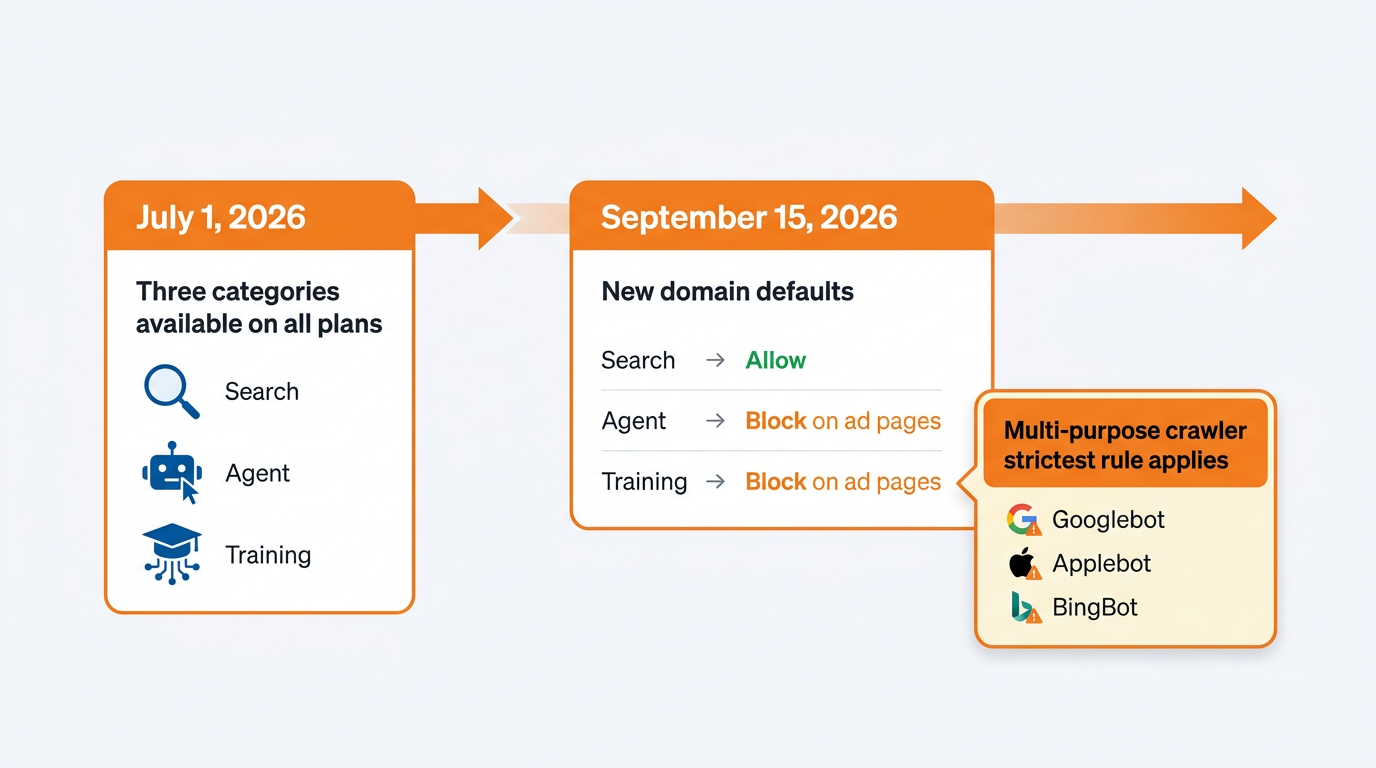
When a crawler belongs to more than one category, the most restrictive applicable policy may determine the outcome. This means a Training block can affect a crawler that also supports Search, so category labels should never replace log-based verification.
Operationally, treat Training as a business decision with SEO consequences. If leadership wants to block Training for IP reasons, you need a mitigation plan for mixed-purpose crawlers. If you do not want the September 15 default change to affect mixed-purpose Search and Training crawlers, review the opt-out control in Cloudflare Security settings before that date. This preserves your existing treatment of those mixed-purpose crawlers. This should not be treated as a general exception to every restrictive policy. Confirm the resulting behavior in Cloudflare events and origin logs after making the change.
Step 3: Configure Cloudflare AI crawler categories (recommended posture + table)
To configure category-level policies, open the relevant Cloudflare zone and locate the AI traffic controls under its Security or zone settings. Interface labels may vary by account and rollout. Search, Agent, and Training can each be set to Allow, Block on pages with ads, or Block on all pages, as described in Cloudflare's official announcement. For crawler-level investigation and individual rules, use AI Crawl Control.
| AI Category | Recommended Setting | Rationale |
|---|---|---|
| Search | Allow | Keeps you eligible for AI-driven discovery and answer experiences. |
| Agent | Allow (or Block on ad pages if you must) | Agent requests may represent user-directed activity, but value and risk vary by agent and task. Validate with logs. |
| Training | Decide deliberately; start with Block on ad pages | Depending on your content model, this can protect monetized inventory while you evaluate licensing and IP risk. Watch mixed-purpose crawler behavior and validate in logs. |
| If you block Training globally, validate that Googlebot and other mixed-purpose bots are not being blocked as collateral. |
This is a starting framework rather than a universal policy. Final settings should reflect content rights, regulatory obligations, monetisation models, infrastructure capacity, server costs, and the level of organic discovery coverage the organisation wants to maintain.
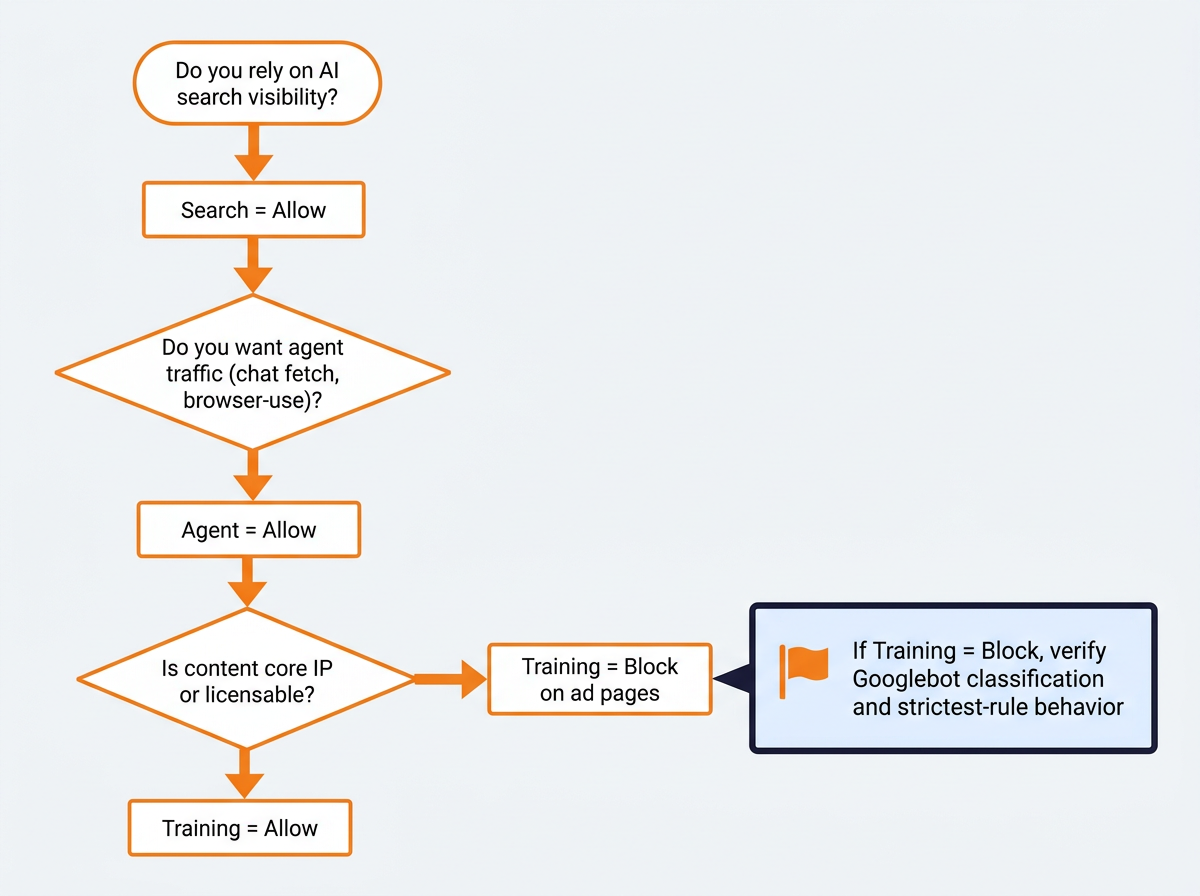
The "block on pages with ads" option is a monetisation-aware compromise rather than a security feature. It works best when advertising is rendered consistently through clearly identifiable templates rather than injected dynamically and inconsistently. If ad detection varies between templates or sessions, treat the setting as a hypothesis and verify the resulting behaviour in your logs.
Enterprise customers can use Cloudflare BotBase to investigate known bots, review their classifications, and assess associated traffic before applying individual crawler rules. Use it to confirm how specific user agents are categorised before changing Training policies.
Cloudflare provides infrastructure-level controls for deciding which automated visitors can access a website. Vizup turns those controls into an ongoing organic discovery workflow. As an Organic Autopilot for modern discovery, Vizup helps brands monitor, create, optimise, publish, and learn across Search, Social, Communities, AI Answer Engines, and Local Discovery. It combines AI agents, human experts, and live SEO, pSEO, AEO, and GEO tools so teams can identify visibility risks, act on opportunities, and continuously improve performance. Paid advertising is available as an optional amplification layer once the organic foundation is working.
Step 4: Verify what is actually blocked (Cloudflare logs, BotBase, and robots.txt)
After changing a policy, verify the result with evidence rather than assumptions. Review Cloudflare Security Events for blocked, challenged, and allowed bot requests, then compare those findings with origin access logs. Confirm that important crawlers can still reach key templates such as the homepage, category pages, product pages, documentation, and high-value content.
A fast verification checklist:
- In Cloudflare, confirm events for Googlebot, Applebot, and BingBot are not showing blocks after a Training policy change, especially as you approach the September 15 behavior change for mixed-purpose crawlers.
- In origin logs, check that requests from major crawlers still reach your application for key templates (home, category, product, docs).
- In Google Search Console, watch crawl stats and indexing signals over the following days and weeks for sudden drops.
- Run an external spot check using Vizup's AI Crawler Checker to test whether common AI crawlers can access important URLs under your current rules. Treat the checker as a current accessibility test rather than a historical record of which crawlers have visited the site.
Do not forget the robots.txt layer. A robots.txt file communicates which crawlers are permitted to access particular paths, but it does not itself enforce network-level blocking. Cooperative crawlers may follow those directives, while other automated visitors may ignore them. Use Vizup's guide to check whether AI crawlers are blocked by your robots.txt.
If spoofed bots are a concern, track identity-verification developments as well. Bot identity is becoming increasingly important because it affects how confidently teams can distinguish legitimate Agent traffic from abusive automation. For a deeper explanation of crawler verification, read how Google is testing Web Bot Auth.
Common mistakes and troubleshooting (what breaks visibility)
Most production incidents with Cloudflare AI crawlers are configuration mismatches, not malicious activity. These are the patterns that repeatedly cost teams rankings and revenue:
- Blocking Training without accounting for mixed-purpose crawlers and the September 15 behavior change: you intended to block model ingestion, but you can also block Googlebot, Applebot, or BingBot depending on your settings and whether you opted out.
- Assuming "Search allowed" equals "Google allowed": classification matters more than labels, so validate in logs.
- Using "block on ad pages" with inconsistent ad detection: you end up blocking more (or less) than intended, and it is hard to debug after the fact.
- Forgetting robots.txt and WAF rules: Cloudflare settings can say Allow while robots.txt discourages crawling, or a WAF rule challenges bots and looks like a crawler policy issue.
- No rollback plan: treat crawler policy like any other production change, with timestamps, owners, and a revert path.
Allowing a crawler does not guarantee indexing, citations, AI answer-engine visibility, or referral traffic. It only preserves the technical opportunity for discovery. Content quality, authority, structure, relevance, freshness, internal linking, and accessibility still determine whether a brand appears across modern discovery surfaces.
Step 5: Summary and next steps
Cloudflare's Search, Agent, and Training controls give teams more precise control over automated access, but these policies should be managed as production settings rather than one-time switches. Document the business intent behind each category, verify the resulting behaviour in Cloudflare and origin logs, and review the configuration again before September 15, 2026, especially where Search and Training behaviours overlap.
Vizup helps turn crawler configuration into an always-on organic discovery system. Its Organic Autopilot helps brands monitor, create, optimise, publish, and learn across Search, Social, Communities, AI Answer Engines, and Local Discovery using AI agents, human experts, and live SEO, pSEO, AEO, and GEO tools. Start by understanding what an SEO agent is, then connect crawler monitoring to a continuous Vizup-led organic discovery workflow. Paid advertising can be added as an amplification layer rather than used as a substitute for organic visibility.
FAQ
What are the new Cloudflare AI crawler categories?
As of July 1, 2026, Cloudflare split AI traffic controls into three categories: Search (indexing for later answers), Agent (real-time activity on a user's behalf), and Training (model training ingestion). This replaced a single blanket toggle.
Will blocking 'Training' bots in Cloudflare block Googlebot?
It can, depending on timing and your opt-out status. Cloudflare says mixed-purpose crawlers used for both Search and Training are treated differently starting September 15, 2026. Until then, the legacy Block AI bots setting excludes those mixed-purpose crawlers, but from September 15, mixed-purpose crawlers will be affected by Training-block configurations unless you opt out of the change.
What are the default AI crawler settings after September 15, 2026?
For new customers and for new sites or domains added by existing customers from September 15, 2026, Cloudflare defaults to blocking Training and Agent traffic on pages that display ads, while Search remains allowed. Review Cloudflare's official announcement and confirm the settings immediately after onboarding a new zone.
How do I know which AI bots are crawling my site?
Start in Cloudflare Security Events and filter for bot actions (allowed, blocked, challenged), then cross-reference with origin access logs. Enterprise accounts can use Cloudflare BotBase to review known bots and their classifications. You can also check your site with an AI crawler checker to test whether common AI crawlers can access key URLs under your current rules.
Should I block AI crawlers on my website?
Block selectively based on your goals. If you want AI visibility, many sites keep Search allowed. Agent traffic can be valuable for user-directed tasks, but it can also create abuse or resource load, so many teams allow verified Agent traffic and tighten only when logs show problems. Training is usually the most business-model-dependent decision. If you block AI Training crawlers, validate that you are not also catching mixed-purpose crawlers like Googlebot, especially around the September 15, 2026 behavior change and opt-out window.
