On July 16, 2026, Google renamed NotebookLM to Gemini Notebook. The branding shift is superficial; the plumbing change is the part that will bite you. Google also revised its user-triggered fetchers documentation, swapping the google-notebooklm user agent string for Google-GeminiNotebook. Google lists Google-NotebookLM as the former agent, supported until August 2026. Because no exact cutoff day is published, complete the migration before the transition ends.
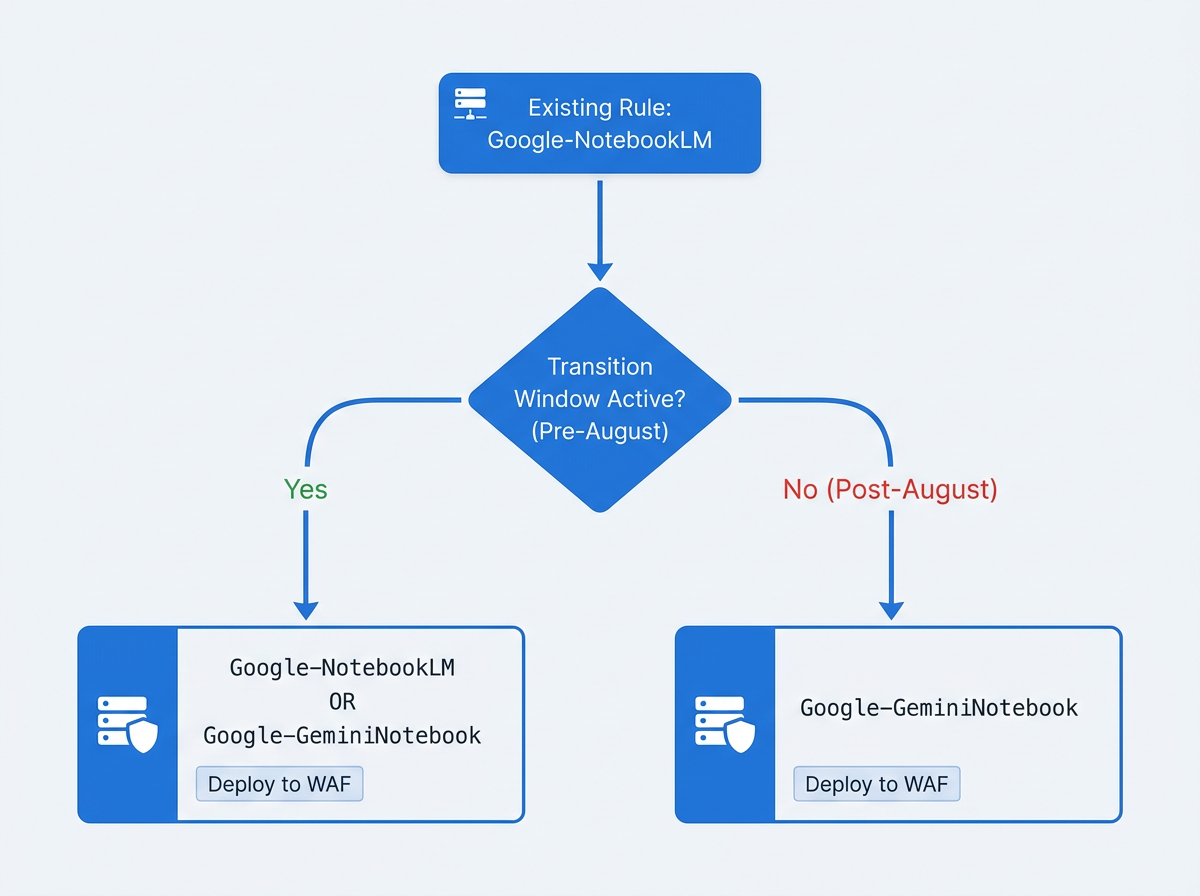
If you have Google-NotebookLM hardcoded in a WAF rule, an .htaccess block, an Nginx config, or a log-parsing filter, it will simply stop matching when Google finishes the cutover. Unless your monitoring detects the mismatch, the failure may be silent. Just missing coverage. The fix is straightforward: (1) audit your stack for Google-NotebookLM, (2) update rules to match Google-GeminiNotebook, (3) run both strings in parallel during the transition window, and (4) confirm the new rule is actually catching traffic.
The Critical Distinction: User-Triggered Fetcher, Not a Crawler
Google-GeminiNotebook is a Google user-triggered fetcher. It shows up when a person adds a URL as a source inside Gemini Notebook. It is not an autonomous crawler like Googlebot making routine passes.
That difference is why so many access-control setups fail quietly. Google's documentation is clear that user-triggered fetchers generally do not follow robots.txt, since robots.txt is aimed at crawlers, not user-initiated fetches. A Disallow: / for this agent in robots.txt is decorative. The same confusion shows up in declaration files: as covered in 97% of llms.txt files are never read, passive declarations are not enforcement. If you want control, you need it at the server or firewall layer. That is also why people hardcoded user-agent matches for this fetcher in the first place, and why a rename creates real operational risk.
Warning: robots.txt will not block Google-GeminiNotebook. If your current strategy relies on a robots.txt Disallow for this fetcher, it was never working. Move the rule to your WAF or.htaccess immediately.
Step 1: Audit Your Stack for the Old Google-NotebookLM User Agent
Do a targeted search anywhere HTTP headers get inspected, transformed, or filtered. You are hunting for every occurrence of Google-NotebookLM, including places that do not look like "security" at first glance.
Where to search:
- Cloudflare WAF: Security > WAF > Custom Rules. Filter for rules where the User Agent field contains
Google-NotebookLM. Cloudflare's bot management interface groups these under Cloudflare AI crawler categories, so review both custom rules and any managed ruleset overrides. - Apache.htaccess: Run
grep -r 'Google-NotebookLM' /var/www/to catch every.htaccessfile across vhosts. - Nginx:
grep -r 'Google-NotebookLM' /etc/nginx/covers your main config and any included site configs. - Server logs:
grep 'Google-NotebookLM' /var/log/apache2/access.log(or your Nginx equivalent) tells you whether the fetcher has been hitting your site and whether your current rule ever matched. - Analytics segments and log filters: Review Google Analytics custom segments, log-ingestion pipelines (Splunk, Datadog, Elastic), and bot dashboards for saved filters that reference the old string.
Step 2: Update Rules to Match the New Google-GeminiNotebook User Agent
| Field | Old Value | New Value |
|---|---|---|
| User-Agent string | Google-NotebookLM | Google-GeminiNotebook |
| Supported until | August 2026 (transition) | Ongoing |
| Fetcher type | User-triggered | User-triggered |
| robots.txt obedience | No | No |
| Effective control layer | WAF /.htaccess / Nginx | WAF /.htaccess / Nginx |
| The notebooklm rebrand gemini notebook change affects only the user-agent string. Fetcher behavior and control requirements are unchanged. |
On Apache .htaccess, swap the old block for a combined rule that matches both strings for the transition window. Once August passes, remove the deprecated condition:
RewriteEngine On
RewriteCond %{HTTP_USER_AGENT} Google-NotebookLM [OR]
RewriteCond %{HTTP_USER_AGENT} Google-GeminiNotebook
RewriteRule .* - [F,L]
On Cloudflare WAF, edit the existing custom rule and update the User Agent value from Google-NotebookLM to Google-GeminiNotebook. To span the transition, make it an OR: (http.user_agent contains "Google-NotebookLM") or (http.user_agent contains "Google-GeminiNotebook"). Ship the combined rule now, then delete the old condition after the August cutoff.
Step 3: Verify the Fix and Monitor for Gaps
After you deploy, verify the new match path is live. In Cloudflare, open Security > Events and filter by your rule name; if the fetcher is active on your domain, you should see Google-GeminiNotebook show up within a day or two. On Apache or Nginx, tail the access log and grep for the new token: tail -f /var/log/apache2/access.log | grep GeminiNotebook. Because user-agent strings can be spoofed, Google warns that stronger authentication may be required. To be certain a request is from Google, perform a reverse DNS lookup on the source IP or validate it against Google's published IP ranges.
Put a calendar reminder on the first week of August to remove the Google-NotebookLM condition from your combined rules. Dead conditions will not break anything, but they do accumulate into maintenance debt and make future audits slower. If you want a wider tripwire for odd fetcher behavior, use a monitoring layer that surfaces which user agents are ignoring robots.txt. The Microsoft Clarity robots.txt violations report is one example. For a more systematic check of which AI crawlers your current controls actually catch, the walkthrough at how to check if AI crawlers are blocked by robots.txt applies the same approach to server-level enforcement.
Updating one user-agent rule solves the immediate migration risk, but crawler controls should be reviewed as part of a wider discovery workflow. Vizup's Organic Autopilot for modern discovery helps brands monitor, create, optimise, publish, and learn across Search, Social, Communities, AI Answer Engines, and Local Discovery using AI agents, human experts, and live SEO, pSEO, AEO, and GEO tools. Teams can use Vizup's AI Crawler Checker to review declared access for major search and AI crawlers, while confirming Google-GeminiNotebook enforcement separately through WAF events and server logs. Paid ads are available as an optional amplification add-on.
The Bigger Question: Should You Block Gemini Notebook at All?
The rename fix is mechanical. The harder part is deciding whether the block should continue to exist. Gemini Notebook can summarize your content, generate audio overviews, and produce derivative outputs inside a user's private research workflow. The fetch itself does not guarantee referral traffic, so evaluate its value through visibility, citations, and measurable downstream visits. If you want to prevent repurposing without attribution or traffic return, a server-level rule to block gemini notebook access is the enforcement point that actually works.
The case for allowing it is just as practical: your pages can become sources inside Google's AI-powered research tool. For publishers and brands trying to reach researchers and analysts, that placement can function like a credibility signal even without a click. That sits alongside how Google Business Profile is being integrated into Gemini and the broader question of AI search visibility in Google's agentic era. There is no universally correct answer here. What is not optional is updating the rule so your intent, whatever it is, still executes after August.
A 5-Minute Fix for a Silent Risk
The google-gemininotebook user agent change is a maintenance ticket with a date on it. Grep your configs, update the string, run both values in parallel through August, then prune the old match. Most breakages around this fetcher come from the same mistake: assuming robots.txt is enforcement. It is not. If you need a block to stick, it belongs at the firewall and server layer, not in a text file at the root of your domain.
Frequently Asked Questions
What is the new user agent for Gemini Notebook?
The new user-agent string is Google-GeminiNotebook. Google updated its user-triggered fetchers documentation on July 16, 2026, alongside the notebooklm rebrand gemini notebook change. The old Google-NotebookLM string remains supported through August 2026.
Why doesn't blocking Google-GeminiNotebook in robots.txt work?
Google-GeminiNotebook is a user-triggered fetcher, not an autonomous crawler. Google's documentation says user-triggered fetchers generally do not obey robots.txt, because robots.txt is meant to manage crawler behavior. To block gemini notebook access, enforce it with a WAF rule, an.htaccess directive, or an Nginx map block.
When does the old Google-NotebookLM user agent stop being used?
The google-notebooklm user agent is supported through roughly August 2026. After the cutoff, Google will send only Google-GeminiNotebook. Any rule that matches only the old string will fail quietly.
What does Gemini Notebook (formerly NotebookLM) do with my content?
When someone adds your URL as a source in Gemini Notebook, the fetcher retrieves the page so the product can generate summaries, audio overviews, and other derivative outputs inside that user's private workspace. It does not send referral traffic back to your site.
Will blocking the Google-GeminiNotebook user agent affect my SEO or Googlebot crawling?
No. Google-GeminiNotebook is separate from Googlebot and other Google search crawlers. Blocking it at the firewall or.htaccess level does not affect indexing, ranking, or any other search crawl behavior. Your robots.txt rules for Googlebot are unchanged.
