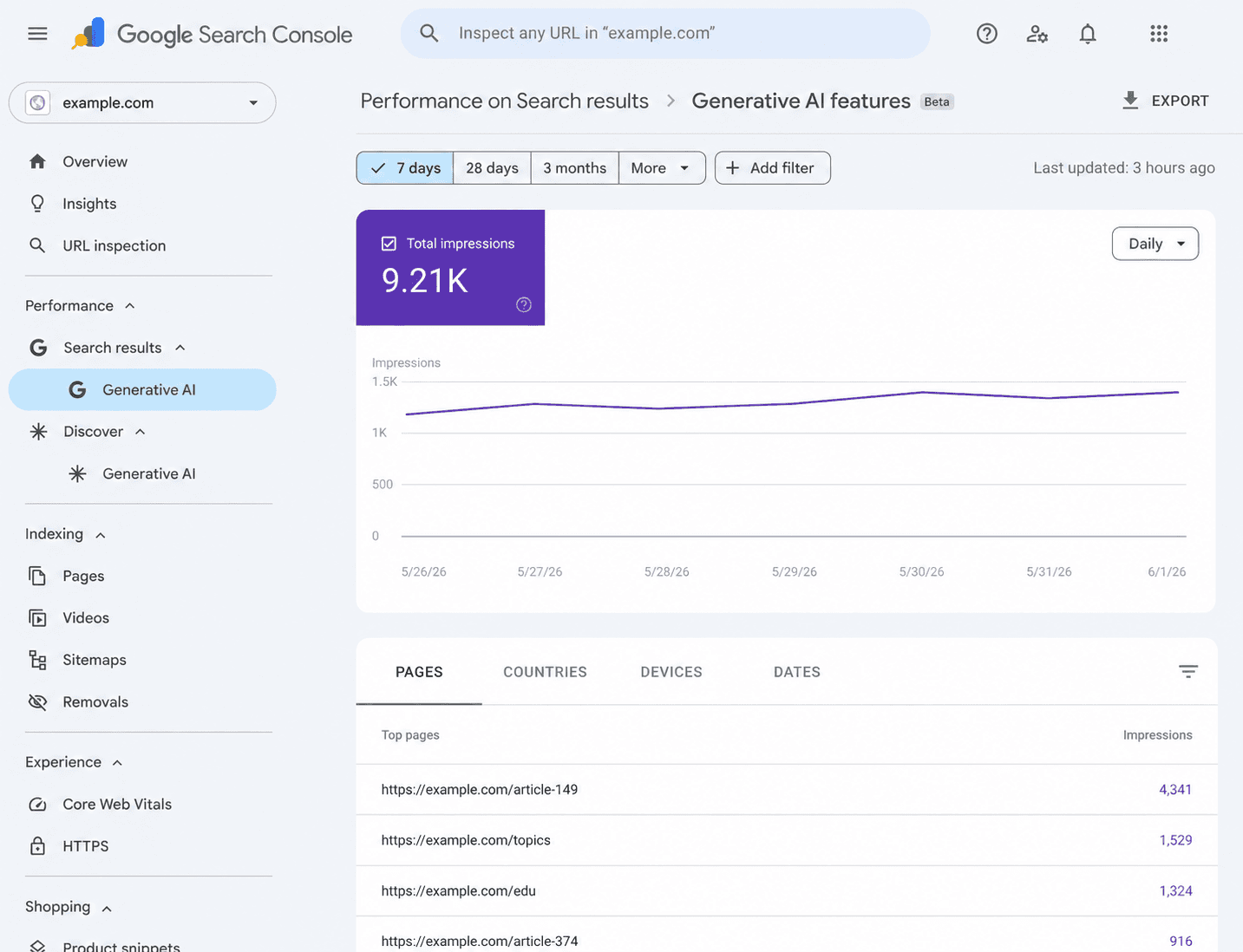
For months, SEOs have been working without a clear read on what's happening. AI Overviews and other generative features reshaped the results page, but the numbers stayed stubbornly opaque. Impressions were a grab bag: classic blue links mixed together with AI-driven placements. That's now starting to unmix. Google is rolling out Search Generative AI performance reports inside Search Console.
This isn't a cosmetic tweak. It changes what "performance" even means when the search results increasingly answer questions on the page. For the first time, there's a dedicated view into visibility across AI surfaces like AI Overviews and AI Mode. That matters for plain old SEO, for AEO (Answer Engine Optimization), and for anyone trying to report on where their brand shows up when an AI is doing the talking.
What Are Google Search Generative AI Performance Reports?
The simplest way to describe it: a new filter on data you already live in. Google Search Generative AI performance reports live as their own area in Search Console and show visibility specifically inside Google's generative AI features. Until now, impressions from AI Overviews were folded into the main "Web" search type, which made the impact hard to isolate. If impressions climbed while clicks didn't budge, you were left reading tea leaves. This report is Google's version of turning the lights on.
None of this replaces your existing Performance report, and Google isn't subtracting anything from the standard view. The change is that you can finally narrow the lens to just AI-powered experiences and see how your pages show up there. It's the split SEOs have been asking for, now shipped as an actual interface instead of a spreadsheet workaround.
Which Google AI Features Are Covered?
The report is meant to track the growing set of generative experiences across Google. The edges between products can feel fuzzy, but the reporting is centered on a handful of places where generative AI is already shaping discovery.
AI Overviews
AI Overviews are the machine-written summaries that sit above the traditional results for many queries. They pull from multiple pages and stitch together a direct answer. When your URL appears here, it means your page was shown within the AI feature. For most SEOs, this is the headline feature and the main reason the new Google Search Console generative AI report matters.
AI Mode
AI Mode is Google's more conversational, chat-style search experience. People can ask follow-ups and keep the thread going instead of starting over. Seeing AI Mode visibility in Search Console helps you gauge whether your content is getting pulled into those longer, exploratory sessions. Google treats each follow-up as a new search, which means the patterns here may not map neatly to the way you're used to analyzing queries.
Generative AI Features in Discover
Search may be the main stage, but the report is also intended to capture performance from generative AI features inside Google Discover. For publishers and brands that depend on Discover, that matters: it puts numbers on a distribution channel that has often been hard to explain, even when the traffic shows up in analytics.
What Data Can You See in the Report?
Google has outlined the first batch of dimensions you'll get in the new view, and the emphasis is telling: this is about visibility, not traffic. Expect to see big impression counts without a matching click story. If your page is cited in an AI answer, the user may never need to leave Google.
| Data point | What it means |
|---|---|
| Impressions | How often your URLs showed up as a citation or link inside generative AI features. |
| Pages | The specific URLs from your site that appeared in AI responses. |
| Countries | Where that AI visibility is happening, broken out by geography. |
| Devices | How often your site appears in AI-powered results by device type. |
| Dates | Trends over time, with time ranges from hourly to monthly. |
| Key data dimensions available in the new Generative AI report. |
Why This Update Matters for SEOs
This isn't data for the sake of another dashboard. It gives you a clean line between traditional organic visibility and generative AI visibility. Once you can separate those worlds, you can see which pages are getting pulled into AI Overviews and similar features, and you can start treating that as a real input to AEO work instead of a hunch. It also gives agencies and in-house teams something concrete to point to when stakeholders ask, "Are we showing up in AI?"
It also helps explain the weird weeks. If you've watched impressions wobble while clicks stayed stubborn, you now have a way to test whether AI placements are part of the story. You can tie content changes to shifts in AI impressions instead of guessing after the fact. If you want to go deeper on measurement, the guide on AI search performance analytics is a useful next read.
Is This Report Available to Everyone?
Not yet. Google says the report is rolling out to a subset of sites first. That's typical for Search Console changes: ship to a slice, watch for issues, then broaden access. If you don't see it in your account, it doesn't mean anything is broken. It just means you're not in the first wave, so keep checking over the next few weeks and months.
How SEOs Should Use This Report
Once you have access, skip the temptation to celebrate (or panic over) the headline numbers. The signal is in the cut-by cuts.
Track AI impressions by page
Start with the pages doing the heavy lifting. Which URLs rack up the most AI impressions in Search Console? Treat them like case studies: look at how they're structured, how quickly they answer the question, and what formatting makes them easy to quote.
Compare AI visibility with organic clicks
Hunt for mismatches. Do the pages that show up in AI features also win clicks in traditional results, or are you looking at two different content portfolios? That split tells you whether one set of pages can serve both goals, or whether you need separate tactics for AI citations versus click-through.
Check country and device patterns
Slice the report by market and device and see what changes. If AI visibility clusters in a few countries or skews mobile, that should shape your international SEO and mobile priorities. Don't assume it will mirror your existing organic traffic mix.
Monitor visibility before and after content updates
This is the feedback loop SEOs haven't had. Make a change (tighten an answer, add structured data, clarify headings), then watch what happens to AI impressions for that page. Over time, that gives you evidence for what Google's systems tend to surface, rather than relying on folklore.
Identify content formats that appear in AI features
Look for repeatable patterns in format. Are FAQs showing up more than long essays? Do step-by-step pages get cited more often than narrative explainers? Use the report to spot what gets pulled into AI experiences, then scale those formats deliberately. That's central to tracking AI visibility with something closer to rigor than vibes.
What This Means for AEO and AI Visibility Tracking
For Answer Engine Optimization, this is a vote of confidence from the only player that really matters: Google is acknowledging AI visibility as its own measurable layer. Brands and agencies should start reporting Google AI search performance alongside, not inside, traditional organic. The era where keyword rankings alone could stand in for "search performance" is over. If your dashboards ignore AI surfaces, they're missing a meaningful chunk of how people encounter your content.
The debate has shifted from whether AI changes search to how you measure the change and respond. This report is Google's first serious attempt at giving site owners a consistent way to do that. It also reinforces the case for thinking about AI search visibility in the agentic era, where content isn't just read by humans but pulled, summarized, and acted on by systems working on their behalf.
Limitations of the Report
It's still early, and the first version comes with real constraints.
- Limited Rollout: As mentioned, not everyone has it yet. It could be months before it's universally available.
- No Clicks: The report is built around impressions and visibility, not end-to-end attribution. It won't tell you whether someone clicked your link inside an AI Overview, which is the metric many teams want most.
- Limited Query Data: Depending on how the final UI lands, query-level visibility for AI features may remain aggregated or anonymized, similar to how Search Console already handles some long-tail queries.
- It's a Starting Point: Google has said it's collecting feedback and could add more metrics over time. What you see now is likely V1, not the finished product.
Final Takeaway
This is one of the most consequential Search Console updates of the AI-search era because it turns a vague argument into something you can measure. Google is offering data where there used to be speculation, and that alone changes the conversation. Instead of hand-wringing about traffic loss in the abstract, teams can talk about visibility, coverage, and where their content actually shows up.
When the report lands in your account, treat it like a new baseline. Pull the pages, sort by impressions, and start building a view of how Google's generative systems are using your work. This isn't just a novelty report; it's the start of a new measurement layer you'll be expected to explain. For teams that need to connect these new visibility signals to an actual content workflow, a platform like Vizup is built to close that loop between monitoring and action. If you're ready to move from just tracking data to actively improving your presence in AI-driven search, you can book a demo to see how it works.
Frequently Asked Questions
Will the new report show clicks from AI Overviews?
No. The first version of the Google Search Generative AI performance report is limited to impressions, pages, countries, devices, and dates. Google has said it may add metrics over time based on feedback, but clicks are not included at launch.
How does the generative AI report count an "impression"?
It counts an impression when a URL from your site appears inside a generative AI feature, such as a citation link in an AI Overview or a referenced resource in AI Mode. That's different from a traditional impression, where your result is simply displayed on a results page.
Do I need to do anything special to get access to this report?
No. There's nothing to enable or request. Google is rolling the report out to a subset of sites first, and access should expand automatically to more Search Console properties over time.
Does this replace the existing Performance report in Search Console?
No. This is an additional view or filter within Search Console's performance reporting. Your standard "Web" performance data (which includes aggregated AI and traditional search impressions) will still be there.
How can I prepare my content for better AI visibility?
Prioritize clarity and structure: answer questions directly, use descriptive headings, and keep facts easy to extract. FAQs can help when they fit the page's purpose. There are no secret switches to flip, but content that's straightforward for machines to parse is more likely to be cited. Google's official AI search guidance is a good baseline, and our tips on understanding Search Console impressions can help you interpret the numbers you see.
