If you run a small business in Tennessee, your Google reviews, listings, and search visibility just picked up a legal tripwire. Tennessee SB 2262, effective July 1, 2026, requires platforms like Google to notify small businesses within 24 hours when they reduce visibility, remove search results, or delete 25% or more of a business's reviews (LegiList, 2026). Google has already posted its compliance guidance, which means the practical work now sits with business owners and the people who manage their local presence. Below is what Google Tennessee SB2262 small business notifications look like, who actually gets them, and the steps to take now so a removal does not blindside you.
This guidance tracks directly to Tennessee SB2262 and only applies to certain Tennessee small businesses: those with 50 or fewer full-time employees. If you own a shop in Nashville, run local SEO for clients across the state, or manage reputation for an agency, the same setup work applies. The path is straightforward: understand what the law calls "blacklisting," make sure Google can reach you, tighten up your Google Business Profile, set up Merchant Center if you sell products, and put a monitoring routine in place so you catch issues early.
Understanding Tennessee SB 2262: Who It Affects and Why It Matters
Tennessee SB 2262 uses a broad definition of "blacklisting." Under the law, a platform blacklists a small business when it reduces visibility, removes a website or search result, or deletes 25% or more of a business's reviews (LegiList, 2026). Coverage is narrow in one important way: it applies to Tennessee businesses with 50 or fewer full-time employees. If you meet that threshold, Google and other platforms have a legal duty to tell you when they take the actions spelled out in the statute.
Some people hear "blacklisting" and assume SB 2262 is a new set of rules that forces Google to keep everything up. It is not. The law is about notice, not protection from enforcement: it is meant to stop silent visibility loss. Google's response has been pretty plainspoken: verify your site in Search Console and claim your Google Business Profile so the alerts land in an account you control (Google Search Central, 2026). If that setup is missing, the notice requirement does not help you much.
Warning: SB 2262 does not prevent Google from removing content. It requires Google to notify you within 24 hours when they do. If your notification channels are not configured, you will miss these alerts entirely.
Step 1: Verify Your Website in Google Search Console
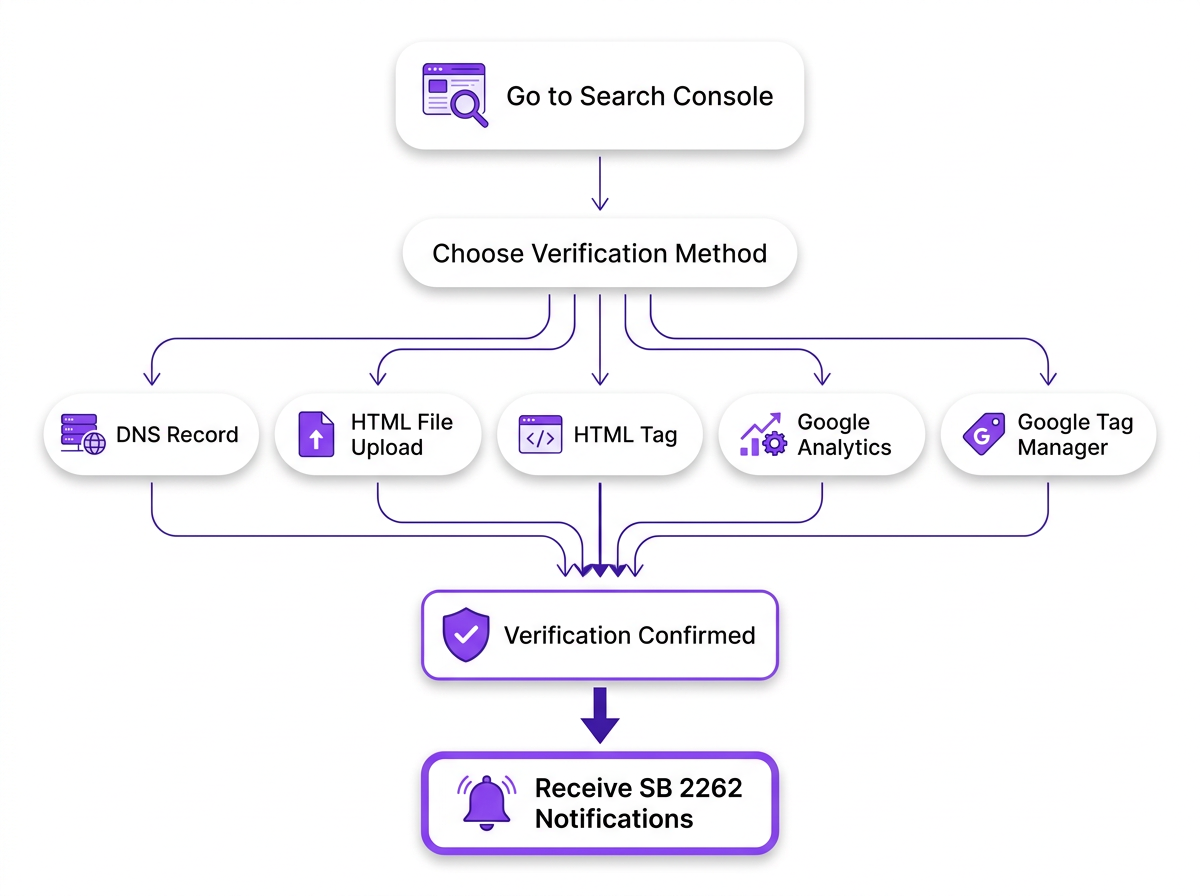
Search Console is your most reliable early-warning system. In Google's own SB 2262 compliance guidance, the company tells businesses to verify their website in Google Search Console so they can receive alerts tied to manual actions, URL removals, and indexing problems (Google Search Central, 2026). If your site is not verified, Google does not have a dependable way to reach you when a visibility removal hits.
To verify your site, follow these steps:
- Go to search.google.com/search-console and sign in with the Google account associated with your business.
- Add your property using either the Domain method (covers all subdomains) or the URL prefix method (covers a specific URL path).
- Complete verification through one of Google's approved methods: DNS record, HTML file upload, HTML tag, or linking through Google Analytics.
- Confirm that the email address on this Google account is one you actively monitor. Notifications sent to an abandoned inbox are useless.
- Check the 'Messages' panel weekly. Do not rely solely on email forwarding.
If your site is already verified but you are seeing a drop in Google Search Console impressions, treat it as a prompt to investigate rather than a curiosity. With SB 2262 enforcement in the background, unexplained visibility shifts are worth documenting and tracing sooner rather than later.
Step 2: Claim and Optimize Your Google Business Profile
Your Google Business Profile (GBP) is where local visibility is won or lost. For Tennessee small businesses, it is also where Google review removal and Google listing restricted notifications are most likely to show up. Google's compliance documentation is explicit: you need to claim your GBP to receive SB 2262 alerts (Google Search Central, 2026). If the profile is unclaimed, Google has nowhere appropriate to send those notices.
Claiming the profile gets you in the door; keeping it clean reduces the odds of avoidable enforcement. Profiles that are incomplete or inconsistent tend to invite automated friction. Start by optimizing your Google Business Profile categories so the listing matches what you actually do. Then make your name, address, phone number, hours, and website URL match everywhere your business is listed, down to punctuation and suite numbers.
When Google Review Removal Happens
A review disappearing is not automatically an SB 2262 moment. Sometimes it is routine spam cleanup. Other times it is a bulk action that crosses the threshold in the law. Knowing which one you are dealing with changes what you do next.
| Removal Type | Trigger | Notification? | Response | Expected Timeline |
|---|---|---|---|---|
| Spam/Fake Review | Google's automated spam filters flag the review | Usually none | No action needed; watch for patterns | Permanent removal |
| Policy Violation | Review violates Google's content policies (hate speech, off-topic, conflict of interest) | Sometimes via GBP dashboard | Review Google's policies; request re-evaluation if you believe the removal was wrong | 7-14 days for appeal review |
| SB 2262 Trigger (25%+ removed) | Google removes 25% or more of a business's reviews in aggregate | Required within 24 hours under SB 2262 | Save the notification; appeal through GBP; consult legal counsel if the reviews were legitimate | Appeal review varies; 14-30 days typical |
| Account Restriction | Google restricts the account managing the Business Profile | All profiles under that account are suspended (Google Business Profile Help, 2026) | Submit an appeal through the restricted account's dashboard | 21-45 days; complex cases take longer |
| Response strategies differ significantly based on the type of removal. SB 2262 notifications only apply to Tennessee businesses with 50 or fewer employees. |
Account restrictions are the messiest version of this problem. When a business's Google account is restricted, every Business Profile managed by that account gets suspended and you have to appeal to get the restriction lifted (Google Business Profile Help, 2026). That is why agencies with multiple Tennessee clients should avoid putting all profiles under one umbrella login. One restriction can ripple across your client roster and turn a single issue into a multi-location outage.
If you are rebuilding after a review loss, keep it simple and legitimate: post-purchase follow-ups and in-store prompts that ask customers to leave honest feedback. Then measure the recovery instead of guessing. connecting Google Business Profile data to Google Analytics gives you a clearer read on whether visibility and traffic are actually coming back.
Step 3: Set Up Google Merchant Center (If You Sell Products)
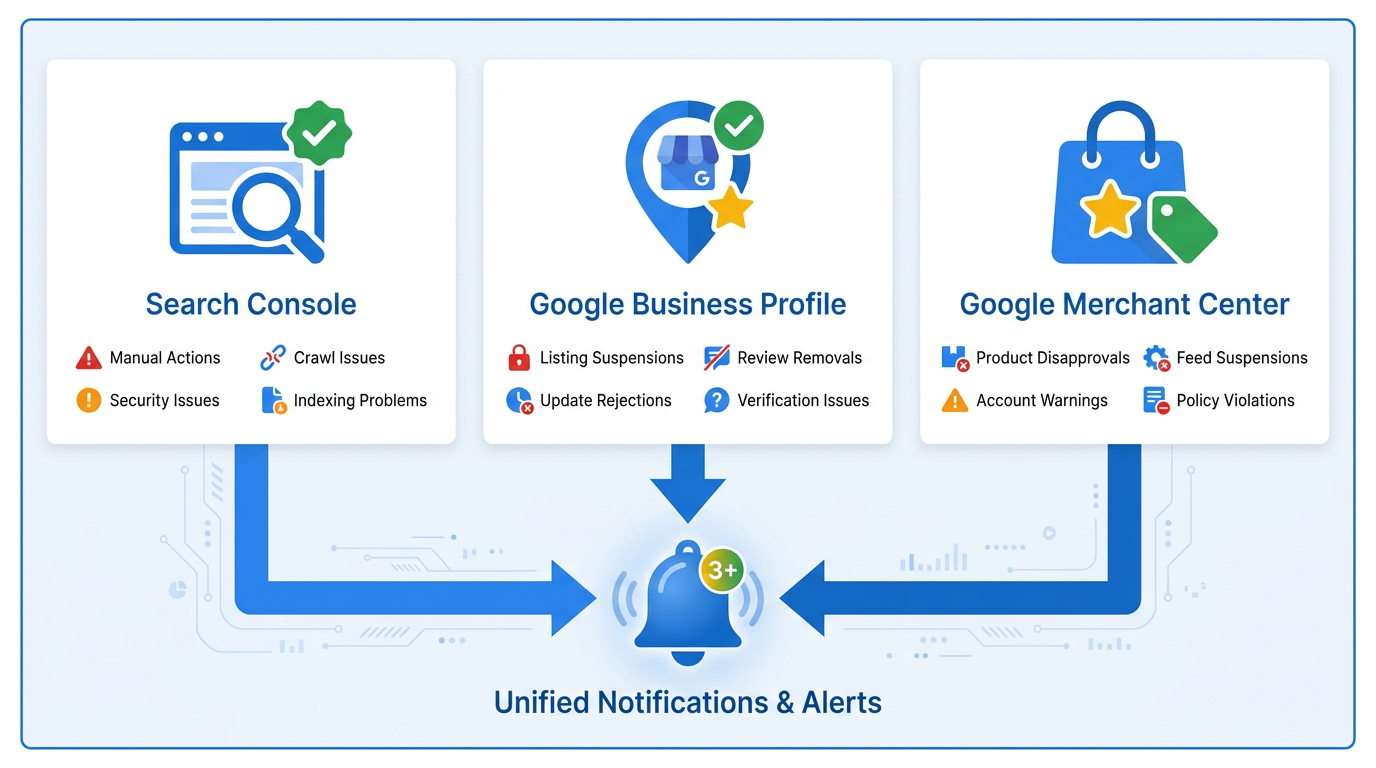
SB 2262's idea of "reducing visibility" is not limited to blue links in organic search. If you sell products online through Google Shopping or free product listings, Merchant Center becomes part of your risk surface. Product disapprovals, feed suspensions, and account warnings can all function as visibility reductions that fall under the law's notice requirement. Link Merchant Center to the same Google account you use for Search Console and GBP, and keep your feeds accurate and policy-compliant. Mismatched pricing, misleading descriptions, and missing shipping details are common ways listings get restricted.
Step 4: Build a Proactive Monitoring System
Most businesses trip up on SB 2262 the same way: they treat compliance as a setup chore. Verify Search Console, claim GBP, move on. But the law creates an ongoing stream of notifications, and your job is to actually receive them and respond before the damage spreads. That takes a monitoring habit, not a one-and-done checklist.
Vizup helps teams create, optimize, index, monitor, and improve organic visibility across Google and AI answer engines. For Tennessee businesses thinking about SB 2262 compliance, that translates into earlier detection of the signals that usually show up before a bigger problem: local visibility drops, review-count changes, and indexing anomalies. It is also worth understanding how AI impacts search visibility as Google folds AI Overviews into more local results.
A practical monitoring routine for Tennessee small businesses:
- Weekly: Review Search Console messages and GBP notifications for alerts tied to manual actions, removals, or restrictions.
- Bi-weekly: Audit your review count. If you see a sudden drop of 25% or more, investigate immediately.
- Monthly: Confirm your business info is consistent across Google, Bing, Apple Maps, and major directories.
- Quarterly: Check Merchant Center diagnostics (if applicable) and clear any pending product disapprovals.
Your SB 2262 Action Plan: Summary
Tennessee SB 2262 changes the relationship between platforms and small businesses in one specific way: visibility hits can no longer happen quietly. Google has to tell you when it reduces visibility or removes content, but that only works if your accounts are set up to receive the notice. For Tennessee businesses with 50 or fewer employees, proactive presence management is now table stakes. Verify Search Console. Claim your Google Business Profile. Add Merchant Center if you sell products. Then stick to a monitoring cadence that surfaces problems within hours, not weeks. Treat Google Tennessee SB2262 small business notifications as an operating discipline, and you will be in a much better position when enforcement actions land.
Frequently Asked Questions About Google's SB 2262 Guidance
Does SB 2262 apply to every Tennessee business, or only some?
SB 2262 is limited to Tennessee small businesses with 50 or fewer full-time employees (LegiList, 2026). Larger employers and out-of-state companies are not covered by the notification requirement. Industry does not matter here; employee count does.
How will I know if Google removed my listing or deleted reviews under SB 2262?
Google must notify you within 24 hours of a qualifying action, but only if you have verified your website in Google Search Console and claimed your Google Business Profile (Google Search Central, 2026). If either step is missing, you can easily miss the alert. Make a habit of checking Search Console messages and your GBP dashboard.
What's the difference between a removed review and a "Google listing restricted" status?
A review removal is the deletion of individual reviews (because of spam, policy violations, or a bulk action that can trigger SB 2262). A "Google listing restricted" status usually means the entire Business Profile is suspended, often because the managing Google account was restricted. When an account is restricted, all profiles under it are suspended and require an appeal (Google Business Profile Help, 2026).
Can businesses outside Tennessee be affected by SB 2262?
SB 2262's notification requirement only applies to Tennessee small businesses. Still, the underlying setup is smart anywhere: verify Search Console and claim your GBP so you catch visibility changes quickly. If other states pass similar laws, Google's compliance process could expand.
If my reviews are removed, can I recover them, and how long does it take?
It depends on why they were removed. Spam removals are usually permanent. Policy-violation removals can sometimes be appealed in your GBP dashboard, and restorations often take 7 to 14 days. For SB 2262-related bulk removals, the appeal process is less settled, and 14 to 30 days is a typical range. Save screenshots, keep records, and consult legal counsel if you believe legitimate reviews were removed.
