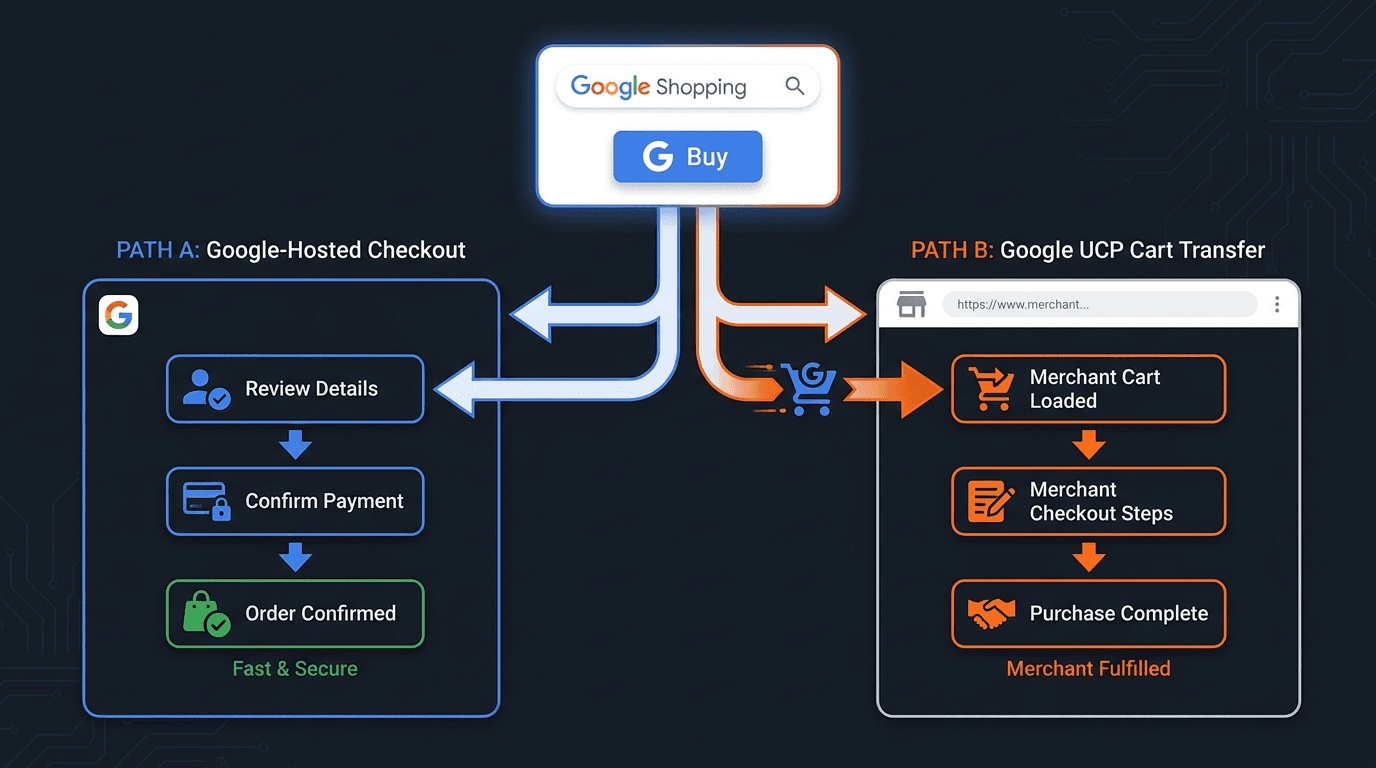
Google is introducing checkout options that put a consequential choice in front of merchants: let shoppers complete the purchase on a Google surface or transfer the populated cart to the retailer's store. Google UCP cart transfer sends the cart from a Google experience to the merchant's site for checkout. The retailer remains the merchant of record in both paths. The practical distinction concerns checkout control, merchandising, user experience, and where the final purchase interface appears.
Availability is not universal. According to Google's official UCP launch announcement (Google, 2026), UCP-powered checkout began rolling out in the United States with eligible retailers. Cart transfer also requires merchant onboarding and technical review. Merchants should confirm their current eligibility and market availability with Google rather than treating the feature as generally available. For teams planning before peak season, the readiness sequence covers the checkout tradeoff, Cart API implementation, validation, analytics, and preparation for an agentic commerce holiday 2026.
Step 1: Understand the UCP Checkout Crossroads
The Universal Commerce Protocol standardizes how commerce systems and AI agents exchange product, cart, checkout, and order information. Google's initial experiences include AI Mode in Search and Gemini. The official UCP specification (UCP, 2026) documents the protocol, while Google's 2026 product announcement explains how it is being applied to agentic shopping. For participating retailers, the checkout decision determines where the shopper completes the final purchase steps, not who owns the underlying retail transaction.
The tradeoff is straightforward: native checkout on Google favors a shorter experience within the Google interface, while cart transfer returns the shopper to the merchant's property. The retailer remains the merchant of record in either model, but its control over the visible checkout journey differs.
Path A: Google-Hosted Checkout
With native UCP checkout, the shopper completes the purchase on a Google surface. The retailer remains the merchant of record and retains responsibility for the sale, fulfillment, customer service, returns, and applicable tax obligations. Google's interface hosts the final purchase experience, so the operational distinction is where checkout occurs rather than a transfer of transaction ownership.
Pros:
- Reduced Friction: A shopper can complete the purchase without leaving the Google experience, reducing transitions between discovery and checkout.
- Consistent User Experience: Google controls the visible checkout interface, which can provide a familiar path for shoppers already using its services.
- Earlier Participation: Eligible retailers can support an agent-led purchase path without redirecting the shopper into a separate on-site checkout experience.
Cons:
- Less Checkout Control: The retailer has less control over the layout, interaction design, and sequence of the final purchase interface.
- Limited Merchandising: Upsells, cross-sells, loyalty prompts, and brand storytelling must fit the capabilities Google exposes within native checkout.
- Separate Measurement Context: Google reports activity within its checkout environment, while the retailer's analytics and order systems remain responsible for their own parts of the transaction record.
Path B: Google UCP Cart Transfer to Your Site
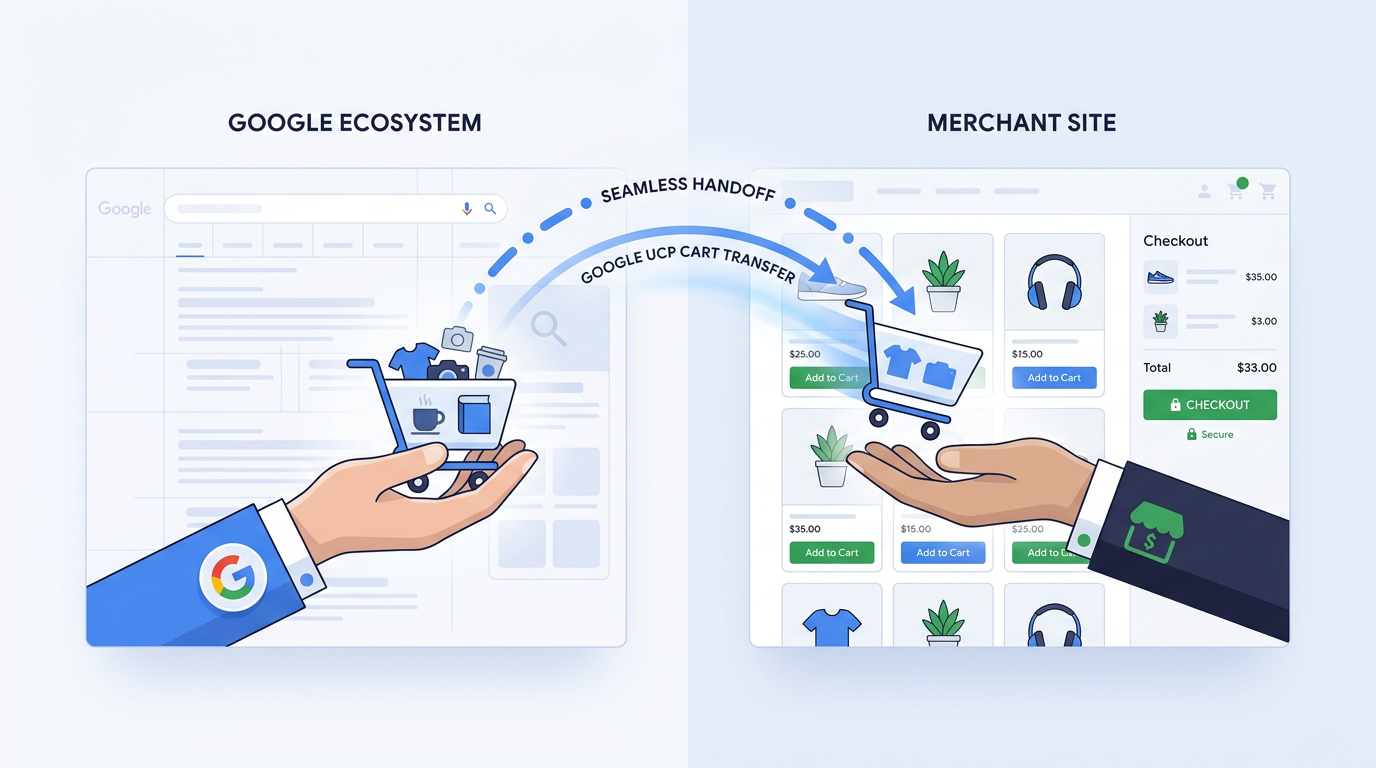
With cart transfer, a shopper assembles a cart on Google and then moves to the retailer's site for the final purchase. The merchant must support the Cart API described by the official UCP specification (UCP, 2026). In the documented flow, Google sends a POST /carts request containing the selected items and relevant cart data. The merchant validates the request, creates the cart, and returns a continue_url that sends the shopper into the correct on-site checkout journey.
Implementation requires authenticated requests, validation of product and variant identifiers, accurate prices and availability, predictable error responses, and defined handling for items that have become unavailable. Merchants should test malformed requests, expired or invalid credentials, identifier mismatches, inventory changes, and partial cart failures. Cart transfer is a one-way handoff into the merchant's checkout, not continuous synchronization between the Google cart and the retailer's cart after transfer.
Pros:
- Control the Checkout: The retailer manages the final interface, payment sequence, accessibility, and brand experience on its own site.
- Control Merchandising: The on-site journey can include supported upsells, cross-sells, loyalty prompts, and relevant brand messaging.
- Use First-Party Measurement: The retailer can measure the on-site checkout journey through its own consent-aware analytics and transaction systems, alongside Google's UCP reporting.
Cons:
- Technical Implementation: Cart transfer requires Cart API support, authentication, product validation, error handling, and a checkout capable of reconstructing the transferred cart correctly.
- Handoff Quality: Slow pages, identifier mismatches, unavailable products, or confusing transitions can interrupt the purchase journey.
- Onboarding Required: Availability depends on Google's rollout, merchant eligibility, successful validation, and completion of Google's onboarding or review process.
Step 2: Assess Your Readiness for Cart Transfer
Cart transfer is not a universal switch inside Google Merchant Center. The confirmed sequence involves expressing interest, preparing accurate product data, implementing the Cart API, validating the integration, and completing Google's onboarding or review. Assess the checkout, catalog, privacy, and measurement foundation before submitting interest.
From Interest Form to Onboarding
The interest form begins the process, but submission does not guarantee access. Google has not published brand-reputation or transaction-volume thresholds for cart transfer, so merchants should not treat those factors as official selection criteria. Focus the application and implementation work on the steps supported by Google's documentation:
- Submit the Interest Form: Provide the merchant and technical information Google requests for the current rollout.
- Prepare Accurate Product Data: Keep identifiers, variants, prices, availability, landing pages, and checkout information consistent across the feed, site, and API responses.
- Implement the Cart API: Support authenticated
POST /cartsrequests and return a validcontinue_urlfor the created cart. - Validate the Integration: Test successful carts, invalid products, unavailable items, authentication failures, and other documented error conditions.
- Complete Onboarding or Review: Address Google's validation feedback and confirm production readiness before launch.
Use the preparation period to document data-quality controls, checkout ownership, escalation paths, and testing results. Work such as optimizing Google Merchant listings also reduces inconsistencies between what shoppers see on Google and what the merchant can fulfill.
Technical Pre-flight Check
Enhanced checkout flow testing should be an internal discipline rather than a last-minute exercise. Use Google's supported sandbox or test environment where available, then validate the complete production-like journey from the Google request through cart creation, the continue_url, checkout, payment, confirmation, and order reporting. The checks below are merchant readiness practices, not official Google performance thresholds.
| Readiness Area | What to Confirm | How to Validate |
|---|---|---|
| Checkout Performance | Confirm that mobile and desktop checkout pages load reliably and remain usable throughout the transferred-cart journey. | Run device, browser, accessibility, network-condition, and load tests. |
| Cart API Functionality | Verify authenticated POST /carts requests, cart creation, response formatting, and valid continue_url behavior. | Test approved requests, authentication failures, malformed payloads, retries, and duplicate requests. |
| Product Consistency | Confirm that product and variant identifiers, prices, quantities, and offer details match across Google data, the API, and the site. | Compare representative feed records with API responses and checkout output. |
| Availability Handling | Define what happens when an item or requested quantity is unavailable when the cart is created. | Test unavailable products, reduced quantities, substitutions where permitted, and clear shopper-facing messages. |
| Structured Data Health | Keep product and merchant structured data accurate and free from material validation errors. | Use Google Search Console and the Rich Results Test, then compare markup with visible page content. |
| End-to-End Validation | Confirm that the shopper can move from the transferred cart through payment, confirmation, fulfillment records, and required reporting. | Run sandbox and production-like test orders, including failure and recovery paths. |
| These are practical merchant readiness checks for cart transfer, not official Google thresholds. |
Step 3: Master the New UCP Analytics Dashboard
Once an eligible merchant is onboarded and UCP activity begins, Google provides dedicated reporting through the UCP area of Merchant Center. Where enabled for the account, open Merchant Center, select the UCP hub, and then open its Analytics view. Navigation and available cards can change during rollout, so merchants should follow the interface and current Merchant Center Help guidance from Google.
The UCP dashboard covers activity associated with Google's UCP experiences. It is distinct from GA4 reports, standard Merchant Center performance reporting, Google Ads attribution, and the merchant's order-management records. Google's documented dashboard can include the following measures and views, subject to account eligibility and rollout:
- Clicks to Buy: The number of times shoppers initiate the documented purchase path from a supported Google experience.
- Purchases: Completed purchases reported through the UCP flow. For cart transfer, this should be reconciled with the merchant's own order records rather than treated as proof that every handoff converted.
- Purchase Rate: The relationship between Clicks to Buy and reported purchases, as defined in the dashboard.
- Average Order Value: The average value of reported UCP purchases. Compare it with validated order data before using it for commercial decisions.
- Cancellations: Canceled UCP orders reported to Google. Review them alongside order, inventory, and fulfillment systems to identify operational causes.
- Account Linking: The account-linking view or measure shown for eligible UCP experiences. Keep it separate from purchase and conversion reporting.
- Top Selling UCP Products: A product-level view of items generating the most reported UCP sales, where Google makes the report available.
Info: What most people get wrong: Do not force UCP dashboard data into GA4 session reporting. The UCP dashboard measures activity within supported Google commerce experiences, while GA4 measures consented behavior and purchase events configured on the merchant's property. Reconcile the systems through stable transaction IDs and consistent order status definitions without assuming their totals will always match. Start with a Google Analytics data cleanup, then make sure you are correctly migrating to the unified Google Tag.
Step 4: Prepare for the Agentic Future (Holiday 2026 & Beyond)
UCP and cart transfer are parts of Google's broader agentic commerce work. In supported experiences, AI systems can help a shopper move from product discovery toward purchase with fewer conventional browsing steps. The checkout path a retailer supports determines where the final interface appears and how much control the retailer has over that experience. It does not change the retailer's merchant-of-record status.

For merchants, the strategic question is not whether Google owns the customer or transaction. The retailer remains responsible for the sale under both supported checkout paths. The decision concerns control over the final interface, the ability to present on-site merchandising, the measurement systems involved, and the operational work required to maintain a reliable cart handoff.
Google's 2026 announcement also describes Business Agent and other agent-led retail experiences, reinforcing the role of rich, accurate product data in conversational discovery. As shoppers increasingly encounter products through AI-generated answers and assisted journeys, product information must be consistent across feeds, structured data, landing pages, and commerce systems. AI search performance analytics helps brands evaluate visibility and organic performance across those AI-driven environments.
Vizup is Organic Autopilot for modern discovery, helping brands monitor, create, optimise, publish, and learn across Search, Social, Communities, AI Answer Engines, and Local Discovery using AI agents, human experts, and live SEO, pSEO, AEO, and GEO tools. Paid ads are available as an amplification add-on. For ecommerce teams, that positioning connects product visibility, AI-powered discovery, measurement, and organic performance. Vizup does not replace Cart API infrastructure, Google's onboarding process, or Merchant Center transaction functionality.
Readiness for Google UCP cart transfer therefore rests on verified eligibility, consistent commerce data, a dependable Cart API implementation, full journey testing, and disciplined reconciliation between UCP analytics and merchant-owned measurement. Completing that work before peak season gives the team time to find handoff failures without relying on undocumented thresholds or assumptions about the rollout.
FAQs: Your UCP Cart Transfer Questions Answered
Will Google UCP cart transfer replace the standard 'Visit Site' button on Shopping ads?
Google has not documented cart transfer as a universal replacement for the standard "Visit Site" experience. UCP checkout is rolling out through specific Google surfaces, markets, and eligible merchants. Retailers should evaluate each experience based on the placement and capabilities Google currently documents for their account.
What if a shopper abandons a cart after it transfers to my site? Can I run my usual abandoned-cart flows?
Not automatically. Cart transfer creates a cart and sends the shopper to the merchant's site, but an abandoned-cart email requires identifiable customer information, an appropriate legal basis or consent, and a configured recovery workflow. Retargeting also depends on consent, applicable privacy requirements, audience eligibility, and correct platform configuration. A transferred cart alone does not guarantee that the merchant can identify or contact the shopper.
Is there a published list of requirements for the UCP cart transfer program?
Google has not published a universal eligibility checklist or numerical performance thresholds. The documented process centers on submitting interest, implementing the Cart API, maintaining accurate product information, validating the integration, and completing Google's onboarding or review. Availability also depends on the current geographic rollout and merchant eligibility.
How does merchant-of-record status affect sales tax, customer service, and returns?
The retailer remains the merchant of record under both native UCP checkout and cart transfer. It remains responsible for the retail sale, fulfillment, customer service, returns, and applicable tax obligations. The main difference is where checkout occurs: native checkout appears on a Google surface, while cart transfer sends the shopper to the retailer's site.
Will Google Ads still show conversion performance for cart-transfer sales?
Attribution depends on the merchant's Google Ads, analytics, consent, and conversion-tracking setup. For on-site checkout, configure the purchase event with accurate values, currency, and transaction IDs, then verify that campaign attribution and duplicate-event controls work as intended. Google does not document a universal requirement for a separate UCP conversion action, so merchants should follow the conversion configuration supported for their account and checkout flow.
