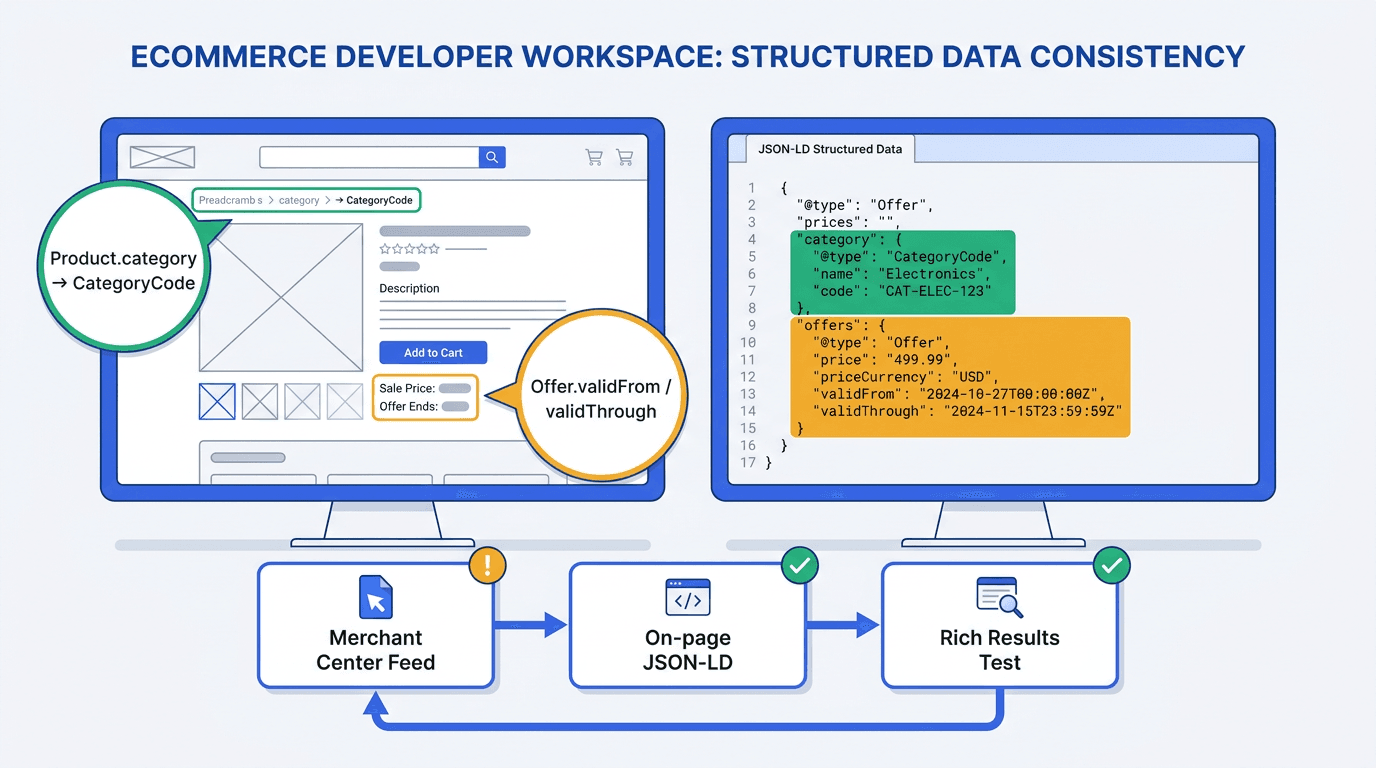
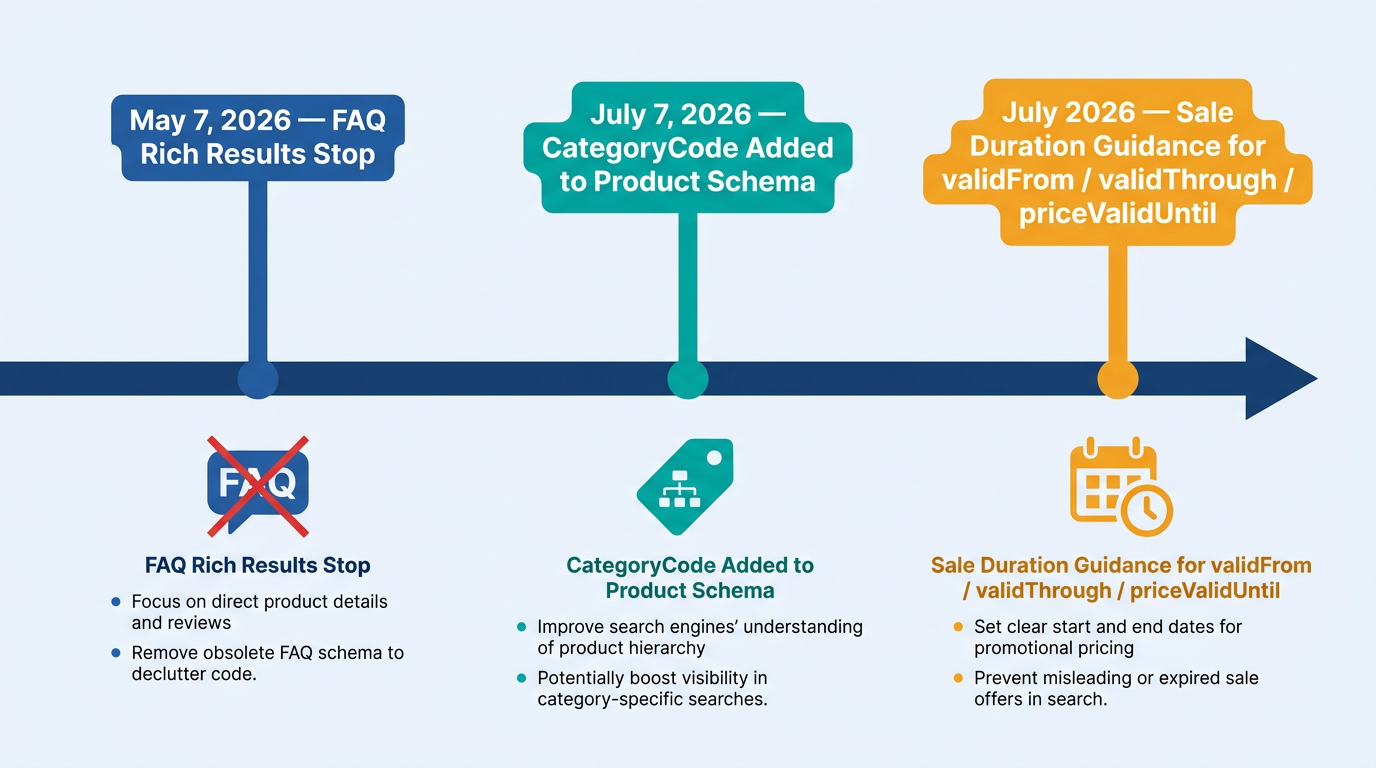
If you maintain merchant listing structured data on ecommerce PDPs, July 7, 2026 closed two long-running gaps: product categorization and sale timing. On July 7, 2026, Google added documented support for Product.category, including the CategoryCode type, and clarified how validFrom, validThrough, and priceValidUntil can be used to communicate sale-price effective dates in merchant listing structured data.
That means you can stop relying on Google to infer your category and your promo window. Declare both explicitly, validate in the Rich Results Test, and keep your Merchant Center feed and on-page markup in sync so eligibility does not get quietly downgraded.
How to implement the update (the exact 3-step workflow):
- Add Product.category using a CategoryCode object that mirrors your google_product_category taxonomy ID (and optionally your product_type hierarchy).
- Define sale timing on the active Offer using validFrom and validThrough (and use priceValidUntil only for non-sale offer expiry).
- Validate in the Rich Results Test, then check feed-to-markup consistency at scale (mismatches are the most common failure).
Why this update matters for product structured data 2026
Before July 2026, many sites shipped clean Product markup but left category and sale windows implicit. Google would infer a category from text, breadcrumbs, or the Merchant Center feed, and infer sale timing from price changes or feed attributes. Both properties are now explicitly declarable in merchant listing markup, which is exactly the kind of machine-readable clarity Google keeps rewarding on commercial surfaces (Google Search Central, 2026).
Stepping back, Google's structured-data investment is still flowing toward shopping-adjacent types while reference types are being deprecated. Google stopped showing FAQ rich results on May 7, 2026, reinforcing the need to prioritise structured data that supports relevant search features and genuine user value. For broader implementation context, include these checks in a comprehensive ecommerce SEO audit covering product templates, crawlability, structured data, internal linking, and organic discovery performance.
Prerequisites: what you need before changing merchant listing markup
Have these ready so implementation is a single deploy, not a week of back-and-forth:
- Access to your product page template (server-rendered, headless, or tag-managed JSON-LD).
- Your current Product or merchant listing structured data implementation, ideally in JSON-LD, using the Schema.org Product specification as a reference for the underlying vocabulary.
- Your Google Merchant Center feed mapping for product_type and google_product_category.
- A test environment or a single PDP you can safely modify first.
- Validation tools should include the Google Rich Results Test and the Vizup Schema Checker to review structured data syntax, supported properties, and potential implementation issues.
Note: If you deploy JSON-LD via a tag container, treat it like code. Version it, add QA checks, and document ownership. If your team deploys JSON-LD through GTM, review Vizup's guidance on using Google Tag Manager in 2026 and confirm that the markup is rendered consistently for users and search-engine crawlers.
Step 1: Add CategoryCode to Product.category (explicit google product category)
Google's July 2026 documentation update added support for [Product.category](https://developers.google.com/search/docs/appearance/structured-data/merchant-listing) in merchant listings. A text value can represent a merchant-defined category, while a CategoryCode object can represent a category from the Google Product Taxonomy. In practice, this is the cleanest path to ending category guessing and aligning on-page category with your feed.
Pick the right category value (ID vs path)
In Merchant Center, google_product_category is typically a taxonomy ID (numeric) or a full taxonomy path, depending on how your feed is built. For a CategoryCode implementation, use either the numeric Google Product Category ID or the complete taxonomy path accepted by Google. Match the value and format used in the corresponding Merchant Center feed wherever possible. If you also maintain product_type (your internal hierarchy), keep it consistent across feed and site, but do not conflate it with Google's taxonomy.
JSON-LD before vs after (CategoryCode added)
| Property | Before (Old Method/Inferred) | After (New Explicit Method) | Notes/Impact |
|---|---|---|---|
| Product.category | Omitted, or plain text like "Running Shoes" | CategoryCode object with codeValue and inCodeSet | Aligns on-page category with google_product_category feed attribute (Google Search Central, 2026). |
| Offer.validFrom | Omitted | ISO 8601 start timestamp | Defines sale start, supports Sale duration section (Google Search Central, 2026). |
| Offer.validThrough | Omitted | ISO 8601 end timestamp | Defines sale end, reduces ambiguity for limited-time pricing. |
| Offer.priceValidUntil | Used for sale end by habit | Use for offer expiry, not necessarily a promo window | Google recommends validFrom plus validThrough or priceValidUntil for end timing, but keep semantics clean (Google Search Central, 2026). |
| Use CategoryCode for taxonomy mapping, and validFrom/validThrough for sale duration schema clarity. |
Example snippet (drop into your existing Product JSON-LD, keeping your current required fields intact):
Minimal pattern to add:
- "category": {"@type": "CategoryCode", "codeValue": "187", "inCodeSet": "https://www.google.com/basepages/producttype/taxonomy-with-ids.en-US.txt"}
Warning: Do not guess the taxonomy ID. If your feed uses a different google_product_category than your PDP markup, Google can treat the page as inconsistent and ignore the on-page signal. Feed-to-markup mismatch is the #1 failure pattern we see during rollouts.
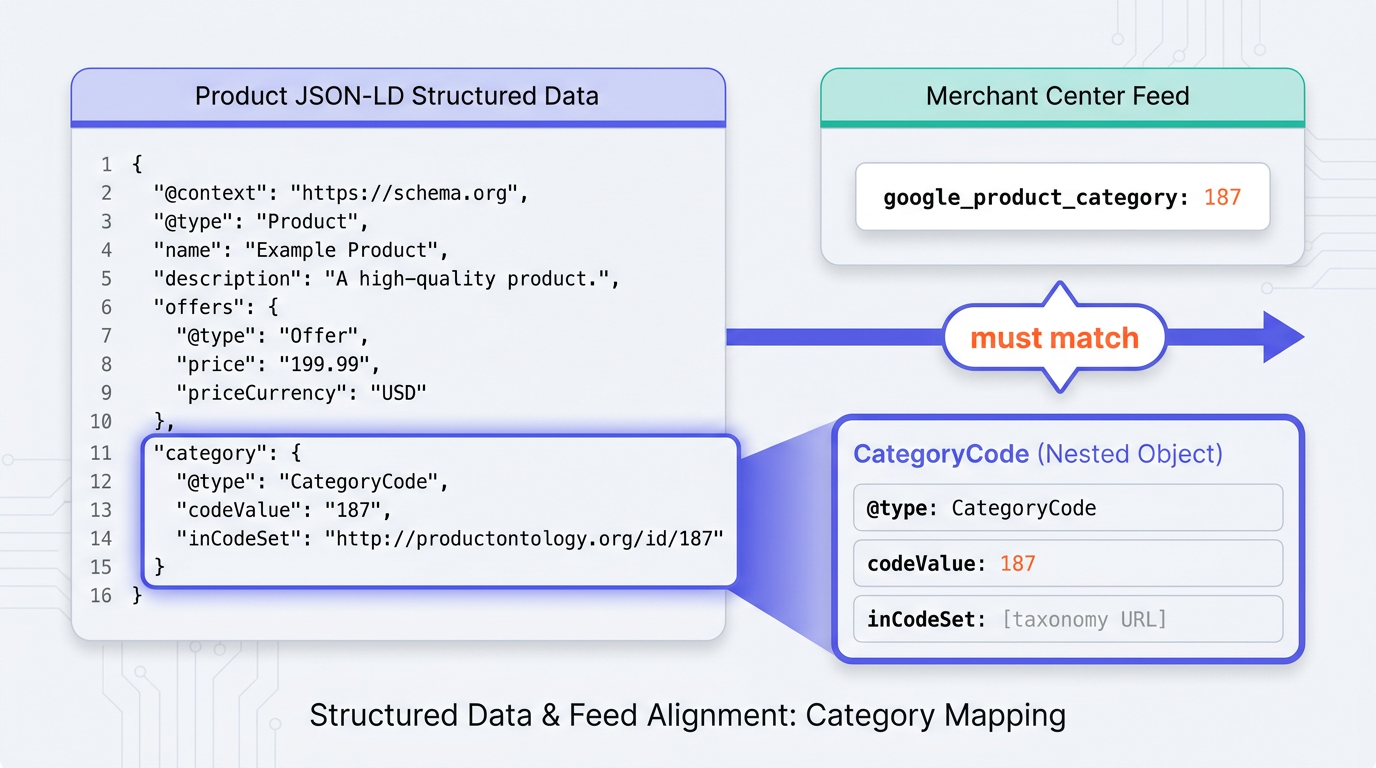
codeValue in your JSON-LD must match the numeric ID in your Merchant Center feed exactly.Step 2: Implement sale duration with validFrom, validThrough, and priceValidUntil
Google's sale duration guidance explains how to communicate the effective dates of a sale price through merchant listing structured data. When the sale price is defined directly on an Offer, add validFrom for the start date and either validThrough or priceValidUntil for the end date. When the sale price is represented through a PriceSpecification, place validFrom and validThrough on that specific price specification. This is the sale duration schema you want when merch teams ask, "Can we tell Google the sale ends Sunday at midnight?"
Implementation rules that keep you out of trouble:
- Use ISO 8601 timestamps with timezone, for example 2026-07-20T00:00:00+00:00.
- Put validFrom and validThrough on the same Offer as the sale price.
- Use
priceValidUntilas the end of the sale-price period when the sale price is defined directly on anOffer. Do not addpriceValidUntilto aPriceSpecification; usevalidThroughthere instead. - If you have multiple offers (variants, sellers), ensure the sale timing applies to the correct offer node.
Apply sale timing to the specific Offer or PriceSpecification associated with the affected product or variant. For products with multiple variants, follow Google's product variant structured data guidance and ensure that prices, availability, SKUs, and sale dates map to the correct variant. When there is no sale, omit validFrom/validThrough rather than leaving stale dates sitting in markup.
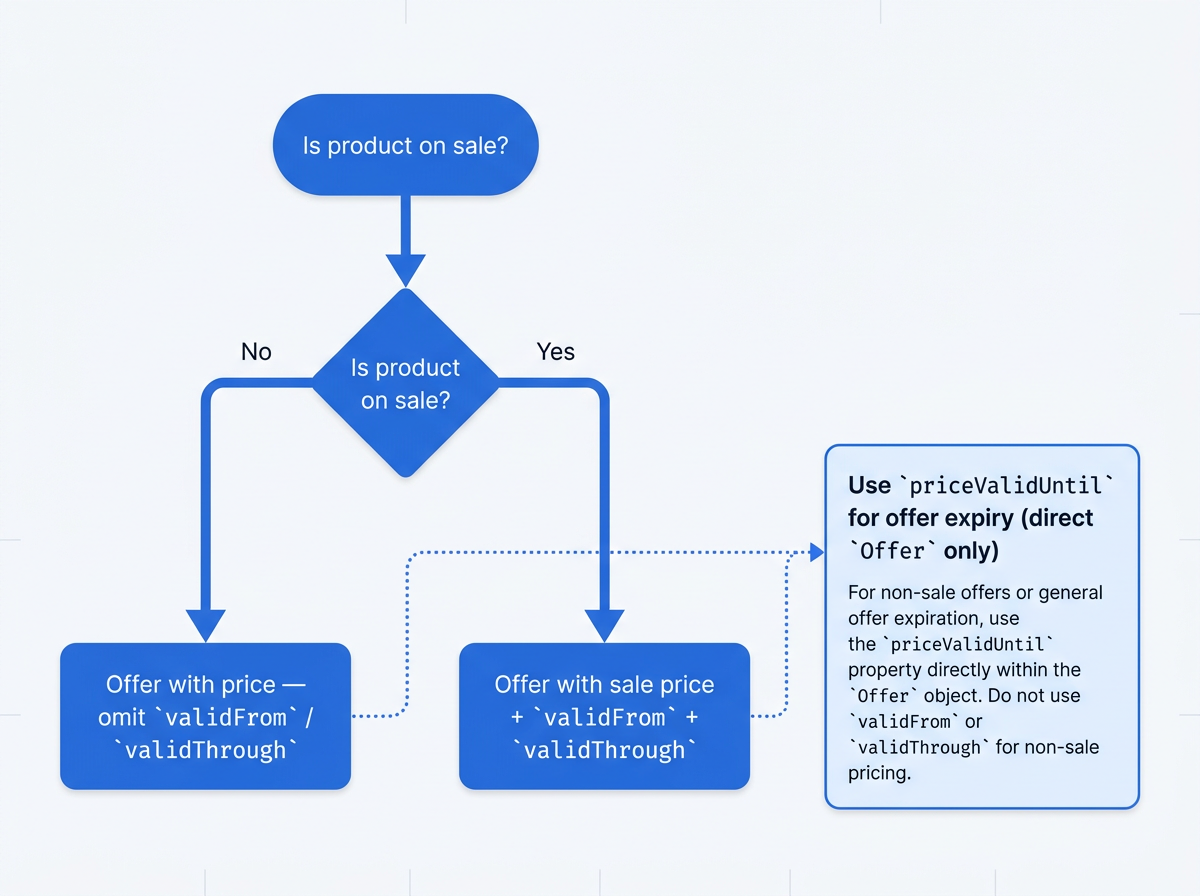
validFrom and validThrough rather than leaving stale dates in markup.Step 3: Validate in Rich Results Test, then enforce feed-to-markup consistency
After deployment, test a representative PDP in the Google Rich Results Test and confirm that Google detects the intended Product, Offer, PriceSpecification, and category properties. This is where you catch the classic issues: category in the wrong node, sale dates on Product instead of Offer, or a templating bug that outputs invalid JSON.
For a repeatable workflow, follow Vizup's guide on how to validate schema markup and fix structured data errors, then use the Vizup Schema Checker and Google Rich Results Test together before releasing changes across every PDP template. It pairs well with the Rich Results Test because it forces you to resolve errors that Google treats as hard blockers, not just warnings.
Consistency checks to run before you roll this out to every PDP:
- Merchant Center feed: confirm google_product_category ID for the SKU matches CategoryCode.codeValue on the PDP.
- Merchant Center feed: confirm product_type hierarchy matches any on-page category text you expose (breadcrumbs, nav, PDP labels).
- On-page: confirm the sale price in Offer.price matches the visible sale price, and validFrom/validThrough match the promo schedule.
- Scale monitoring: use Search Console's Product snippets and Merchant listings reporting to spot template-wide regressions (Google Search Central, 2026).
Info: Google recommends providing both on-page product structured data and a Merchant Center feed because the two sources can be combined to maximise eligibility for product experiences. Keep prices, availability, identifiers, categories, and sale dates consistent across both sources. See Google's guidance on providing product data. That only helps when the two sources agree.
Common mistakes and troubleshooting (what breaks merchant listing structured data)
Most rollouts fail for boring reasons: mismatched sources of truth, date formatting, and schema nodes that look right to humans but parse wrong to Google.
Fix these first when your merchant listing markup does not validate or does not show eligibility:
- Feed vs markup mismatch: Your feed google_product_category says one thing, your CategoryCode says another. Decide the canonical mapping, then update both so they match.
- Wrong node placement: validFrom/validThrough belong on Offer, not on Product. CategoryCode belongs in Product.category.
- Bad timestamps: Missing timezone, non-ISO formats, or end dates earlier than start dates. Use full timestamps, not just dates, if your sale is time-bound.
- Misusing priceValidUntil: If you use it as a promo end date while also using validThrough, you create conflicting semantics. Keep one clear meaning per property.
- Deploying via JS too late: If JSON-LD is injected after render, Google can miss it on some crawls. Prefer server-rendered JSON-LD when possible.
If you need to justify prioritization internally, point to adoption and directionality. Structured data usage keeps trending upward for commercial types, and the features being added are clustered around shopping. For broader context, review Vizup's Schema.org usage statistics dataset and its analysis of why Google removed FAQ rich results.
Summary and next steps for merchant listing structured data
Three things to ship from Google's July 2026 update: add CategoryCode to Product.category, define sale windows with validFrom and validThrough on the Offer, then validate and monitor with the Rich Results Test plus feed consistency checks. That is the practical path to clearer categorization, cleaner promo timing, and fewer eligibility surprises in product structured data 2026.
From here, audit every PDP and variant template, validate representative pages with the Vizup Schema Checker, and add feed-to-markup checks to your release process. To operationalise monitoring, content creation, optimisation, publishing, and learning across the complete organic discovery ecosystem, book a Vizup demo. To understand how structured data and machine-readable content can support discovery beyond traditional search results, read Vizup's guide on making content discoverable in AI engines.
Frequently Asked Questions
What is the difference between product_type and google_product_category?
product_type is your merchant-defined category hierarchy, typically used for internal merchandising and bidding structure. google_product_category is Google's taxonomy classification, usually a specific numeric taxonomy ID. Google's July 2026 update aligns CategoryCode in markup with both, but CategoryCode is best used to mirror google_product_category for unambiguous taxonomy mapping (Google Search Central, 2026).
Can I use both the old priceValidUntil and the new sale duration properties?
Yes, but keep the semantics clean. Use validFrom and validThrough to describe a temporary sale window. Use priceValidUntil when the offer or price expires more generally. Google documents validFrom plus either validThrough or priceValidUntil for end timing, but combining them without a clear intent can create conflicts (Google Search Central, 2026).
How do I find the correct Google Product Category code for my products?
Use the Google Product Taxonomy you already reference for Merchant Center and pick the most specific matching category. Copy the numeric taxonomy ID into CategoryCode.codeValue and set inCodeSet to the taxonomy URL. The critical part is that the ID matches your Merchant Center google_product_category for the same item.
Will this new merchant listing structured data guarantee a rich result?
No. Structured data is an eligibility signal, not a guarantee. Google still needs to crawl, parse, and trust the page, and your site must meet other policy and quality requirements. What this update does is remove ambiguity around category and sale timing, which reduces avoidable eligibility loss (Google Search Central, 2026).
What happens if my on-page schema and Merchant Center feed don't match?
In many cases, Google will prioritize the feed or treat the page as inconsistent, which can weaken or nullify the on-page signals. Treat feed-to-markup alignment as a release gate: if google_product_category, price, availability, or sale dates differ between sources, fix the source of truth and redeploy so both match.
