Google UCP checkout isn't just another ad unit dressed up with a new name. It's a shift in where the transaction actually happens. Since January 2026, the Universal Commerce Protocol has let shoppers complete a purchase inside Google's AI-powered search surfaces without ever landing on a retailer site. If you sell physical products online, that changes how you should think about the funnel you manage.
This piece goes from context to execution. You'll get clear on what UCP is, why it compresses the funnel in ways that blow up traditional measurement, and what you should do over the next 30 days to get eligible. It applies to DTC brands, Shopify merchants, marketplace sellers, and omnichannel retailers alike. Buy-button space is limited, and it's getting claimed quickly.
What Google UCP Checkout Actually Is (And Why It's Different)
The Universal Commerce Protocol Google introduced is an open-source standard that lets AI agents and platforms discover a merchant's commerce capabilities (inventory, pricing, shipping, returns, checkout) and execute transactions directly. Co-developed with Shopify, Etsy, Wayfair, Target, and Walmart, and backed by Mastercard, Visa, Stripe, and Adyen, UCP isn't a Google-only feature. It's an interoperability layer for an agent-driven web.
Here's the real-world flow: someone searches in Google Search or the Gemini app, sees a result card with a Google buy button, taps it, pays with Google Pay, and gets an order confirmation. You're still the Merchant of Record, and you still own fulfillment and customer data. Google owns the transaction surface. That line matters when you're planning brand continuity and post-purchase messaging.
Info: UCP is compatible with the Model Context Protocol (MCP), which means the same capability layer that powers Google's AI surfaces can be accessed by other AI agents. Your UCP integration is not Google-only infrastructure.
The Funnel Has Collapsed: Zero-Click Purchase and What It Breaks
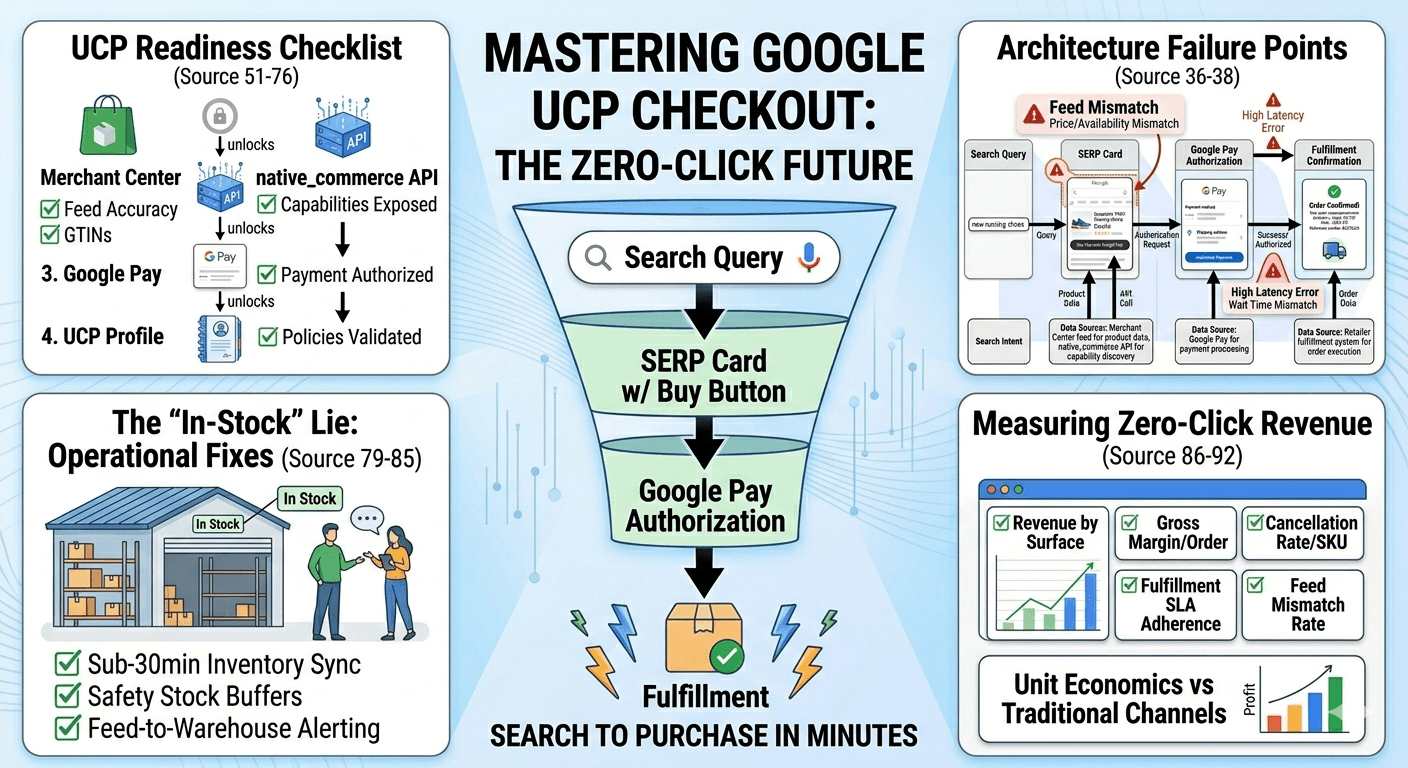
Traditional Shopping ads pushed traffic to your site. UCP skips that step. The new sequence looks like this: search impression, product details rendered in the SERP, buy, Google Pay authorization, fulfillment. A zero-click purchase isn't a novelty or a corner case; it's the experience Google is steering toward for high-intent product searches.
The breakage is immediate: session-based analytics, on-site conversion tracking, remarketing pixels, and first-party capture. GA4 will show revenue that doesn't line up with ad attribution. Email list growth from organic product searches slows down. LTV models that rely on browsing behavior lose a major input. Most measurement stacks weren't built for a checkout that happens off-site.
Your KPIs shift with it. Rankings matter less as a lever, while feed accuracy, inventory truthfulness, and fulfillment reliability start doing the work conversion rate used to do. Google will suppress or demote listings that drive cancellations, mismatches, or policy violations. If you want the broader measurement reset, the AI search visibility optimization 2026 playbook lays out what to rebuild.
Architecture: The UCP Checkout Flow With No Site Visit
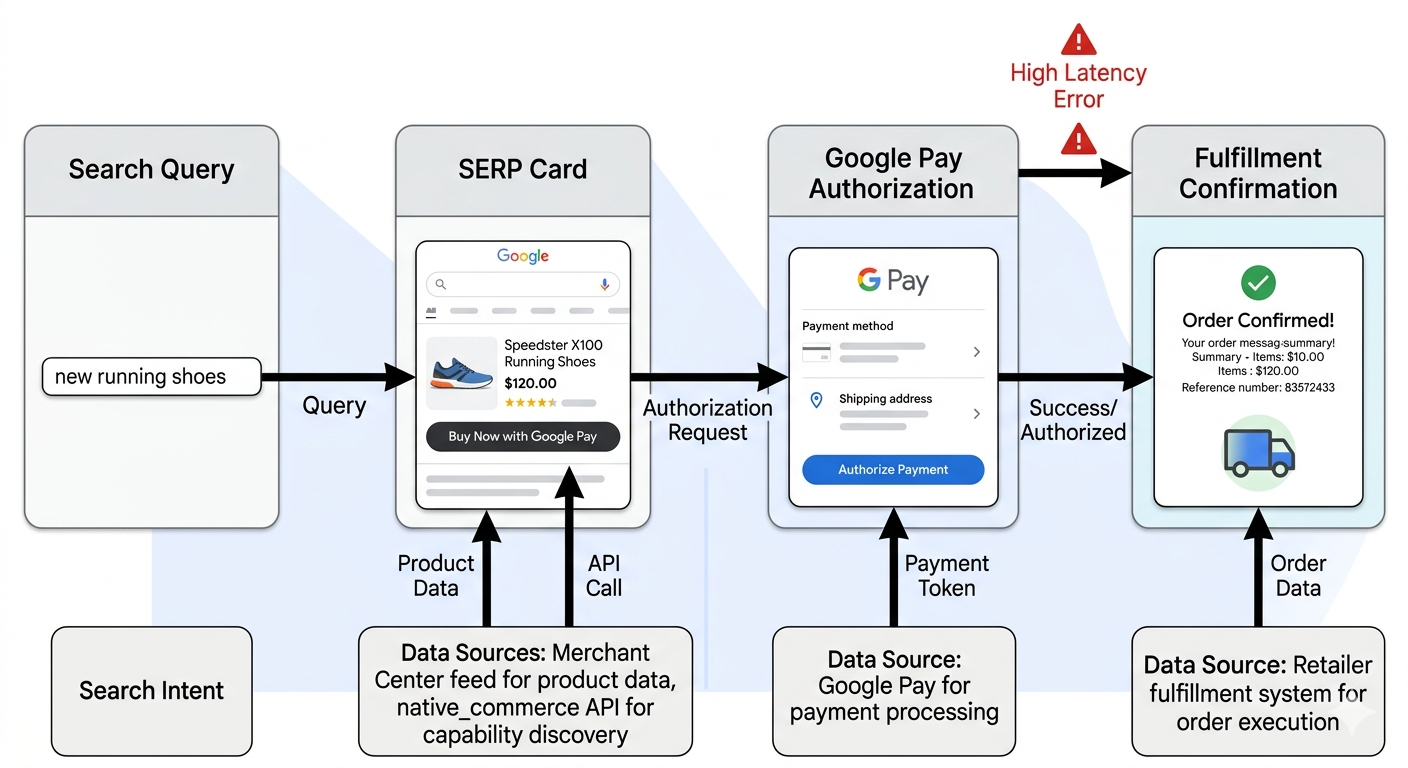
In this flow, you control three levers: Merchant Center feed accuracy, the completeness of what you expose via native_commerce, and fulfillment reliability. Google controls the surface, the payment UI, and the eligibility decision. Most failures cluster in three places: feed-to-SERP mismatches (price or availability), capability gaps in native_commerce (missing return policy, unsupported shipping option), and fulfillment breakdowns (cancellations after confirmation). Each one has a different fix, which is why "just optimize the feed" doesn't hold up in practice.
UCP vs AI Mode Checkout: Don't Optimize for the Wrong Surface
This question comes up constantly: what is the difference between UCP vs AI Mode checkout? They're different entry points into the same capability layer. Google Search's AI Mode surfaces products through a conversational interface. Classic Search shows Shopping-style cards. Agentic flows (Gemini app, third-party agents using MCP) can execute purchases autonomously. UCP is what sits underneath all of it.
The implication is straightforward: one integration, multiple discovery contexts. Your data quality has to travel well because you don't get to choose which surface introduces your product to the shopper. If you optimize only for classic Shopping cards and ignore the AI Mode path, you'll miss an increasing share of high-intent queries as more volume shifts into AI-generated experiences.
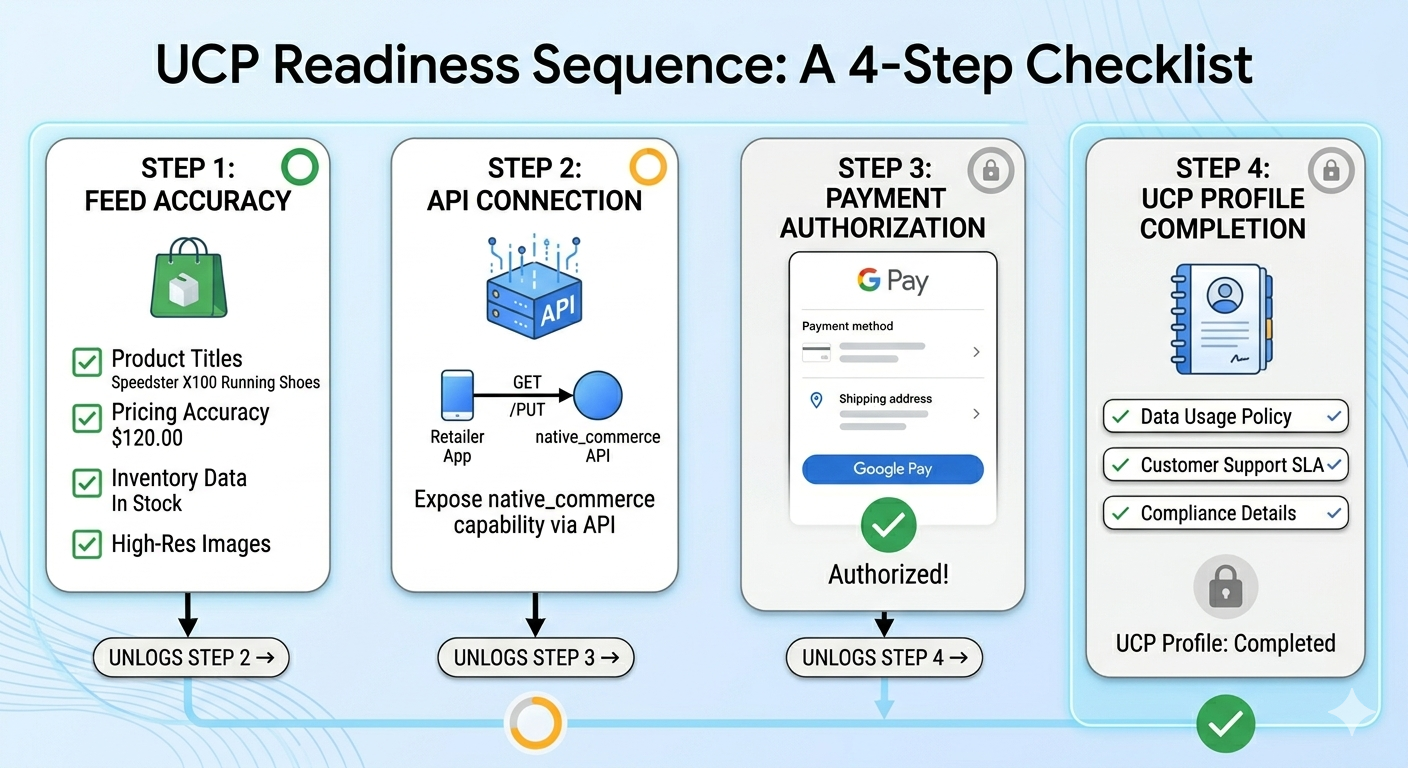
The UCP Readiness Checklist (Do This in Order)
Order matters. Each step unlocks the next, and skipping ahead often creates eligibility failures that don't announce themselves. By the time you notice, you're stuck debugging a system that looks "fine" on paper but never earns the buy button.
Step 1: Merchant Center. The Foundation That Decides Everything
Audit these before touching anything else:
- Price and availability accuracy: Feed data has to match your live site within minutes, not hours. Mismatches are the biggest driver of UCP eligibility loss.
- GTIN coverage: Missing or incorrect GTINs lower match confidence. Target 95%+ coverage on eligible products.
- Shipping and returns: Every product needs accurate shipping costs and a returns policy your operation can actually honor.
- Account health: A single active policy violation can suppress your entire catalog from buy-enabled surfaces. Check the account health dashboard weekly.
Step 2: native_commerce. Make Your Capabilities Discoverable
native_commerce is how Google's agents learn what your store can really do: which checkout flows you support, what shipping options exist, whether returns are accepted, and how discounts work. The most common mistake is exposing only part of the picture. If you publish checkout support but omit your return policy, agents treat the listing as incomplete and push it down. Treat native_commerce like a real API product: version it, monitor it, and assume it will break if nobody owns it.
Step 3: Google Pay. Reduce Friction Without Outsourcing Trust
Google Pay removes the form-filling that drags down mobile conversion. Once checkout is mediated, though, brand trust shifts to what happens after the click: order confirmation emails, shipping notifications, and support flows still need to feel like your brand, not a generic Google receipt. Fraud and chargeback handling also needs explicit setup, because payment is authorized on Google's surface but fulfilled through your systems.
Step 4: UCP Profile. The Part Most Retailers Rush
Your UCP profile is the contract agents and Google surfaces read before deciding whether to show your buy button. Include supported payment methods, shipping carriers and speed tiers, your return window and conditions, and the service levels you can consistently hit. The common failure is "aspirational" profiles: promises that sound good but don't match what ops can deliver on a bad week. Validate every field against your real fulfillment SLAs before you publish.
The 'In-Stock' Lie That Kills Your Buy Button Eligibility
This is the pattern that keeps repeating. A Merchant Center feed marks a SKU as in stock. The warehouse is actually backordered. A shopper buys through UCP checkout. You cancel the order. Google logs a fulfillment failure, and visibility for that product drops across buy-enabled surfaces. Do that three times in a week and you've created an eligibility problem that can take weeks to unwind.
The fix is operational, not a marketing tweak: increase inventory sync frequency (aim for sub-30-minute updates on fast movers), use safety stock buffers that flip to "out of stock" before you hit zero, and track feed-to-warehouse mismatch rate daily with alerting. UCP performance ends up being as much ops engineering as search optimization.
Measuring Revenue When the Purchase Is Zero-Click
A minimum viable measurement plan for UCP commerce comes down to five metrics: revenue by surface (UCP vs on-site vs other), gross margin per order, cancellation rate by SKU, fulfillment SLA adherence, and feed mismatch rate. You lose on-site session data for UCP orders, but you gain clean order-level reporting from Google and your own fulfillment systems. In practice, server-side event tracking and order reconciliation replace pixel-based attribution.
For exec reporting, keep the framing simple: UCP is a new revenue channel with different unit economics (lower acquisition cost, higher fulfillment accountability). Give it its own line item instead of forcing it into your existing channel taxonomy. If you're rebuilding the plumbing underneath that reporting, how to structure URLs for AI covers the technical foundation.
Preparing for Agentic Commerce Google 2026 and Beyond
Agentic commerce is the use of AI agents to run end-to-end purchase tasks autonomously, across surfaces and protocols, on a user's behalf. According to a January 2026 Google Cloud analysis of the "invisible shelf" dynamic, structured product data and machine-readable policies determine whether your brand shows up in an agent's decision set. Agents do not browse; they query capability layers.
Here's the paradox: more purchases happen off-site, while your site matters more as the authoritative source for policies, brand signals, and support. If an agent misstates your return policy or shows a stale price, it's pulling from somewhere. Make your site the cleanest, most structured source available: machine-readable policy pages, consistent entity data across surfaces, and optimizing for AI search visibility as an ongoing practice rather than a one-off project.
How Vizup Fits: Monitoring the SERP Storefront
When checkout shifts onto Google's surfaces, monitoring shifts with it. You're not just watching rankings anymore. You need to see how products render across Search experiences where the buy button can appear, whether AI summaries are accurately reflecting price and availability, and whether your UCP profile matches what shoppers are actually being shown.
Vizup's Digital Presence Monitoring and Answer Engine Monitoring are built around that reality. If an AI-generated summary gets your return window wrong or shows an outdated price, Vizup flags it so you can decide whether the fix lives in the feed, on a policy page, or in native commerce configuration. The workflow is simple: alert, triage, fix, re-validate. It has to run continuously because these surfaces change faster than any manual audit schedule. Vizup is oriented toward AI surface accuracy rather than traditional rank tracking.
Comparison: UCP Checkout vs AI Mode vs Traditional On-Site
It helps to separate the surfaces so you can prioritize the work that actually moves eligibility and revenue:
Surface comparison at a glance:
- UCP Checkout (classic Search): Data required: Merchant Center feed + UCP profile. User steps: 2-3 taps. Measurement visibility: order-level only, no session data. Common failure: feed mismatch, cancellation spike.
- AI Mode Checkout: Data required: same as UCP plus structured entity data for AI comprehension. User steps: conversational query + 1-2 taps. Measurement visibility: limited, surface-reported only. Common failure: AI misrepresentation of product attributes.
- Traditional On-Site: Data required: product pages, standard Merchant Center. User steps: 5-10 steps. Measurement visibility: full session, pixel, and attribution data. Common failure: cart abandonment, page speed, checkout friction.
FAQ: Google UCP Checkout
What is Google UCP checkout, and is it the same as Universal Commerce Protocol Google?
Yes. Universal Commerce Protocol (UCP) is the open-source standard introduced in January 2026 that enables direct purchases inside Google's AI search surfaces (Google Developers Blog, 2026). "Google UCP checkout" is the shopper-facing experience UCP enables: a buy button in search results, payment via Google Pay, and no site visit.
Will Google UCP checkout reduce my website traffic (and should I care)?
Yes, for product queries where you have a buy-enabled listing, traffic will drop. Whether that matters depends on how your business uses the site visit. If the visit is mainly a conversion step, losing it hurts less than most teams assume. You're still the Merchant of Record and keep the customer relationship. What you lose is on-site data capture, remarketing pixels, and email list growth from organic product searches, so plan for that gap up front.
How do I become eligible for the Google buy button search results experience?
Work the four steps in order: (1) Get Merchant Center account health clean and keep feed data accurate. (2) Implement the necessary capabilities so your full feature set is discoverable. (3) Enable Google Pay as a supported payment method. (4) Complete and validate your UCP profile with accurate policy and service-level details. Eligibility isn't a one-time gate; feed accuracy and fulfillment performance continue to influence it.
What's the difference between UCP vs AI Mode checkout for retailers?
UCP is the protocol; AI Mode is one surface that uses it. Classic Search results, AI Mode, and the Gemini app all rely on UCP underneath. The difference is discovery: classic Search leans on structured feed matching, while AI Mode interprets conversational queries. The integration work is the same either way, but AI Mode raises the bar on data quality because the AI has to interpret your attributes correctly before it surfaces the buy button.
How should I measure conversions and attribution for a zero-click purchase Google flow?
Move from pixel-based attribution to server-side order reconciliation. Track revenue by surface, cancellation rate, fulfillment SLA adherence, and feed mismatch rate. Use Google's merchant reporting for surface-level visibility and reconcile it against your order management system. Last-click attribution isn't available for UCP orders, so give this channel its own reporting line instead of forcing it into existing attribution models.
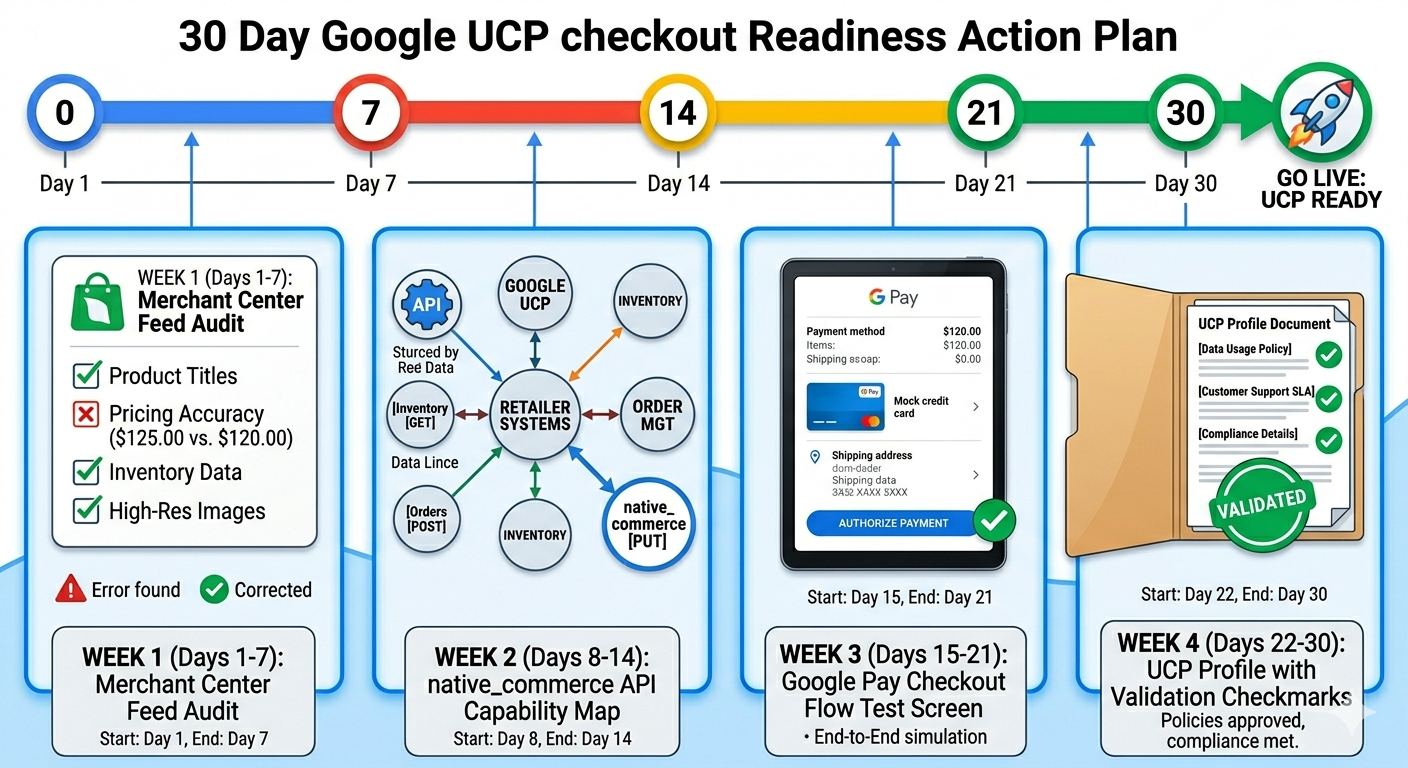
What to Do in the Next 30 Days
The sequence itself is straightforward. The hard part is coordination, and most retailers underestimate it. Marketing owns the Merchant Center audit and UCP profile. Engineering owns native_commerce implementation and inventory sync. Ops owns fulfillment SLA accuracy. CX owns post-purchase brand continuity. If one group lags, the whole system suffers.
30-day action plan:
- Week 1: Audit Merchant Center for feed accuracy, GTIN coverage, and account health. Fix all active policy issues before proceeding.
- Week 2: Implement or audit native_commerce capability exposure. Test every capability you claim to support.
- Week 3: Confirm Google Pay integration and test the full checkout flow end-to-end in a staging environment.
- Week 4: Finalize and validate your UCP profile. Set up monitoring for feed mismatch rate and cancellation rate as daily operational metrics.
If you wait for "proof" that UCP drives revenue, you'll be waiting while competitors bank buy-button impressions and build the fulfillment track record that turns into eligibility advantage. The work you do now on data accuracy and operational reliability compounds. Start with Step 1 in Merchant Center this week; everything else depends on it.