For years, the bargain was simple: someone searched, clicked a blue link, and your analytics told the story. Now AI assistants answer the question on the spot, often pulling from your site without sending anyone your way. Your content can shape the response, but you see no click, no session, no neat attribution in a dashboard. You end up writing the lines while the chatbot takes the bow.
Knowing an AI cited your site is helpful. Microsoft Clarity's AI Citations feature offered that first peek. But the harder question is the one teams actually need to act on: why does a competitor get cited more on the topics you care about, and what should you publish next to change that? That's where strategy starts. Clarity's new Topic Insights feature is meant to answer those questions, not just log what happened.
What Is Microsoft Clarity Topic Insights?
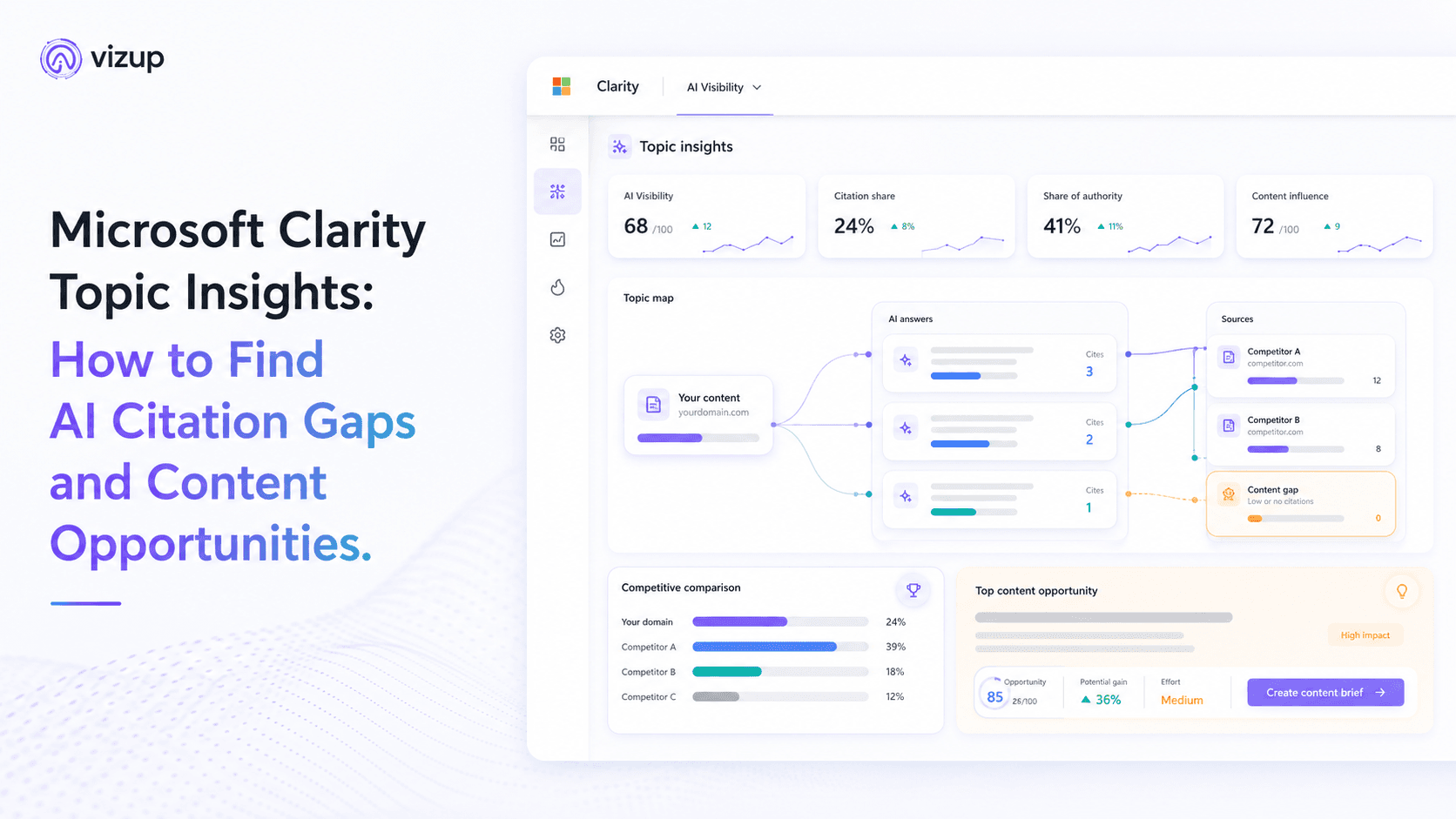
Topic Insights is a new AI Visibility feature inside Microsoft Clarity, and it is currently in beta. The point is to replace guesswork about your presence in AI-generated answers with something you can track over time. Instead of treating every prompt like a separate event, it bundles prompts into topics you define so you can see how your authority holds up at a category level.
Clarity analyzes AI answers tied to those topics, lists every cited site, and then does the part that actually matters: it estimates how much each source contributed to the finished response. That separates a drive-by mention from a source the model leaned on to build the answer. From there, Topic Insights highlights where you are strong, where competitors are outmuscling you, and where new content could move the needle.
Microsoft Clarity Topic Insights is a beta AI-visibility feature that tracks how often, and how heavily, a website is used in AI-generated answers across the topics you choose.
Why Microsoft Introduced Topic Insights
This is not Microsoft tossing another widget into Clarity for the sake of it. It is a response to what marketers and SEOs ran into as soon as the first wave of AI tracking tools arrived: lots of visibility, not much direction.
Citations answered the visibility question
When Microsoft Clarity's AI Citations feature launched, it finally made AI answers legible. You could see whether your pages appeared in supported AI-generated experiences, which grounding queries triggered citations, and which URLs were referenced. It answered the most basic question teams had been stuck on: are we even showing up? As a first step, that observational data mattered.
Marketers still lacked competitive context
But once you have the log, you immediately want the analysis. The Citations report left teams with the same strategic questions, over and over. I've watched people pull it up and ask:
- Great, we got cited. But who else did? And did they get cited more?
- Which topics are our competitors completely dominating?
- Are we just getting a token mention, or is our content meaningfully shaping the answer?
- Where are the biggest gaps in our content? What should we write next?
- Which of our existing pages are underperforming and need an update?
Topic Insights moves from observation to action
Topic Insights is Microsoft's attempt to turn those questions into a workflow. It shifts Clarity from a reporting surface into something closer to an analysis engine: less "what happened" and more "what do we do next?". Microsoft cites a Clarity study of more than 1,200 publisher and news sites in which AI referral traffic converted at approximately three times the rate of other channels. Results may vary by website and industry. If that trend holds for your business, then knowing where you are losing influence is not trivia; it is a roadmap.
The Four Areas Topic Insights Measures
Topic Insights breaks AI performance into four dimensions. If you want the reports to be more than pretty charts, it helps to know what each one is actually trying to capture.
1. AI visibility
This is the headline metric, but it is not simply a citation tally. It provides a topic-level view of how often your domain is cited and its share of authority relative to other cited sources.
2. Content influence
A citation can mean anything from "also see" to "this is where the answer came from." Topic Insights tries to draw that line. Microsoft calls it "influence": how much of the AI answer is supported by your content. Stronger influence indicates that more of the final answer is supported by your content, rather than your page appearing only as a minor citation. For most teams, that is a more honest KPI than raw citation count.
3. Competitor performance
No site gets cited in isolation. Topic Insights shows which other domains appear for your topics, along with their citation frequency and influence. The value is in the contrast: it makes it obvious where another publisher or competitor is beating you, and by how much. You may even find that a site you do not track in traditional SEO is the default source for a specific customer question.
4. Content opportunities
The last piece is the output everyone actually wants: a prioritized set of things to do next. Topic Insights is not just spitting out generic advice; it can surface opportunities like:
- Topic areas where you have no visibility at all.
- Existing pages that get cited but have low influence, signaling a need for optimization.
- Areas where you need to build more authority with supporting content.
- A prioritized list to help you decide what to work on first to close the biggest gaps.
How Microsoft Clarity Topic Insights Works
The flow is simple: you give Clarity a set of representative prompts, and it returns an aggregated view of how AI answers treat your site across the topics you care about.
Step 1: Define representative prompts
You start by supplying prompts that match how customers actually talk to AI assistants. Use natural language, not two-word keyword fragments. Instead of "marathon shoes," you might use prompts like "which running shoes are suitable for marathon training?" or "how to prevent injuries when training for a marathon?"
Step 2: Clarity evaluates AI-generated responses
After you set topics and prompts, Clarity analyzes the AI-generated answers for those prompts and extracts the sources: which domains were cited and which specific pages were used as references.
Step 3: It measures source contribution
This is the differentiator. Topic Insights does not treat every cited link as equal. It estimates how much of the final response is substantiated by each source, which is how it separates "mentioned" from "relied on."
Step 4: Results are aggregated by topic
Rather than dumping a chaotic, prompt-by-prompt spreadsheet on you, Topic Insights rolls results up to the topic level you defined at the start. That reduces the noise of individual queries and makes patterns easier to spot. The question becomes "which topics are we winning or losing?" instead of "which random prompt did we get lucky on this week?"
Topic Insights vs. Microsoft Clarity Citations
Topic Insights is best understood as the layer above Citations, not a replacement for it. Citations gives you the raw record of where you appeared; Topic Insights tries to turn that record into a plan.
| Capability | Citations | Topic Insights |
|---|---|---|
| Shows cited pages from your domain | Yes | Included within its analysis |
| Shows grounding queries | Yes | Uses representative prompts defined by the user |
| Reports citation activity over time | Yes | Helps establish and compare topic-level baselines |
| Reports share of authority | Yes | Yes, at the selected topic level |
| Measures how much a source supports an answer | No clear support | Yes |
| Lets users define topics and prompts | No | Yes |
| Lets users define competitors | No | Yes |
| Identifies competitive content gaps | Limited | Yes |
| Provides prioritised recommendations | No | Yes |
| Topic Insights builds on the foundation of Citations with deeper analysis and actionable recommendations. |
Practical Use Cases for SEO and Content Teams
Based on the feature's capabilities, here is how SEO and content teams can apply Topic Insights in practice. Used well, Topic Insights can plug directly into planning, updating, and reporting for content and SEO teams.
Find topics where competitors dominate AI answers
Start with competitive reality. Run Topic Insights on your core product categories and solution areas, then look for the topics where another domain consistently owns the citations and influence. You might even see a weird mismatch: you rank #1 organically, but a competitor's explainer gets cited most of the time because it answers the question more directly. That discrepancy is the signal.
Identify missing informational content
A lot of brands are long on product pages and short on the content people use to make decisions. AI systems often pull from guides, how-tos, comparisons, and troubleshooting posts because those pages are written to resolve a question. Topic Insights can show where your product-first approach leaves you exposed. If users ask "how to solve X" and you only have a page that sells a "solution for X," you should expect competitors with a real guide to show up more often.
Decide whether to update or create content
The influence metric is useful for triage. If a page gets cited but barely contributes to the answer, that is often an update problem: strengthen the evidence, add clearer examples, improve the structure, or include original data if you have it. If you have no citations at all on a high-priority topic, that is usually a creation problem: you need a new cluster, not a rewrite. Either way, it is a cleaner way to set a content calendar than gut feel, and it fits neatly into a modern B2B content marketing strategy.
Measure content performance beyond clicks
For the last decade, content performance has been judged by sessions, rankings, and conversions. AI citations and influence add a parallel set of KPIs for channels that may not send traditional clicks at all. They should sit next to your existing analytics, not replace them. The upside is a clearer picture of where your work is being used, especially if you are trying to make your content discoverable in AI engines.
Example: Turning an AI Citation Gap Into a Content Plan
Microsoft's running-shoe example is a good way to see how this plays out. Imagine you are a shoe company best known for high-performance racing flats.
Scenario:
- You run a Topic Insights report and see you get plenty of citations for prompts about speed and race-day performance.
- But for adjacent topics like shoe durability, injury prevention, and marathon training, your competitors are dominating the AI answers.
- The AI is frequently citing competitor guides on when to replace running shoes and how to choose a shoe to avoid certain injuries.
That is the textbook version of a content gap: authority in one slice of the category, near-zero presence in the questions that surround it and drive real buying decisions. Building on Microsoft's example, a brand could also consider a shoe-replacement calculator, condition-specific FAQs, or product-linked training resources.
Recommended Actions:
- Create new assets: Build out a comprehensive running shoe durability guide, maybe even a simple shoe replacement calculator based on mileage and wear.
- Build topic clusters: Develop a series of articles on injury prevention, linking back to your relevant shoe models.
- Expand use cases: Create content specifically for marathon training, addressing concerns unique to long-distance runners.
- Add supporting content: Publish FAQs and comparison pages that directly address the questions competitors are currently answering.
The point is not that keyword research is obsolete; it is that conversational intent gets messy in ways keyword lists do not always capture. Topic Insights can surface that mess, then give you a practical way to organize your response.
How to Set Up Topic Insights in Microsoft Clarity
Setup is not complicated, but you do need the prerequisites. Microsoft requires a Clarity project and a verified domain before you can enable Citations, which Topic Insights depends on.
Here's the step-by-step process:
- Create or open a Microsoft Clarity project: If you don't have one, setting one up is free.
- Verify your website domain: You must prove you own the site you want to track.
- Enable the Citations feature: This is the prerequisite for all AI visibility reporting.
- Open the AI Visibility dashboard: You'll find this in the left-hand navigation.
- Select Topic Insights: This will take you to the setup screen for the feature.
- Define your topics, prompts, and competitors: This is where you provide the inputs. Start with your most important product categories, high-intent customer questions, and topics where you know competitors are active.
How to Build Better Prompts for Topic Insights
The usefulness of the report depends heavily on the quality and representativeness of your prompts. If you hand it vague, unrealistic queries, you will get vague, unrealistic insights back. Based on the feature's capabilities, here is a practical approach.
Use natural customer questions
Write prompts the way a person would ask them. Customer support tickets, sales call transcripts, and community forums are full of phrasing you can reuse. When possible, lift the language directly instead of translating it into SEO shorthand.
Cover the full buying journey
Do not limit prompts to bottom-of-funnel queries. A useful set spans the whole arc: early problem discovery, research, comparisons, purchase decisions, and post-purchase support. AI answers show up at every step, not just the last one.
Include non-branded queries
Branded prompts are satisfying, but they are rarely where the biggest opportunity lives. The more revealing prompts are non-branded and problem-led, because they show how you compete when the user is not already looking for you. That is where citation gaps tend to be the most instructive.
Group prompts into meaningful topics
The topic grouping is where Topic Insights earns its name, so treat it like real information architecture. Avoid one mega-topic that lumps everything together. Build groupings that match your business units or content categories. For a brand like us, Vizup, that could mean topics like AI visibility monitoring, programmatic SEO, and competitor content analysis.
Review prompts regularly
Prompts age faster than you think. Customer language shifts, products change, and AI systems do not stand still. Plan to revisit the prompt set quarterly so your reports keep tracking the questions that matter now, not the ones that mattered last season.
Important Beta Limitations
Topic Insights is still a beta feature, which means you should treat it as directional evidence. Microsoft is upfront that the system has limits. Use the output to guide your analysis, then sanity-check it with your other data sources.
Here are the key things to keep in mind:
- It's a beta: The feature is still under development and may change.
- Limited reports: Projects currently get an allowance of 10 reports per week.
- Model used: Microsoft says the beta currently uses GPT-5.3 to evaluate AI-generated responses.
- Underlying system: The beta currently uses GPT-5.3 and Microsoft WebIQ as its search-grounding layer. Its findings should therefore be treated as a directional sample rather than a complete measurement of visibility across every AI platform.
- Directional data: The findings are meant for monitoring trends, not as a perfectly precise accounting of every citation.
- No guarantees: Microsoft explicitly states that its recommendations don't guarantee accuracy or specific outcomes.
- Availability: Not all projects or website categories may have access to every AI Visibility report yet.
Is Microsoft Clarity Topic Insights Free?
Yes. Microsoft is offering Topic Insights for free inside the already-free Clarity platform. That is notable because many competing solutions reserve such insights for paid tiers. Beta eligibility can still affect access, but Microsoft has signaled it wants this available to Clarity users without a separate paid tier.
What Topic Insights Means for AEO and Modern SEO
When a company like Microsoft ships a tool like this, it is a tell. SEO spent years optimizing for a ranked list of blue links; that model is giving way to answer-first interfaces. Answer Engine Optimization (AEO) is moving from a buzzword into something teams can actually measure.
Rankings still matter, but they are no longer the full story. They do not show how your content is being used to assemble an AI response, or whether a competitor is becoming the default source for a topic you care about. Based on Vizup's analysis, topic-level authority, citations, and influence are headed toward standard reporting for content teams. The goal shifts from winning a single query to owning a topic area, which means resisting the urge to chase one-off prompt wins and instead building durable topic clusters that demonstrate real expertise. That requires understanding how AI engines retrieve and cite content and planning around it.
How to Turn Topic Insights Into an Ongoing Content Workflow
A report that never turns into a decision is just noise. Based on the feature's capabilities, here is how to treat Topic Insights as part of a repeatable content loop, not a one-time audit.
Here's a simple process to get started:
- 1. Establish a baseline: Run your initial reports to understand your current AI visibility and influence.
- 2. Identify weak topics: Find the high-priority business topics where your citation share is low.
- 3. Analyze the winners: Dig into the domains and specific pages that are winning those topics. What are they doing right?
- 4. Separate opportunities: Is this a gap you can fill by optimizing an existing page, or do you need to create something new?
- 5. Prioritize and execute: Rank the content gaps by business relevance and start creating or updating.
- 6. Measure and iterate: After publishing, re-run the report. Track changes in citations, influence, and your traditional metrics like organic traffic and conversions.
That loop, repeated, is what modern content strategy looks like: spot the gap, ship the fix, measure the result, repeat. Many teams stall in the handoff between insight and execution. This is where tools like Vizup's Organic Autopilot fit, helping teams manage the workflow from identifying opportunities in Clarity to creating, optimizing, publishing, and learning across both search and answer engines.
Final Takeaway
If Citations told you whether AI systems were noticing your site, Topic Insights starts to show how they are using it. The added context matters: topic-level comparisons, influence measurement, and concrete recommendations that can feed a content plan. For teams trying to compete in AI answers, it is a meaningful step beyond guesswork.
Just keep the beta label in mind. The data is directional, and the recommendations are a starting point, not an oracle. Cross-check what you see against Search Console, your analytics, customer research, and your own business priorities. Use Topic Insights to sharpen the questions you ask, then do the hard work of answering them.
Frequently Asked Questions
What is Microsoft Clarity Topic Insights?
Microsoft Clarity Topic Insights is a free beta feature inside Microsoft Clarity that evaluates how visible your site is in AI-generated answers and how much your content contributes to those answers. It reports at the topic level, compares competitor performance, and flags content gaps and opportunities.
Where can I find Topic Insights in Microsoft Clarity?
In your Microsoft Clarity project, open the 'AI Visibility' area and select Topic Insights. You will need a verified domain, and you must enable the Citations feature before Topic Insights is available.
Is Microsoft Clarity Topic Insights free?
Yes. Microsoft is making Topic Insights available for free to eligible Clarity users. During the beta, usage is limited, but it is not positioned as a paid add-on.
How is Topic Insights different from Citations?
Citations shows when your site appears as a source in an AI answer and which prompts and pages were involved. Topic Insights groups that data into topics, estimates share of visibility and influence versus competitors, and surfaces recommended actions based on the gaps.
Should Topic Insights replace traditional SEO tools?
No. Topic Insights adds AI-visibility metrics you will not get from traditional SEO platforms, but it works best alongside tools like Google Search Console and your analytics stack. Use it to complement existing reporting, not to swap it out.
