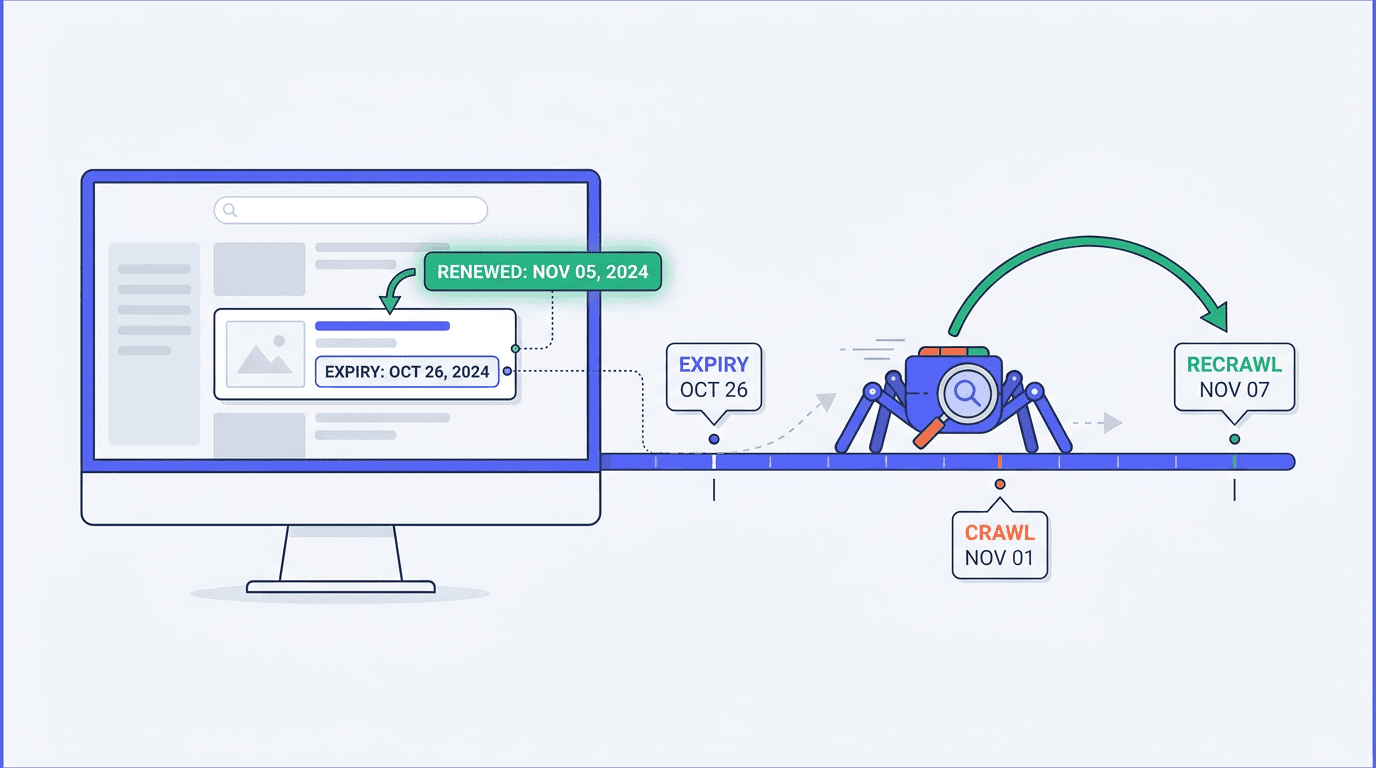
You renew a listing, extend its expiry, confirm it is live for users, and then watch it vanish from Google anyway. If you are using the unavailable_after meta tag to manage short-lived URLs, that failure mode is not a bug in your CMS. It is the recrawl dependency.
This tutorial covers how to implement expiry directives safely for expiring pages SEO patterns -- classifieds, jobs, events, tickets, travel availability, auctions, fast-rotating retail catalogues -- and how to choose a strategy that does not assume Google will come back in time.
How to use unavailable_after without burning renewed inventory:
- Step 1: Confirm what the directive actually does (index serving eligibility, not crawl budget).
- Step 2: Model the unavailable_after recrawl trap and decide if the directive fits your renewal behavior.
- Step 3: Implement expiry in HTTP headers (preferred) or HTML head, not client side JavaScript.
- Step 4: Pick the right expiration outcome per URL using a decision table (unavailable_after vs noindex vs 404/410 vs leave live).
- Step 5: Monitor outcomes in Google Search Console and server logs, then iterate.
Step 1: Understand the promise vs reality of unavailable_after
Google documents unavailable_after as a robots directive that tells Google not to show a page in search results after a specified date and time, supported since July 2007. You can send it via an HTML meta robots tag or the X-Robots-Tag HTTP header, and the date must be in a widely adopted format such as RFC 822, RFC 850, or ISO 8601 (Google Search Central robots meta documentation).
What it does not do is reduce crawling. It is a visibility instruction that affects index selection and serving. A crawler still has to fetch the URL to see the directive -- and if the directive changes, the crawler has to fetch again to learn that it changed. If your team reached for it to thin crawler load on high-turnover inventory indexing, you attached the hope to the wrong mechanism.
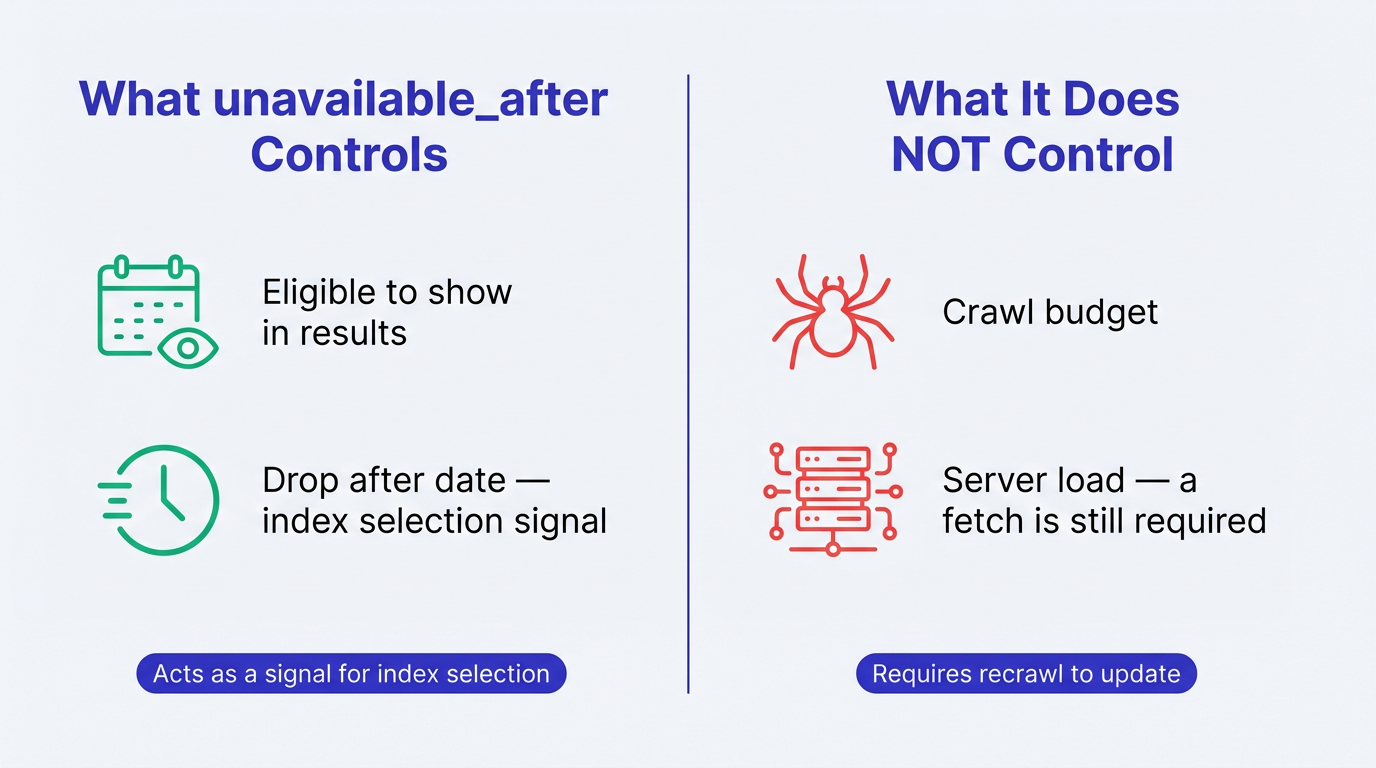
Note: Epistemic status: In late July 2026, SEO consultant Javier Lorente Murillo asked Google Search team about dynamically pushing unavailable_after forward for renewed listings. Gary Illyes replied with a first read and said he would need to check the fuller question. His gut feeling was that pushing the date forward is fine, but Google must crawl the page again to see the new date, and the directive has no implications beyond index selection where it acts as a signal that the page can be dropped (covered by Search Engine Journal, 2026). Treat this as current guidance, not a settled rule.
Step 2: Map the recrawl trap (and why renewed listings drop)
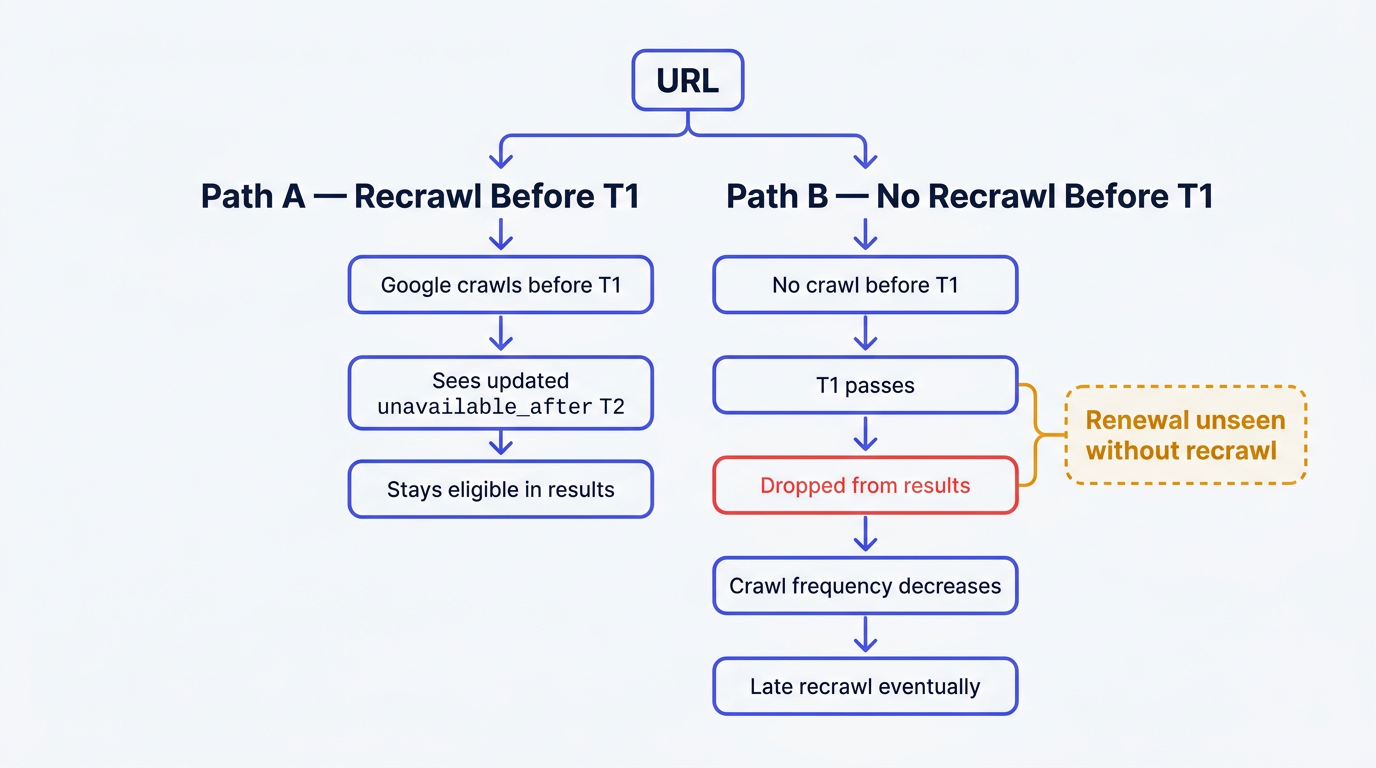
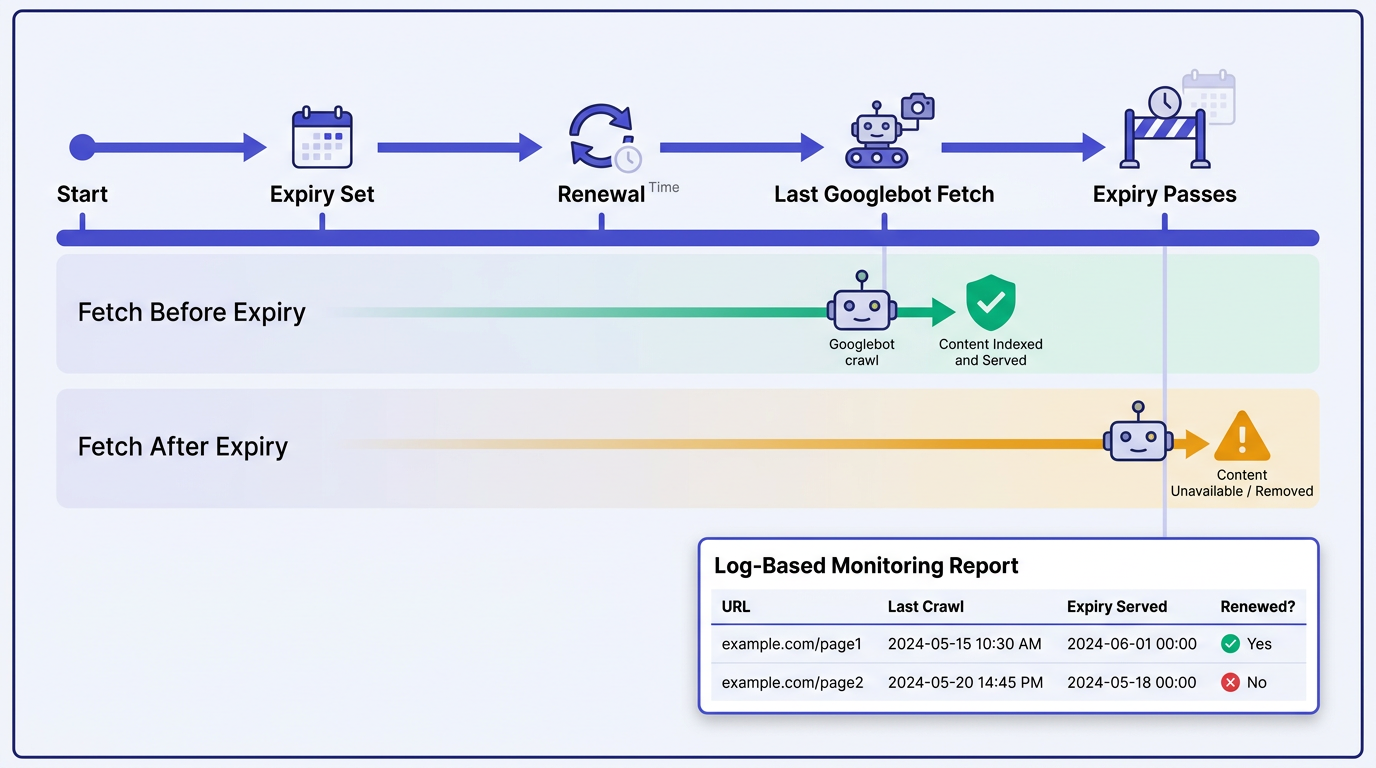
The risk is simple: you set unavailable_after to T1. A user renews at T0 < T1 and you push the date to T2. If Google does not recrawl between T0 and T1, it may continue acting on the old date because it has not discovered T2. Google has not documented the exact outcome for this renewal scenario, so treat temporary disappearance as a risk rather than a guaranteed result.
Google's documentation also warns that Googlebot crawls a URL considerably less often after the unavailable_after date passes. MDN echoes this expectation for crawlers, noting they significantly decrease crawl rate after the specified date (MDN on X-Robots-Tag). That compounds the problem: once you miss the window, you are less likely to get a timely recrawl that would discover the renewal.
Illyes also noted that Google rarely issues HEAD requests, so verifying a changed date still means downloading the content. That matters operationally: even if you hoped to use expiry directives to save bandwidth, the check is not a lightweight probe.
If this feels familiar, it is the same dependency you see with other index state changes: Google needs to revisit the URL (or cluster) to process the new signals. Canonical fixes are a common example, where clusters can take time to split because recrawls and reprocessing are required. Vizup covered that recrawl dependency in Canonical Re-Evaluation Time: Google Says Duplicate Clusters Can Take Two Weeks to Split.
Step 3: Implement expiry directives correctly
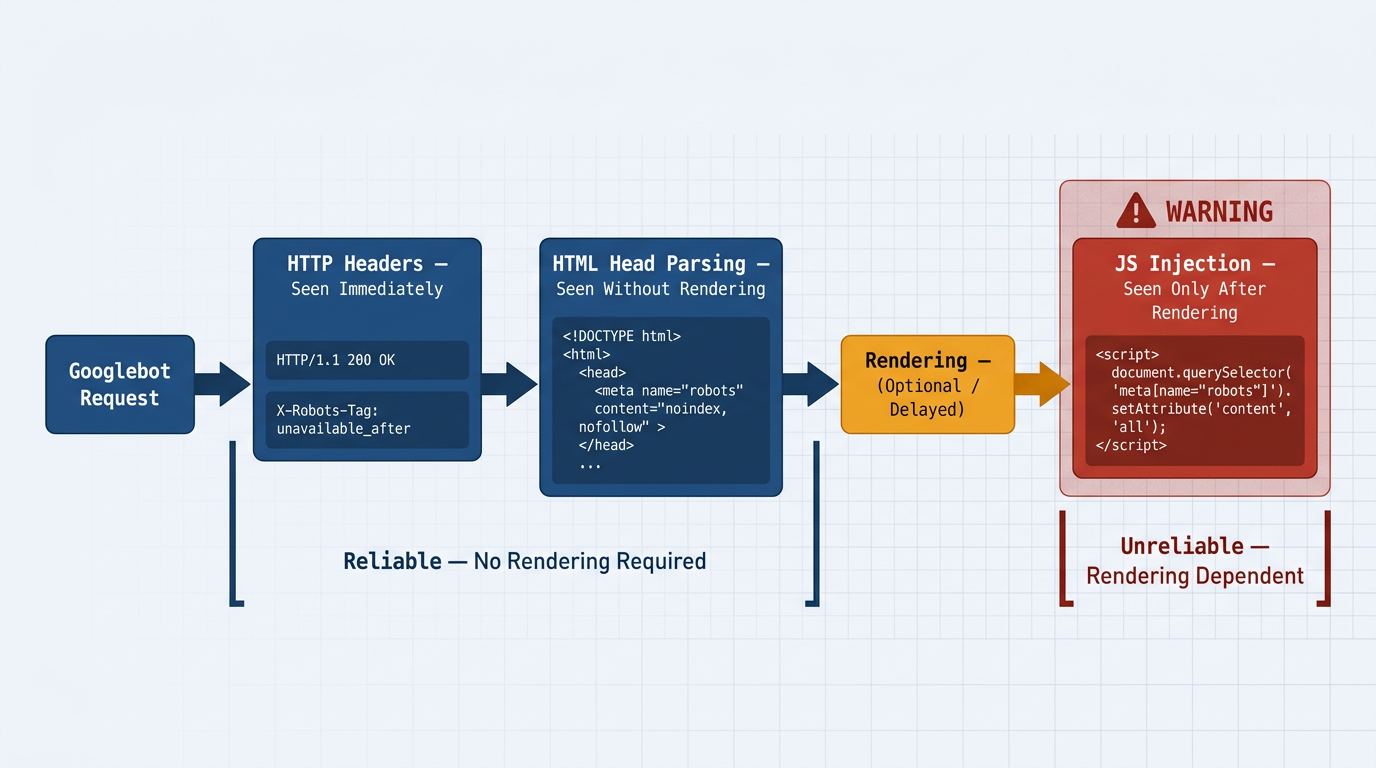
The goal is not to make Google crawl more. The goal is to ensure that when Google does crawl, it reliably receives the directive -- early and without rendering dependencies.
Method 1: X-Robots-Tag HTTP header
Use an HTTP response header when you want the directive applied consistently across templates, when you serve multiple content types, or when you do not fully control HTML head rendering. Google Search Central also requires it for non-HTML files like PDFs. This can be a reliable implementation method at scale because the directive is delivered in the HTTP response and does not depend on HTML parsing or rendering.
Example header value (send on 200 responses for URLs that truly expire):
- X-Robots-Tag: unavailable_after: 2026-09-01T00:00:00Z
If you are unsure whether your stack is emitting the header, validate it with a curl fetch in CI and in production. For large sites, pair this with log analysis so you can correlate when Googlebot actually fetched the URL against when the expiry was set.
Method 2: HTML meta robots tag (acceptable, but keep it server rendered)
If you use HTML, place the directive in the head so it is present in the initial response, not injected later. Example:
HTML head example:
- <meta name="robots" content="unavailable_after: 2026-09-01T00:00:00Z">
Warning: Do not set unavailable_after through client side JavaScript. If Google does not render the page on that crawl, the directive is never seen. Even when rendering happens, it adds latency and variability you do not want for expiring inventory.
Step 4: Choose the right expiration strategy (decision table for expiring listings)
This is where most implementations go wrong. unavailable_after works well when a URL truly expires and should not return to search. It is risky when the URL can be renewed, relisted, or extended unpredictably -- which is the core tension when managing SEO for expiring marketplace listings.
| Strategy | Best For (Use Case) | Pros | Cons | Google's likely response |
|---|---|---|---|---|
| unavailable_after | Known, hard expiry where the URL should stop appearing after a specific time (events that end, auctions that close, limited time offers that will not return). | Timed removal signal; can keep URL indexable until the date; works in HTML or header. | Unreliable for renewals because it needs a recrawl before the old date; after the date, Googlebot crawls less often; does not reduce crawl load. | Stops serving after the date once processed; may take time to reappear if renewed and the new date is only visible after a later crawl. |
| noindex | Pages that should remain accessible to users but should not be indexed (thin search pages, internal account pages, low value expired listings kept for UX). | Clear instruction to drop from index; reversible when removed (after recrawl). | Still requires crawling to process; if you block crawling, noindex cannot be seen; not time based. | Drops from results after processing; can return after recrawl if noindex is removed. |
| 404 or 410 | Content that is truly gone and should not be accessible (deleted listings, removed products, policy takedowns). | Strong removal signal; aligns with user reality; cleans up index over time. See The Essential Guide to HTTP Status Codes for SEO. | Bad UX if you actually have a replacement; can break internal links; requires good handling for relisted inventory. | Google removes these URLs over time; both 404 and 410 responses indicate that the content is unavailable. |
| Leave live (200) with an expired state | Evergreen URLs where the page remains useful after expiry (job filled but show similar jobs, event ended but show recap, product out of stock but expected back). | Keeps accumulated signals; avoids churn; can rank for informational intent; supports internal linking. | Needs careful content quality to avoid "dead" pages; can create index bloat if not curated. | Google continues to crawl based on signals; indexing depends on perceived value and uniqueness. |
| Pick the strategy based on whether the URL can come back and whether the page remains useful after expiry. |
For job boards, ticketing, travel availability, and fast-rotating retail, choose the response based on what remains useful: keep the URL live with a clear expired state and relevant alternatives when it still helps users, or return 404/410 when the content is permanently gone and has no suitable replacement. Reserve unavailable_after for hard expiries where you can commit to a clean stop and you are comfortable with renewed pages temporarily disappearing if the recrawl window is missed.
Step 5: Monitor impact and catch drops early
You need two feedback loops: Google Search Console for index state, and server logs for crawl timing. Start by tightening how you monitor your site in Google Search Console so you can spot sudden impressions drops that line up with expiry windows (Vizup on GSC monitoring).
What to watch in GSC for high-turnover inventory:
- Pages that flip from indexed to not indexed shortly after the unavailable_after timestamp.
- Renewed listings that stay excluded longer than expected after you push the date forward.
- Quality related exclusions such as "Crawled - currently not indexed" for expired state pages that are too thin or duplicative. Use Vizup's walkthrough on Crawled - currently not indexed to diagnose possible quality, duplication, and indexing issues.
In logs, build a simple report: URL, last Googlebot fetch time, current expiry timestamp served (header or HTML), and whether the listing was renewed before the previous expiry. This tells you whether unavailable_after recrawls are realistically happening within your renewal window. If they are not, you either need a different strategy or you need to rethink how renewed inventory is represented -- for example, stable evergreen URLs for entities with separate short-lived URLs for individual availability instances.
Common mistakes and troubleshooting
- Using unavailable_after to save crawl budget: It is not a crawl throttle. If crawl efficiency is the goal, focus on things that actually waste crawling, such as redirects in sitemaps. Vizup has a practical breakdown in Redirects in Sitemaps: Why They Waste Crawl Budget.
- Setting the directive via JavaScript: Rendering may not run on that crawl, so the expiry is invisible. Keep it in the HTTP header or HTML head.
- Pushing the date forward without a recrawl plan: If renewals are frequent and short, assume Google will miss some updates. Reserve the directive for hard expiries.
- Wrong date format or timezone ambiguity: Use ISO 8601 with an explicit timezone (for example Z). Google accepts several formats, but consistency reduces implementation bugs (Google Search Central robots meta documentation).
- Expecting HEAD checks: Per Illyes' note, Google rarely uses HEAD, so changes still require full fetches. Budget for that reality.
FAQ
Does unavailable_after affect crawl budget?
Not directly. It is a serving and index selection signal, and Google still has to crawl the URL to see it. If you are trying to reduce wasted crawling, fix structural waste sources rather than relying on expiry directives.
What is the difference between unavailable_after and noindex?
noindex is a direct instruction not to index a page. unavailable_after is a timed instruction that allows indexing until a specific date, then makes the page ineligible to show. Both require a recrawl to be processed, and both can only be reversed after Google fetches the updated response.
Can I use JavaScript to set the unavailable_after date?
It may be discovered if Google renders the page, but you should not rely on that implementation. Client-side injection depends on Google rendering the page on that particular crawl. If rendering does not happen, the directive is never seen. Put it in the HTML head or send it as an X-Robots-Tag header.
How quickly will Google remove a page after its unavailable_after date?
Removal timing depends on when Google processes the directive after the date has passed. Google also crawls the URL considerably less often after that date, so do not assume immediate cleanup -- or immediate recovery if the date is later extended.
Is it better to 404 an expired listing or use the unavailable_after tag?
404/410 is the right call when the listing is truly gone and should not be accessible. unavailable_after fits when the page is valid until a known cutoff and you want a timed drop from results. When listings can be renewed unpredictably, 404/410 or leaving the page live with an expired state usually avoids the renewed-listing disappearance problem.
Summary and next steps: de-indexing tool, not life support
The unavailable_after directive provides Google with a date after which the URL should no longer appear in search results. It can be risky for renewed listings because Google must recrawl the URL to discover an extended expiry date. That is the central risk for expiring pages SEO on short windows -- and it compounds after the date because crawl frequency drops.
Next steps: audit which URL types truly have hard expiries, move expiry directives into headers or HTML head, and build a log plus GSC monitor that flags renewed pages going dark. For a quick way to standardize checks across templates, use Vizup's prompt for an SEO content audit to generate a repeatable QA checklist for your engineering team.
