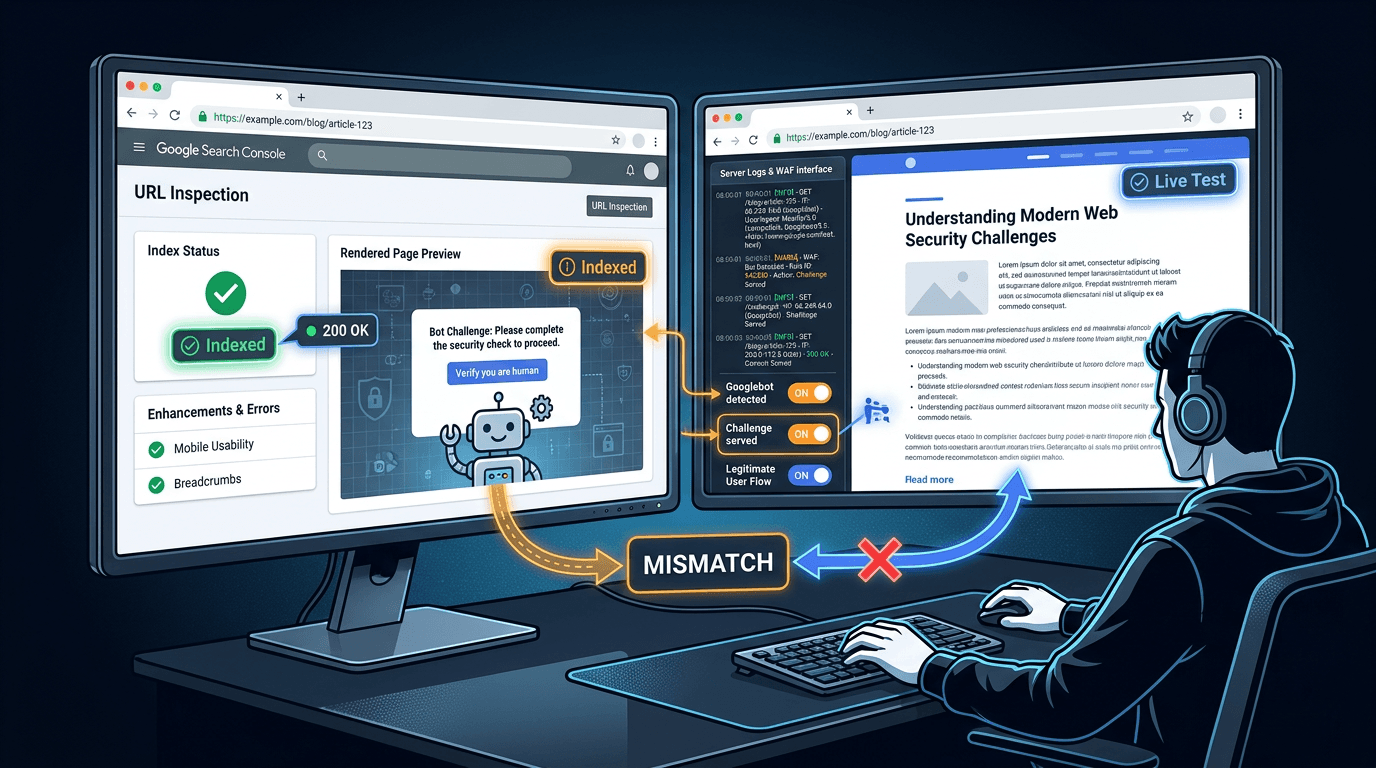
Chasing an unexplained ranking drop where everything looks normal in your browser? You might be staring at an are you a robot page indexing issue. The failure mode is brutal precisely because you cannot see it, your customers cannot see it, but Googlebot can.
Google Search Advocate John Mueller walked through this on Search Off the Record, and Search Engine Journal captured the mechanism cleanly: bot protection flags Googlebot, returns a challenge page with a 200 OK, and Google indexes the interstitial instead of the content (Search Engine Journal, 2026). Because the same challenge template appears across many sites, Google can treat those pages as duplicates and consolidate them to a single canonical URL that might not be yours.
How to diagnose and fix it (step summary):
- Use Google Search Console URL Inspection to view the crawled HTML and rendered screenshot for a dropped URL.
- Compare the indexed version to a live test to see whether the bot check is intermittent or persistent.
- Check URL Inspection canonicals to catch duplicate consolidation, including cases where Google picks another domain.
- Confirm in server logs that a challenge was served to verified Googlebot, not just a spoofed user-agent.
- Adjust WAF or bot protection rules to allowlist verified crawlers and ensure challenges never return 200 OK.
Prerequisites: What you need before you start
You can complete the workflow with: (1) access to Google Search Console for the property, (2) access to edge or origin logs (CDN, WAF, load balancer, and web server), and (3) admin access to your bot protection or WAF rules. If you do not have logs, get temporary access for at least 7 days so you can correlate crawl timestamps with challenge responses.
Warning: Do not rely on the user-agent string to identify Googlebot. Google documents the correct method in its guidance on verifying Googlebot. You will use that in Step 4.
Step 1: Confirm what Googlebot actually sees in URL Inspection
Start with a URL that lost impressions or is showing odd indexation statuses. In Google Search Console, open URL Inspection and inspect the exact URL (including parameters and trailing slash behavior). The goal is to catch direct evidence that the bot check screen indexed is not your real page.
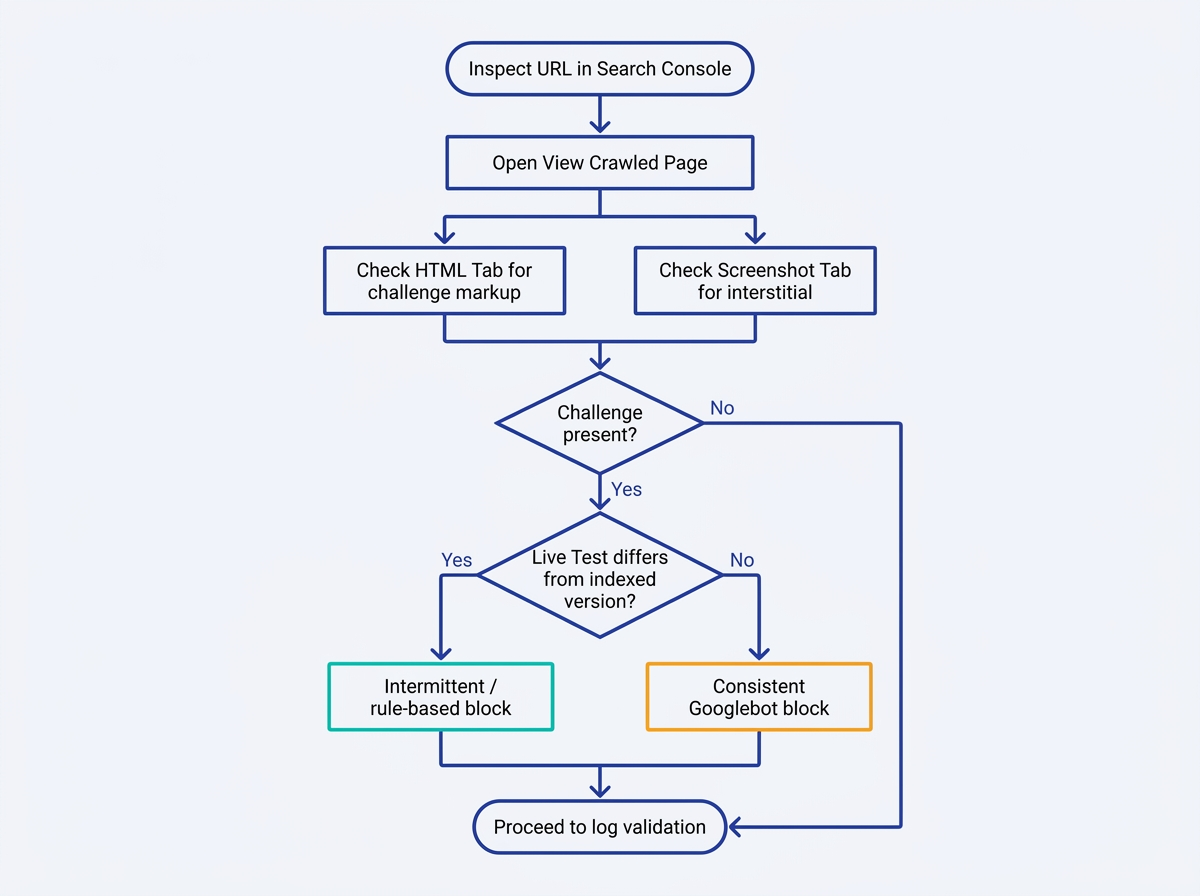
Action: Use View Crawled Page (HTML and Screenshot tabs)
In the inspection result, open "View crawled page" (wording varies by UI). Check both the HTML and Screenshot views. A CAPTCHA, a JavaScript challenge, or an "Are you a robot?" interstitial in either tab is direct proof that an interstitial served to Googlebot replaced your content at crawl time.
This is why the problem hides in plain sight. Normal visitors rarely trigger the check, so the site owner loads the page and assumes nothing is wrong technically. Mueller specifically called out that the crawler's request rate can be what trips the protection in the first place (Search Engine Journal, 2026).
Action: Run Test Live URL and compare to the indexed version
Run "Test Live URL" for the same page. If the live test renders your real content but the indexed view shows the challenge, the bot check is intermittent or rule-based, triggered by IP reputation, request patterns, or missing cookies, for example. If both views show the challenge, your bot protection SEO configuration is consistently blocking Googlebot.
If you suspect this is happening across many URLs, quantify the scope quickly by sampling sections of the site or using bulk methods to check your indexed pages before touching any rules. That way you do not "fix" one template while the rest of the site still serves challenges.
Step 2: Connect the symptom to indexing reports and quality signals
Once you have one confirmed example, look for the pattern across GSC reports. A challenge page returned with 200 OK is a soft block, not a crawl error, so it tends to surface as confusing indexation statuses rather than clean failures.
Where it tends to surface in Search Console:
- Page Indexing report: sudden spikes in "Duplicate" or "Alternate page" statuses.
- URL Inspection: "Page fetch" shows success, but the rendered output is a challenge.
- Coverage patterns: important URLs move from indexed to excluded without server errors.
One common downstream symptom is "Crawled, currently not indexed" when Google repeatedly fetches non-content or low-value interstitials. If that status is showing up, compare against your bot protection timeline and use the same diagnostic lens described in Fix 'Crawled, currently not indexed' in GSC.
Note: If Googlebot receives a challenge page while visitors receive the intended content, the result is a crawler, user content mismatch. This is not automatically cloaking, but it should be investigated immediately to ensure the difference is caused by an accidental security rule rather than an attempt to manipulate search visibility. Google explains intentional cloaking in its spam policies.
Step 3: Check for the canonical catastrophe (duplicate consolidation)
The nastiest variant is when Google decides your page is a duplicate of other sites because you are all returning the same generic challenge template. Search Engine Journal reported Mueller's warning that Google can index the "are you a bot" page and then treat it like any other duplicate set (Search Engine Journal, 2026). Google explains how it consolidates duplicates in its documentation on consolidating duplicate URLs.
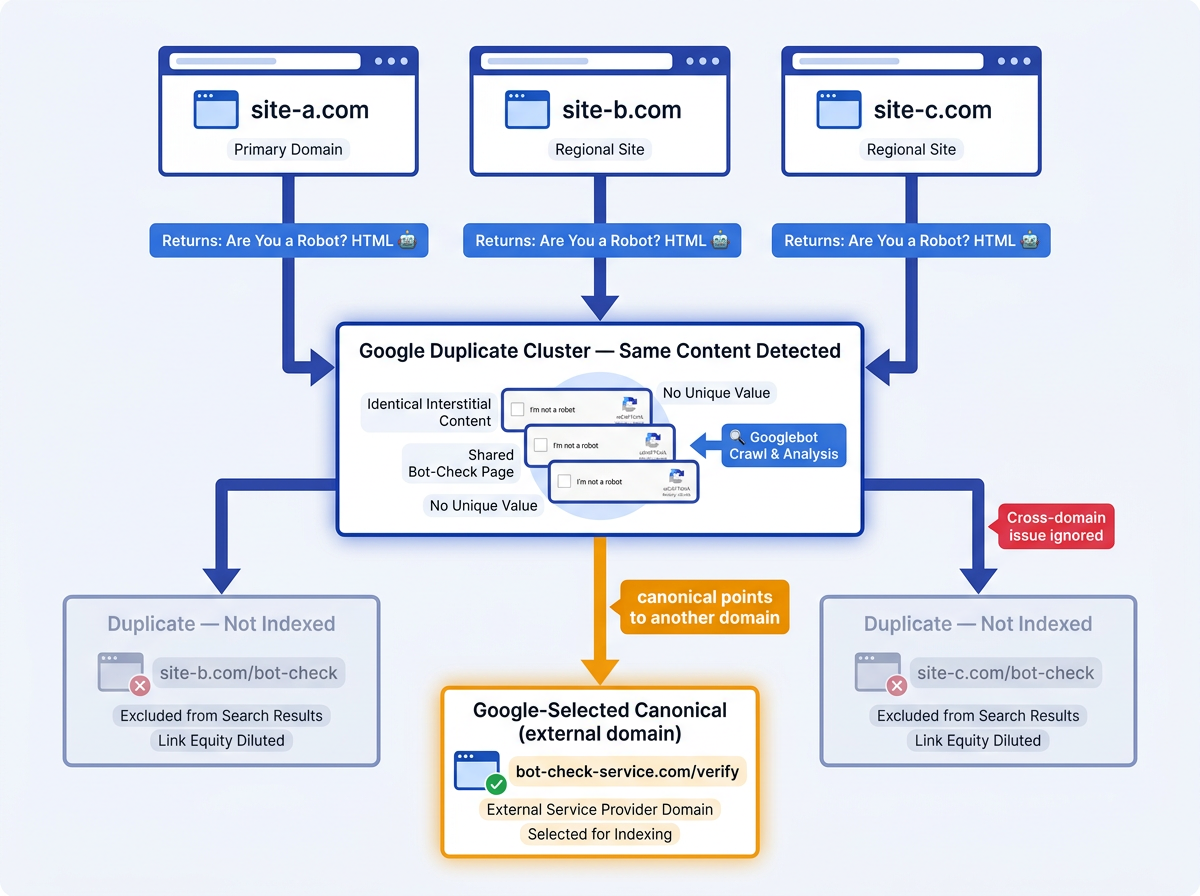
In URL Inspection, open the Indexing section and check "User-declared canonical" versus "Google-selected canonical". A duplicate canonical another site outcome (where the Google-selected canonical points to an unrelated domain) is an emergency. It means Google clustered your URL with other challenge pages and decided yours is not the representative.
Google describes this type of CDN response as a soft block. When multiple URLs return the same bot-verification page with a 200 OK status, Google may treat those responses as duplicates and select a different URL as the canonical version. Review Google's guidance on CDNs and crawling alongside its documentation on consolidating duplicate URLs.
Step 4: Prove it in logs, then verify Googlebot correctly
GSC tells you what Google rendered. Logs tell you why. Pull requests for affected URLs around the crawl times shown in URL Inspection. Look for responses that match your bot challenge endpoints, WAF actions, or interstitial paths. The target is a request where a challenge response was served to a verified Googlebot IP.
What to extract from logs for each suspicious request:
- Timestamp, URL, response status, and response size (challenge pages often have a consistent size).
- WAF action or rule ID (challenge, JS challenge, managed bot fight mode, rate limit).
- Client IP, user-agent, and any edge headers (for example, CDN bot score headers).
- Whether the response was cached at the edge, which can repeatedly serve the interstitial.
Then verify the crawler. Follow Google's process for verifying Googlebot: reverse DNS the IP, confirm the hostname ends in googlebot.com or google.com, then forward DNS it back to the same IP. That distinction separates a real block from a reaction to a spoofed user-agent.
Tip: If you are also hard-blocking crawlers in robots.txt, you can end up with overlapping symptoms. Run a quick audit using how to check if crawlers are blocked so you do not misattribute the cause.
Step 5: Fix bot protection rules so challenges never get indexed
Do not turn off security. Adjust it so verified search crawlers are not challenged, and so any unavoidable challenge response sends an unmistakable error signal to crawlers.
Remediation checklist that usually resolves the issue:
- Allowlist verified search crawlers in your WAF or bot management layer (Googlebot, Bingbot, and other major search agents).
- Reduce false positives by scoping bot rules to sensitive paths (login, checkout, API) instead of applying the strictest mode sitewide.
- Disable or relax rules that trigger on high request rate for known good bots, or add rate-limit exceptions for verified crawler IPs.
- Ensure the challenge page is not cacheable for crawler traffic, so one challenge does not poison the edge cache.
- If a challenge must be served, do not return 200 OK. Use a retryable status such as 503 so indexing systems treat it as temporary.
The HTTP status detail is not pedantic. Mueller's warning hinges on the fact that the bot check returns a normal response code, giving Google no error signal, so it indexes the interstitial (Search Engine Journal, 2026). Align the behavior with Google's expectations for accessible content and avoid patterns that look like intrusive interstitials, which Google recommends ensuring that crawlers can fully access and render page content so indexing systems receive the same content intended for users.
AI-era crawler defense is raising the risk of over-blocking because teams are building more granular bot categories with stricter defaults. If your organization uses Cloudflare-style segmentation, audit those policy buckets and confirm which classes are being challenged. Vizup's write-up on Cloudflare AI crawler categories is a useful checklist for where these settings commonly get misapplied.
Common mistakes and troubleshooting
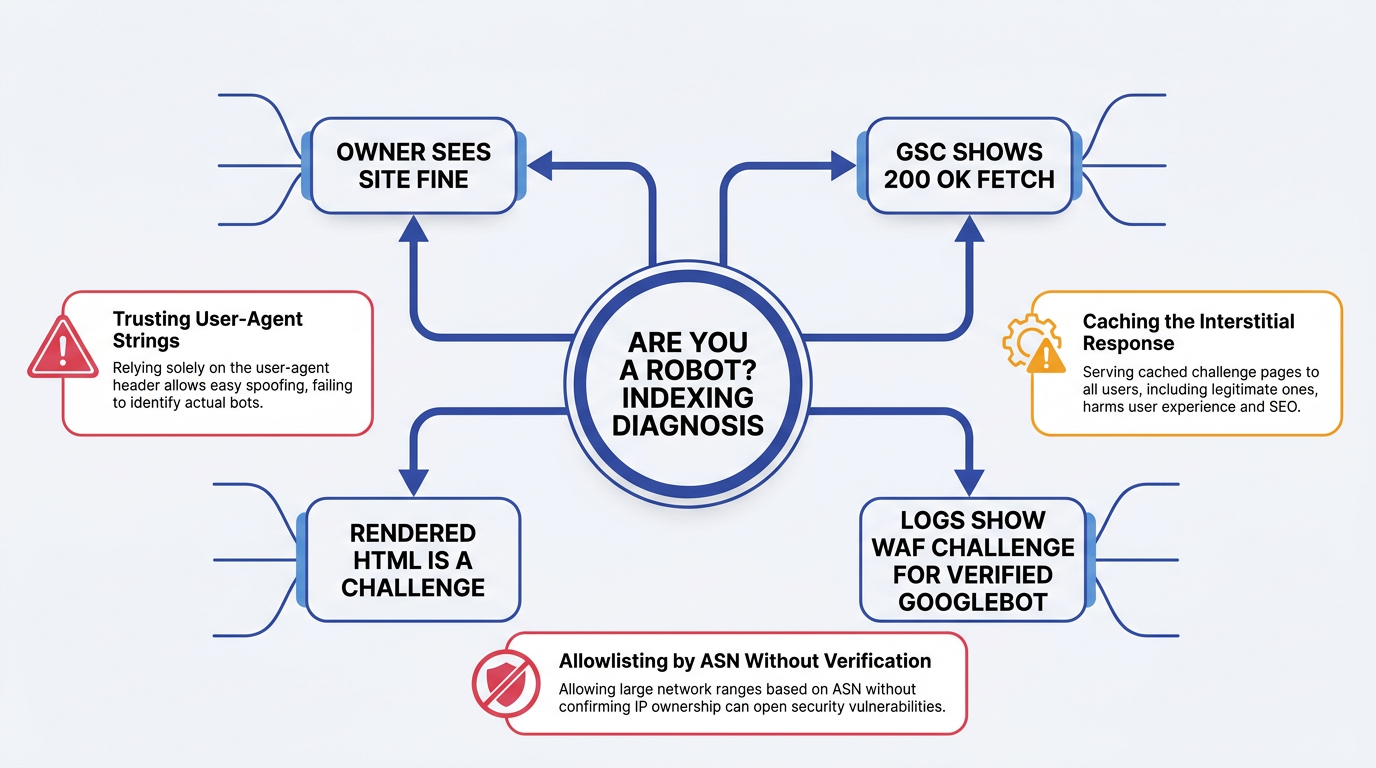
Pitfalls that waste the most time:
- Testing only in a browser: you never trigger the bot check, so you assume the page is fine.
- Allowlisting by user-agent string: attackers can spoof it, and you still might challenge real Googlebot.
- Forgetting edge caching: a single challenge response can be cached and served repeatedly to crawlers.
- Fixing robots.txt while ignoring WAF challenges: robots.txt blocks are explicit, interstitials are silent.
- Leaving the challenge on 200 OK: Google indexes the interstitial and you chase "quality" ghosts.
Summary and next steps (monitoring and prevention)
An are you a robot page indexing issue is a crawler visibility problem, not a browser UX problem. You resolve it by validating what Google rendered, confirming the challenge in logs for verified Googlebot, and correcting both bot protection rules and HTTP responses so the interstitial cannot become the indexed document.
For longer-term prevention, move toward stronger bot identity signals. Google is experimenting with infrastructure-level verification in Google's Web Bot Auth test, which points to where the web is heading. Until that is widespread, schedule recurring checks of indexation and crawler access, and treat every security rule change as an SEO change.
Preventing this problem requires more than a one-time WAF fix. Vizup's Organic Autopilot helps brands monitor, create, optimise, publish, and learn across Search, Social, Communities, AI Answer Engines, and Local Discovery. It combines AI agents, human experts, and live SEO, pSEO, AEO, and GEO tools to help teams identify indexing and crawler-access risks while improving organic visibility across modern discovery channels. Paid ads can be added when amplification is needed.
FAQ
What is an 'are you a robot' page indexing issue?
It happens when a security layer (WAF, bot manager, or CAPTCHA provider) returns a bot-check interstitial to Googlebot with a 200 OK status, so Google indexes the challenge page instead of your real content (Search Engine Journal, 2026).
How do I know if Google is indexing my CAPTCHA page?
Open URL Inspection in Search Console and check the rendered screenshot and HTML for the most recent indexed crawl. If you see a challenge template, you have a captcha page indexed. Run Test Live URL next to determine whether the problem is intermittent or consistent.
Why would Google choose another site's URL as the canonical for my page?
When many sites serve the same generic challenge template, Google clusters them as duplicates and picks one representative canonical URL. That produces a duplicate canonical another site outcome, where your URL is treated as a duplicate of an unrelated domain (Search Engine Journal, 2026).
Is it safe to allowlist all of Googlebot's IP addresses?
Allowlisting is safe only when it is based on verified Googlebot identity, not a claimed user-agent string. Follow Google's reverse DNS and forward DNS verification process in verifying Googlebot and build allow rules around those confirmed identity signals.
What HTTP status code should a bot challenge page return?
Never return 200 OK for a challenge, that signals to Google that the interstitial is the content. Use a retryable status like 503 (Service Unavailable) for any temporary challenge, and wherever possible bypass challenges entirely for verified search crawlers (Search Engine Journal, 2026).
