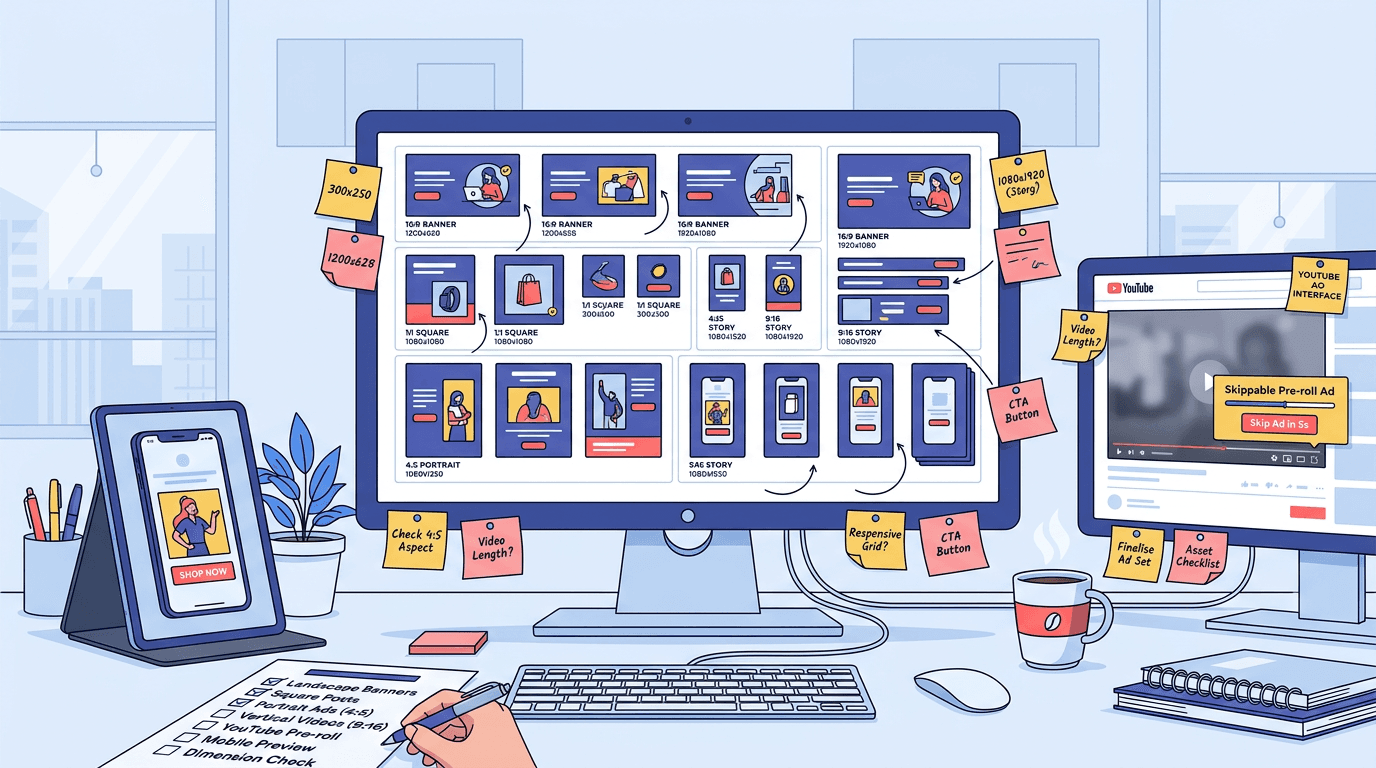
Google runs ads across Search, Display, YouTube, Gmail, Discover, Maps, and connected TV. Each surface comes with its own creative rules, and the specs change just often enough to trip up even organized teams. Get a single dimension wrong and your asset gets cropped into oblivion, rejected outright, or shown in a way that drags down click-through rate before you've spent your first dollar. This reference pulls the Google Ads specs you need for 2026 into one place, so you can stop pinballing between a half-dozen support pages.
If you're a PPC manager building asset groups, a designer exporting finals, an ecommerce operator launching Performance Max, or an agency producer coordinating deliverables across multiple clients, the breakdowns below focus on the numbers that matter: dimensions, file sizes, character limits, and the specific mistakes that trigger disapprovals. And if you're also generating Google Ads copy, keep this open while you write so your text and creative don't fight each other once everything hits the platform.
A Quick Primer: How Google Ads Specs Actually Work
Google doesn't want you building one ad per placement anymore. You hand over assets (images, videos, headlines, descriptions, logos), and Google assembles combinations across its inventory. That same image can show up as a wide unit on a news site, a square card in Gmail, and a vertical placement in Discover. Your job is to make sure the asset still looks intentional in all of those contexts.
That's why creative specs matter more now than they did back when you uploaded a single static banner and called it a day. "Required" means the campaign won't run without it. "Recommended" means Google will accept the setup, but delivery and performance drop because the system can't compete for large chunks of inventory. In practice, treat recommended as required.
Note: Tip: If you already understand responsive asset assembly and just need the numbers, skip ahead to the Master Specs Table below.
Master Google Ads Specs Table: Key Formats at a Glance
This is the table worth bookmarking. It rolls up the major campaign types and lists asset type, dimensions, file format, max file size, character limits, and whether Google treats the asset as required or merely recommended. Two file-size ceilings show up constantly: 150 KB for static uploaded display ads, and 5,120 KB (5 MB) for Responsive Display, Demand Gen, and Performance Max image assets, according to Google responsive display ad specs. The dimension pairs below cover the bulk of the inventory you'll actually buy.The dimension pairs below cover the core inventory most advertisers need, but always confirm final specs inside Google Ads before upload.
| Campaign Type | Asset Type | Dimensions / Ratio | Min Resolution | Max File Size | File Formats | Char Limits | Status |
|---|---|---|---|---|---|---|---|
| Responsive Display | Landscape image | 1.91:1 | 600×314 | 5,120 KB | JPG, PNG | , | Required |
| Responsive Display | Square image | 1:1 | 300×300 | 5,120 KB | JPG, PNG | , | Required |
| Responsive Display | Landscape logo | 4:1 | 512×128 | 5,120 KB | JPG, PNG | , | Recommended |
| Responsive Display | Square logo | 1:1 | 128×128 | 5,120 KB | JPG, PNG | , | Required |
| Responsive Display | Headline | , | , | , | Text | 30 chars (×5) | Required |
| Responsive Display | Long headline | , | , | , | Text | 90 chars | Required |
| Responsive Display | Description | , | , | , | Text | 90 chars (×5) | Required |
| Demand Gen | Landscape image | 1.91:1 | 600×314 | 5,120 KB | JPG, PNG | , | Recommended |
| Demand Gen | Square image | 1:1 | 300×300 | 5,120 KB | JPG, PNG | , | Recommended |
| Demand Gen | Portrait image | 4:5 | 480×600 | 5,120 KB | JPG, PNG | , | Recommended |
| Demand Gen | Carousel card | 1:1 or 1.91:1 | 300×300 / 600×314 | 5,120 KB | JPG, PNG | 40 chars headline | Required (2–10 cards) |
| Demand Gen | Video (horizontal) | 16:9 | 1920×1080 for CTV | Per YouTube upload | MP4, MOV | , | Recommended |
| Demand Gen | Video (vertical) | 9:16 | 1080×1920 | Per YouTube upload | MP4, MOV | , | Recommended |
| Performance Max | Landscape image | 1.91:1 | 600×314 | 5,120 KB | JPG, PNG | , | Required (×3 rec.) |
| Performance Max | Square image | 1:1 | 300×300 | 5,120 KB | JPG, PNG | , | Required (×3 rec.) |
| Performance Max | Portrait image | 4:5 | 480×600 | 5,120 KB | JPG, PNG | , | Recommended (×1) |
| Performance Max | Logo (square) | 1:1 | 128×128 | 5,120 KB | JPG, PNG | , | Required |
| Performance Max | Logo (landscape) | 4:1 | 512×128 | 5,120 KB | JPG, PNG | , | Recommended |
| Performance Max | Headline | , | , | , | Text | 30 chars (×15) | Required |
| Performance Max | Long headline | , | , | , | Text | 90 chars (×5) | Required |
| Performance Max | Description | , | , | , | Text | 90 chars (×4) | Required |
| Performance Max | Short description | , | , | , | Text | 60 chars (×1) | Required |
| Performance Max | Video | 16:9, 1:1, or 9:16 | , | Per YouTube upload | MP4, MOV | Min 10 sec | Recommended |
| YouTube | Skippable in-stream | 16:9 or 1:1 | , | 128 GB (YouTube) | MP4, MOV | No max length | Required |
| YouTube | Non-skippable | 16:9 | , | 128 GB | MP4, MOV | 15 sec exactly | Required |
| YouTube | Bumper | 16:9 | , | 128 GB | MP4, MOV | 6 sec max | Required |
| YouTube | Shorts | 9:16 | , | 128 GB | MP4, MOV | 60 sec max | Recommended |
| YouTube | Companion banner | 300×60 px | 300×60 | 150 KB | JPG, PNG, GIF | , | Optional |
| Search (RSA) | Headline | , | , | , | Text | 30 chars (×15) | Required |
| Search (RSA) | Description | , | , | , | Text | 90 chars (×4) | Required |
| Search | Image extension | 1.91:1 | 600×314 | 5,120 KB | JPG, PNG | , | Optional |
| Search | Logo (verified) | 1:1 | 128×128 | 5,120 KB | JPG, PNG | , | Optional |
| Specs based on Google Ads documentation as of 2026. Recommended minimums for Performance Max per Google for Developers asset requirements documentation. |
Responsive Display Ads: Image, Logo, and Text Specs
Responsive display is the format everyone cites and still manages to mess up. Per Google responsive display ad best practices, you should supply at least five images, five short headlines, and five descriptions. The full asset set includes landscape images (1.91:1), square images (1:1), landscape logos (4:1), square logos (1:1), up to five headlines (30 characters each), one long headline (90 characters), and up to five descriptions (90 characters each). Those character limits are unforgiving, which is why headline writing here is closer to editing than brainstorming.
Image Requirements and Safe Zones
Responsive display images have minimums (600×314 for landscape and 300×300 for square), but minimum is the fast track to soft-looking creative. Upload at the recommended sizes instead: 1200×628 and 1200×1200. Max file size is 5,120 KB, with JPG and PNG accepted; static GIF is allowed, but not animated frames. The detail that causes the most pain in production is cropping: keep anything that matters (product, text, CTA) inside the center 80% of the image because Google trims edges aggressively in certain placements. If overlaid text takes up more than 20% of the image, or you bake the logo into the image instead of uploading it as a logo asset, you're asking for a rejection.
Logo Specs and the Mistakes Designers Keep Making
Square logo: 1:1 ratio, minimum 128×128, recommended 1200×1200. Landscape logo: 4:1 ratio, minimum 512×128, recommended 1200×300. The mistake that shows up over and over is padding. Google applies its own spacing, so a logo file with generous whitespace ends up rendering comically small. Crop to the mark. Transparent backgrounds are allowed (and usually the right move), but check how the logo reads on both light and dark backgrounds before you ship it.
A quick note on Google display ad specs: uploaded display ads (static images or HTML5) still sit alongside responsive formats. Use them when you need pixel-perfect control for a specific placement. The tradeoff is you give up the automated assembly and the reach that comes with it.
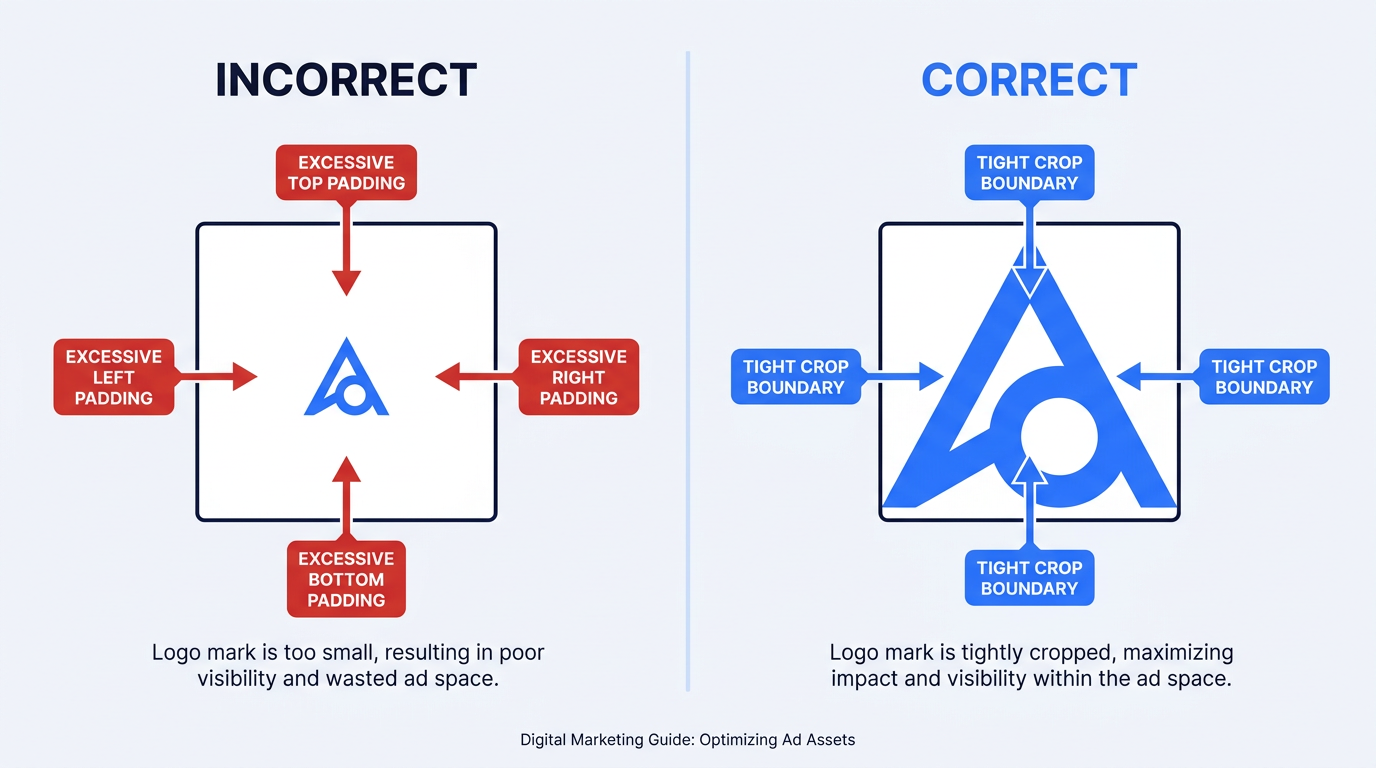
Excessive whitespace in logo files causes small rendering — always crop tightly to the mark before uploading.
Demand Gen Specs: Images, Carousels, and Video
Demand Gen is where specs get slippery because the campaign spans YouTube Home, Shorts, in-stream, Discover, and Gmail. Those surfaces don't render assets the same way, which is why Demand Gen needs more variants than standard Display. For images, plan on delivering the core ratios for broad placement coverage: landscape (1.91:1, 1200×628), square (1:1, 1200×1200), and portrait assets where supported, such as 4:5 or vertical formats for additional inventory. According to Google Demand Gen asset specifications, image files cap at 5MB and you're limited to JPG, PNG, and non-animated GIF formats.
Carousel ads take 2 to 10 cards in either square (1:1) or landscape (1.91:1). Each card has its own 40-character headline, URL, and an optional CTA. Video is similar: bring horizontal (16:9), square (1:1), and vertical (9:16) so Google isn't forced to improvise. Minimum duration is 10 seconds for in-feed placements and 6 seconds for bumper-style delivery. CTV inventory is stricter: it serves horizontal 16:9 only, with a minimum resolution of 1920×1080. Google also supports QR code overlays on CTV ads, but the QR has to resolve to the same final URL as the ad. And don't ignore UI overlays: keep text and logos inside the center 90% horizontally and 80% vertically so playback controls and badges don't clip your message.
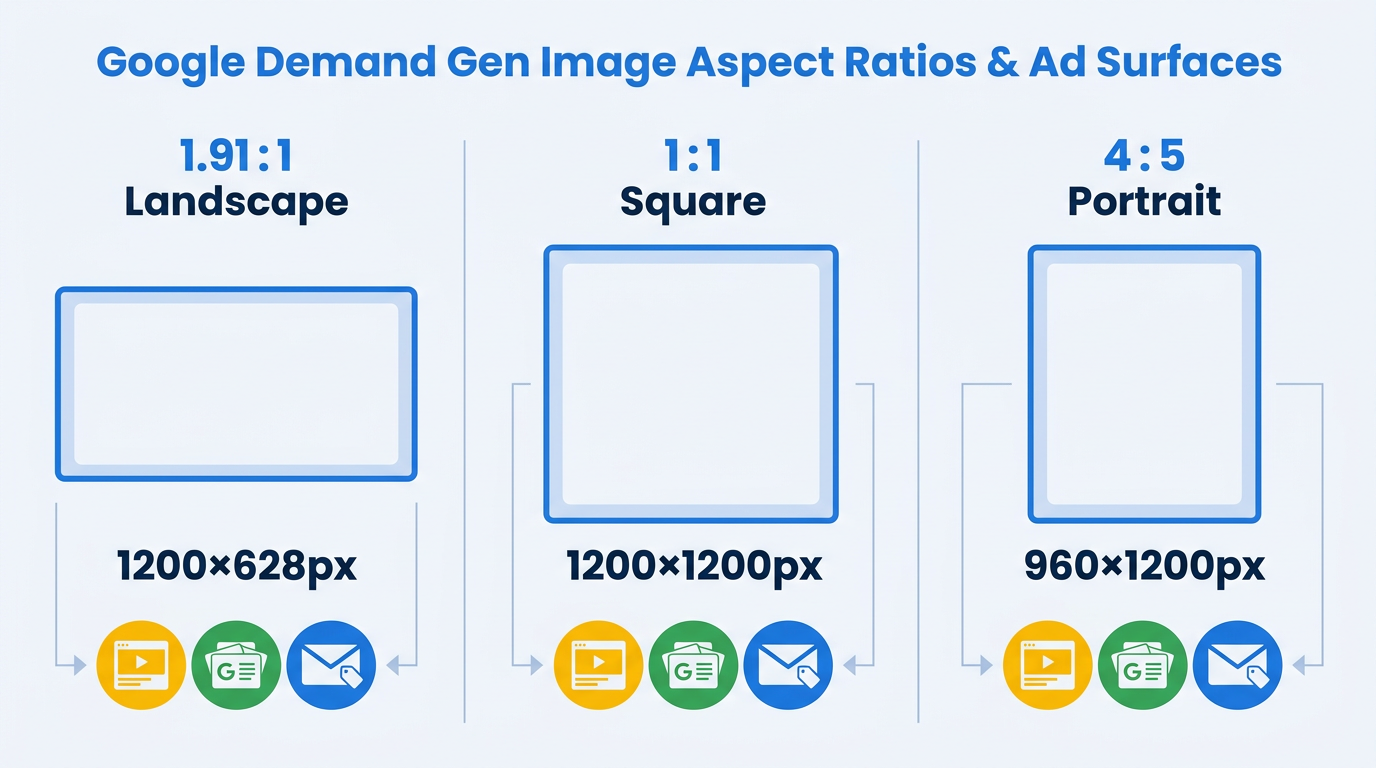
Demand Gen campaigns require landscape, square, and portrait images to cover all Google placements.
Performance Max Asset Specs: The Everything Campaign
Performance Max is a spec mashup. It borrows requirements from Display, Demand Gen, YouTube, and Search because it serves across all of them at once. Per asset group, the list of allowed assets includes up to 20 images, 5 logos, 5 videos (or Google can generate them), 15 headlines (30 characters), 5 long headlines (90 characters), and 5 descriptions (90 characters), plus your business name and final URL. For Performance Max campaigns, the key image orientations are landscape (1.91:1), square (1:1), and portrait (4:5), according to Google's official Google Performance Max asset requirements.
Note: Warning: The constraint most teams miss: Google recommends at least 3 landscape images, 3 square images, 1 portrait image, 1 landscape logo, 1 square logo, and 1 video (minimum 10 seconds). Below that threshold, your asset group won't reach all available inventory, and performance will suffer noticeably.
An opinionated aside: PMax's auto-generated videos are mediocre. Google turns your images into a slideshow with stock transitions and generic music, which rarely matches the product or the brand. Even a straightforward 15-second product walkthrough shot on a phone tends to beat the auto-generated version. Upload your own video. If you need help writing effective YouTube scripts, focus on a hook in the first three seconds and one clear CTA.
YouTube Ad Specs: Format-by-Format Breakdown
YouTube specs depend heavily on the format you're buying. The baseline technical requirements are consistent: MP4 or MOV container, H.264 codec, AAC audio, and a practical upload cap of 128 GB via YouTube. After that, everything that affects production lives in the details: length, aspect ratio, and whether a companion asset is involved.
Skippable, Non-Skippable, and Bumper Ads
- Skippable in-stream: No maximum length is enforced, but keeping videos under 3 minutes is recommended. The ad supports 16:9 and 1:1 aspect ratios. A skip button appears at 5 seconds, making a strong early hook critical.
- Non-skippable in-stream: Standard Google Ads non-skippable formats are typically 7–15 seconds, while some connected TV inventory supports longer non-skippable formats. Use these when you need viewers to receive the full message before the video continues.
- Bumper ads: A maximum of 6 seconds and non-skippable, these ads are ideal for raising brand awareness and reinforcing other ad messages.
- Companion banner (desktop only): A 300×60 pixel banner that appears next to your ad on desktop. It can be auto-generated from your channel's artwork or you can upload a custom image. The file size must not exceed 150 KB.
Shorts, In-Feed, and Masthead Ads
Shorts ads run as vertical 9:16 video with a 60-second maximum. They pull from videos you've already uploaded to YouTube, so you don't need a separate upload, but you do need vertical creative if you want the placement to look native. In-feed video ads are closer to a click-to-play unit: a thumbnail (auto-selected or custom), a headline (100 characters), and two description lines, with playback starting on click. For thumbnails, YouTube calls for 1280×720 minimum, 2 MB max, in JPG/PNG/GIF/BMP. Masthead is a reserved buy (16:9 autoplay, up to 30 seconds, typically through a Google rep). Most teams will never touch masthead, but it's useful context for big launches. And yes, discovery behavior matters too: how AI is changing YouTube search affects where your videos show up around the platform.
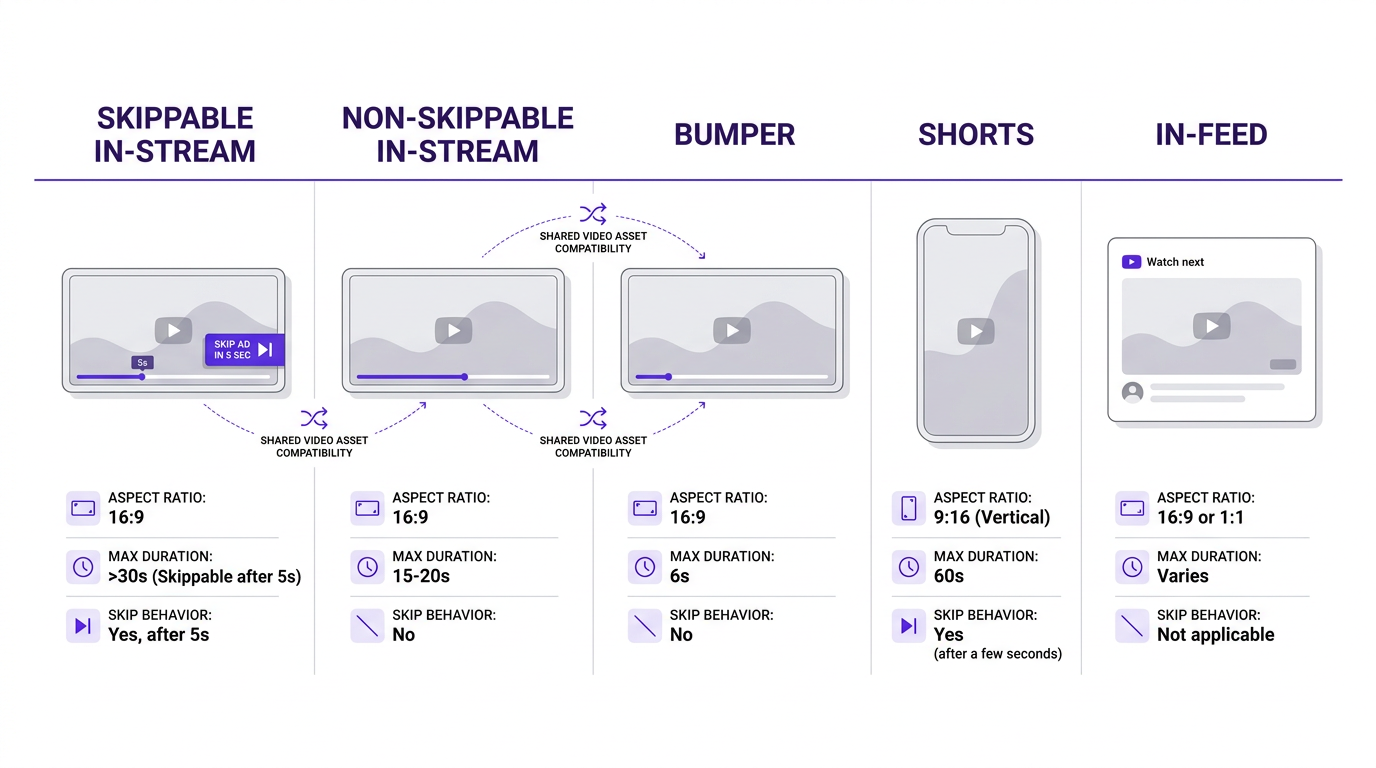
Five YouTube ad formats side by side, with key specs and shared asset compatibility mapped visually.
Search Ads: Text Specs and the Assets You're Probably Forgetting
For Responsive Search Ads, the limits are straightforward: up to 15 headlines (30 characters each) and up to 4 descriptions (90 characters each). On any given impression, Google can show up to 3 headlines and 2 descriptions. That's the part everyone remembers. The misses tend to be the supporting assets: image extensions (1.91:1, minimum 600×314), sitelink extensions (25-character link text plus two 35-character description lines), callout extensions (25 characters), and structured snippets. Image extensions on Search are still underused in many accounts, even though they can improve ad visibility when the creative is relevant. They require manual opt-in and review. Google also surfaces business name and logo for verified advertisers; the logo is square 1:1, minimum 128×128, with a transparent or white background.
The Designer's Pre-Flight Checklist
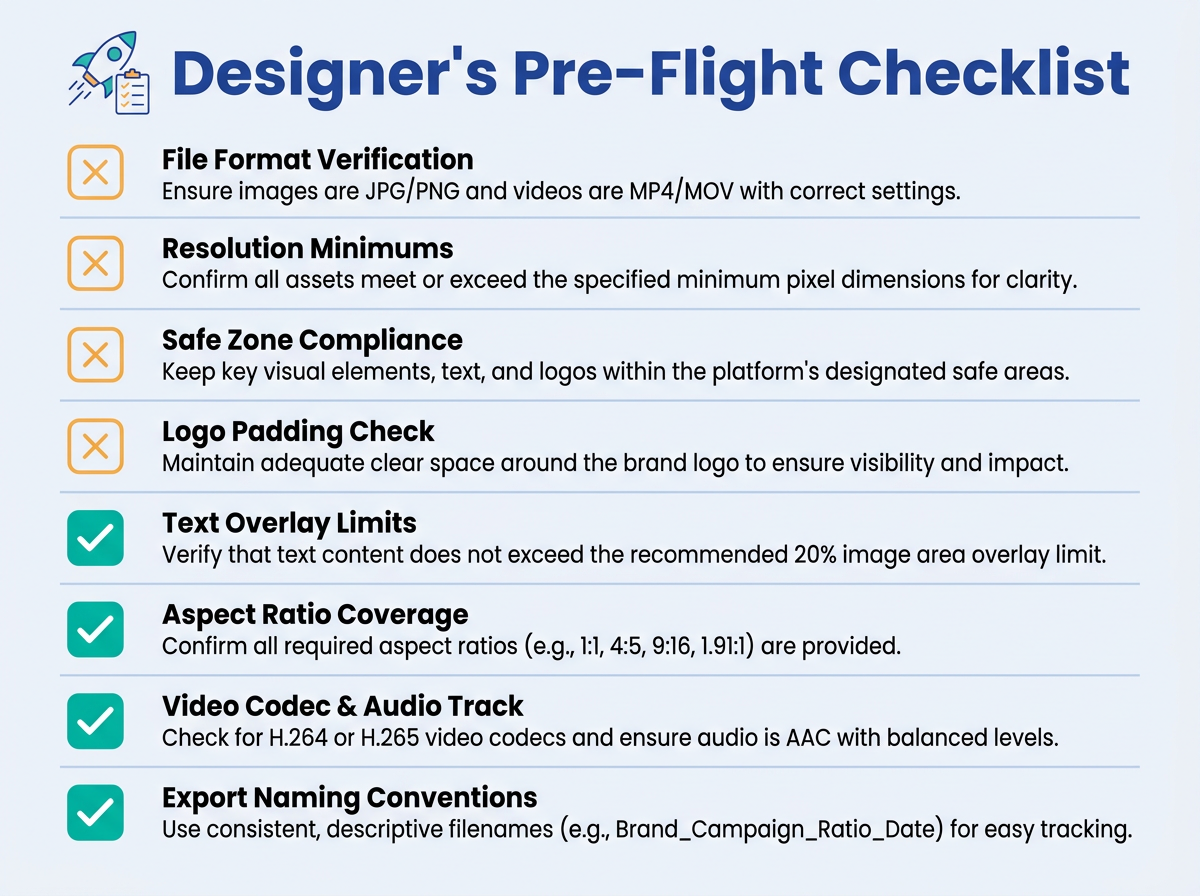
Eight essential checks every designer should complete before handing off Google Ads assets.
Before handing off assets to the media buyer, verify every item:
- File format: JPG or PNG for images, MP4 or MOV for video (H.264 codec, AAC audio)
- Resolution: exported at recommended sizes (1200×628 landscape, 1200×1200 square, 960×1200 portrait), not just the minimum thresholds
- Safe zones: critical content stays inside the center 80% of images, and the center 90%×80% of video frames
- Logo padding: cropped tight to the logo mark with no extra whitespace
- Text overlay: under 20% of the image area, and no baked-in CTA buttons
- Aspect ratio coverage: landscape + square + portrait delivered for every campaign type that supports all three
- Video: includes an audio track (even if silent) and meets minimum duration (10 seconds for most formats, 6 seconds for bumpers)
- File size: under 5,120 KB for responsive/PMax/Demand Gen images, under 150 KB for static uploaded display ads
The PPC Manager's QA Checklist
This is the post-upload version of QA: the checks that matter after assets are inside Google Ads, not sitting in a folder waiting for launch.
- Asset group completeness: Does every PMax asset group have at least 3 landscape images, 3 square images, 1 portrait image, 1 square logo, 1 landscape logo, and 1 uploaded video?
- Ad strength indicator: Aim for "Excellent," but don't treat it as gospel. "Excellent" means you've provided enough inputs for optimization, not that the ads will perform.
- Character limit compliance: Spot-check headlines (30 chars) and descriptions (90 chars). Truncation can happen without a warning.
- Final URL consistency: Keep assets pointed at the same final URL unless you're intentionally using URL expansion.
- Mobile preview check: Preview responsive display ads across at least 5 different renderings. Google's preview is a sample, not a full inventory simulator.
What Gets Your Ads Rejected: Common Creative Spec Mistakes
These are the creative-spec violations that show up most often in rejections, based on recurring patterns across accounts:
- Text-heavy images with more than 20% text overlay
- Misleading CTA buttons baked into images ("Click Here" or "Download Now" rendered as a button graphic)
- Low-resolution uploads that fall below minimum pixel thresholds
- Logos with excessive whitespace padding
- Videos without an audio track (even if the ad is silent, include a silent audio track)
- Images with decorative borders or frames
The one that catches teams off guard: a landscape image that technically hits 1.91:1, but includes black bars or letterboxing. Google's review system flags that as "non-functional space" and rejects it. One ecommerce team had 40% of their PMax image assets disapproved because their product photos carried thin white borders from a studio template. Removing the 2-pixel border cleared every rejection. If you're juggling multiple platforms, our guides to Meta ad specs, X ad specs, Reddit ad specs, TikTok ad specs, and LinkedIn ad specs walk through similar creative QA issues for other major networks.
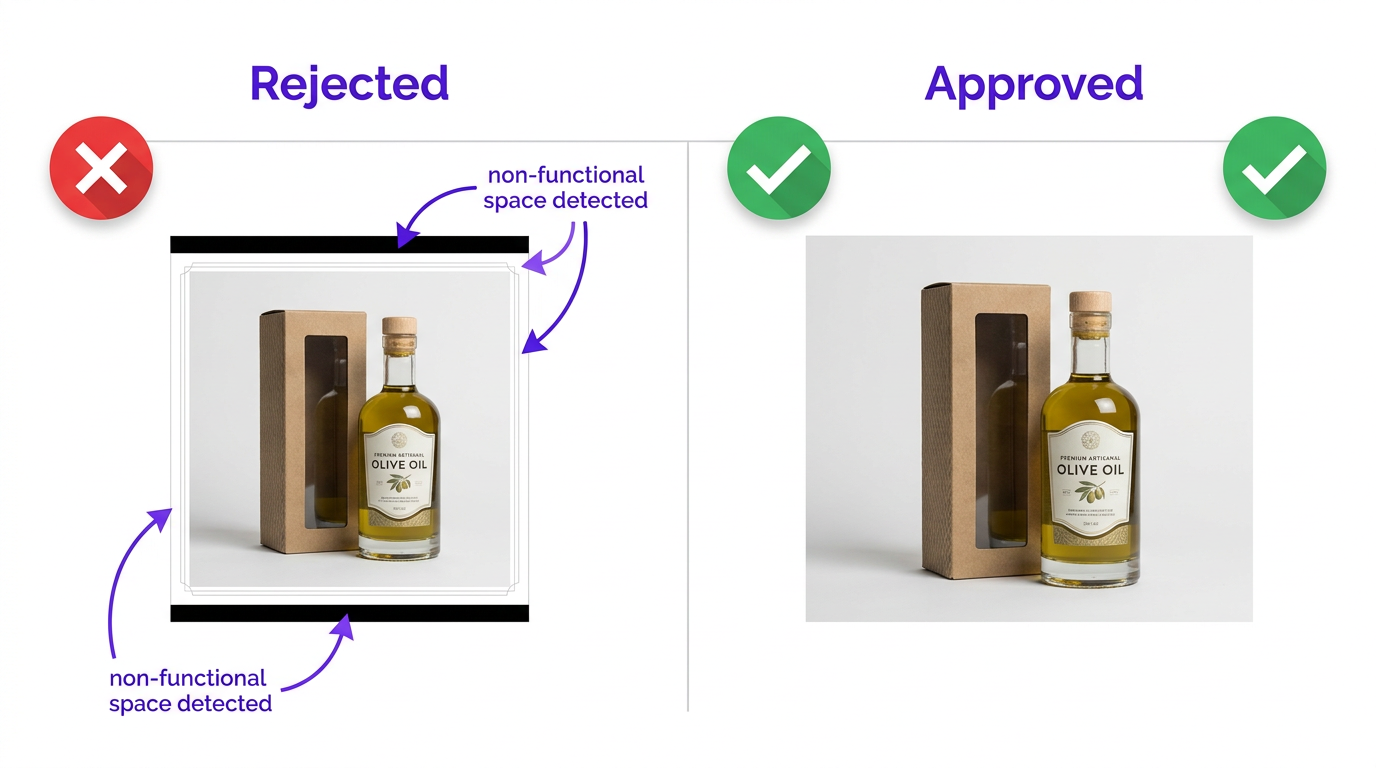
A 2-pixel studio border was enough to trigger automated rejections across an entire PMax asset group.
Advanced: Edge Cases and Expert-Level Considerations
Animated GIFs work for uploaded display ads (max 30 seconds, 150 KB), but Google does not accept them as responsive display image assets. HTML5 ads are still supported through Google Web Designer for uploaded display campaigns, with a 150 KB max initial load and separate uploads required per size (no responsive assembly). For Demand Gen product feed ads, animated images (GIF and APNG) are supported, capped at 5 MB, in square format only.
Video repurposing needs a quick reality check. If you're taking a 16:9 hero video and trying to use it for Shorts (9:16), don't rely on a center crop. That approach usually chops off the subject or the product. Reframe the shot, or shoot vertical from the start. For 2026 coverage, the ratios worth standardizing across your creative pipeline are 1.91:1, 1:1, 4:5, 16:9, and 9:16. When you have clean assets in all five, you can serve into essentially every placement Google offers.
Turn Your Ad Specs Content Into Organic Visibility
Most teams treat specs knowledge as pure operations: something you reference, use, and forget. That's a missed opportunity. The same details you need to ship paid creative can also power a high-intent content asset that earns organic traffic from marketers searching for exact dimensions and limits. When teams publish and maintain specs references (internal wikis, blog posts, resource hubs), the traffic tends to compound because the demand is steady and the queries are specific.
The catch is visibility. Plenty of teams publish solid operational content and never verify whether it shows up in search results or in AI-generated answers. Vizup helps teams monitor how published content performs across Google Search and AI answer engines. If you're putting out a specs guide, a resource hub, or landing pages alongside your campaigns, Vizup's digital presence monitoring and answer engine monitoring tools let you track indexing, rankings, and whether your content is appearing in AI-generated responses. That closes the loop between publishing and being findable.
FAQ: Google Ads Specs Questions We Hear Constantly
What is the maximum file size for Google Ads images in 2026?
For Responsive Display Ads, Demand Gen, and Performance Max, the image cap is 5,120 KB (5 MB) per file. Static uploaded display ads (non-responsive) have a much tighter limit: 150 KB. Export as high-quality as you can while staying under the cap, since Google will still compress the asset on delivery. Across campaign types, stick to JPG or PNG.
Do I need to upload separate video assets for YouTube Shorts ads?
No. Shorts ads can pull from videos you've already uploaded to YouTube. That said, you should plan on dedicated vertical 9:16 creative. If all you have is horizontal 16:9, Google can try to serve it, but the result usually looks like a compromise. Shoot or properly reframe a vertical version instead of gambling on auto-cropping.
What aspect ratios should I provide for Performance Max campaigns?
Start with the basics: landscape (1.91:1), square (1:1), and portrait (4:5) images. Google recommends at least 3 landscape, 3 square, and 1 portrait image per asset group. For video, cover 16:9 (horizontal), 1:1 (square), and 9:16 (vertical). For logos, include both 1:1 (square) and 4:1 (landscape). Skip any of these and you limit which surfaces your ads can enter.
Why do my Google Ads images keep getting disapproved?
The repeat offenders are consistent: text overlays above 20% of the image, CTA buttons baked into the artwork, decorative borders or letterboxing (flagged as non-functional space), logos with too much padding, and images that miss minimum resolution thresholds. Use safe zones, remove borders, and upload logos as logos (not embedded inside image creatives).
Are Google Ads specs the same for Demand Gen and Display campaigns?
They overlap, but they are not the same spec sheet. Both accept landscape (1.91:1) and square (1:1) images up to 5,120 KB. Demand Gen also supports portrait (4:5) images and runs across surfaces like Discover, YouTube Home, and Gmail. Demand Gen video also brings CTV constraints (1920×1080 minimum for connected TV). Display campaigns, on the other hand, support HTML5 and animated GIF uploads, which Demand Gen does not.
Key Takeaways and Your Next Move
- Cover all five critical aspect ratios: 1.91:1, 1:1, 4:5, 16:9, and 9:16. Miss one and you cap your reach.
- Export at recommended resolutions, not the minimums. Google can downscale cleanly; it won't rescue low-res files.
- Keep critical content inside safe zones (center 80% for images, center 90%×80% for video).
- Skip PMax auto-generated video. Upload your own, even if it's simple.
- QA after upload, not just before. Preview multiple renderings and confirm asset group completeness.
- Strip borders, letterboxing, and logo padding before you export.
Bookmark the master table, send it to your creative team, and run your current asset groups through both checklists. Once campaigns are live, use Vizup to create, optimize, index, and monitor organic visibility across Google and AI answer engines.
