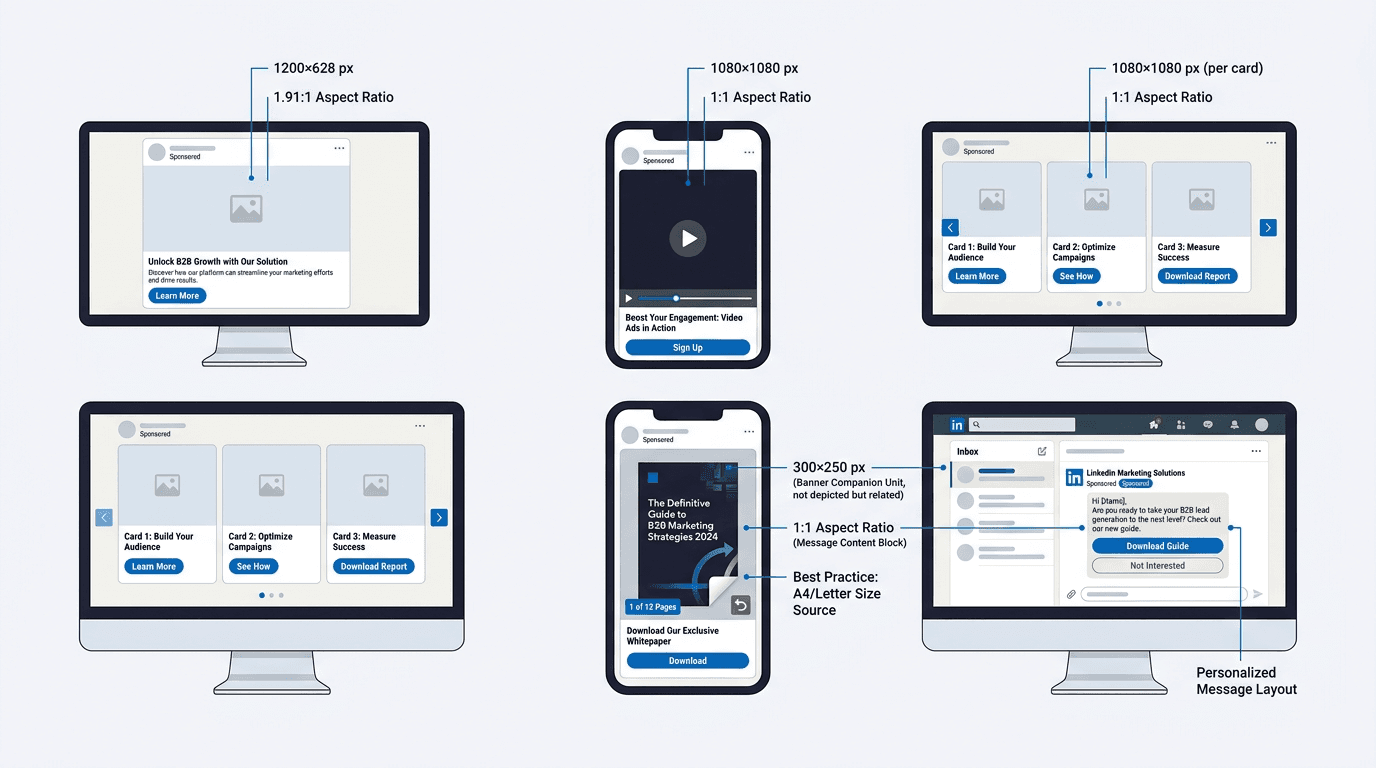
LinkedIn ad specs shift just often enough to trip up even disciplined creative teams. A carousel that looked perfect last quarter can start cropping headlines after a quiet UI tweak, and a video that reads clean on desktop can lose its CTA real estate on mobile. With WARC forecasting LinkedIn's global ad revenue to reach $9.7 billion in 2026, more B2B budgets are flowing into the platform, and the penalty for sloppy specs (wasted spend, weaker engagement, rejected uploads) keeps getting more expensive.
Specs get the asset approved, but they do not make the campaign discoverable after the paid budget stops. Vizup helps B2B teams turn campaign assets into content that can be optimized, indexed, monitored, and improved across search and AI answer engines.
This reference runs through every LinkedIn ad format available in 2026: single image ads, video ads, carousel ads, document ads, message ads, conversation ads, text ads, follower ads, spotlight ads, and event ads. It includes the exact dimensions, character limits, file types, file sizes, and aspect ratios, plus the production mistakes that quietly drag down performance. If you are a demand gen manager handing off a brief or an agency producer standardizing templates, this is the page you keep open so nobody is guessing in Campaign Manager.
Quick-Reference Table: All LinkedIn Ad Sizes and Formats
When you are mid-production and need an answer in 10 seconds, this is the cheat sheet. It pulls the critical specs for every major LinkedIn ad format into one place.
| Format | Recommended Size (px) | Aspect Ratio | File Type | Max File Size | Key Character Limits |
|---|---|---|---|---|---|
| Single Image Ad | 1200 x 1200 | 1:1 (also 1.91:1, 1:1.91) | JPG, PNG, GIF | 5 MB | Headline 70 chars, Intro 150 chars |
| Video Ad | 1920 x 1080 (landscape) or 1080 x 1080 | 16:9, 1:1, 4:5, 9:16 | MP4 | 200 MB | Headline 70 chars, Intro 150 chars |
| Carousel Ad | 1080 x 1080 per card | 1:1 | JPG, PNG | 10 MB per card | Headline 45 chars per card, Intro 150 chars |
| Document Ad | N/A (document pages) | Vertical or square pages | PDF, DOC, DOCX, PPT, PPTX | 100 MB | Headline 70 chars, Intro 150 chars |
| Message Ad | 300 x 250 (banner) | N/A | JPG, PNG, GIF (non-animated) | 2 MB | Subject 60 chars, Body 1500 chars, CTA 20 chars |
| Conversation Ad | 300 x 250 (banner) | N/A | JPG, PNG, GIF (non-animated) | 2 MB | Intro 500 chars, CTA buttons 25 chars each |
| Text Ad | 100 x 100 | 1:1 | JPG, PNG | 2 MB | Headline 25 chars, Description 75 chars |
| Follower Ad | 100 x 100 (company logo) | 1:1 | JPG, PNG | 2 MB | Headline 50 chars, Description 70 chars |
| Spotlight Ad | 100 x 100 (company logo) | 1:1 | JPG, PNG | 2 MB | Headline 50 chars, Description 70 chars, CTA 18 chars |
| Event Ad | 1200 x 628 (pulled from event) | 1.91:1 | Auto from event page | N/A | Intro 600 chars |
| Specs sourced from LinkedIn Marketing Solutions documentation (2026). Character limits reflect recommended lengths for optimal display without truncation. |
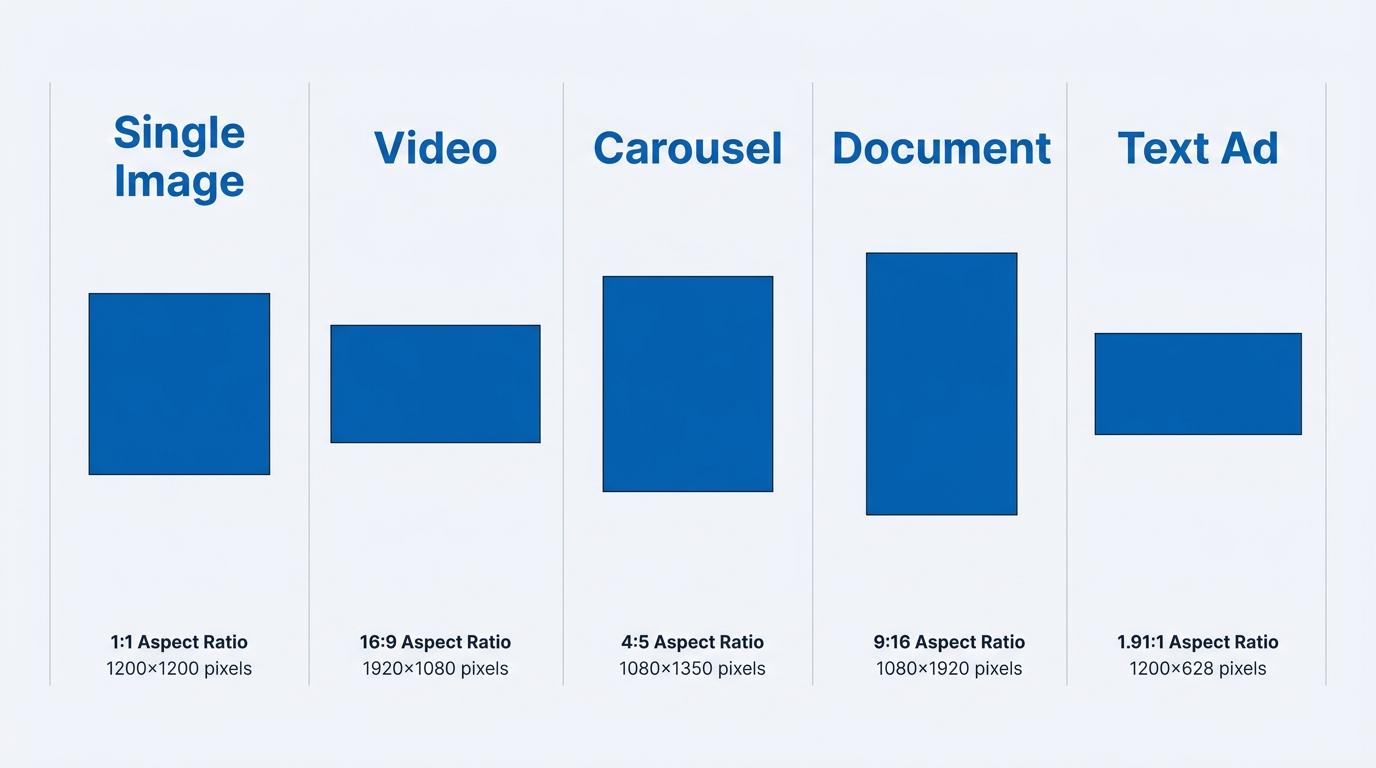
Aspect ratio shapes scaled proportionally for each core LinkedIn ad format.
LinkedIn Single Image Ad Specs
Single image ads are still the workhorse format for Sponsored Content. They run natively in the feed across desktop and mobile, which makes them the default for most awareness and lead gen builds. Per LinkedIn's official single image ad documentation, you can use three aspect ratios: horizontal (1.91:1, recommended 1200 x 628px), square (1:1, recommended 1200 x 1200px), and vertical (1:1.91, recommended 628 x 1200px). If you want one asset that behaves predictably across placements, 1200 x 1200px at 1:1 is the safest production standard.
LinkedIn accepts JPG, PNG, and static GIF for this format, with a 5 MB max file size. Introductory text can be up to 255 characters, but most users will only see the first ~150 before the "see more" fold, especially on mobile. Headlines can technically go up to 200 characters, yet LinkedIn recommends keeping them under 70 to avoid getting clipped. The description field (only used in some placements) supports up to 100 characters.
Note: Warning: Truncation trap: LinkedIn's mobile app cuts introductory text at roughly 150 characters. If your value prop or CTA lives after that, you are paying for words most people never see. Put the hook first.
LinkedIn Video Ad Specs
Video is where spec discipline starts to matter, because small technical misses show up as soft-looking playback or awkward cropping. LinkedIn only accepts MP4, encoded with H.264 video and AAC audio. Per LinkedIn's video ads specifications, video length can run from 3 seconds to 30 minutes, but 15 to 30 seconds is the practical range for performance campaigns. Max file size is 200 MB.
LinkedIn supports four aspect ratios: 16:9 (landscape, 1920 x 1080px), 1:1 (square, 1080 x 1080px), 4:5 (vertical, 1080 x 1350px), and 9:16 (full vertical, 1080 x 1920px). Keep frame rate at 30fps or below. LinkedIn lists 360px on the shortest side as the minimum, but anything under 720p tends to look mushy in desktop feeds and does your brand no favors.
LinkedIn video ad specs checklist:
- Format: MP4 (H.264 codec)
- Audio: AAC format, optional but recommended
- Duration: 3 sec to 30 min (15 to 30 sec recommended)
- File size: up to 200 MB
- Captions: SRT file upload supported (strongly recommended for silent autoplay)
- Thumbnail: auto-generated or custom upload
If you are repurposing assets from Meta, the encoding basics will feel familiar. The differences show up in what tends to perform (duration expectations) and how thumbnails get handled. Our guide to Meta video ad specs breaks down those gotchas.
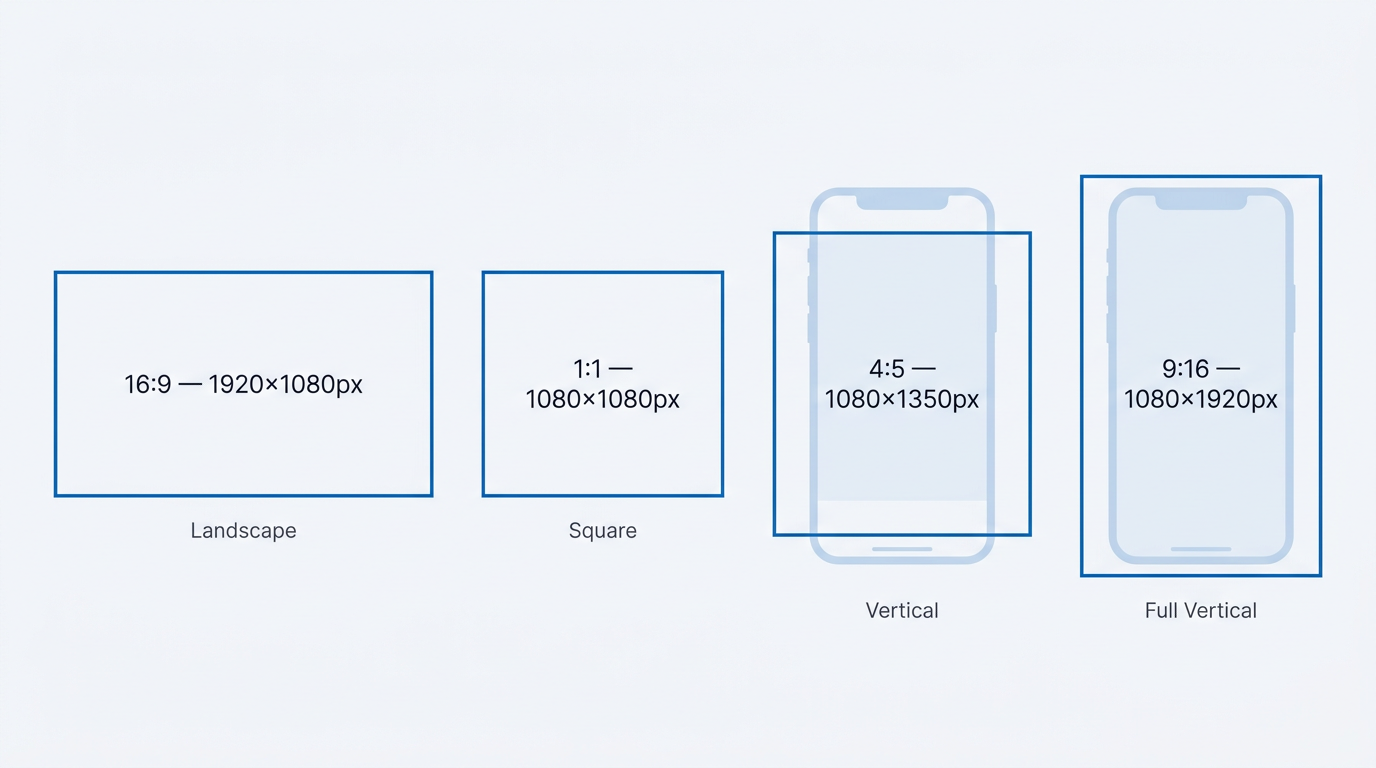
LinkedIn supports four video aspect ratios — vertical formats dominate mobile screen real estate.
LinkedIn Carousel Ad Specs
Carousel ads are built for sequencing: a step-by-step story, a multi-feature product walk-through, or a set of offers under one Sponsored Content unit. LinkedIn requires 2 to 10 cards per carousel. Each card is 1080 x 1080 pixels (1:1), uploaded as JPG or PNG, with a 10 MB max per card. Within a carousel, every card has to use the same aspect ratio.
Carousel comes with tighter copy constraints than single image. Card headlines cap at 45 characters, and intro text still lives under the same ~150-character visible threshold in the feed. The mistake I see most often is designing a carousel where each card depends on the previous one for context, as if everyone swipes in order. In reality, people skip around. Make every card understandable on its own, then use the sequence to add momentum.
Note: Tip: Design tip: Lead with your strongest card and close with the CTA. LinkedIn analytics show swipe-through drops hard after card three, so do not hide the point of the carousel on card seven.
LinkedIn Document Ad Specs
Document ads are one of LinkedIn's most B2B-native formats, and they can be a reliable lead gen lever when the offer is genuinely useful. Users can preview a whitepaper, case study, or deck right in the feed, with an optional lead gen form gating the download. Per LinkedIn's document ads specifications, supported file types are PDF, DOC, DOCX, PPT, and PPTX. Max file size is 100 MB, and documents can run up to 300 pages.
There is no fixed pixel dimension requirement for individual pages, but page orientation matters a lot for how the preview renders. Portrait pages typically read best in-feed; landscape slides from PowerPoint tend to show up letterboxed on mobile. Intro text and headlines follow the same guidance as single image: plan around ~150 visible characters for intro text and keep headlines under 70 characters if you want them to display cleanly.
One detail that gets missed in briefs: LinkedIn generates the preview thumbnail from page one. If your first page is a generic title slide with tiny type, the ad will look like a placeholder in the feed. Treat page one like a standalone creative, because functionally, it is.
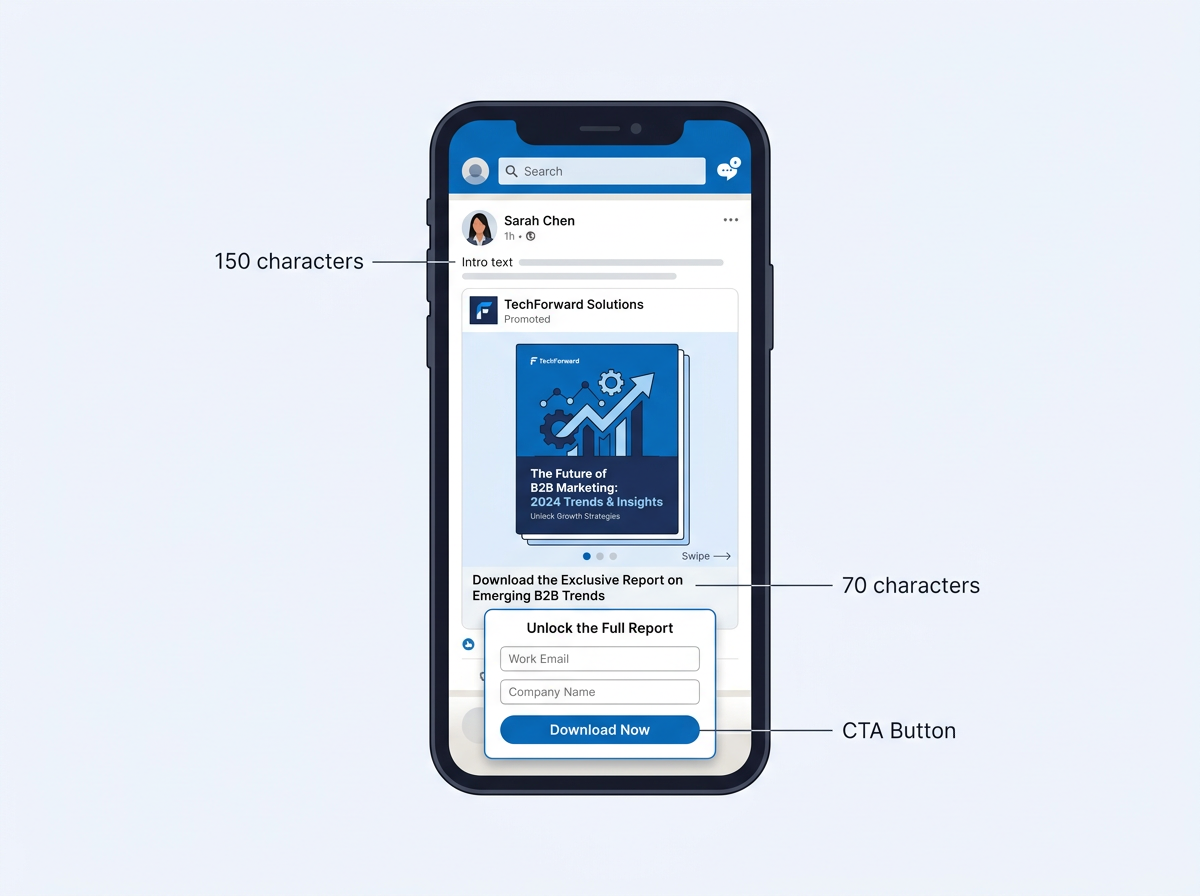
Document ads combine in-feed preview with optional lead gen gating for high-intent content offers.
Message Ads, Conversation Ads, and InMail Specs
LinkedIn message ad specs cover two related formats: Message Ads (formerly Sponsored InMail) and Conversation Ads. Both deliver straight into a prospect's LinkedIn inbox, which is why they tend to post open rates that email teams would love to replicate. LinkedIn is considered 277% more effective for lead generation than Facebook and Twitter, and inbox placements play a meaningful role in that gap.
Message Ads
Message Ads are the simpler of the two: one message, one CTA button. Subject lines allow up to 60 characters. The message body supports up to 1,500 characters (including a clickable link), and CTA button text is limited to 20 characters. You can add an optional 300 x 250px banner image (JPG, PNG, or non-animated GIF, max 2 MB) that appears alongside the message on desktop. LinkedIn only delivers Message Ads when the recipient is active, which helps avoid the "stale inbox" effect you get when email sits unopened for days.
Conversation Ads
Conversation Ads take the same inbox placement and add branching CTA buttons, so prospects can self-select what they want next. The intro message supports up to 500 characters. CTA buttons allow 25 characters each, with up to five buttons per message layer. The banner image specs stay the same at 300 x 250px. Where this format shines is intent routing: different buttons, different landing pages, and cleaner downstream attribution than forcing everyone through the same click path.
Text Ads, Follower Ads, and Spotlight Ads
These formats live in LinkedIn's desktop inventory (right rail and top banner). They are lighter-weight to produce than feed ads, which makes them useful for always-on awareness, low-friction retargeting, and follower growth when you want steady presence without constant creative refreshes.
Text Ads are the most constrained format on the platform: a 100 x 100px image (1:1, JPG or PNG, max 2 MB), a 25-character headline, and a 75-character description. The footprint is small, but they can still pencil out for retargeting and brand reinforcement, since they are bought on CPC or CPM and often face less competition than feed placements.
Follower Ads and Spotlight Ads are dynamic. LinkedIn pulls in the viewer's profile photo next to your company logo (100 x 100px). Follower Ads are built to drive Company Page follows, with a headline up to 50 characters and a description up to 70. Spotlight Ads add a custom CTA button (18 characters max) and can include a background image (300 x 250px, max 2 MB) when the goal is traffic to a specific landing page.
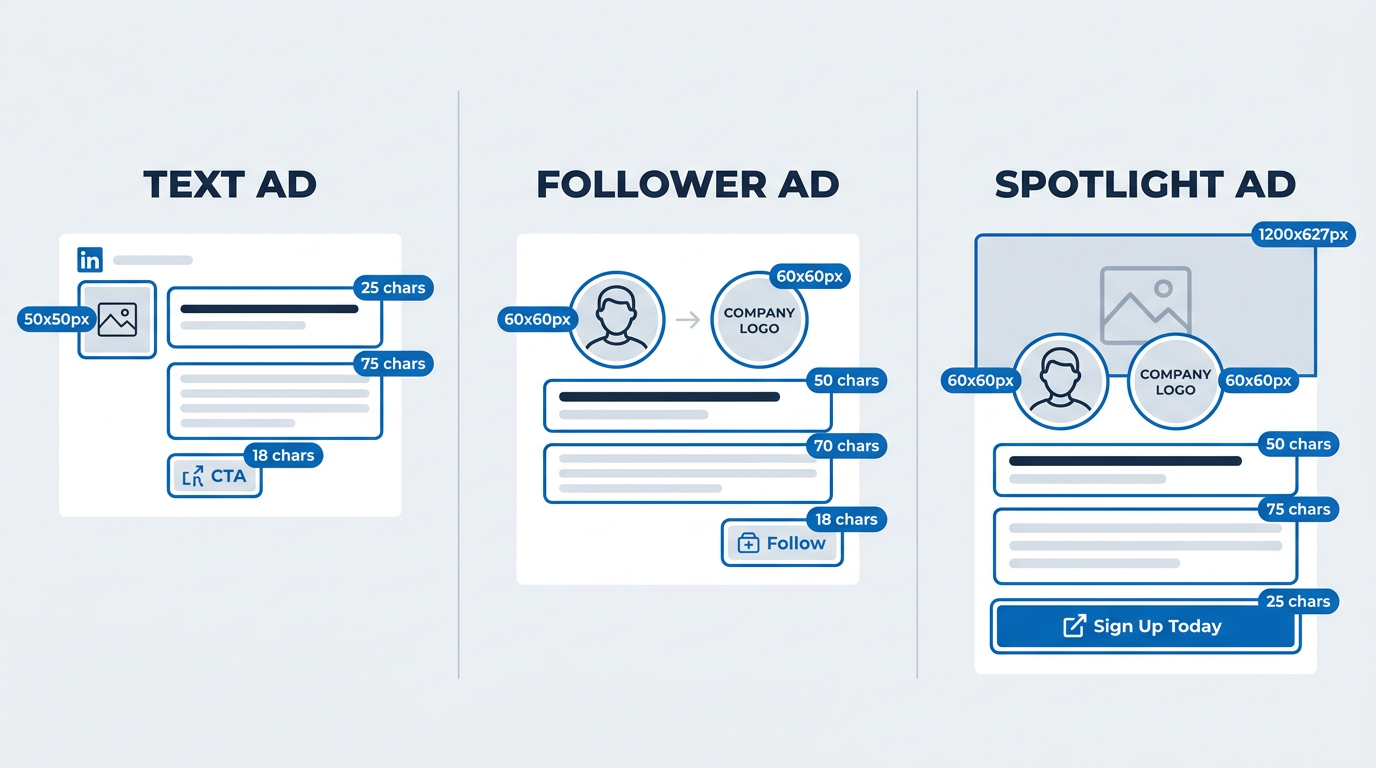
Desktop-only LinkedIn ad formats compared side by side with character limits and image specs.
Event Ads
Event Ads promote LinkedIn Events in the feed. The image is pulled from your LinkedIn Event page (recommended 1200 x 628px at 1.91:1), so there is no separate upload inside Campaign Manager. Introductory text supports up to 600 characters, while the event name, date, and time are auto-populated. Because the creative is inherited, your Event page banner effectively becomes your paid asset. Build it like one, not like a nice-to-have.
Common Creative Mistakes That Waste LinkedIn Ad Spend
Meeting LinkedIn ad specs gets you through upload. It does not guarantee the creative will render well, read well, or convert. These are the recurring issues that burn budget even when the file technically passes validation.
- Ignoring mobile truncation. A majority of LinkedIn engagement now happens on mobile devices. If your introductory text, headline, or image safe zone is not built for the mobile viewport, the message gets chopped.
- Using landscape images for feed ads. A 1200 x 628px (1.91:1) creative takes up less vertical space in the mobile feed than a 1200 x 1200px (1:1) asset. Square and vertical formats win more screen real estate and typically beat landscape on engagement.
- Embedding critical text in image corners. LinkedIn overlays the CTA button and ad label on top of your image. Put text or logos in the bottom corners and you are asking for them to be covered.
- Uploading low-resolution video. LinkedIn will accept 360px, but viewers will notice. Anything below 720p looks rough on desktop and chips away at brand trust.
- Skipping captions on video ads. Videos autoplay without sound. If the value prop lives in the voiceover, most of your audience never gets it.
- Designing carousel cards that only make sense in sequence. People swipe fast, skip cards, and stop early. Each card needs to stand on its own.
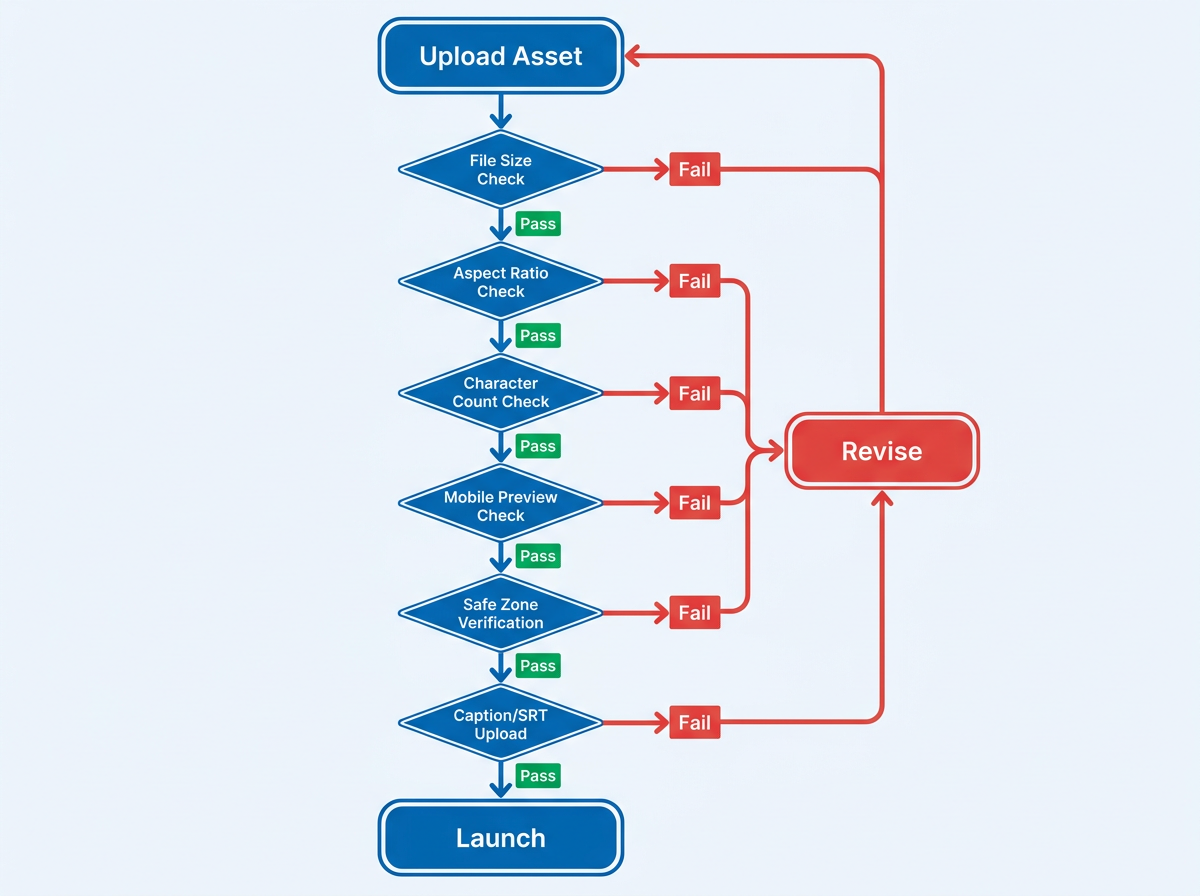
Run every creative through this QA flow to catch spec failures before they waste ad spend.
From Paid Ads to Organic Visibility: Making Your Content Work Harder
LinkedIn ads can generate clicks and leads quickly, but the asset behind the ad still has to pull its weight outside the campaign window. Teams that publish high-intent, technical content get compounding returns: the same whitepaper or post that fuels a document ad or carousel can also rank in Google and get cited by AI answer engines like ChatGPT, Perplexity, and Google's AI Overviews.
This is where Vizup fits into the workflow. Vizup helps B2B teams create, optimize, index, monitor, and improve organic visibility across traditional search and AI answer engines. If you are paying to distribute a piece of content through LinkedIn Sponsored Content, it is worth making sure that same content can be found when prospects search outside LinkedIn. Running paid without organic is like filling a bucket with a hole in it.
If you are coordinating creative across channels, it also helps to keep one consistent specs reference per platform. For Facebook and Instagram builds, our Meta ad specs for 2026 guide uses the same structure as this one. We also publish complete guides to Google ad specs for 2026, X ad specs for 2026, TikTok ad specs for 2026, and Reddit ad specs for 2026.
Key Takeaways
- Default to 1200 x 1200px (1:1) for LinkedIn single image ad specs to maximize mobile feed presence.
- Keep LinkedIn video ads between 15 and 30 seconds, include captions, and upload at 720p or higher.
- Design each LinkedIn carousel ad card to work as a standalone message, and plan around the 45-character headline limit per card.
- Treat the first page of any document ad like a standalone creative, since LinkedIn pulls the thumbnail from it.
- Front-load your intro copy within the first 150 characters to survive mobile truncation across formats.
- QA every asset before launch: file type, file size, aspect ratio, character count, and safe zones.
- Pair paid LinkedIn campaigns with organic content optimized for search and AI answer engines to compound the investment.
Frequently Asked Questions
What is the best image size for LinkedIn ads in 2026?
For single image ads, 1200 x 1200px (1:1) is the most reliable choice across desktop and mobile. It takes up more vertical space than landscape (1200 x 628px), which usually translates to better visibility and engagement. LinkedIn accepts JPG, PNG, and static GIF files up to 5 MB.
What are the LinkedIn ad character limits for introductory text and headlines?
Most Sponsored Content formats allow up to 255 characters of introductory text, but mobile typically shows only the first 150 characters before truncation. Headlines can go up to 200 characters, though LinkedIn recommends staying under 70 to avoid cutoff. For Text Ads, the headline is capped at 25 characters and the description at 75.
How long can a LinkedIn video ad be?
LinkedIn video ads can run from 3 seconds to 30 minutes. For most awareness and consideration campaigns, 15 to 30 seconds is the sweet spot LinkedIn recommends and benchmarks tend to support. Longer videos (2 to 5 minutes) can still work when you are targeting retargeting audiences that have already engaged.
What file types does LinkedIn accept for document ads?
LinkedIn document ads support PDF, DOC, DOCX, PPT, and PPTX. The max file size is 100 MB, and documents can include up to 300 pages. Portrait pages usually render best on mobile, and page one becomes the preview thumbnail, so design it to look strong in-feed.
How can I make sure my LinkedIn ad content also ranks in search and AI engines?
Treat the landing pages, whitepapers, and blog posts behind your LinkedIn ads like long-term acquisition assets, not disposable campaign collateral. Platforms like Vizup help B2B teams monitor and improve visibility across Google and AI answer engines such as ChatGPT and Perplexity, so paid promotion also drives organic traffic and citations over time.
