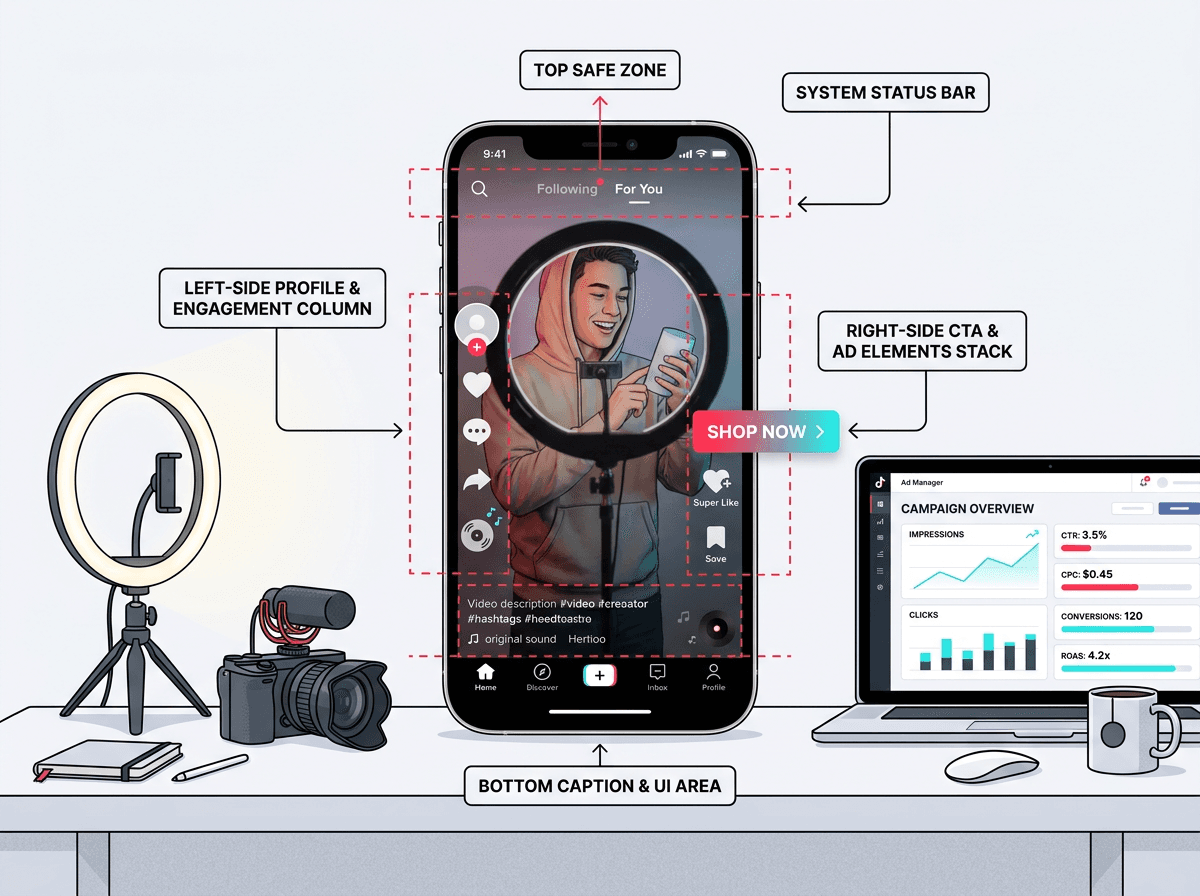
Getting TikTok ad specs wrong burns budget before anyone even has a chance to swipe. A logo tucked under the profile icon, text swallowed by captions, or a file that fails at upload are the kinds of small mistakes that blow up timelines and rack up revision rounds. If you are a UGC creator shooting on an iPhone, an editor exporting out of Premiere, or a media buyer shipping campaigns through TikTok Ads Manager, treat the specs below like your on-set call sheet.
Every TikTok ads format you are likely to touch in 2026 is here: standard in-feed, Spark Ads, TopView, and TikTok Shop creatives. You will get a quick specs table, a safe zone breakdown you can hand to editors, creator and paid-team checklists, plus fixes for the upload errors that waste the most time. Save it, drop it in Slack, and stop shipping creatives on vibes.
Quick-Reference TikTok Ad Specs Table
If you just need the numbers, start here. This table pulls the most-used TikTok ad dimensions, file limits, and creative requirements into one place. Pin it in your team's channel or keep it open while you export.
| Spec | In-Feed (Non-Spark) | Spark Ads | TopView |
|---|---|---|---|
| Aspect Ratio | 9:16 (recommended), 1:1, 16:9 | Mirrors organic post (any ratio) | 9:16 required |
| Resolution | 1080 x 1920 px (recommended) | Matches source video | 1080 x 1920 px (recommended) |
| Video Duration | 5-60 sec (up to 10 min supported) | No hard cap (organic limits apply) | 5-60 seconds |
| Max File Size | 500 MB | N/A (uses organic post) | 500 MB |
| File Formats | MP4, MOV, MPEG, AVI, 3GP | N/A (uses organic post) | MP4, MOV, MPEG, AVI, 3GP |
| Ad Description | 1-100 characters | Uses organic caption | 1-100 characters |
| CTA Button | Yes (customizable) | Yes (added via Ads Manager) | Yes (customizable) |
| Brand Name | 2-40 characters | Pulls from organic profile | 2-40 characters |
| TikTok video ad specs for the three most common placement types. Data sourced from TikTok Ads Manager documentation (TikAdSuite, 2026; Benly, 2026). |
Two quick callouts before you build a whole workflow around the table. TikTok caps uploaded ad files at 500 MB for most formats, including In-Feed and TopView ads. You will have a smoother time if you keep exports under 100 MB so uploads and transcoding do not crawl. The ad description limit for non-Spark ads is also tighter than most teams expect: 1-100 characters total, including any emojis and hashtags, according to TikTok's Auction In-Feed Ads documentation. Write like you are paying per letter.
Spark Ads vs. Non-Spark Ads: What Actually Changes
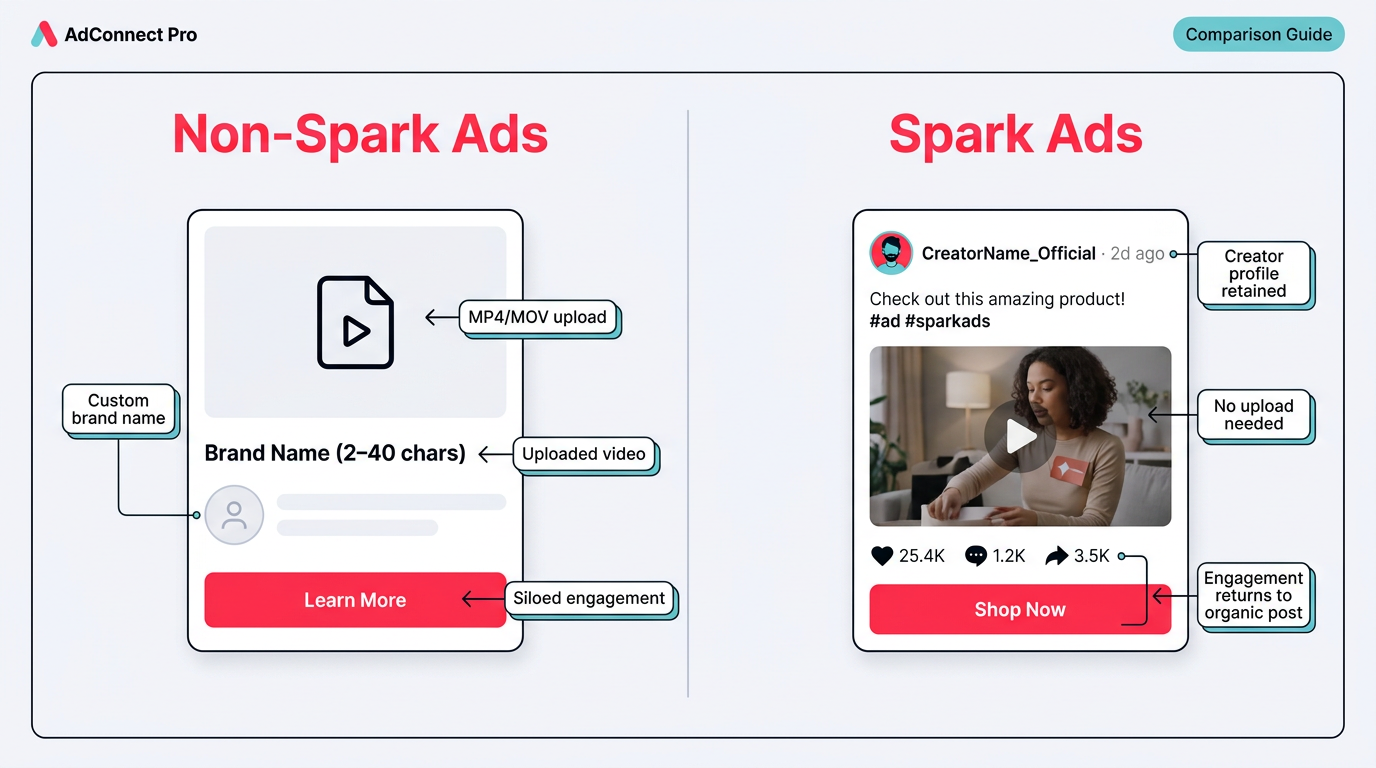
Spark Ads boost existing posts as-is; non-Spark Ads require a full creative upload from scratch.
The Spark Ads vs. non-Spark split confuses people because it sounds like a creative format decision. It is not. Spark Ads are simply a way to put spend behind an existing organic TikTok post (from your brand account or a creator). Since the post already lives on TikTok, you are not uploading a new file or picking a codec. The paid unit inherits whatever the original post is: aspect ratio, resolution, and the rest.
Non-Spark Ads (you will also hear "custom identity") are the opposite workflow: you upload a video into TikTok Ads Manager and set everything yourself, from aspect ratio to thumbnail. The tradeoff is attribution and social proof. Non-Spark engagement stays trapped on the ad and disappears when the campaign stops, instead of building on an organic post over time.
Key differences that affect production:
- File handling: Non-Spark requires MP4/MOV upload (max 500 MB). Spark Ads use the organic post as-is.
- Duration: Non-Spark in-feed ads support 5–60 seconds officially, though auction placements can run up to 10 minutes. Spark Ads have no additional restrictions beyond TikTok's organic video limits, meaning they can be longer than 60 seconds and use non-9:16 ratios (TikTok's Auction In-Feed Ads documentation).
- Profile display: Non-Spark shows a custom brand name (2-40 characters) and profile image you upload. Spark Ads pull the creator's real profile.
- Engagement: Spark Ads funnel all engagement back to the organic post. Non-Spark engagement is siloed to the ad.
Note: Tip: If you are running UGC-style creatives, Spark Ads almost always outperform non-Spark because the organic profile and engagement signals make the ad feel native. The creator grants access via a video code in TikTok's creator tools.
TikTok In-Feed Ad Specs: The Workhorse Placement
In-feed is the default TikTok placement: full-screen video served between organic posts on the For You Page. TikTok's official documentation for Auction In-Feed Ads recommends a 9:16 aspect ratio at a resolution of 1080 x 1920 px. While 1:1 and 16:9 formats are technically allowed, they often appear with black bars or awkward cropping, which is a fast way to tank your thumb-stop rate. If you are building for performance, build vertical.
TikTok's official in-feed ads documentation notes that auction in-feed ads can run up to 10 minutes, even though most accounts see the strongest results in the 15-30 second range. Accepted formats include MP4, MOV, MPEG, AVI, and 3GP. TikTok lists 516 kbps as the minimum bitrate, but if you have on-screen text, UI callouts, or tight product shots, aim for 2,500 kbps or higher so the details survive compression.
TopView and Other Premium Placements
TopView plays by stricter rules than standard in-feed. It is the first thing a user sees when they open the app, so TikTok locks the creative to 9:16 and keeps duration in the 5-60 second range (TikTok Ads Help Center, 2026). The TopView ad specifications page lays out Spark and non-Spark requirements for the placement. Since TopView is a reservation buy rather than auction, approval tends to move slower. Plan to submit assets at least 2-5 business days before your flight date.
TikTok Safe Zone: Where Your Content Actually Shows
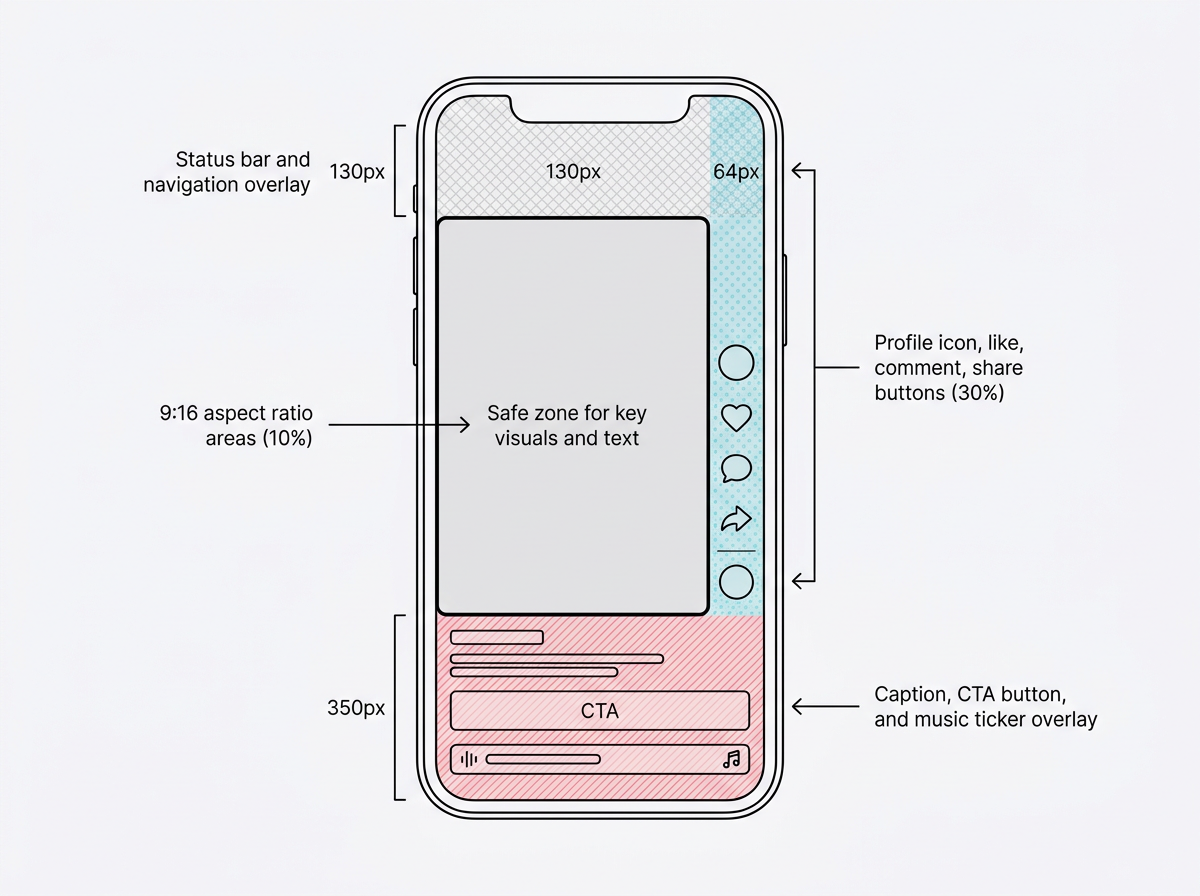
TikTok's UI overlays consume far more screen real estate than most ad teams anticipate — plan your safe zone before editing begins.
Safe zones are where TikTok ads go to die, mostly because teams treat the full 1080 x 1920 frame like it is all usable. It is not. TikTok drops UI on top of your video: profile icon, the like/comment/share stack, captions, CTA buttons, and the music ticker. Put your logo or headline under any of that, and the viewer never sees it.
Safe zone dimensions depend on factors like caption length and interactive add-ons, so there isn't one universal pixel measurement. Use TikTok's downloadable safe zone templates inside Ads Manager as the definitive source of truth. Your editors should have these templates sitting in their project files as timeline guides, not as an afterthought during final export.
Note: Warning: The bottom safe zone is the one that gets people. The CTA button, ad description, and music ticker can stack into roughly 350 pixels. If you are burning in subtitles, keep them in the center-lower third of the safe area, not hugging the bottom edge.
TikTok Shop Ad Specs and Commerce Considerations
TikTok Shop ads add another layer of UI on top of the usual in-feed overlays. With Video Shopping Ads or Product Card ads, TikTok pins a product card to the bottom of the video with the product image, title, price, and a "Shop Now" button. Translation for editors: your bottom safe zone effectively gets 80-100 pixels tighter.
The underlying creative specs stay the same for Shop campaigns: 9:16, 1080 x 1920 px, and the same 500 MB max file size. What changes is how the CTA and product info land on-screen. Product titles come straight from your TikTok Shop catalog, so keep catalog titles tight (under 34 characters if you want full visibility on the card). If you are reusing the same video for standard in-feed and Shop, preview the Shop placement on its own. That product card shifts the whole composition.
UGC Creator Checklist
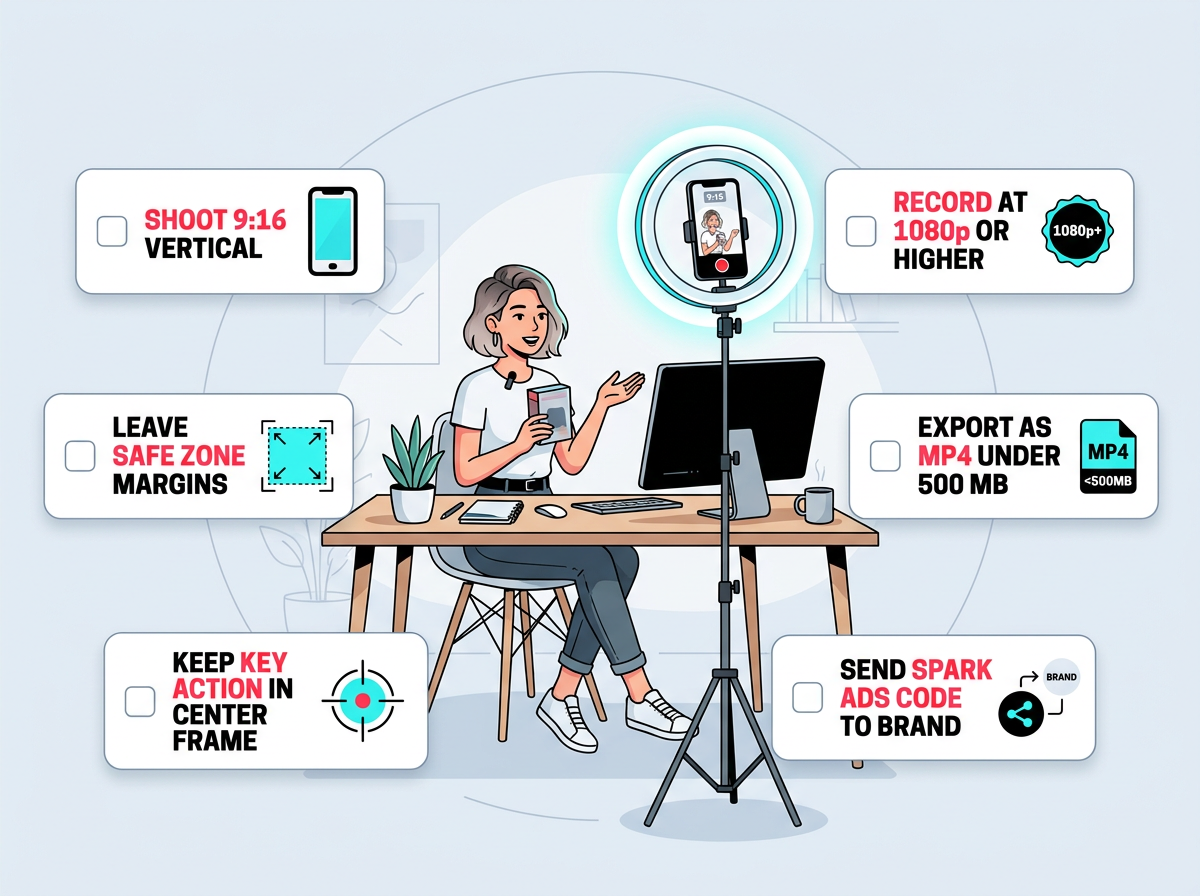
Share this checklist with every creator before they hit record to avoid costly re-shoots.
If you send creators a brief with no spec guardrails, you will get the classics: horizontal footage, a logo parked in the bottom-right where TikTok's UI lives, and a 720p export that turns to mush in feed. Share this checklist before anyone hits record and you will save yourself the re-shoot.
- Orientation: Always shoot vertical (9:16). Lock your phone or camera in portrait mode.
- Resolution: 1080 x 1920 px minimum. 4K is fine; TikTok will downscale.
- Framing: Keep your face, product, and any on-screen text in the center 880 x 1440 px safe zone.
- Duration: Aim for 15-30 seconds for direct response. 45-60 seconds for storytelling or testimonial hooks.
- Audio: Use a lav mic or shoot in a quiet room. TikTok compresses audio aggressively, so clean source audio matters.
- Export: MP4, H.264 codec, under 100 MB. If the brand needs a Spark Ad, post the video organically and generate the video code from your TikTok creator tools.
- Captions: If the brand wants burned-in subtitles, position them in the vertical center of the frame (not the bottom 20%).
Paid Media QA Checklist
Treat this like your pre-flight checklist before you click "Submit" in Ads Manager. Most upload rejections and "why is this underperforming" post-mortems trace back to one of these basics.
- Aspect ratio confirmed: Is the asset 9:16? If running 1:1 or 16:9, have you previewed how TikTok crops or letterboxes it?
- Safe zone preview: Open the creative in TikTok's ad preview tool. Is any critical text or branding hidden behind the profile icon, CTA, or caption area?
- File size under 500 MB: Ideally under 100 MB for faster processing.
- File format: MP4 or MOV. Other formats (AVI, 3GP, MPEG) are accepted but occasionally cause transcoding artifacts.
- Ad description under 100 characters: Count emojis and hashtags. Each emoji counts as one character.
- Brand name under 40 characters: This displays next to the profile icon on non-Spark ads.
- CTA button selected: Choose the CTA that matches your objective (Shop Now, Learn More, Download, Sign Up).
- Landing page loads on mobile: TikTok's review team checks your destination URL. Broken or slow-loading pages trigger rejection.
- Spark Ad code valid: If running Spark Ads, confirm the video code has not expired (codes last 7, 30, or 60 days depending on creator settings).
Note: Tip: Running campaigns on TikTok, Meta, Google, X, Reddit, and LinkedIn? Cross-check your assets against the latest Meta ad specs, Google Ads specs, X ad specs, Reddit ad specs, and LinkedIn ad specs to avoid reformatting creative. A well-organized video ad specs guide covers the differences between platforms so your editor can batch-export correctly.
Common Upload Issues and How to Fix Them
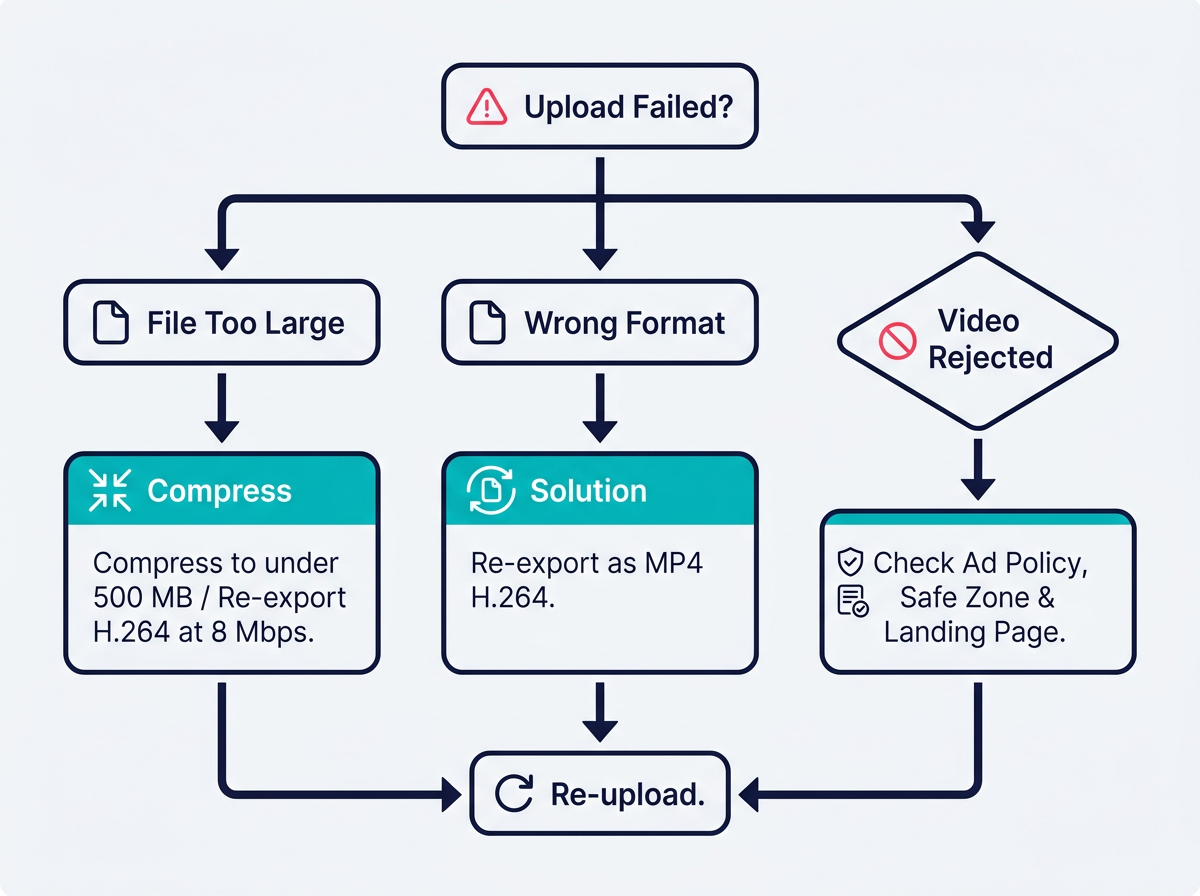
Diagnose your failed TikTok ad upload in three steps before raising a support ticket.
"File size exceeds limit" is almost always an export problem, not a TikTok problem. Re-export with H.264 and set a variable bitrate cap around 8 Mbps. A 30-second spot at that setting typically lands well under 100 MB. If you are coming out of After Effects, push the file through Adobe Media Encoder, start with the "Match Source - High bitrate" preset, then dial down the target bitrate manually.
"Creative rejected" is the least helpful notification TikTok sends, because it rarely tells you what tripped review. The usual suspects are familiar: text covering more than 20% of the frame (TikTok's policy mirrors Meta's old rule here), a CTA that does not match what the ad is actually doing, unsubstantiated claims like "#1 product", or a landing page that fails to back up the promise. Before you resubmit, scan TikTok's ad format and functionality policies and make sure your destination page is aligned.
Blurry or pixelated playback after upload usually means TikTok's transcoder is doing you no favors because the source file is too low-bitrate. Export at 1080 x 1920 and keep bitrate at 2,500 kbps or higher. Uploading 720p and hoping TikTok magically sharpens it is a losing bet.
TikTok Ad Sizes Across Devices and Placements
TikTok ad sizes are consistent on paper and messy in the real world, because placement changes how your creative is framed. On the For You Page, a 9:16 video takes over the screen. In TikTok Search Results ads, your thumbnail gets squeezed into a smaller card, so the first frame needs to read even when it is tiny. And on Pangle (TikTok's audience network), ads can render inside third-party apps with players that vary. If you are opting into Pangle, test both 9:16 and 1:1 versions so you are not surprised by odd crops.
One warning for teams repurposing content: do not take a 16:9 YouTube ad, crop it to 9:16, and call it a day. The composition falls apart. Faces end up clipped, text turns unreadable, and the pacing feels slow on a vertical feed. Recut the edit for 9:16 instead. It is often an extra 30 minutes that saves you from buying impressions on a creative that looks like a repost. If you want a stronger framework for what actually converts across platforms, Vizup has a useful breakdown of high-converting ad creatives worth keeping on hand.
Frequently Asked Questions
What is the maximum TikTok ad file size for in-feed ads?
TikTok in-feed ads max out at 500 MB. In practice, exports under 100 MB upload faster and tend to run into fewer transcoding headaches. Use H.264 with a variable bitrate cap around 6-8 Mbps to balance clarity and size.
Can Spark Ads use a different aspect ratio than 9:16?
Yes. Spark Ads pull specs from the original organic post, so they can run in whatever aspect ratio the creator posted, including 1:1 or 16:9. Performance-wise, 9:16 still wins on the For You Page because it fills the screen; non-vertical posts will show with padding.
How many characters can I use in a TikTok ad description?
TikTok ad descriptions allow 1-100 characters total, and that count includes emojis and hashtags. For non-Spark ads, the brand name field is 2-40 characters. Keep the copy tight: most users will not read past the first line anyway.
What are the TikTok safe zone pixel measurements?
Safe-zone measurements vary by placement, caption length, creative dimension, and add-ons. For a 1080 x 1920 px creative, treat the top, bottom, and right-side UI areas as high-risk zones, then confirm the final layout using TikTok's downloadable safe-zone templates and preview tool. Those areas get covered by the status bar, captions, CTA button, music ticker, and the social icon stack. For exact overlays, download TikTok's safe zone templates from Ads Manager.
Do TikTok Shop ads have different creative specs than standard in-feed ads?
The base specs are the same (9:16, 1080 x 1920 px, 500 MB max). The difference is the product card overlay TikTok adds at the bottom, which effectively eats another 80-100 pixels of your usable space. Preview Shop placements separately so key visuals do not end up buried.
Turn TikTok Specs into Organic Visibility
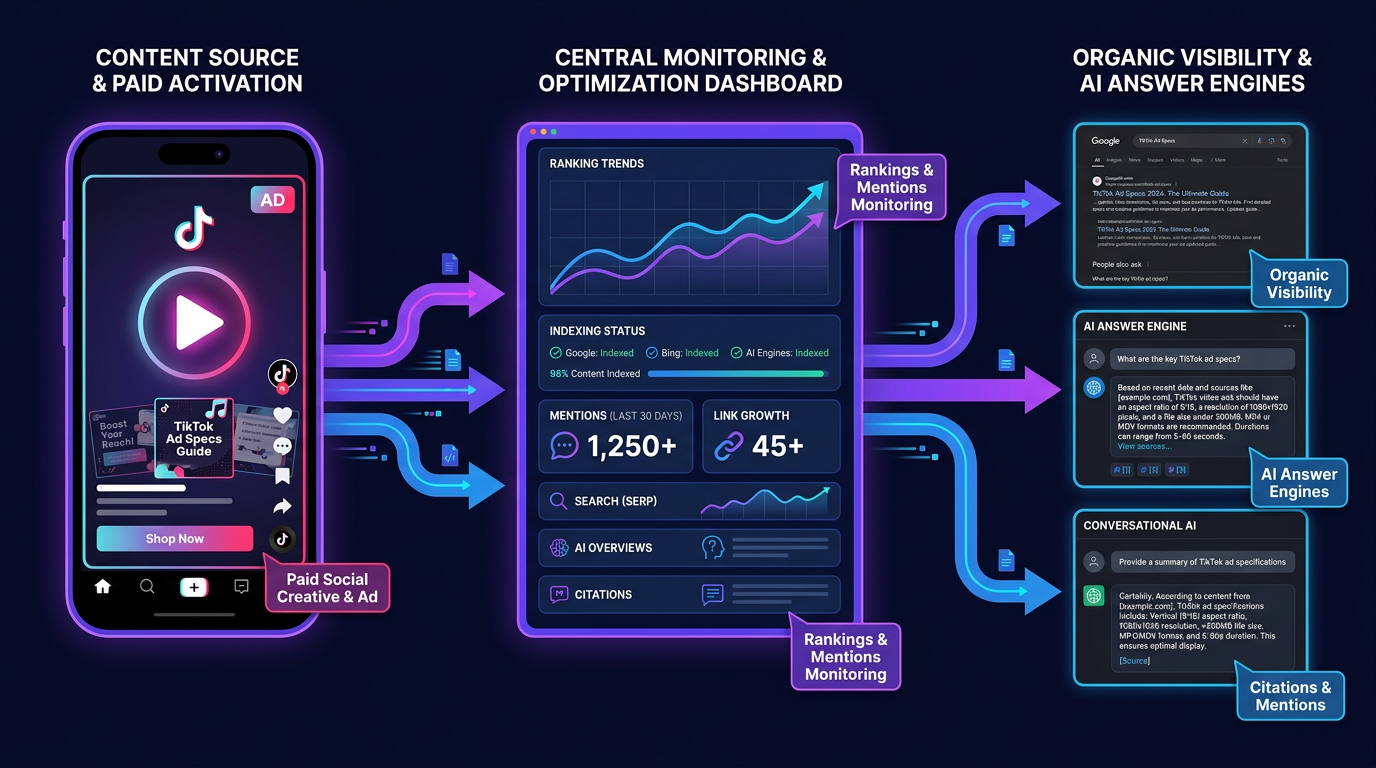
Vizup tracks whether your TikTok ad specs content earns citations in Google, ChatGPT, and Perplexity.
Now you have a production-ready reference for TikTok ad specs in 2026. Specs are only half the win, though. The other half is making sure your playbooks, breakdowns, and platform comparisons actually show up when marketers go searching for them in Google or in AI answer engines.
That is where Vizup slots into the workflow. Vizup helps teams create, optimize, and monitor organic visibility across traditional search and AI answer engines. If you publish ad specs pages, creative strategy posts, or platform comparison content, Vizup tracks indexing, rankings, and whether AI products like ChatGPT, Perplexity, or Google's AI Overviews are citing your work. Instead of guessing if your SEO and AEO efforts are landing, you get a dashboard that shows what is visible, what is missing, and what to fix next.
For DTC brands and agencies running both paid social and organic content, the loop is straightforward: ship TikTok creatives that follow specs so paid performance is not kneecapped by execution, then turn the know-how behind those creatives into pages that earn free traffic. Vizup monitors both sides so the system stays tight.
See how Vizup tracks your visibility in Google and AI engines.
