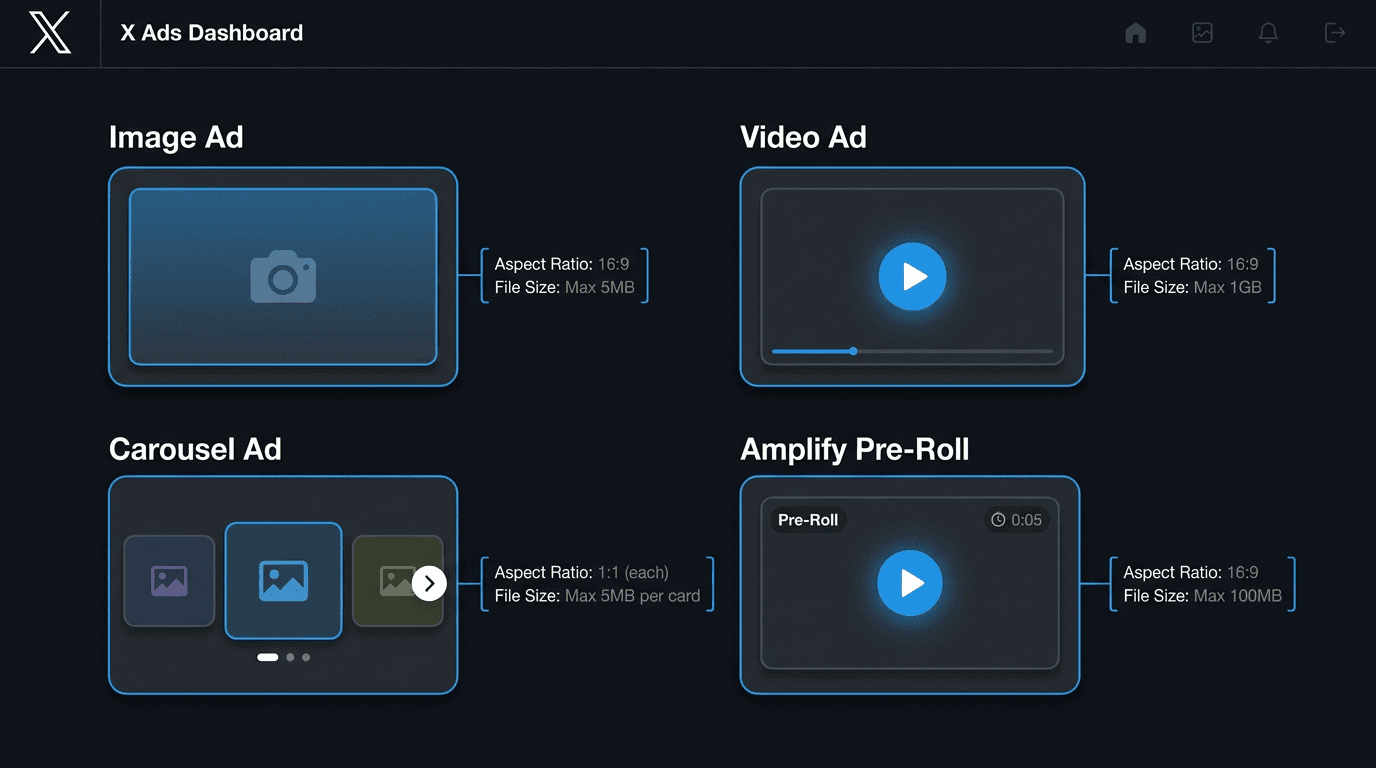
If you searched for "Twitter ad specs" and ended up here, you are solving the right problem. Since the platform became X, the official docs have bounced between URLs, consolidated pages, and quietly refreshed requirements. The predictable outcome: teams ship Twitter-era creatives, get flagged on upload, and burn time chasing down what changed. This page pulls the current X ad specs into one place you can actually bookmark and use in 2026, whether you are a performance marketer, an agency, or the person wrangling creative handoffs.
You will find a master specs table, format-by-format requirements for image, video, carousel, and Amplify pre-roll, plus a designer checklist, a media buyer QA checklist, common rejection triggers, and an FAQ. If you are coordinating assets across networks, pair this with our other guides for Meta ad specs, Google ad specs, TikTok ad specs, LinkedIn ad specs, and Reddit ad specs so your team is not rebuilding the same creative in multiple templates.
A Note on "Twitter Ad Specs" vs. "X Ad Specs"
X ads still live at ads.x.com, but "Twitter ad specs" is the phrase that refuses to die in client decks, internal SOPs, and old creative briefs. Practically, they are the same thing: same Ads Manager, same file rules, same dimensions. In the sections below, we use "X" for the current name and "Twitter" only when the legacy wording helps you map old documentation to current requirements. If your brief says "Twitter ad dimensions," plug in the specs below; Many legacy Twitter terms still map to the current X Ads workflow, but specs vary by format and placement, so validate final assets against X's current creative specifications before launch.
Master X Ad Specs Table (2026)
Use this as the quick-reference layer: formats, X ad sizes, file types, and limits in one scan. Drop it into Notion, your creative brief template, or your agency wiki. Specs are pulled from the X Ads Help Center creative specifications.
| Format | Aspect Ratio(s) | Recommended Size (px) | File Types | Max File Size | Video Length | Post Copy Limit |
|---|---|---|---|---|---|---|
| Image Ad (1.91:1) | 1.91:1 | 800 x 418 | PNG, JPEG | 5 MB | N/A | 280 chars (~257 usable with link) |
| Image Ad (1:1) | 1:1 | 800 x 800 | PNG, JPEG | 5 MB | N/A | 280 chars (~257 usable with link) |
| Video Ad (landscape) | 16:9 | 1920 x 1080 | MP4, MOV | 1 GB (under 30 MB recommended) | Up to 2 min 20 sec (15 sec recommended) | 280 chars (~257 usable with link) |
| Video Ad (square) | 1:1 | 1200 x 1200 | MP4, MOV | 1 GB (under 30 MB recommended) | Up to 2 min 20 sec (15 sec recommended) | 280 chars (~257 usable with link) |
| Video Ad (vertical) | 9:16 | 1080 x 1920 | MP4, MOV | 1 GB (under 30 MB recommended) | Up to 2 min 20 sec (15 sec recommended) | 280 chars (~257 usable with link) |
| Carousel (image) | 1.91:1 or 1:1 | 800 x 418 / 800 x 800 | PNG, JPEG | 5 MB per card | N/A | 280 chars (~257 usable with link) |
| Carousel (video) | 16:9 or 1:1 | 1920 x 1080 / 1200 x 1200 | MP4, MOV | 1 GB per card | Up to 2 min 20 sec per card | 280 chars (~257 usable with link) |
| Amplify Pre-roll | 1:1 (recommended), 16:9 | 1200 x 1200 | MP4, MOV | 1 GB | 15 sec or less recommended | 280 chars (~257 usable with link) |
| Takeover (Timeline) | Same as image/video ads | Same as image/video ads | PNG, JPEG, MP4, MOV | Same as format | Same as format | 280 chars (~257 usable with link) |
| Takeover (Trend) | 16:9 or 1:1 | 1200 x 1200 / 1920 x 1080 | PNG, JPEG, MP4, MOV | Same as format | Same as format | 70 chars (trend name) + 280 chars (companion post) |
| Standalone Image Ad | 1:1 or 1.91:1 | 1200 x 1200 / 1200 x 628 | PNG, JPEG | 5 MB | N/A | 280 chars |
| Complete X ad dimensions and file requirements for 2026. BMP and TIFF files are not accepted on any format. |
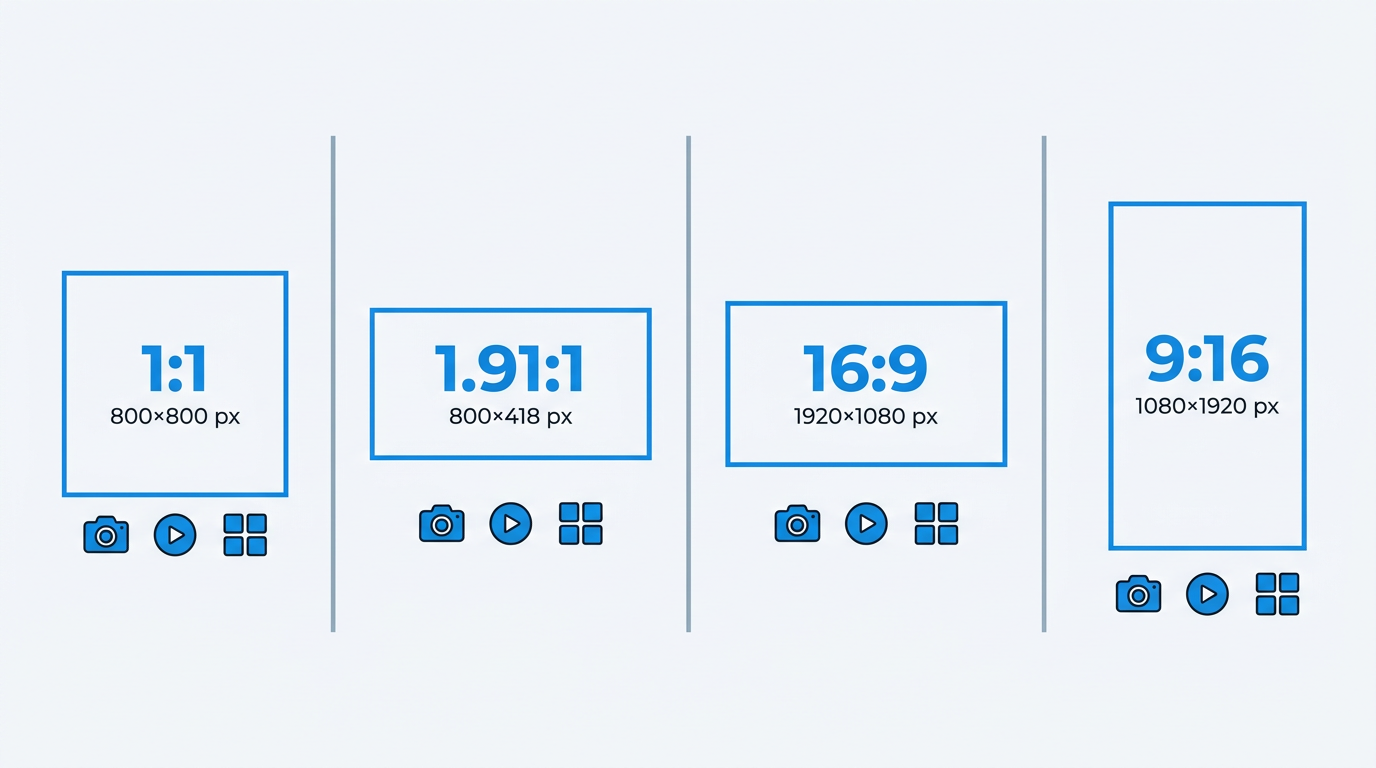
Four aspect ratios govern every X ad creative — from square to full-screen vertical.
X Image Ad Specs
If you need something live fast, image ads are still the cleanest path on X. The requirements are simple: upload a PNG or JPEG (skip BMP and TIFF) at either 800 x 418 (1.91:1) or 800 x 800 (1:1), and keep the file under 5 MB. In placement terms, 1:1 usually wins for attention because it takes up more vertical space in the timeline, especially on mobile. The 1.91:1 layout earns its keep when you are pairing the creative with a website card CTA, since the headline and metadata sit neatly below the image without feeling cramped.
Note: Tip: Skip this if you already know: X strips EXIF data on upload, so embedded color profiles will not survive. Export in sRGB to avoid washed-out colors in the feed.
One production detail that saves headaches: X compresses images after upload. When your creative includes small text, UI screenshots, or thin strokes, minimum dimensions can look soft once compression kicks in. Design and export at 2x (1600 x 836 for 1.91:1, 1600 x 1600 for 1:1) and let X downsample; you typically end up with a sharper result than handing over the bare minimum.
X Video Ad Specs
Video is where teams start getting tripped up, mostly because "allowed" and "recommended" are not the same thing. X accepts MP4 and MOV up to 1 GB, but its own docs push you toward files under 30 MB so processing and delivery do not drag. You have three practical aspect ratios: 16:9 (landscape), 1:1 (square), and 9:16 (vertical). The hard cap is 2 minutes and 20 seconds, but if you are optimizing for completion, 15 seconds is the safer default.
Key X video ad specs to remember:
- Resolution: 1920 x 1080 (16:9), 1200 x 1200 (1:1), or 1080 x 1920 (9:16).
- Frame rate: 30 fps or 60 fps. Skip 24 fps; it can introduce judder on mobile playback.
- Bitrate: 6,000 to 10,000 kbps for 1080p. Going higher usually just inflates file size without a visible in-feed payoff.
- Audio: AAC, 128 kbps stereo minimum. Plan for sound-off viewing and include captions.
- Thumbnail: auto-selected from the first frame unless you upload a custom image. Treat your opening frame like a static ad because it will do a lot of the work.
If you are repurposing the same video across networks, our Meta video ad specs workflow guide breaks down how to export once and adapt without rebuilding edits from scratch.
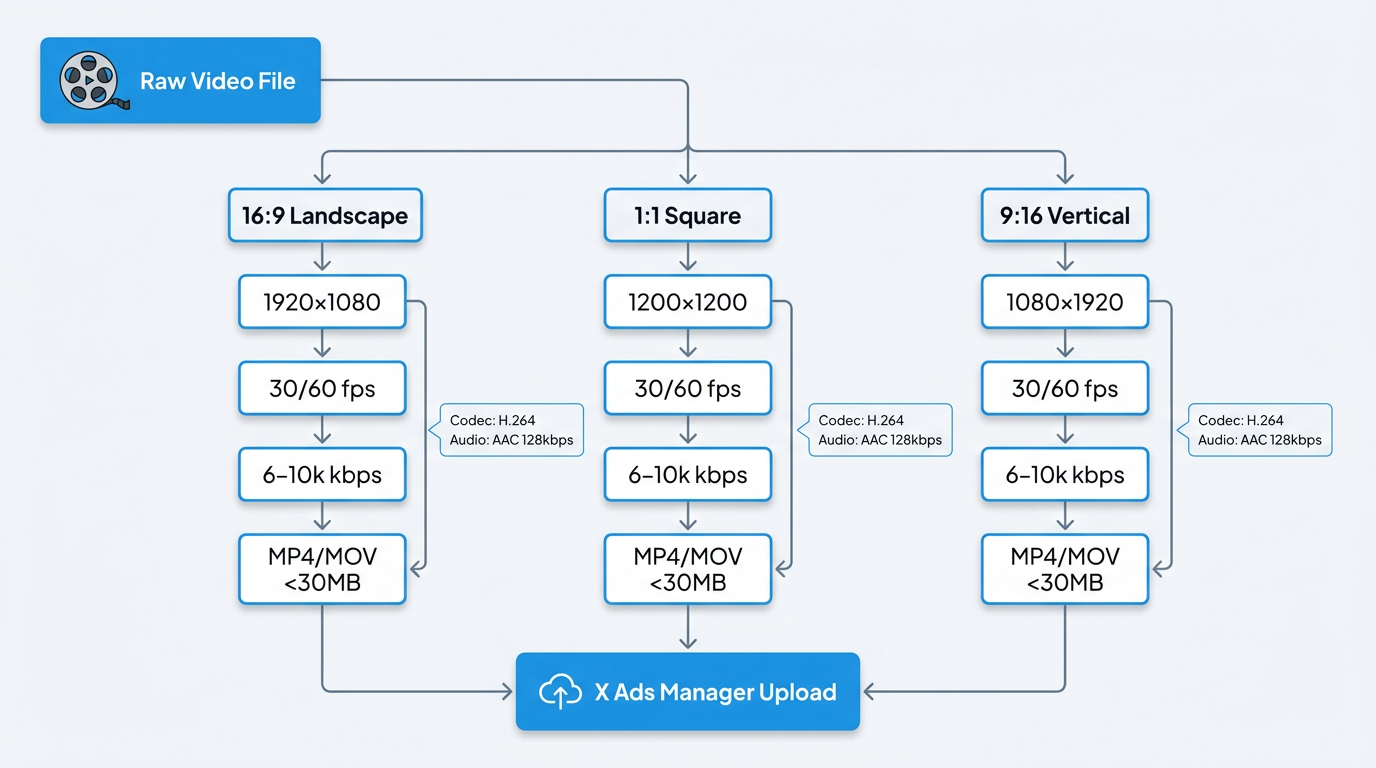
Three export paths converge at X Ads Manager — each with distinct resolution and codec requirements.
X Carousel Ad Specs
Carousel ads give you 2 to 6 swipeable cards inside one promoted post. Each card can be an image or a video, but a single carousel cannot mix the two. For image carousels, the specs match standard image ads: 1.91:1 or 1:1, PNG or JPEG, 5 MB per card. Video carousels run in 16:9 or 1:1, with the same 1 GB ceiling per card as standalone video.
The carousel mistake I see most often is structural, not technical: building six disconnected cards and calling it a funnel. Carousels work when the cards are sequenced (problem, proof, product, offer) or when each card is a deliberate part of a lineup (variants, features, use cases) and the user gets more value with every swipe. If Card 3 has to stand alone because Card 1 might be skipped, you are basically running a gallery. Also note the hard rule that triggers easy rejections: every card has to share the same aspect ratio. Mixing 1:1 and 1.91:1 in one unit will get kicked back.
X Amplify Pre-Roll Specs and Takeover Placements
Amplify pre-roll runs ahead of premium publisher video on X, so it is built for short, high-signal creative. X recommends 15 seconds or less, even though the technical maximum is the same as standard video (2 minutes 20 seconds). The recommended export is 1200 x 1200 (1:1), which tends to render cleanly across mobile and desktop players. File rules are the same as any other video ad: MP4 or MOV, up to 1 GB.
Takeover placements come in two flavors. Timeline Takeover pins your promoted ad to the top of a user's timeline for their first impression of the day, and it follows the standard image or video specs. Trend Takeover (previously Promoted Trend) adds a 70-character trend name plus a companion post and optional creative. For Trend Takeover, a 6-second auto-playing video or animated image is often enough to stop the scroll without asking for a click. These are reservation placements and are typically handled through an X sales rep rather than self-serve.
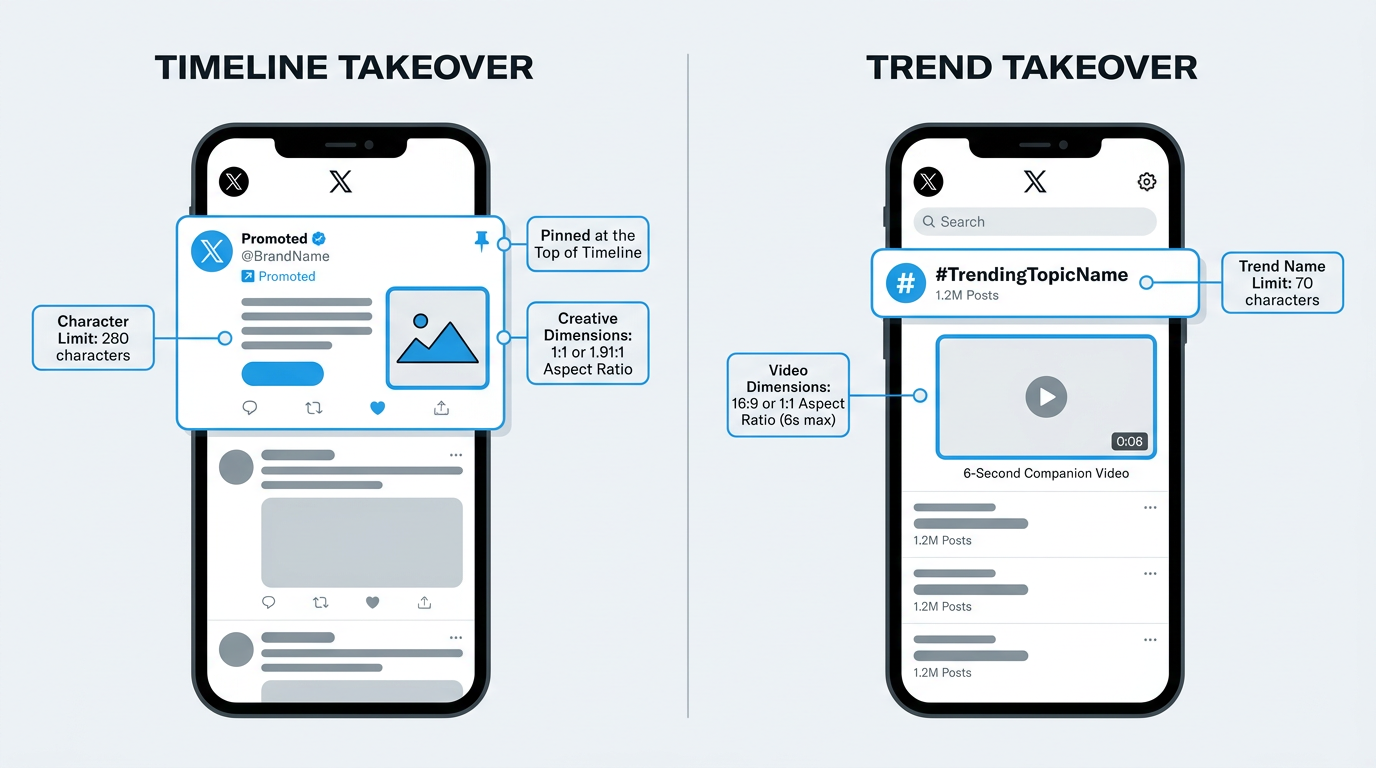
Timeline Takeover pins your ad first in-feed; Trend Takeover adds a branded trending label with companion creative.
Post Copy, Character Limits, and the Link Tax
Across X ad formats, you get 280 characters of post copy. In practice, you get less once you include a URL. X wraps links with a t.co short link that eats roughly 23 characters no matter how long your original URL is, leaving about 257 characters for actual messaging. This is the "link tax" that trips up even experienced media buyers: copy drafted to 280 looks fine in a doc, then truncates the moment the link is attached.
Note: Warning: Draft your ad copy at 257 characters max when a link is present. If you are running a Trend Takeover, the trend name itself is capped at 70 characters, separate from the companion post's 280-character limit.
Hashtags count. @mentions count. If you are trying to keep copy tight, one practical move is shifting hashtags into the creative as a text overlay and using the post copy for the value prop and CTA. It also reads cleaner in the timeline, which tends to help click-through rate.
Designer Checklist for X Ad Creatives
Send this to your design team before production starts. It focuses on the specs that prevent rework during handoff, not just the rules that matter at upload.
- Export all images in sRGB color space as PNG (for graphics with text) or JPEG (for photography). Never deliver BMP or TIFF.
- Keep critical text and logos within the inner 80% of the canvas. X crops edges on some devices and placements.
- For 1.91:1 images, design at 1600 x 836 and let X downsample. For 1:1, design at 1600 x 1600.
- Video: export H.264 codec in MP4 container. Include burned-in captions or a separate SRT file.
- Carousel: confirm all cards share the same aspect ratio before handoff. Mixed ratios cause rejection.
- Deliver a standalone thumbnail frame for every video. Do not rely on auto-generated thumbnails.
- Name files with format and ratio in the filename (e.g., "brand_video_1x1_15s.mp4") so media buyers can identify assets instantly.
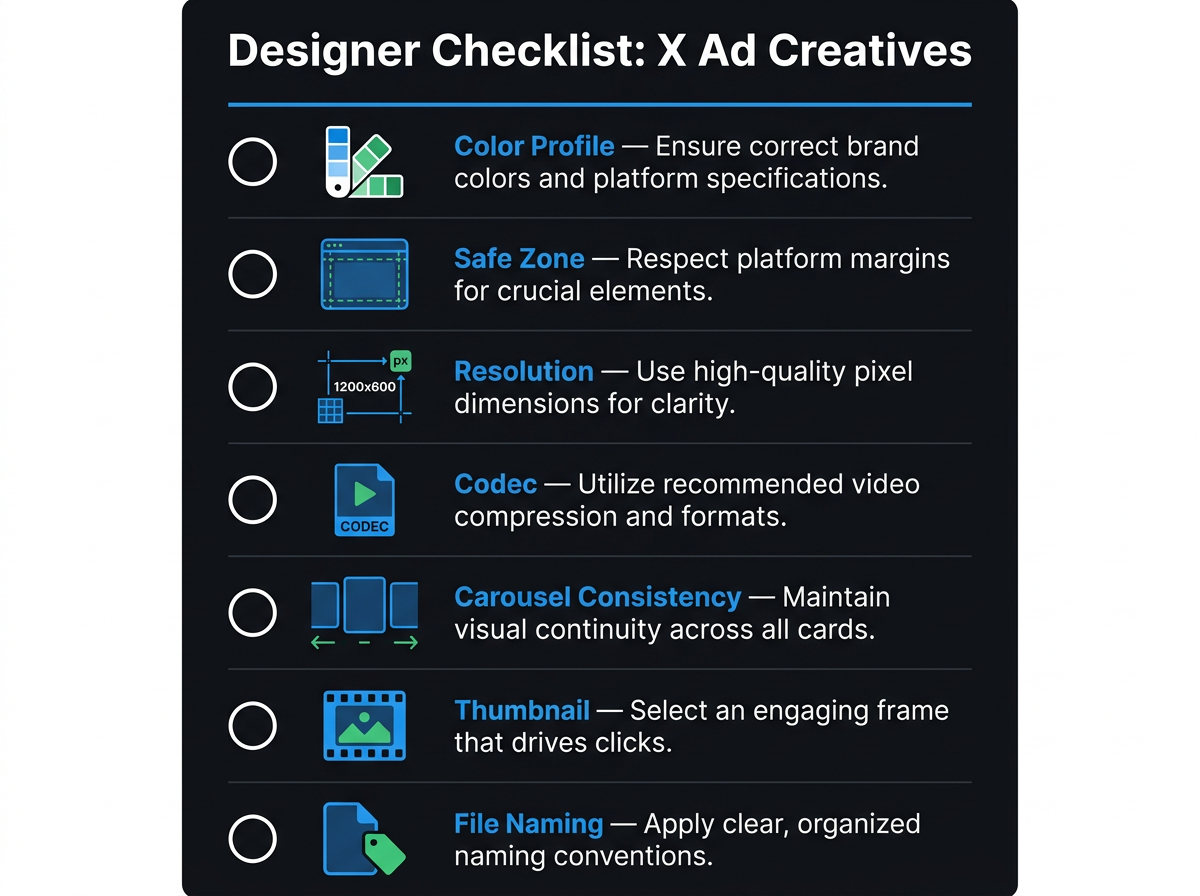
Seven production checks every designer should complete before handing off X ad assets.
Paid Media QA Checklist
Once the assets are in Ads Manager, this is the last line of defense before you spend. These checks are where file size, copy truncation, and format mismatches usually show up.
- Preview every ad on both mobile and desktop within Ads Manager. Cropping behavior differs.
- Paste your final copy into a character counter that accounts for the ~23-character link tax. Confirm the total stays under 280.
- Verify the landing page URL resolves correctly after t.co wrapping. Broken redirects are a top rejection reason.
- Check that video files are under 30 MB for optimal delivery speed, even though the platform allows up to 1 GB.
- For carousels, swipe through every card in preview. Confirm card order, headlines, and destination URLs are correct.
- Confirm the ad complies with X's advertising policies (no misleading claims, prohibited categories, or missing disclaimers).
Common Mistakes and Rejection Reasons
X review tends to be machine-first, human-second. When an ad gets rejected quickly, it is usually a spec violation rather than a policy issue. These are the mistakes behind most failed uploads across formats.
| Mistake | Why It Happens | Fix |
|---|---|---|
| Uploading BMP or TIFF files | Assets exported from Illustrator/Photoshop without switching formats | Re-export as PNG or JPEG |
| File exceeds 5 MB (image) or 1 GB (video) | High-res exports pushed through without compression | Use TinyPNG for images; Handbrake for video |
| Mixed aspect ratios in a carousel | Cards designed in isolation without a shared template | Standardize all cards to 1:1 or 1.91:1 before upload |
| Copy exceeds 280 characters after link insertion | Copy drafted without budgeting for the ~23-char link tax | Cap copy at 257 characters when a URL is included |
| Video has no audio track | Screen recordings or animations exported without an audio layer | Add a silent audio track; X flags videos with zero audio data |
| Landing page mismatch or broken redirect | URL changed after drafting, or tracking parameters break redirects | Test the final URL in an incognito browser before submission |
| Text covers more than 20% of image | Leftover Facebook-rule habits; X is looser but still flags heavy text | Keep overlay text tight; put the message in post copy |
| Top X ad rejection reasons and how to prevent them. |
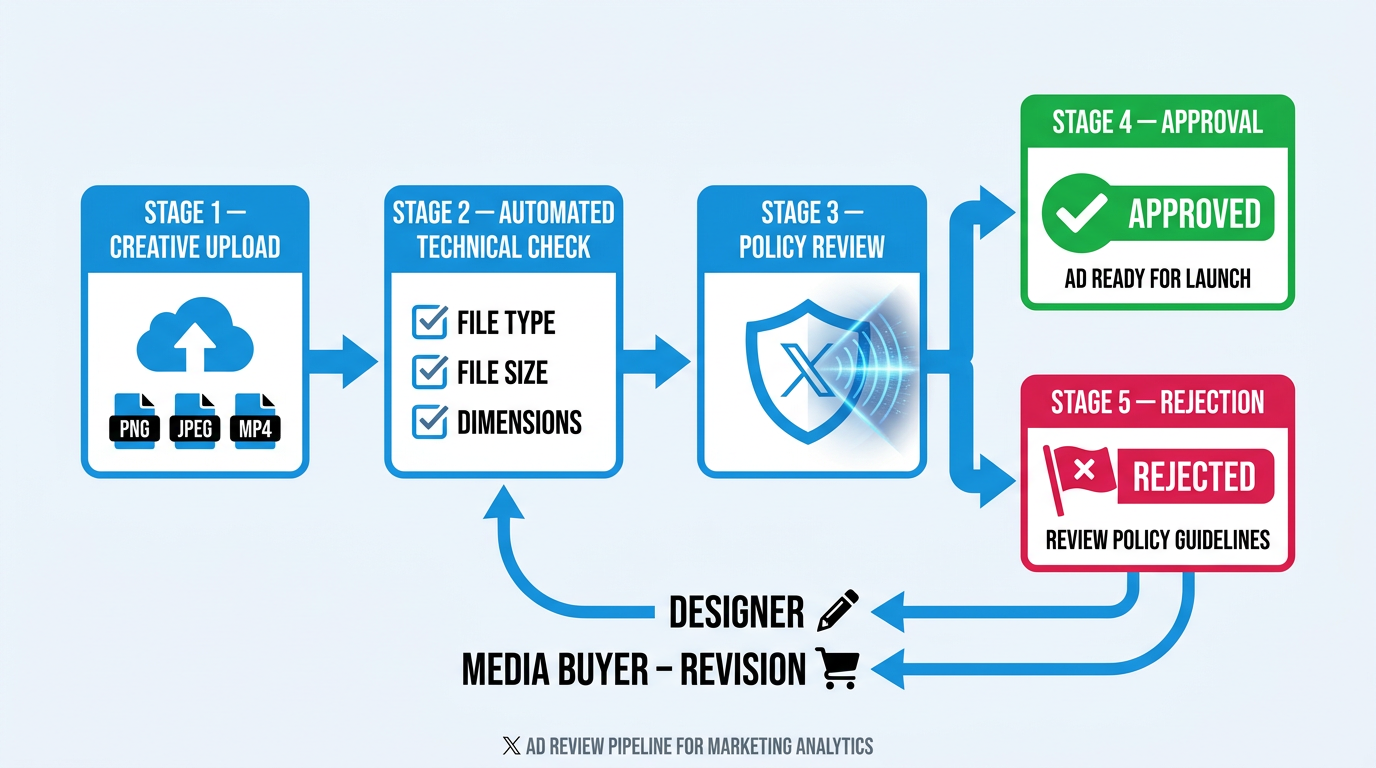
X runs a machine-first review — most rejections happen at the automated technical check stage.
Frequently Asked Questions
Are X ad specs the same as the old Twitter ad specs?
Yes. Twitter became X, but the underlying ad specs, file requirements, and Ads Manager experience stayed the same. When someone says "Twitter ad specs" or "Twitter ad dimensions," they are referring to the current X requirements listed above.
What is the X ad character limit after adding a link?
The limit is still 280 characters, but a URL gets wrapped as a t.co link that uses roughly 23 characters. Plan on about 257 characters of usable copy once a link is included.
Can I use GIFs in X ads?
GIFs work in organic posts, but in promoted placements they are effectively handled as video. Convert and upload as MP4 or MOV; uploading an animated GIF file directly can lead to inconsistent rendering across placements.
What video length works best for X Amplify pre-roll?
X recommends 15 seconds or less for Amplify pre-roll. Users are trying to get to publisher content, so shorter spots tend to earn better completion. Make sure your brand and hook land in the first 3 seconds.
How do I plan ad creatives across X and other platforms efficiently?
Start from the most restrictive format (often 9:16 vertical for Stories/Reels), then reframe for 1:1 and 1.91:1. A social media calendar workflow helps you coordinate production so you are not redesigning from scratch for every channel.
Turn X Ad Specs into Organic Visibility
Having every X ad dimension and file rule memorized is table stakes. The real lift comes when paid and organic are working the same angle: the ad earns the click, and the brand the user lands on looks established across search, AI answer engines, and the communities where buyers validate decisions. Without that organic footprint, you are paying for attention and then asking users to take you on faith.
Vizup combines AI agents and human experts to monitor, create, publish, and learn across Search, Social, Communities, AI answer engines, and local discovery. The point is operational: instead of treating paid social as a standalone channel, Vizup helps your brand show up consistently wherever your audience checks credibility, so the traffic you buy on X converts against a visible, trustworthy presence. That is the gap between running campaigns and building a brand.
Specs will keep shifting and platforms will keep renaming themselves. The teams that stay ahead are the ones with a visibility system that updates without manual spreadsheet archaeology. If you are still cross-referencing ad specs across networks while also trying to protect organic rankings, you are living in the exact kind of fragmented workflow Vizup is designed to replace.
