If you spend any real time in Meta Ads Manager, you’ve probably noticed the floor moving under your feet. The product is faster, more automated, and increasingly eager to make decisions on your behalf. One week it’s a new AI toggle; the next, a familiar setting has been relocated. That’s not paranoia. Meta has been explicit about its push toward AI-led advertising, with the stated aim of getting close to fully automated ad creation and targeting. This isn’t a distant roadmap item; it’s already showing up in the day-to-day tooling.
A lot of the Meta Ads updates for May 2026 are being spotted mid-rollout, which means you might see them in one account and not another. Some are minor interface cleanups; others hint at a pretty meaningful shift in how campaigns get built and managed. I’ve been combing through the platform, comparing notes with other advertisers, and tracking what’s landing where. These are six changes that deserve a spot on your radar.
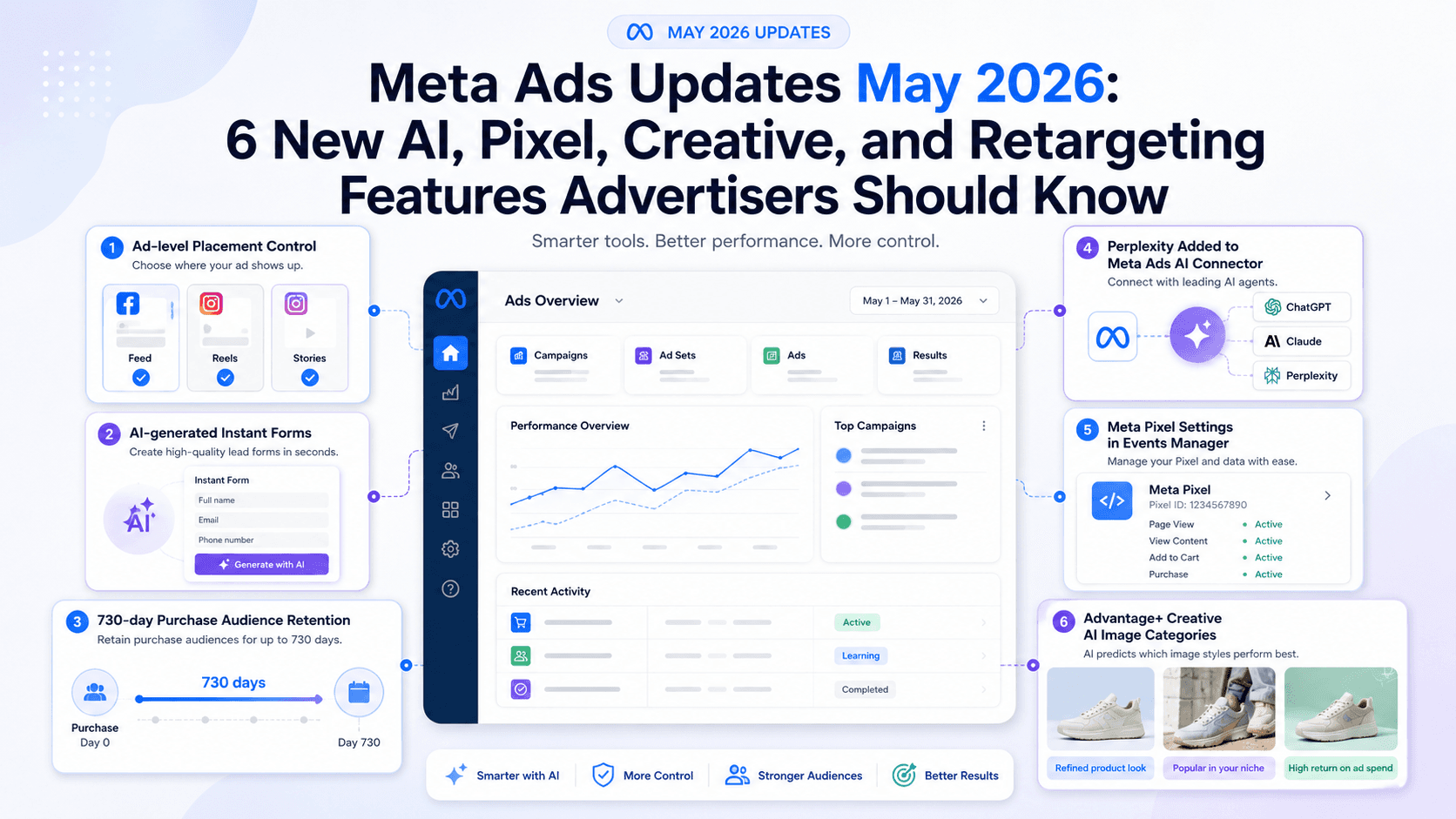
1. Ad-Level Placement Control in Creative Setup
For years, placements have mostly been an ad set-level call. You’d stick with “Advantage+ Placements” (the default) or manually choose ad placements in Meta Ads Manager from the familiar list of ad placements across Meta technologies: Facebook Feed, Instagram Stories, Reels, Audience Network, and so on. The catch was always creative. If you wanted one specific asset to run only in Reels, you often ended up duplicating ad sets just to keep things clean. It worked, but it was messy.
Now, controls are being spotted in some accounts that let advertisers pick placements at the ad level. It’s a small UI change that carries big implications.
This really comes down to creative discipline. A square image that looks great in Feed can look broken in a vertical Story. A slick, cinematic video can feel oddly stiff inside the rapid-fire, lo-fi energy of Reels. Ad-level placement choices mean you can keep targeting unified in one ad set, while you customize your ad creative for placements to match the right format and message to the environment. It also reduces the need for a graveyard of single-placement ad sets cluttering your account. The result is a cleaner campaign structure and fewer compromises on how your work shows up in the wild. For a full rundown of dimensions, check out the latest Meta ad specs.
2. AI-Generated Instant Forms Using a URL or Prompt
Building lead forms has never been difficult; it’s just been tedious. You pick fields, write a headline, add an intro, and click through a few more screens than you’d like. Meta is reportedly rolling out an AI-assisted option that can generate an Instant Form from a website URL or a short text prompt, a significant update for lead ads with Instant Forms.
The appeal is speed. A real estate agent trying to capture interest for a new listing could point the tool at the property page and get a usable form in minutes. Promoting a webinar for a SaaS product? Feed it the registration page URL and let it draft the structure. For teams that ship lots of small lead-gen campaigns, that alone can shave meaningful time off the process to create a lead ad with Instant Form in Meta Ads Manager.
I’m optimistic, with a big asterisk. Fewer clicks and less busywork is unambiguously good. For straightforward lead gen (course signups, demo requests, basic e-commerce inquiries) this should save time. The tradeoff is that the output is only as good as the input and the model’s interpretation. AI-written ad copy has a habit of sanding off nuance, and forms are no different. The value props it pulls, the way it frames questions, and the qualifiers it chooses won’t always match what you’d write yourself. Treat it like a first draft, not a finished asset. Let it generate the skeleton, then edit it like you’re the one paying for the traffic (because you are). And if you want the leads to land somewhere useful, make sure you’ve got the plumbing in place, especially the tracking and integrations that depend on solid Facebook conversion tracking in 2026.
3. Purchase Event Audience Retention Reportedly Extended to 730 Days
Advertiser circles have been loud about this one: the maximum retention window for a custom audience built from the “Purchase” event is reportedly jumping from 180 days to 730 days. If it rolls out broadly, it’s a meaningful upgrade for long-horizon custom audiences for retargeting campaigns and loyalty work.
The old 180-day cap always felt oddly restrictive. It’s fine if you sell products people buy every few weeks. It’s less useful when you’re dealing with higher-ticket items or categories where the buying cycle is measured in quarters, not days. This change is particularly relevant for any custom audience from website events, as customers would previously age out of your audience right around the time they might realistically be ready to buy again.
Three practical use cases stand out, especially considering Meta's developer documentation has already cited Engagement Custom Audiences retention limits of up to 730 days for other sources:
- High-Ticket & Long-Cycle Products: Furniture, luxury cars, enterprise software, anything where a purchase is infrequent by design. Someone might buy a sofa today and not be in-market for another major furniture purchase for a year. A 730-day window gives you room to stay present until timing catches up.
- Seasonal & Annual Purchases: If you sell seasonal goods (holiday decor, ski gear), you can build an audience of last year’s buyers and bring them back as the season returns. The same logic applies to annual renewal cycles.
- Loyalty & Upsell Campaigns: Longer retention makes it easier to run nurturing sequences that don’t feel rushed. You can target someone who bought 18 months ago with a complementary product or an upgrade offer, which is a direct lever on lifetime value.
One caveat: reports suggest existing 180-day purchase audiences might be automatically expanded to 730 days. That sounds convenient until it quietly broadens an audience you intended to keep tight. If your retargeting strategy depends on recency, check Audience Manager and confirm what changed. You may need to opt out (if available) or rebuild audiences with explicit windows to keep your segmentation intact. It’s a strong capability, but it’s also the kind that can distort results if it lands without warning.
4. Perplexity Added to Meta Ads AI Connector
Meta is making a direct play for advertisers who already live inside AI tools. Perplexity has been added to the supported agents in the official Meta Ads AI connectors, joining ChatGPT and Claude. This goes well beyond copy suggestions. The Connector is designed to let external AI platforms securely connect to your Ads Manager account to help advertisers analyze account data, ask campaign questions, and explore performance insights.
Perplexity is particularly notable because it’s built around real-time web search. While ChatGPT and Claude are strong language models, Perplexity behaves more like a conversational search engine. That difference points to some useful workflows for analysis and insight.
- Performance Summaries in Plain English: Instead of navigating complex report views, you could ask, “Summarize the performance of my Q2 campaigns and flag any unusual conversion-rate drops.”
- Trend-Based Research: You can have it surface trending topics or conversations in your niche to inform creative and copy directions.
- Competitive Research Support: You can use Perplexity to research broader market angles and use those insights to inform your own creative testing.
Stepping back, this is Meta nudging ad management toward a different interface altogether: less dashboard spelunking, more conversational inquiry. The work shifts from pulling individual levers to describing outcomes and asking for analysis. For agencies and in-house teams trying to scale without adding headcount, this is worth testing sooner rather than later. It’s also a reminder that Meta’s future isn’t only about what’s native to Ads Manager; it’s about how Ads Manager plugs into other modern ads tools.
5. New Meta Pixel Settings in Events Manager
The Meta Pixel is getting more capable and, depending on your perspective, more aggressive. A new setting is appearing in Events Manager that lets advertisers review and control whether the Pixel can “automatically include more detailed page and product info.” In some accounts, this may appear enabled by default. It suggests the Pixel isn’t just waiting for your site to fire a Meta Pixel standard event setup; it’s also pulling information directly from your pages to collect extra signals.
That can include product names, prices, availability, page metadata, and even business details visible on the page. Meta’s argument is straightforward: more context helps its delivery system understand what’s being sold and improves measurement. With third-party cookies gone and attribution harder, Meta is looking for signal wherever it can get it, especially first-party signal coming straight from your site. That push is closely tied to broader Meta Pixel and CAPI updates.
The upside is obvious: richer inputs can produce better optimization. If Meta’s systems know exactly which products a person viewed (and the details that matter) it can improve targeting and lookalike modeling. The downside is governance. This is meaningful data collection that plenty of advertisers won’t realize is turned on. Go into Events Manager, open Pixel settings, and confirm what’s being collected and shared. Some controls exist, but they only help if you use them. If you operate under strict privacy regimes, this is the kind of default that can create uncomfortable questions later. A careful process to set up and install the Meta Pixel, especially setting up the Conversions API, matters more than ever if you want to manage that data flow intentionally.
6. Advantage+ Creative Image Generation Categories
Advantage+ creative has been generating image variations for a while, swapping backgrounds, expanding images to fit vertical placements, and other quick edits. The newer twist, spotted rolling out in some accounts, is that Meta is making those suggestions feel less random by grouping AI-generated options into defined categories.
Instead of a grab bag of variations, some advertisers are seeing suggestions organized into themes such as:
- Refined product look: Produces a cleaner, more polished background for a product shot.
- Popular in your niche: Generates images influenced by styles that are performing well for other advertisers in your industry.
- High return on ad spend: Creates variations based on creative styles that have historically driven high ROAS.
This is Meta trying to compress creative testing cycles. For an e-commerce brand, it means a single product photo on a white background can quickly turn into a set of lifestyle-ish variants without booking a shoot. You can test whether a “liquid glass” look or a “faded profile” style lands better with your audience. This is part of a broader push to generate image variations in Meta Ads Manager with less manual effort.
The tension, as always, is control versus performance. AI-generated variants can surface surprising winners, and they can also spit out visuals that drift from your brand in ways your team won’t love. The practical approach is to use this as a testing engine, not a design department. Let it generate options quickly, then apply human taste and brand standards before anything scales, all within the updated Ad creative section in Meta Ads Manager. Plenty of AI ideas will be unusable; the point is finding the few that outperform your baseline faster. For more on building strong inputs for Meta’s systems, our guide to high-converting ad creatives is a solid next step.
What These Updates Mean for Advertisers
Taken together, these six updates point to a few consistent themes. Meta isn’t just shipping features; it’s reshaping what competent day-to-day execution looks like on the platform.
| Theme | Key Updates | Implication for Advertisers |
|---|---|---|
| Increased AI Assistance | AI-generated forms, Perplexity connector, Advantage+ image categories | The job shifts away from manual setup toward setting direction and supervising what the AI produces. |
| Faster Creative Testing | Ad-level placement control, Advantage+ image categories | The gap between an idea and a live test keeps shrinking; the bottleneck moves to strategy, judgment, and analysis. |
| Deeper Data Integration | New Pixel settings, 730-day retention | First-party data and on-site signals are becoming core inputs for Meta’s optimization. Tracking quality isn’t optional. |
| More Flexible Retargeting | 730-day purchase audience window | Longer-term retention makes loyalty and lifetime-value plays easier to run directly inside Ads Manager. |
The throughline: being great at clicking around Ads Manager matters less than it used to. What matters is what you feed the system, clean tracking, strong creative, a clear view of your customer lifecycle, and real discipline around data governance. Meta’s machinery is increasingly competent at the “how.” That puts pressure on advertisers to be sharper about the “what” and the “why.” If you’re thinking about how that mindset carries over to non-paid channels, AI audience targeting is a useful parallel.
Final Takeaway
The Meta Ads updates for May 2026 don’t read like a random grab bag. They look like another deliberate step toward an AI-assisted ad stack where setup work fades into the background. Generating lead forms from a URL, expanding audience windows, and letting supported AI agents help advertisers ask questions about campaign performance all point in the same direction: less manual friction, more automation.
For advertisers, that’s both upside and risk. The upside is speed: more tests, faster iteration, and more time spent on strategy instead of configuration. The risk is complacency. Turning on automation without checking the output is an easy way to burn budget and confuse your measurement. Treat AI-generated forms and creative as drafts. Audit what your Pixel is collecting. And don’t let a 730-day audience quietly rewrite your retargeting logic without a plan. The teams that do well here won’t be the ones who blindly follow the machine, they’ll be the ones who know how to steer it, including when they build ad campaigns with natural language.
Frequently Asked Questions
Will these Meta Ads updates apply to my account automatically?
Many of these features are rolling out in stages, so what you see can differ by account. Some changes (like the reported 730-day purchase audience retention) may also update existing settings automatically. Check Ads Manager and Audience settings to confirm what’s live in your account.
Is it safe to connect Perplexity or ChatGPT to my Meta Ads account?
Meta’s AI Connectors use a secure, authenticated connection. That said, you’re still granting an external tool access to ad account data and, potentially, controls. Move carefully: review permissions, start with read-only analysis, and only expand access if you’re comfortable with what the tool can do.
Do I still need a designer if Advantage+ can generate images?
Yes. AI image generation is useful for quick variation and testing, but it doesn’t replace creative direction or brand judgment. Use it to extend what your team can test, not to outsource the responsibility for what your brand looks like.
What is the biggest risk with the new Meta Pixel data collection?
The biggest risk is simply not realizing it’s happening. If Meta enables enhanced collection by default, you may be sharing more website data than you intended. That can create privacy and compliance problems (especially under rules like GDPR) unless you review and manage Pixel settings in Events Manager.
How can I prepare my business for these AI-driven ad updates?
Put your effort into the inputs. Make sure your first-party data and tracking are solid with the Meta Pixel and Conversions API. Invest in a creative strategy that produces strong base assets the AI can iterate on. Then adopt a habit of testing and verification: treat AI suggestions as drafts, and validate performance before you scale.
